The 8 best Ago AI alternatives in 2026

Rama Adi

Katelin Teen
Last edited October 14, 2026
Why teams look past Ago AI
First, the fair part. Ago AI is doing something most support tools don't: it puts the agent inside the product, so a user can ask a question and the agent can actually navigate the app, change page state, and call your own functions to get something done. Their SDK installs with a couple of lines in React, Vue, or Angular, it's SOC 2 Type II and EU-hosted, and the company cites real numbers on its platform page (800k+ conversations handled, a 70% AI resolution rate, 96% CSAT at Mirakl). If you're a product-led SaaS with engineers to spare, that in-product model is a real edge.
The trouble is that most support teams aren't shaped like that. I build integrations for a living, and the pattern I see over and over is a team that already lives in Zendesk or Freshdesk, with a chunk of volume coming through email and Slack. For that team, "embed our agent in your web app" is a project, not a plug-in. Here are the specific reasons the switch conversation starts.
The €500/month floor, before you resolve a ticket. Ago AI's pricing is €0.50 per conversation with a €500/month minimum, and there's no free trial or free tier to test it first. A small team doing 200 conversations a month would owe €0.50 × 200 = €100 in usage, but the €500 minimum means they pay €500 anyway. You're buying a commitment before you've seen a single resolution.
It bills every conversation, not every resolution. Per-conversation pricing charges for each incoming chat whether or not the AI actually solved it. That's a fine model at scale, but it means an unresolved, escalated, or "never mind" conversation still lands on the bill. Outcome-priced tools only charge when something gets solved, which changes the math for teams with a lot of low-intent traffic.
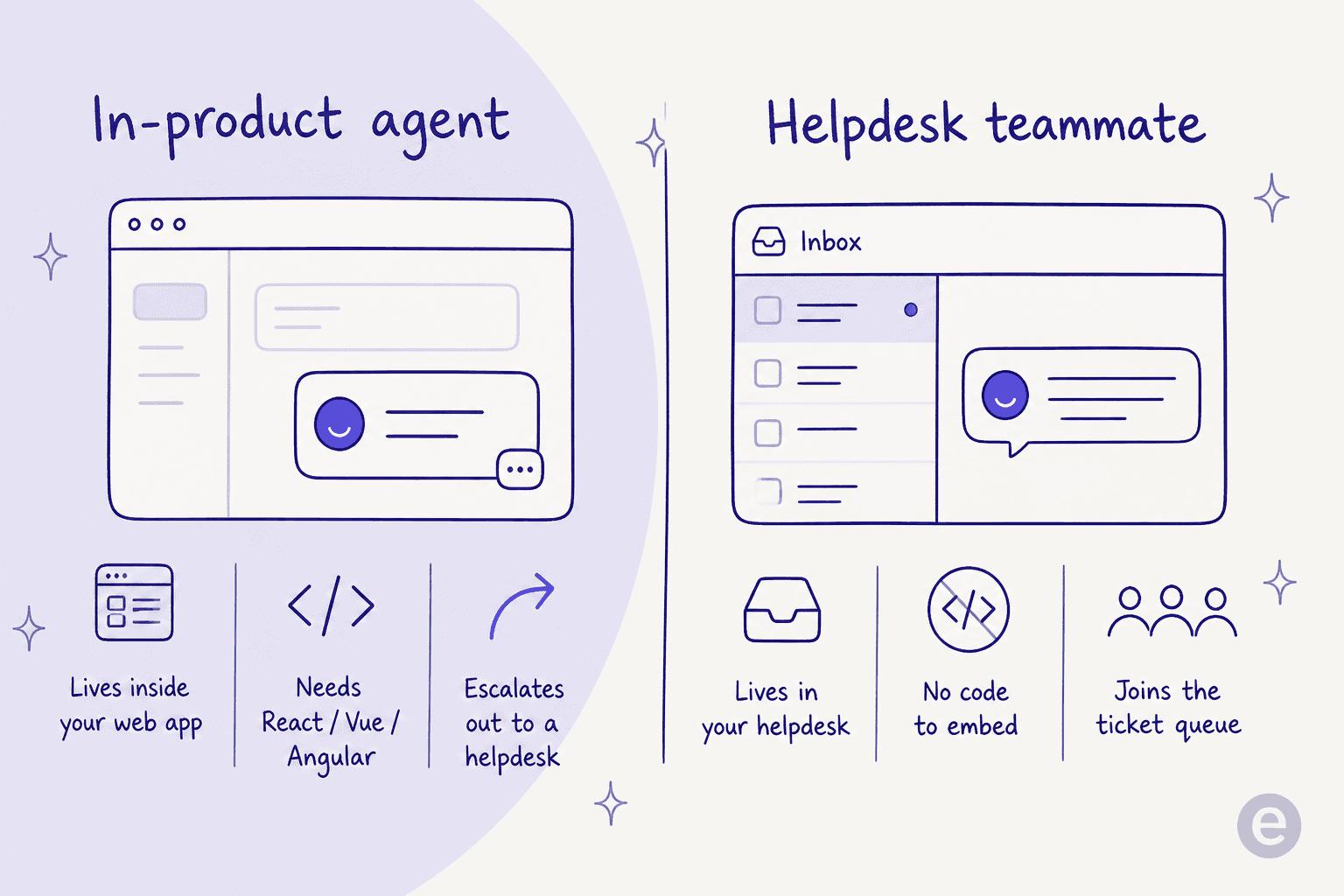
You need a front end to embed it in. The whole design assumes a web app you control. If your support lives in a helpdesk, a shared inbox, and email threads, there's no obvious place to drop an SDK, and the parts of Ago that do reach your helpdesk are the escalation hand-off, not the resolution.
The rollout is a service, not self-serve. Ago sells a "co-construction" model with forward-deployed AI engineers who tune the agent over time, and its AI-ready docs offering is a done-for-you service where their team restructures your knowledge base. That's reassuring for a big enterprise and slow for a lean team that wants to try something this afternoon.
There's almost no public track record yet. Ago is a newer vendor, and as of writing its G2 profile is unclaimed with zero reviews, with nothing on Capterra, Trustpilot, or Reddit that names it. That's not a knock on the product, but if you like to read real user reviews before you commit, there isn't much to read.
None of this makes Ago AI bad. It makes it a specific fit: product-led companies with engineering capacity and enterprise budget. If that's not you, the tools below give you AI support without the SDK, the floor, or the wait.
How I compared these Ago AI alternatives
I've spent the last few years putting AI agents on live support queues, and the thing that separates a demo from a deployment is boring: does it fit the way your team already works, and can you tell whether it's any good before it starts talking to customers. So I weighed every tool here on:
- Where it runs - inside your existing helpdesk, as a standalone agent platform, or embedded in your product.
- Billable unit and floor - per conversation, per resolution, or per ticket, and whether there's a minimum or free trial.
- Setup effort - self-serve in an afternoon, or a sales-led, services-heavy rollout.
- Testing before go-live - can you simulate on real past tickets, or do you flip it on and hope.
- Where it's strongest - the customer profile each one is genuinely built for.
One honest note before the list: I run support tooling at eesel, so I have a point of view. I've tried to be specific about where each competitor wins so you can weigh it yourself, and I link every price and claim to the source.
Ago AI alternatives at a glance
| Tool | Best for | Billable unit | Entry cost | Free trial | Where it runs |
|---|---|---|---|---|---|
| eesel AI | Adding AI to your existing helpdesk | 1 credit per ticket or chat | From $299/mo (500 credits) | 100 free credits | Inside Zendesk, Freshdesk, Gorgias, Slack, email |
| Ago AI | Product-led SaaS with engineers | Per conversation | €500/mo minimum | None | Embedded in your web app (SDK) |
| Decagon | Enterprise CX concierge | Per conversation or resolution | Quote-only | None (demo) | Standalone agent platform |
| Sierra | Large consumer brands | Per outcome | Quote-only | None (sales-led) | Standalone agent platform |
| IrisAgent | Mid-market, multichannel | Tiered + usage | Free tier | Yes | On top of your helpdesk |
| Gorgias | Shopify / ecommerce | Ticket tiers + per resolution | From $10/mo | 7-day trial | Helpdesk + AI agent |
| Zendesk AI | Teams already on Zendesk | Per automated resolution | Add-on to Suite | 14-day trial | Native in Zendesk |
| Freshdesk Freddy | Budget-conscious teams | Per session | 14-day trial, Free Program | Yes | Native in Freshdesk |
| Crescendo | Managed, done-for-you CX | Per solve + service fee | $2,900/mo service fee | None (demo) | Managed service + platform |
Now the detail on each.
1. eesel AI
Best for: teams that already have a helpdesk and want AI on top of it without a rebuild, a sales call, or a minimum.
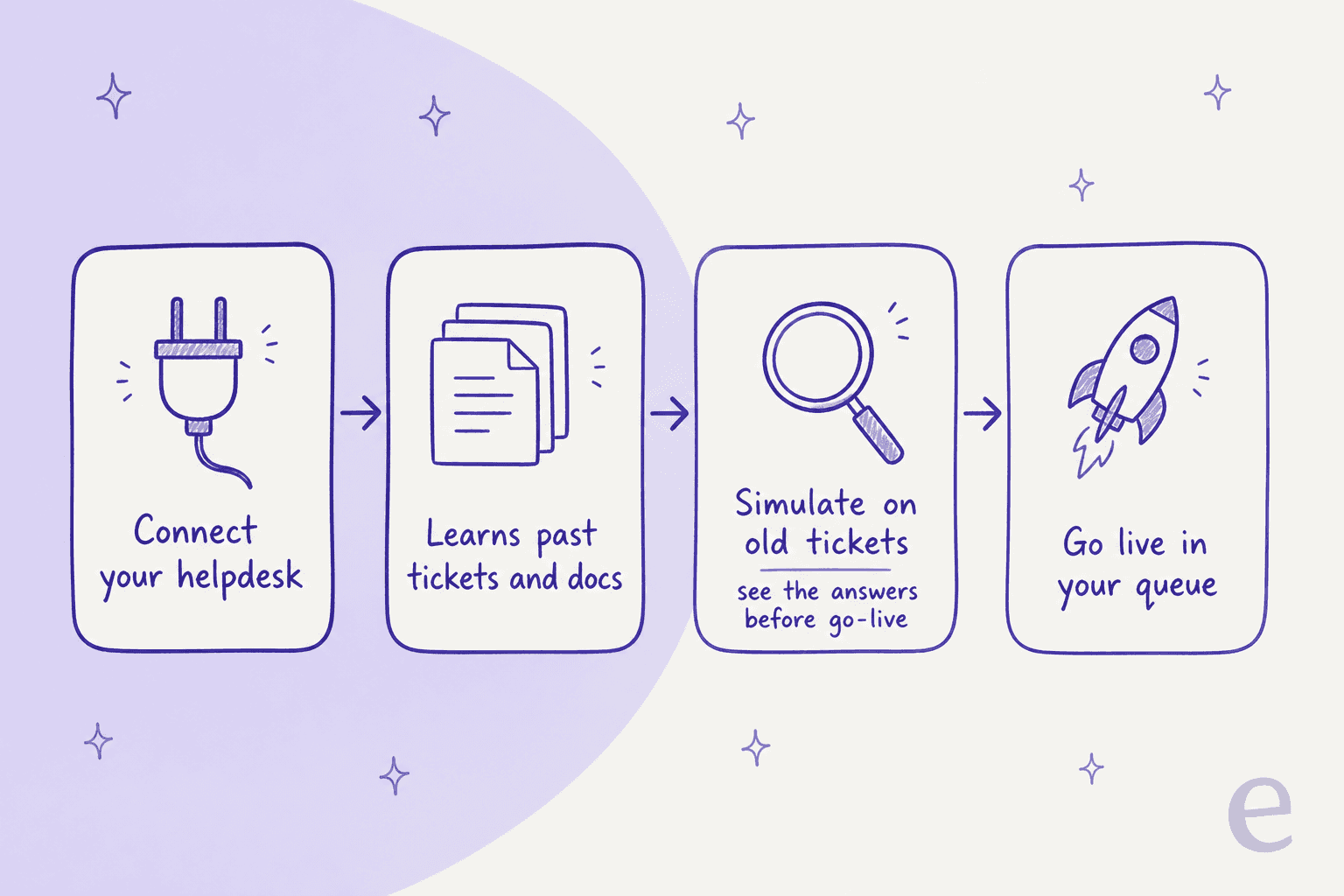
eesel takes the opposite approach to Ago's in-product SDK. Instead of asking you to embed an agent in your app, it hires a ready-to-work AI helpdesk teammate that joins the helpdesk you already run. It plugs into Zendesk, Freshdesk, Gorgias, Help Scout, Slack, and email, trains on your past tickets and docs, and starts drafting or sending replies inside the same queue your agents use. The homepage claims 1000+ integrations, and the whole thing is self-serve, so it goes live in minutes rather than weeks.
The piece I'd point an Ago-shopper to is the simulation mode. Before the AI answers a single real customer, you run it against thousands of your historical tickets and see exactly what it would have said and what resolution rate you'd get. I've watched enough confident-sounding bots quietly give wrong answers to believe this is the step that matters, and it's the opposite of "flip it on and hope."
Pricing. eesel is one fixed monthly price: 100 free credits (no credit card), then the Teammate plan from $299/month for 500 credits, with no per-seat fee and no platform fee. One credit covers one ticket or chat no matter how many messages it takes. At 500 tickets a month that's $299; at 1,000 it's $499. Pay a year upfront and get two months free. SSO and priority support are available as add-ons.
Pros:
- No minimum and a genuine free tier, so you can prove it out before spending anything.
- Lives in your existing helpdesk instead of needing an app to embed in.
- Simulation on real past tickets before go-live.
- Usage-based per ticket, so you're not billed for conversations your humans handle.
Cons:
- It rides on your existing helpdesk, so if you don't have one (and want the agent inside a product surface), Ago's SDK model is genuinely a different tool.
- Usage-based billing means very high, spiky volumes need a quick napkin-math check, though the annual commit caps that.
Our take: for the majority of teams leaving Ago because of the floor or the SDK requirement, eesel is the most direct swap. You keep your helpdesk, you test before you commit, and there's nothing to clear before you find out if it works. It's the one I'd start a trial with.
2. Decagon
Best for: enterprise CX teams that want a full concierge-style agent platform and can run a proper sales-led rollout.
Decagon is the alternative that's closest to Ago in ambition: an AI-native platform that "unifies chat, voice, and email within a single intelligence layer" rather than bolting AI onto a helpdesk. Its authoring wedge is AOPs (Agent Operating Procedures), natural-language workflows for agents, sitting alongside simulation, live A/B experiments, and always-on QA. Named customers report big numbers (80% deflection at Duolingo, 65% cost reduction at Curology), and its recent Browser Actions feature lets agents act across web-based systems, which is philosophically similar to Ago's in-product actions.
Pricing. Quote-only, but Decagon is unusually candid about its meters. It publishes two options, per conversation or per resolution, and says most customers pick per-conversation. There's no published rate, no self-serve, and every path routes to a demo.
Pros:
- Serious enterprise platform with simulation, QA, and experimentation built in.
- Publishes and explains its pricing meters, which is rare for quote-only vendors.
- AOPs make complex workflows configurable in natural language.
Cons:
- No public rate card, no free trial, and a sales-led rollout, so it's not a fast or cheap test.
- Aimed squarely at enterprise, which can be heavy for a small or mid-market team.
Our take: if you liked Ago's ambition but want a more established, enterprise-proven platform, Decagon is the natural comparison. Just know you're trading Ago's SDK model for a different kind of commitment: a sales cycle and a quote.
3. Sierra
Best for: large consumer brands that want outcome-based pricing and a marquee partner.
Sierra is the enterprise agent platform founded by Bret Taylor and Clay Bavor, and it's raised, by the founder's own account, $950 million at a $15B+ valuation. It builds agents through Agent Studio (no-code journeys) and an Agent SDK (agents-as-code), and it claims 40% of the Fortune 50 as partners. The headline is outcome-based pricing: you pay when the agent delivers a defined outcome, like a resolved conversation, rather than per seat.
Pricing. Quote-only with no rate card anywhere on the site. Outcomes are negotiated per contract, and Sierra concedes the real bill is often blended with consumption-style work where outcomes don't fit cleanly. Escalations are, in most cases, not charged.
Pros:
- Outcome pricing means you're not paying for conversations that go nowhere.
- Heavyweight platform and team, built for consumer scale across voice, chat, email, and WhatsApp.
- Two authoring paths (no-code and agents-as-code).
Cons:
- No published pricing, no self-serve, sales-led only.
- "What counts as an outcome" is defined per contract, so model the blended cost carefully before signing.
Our take: Sierra is a strong Ago alternative for a large brand that specifically wants to pay for outcomes and has the volume to make an enterprise contract worthwhile. For everyone smaller, the lack of a rate card and any self-serve on-ramp is a real barrier.
4. IrisAgent
Best for: mid-market teams that want grounded resolution across chat, email, and voice, layered onto their existing helpdesk.
IrisAgent sits, like eesel, on top of your existing stack (it connects to Zendesk, Salesforce Service Cloud, Freshworks, HubSpot, Zoho Desk, and Gorgias) rather than replacing it. Its pitch is grounding: a named Hallucination Removal Engine that validates every answer against your own content, and a founder thesis that AI support only works when it's grounded in your knowledge base and ticket history, not the model's training data. It publishes a resolution figure that appears on its own pages as both "60%+" and "50%+", so cite whichever number the specific page carries rather than averaging them.
Real users back the triage angle. One first-hand account on Reddit:
"OP, you should checkout IrisAgent. We're using them at my company (Fintech) - I haven't had to manually update a field or tag a ticket in 9 months because of it. Soooo nice lol"

Pricing. Tiered from a Free plan through Standard (Teams/SMEs) to Enterprise, with a usage component. It advertises a 24-hour deploy, though its own voice rollout notes most teams are live within a couple of weeks.
Pros:
- Free tier and a self-serve on-ramp, unlike Ago.
- Grounding-first design aimed at accuracy, plus triage, tagging, and QA on top.
- Multichannel across chat, email, and voice.
Cons:
- The headline resolution rate is published as two different numbers, which is a small trust ding.
- Deploy time in practice can be longer than the "24 hours" marketing suggests.
Our take: IrisAgent is a close cousin of eesel in shape (helpdesk-native, grounded, self-serve), and a solid Ago alternative if you want a resolution engine that layers onto what you have. I'd trial it alongside eesel and let the simulation numbers decide.
5. Gorgias
Best for: Shopify and ecommerce brands where support is tied to orders and revenue.
Gorgias is a different animal from Ago: it's a full ecommerce helpdesk with an AI agent built in, and its whole reason for existing is deep Shopify integration. Orders, refunds, and cancellations live inside the ticket, so the agent can actually do the WISMO ("where is my order") work rather than just answer FAQs. It claims to power 40% of Shopify brands. A candid buyer summed up the decision on Reddit:
"I've been around ecommerce for 10+ years and this is honestly how I'd choose: 40%+ tickets need Shopify actions → I'd lean Gorgias. Mostly conversational support → Zendesk is fine."
Pricing. Ticket-based helpdesk tiers from $10/mo (Starter, 50 tickets) up to $750/mo (Advanced, 5,000 tickets), plus Enterprise. The AI Agent is a usage add-on at $0.90 per resolved conversation on annual plans ($1.00 monthly), and each AI interaction also counts as a billable ticket.
Pros:
- Purpose-built for Shopify with order actions inside the ticket.
- Real self-serve tiers starting at $10/mo.
- AI agent billed per resolution, not per conversation.
Cons:
- Ecommerce-specific, so it's overkill outside retail.
- Costs can climb as volume grows, and AI interactions double as billable tickets.
Our take: if you're an online store and most of your tickets are order-related, Gorgias is a better fit than a general agent OS like Ago. For non-ecommerce support, look elsewhere on this list.
6. Zendesk AI
Best for: teams already living in Zendesk who want to turn on native AI resolution.
If you're already on Zendesk, the simplest Ago alternative might be the AI that's already in your stack. Zendesk's AI agents resolve conversations natively, draw on your help center, and now ship a first-party connector so you can bring your own model. Customers like Squarespace and Tesco cite real self-service gains. The upside over Ago is obvious: no SDK, no new vendor, it's already wired into your tickets, macros, and reporting.
Pricing. Zendesk's automated resolutions are priced as an add-on to a Suite subscription, at roughly $1.50 to $2.00 per automated resolution depending on plan, on top of per-agent seat costs. There's a 14-day trial.
Pros:
- Zero new integration if you're already on Zendesk.
- Mature reporting, routing, and knowledge management around the AI.
- Per-resolution billing on the AI layer.
Cons:
- You're paying per-agent seats plus per-resolution AI on top, which adds up.
- It's only the obvious choice if Zendesk is already your helpdesk.
Our take: for existing Zendesk shops, turning on native AI (or adding a layer like eesel that plugs into Zendesk) beats introducing an in-product SDK. If Zendesk isn't your helpdesk, this isn't your alternative.
7. Freshdesk Freddy
Best for: budget-conscious teams that want an affordable helpdesk with AI that starts free.
Freshdesk is the value pick. It's a mature ticketing helpdesk with a no-code AI layer called Freddy, and unlike Ago it has a genuine free on-ramp. The Freddy AI Agent resolves email and chat end to end, built in AI Agent Studio, and there's a dedicated Email AI Agent for inbound support mail. It's the antithesis of a €500 floor.
Pricing. Standalone Freshdesk runs Free, then Growth $19, Pro $55, Enterprise $89 per agent/month (annual). The Freddy AI Agent is usage-based: first 500 sessions free, then $49 per 100 sessions. A session is a 72-hour window per customer, so multiple replies inside it count once. You can plug eesel into Freshdesk too if you'd rather bring your own AI layer.
Pros:
- A 14-day trial, a 6-month Free Program for 2 agents, and 500 free Freddy sessions, so testing costs little.
- Mature email/ticketing heritage with SLAs and routing.
- Low per-agent entry price.
Cons:
- Consumption pricing on the AI agent can surprise you at high volume, and community users report confusion over how sessions are counted.
- The AI layer is newer than the ticketing core it sits on.
Our take: if the thing that pushed you off Ago was the cost floor, Freshdesk is the easiest place to land: start free, add Freddy sessions as you grow, and never clear a minimum. It's less of an autonomous "agent OS" and more an affordable helpdesk with AI attached, which is exactly what many teams actually want.
8. Crescendo
Best for: teams that would rather buy managed AI plus human agents as a done-for-you service.
Crescendo is the closest to Ago's "co-construction" spirit, taken all the way: it's a managed service where AI handles the front line and human "Superhumans" back it up, sold with a Total Outcome Guarantee. If you liked the idea of Ago's forward-deployed engineers but want them to own the whole operation, Crescendo is that, as a service.
Pricing. The publicly priced tier is Managed AI at $1.25 per solve with a $2,900 starting monthly service fee. There's no self-serve signup and no plan comparison table on the page; the only CTA is a demo.
Pros:
- Fully managed, so you're buying an outcome, not running a tool.
- Per-solve pricing with a Total Outcome Guarantee.
- Humans in the loop for the cases AI shouldn't own.
Cons:
- The $2,900/month service fee is a bigger floor than Ago's, so this is not the budget escape.
- Managed service means less direct control than a self-serve tool.
Our take: Crescendo is for teams that want to outsource the whole CX operation to AI-plus-humans. If you want to keep support in-house and just add AI, it's the opposite direction from what most Ago-switchers are after, but for the "do it for me" crowd it's a genuine option.
What real support teams say actually works
Because Ago itself has so little public feedback yet, the most useful signal comes from the broader debate support leaders keep having about whether AI has "solved" support at all. In a long r/CustomerSuccess thread on exactly that question, a few themes come up every time, and they map neatly onto how to choose from this list.
The consensus isn't "AI resolves everything." It's narrower and more useful: keep the AI's scope tight, keep your knowledge base clean, give the human real context when the AI escalates, and don't chase an unrealistic headline deflection number without testing first. That's the exact case for a tool you can simulate on your own past tickets before go-live, and against buying any per-conversation contract before you've modelled how many of those conversations the AI will actually resolve.
It's also why I keep coming back to the "test it first" point. Whatever you pick, the difference between a great rollout and an expensive one is whether you could see the resolution rate before customers did.
Try eesel
If you're leaving Ago AI because the SDK model or the €500 floor doesn't fit, eesel is built for exactly your situation. It hires an AI helpdesk teammate that plugs into the helpdesk you already run (Zendesk, Freshdesk, Gorgias, Help Scout, Slack, and email), trains on your past tickets and docs, and is ready in minutes with no code to embed.
The differentiator that matters most for a switcher: you can run a simulation on thousands of your real past tickets and see the resolution rate before it ever answers a live customer. And the pricing is predictable: 100 free credits, then from $299/month for 500 credits (1 credit per ticket), no per-seat fee. One customer, Global Pay's Alex Capurro, put the payoff simply: "we have seen up to 80% time savings." Try eesel free and find out what your own number would be.