Freshdesk translation in 2026: Live Translate, Freddy AI and the limits

Rama Adi

Katelin Teen
Last edited October 22, 2026

How translation works in Freshdesk today
I build integrations at eesel, and Freshdesk is one of the helpdesks eesel connects to, so I spend a fair amount of time reading Freshworks' docs instead of its marketing pages. On translation the two don't quite match. The pricing page and the Copilot product page promise live translation "in 60+ languages". The Live Translate help doc lists 43 entries, with Czech appearing twice. The pricing page also says Freshdesk can "translate customer communication and knowledge base articles", while the knowledge base docs describe an editor where you type the translation yourself.
None of that is a scandal. It does mean you should plan from the help docs, which is what I've done below. This post is the Freshdesk sibling of my guides on customer service translation and multilingual customer support.
If you run a different helpdesk, I did the same teardown for Zendesk translation and HubSpot translation.
Here's every translation-related feature I found in Freshworks' own docs, mapped to the job it does.
| Feature | What it translates | Plan needed | Extra cost |
|---|---|---|---|
| Live Translate | Ticket conversations, on an agent's click | Pro or Enterprise (Omni Pro or Enterprise) | Copilot, $29 per agent per month |
| Freddy AI Agent | Writes replies in the language it detects | Growth, Pro, Enterprise | $49 per 100 sessions after 500 |
| Multilingual knowledge base | Articles, categories and folders, typed by you | Pro or Enterprise | Pro seat |
| Manage languages | Portal, help widget, ticket fields and forms | Pro or Enterprise | Pro seat |
| Dynamic email notifications | Automated emails, per customer language | Used with a multilingual setup | None listed |
| Marketplace apps | Tickets or chats, by AI or human translators | Varies by app | The app's own subscription |
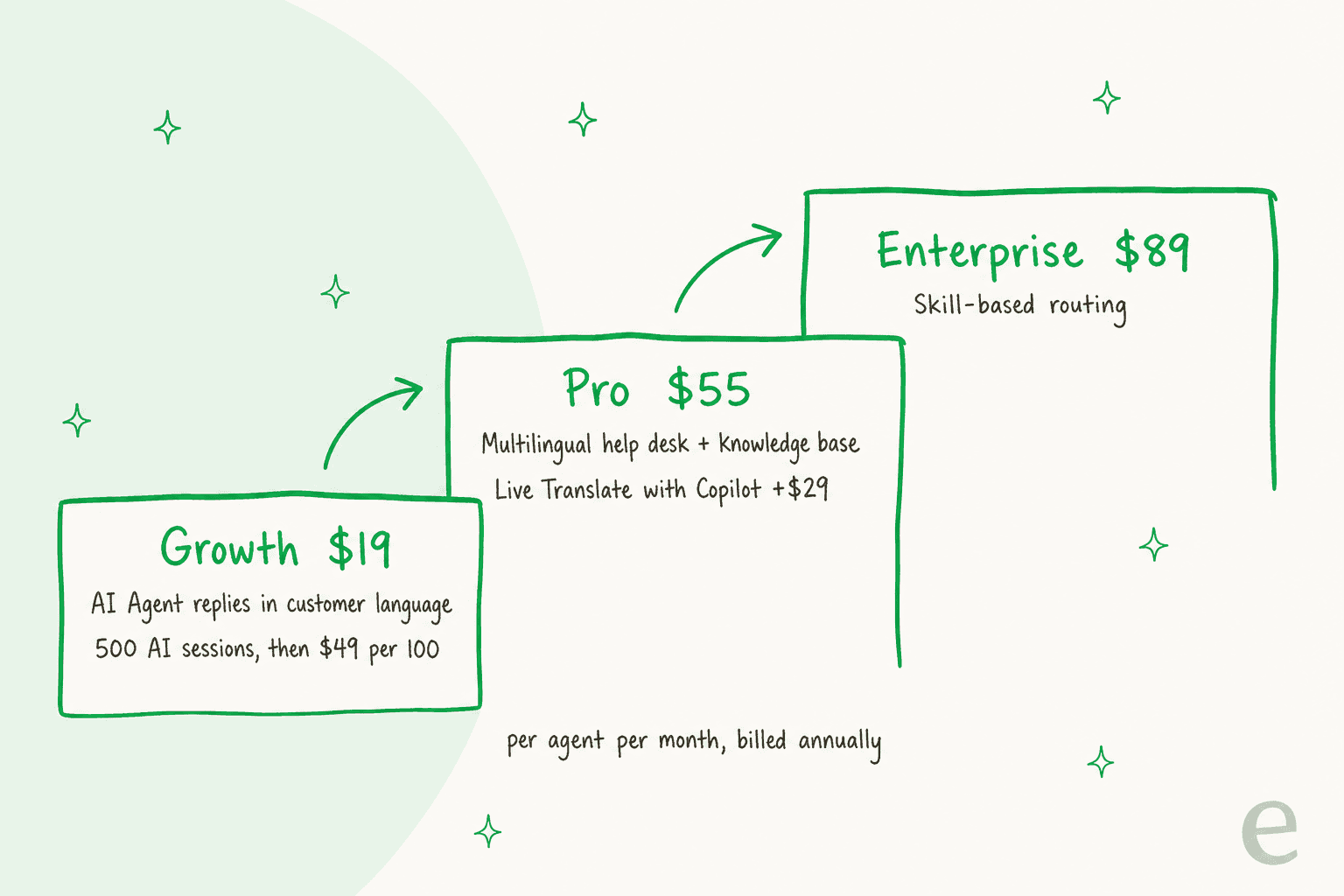
The staircase is the main thing to take from this section. On Growth, only the AI Agent speaks other languages. Your people get translation help from Pro upward, and only if you also buy Copilot. The full plan breakdown is in my Freshdesk pricing post.
Live Translate: the Translate button for agents
This is the feature most people mean when they search for Freshdesk translation. Freshworks describes it as a feature that "automatically detects and translates ticket conversations in real time", powered by Freddy AI. An admin turns it on under Admin > Freddy > Live translation for tickets.
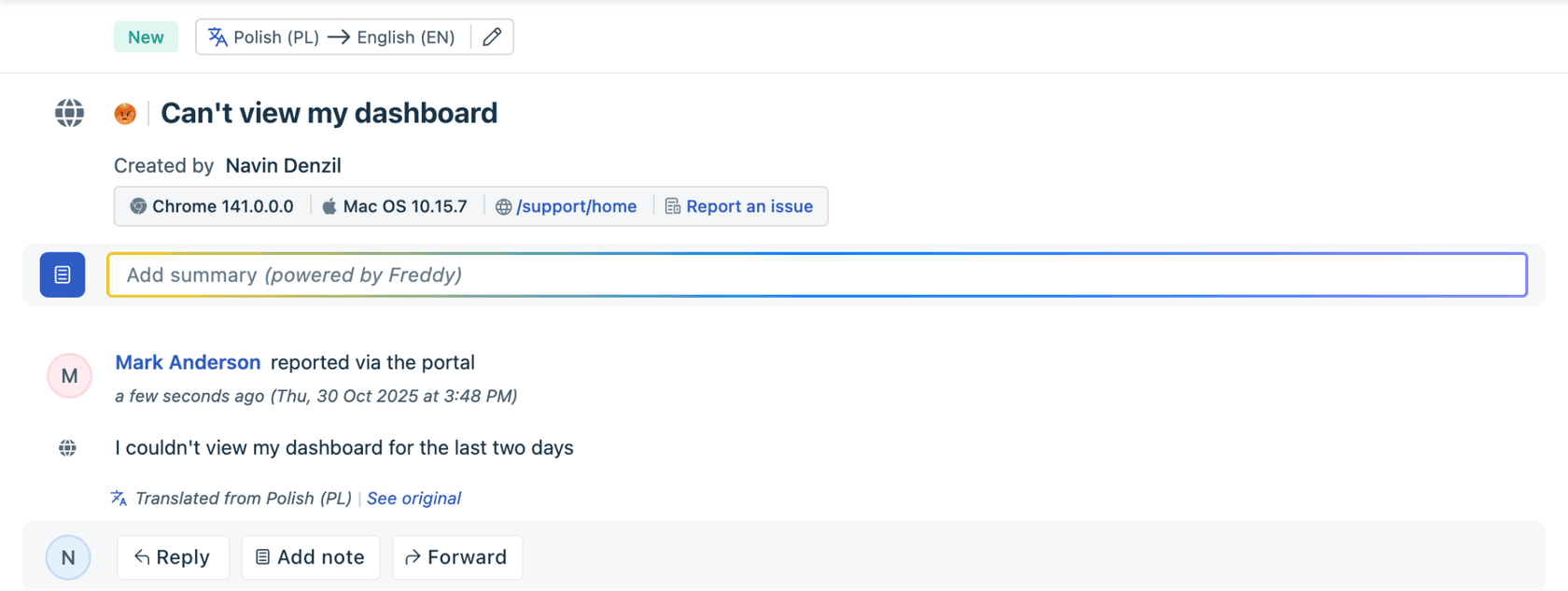
How it works on the ticket, per the Live Translate doc:
- When the ticket's language differs from the agent's, a Translate button shows at the top of the conversation.
- Clicking it shows the customer's message in the agent's language, with See original to flip back.
- Agents can change the detected language if Freddy got it wrong.
- Agents have to click Translate on every ticket. Nothing translates in the background.
The doc's supported-language list covers the big European and Asian languages (German, French, Spanish in two variants, Dutch, Japanese, Korean, both Chinese scripts, Arabic, Hebrew, Ukrainian and so on). If your customers write in Hindi, Tagalog or Swahili, check the list before you buy, because those aren't on it.
The limit that catches teams out
Live Translate is metered, and the meter is tied to Copilot seats, not to your helpdesk seats:
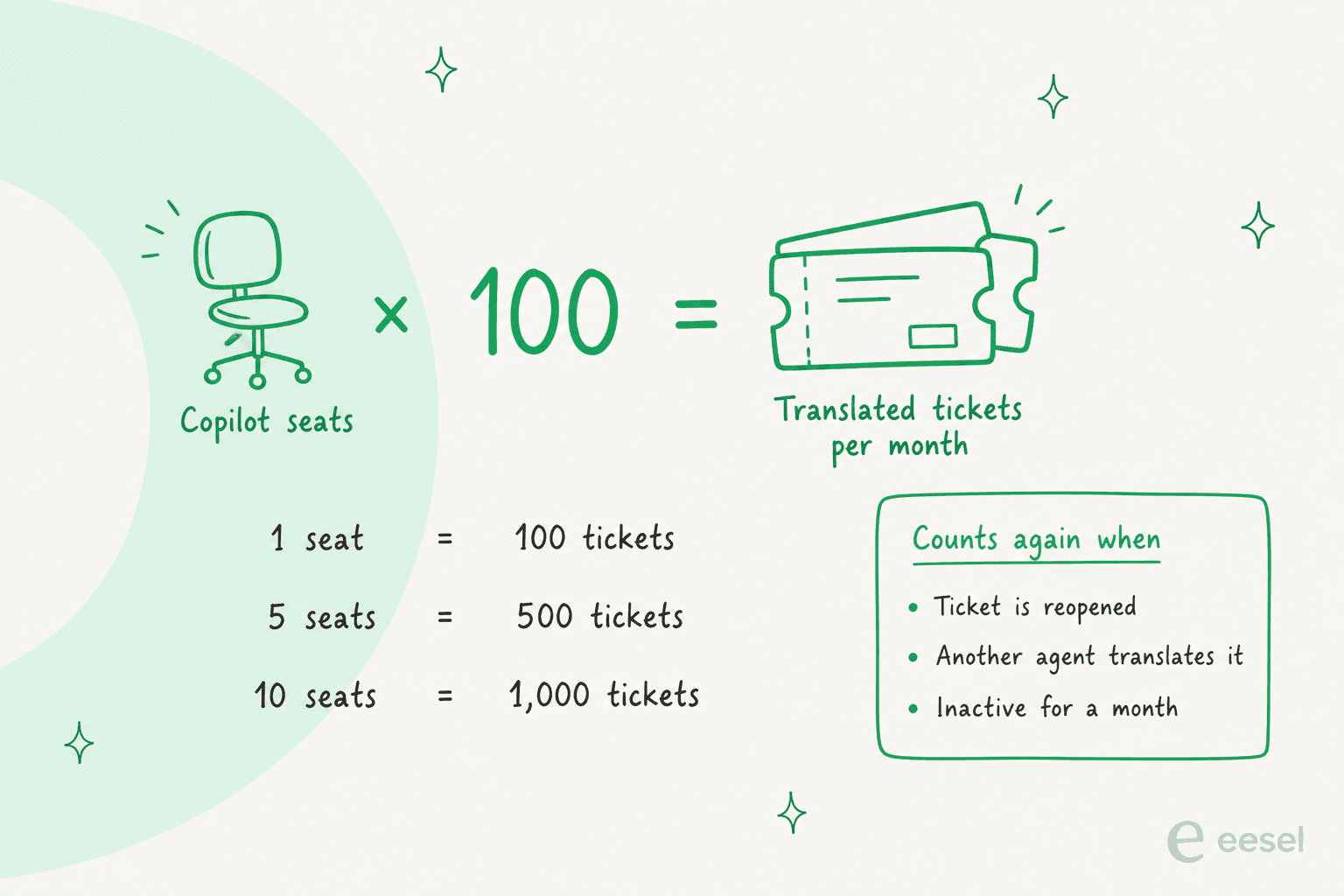
The doc spells out the formula as "Ticket Limit = Number of Copilot licenses × 100", applied at the account level. A ticket counts once when an agent translates it, and again if it's reopened, if a different agent translates it, or if it's translated after a month of inactivity. When the account hits the limit, the button is disabled with a banner reading "Translation limit reached for this billing cycle", though tickets already translated keep their translations.
Two smaller limits are worth knowing. Each translation tops out at 50,000 characters, and that count includes HTML, signatures, disclaimers and embedded images, so a short email with a heavy signature can fail. And for mixed-language messages, Freshworks says "only a single language is returned", usually the dominant one.
Admins can track usage in the Freddy AI Impact Reports, broken down by agent and group, which is the first place I'd look a month after rollout. If you're pricing the add-on more broadly, my Freddy Copilot pricing post covers what else the $29 buys.
My take: Live Translate is the right fit when a few bilingual-minded agents handle a steady trickle of foreign-language tickets. Size the Copilot seats to your translated-ticket volume, not to headcount, and leave room for reopens.
Freddy AI Agent: replies in the customer's language
The AI side handles language differently. The Freddy AI Agent doesn't translate a reply word for word; it writes the reply in the customer's language from your knowledge sources. Freshworks markets it as able to "speak 60+ languages" on the AI Agent page, without publishing the list there.
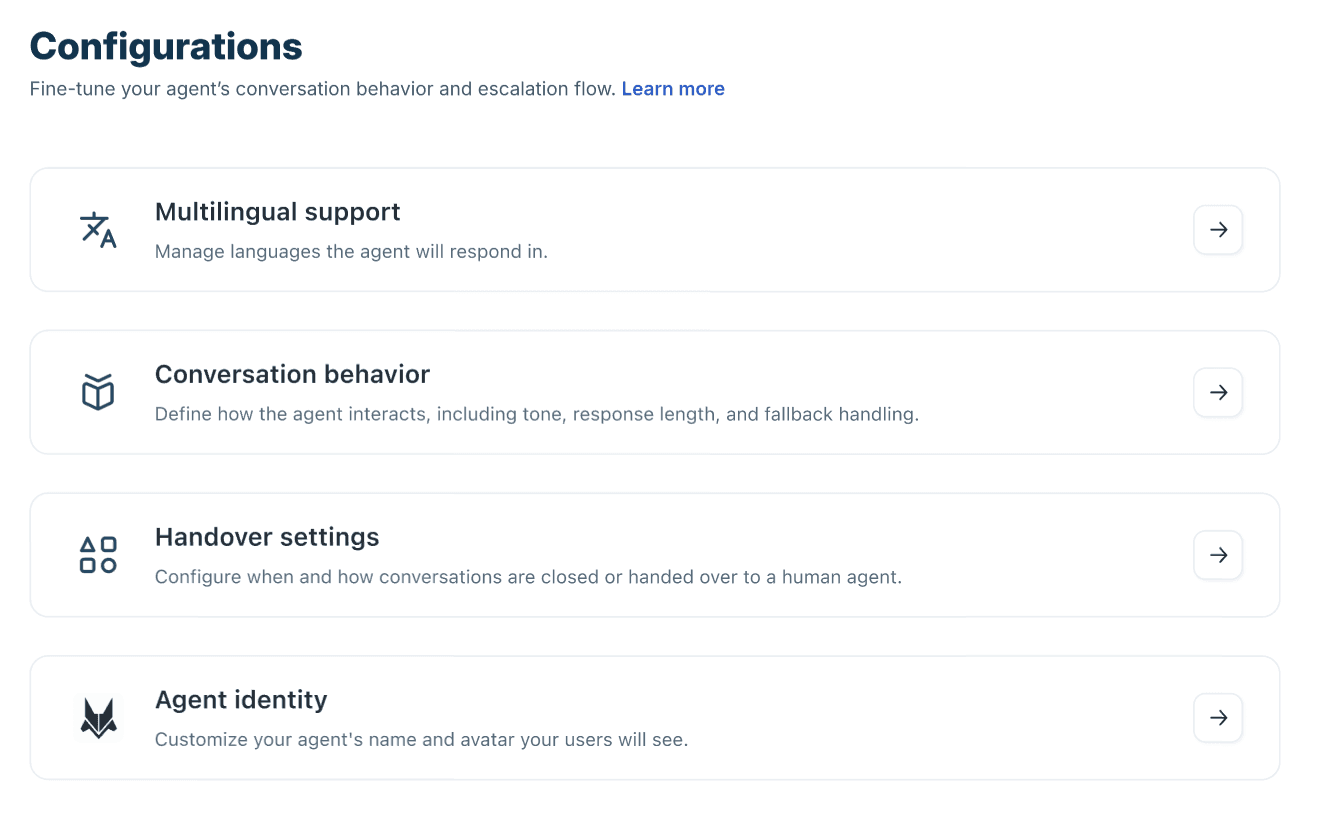
You set a primary language when you create the agent, then manage the rest under Build > Configurations > Multilingual support. Per the Chat AI Agent setup doc:
- The agent automatically detects the user's language.
- Responses are generated in the detected language.
- If the language isn't supported, fallback handling kicks in.
- Handover rules still apply regardless of language.
That same doc recommends running "at least 20 queries" before going live, including queries in non-primary languages. I'd push that further and test with real past tickets in each language, because a confident wrong answer in Portuguese is harder for your team to catch than one in English. My Freddy AI Agent knowledge sources guide covers the testing tools.
What the AI Agent costs
The AI Agent comes with every paid plan, and you pay for usage in sessions. Freshworks' own pricing page says it all in two lines: "First 500 sessions included. $49 per 100 sessions". The FAQ adds the detail that matters: the free 500 sessions are "limited to once per account", so they're a trial pool, not a monthly allowance. After that it's $0.49 a session, whatever language the customer writes in. My session consumption post explains what counts as a session, and Freddy AI pricing has the bigger picture.
My take: for repeat questions in languages your team doesn't speak, this is the most useful translation feature Freshdesk has. It does nothing for the tickets it hands over, which land with your team in the original language. That's where Live Translate or an outside tool has to pick up.
Translating the Freshdesk knowledge base
A translated help center helps customers before they ever open a ticket, and it gives the AI Agent better material in each language. Freshdesk's multilingual knowledge base needs Pro or Enterprise, and it works on a strict master-and-translation model:
- Turn on multilingual support and pick a primary language. You can't change the primary language afterwards.
- Add supported languages. Freshworks says "You can add any number of languages", from a list of
47, four of which (Albanian, Belgian Dutch, Belgian French and Georgian) work in the knowledge base only. - Write each article in the primary language first. Translations can only exist once that master version does.
- Open the article in the target language and type the translation, with Show Master to keep the original alongside.
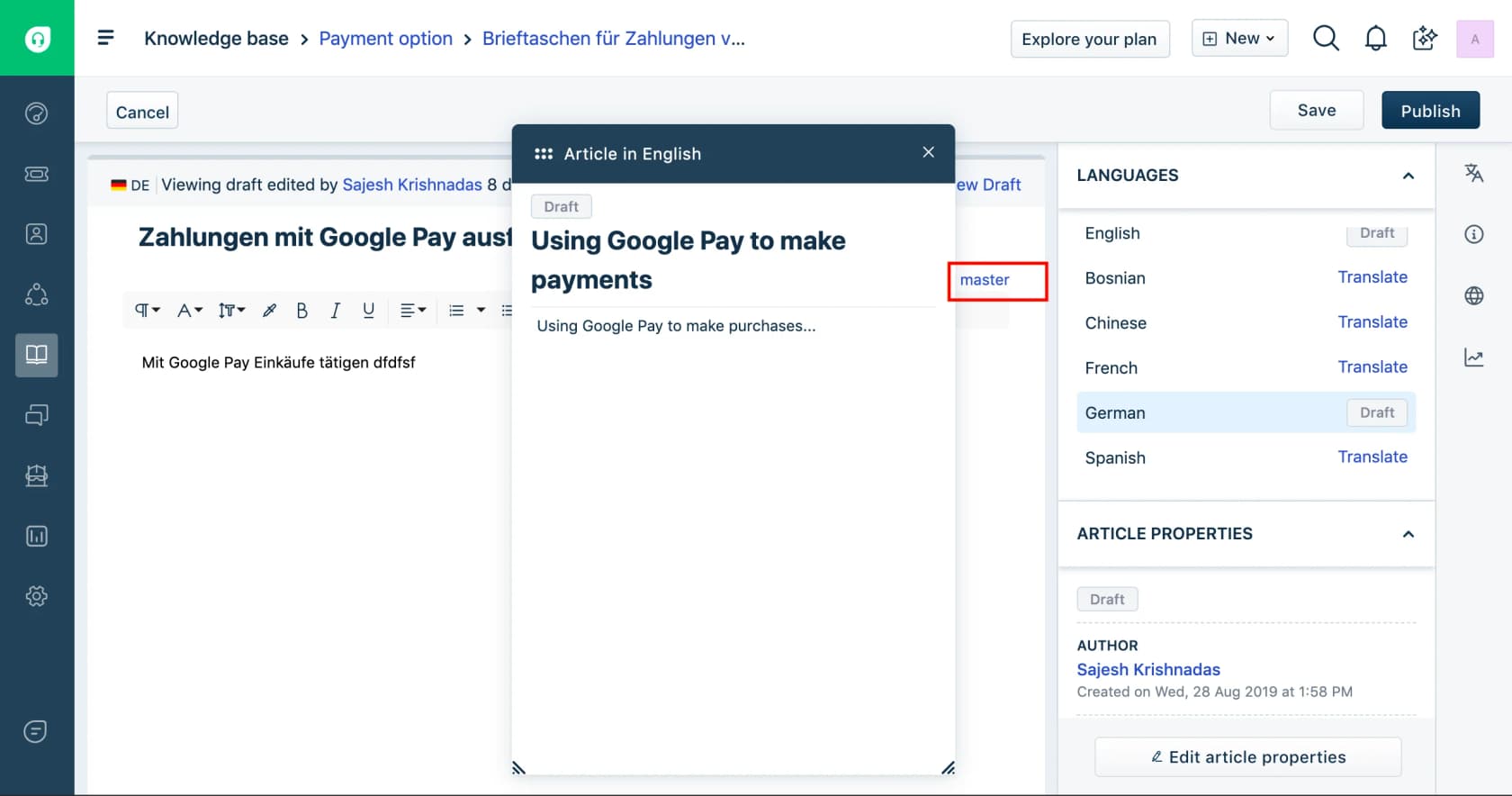
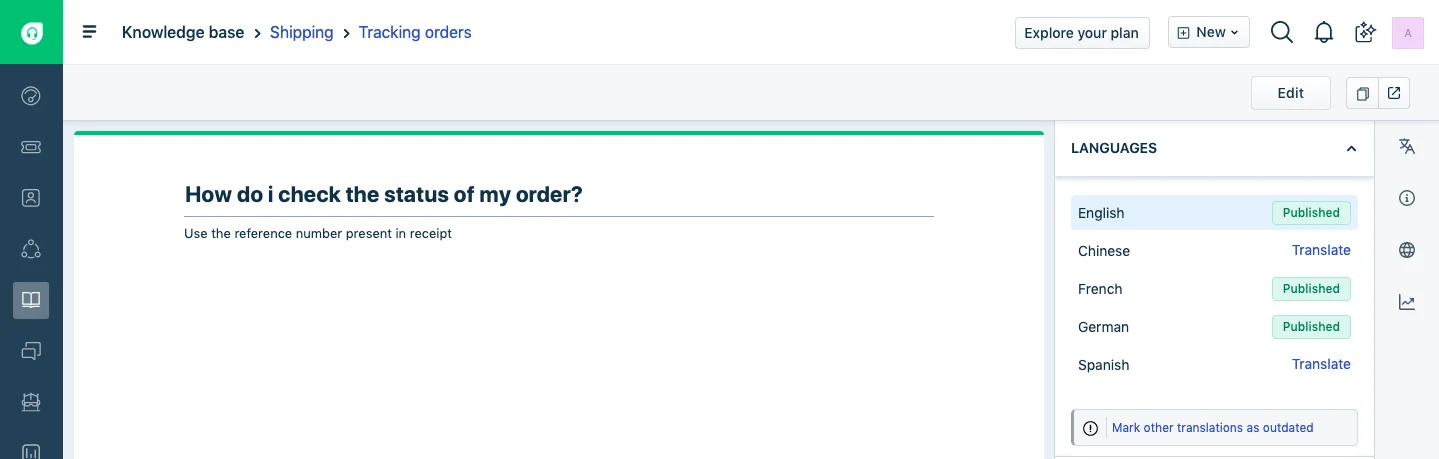
The upkeep is where this gets expensive in time. When you change the English article, the translations don't go stale on their own. Freshworks' article status doc tells you to click Mark other translations as outdated, and says plainly: "You perform this action each time you update the primary article." Forget it, and the French version keeps serving last quarter's return policy. There's an outdated and untranslated list view per language to catch the drift afterwards.
One more useful detail: each new language is hidden from the portal by default, so you can add Italian, translate quietly, and only show it once the content is ready. Users have long noticed the uneven split between automated emails and articles:
"There is multilingual support for automatically generated emails, but it would be great if this could be extended to Solutions pages."

My take: translate your top 20 solution articles into your top two or three languages, and no more until you have someone who owns the "mark as outdated" step. I compared how other tools handle this in multilingual knowledge base software, and Freddy on the knowledge base covers what the AI does with those articles.
Language detection, notifications and routing
The quieter language features sit around the ticket rather than in it. The Manage languages settings drive three surfaces off one list: the help widget, ticket fields and forms, and the customer portal. Dynamic email notifications then send automated emails in the customer's language.
That depends on Freshdesk knowing the customer's language, and customers don't always stay in one. Freshworks itself publishes a free marketplace app, Detect and Update Requester Language, which "detects the language of the email and automatically updates the requester's language" so notifications follow. The listing shows 100+ installs and a 3.6 rating from 8 reviews.
For routing, skill-based routing is on the Enterprise plan, per the pricing page. If you have native speakers on the team, sending German tickets to them is cheaper than translating every one. It runs out the moment no one on shift speaks the language, which is usually the ticket you were worried about.
Marketplace translation apps for Freshdesk
If you're on Growth, don't want Copilot, or need human-quality translation, the Freshworks Marketplace fills the gap. These are the translation listings I found live in October 2026:
| App | How it translates | Notable detail | Cost |
|---|---|---|---|
| Unbabel for Freshdesk | AI plus a community of human translators | Translations land in the agent's language; agents reply below #unbabel in a private note | Free listing, Unbabel subscription required |
| Lingpad for Freshdesk | AI with business context | 120+ languages, glossary, tone setting, auto language detection | Free listing, pay-as-you-grow plans |
| Lingpad for Freshchat | AI for chat | Per-word pricing, auto-detects the customer's language | Free listing, Lingpad plan |
| Translate By Humans | Machine translation in, professional translators out | Replies in 60+ languages via assigned human translators | Free listing, Translate By Humans pricing |
| Translate Buddy | Quick translations in a ticket sidebar widget | Lives on the ticket detail screen | Free |
I didn't find a DeepL app on the Freshworks Marketplace. If DeepL is your engine of choice, it's copy-paste or a custom build on its API, and my DeepL pricing post has the API plans. Whatever you install, set up a glossary first so your product names don't get translated into something odd; I wrote a separate guide to building a support translation glossary.
My take: Unbabel and Translate By Humans make sense when a wrong word is costly, like regulated or high-value B2B support, because a person checks the output. For everyday tickets, Live Translate or Lingpad is faster and cheaper.
What Live Translate costs for your team
The translation cap is the number most teams miss when they budget for Freshdesk translation. Plug in your plan, headcount, Copilot seats and monthly foreign-language tickets to see the cost and whether the cap covers you.
Translating a ticket isn't resolving it
Every option above solves the same narrow problem: the words. After Live Translate shows the Polish ticket in English, your agent still has to find the answer, check the order and write a reply someone will trust, and only then translate it back. In the years eesel has spent running AI on live support queues, language has rarely been the slow part. The research is.
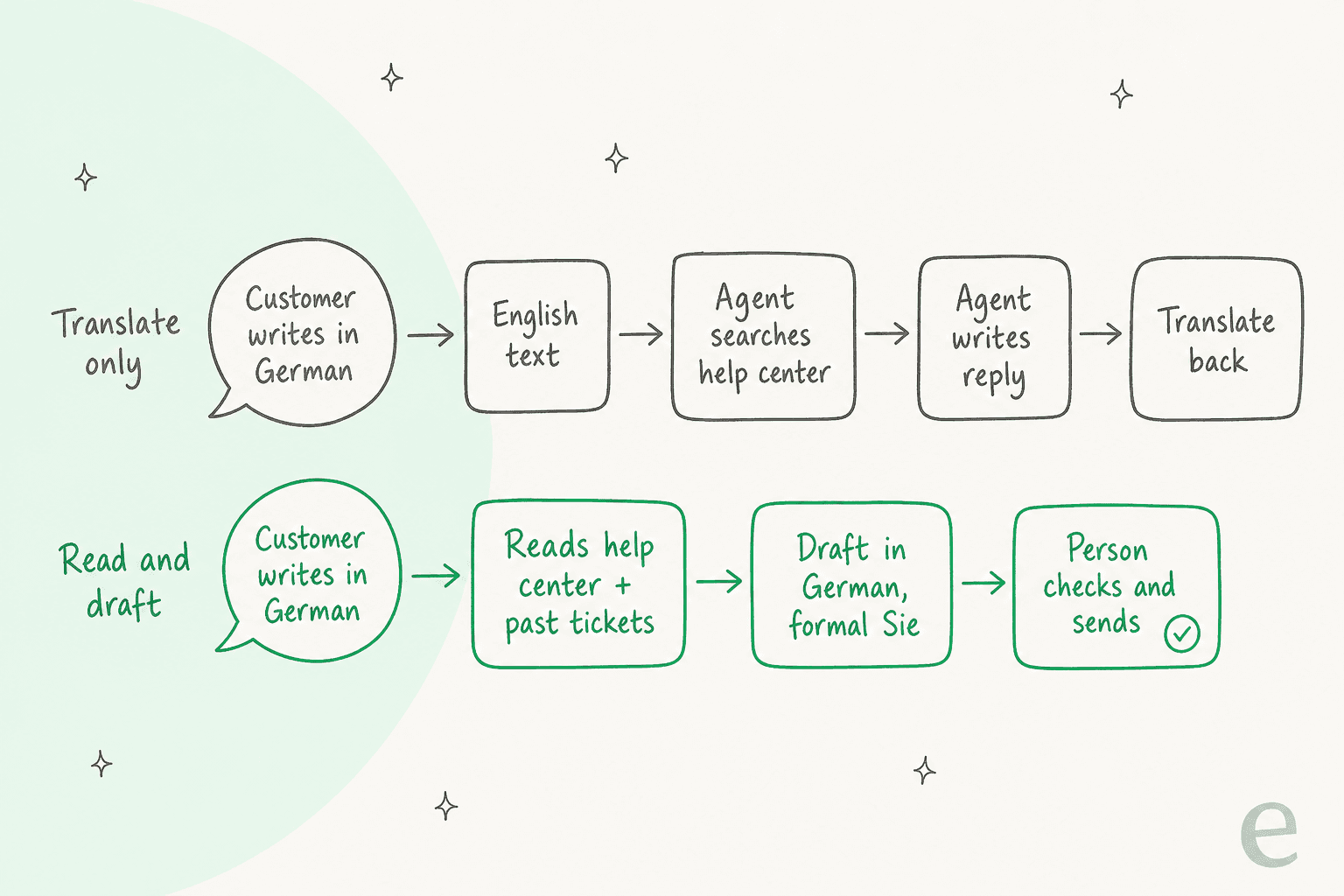
Innr is the clearest Freshdesk example I can point to. It's a smart lighting company in Hilversum, the Netherlands, and its customers write in Dutch, German, English and French, mostly about pairing bulbs and bridges. Here's how eesel runs on its Freshdesk tickets:
- A filter skips marketplace notifications, courier updates, review digests and sales pitches before anything runs.
- It searches the help center first, about
1,500help center articles and past tickets synced from Freshdesk, topped up every Monday with the past week's tickets. - It leaves the draft as an internal note, in the customer's language, and a person sends it. German customers get the formal "Sie" in every sentence.
- Warranty claims, billing and order status, bulk orders and anything the help center doesn't cover go straight to a person with a note saying why.
Between 8 August and 8 September 2026 that came to 190 Freshdesk tickets prepared, 450 internal notes and 180 draft replies. The translating happened inside the draft, not in a separate step.
Koffer.ch, a Swiss luggage shop in Zug, shows a different angle. Its answers already lived in Freshdesk macros, so eesel uses a matching macro word for word and translates it into the customer's language when needed, across German, French, English and Italian, with Swiss spelling ("ss" rather than "ß") in the German. And Timengo gets Danish drafts on technical tickets, written from 5,300 past tickets and help center articles.
The pattern shows up in sales calls too. A Belgian delivery company on Freshdesk opened its first eesel test with a Dutch question about shipping costs to Germany, got a detailed Dutch answer with specific pricing, and immediately asked why its past Freshdesk tickets weren't feeding the answers yet. That's the right instinct: past tickets are where the real answers live.
It's also why I'd test any AI on your own tickets before trusting it. As one Reddit user put it:
"it worked for very simple tickets but anything slightly complex got misclassified. agents ended up spending more time fixing errors than before"

If you want the general case, I covered whether AI can handle multilingual support and how to check language quality before anything goes out.
Where eesel isn't the right fit: if your agents want to read every ticket in English and write every reply themselves, Live Translate or a marketplace app is the simpler tool. eesel is for teams who want the research and the draft done as well as the words.
Try eesel on your Freshdesk tickets
If foreign-language tickets in Freshdesk keep landing with whoever happens to be online, eesel works like a new AI helpdesk teammate that joins your existing queue. It reads each ticket in the language it arrived in, searches your help center, macros and past tickets, and leaves a draft in that language as an internal note, per the eesel helpdesk docs. You set the rules in plain language, like "use Sie for German customers" or "never translate the product name", and correct it the same way.
It connects through the Freshdesk integration, starts as drafts so your team stays in control, and counts a ticket as one credit whatever language it's in. eesel pricing starts free with 100 credits, then $299 a month for 500.
If you're weighing it against Freshworks' own AI, my eesel vs Freddy comparison lays out the differences, and best AI for Freshdesk covers the wider field.
Try eesel on a week of your Freshdesk tickets and read the drafts before you decide.
Frequently Asked Questions
Does Freshdesk have built-in translation?
Yes, from the Pro plan up. Live Translate adds a Translate button to tickets for human agents, but it needs the Freddy AI Copilot add-on and is capped at 100 translated tickets per Copilot seat per month. The Freddy AI Agent also replies in the customer's language on every paid plan. My customer service translation guide compares other helpdesks.
How much does Freshdesk translation cost?
Live Translate needs Freshdesk Pro at $55 or Enterprise at $89 per agent per month billed annually, plus Freddy AI Copilot at $29 per agent per month. AI Agent replies cost $49 per 100 sessions after a one-time 500 free sessions. See Freshdesk pricing for the full plan table.
How many languages does Freshdesk Live Translate support?
Freshworks' Live Translate help doc lists 43 entries, with Czech appearing twice, covering the main European and Asian languages plus Arabic and Hebrew. The pricing and Copilot pages say 60+ languages, so check the help doc list for your exact languages. My Copilot pricing post covers the add-on.
Can the Freddy AI Agent reply in other languages?
Yes. Under Multilingual support in the agent's configurations, you choose the languages it responds in, and it detects the customer's language and replies in it, with fallback handling for unsupported languages. Each conversation uses AI Agent sessions. The Freshdesk AI Agent guide walks through setup.
Can I translate my Freshdesk knowledge base automatically?
Not according to Freshdesk's knowledge base docs, which describe typing each translation yourself next to the master article. You also have to mark translations as outdated every time the primary article changes. My multilingual knowledge base software post compares tools that handle this differently.
Is there a DeepL or Google Translate app for Freshdesk?
I didn't find a DeepL app on the Freshworks Marketplace. The live translation apps include Unbabel for Freshdesk, Lingpad, Translate By Humans and Translate Buddy. If you want DeepL, my DeepL pricing breakdown covers its API plans.
What's the best Freshdesk translation setup for a small team?
If foreign-language tickets arrive a few times a week, Live Translate on one or two Copilot seats is enough. Once they're daily, an AI teammate that drafts in the customer's language saves the research as well as the translating. eesel plugs into Freshdesk through its Freshdesk integration and starts at $299 a month for 500 credits.