Quality assurance has come a long way from the days of manually sampling 2% of customer conversations and hoping they represent the whole. Today, AI-powered tools like Zendesk QA can review 100% of interactions automatically, giving support teams unprecedented visibility into agent performance.
But having the data is only half the battle. The real value comes from how you use that data to give agents constructive feedback that actually improves their performance. That's what this guide covers: the complete workflow for using Zendesk QA to give and receive agent feedback, from setting up scorecards to handling disputes.
If you're exploring alternatives, we integrate with Zendesk and offer a different approach to quality assurance through AI-powered support that learns from your existing conversations. More on that later.

What is Zendesk QA?
Zendesk QA is an AI-powered quality assurance solution that automatically reviews customer service conversations and provides actionable insights. Originally developed by Klaus (which Zendesk acquired), it integrates natively into the Zendesk platform.
The key difference from traditional QA is coverage. Most support teams manually review about 2% of conversations due to time constraints. Zendesk QA uses AI to score 100% of interactions based on criteria you define, whether that's tone, accuracy, policy adherence, or empathy.
The system offers two main approaches:
- AutoQA: AI automatically scores conversations based on predefined or custom criteria
- Manual review: Human reviewers grade conversations using structured scorecards
You can use either approach or combine them. Many teams use AutoQA to identify conversations that need human attention, then have reviewers focus on those rather than random samples.
Setting up Zendesk QA for feedback
Before you can start giving feedback, you need the right foundation in place.
Requirements and access
Zendesk QA is available as an add-on to any Zendesk Support or Suite plan. You'll need either:
- The Quality Assurance (QA) add-on
- The Workforce Engagement Management (WEM) bundle
As for who can do what, the roles break down like this:
- Admins and workspace managers: Full access to configure QA settings
- Leads and reviewers: Can review conversations and leave feedback
- Agents: Can view feedback on their own work and dispute ratings
Creating scorecards
Scorecards are the foundation of your feedback system. They're essentially rubrics that define what "good" looks like for your team.
Zendesk QA comes with out-of-the-box scorecards covering:
- Readability
- Empathy
- Grammar
- Tone
You can also create custom scorecards by telling the AI what to look for in plain language. For example, you might create a scorecard that checks whether agents properly verified customer identity before discussing account details.
Each scorecard can have:
- Rating scales: Typically binary (pass/fail) or graded (1-5)
- N/A options: For criteria that don't apply to every conversation
- Weighted criteria: Some factors matter more than others
- Critical requirements: Must-pass items that automatically fail a conversation if missed
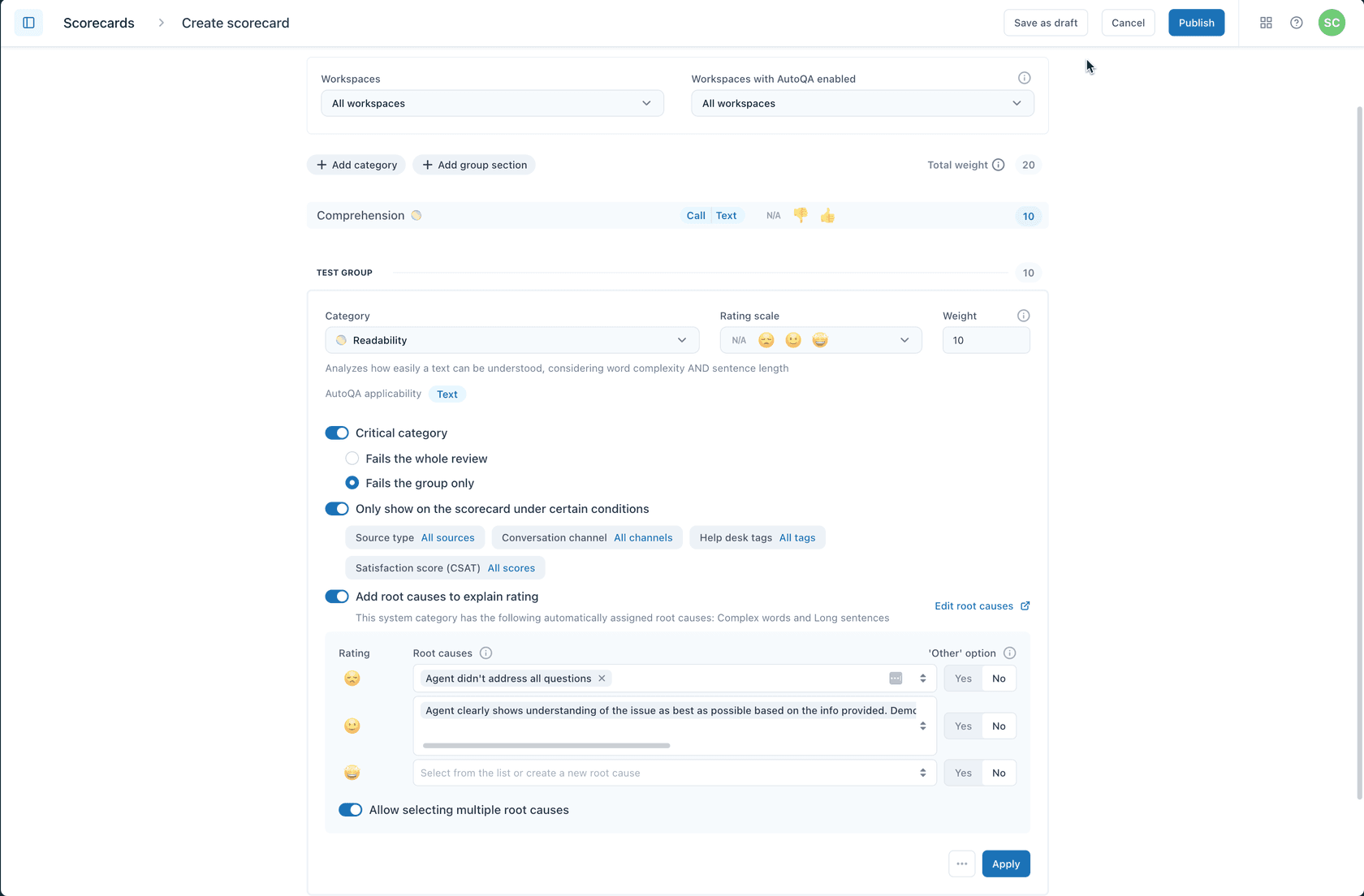
The key is involving your team in creating these scorecards. When agents help define what quality means, they're more likely to buy into the feedback process.
How reviewers give Zendesk QA agent feedback
Once your scorecards are set up, reviewers can start grading conversations and leaving feedback.
Accessing conversations
Reviewers spend most of their time in the Conversations view. From here, they can:
- Browse conversations assigned to them
- Use filters to find specific types of interactions
- Create custom filters (public for the team or private)
Filters are powerful. You might create filters for:
- Conversations with low CSAT scores
- Interactions longer than 10 minutes
- Tickets tagged with "escalation"
- Specific agents or channels
Grading conversations
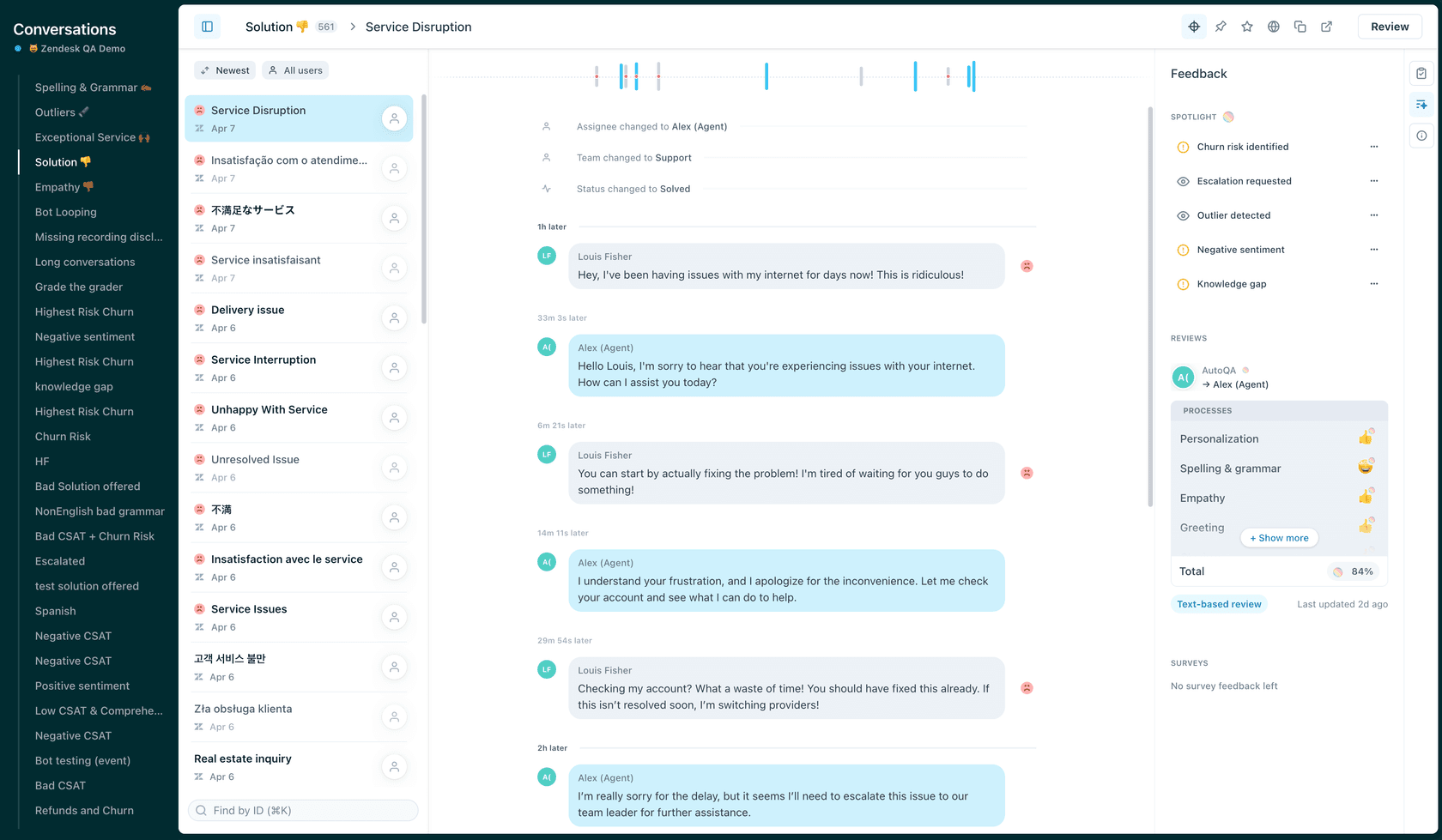
When reviewing, you can assess either the entire conversation or specific messages within it. This is useful when multiple agents were involved or when you want to address a particular moment.
The grading process works like this:
- Select the conversation from the filtered list
- Choose the appropriate scorecard
- Rate each category (or let AutoQA do it)
- Add root cause analysis if needed
- Leave comments
- Submit the review
Leaving constructive comments
The scores tell agents what happened. Your comments tell them why it matters and how to improve.
Best practices for feedback comments:
- Be specific: "You interrupted the customer three times" beats "Work on listening"
- Reference the scorecard: Connect your comment to the specific criterion
- Suggest alternatives: "Next time, try confirming the issue before proposing a solution"
- Use @mentions: Tag team members who should see the feedback
- Add hashtags: Categorize feedback types (#coaching, #policy, #tone)
Once you've added scores, comments, and any mentions, submit the review. The agent gets notified according to their preferences.
How agents receive and respond to feedback
Getting feedback is only valuable if agents can act on it. Zendesk QA gives agents several ways to engage with their reviews.
Viewing feedback
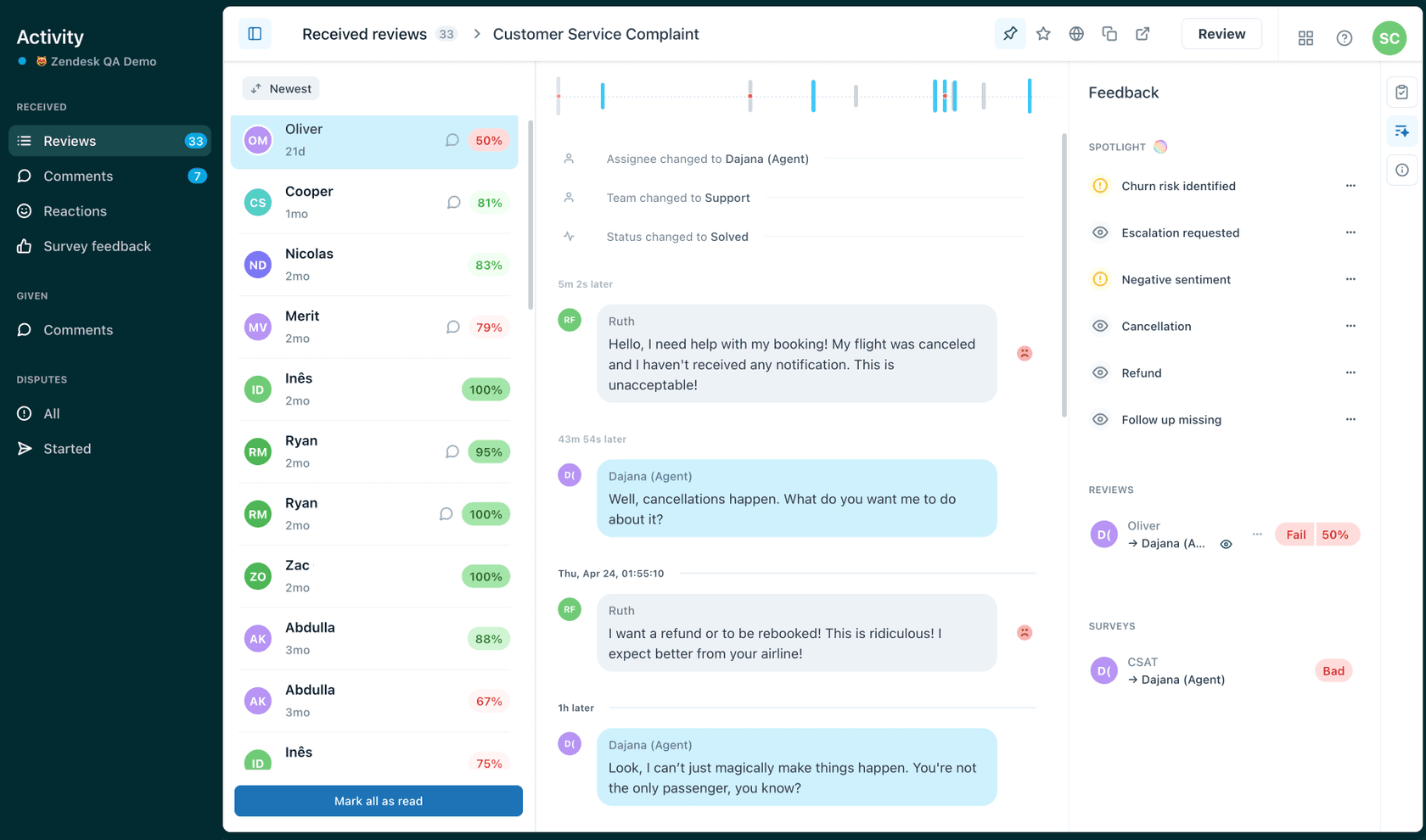
Agents access their feedback through the Activity page. Here they can see:
- All reviews they've received with ratings and comments
- Survey feedback (CSAT) alongside QA scores
- Icons indicating positive or negative ratings
- Whether a review includes comments
Seeing QA scores alongside CSAT helps agents understand the relationship between process adherence and customer satisfaction. Sometimes you follow all the rules but the customer still isn't happy. Other times, customers give high CSAT even when agents skip steps. Both patterns are worth understanding.
Managing disputes
Not every rating is fair or accurate. When agents disagree with feedback, they can dispute it.
The dispute process lets agents:
- Suggest an alternative rating for specific categories
- Leave a comment explaining their perspective
- Send the dispute back to the original reviewer or escalate to a manager
This isn't about arguing every point. It's about creating a dialogue. Maybe the reviewer missed context that explains why an agent handled a situation a certain way. Or maybe the agent genuinely misunderstood a policy and needs clarification.
Either way, disputes should be resolved quickly. Nothing undermines a QA program faster than feedback that sits in limbo.
Using dashboards for self-improvement
Agents have access to several dashboards that help them track their own progress:
- Reviews dashboard: See all feedback over time
- Categories dashboard: Understand which criteria you struggle with most
- Disputes dashboard: Track dispute resolution
The key is using these tools proactively. Agents who regularly check their dashboards and work on their weak areas tend to see faster improvement than those who only look at feedback when required.
Evaluating AI agent performance with Zendesk QA
As AI agents handle more customer conversations, you need a way to evaluate their performance too. Zendesk QA supports this through specific features for bot evaluation.
Configuring AI agent reviews
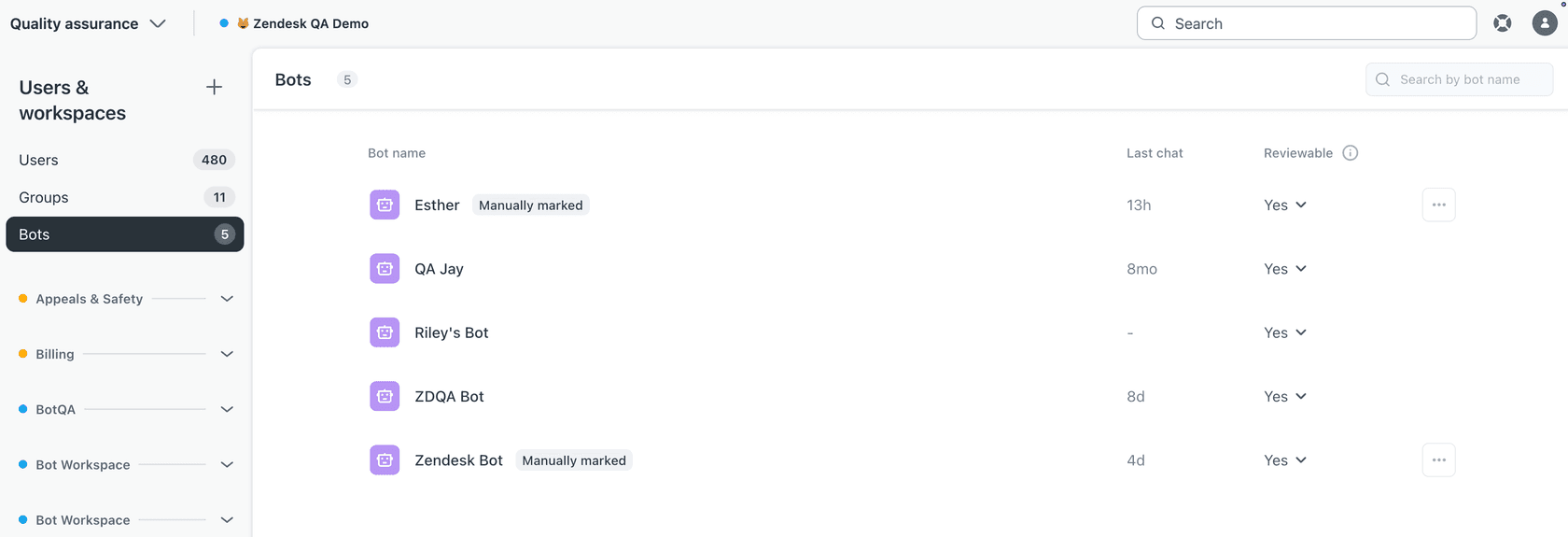
Zendesk QA automatically detects:
- Zendesk AI agents
- Sunshine Conversations bots
You can also manually flag other users as AI agents. Once configured, you choose whether each bot is "reviewable" (included in QA) or not.
For reviewable bots, you can:
- Set up bot-specific scorecards
- Enable autoscoring for automatic evaluation
- Use filters to find bot conversations that need manual review
Using the BotQA dashboard
The BotQA dashboard tracks metrics specific to AI agent performance:
- Escalation rates (how often bots transfer to humans)
- Resolution rates
- Quality scores over time
- Comparison against human agent benchmarks
This helps you understand whether your AI agents are actually solving problems or just creating more work for your human team.
Best practices for effective Zendesk QA agent feedback
Having the tools is one thing. Using them well is another. Here are practices that separate effective QA programs from checkbox exercises.
Make feedback a dialogue
The best QA programs feel like coaching, not grading. That means:
- Reviewers explain their reasoning, not just assign scores
- Agents can ask questions and dispute ratings without fear
- Feedback leads to actual skill development, not just compliance
Get team buy-in early
Change is hard. If agents see QA as something being done to them rather than for them, you'll get resistance.
Involve the team in:
- Creating scorecards
- Setting quality standards
- Deciding how feedback should be delivered
When agents help define quality, they own it.
Run calibration sessions
Different reviewers will interpret the same criteria differently. Regular calibration sessions (where multiple reviewers grade the same conversation and discuss their reasoning) keep scoring consistent.
Balance automated and manual QA
AutoQA is great for coverage and consistency. Human reviewers add nuance and context. Use both:
- Let AutoQA handle the bulk of scoring
- Have humans review edge cases and disputes
- Use AutoQA to flag conversations that need human attention
Track quality alongside outcomes
Quality scores matter, but so do results. Track how QA scores correlate with:
- CSAT ratings
- Resolution times
- Customer retention
If your highest-scoring agents have the lowest CSAT, your scorecard might be measuring the wrong things.
Zendesk QA pricing and alternatives
Pricing overview
Zendesk QA costs $35 per agent per month when billed annually, as a standalone add-on. You can also get it bundled with Workforce Management for $50 per agent per month total.
Remember, this is on top of your base Zendesk plan. So a team on Suite Professional ($115/agent/month) would pay $150/agent/month total with QA added.
There's also a Workforce Engagement Bundle at $50 per agent per month that includes both Quality Assurance and Workforce Management, which saves money if you need both.
Alternative approaches to quality assurance
Zendesk QA is a solid tool, but it's not the only way to maintain quality in customer support.
At eesel AI, we take a different approach. Instead of reviewing conversations after they happen, we focus on preventing quality issues before they reach customers.
Here's how it works:
- Simulation: Before going live, you can run our AI on thousands of past tickets to see exactly how it would respond. You measure quality before customers see anything.
- Continuous learning: When you correct an AI response, it learns from that correction. No need for separate QA workflows.
- AI Copilot: Our AI Copilot drafts replies for human agents based on your past tickets and help center, ensuring consistency without manual review.

The result is quality built into the process rather than inspected after the fact. If that sounds interesting, you can learn more about our AI Agent or explore how we integrate with Zendesk.
Getting started with better agent feedback
Implementing a QA program that actually improves performance takes more than buying software. It takes:
- Clear standards that the team helps define
- Consistent feedback delivered as coaching, not criticism
- Tools that make the process efficient rather than burdensome
- A culture where quality is everyone's goal
Zendesk QA provides the infrastructure for this. Whether it's the right choice depends on your team's size, your existing Zendesk investment, and how you prefer to approach quality.
If you're looking for an alternative that embeds quality into the support process itself, we built eesel AI to do exactly that. You can run simulations before going live, train the AI on your existing conversations, and let it handle routine issues while escalating edge cases to your team.
Either way, the goal is the same: giving your customers consistently great support. The tools just help you get there faster.