
Choosing the right analytics tier can feel like a guessing game. You know you need data to run your support team effectively, but do you really need real-time dashboards? Is external sharing worth the upgrade cost?
Let's break it down. This comparison covers exactly what you get with Zendesk Explore Professional versus Enterprise, how the pricing shakes out, and which features actually matter for different team sizes.
What is Zendesk Explore?
Zendesk Explore is the analytics and reporting arm of the Zendesk Suite. It pulls data from your Support tickets, Talk calls, Chat conversations, and Guide knowledge base into visual dashboards you can actually use.
There are three tiers:
- Explore Lite comes with Suite Team, Suite Growth, and basic Support plans. You get pre-built dashboards with 24-hour data refreshes. It's fine for small teams just starting out.
- Explore Professional is bundled with Suite Professional. You can build custom reports, refresh data hourly, and get more granular insights.
- Explore Enterprise comes with Suite Enterprise and Enterprise Plus. This is where you get real-time dashboards, external sharing, and advanced customization.
The jump from Lite to Professional is significant. The jump from Professional to Enterprise? That depends entirely on how your team operates. Learn more about Zendesk Explore plan types to understand what's included at each level.
For teams looking beyond traditional analytics, eesel AI offers an alternative approach. Instead of building dashboards, you get AI that analyzes conversations automatically, spots trends in your tickets, and identifies knowledge gaps without manual report building. Read our Zendesk AI overview to learn more about AI-powered support options.
Zendesk Explore Professional vs Enterprise: feature comparison
Here's where the two tiers diverge in ways that actually impact your day-to-day operations.
Data refresh rates
Professional: All dashboards refresh hourly. Your pre-built dashboards update every hour. Your custom reports update every hour. This works fine for most teams reviewing performance daily or weekly.
Enterprise: Real-time for pre-built live dashboards, hourly for custom. The live dashboard shows what's happening right now: agents online, tickets in queue, current wait times. Custom reports you build still refresh hourly.
Does real-time matter? It depends. If you have a large team and need to spot problems as they happen (spikes in queue, agents going offline unexpectedly), real-time monitoring is valuable. If you primarily review performance retrospectively, hourly refreshes are probably fine.
Dashboard customization
Professional: You get a pre-built live dashboard, but it's read-only. You can view it and share it internally, but you cannot modify it, clone it, or build your own live dashboards.
Enterprise: Full control. Clone the live dashboard and customize it. Build entirely new live dashboards with the metrics you care about. Drill into live agent status to see exactly what each agent is working on right now.
Source: Zendesk Explore documentation
External sharing
This is a major differentiator that often drives upgrade decisions.
Professional: Internal sharing only. You can share dashboards with other Zendesk users in your organization. If someone outside your team needs to see the data, you need to export a static report or give them a Zendesk license.
Enterprise: Share with anyone. Create public links to dashboards that external stakeholders can access without a Zendesk account. Password-protect them if needed. Display dashboards on office TVs for the whole team to see.
If you need to share support metrics with leadership who don't use Zendesk, or display real-time stats for your team, Enterprise is the only option.
Source: Sharing Explore Dashboards Outside Zendesk
Sandbox environment
Professional: Sandbox is available as an add-on. You will pay extra to test changes in a safe environment before pushing to production.
Enterprise: Up to 2 sandboxes included. Test new workflows, train agents, and experiment with configurations without risking your live data.
Help center and brand support
Professional: Supports up to 5 help centers. It works well for most single-brand companies or those with a few regional variations.
Enterprise: Supports up to 300 help centers. Built for large enterprises managing multiple brands, regions, or product lines.
Advanced analytics features
Enterprise adds several capabilities that power users appreciate:
- Visual data alerts that notify you when metrics hit thresholds
- Business rules analysis to audit and optimize your automations
- Custom agent roles for granular permissions
- Multiple business hours for teams across time zones
| Feature | Explore Professional | Explore Enterprise |
|---|---|---|
| Pre-built dashboards | Yes | Yes |
| Custom reports | Yes | Yes |
| Live dashboard | Read-only | Fully customizable |
| Custom live dashboards | No | Yes |
| Data refresh | 1 hour | Real-time (live), 1 hour (custom) |
| Internal sharing | Yes | Yes |
| External sharing | No | Yes |
| Sandbox | Add-on | 2 included |
| Help centers | Up to 5 | Up to 300 |
| Visual data alerts | No | Yes |
| Business rules analysis | No | Yes |
Source: Zendesk Pricing
Pricing breakdown
Here's what you'll actually pay for each tier:
| Plan | Annual Price (per agent/month) | Monthly Price (per agent/month) | Explore Tier Included |
|---|---|---|---|
| Suite Professional | $115 | $149 | Explore Professional |
| Suite Enterprise | Custom (sales) | Custom (sales) | Explore Enterprise |
Zendesk no longer publishes a Suite Enterprise price, so ask sales for the gap over Professional ($115 annual, $149 monthly).
For a team of 20 agents, that's an additional $1,080 per month ($12,960 annually) to move from Professional to Enterprise. For 50 agents, it's $2,700 per month ($32,400 annually).
Is it worth it? Let's look at when each tier makes sense.
When to choose Explore Professional
Explore Professional fits most growing support teams. Consider it if:
- Your team reviews performance daily or weekly, not minute-by-minute
- You don't need to share dashboards with people outside your Zendesk organization
- You have 5 or fewer brands/help centers
- You're comfortable with hourly data refreshes for most metrics
- You don't need sandbox for testing (or you're willing to pay for it as an add-on)
Many teams find that Professional gives them everything they need. You can still build custom reports, track the metrics that matter, and share insights with your team. The hourly refresh is sufficient for most operational reviews and performance tracking. See the Zendesk data refresh documentation for technical details on sync schedules.
When to upgrade to Explore Enterprise
Enterprise becomes worth the investment when real-time visibility and external sharing become operational requirements. Upgrade if:
- You manage a large team and need to spot issues as they happen
- You want to display real-time metrics on screens in your office
- Leadership or other departments need dashboard access without Zendesk licenses
- You need to share performance data with external partners or clients
- You have multiple brands or complex organizational structures requiring 5+ help centers
- Your team works across multiple time zones with different business hours
- You want sandbox environments included for testing changes
The real-time live dashboard is particularly valuable for teams that have moved to remote or hybrid work. As one Zendesk product leader noted, support leads need real-time views into what's going on more than ever because they can't look out on the call center floor anymore.
Source: Diginomica - Zendesk Explore Enterprise analysis
How eesel AI complements your analytics strategy
While Zendesk Explore focuses on dashboards and manual reporting, eesel AI takes a different approach to understanding your support operations.
Instead of building reports, you get an AI teammate that:
- Analyzes conversations automatically no dashboard configuration required
- Identifies trending topics sees what customers are asking about most
- Spots knowledge gaps finds questions your help center doesn't answer well
- Tracks resolution quality understands which responses solve problems
- Integrates directly with Zendesk works alongside your existing setup
The difference is philosophical. Explore gives you tools to build the reports you think you need. eesel AI surfaces insights you might not have thought to look for.
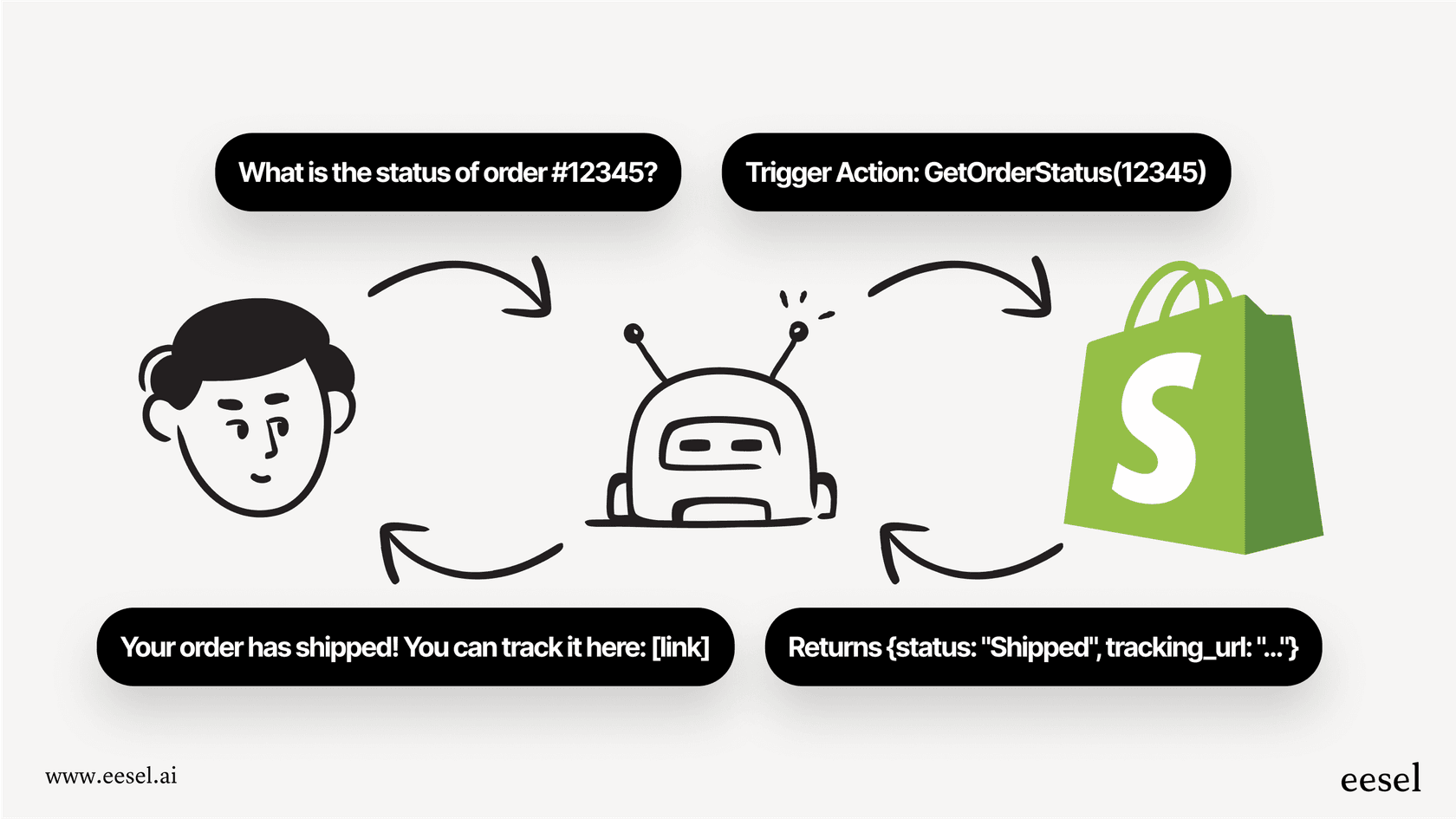
For teams using Zendesk, eesel AI integrates directly with your help desk to provide this layer of AI-powered analysis on top of your existing workflow.
Making your decision
Bottom line? Most teams should start with Professional and upgrade to Enterprise only when specific needs arise.
Choose Explore Professional if you need solid analytics without the premium price tag. It covers the essentials: custom reports, hourly refreshes, and internal sharing. For teams of 10-30 agents reviewing performance regularly, it's usually sufficient.
Choose Explore Enterprise when real-time visibility becomes critical to your operations. If you're managing 50+ agents, working across multiple time zones, or need to share metrics widely outside your support team, the upgrade pays for itself.
The good news: you can always upgrade later. Start with Professional, see how your team uses the data, and move to Enterprise when you hit specific limitations.
For teams looking to augment their analytics with AI-powered insights, eesel AI's Zendesk integration offers a complementary approach that works alongside either Zendesk tier, surfacing insights automatically without requiring manual report building.