

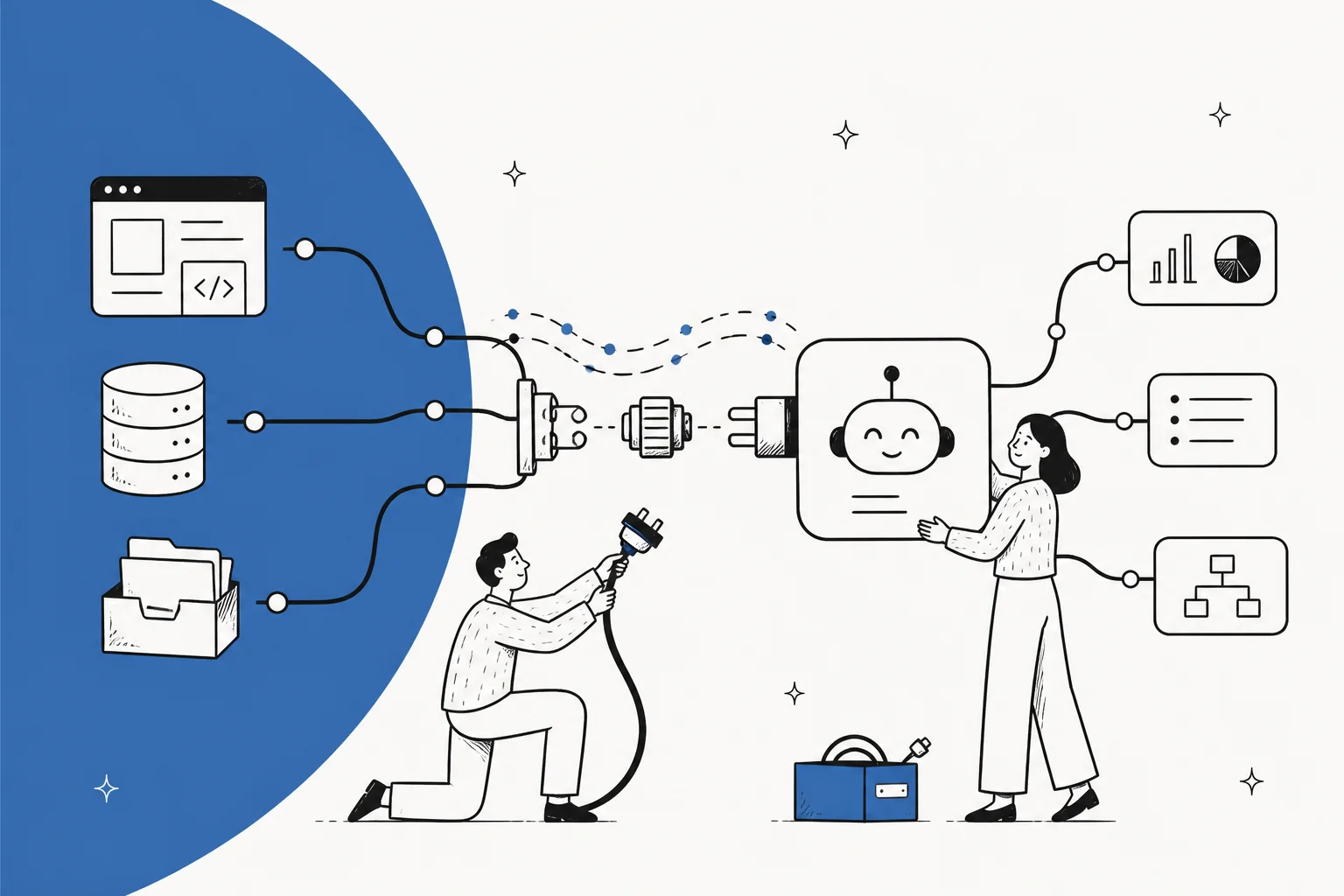
An AI agent API integration is never a single endpoint. What you're actually wiring up is three surfaces: sources (what the agent can read), triggers (what wakes it up), and actions (what it's allowed to do). The model call, the part everyone pictures, is maybe 20% of the work.
The rest is unglamorous plumbing, and it's where projects stall. Triggers alone eat roughly half the effort, because every platform handles events differently and the edge cases are hidden. Actions and permissions take another big slice. Scope your integration by that reality, not by the size of the REST surface.
Two practical calls to make early: build a proper managed connector for the systems you hit constantly, but for rare, long-tail systems, handing the agent an API key and the docs usually beats building anything. And decide up front how you'll handle auth, approvals, and an audit log, because retrofitting those hurts.
If your agent's job is the helpdesk, you can skip most of this: eesel already ships the sources, triggers, and actions for tools like Zendesk, Freshdesk, and Gorgias, plus a CLI and API layer for when you want code control.
The mistake everyone makes on the first integration
I build integrations at eesel, and I can tell you the first estimate on any AI agent integration is almost always wrong in the same direction.
Someone reads a vendor's API docs, sees a clean list of endpoints, and scopes the work as "call this endpoint, feed the response to the model, done." Then they start, and a week disappears into webhook lifecycles, duplicate events, and a permissions model nobody drew on the whiteboard. The API reference was the easy part. It's the map of a country you still have to actually drive across.
I've spent years putting AI agents on live systems, across thousands of real integrations, and the pattern holds every time. So instead of another "here's how to make a POST request" tutorial, this post is about the shape of the whole job: what an AI agent API integration is really made of, where the time actually goes, and the two or three decisions that save you the most pain.
An AI agent integration is three surfaces, not one
The single most useful reframe: an integration isn't "a connection to a tool." It's up to three separate things you're giving the agent, and they're independent.
- Sources are what the agent can read: tickets, help center articles, past conversations, a knowledge base. This is the retrieval side, the context the agent reasons over.
- Triggers are the reasons the agent wakes up: a new ticket lands, someone @mentions it, a webhook fires, a schedule ticks over.
- Actions are the things it's allowed to do back: draft a reply, tag a ticket, escalate, update a record, hit another API.
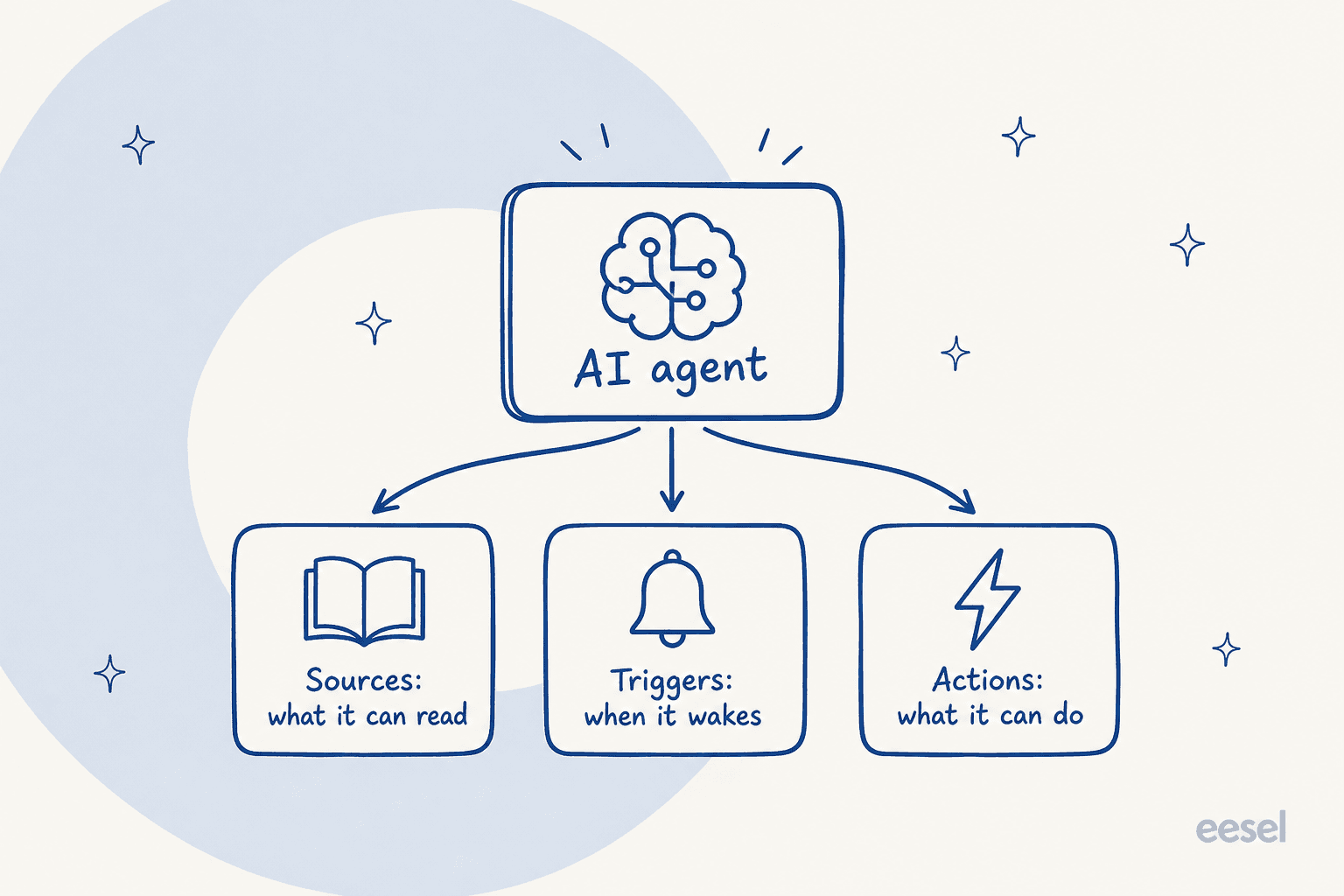
Here's the thing worth internalizing: a system can give you one, two, or all three, and each is a different kind of work. Connecting a docs site is usually sources only. Connecting a helpdesk is often all three. And "integrate X" without saying which of the three you mean is how estimates go sideways. On the eesel integrations page, the subtitle the team landed on is literally "connect integrations to give your agent knowledge sources, triggers, and actions," because that framing is what makes the work legible.

This is also why an AI agent is not a rule-based chatbot with an API bolted on. A chatbot needs a trigger and a canned response. An agent needs all three surfaces working together, because it reads context, decides, and acts.
Where the work actually goes
If you take one number from this post, take this one: on a real integration, the API call itself is roughly the last 20% of the effort. Triggers and event plumbing are closer to half. Actions and permissions take most of the rest.
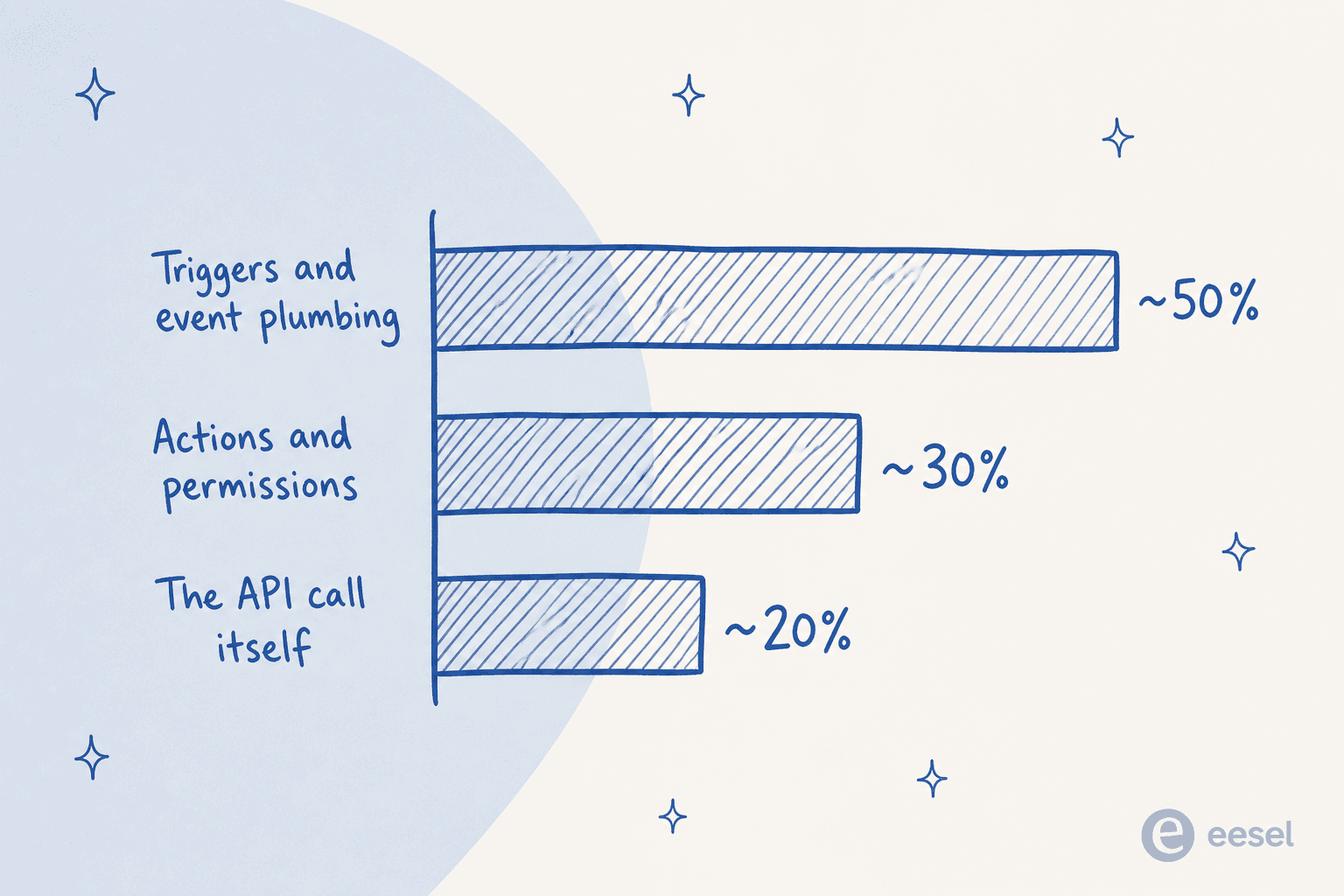
That split surprises people, so here's why triggers are so heavy.
Every platform does events differently. Some send clean webhooks. Some make you build automation rules inside their UI. Some have no real event system and you end up polling an API on a timer. Once events arrive, you have to dedupe them, because platforms happily fire the same event twice, and an agent that replies twice to one ticket is a bad look. Webhook subscriptions have lifecycles that have to be created and cleaned up per customer, or they orphan and silently stop firing months later.
And then there are the behaviors nobody documents. The canonical one that cost me real hours: Freshdesk silently never fires its automation rules for tickets created by an agent. Nothing in the docs says so. You just watch your trigger not fire and lose an afternoon to it. Every mature platform has a handful of these, and you only find them by running the thing against real traffic. This is exactly the sort of gap the eesel Freshdesk integration had to be built around, and it's why eesel now simulates every rollout against a customer's real history before it goes live.
You can hear the same thing from developers wrestling with this outside customer support:
"So I've been messing around with a few AI agents trying to get them to fit into the workflow at my company. We've got a mix of legacy systems and some..."

The legacy-systems-and-some part is the whole story. The "some" is always where the surprises live.
The two decisions that save you the most pain
Once you accept that the plumbing is the job, two design calls do most of the work of keeping an integration sane.
Build a connector, or hand the agent a key?
Not every integration deserves the same investment. There's a real fork here, and picking the wrong branch is how teams over-build.
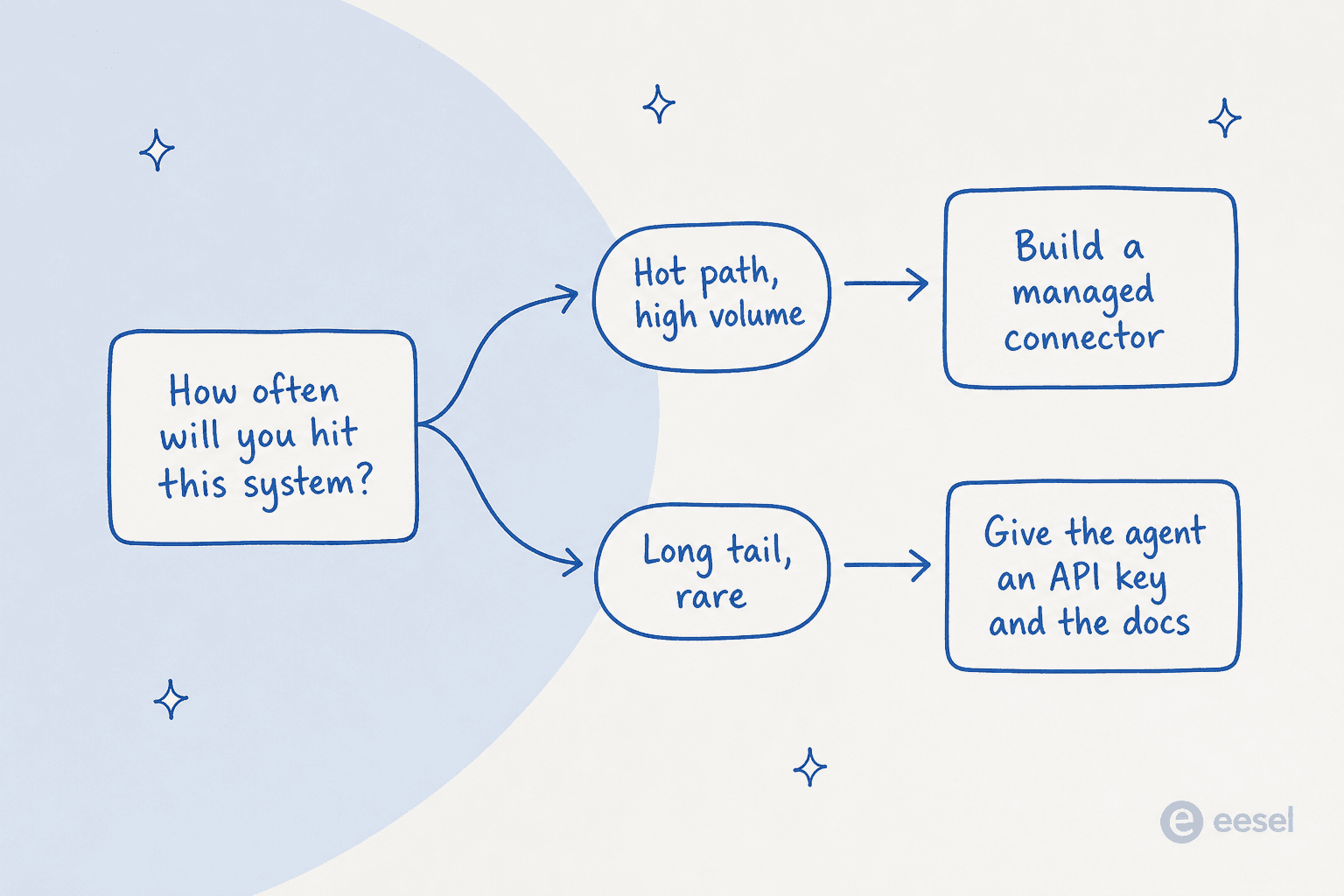
For a hot path, a system your agent hits constantly, build a proper connector: managed auth, pre-built actions, dedupe, retries, the works. The upfront cost pays for itself every day.
For the long tail, systems you touch rarely or that are unique to one customer, that same investment is waste. I actually tested this: hand the agent an API key, the vendor's API docs, and a short reference script, and for one-off integrations it outperformed building a polished vendor-tool wrapper. Modern agents are good at reading API docs and forming requests. Let them. This is the whole idea behind giving an agent network access to an allowlisted domain rather than pre-building a connector for every possible tool. Developers keep landing on the same trade-off:
"APIs are glue, but they're messy glue. Documentation can be outdated, authentication flows differ, and error..."
Messy glue is exactly the long tail. You don't want to hand-build a connector for every messy corner. You want the agent to read the docs and handle it.
Bind to the instance, not the platform
This one is subtle and it will bite you. "Zendesk the platform" and "this customer's specific Zendesk" are not the same thing. If you model your integration around the platform, you'll eventually enable an action for one customer and watch it quietly affect another, because your code bound the action to "Zendesk" instead of to that one workspace.
Anything integration-shaped, sources, triggers, actions, credentials, has to bind to the specific instance. It sounds obvious written down. It is not obvious at 2am when a permission is leaking across tenants. Get this right in the data model on day one and you never think about it again. Get it wrong and it's a rewrite.
The parts of the plumbing people forget
Beyond the three surfaces, a production AI agent API integration needs a few things that never make it into the happy-path demo.
Auth that the model never sees. Credentials should be stored as headers or secrets that the integration layer attaches, not values that ever pass through the model's context. The pattern behind eesel's Network Access feature is exactly this: you allowlist a domain and add an auth header once, the agent can then call that API, and the credential is never shown to the AI. It's the difference between a safe integration and one key leak away from an incident.
Scoped actions with a human in the loop for the risky ones. Reading data is low-stakes. Writing data, refunding an order, deleting a record, is not. Every action the agent can take should be scoped to least privilege, and the destructive ones should be gated behind approval until you trust them. A good customer-support agent API makes "draft but don't send" and "propose but require approval" first-class states, not afterthoughts.
An audit log you can actually read. When an agent does something surprising, and it will, the first question is "what did it see and what did it do?" If your integration can't answer that quickly, you're debugging blind. This is why observability matters as much as the connection itself.

Choosing your integration surface
"Via API" is not the only way to connect an agent, and often not the best one. The surface you reach for should match the job. Here's how the common options actually compare.
| Surface | Best for | What it gives you | Watch out for |
|---|---|---|---|
| REST API | Custom apps, service-to-service calls | Full control, your code owns the flow | You build auth, retries, dedupe, and events yourself |
| Webhooks | Waking the agent on an event | A clean trigger with no polling | Lifecycle management, dedupe, and orphaned subscriptions |
| MCP server | Letting an AI client use your tools | Standard tool interface any MCP client can call | Newer standard; not every client speaks it yet |
| CLI | Scripting, CI, ops-as-code | Scriptable, JSON output, dry-run before writes | A person or script has to drive it |
| Pre-built connector | Hot-path platforms (helpdesks, CRMs) | Managed auth, actions, and events out of the box | You depend on the vendor's coverage of that platform |
Most real setups mix these. You might wake the agent with a webhook, let it read from pre-built sources, take actions through a managed connector, and reach a long-tail system through raw network access. When these workflows require specialized functionality beyond standard connectors, a custom AI development company can help build tailored AI applications around specific business requirements. If you want the deeper comparison of when each surface fits, I wrote a whole piece on programmatic AI agent access and another on why an API-first platform behaves differently from one where the API was bolted on later.
The honest version of the advice: if you're integrating an agent into your helpdesk, don't hand-build any of this. If you're integrating into something bespoke, expect the plumbing, scope for it, and lean on the agent itself for the long tail.
Try eesel for the helpdesk side
If the agent you're wiring up is meant to handle customer support, the three surfaces above are already built. eesel is an AI helpdesk teammate that plugs into your existing stack the way a new hire would, and it treats every connection as sources, triggers, and actions from day one.
That means the parts that eat your integration timeline, event handling for Zendesk or Freshdesk, per-instance binding, scoped actions with approvals, an activity log you can audit, are handled. And when you do want code control, there's a CLI, an MCP server on every workspace, webhooks to wake the agent, and network access for the long tail. You can simulate the whole thing against your real ticket history before it touches a customer, and pricing is one fixed monthly price, so you're not paying per seat for an integration you're still testing.
It's the fastest way to skip the plumbing described in this whole post, at least for the helpdesk half of your stack. Try eesel free.