
A few years ago, AI in business meant chatbots that could barely answer FAQs. You typed something. It guessed. You gave up and called support.
That era is over.
Salesforce Agentforce has changed what businesses expect from AI. We're not talking about better autocomplete. We're talking about autonomous agents: systems that receive a trigger, reason through a problem, and complete multi-step workflows without human intervention.
But here's the catch. Agentforce is powerful, but it's not plug-and-play. Implementation requires careful planning, clean data, and a solid understanding of how the platform works. Get it wrong, and you'll have an expensive experiment that frustrates customers and agents alike.
This guide walks through the complete Salesforce Agentforce implementation process, step by step. It covers what you need before you start, how to configure your first agent, and how to avoid the mistakes that derail most implementations.
What you'll need before starting
Before you write a single instruction or create your first agent, you need several things in place.
A Salesforce org with administrative access. You'll need to enable features, configure permissions, and manage integrations. If you don't have admin rights, you'll need someone who does.
Data Cloud enabled. Agentforce relies on Data Cloud for grounding: the ability to pull from your actual customer records, not generic training data. Without this, your agents will confidently give wrong answers.
Clean, structured CRM data. This is the uncomfortable truth most guides skip. Your agent is only as good as your data. Duplicate records, stale contact info, and outdated knowledge articles will undermine everything.
A clearly defined use case. Don't build an agent that handles everything. Pick one high-volume, low-complexity task to start. Something like resolving shipping disputes, answering billing FAQs, or qualifying inbound leads from a specific source.
Budget clarity. Agentforce pricing has evolved. You have three options:
| Pricing Model | Cost | Best For |
|---|---|---|
| Conversation-based (legacy) | $2 per conversation | Low volume, unpredictable usage |
| Flex Credits | Granular control, mixed use cases | |
| Per-user licensing | $125-550/user/month | Predictable costs, high volume |
Source: Salesforce Agentforce pricing analysis
The key point: you cannot mix Flex Credits and Conversation models in the same org. Choose carefully.
Step 1: Assess your data readiness
Let's break it down. The Atlas Reasoning Engine (the AI brain behind Agentforce) cannot fix bad data. It will just confidently give wrong answers.
Here's your data readiness checklist:
Unify your customer profiles in Data Cloud. Your system needs a single, clean profile for each customer. If the agent sees three different entries for the same person, it won't know which one to trust. Clean your duplicates first. This is non-negotiable.
Build your vector database. Your PDF manuals, help articles, and internal SOPs need to be converted into vector embeddings. This is how the Atlas Reasoning Engine reads your institutional knowledge. Without it, your agents answer from generic training data, not your actual policies.
Configure the Einstein Trust Layer. Before any data touches the LLM, PII should be masked: names, email addresses, payment info, anything sensitive. This isn't optional if you operate in regulated industries or serve customers in the EU, UK, or California.
According to Gartner's 2025 AI Risk Report, 67% of AI deployment failures in enterprise environments are linked to poor data governance, not model quality. Get your data right first.
Step 2: Define your objectives and use case
The biggest mistake I see? Companies trying to build one agent that does everything. That agent will fail.
Start focused. Here's how:
Write your success criteria before you write a single instruction. What does "working" look like? What's your baseline resolution time today? What would a 40% improvement mean for the business?
Choose your agent type. Salesforce offers pre-built agents for common use cases:
| Agent Type | Core Capability | Business Impact |
|---|---|---|
| Service Agent | Resolves cases, processes returns, answers questions | 24/7 omnichannel support |
| SDR Agent | Qualifies leads, books meetings via Slack/Email | Faster pipeline velocity |
| Commerce Agent | Product recommendations, order tracking | Higher average order value |
| Custom Agent | Industry-specific workflows | Tailored automation |
Source: Salesforce Agentforce use cases
Map the ideal user experience. Outline how the conversation should flow, how the system responds to input, and how it handles errors. This diagram will help you generate instructions and know where to use actions, variables, and filters.
Step 3: Enable and configure Agentforce
Here's the short version: you enable the platform, then build in Agent Builder.
Enable Agentforce:
- Navigate to Setup > Einstein Setup and toggle Agentforce to On
- Enable Data Cloud to provide grounding context
- Refresh your browser to reload Setup
Build in Agent Builder:
This is your main workspace. Three things to configure:
Topics: Group related tasks together. Think of Topics like job descriptions. An agent with a "Billing Inquiries" topic knows to handle anything billing-related. Be specific with classification descriptions. Overlapping keywords between two Topics can cause the agent to freeze (it can't decide which Topic to use).
Instructions: Write in clear, declarative English. Instead of "check order status," write: "Check the Shipment_Status__c field on the Order object and compare it against today's date. If the shipment is more than 3 days overdue, escalate to a human agent." Specificity is everything.
Actions: Connect your Topics to the things the agent can actually do: Apex Classes, Autolaunched Flows, Prompt Templates, or external API calls via MuleSoft.
Step 4: Test using the Reasoning Log
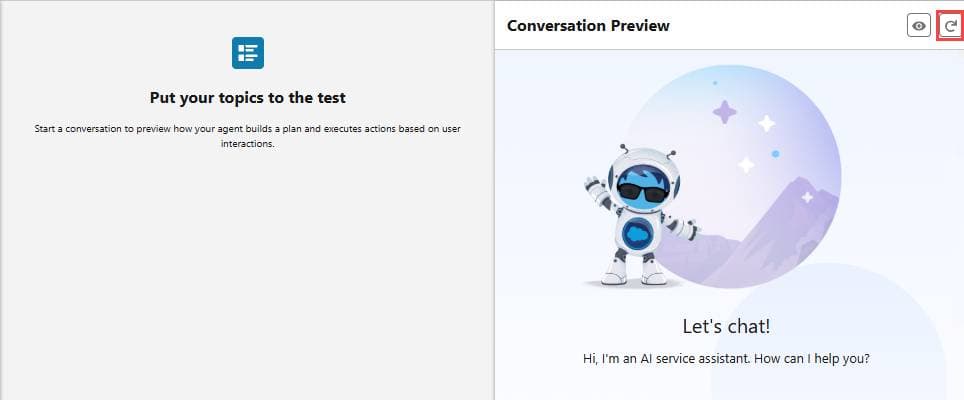
This is where most implementations succeed or fail. Use the Agent Tester to simulate conversations, but here's what nobody tells you: always look at the Reasoning Log.
The Reasoning Log shows you exactly which Topic the agent selected and why it chose a specific Action. If it makes the wrong call, the log tells you where your instructions are ambiguous.
The testing loop:
- Run a test conversation
- Check the Reasoning Log
- Identify where reasoning went wrong
- Fix the instruction
- Test again
- Repeat until the reasoning is correct
This is the hardest part of Salesforce AI automation. It is also the most important. Do not rush it.
Set guardrails before going live. Configure Max Turn limits in Agent Builder settings. This stops the agent from getting stuck in a loop and burning through your Flex Credits. A limit of 10 back-and-forth turns per session is a safe starting point.
Step 5: Deploy to your channels
Agentforce becomes most powerful when agents meet customers where they already are. You can deploy to:
- Experience Cloud (your website or portal)
- WhatsApp and SMS
- Slack (excellent for internal Employee Agents)
- Email, triggered by incoming messages
Start with one channel. Master it. Then expand.
For each channel, you'll need to:
- Configure the channel connection in Setup
- Map the agent to the channel
- Test with real data in a sandbox
- Deploy to production with monitoring
Step 6: Train your team and optimize
Agentforce changes how work gets done, but only if your teams are ready for the shift. Training isn't just about showing features. It's about preparing people for a new way of working.
Focus on:
- Future-state workflows that show how Agentforce takes on repetitive tasks
- Role-specific simulations that mirror day-to-day tasks
- Building trust through understanding how grounded responses are generated
- Champions and superusers who model adoption and answer questions
Measure what matters. Track KPIs that reflect real impact: resolution time, customer satisfaction, agent utilization. Act on feedback from users to identify friction points and fine-tune the experience.
Revisit your setup regularly. As your business evolves, your agents should too. The goal isn't more automation. It's better automation.
Common implementation mistakes to avoid
After reviewing dozens of implementations, here are the patterns that predict failure:
Ambiguous or vague prompts. Clarity in the prompt leads to accurate responses. If your instructions are fuzzy, the agent's actions will be too.
Trying to build one agent that does everything. Start narrow. Expand only after you've proven the agent works for one use case.
Skipping the data cleanup phase. You cannot automate your way out of bad data. Clean first, automate second.
Insufficient testing before go-live. The Reasoning Log is your friend. Use it extensively before customers see the agent.
No defined escalation paths. When should the agent hand off to a human? Define this clearly in your instructions.
Alternatives to consider
Agentforce is powerful, but it's not the right fit for every organization. Here's the bottom line:
Choose Agentforce if:
- You're already invested in the Salesforce ecosystem
- You need deep CRM integration
- You have the technical resources to manage Topics, Actions, and Instructions
- You want autonomous agents, not just assistive AI
Consider alternatives if:
- You're not on Salesforce (or don't want to be)
- You need faster time-to-value
- You want AI agents without the configuration complexity
At eesel AI, we take a different approach. Instead of configuring an AI tool, you hire an AI teammate. Connect eesel to your help desk (Zendesk, Freshdesk, Gorgias, Intercom), and it learns from your past tickets and help center in minutes. No manual training. No complex topic mapping. No coding required.

You start with eesel drafting replies for review. As it proves itself, you level it up to handle full frontline support autonomously. The difference? What takes a human weeks to learn, eesel learns in minutes.
If you're looking for AI customer service without the Salesforce ecosystem complexity, see eesel in action.
Start your Agentforce implementation today
Implementing Agentforce is a significant undertaking, but the potential rewards are substantial. Autonomous agents that can resolve cases, qualify leads, and support customers 24/7 represent a genuine shift in how businesses operate.
The key is to start with a solid foundation. Clean your data. Define your use case narrowly. Test thoroughly. And expand only when you've proven the agent works.
If you're already on Salesforce and have the technical resources, Agentforce is a compelling option. If you're looking for a faster path to AI-powered customer service without the implementation complexity, alternatives like eesel AI can get you there in days, not months.
Either way, the future of customer service involves AI agents working alongside human teams. The question isn't whether to adopt AI agents. It's how to adopt them in a way that actually works for your business.