

Refund first, announce second. Fix the cause, pull the list of affected accounts, issue full refunds, then email each affected customer the amount, the refund date (5 to 10 business days at most banks), and a line saying they don't need to do anything. The order matters because once a customer files a chargeback, Stripe won't let you refund until the bank rules, and the 15 USD fee usually never comes back. The email is the easy part. Trust is won or lost in the "was I affected?" and "where's my refund?" tickets after it, which eesel can answer from your approved note while people keep the disputes.
With the eesel CLI, an AI coding agent can upload your approved billing error note and refund macros, tighten the agent's instructions so disputes go to a person, and run test questions before anything goes live. Connecting the helpdesk itself still needs an admin to approve it.
Why is the message the easy part?
Because a billing error notice is short, and everyone agrees on what it should say. What goes wrong is the order of events around it, and the queue that arrives the minute it lands.
I build the integrations at eesel, including the Stripe lookups eesel's AI agent runs before it replies to a billing ticket, and eesel bills its own customers through Stripe too. So I've seen this from both ends: the code that charged someone twice, and the tickets that follow. My take after both: the wording matters less than what is already true when the customer reads it. "We've refunded you" is a different email from "we will refund you", and it produces a different queue.
The clock you're racing looks like this. Stripe says a card refund shows up as a credit about 5-10 business days later, depending on the bank. A customer, meanwhile, can dispute a card payment with their bank, and card networks typically allow 120 days to do it. The moment they do, three things happen on Stripe:
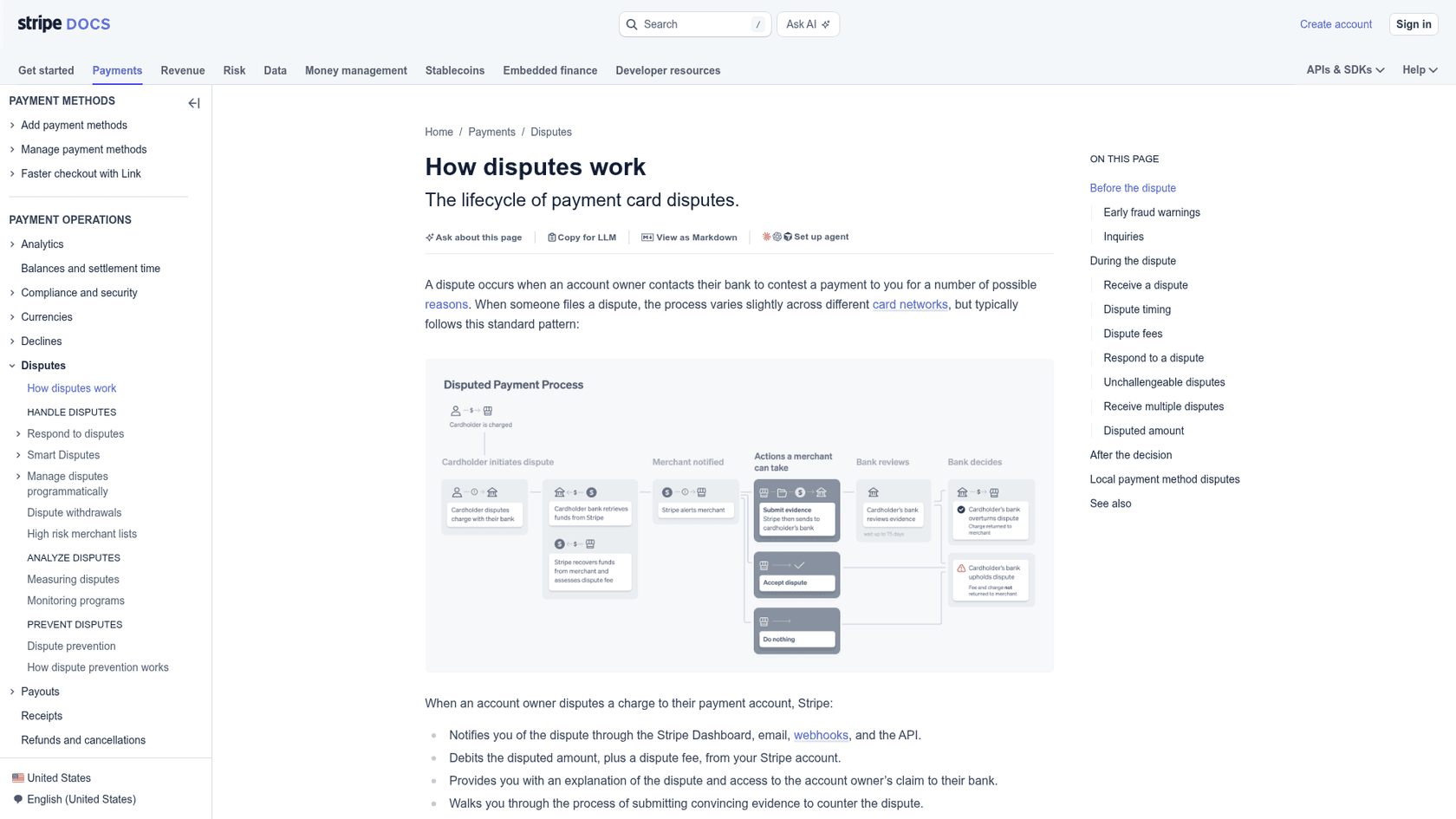
- You lose the ability to fix it yourself. "You can't issue a refund outside the dispute process while the dispute is open," per Stripe's dispute lifecycle docs.
- You pay for it. In the US that's a
15 USDdispute fee, plus another15 USDif you counter it, and Stripe says it never returns the first one unless your contract says otherwise. - It counts against you even if it goes away. "A withdrawn dispute still counts as a dispute," according to Stripe's best practices page, because card networks count disputes received, not won.
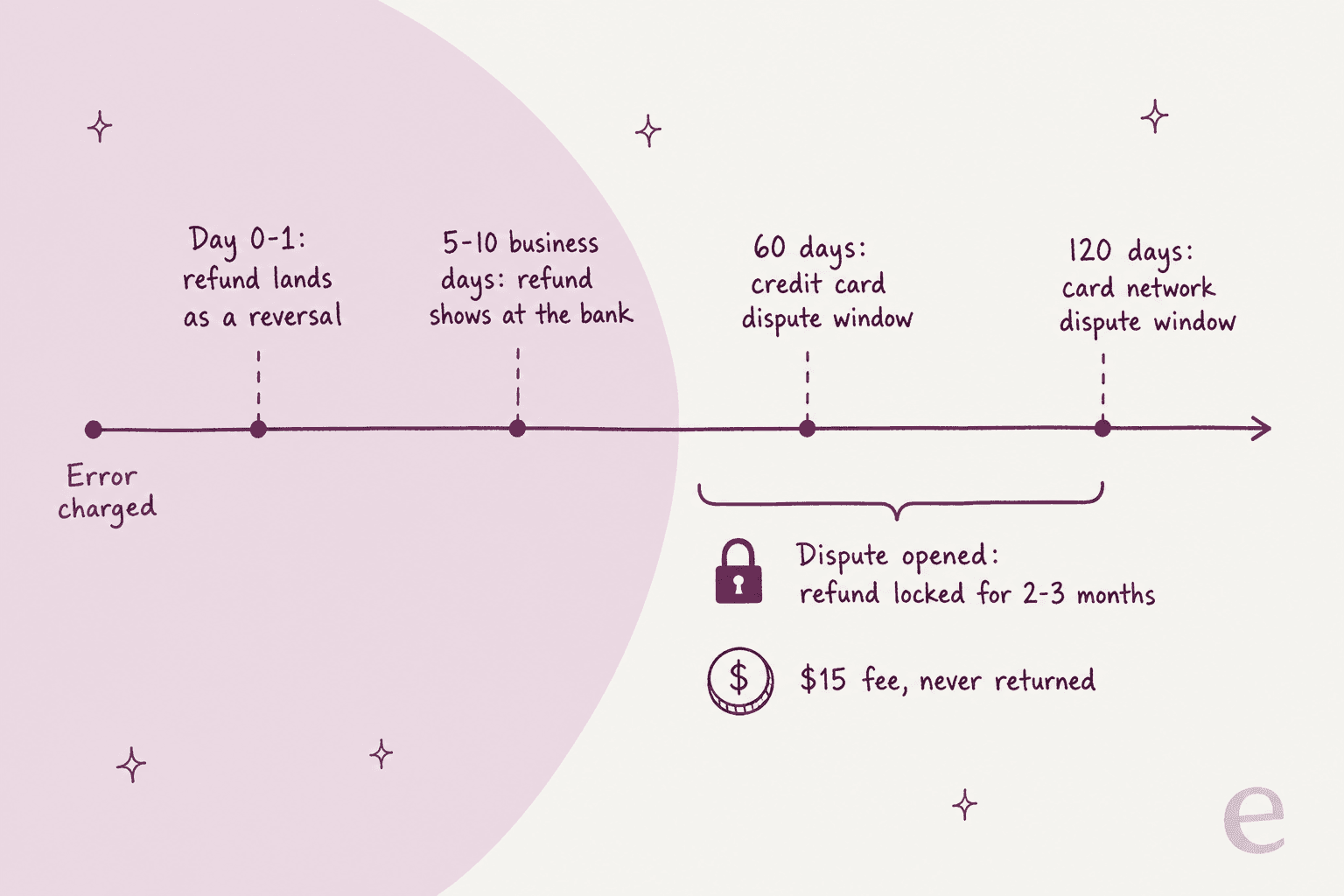
The flip side is the best line in Stripe's docs for anyone in this spot: "customers can't dispute fully refunded payments." A full refund closes the door. A partial one doesn't, and card network rules even allow a partially refunded payment to be disputed for the full amount.
Operators who've lived through this say the same thing more bluntly:
"Dealing with refund requests is easy. The problem is customers who request chargebacks from their banks instead of requesting refunds from you. Payment providers usually contest such chargebacks automatically. This ends up costing you a fee."

So the job isn't really "write a good apology". It's getting the money back to the customer faster than their bank can, and making sure every reply your team sends after the announcement agrees with it.
How long do customers have to dispute a billing error?
Longer than your refund takes, which is the good news. Every consumer clock below runs in weeks or months, while a merchant refund runs in days. The table shows why a slow support reply, not the error itself, is what pushes people to the bank.
| Payment type | Customer's window | How fast the bank must act | Source |
|---|---|---|---|
| US credit card | 60 days after the first statement showing the error | Acknowledge in 30 days, resolve within 2 billing cycles (90 days max) | Regulation Z 1026.13 |
| US debit card or bank transfer | 60 days after the statement | 10 business days, or up to 45 days (90 for point-of-sale debit) with provisional credit | Regulation E 1005.11 |
| Card network chargeback | Typically 120 days from the payment | Merchant has 7-21 days to respond; bank decides in 60-75 days | Stripe dispute timing |
| Klarna, PayPal and similar | Up to 180 days | Varies by provider | Stripe local methods |
| EU direct debit | 8 weeks for a wrong amount or mistaken payment | Bank answers complaints in writing within 15 days | Your Europe |
| UK card-on-file or direct debit overcharge | 8 weeks from the debit | Refund or reasons within 10 business days | PSRs 2017, reg 80 |
The FTC's consumer guide even names your exact situation: a company "may bill you twice for the same thing," and charges with "the wrong date, amount, or a math mistake" are disputable billing errors. Its closing advice tells consumers to contact the card issuer "right away so you don't run out of time" and to contact the seller at the same time. Your customers are being told to go to both of you at once. Make sure you're the faster one.
One more wrinkle worth knowing: under Regulation Z, if a cardholder gets credited twice for the same error (once by the issuer, once by you), the issuer may reverse its own credit. Customers don't know that, and it produces a confused "my refund disappeared" ticket three weeks later. Stripe warns about the merchant version of this: on bank debits like SEPA and ACH, a refund issued while the customer's bank also opens a dispute can credit them twice.
What order should you do things in?
Five steps, in this order. The third is the one teams skip, and it decides how the rest of the week goes.
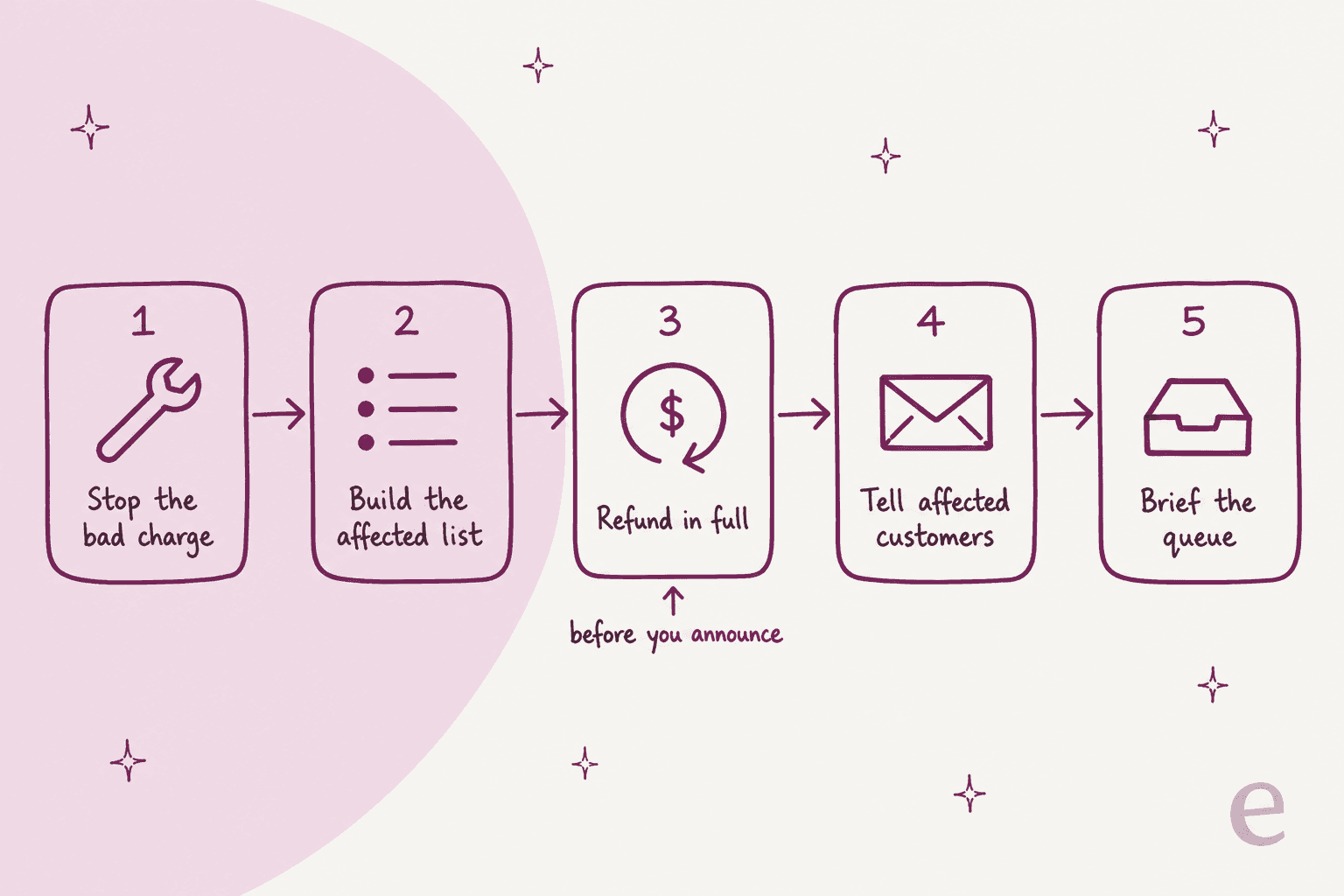
- Stop the bad charge. Pause the job, the retry rule or the price change that caused it before you do anything else. Twilio's 2013 billing post-mortem describes shutting off billing within about 40 minutes of detection, then adding a fail-safe so the system "will not suspend accounts or charge credit cards" when it can't read balances.
- Build the affected list. One row per customer: account, charge ID, wrong amount, right amount, date, payment method. This list powers every later step, including the "was I affected?" answer. Stripe's Dashboard search filters by
amount:,created:ranges,email:and receipt number, and Sigma gives you SQL for anything bigger. - Refund in full, before you announce. Stripe's Dashboard can bulk refund full payments across many pages of results; partial refunds have to go one by one. Refunds issued shortly after the original charge show up as a reversal: "the original charge drops off the customer's statement, and a separate credit isn't issued." Write that into your macros now, because it's the reply to "I don't see a refund".
- Tell affected customers, one by one. A personal email with their amount, not a broadcast. Everyone else gets an in-app banner or status note that tells them how to check.
- Brief the queue before the email goes out. Agents need the affected list, the approved wording, the refund date and the escalation rules ten minutes before customers do, not ten minutes after. I go deeper on this below.
The operators who get this right tend to tell the same story. One founder on Hacker News described a pricing change that "accidentally resumed the subscription and charged 300+ customers $75" who had cancelled long before:
"I had to stay up till 6AM writing a script to detect all of them, refund their money, send an apology email with some free credit, and cancel their subscriptions, and also write a note to my cofounders outlining the situation so they could crisis manage while I was out cold."
Detect, refund, apologize, cancel, brief the team. Same order, written at 6 a.m.
Who needs to hear about a billing error, and who doesn't?
Affected customers hear it directly, everyone else gets a way to check, and your own team hears first. Over-notifying is the more common mistake, because a broad "some customers may have been charged incorrectly" email turns every customer into a "was I?" ticket.
| Audience | Channel | What they need |
|---|---|---|
| Affected customers | Personal email, plus the receipt or credit note | Their amount, what you did, when it shows, no action needed |
| Customers who might worry | In-app banner, status page, billing page notice | Whether it touched them and how to check in one click |
| Support agents | Internal brief and macros, before the email | Affected list, wording, refund date, who owns escalations |
| Finance and billing | Ticket or channel with the affected list | Refund totals, credit notes, dispute watch |
| Account managers | Short note with their accounts flagged | So big customers hear it from a person, not a form email |
The "how to check" part deserves care. When Twilio said its incident affected 1.4% of customers, one reader pointed out the problem with percentages:
"The only thing a bit wishy washy is the "only affected 1.4%" part. [...] The percentage of active accounts affected was probably much higher, for some reasonable definition of active."
No customer can do anything with a percentage. They need a yes or no about their own account, which is why step 2's list matters so much. The same thinking runs through my data breach communication guide: tell people what touched them, specifically.
One more audience is easy to miss. If the error also suspended accounts, as Twilio's did when balances read as zero, restore access before you send anything, and point anyone still locked out to your suspension appeal process rather than the billing queue. For broad incidents that also touch the product, the major incident communication guide covers the wider plan.
Which message do you send for which billing error?
Different errors need different remedies, and the remedy decides the message. A double charge is a refund. An overcharge on an invoice is usually a credit note. A charge after cancellation is a refund plus written confirmation that the subscription is really off. Pick your case below.
Two notes on the overcharge and tax cases, because they catch people out. Stripe's own example of a credit note is exactly this situation: "You accidentally charged your customer 110 USD instead of 100 USD because of a data entry mistake." But issuing a credit note "doesn't automatically refund the customer's payment method". On a paid invoice you choose between a refund, a credit to the customer's balance, or a refund made outside Stripe. If your team picks "balance" by habit, the customer who wanted their money back now has a credit they didn't ask for, and that becomes a ticket.
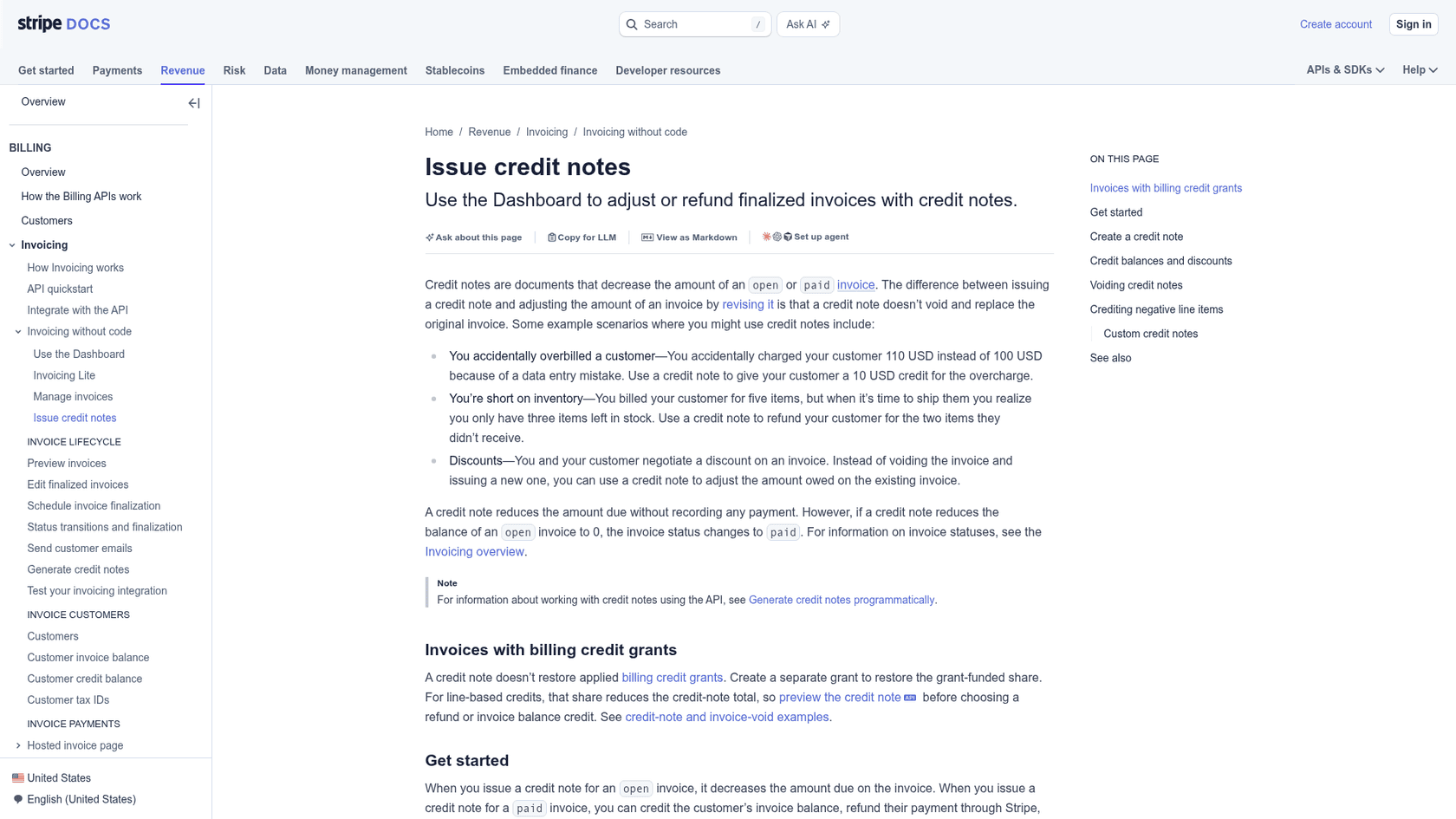
For tax corrections specifically, Stripe doesn't allow custom lines on credit notes when automatic tax is on, so credit by line item. Anything beyond that, like whether you can collect undercharged tax after the fact, is a question for your accountant, not your support macros.
Billing error email templates you can adapt
These follow one structure, which I borrowed from the best billing error email I've seen quoted. A customer on Hacker News pasted the one AWS sent after issuing an early invoice by mistake, and it does every job in six sentences:
"We are notifying you that we incorrectly issued an early invoice for your September AWS usage on September 18th. As your card was charged successfully for this invoice, we are currently processing a refund for the unexpected charge. The refund generally takes 3-5 business days to be received by your bank and some banks may require additional processing time. [...] There is no action required from you"
What happened, what you did, when they'll see it, what happens next, no action needed. Copy the shape, swap the [BRACKETS], and keep the tone plain.
Email to an affected customer (double charge)
Subject: We charged you twice on [DATE]. The extra [AMOUNT] is already refunded.

Hi [FIRST NAME],

On [DATE], a bug in our billing system charged your [CARD BRAND] ending
[LAST 4] twice for your [PLAN] subscription: two charges of [AMOUNT].

We've already refunded the duplicate [AMOUNT]. Because we caught it quickly,
it may simply disappear from your statement rather than show as a separate
refund. If it does show as a refund, most banks post it within 5 to 10
business days.

You don't need to do anything. Your subscription and next billing date
([NEXT DATE]) are unchanged.

If your bank charged you a fee because of the extra charge, reply to this
email and we'll cover it.

Sorry about this. We've fixed the cause and added a check so it can't
charge the same invoice twice again.

[NAME], [TITLE]
Reference: [REFUND ID or RECEIPT NUMBER]
The overdraft line is there on purpose. When Wells Fargo double-ran bill payments, one customer described "a plethora of overdraft protection notices afterward" (HN thread). After Twilio's incident, another reader called reimbursing those fees "the bare minimum" (grimlck, HN). Offer it before they ask.
Email to an affected customer (overcharge or wrong plan)
Subject: We charged you [WRONG AMOUNT] instead of [RIGHT AMOUNT]. Here's your [DIFFERENCE] back.

Hi [FIRST NAME],

Your [MONTH] invoice for [PLAN] should have been [RIGHT AMOUNT]. Because of
a [pricing / plan / tax] error on our side, we charged [WRONG AMOUNT].

We've issued a credit note for [DIFFERENCE] and refunded it to your
[CARD BRAND] ending [LAST 4]. Your corrected invoice is attached and in your
billing portal. Most banks show the refund within 5 to 10 business days.

[If you'd prefer the [DIFFERENCE] as credit on your next invoice instead,
reply and we'll switch it.]

You don't need to do anything else. Sorry for the mix-up.

[NAME], [TITLE]
In-app banner (logged-in users)
We found a billing error affecting some [PLAN] customers on [DATE].
Affected accounts have already been refunded and emailed.
Check your account: [Billing page link]
That banner idea comes straight from customers. During Heroku's 2016 billing incident, a "You have spent money" email went out by mistake, and one commenter suggested exactly this fix: "they could've easily thrown up a banner on logged in pages indicating the current problem" (jqueryin, HN). A banner on the billing page meets people where the panic sends them.
Status page note (only if it's broad)
Billing: incorrect charges on [DATE]
Some customers on [PLAN / REGION] were [charged twice / charged the wrong
amount] on [DATE]. The cause is fixed. All affected customers have been
refunded and emailed directly. No customer will be charged again for this.
Next update: [TIME] or when all refunds are confirmed.
Heroku kept repeating one line through its incident updates: "no customer will be charged against an incorrect invoice" (status incident 854). One line, said every time, is what lets agents and customers stop worrying about the next charge. My outage communication templates cover status page cadence in more depth.
Support macros for the follow-up queue
Build these before the email goes out. Each one should pull from the affected list, not from an agent's memory, and helpdesks like Zendesk let a macro prompt the agent for the amount and date so nobody pastes a placeholder. My guide to generating macros from past tickets is useful if you already have tickets from a past incident to learn from.
[WAS I AFFECTED: YES]
Yes, your account was one of those affected. On [DATE] we charged you
[AMOUNT] by mistake. We refunded it on [REFUND DATE]; most banks show it
within 5 to 10 business days. Reference: [REFUND ID].

[WAS I AFFECTED: NO]
I've checked your account and you weren't affected: your [DATE] charge of
[AMOUNT] is correct for your [PLAN]. If you see something you don't
recognise, send me the date and amount and I'll look at it with you.

[WHERE IS MY REFUND]
We refunded [AMOUNT] on [REFUND DATE]. Most banks post it within 5 to 10
business days. If it hasn't appeared by [DATE + 10 BUSINESS DAYS], your
bank can trace it with this reference: [ARN].

[I SEE TWO CHARGES]
One of those is a pending authorisation hold, not a second charge. It
should drop off within [X] days without any action. If it's still there
on [DATE], reply and I'll check it with you.

[I ALREADY FILED A CHARGEBACK]
Thanks for telling me. Because a dispute is open with your bank, we can't
send a separate refund until your bank finishes its review; doing both
could reverse one of them. I've passed this to our billing team, who will
[accept the dispute / confirm with your bank] so you get your money back.
Two of those need a note. The ARN (acquirer reference number) is the code a customer's bank uses to trace a card refund, and Stripe says it can take up to 7 business days to appear after the refund, so the "where is my refund" macro shouldn't promise one on day one. And the "two charges" macro covers a ticket type that isn't an error at all. One app seller described getting "a support email claiming we charged them twice" every week, which turned out to be authorisation holds (kgrin, HN). During a real double charge incident, those holds look identical to the real thing, so agents need to check before they answer.
How should the support queue handle the wave?
By sorting it into lanes on the way in, and staffing the two biggest lanes with answers, not people. Almost every ticket after a billing error notice is one of five types, and two of them make up most of the volume.
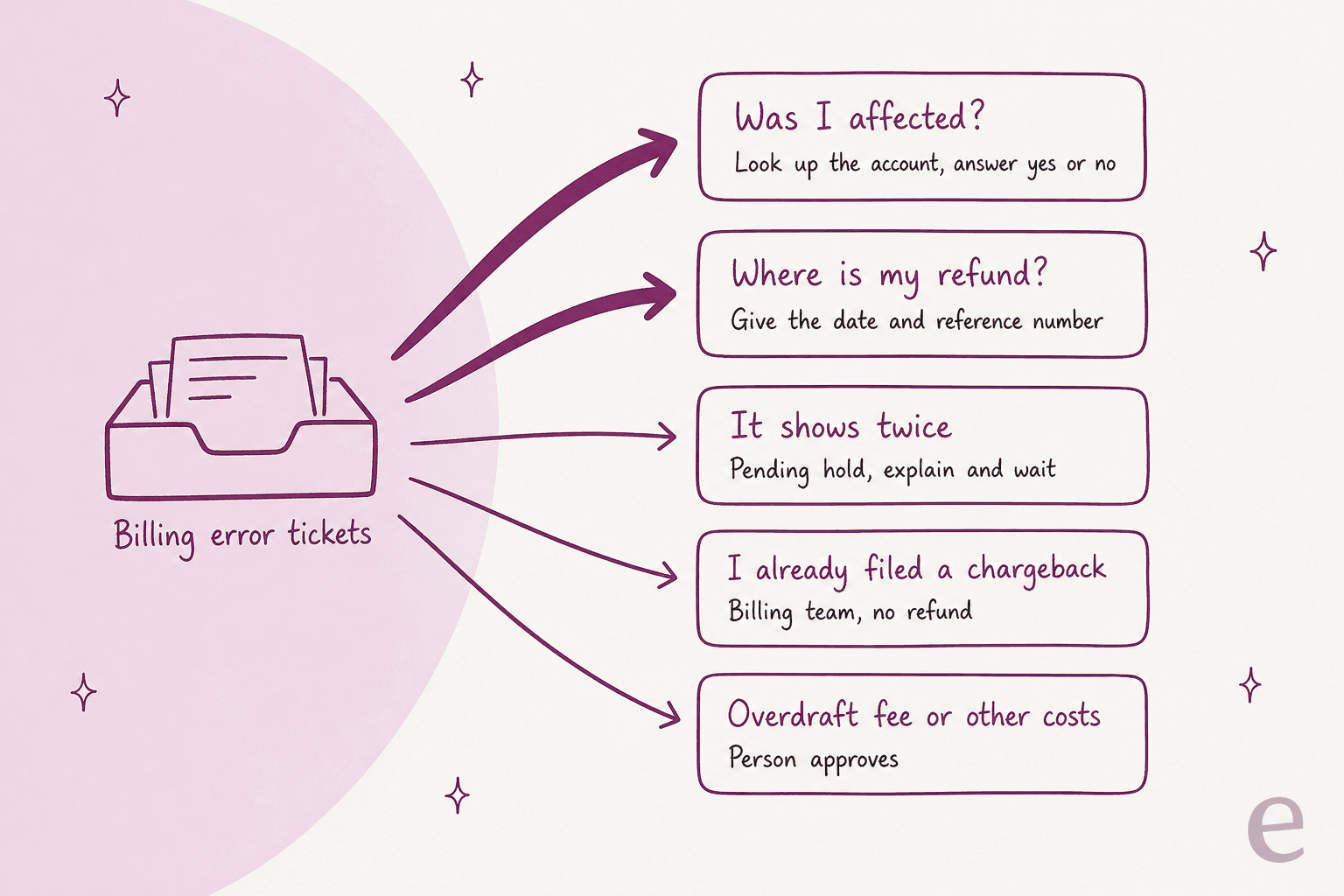
| Lane | Who answers | What they need | Watch out for |
|---|---|---|---|
| Was I affected? | AI or any agent | Lookup against the affected list | Never answer from the general notice alone |
| Where is my refund? | AI or any agent | Refund date, method, reference | Reversals show no credit; ARN can take 7 business days |
| It shows twice | AI or any agent | Charge status (pending vs captured) | Holds look like duplicates during a real incident |
| I already filed a chargeback | Billing or disputes owner | Dispute status in your processor | Don't refund on top of an open dispute |
| Overdraft fee or other costs | A person with approval | Your make-good policy | Decide the policy before the email goes out |
This is the same lane approach I'd use for breach ticket surges, with one difference: here, most lanes have a definite answer you can look up.
Tag every ticket on arrival so you can see the lanes fill up. A ticket tagging rule on words like "charged twice", "refund" and "dispute" is enough, and routing for SaaS queues can send the chargeback lane straight to billing. If you already run a refund request workflow, the billing error lanes slot into it.
The lane that hurts most when it's slow is the first one. During Heroku's incident, a customer looking at a surprise bill wrote that support "took THREE HOURS to answer why I had to pay $700 for dynos I didn't use" (aprdm, HN). Others deleted their apps out of fear before anyone replied. A 3-hour first reply is ordinary on a normal day. On the day you charged someone $700 by mistake, it reads as silence.
And when the queue stays slow for weeks, the customer goes to the bank:
"I got charged 2x. Called 3 times and never could get an agent to fully understand my issue even after escalating to managers each time. I got promised a refund once but it never showed up. After over a month of fruitless calls I did a chargeback."
The double charge wasn't what lost that customer. The month of calls was.
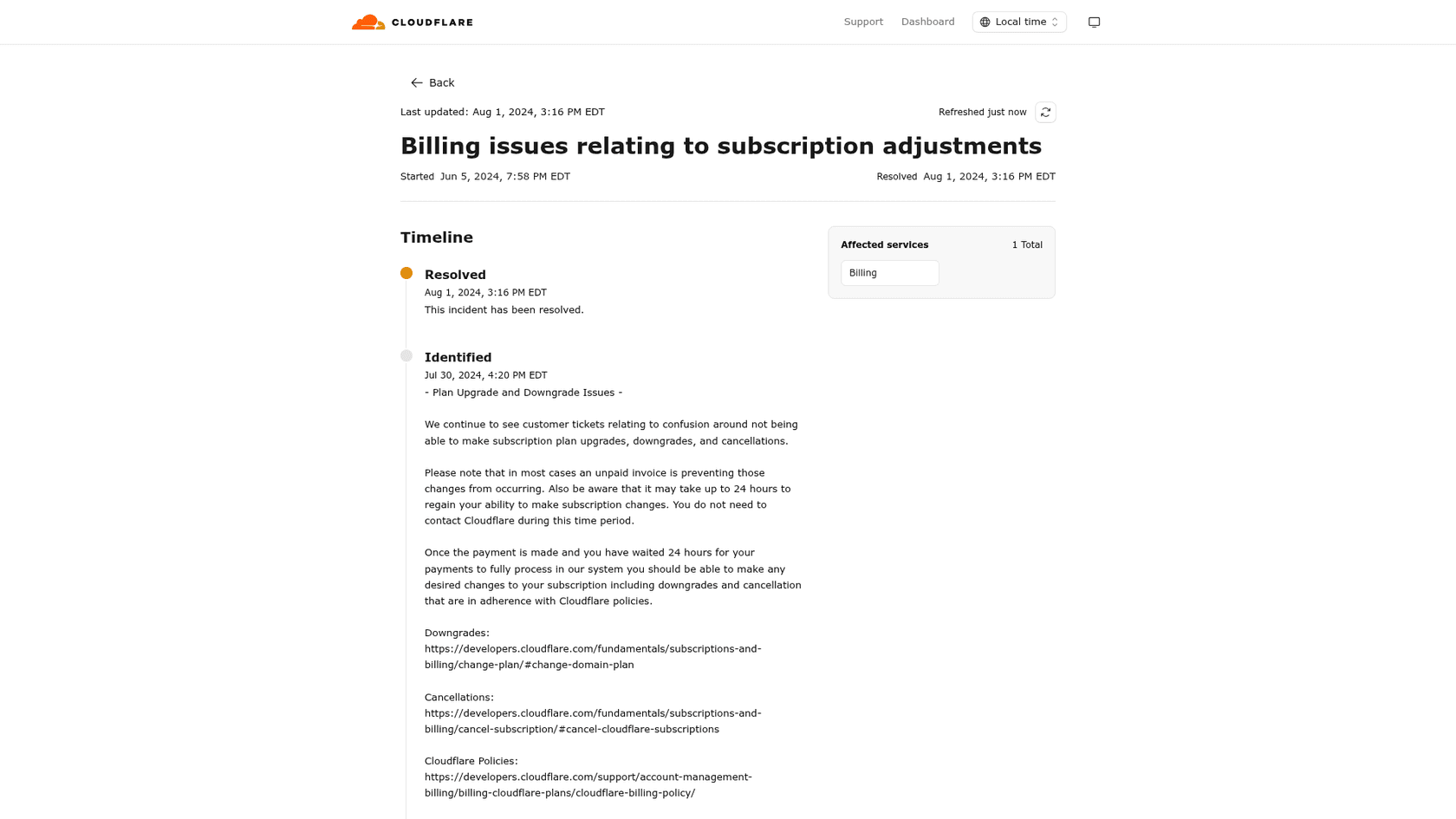
Long incidents create a different queue problem: stale tickets, the same thing that happens in SaaS outage queues. Cloudflare's 2024 billing incident, which covered duplicate invoices and blocked plan changes, ran from June 5 to August 1. Near the end, its status page asked customers to close tickets they no longer needed, because "doing so may result in us getting to your tickets that still need help sooner." That's an honest request, and also a sign the backlog had outgrown the team.
If your incident might run longer than a week, plan extra coverage for the spike and set an SLA for billing tickets on day one, not week three.
Refund, credit note, or account credit: which remedy fits?
Refund the money when you took money you shouldn't have. Use a credit note when the invoice itself was wrong. Use account credit only when the customer asks for it, or as a goodwill extra on top of a refund. This is how those map to Stripe's tools:
| Situation | Stripe tool | What the customer sees | Stops a dispute? |
|---|---|---|---|
| Duplicate or unauthorised charge | Full refund | Reversal (charge disappears) or a credit in 5-10 business days | Yes, fully refunded payments can't be disputed |
| Wrong amount on a paid invoice | Credit note with refund | Corrected invoice and a partial refund | No, the payment can still be disputed for the full amount |
| Wrong amount on an unpaid invoice | Credit note | Lower amount due; at 0 the invoice is marked paid | Nothing charged yet |
| Customer prefers credit | Customer balance | Credit on future invoices, no money back | No, so get their agreement in writing |
| Goodwill gesture | Balance credit, on top of the refund | Extra credit next invoice | Not on its own |
The sources for that table are Stripe's customer balance docs, which say plainly that a balance adjustment "doesn't send money to the customer", plus the credit note and refund pages above.
Goodwill credit works best as a bonus, never a substitute. Twilio finished refunding every erroneous card charge within about a day, and then gave all impacted accounts a credit equal to 10% of their last 30 days of spend. NearlyFreeSpeech.NET, after finding it had been off by about $56 over five years, credited both charges, the original and the duplicate, because that was simpler than crediting only the duplicate. About $12 belonged to accounts that no longer existed, so it went to the EFF, a digital-rights charity. Neither asked customers to choose credit instead of money.
If you're deciding who can approve which refund amounts during an incident, my refund approval matrix has a ready-made grid, and the AI for refund requests guide shows where automation fits.
Where does an AI agent help, and where should it stay out?
It helps in the two big lanes, "was I affected?" and "where is my refund?", as long as it answers from a live lookup and the approved note. It should stay out of anything that moves money outside the plan, and out of open disputes entirely.
The risk with AI here is specific: a bot that says "your refund has been processed" when nothing has been processed is worse than no bot. Swiftreg, a private number plate dealer running eesel on Zendesk, wrote its rule like this: "Live facts win. A tool result beats the knowledge base, past tickets and anything the customer says. eesel never reports a refund, dispatch, DVLA submission or timescale a lookup has not confirmed." That sentence is the right rule for a billing error week, almost word for word. Swiftreg's agent handled about 2,100 Zendesk tickets in a month under rules like that, sending 1,494 public replies and leaving internal notes wherever a step belonged to staff.

How I'd split the work:
- AI answers: was I affected (from the lookup), where is my refund (date and reference from the processor), why do I see two charges (pending vs captured), when is my next bill, and anything already in the approved note.
- AI drafts, a person sends: overcharge and wrong-plan tickets where the customer wants credit instead of a refund, or wants an invoice reissued.
- A person handles: anything with an open dispute, overdraft and bank fee claims, refunds outside the plan, angry escalations from big accounts, and legal or regulator mentions. Route disputes through the payment disputes flow, use your ticket escalation process for the rest, and follow handoff best practices so the customer doesn't repeat themselves.
eesel's own records show both sides of this. Refund questions are where drafts tend to be strongest, but people still edit them. In a real-traffic trial on an e-commerce inbox of about 1,000 tickets a month on Zendesk and Shopify, 100% of eesel's drafts on refund-status tickets were rated useful, and 93.8% on returns and refunds, yet agents sent only 12% of all drafts exactly as written. They used them as research, then rewrote them shorter. For a billing error week, that's fine. A draft with the right amount and the right refund date, rewritten in your agent's voice, is still faster than an agent digging through the processor.
If your agent replies on a website chat as well as email, set it up the way SamCart runs eesel: one agent for Freshdesk tickets and one for the chat bubble, both answering from the same help center, and tagging a ticket for handoff the moment a seller asks for a person or a question goes beyond the help center.
For billing questions outside an incident, the Stripe billing support guide covers what the agent should read before replying, and can AI answer billing questions covers the boundary in general. Disputes have their own playbook in AI for billing disputes.
If you give the agent a Stripe key at all, make it a restricted key limited to reads, and put any refund action behind approval; the AI support security review lists what else to check. I'd treat billing support automation as translation of the record into plain words, not as a replacement for the people who own the money.
What are the most common billing error communication mistakes?
Most of them come down to timing or channel, not wording.
- Sending the scary message before the correction. Heroku's wrong invoice email arrived at 4:20 a.m. Eastern; the correction came at 2:15 p.m., per one customer. Ten hours is a long time to think you owe someone $1,200. If a wrong notice already went out, send the correction to the same people, through the same channel, as fast as you can.
- Correcting in a different channel. Another Heroku customer only learned it was a mistake "from searching online", where the company had tweeted an apology: "No follow up message on email, nor in the dashboard" (chippy, HN). The correction goes where the error went.
- Announcing a refund that hasn't happened. "We will refund you" invites a "when?" ticket and, if it slips, a chargeback. Refund first, then say "we've refunded".
- A partial refund on a full-amount problem. It feels generous to refund the difference, but the payment stays disputable for the full amount. Know which you're doing.
- Telling customers to "contact your bank". That's the one move that guarantees a dispute fee and locks your refund. Unless a refund has actually failed and you need another way to pay someone back, keep the fix with you.
- Refunding a ticket that already has a dispute open. On Stripe, a pending refund fails with
charge_for_pending_refund_disputedwhen a dispute arrives, and Stripe recommends handling the dispute instead "to avoid duplicate reimbursements." - Answering "was I affected?" with the general notice. Pasting the announcement back to someone who asked a yes-or-no question is how a two-message ticket becomes a five-message one.
- Forgetting the people who cancelled. Former customers charged after cancelling don't see in-app banners. They only hear from you by email, so send one. Handled well, it's also a rare chance at a win-back conversation; handled badly, it's a dispute.
The common thread: the customer reads your email once, but they judge you on every reply after it. A billing error handled in a day with straight answers tends to cost less trust than you'd expect. One handled in a month of "we're looking into it" costs more than the refund.
Using eesel for a billing error week
If you're running Zendesk, Freshdesk or Gorgias, eesel's AI helpdesk agent joins your existing queue like a new teammate who has read your approved billing error note. It can be set up to look up the customer's charges in Stripe before it replies, so "was I affected?" gets a yes or no about that account instead of a pasted announcement, and "where is my refund?" gets the date and reference. Refunds outside the plan, open disputes and fee claims go to your team with a note on the ticket. You can test it against your own past billing tickets before it answers a single customer, and the pricing page lists the fixed monthly plans, starting at $299 a month.
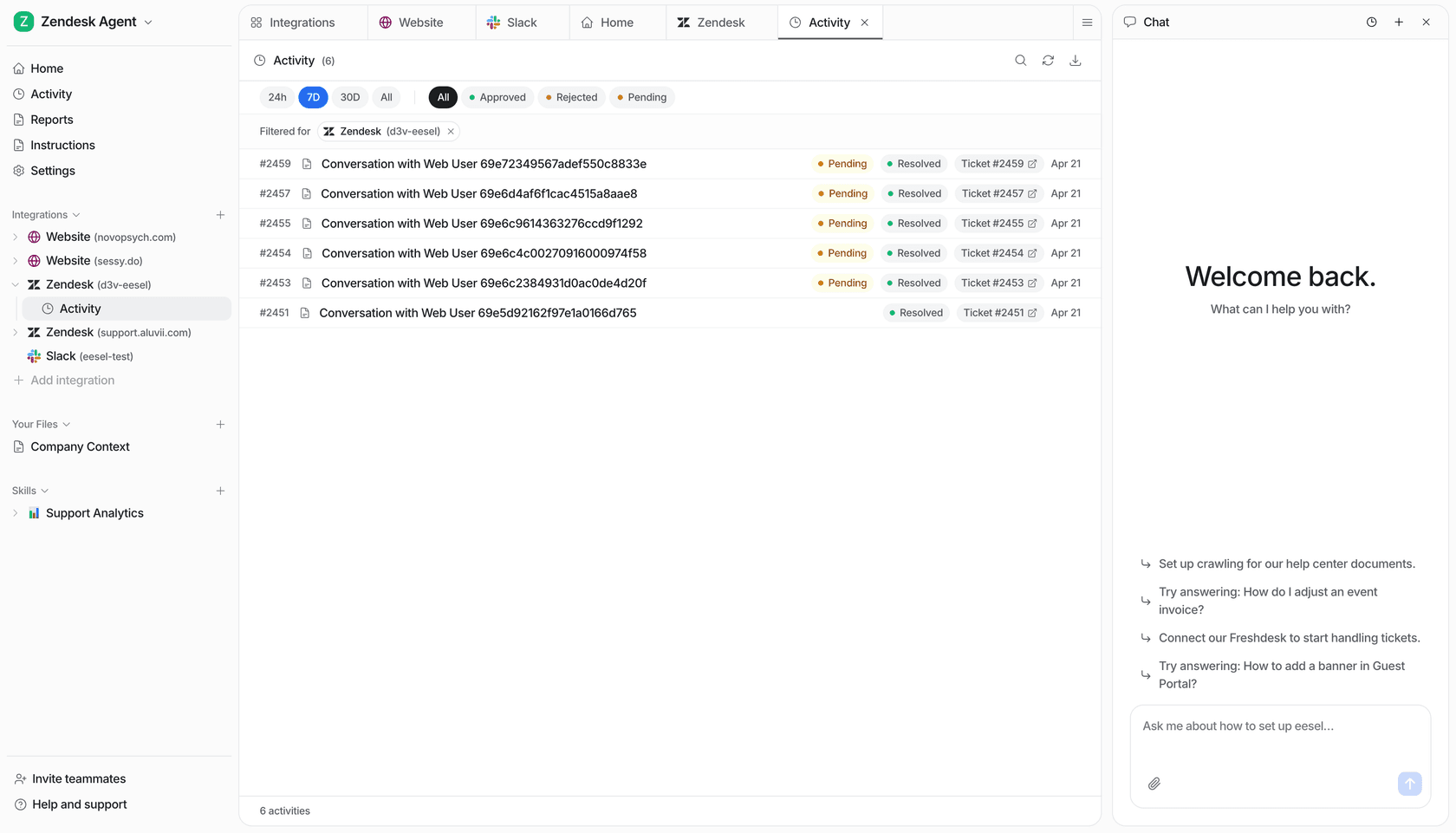
If you'd rather keep a person on every reply, Lesson Pro shows the other setup: eesel leaves a note and a draft on each Zendesk ticket, including payment questions, and the team approves before anything reaches a customer. That worked out to about 560 drafted replies and 1,700 internal notes in a month. Either way, the email you send on day one stays the easy part, and the queue after it stops being the hard one.
Try eesel before your next billing week: connect it to Zendesk or Freshdesk and test it on last month's billing tickets first.