


Front's AI agent evaluation is a tool called Compass, and the part you run before go-live is its Simulations tab, which works for Autopilot agents only. A simulation replays a real conversation against criteria you write, sends nothing to customers, and caps each run at 10 exchanges. After launch, Compass scores live replies with Smart QA and Smart CSAT. It checks the behavior you describe, not whether an answer matches your help center, so read the transcripts too. Compass has no extra fee, while Autopilot starts at $0.05 per conversation.
eesel works inside Front as an AI helpdesk teammate that drafts as internal comments, and every rollout is simulated against the team's own past conversations first. With the eesel CLI, an AI coding agent can upload approved knowledge, such as exported Front help articles and saved replies, then ask test questions and check the answers before anything goes live. Connecting the Front inbox itself still needs an admin to approve it.
What is Front's AI agent evaluation, and where does it live?
It is Compass, and it sits on the agent's own page in company settings. Front's Compass article says it helps admins test AI agents, measure conversation quality, track performance signals and get recommendations. You need company admin permissions and an existing agent. Three tabs do the work: Simulations to test before deployment, Performance to monitor health, and Replies to read every AI message.
The naming took a few months to settle, so searches for "scorecards" or "evaluation reports" lead nowhere in Front's docs. In August a Front community manager asked for design partners for a set of tools to "score every AI interaction, diagnose what went wrong, and validate changes before go-live". On October 6, Front introduced Compass in its product updates, and the October 26 roundup lists agent evaluation and agent testing as two separate lines.
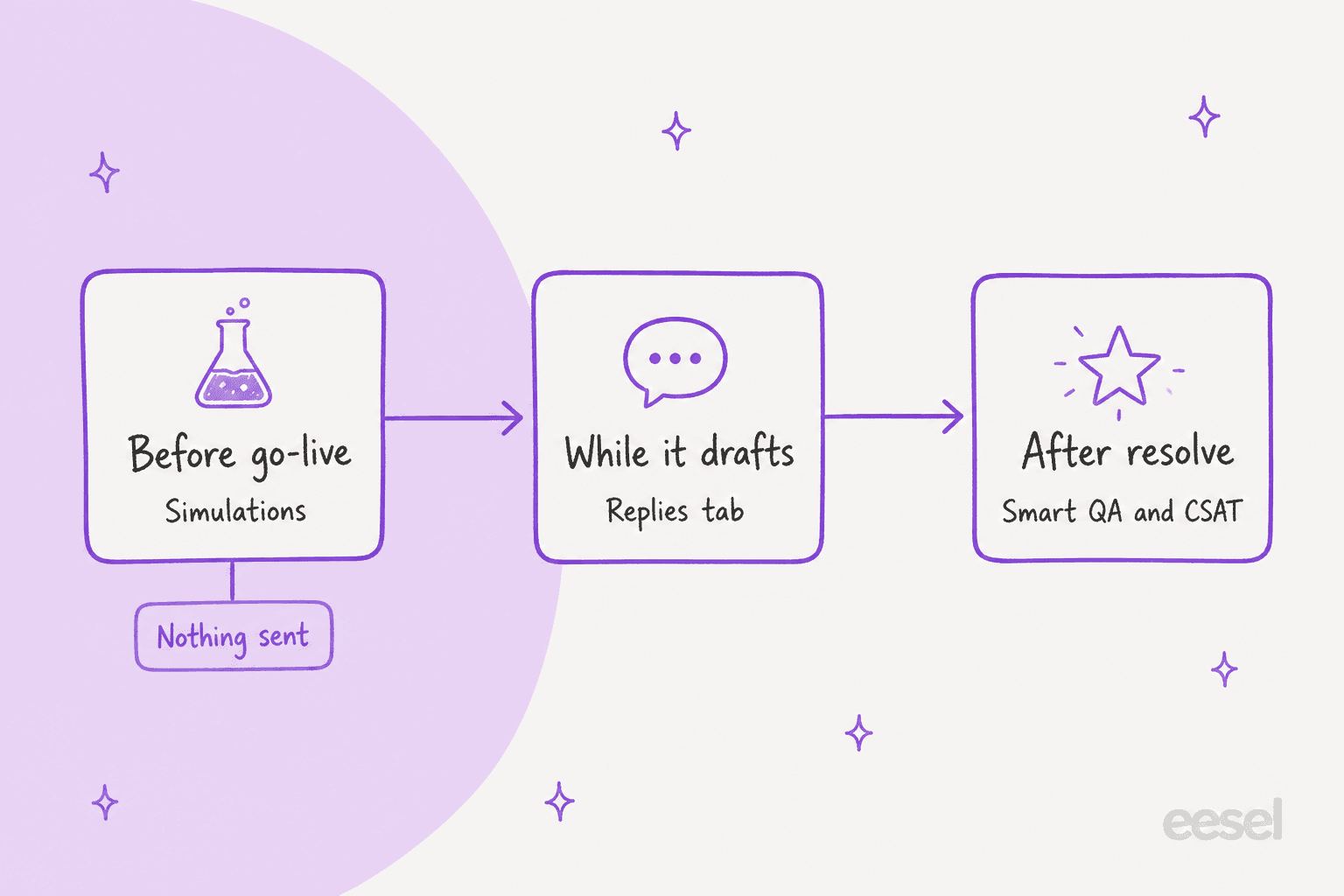
I read the evaluation in three layers, and the picture above is how I would explain it to a support lead. Before go-live you run simulations, while the agent drafts you read the Replies tab, and after a conversation resolves Smart QA and Smart CSAT score it. Each layer answers a different question, which matters for the widget further down.
Which Front plans and add-ons does it need?
Compass itself is free, but the thing it evaluates usually is not. Front's launch post says external agents are available on all plans, Autopilot is a usage-based add-on on all plans, and Compass works for both at no additional fee. Using Compass with Autopilot needs the Autopilot add-on.
| Piece | What Front says | Source |
|---|---|---|
| External agents (Claude, Codex, Sierra and others) | Available on all plans | Front launch post |
| Autopilot agents | Usage-based add-on on all plans, from $0.05 per conversation | Front pricing |
| Compass (Simulations, Performance, Replies) | No additional fee, Autopilot add-on needed for Autopilot agents | Compass article |
| Smart QA and Smart CSAT | Included on the latest Enterprise plan at no extra cost | Smart QA article |
| Enterprise seat | $105 per seat per month, billed annually | Front pricing |
The Smart QA article adds a 30 day Enterprise trial for teams on other plans, started from the rule template. What the docs do not say is whether a Professional customer who adds Autopilot gets Smart QA scores on the AI's replies. The Compass article says Smart QA is switched on automatically for AI agents and the Smart QA article says it is an Enterprise feature, so ask Front before you budget around it. My Front pricing post has the per seat numbers, and Front AI covers the wider product line.
How do Front simulations work?
You build a set of test conversations, give each one criteria, and run them. A set is a named group of related simulations that you re-run as a baseline after every change, per the Compass article. The steps:
- Open the agent, select Simulations and click Create set. Name it and optionally pick a Smart QA scorecard.
- Click Create simulation. Pick a recent open conversation from the selected inboxes, or enter a conversation ID or ticket ID.
- Add simulation criteria, then click Create and run.
- For many conversations at once, paste comma separated IDs. Each one becomes its own simulation, and Run set runs them all.
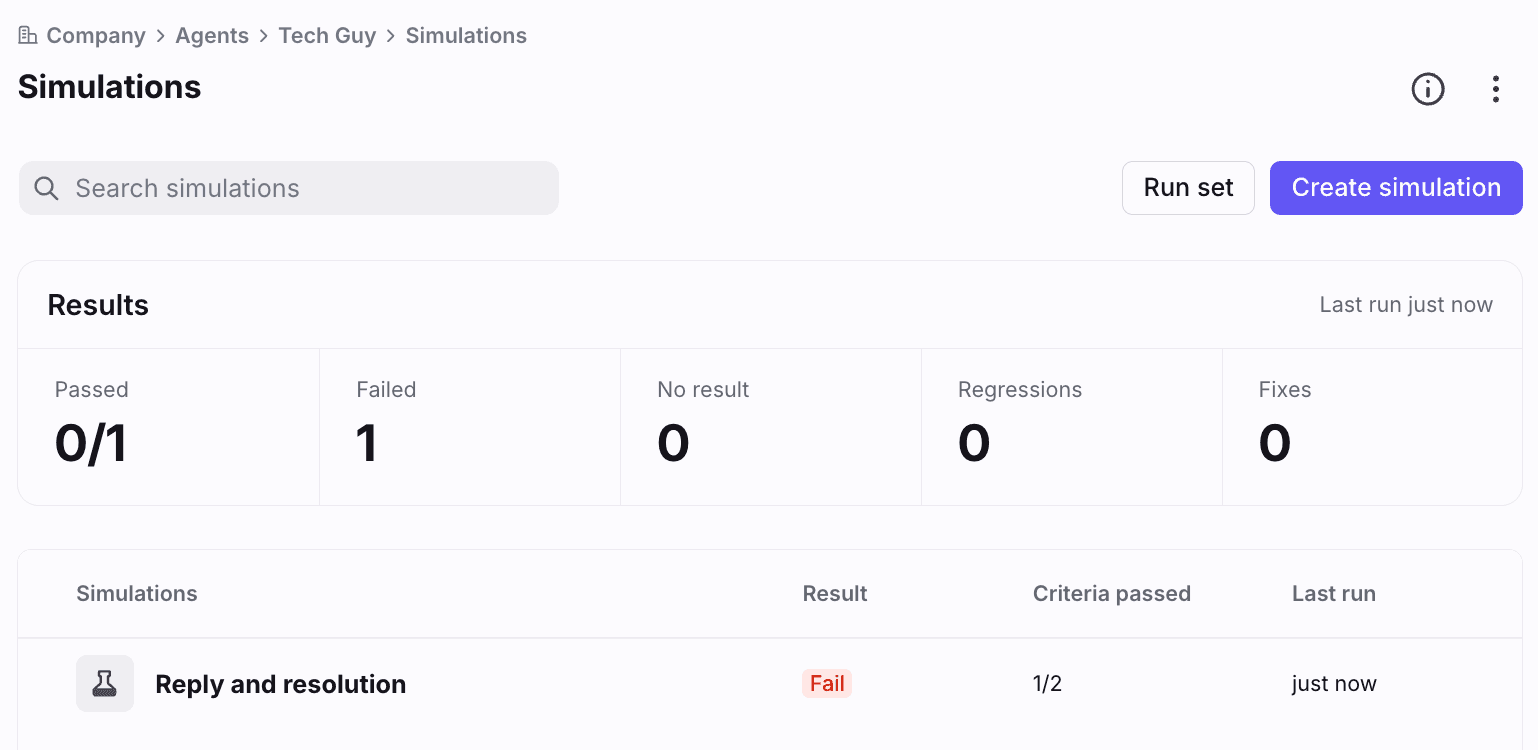
The results panel above counts passed, failed, no result, regressions and fixes. Front's help article says each conversation runs against the agent with a simulated customer, capped at 10 back and forth exchanges, and runs are unlimited. Nothing reaches a real customer, no live conversation changes, and analytics stay clean.
The criteria are where the work is. You write a name and a description of expected behavior, click Generate scale to get pass and fail conditions, and a validator flags anything vague, bundled or unverifiable until it reads "Good definition". Front suggests three starters: the agent never claims an action it did not take, it escalates when it should, and it does not escalate when it should not. Those are the same three failures I would put in any support agent's first test set.
What can a Front simulation see, and what can't it?
This is the limit that matters most. A simulation judges behavior from visible evidence, and the Compass article lists what that evidence is. The validator can see sent messages, internal notes, tags, inbox moves, assignment, ticket status, connector calls and how the conversation ended. It cannot see the content or order of a Playbook, the body of a knowledge article, custom fields, contact records, drafts or attachments.
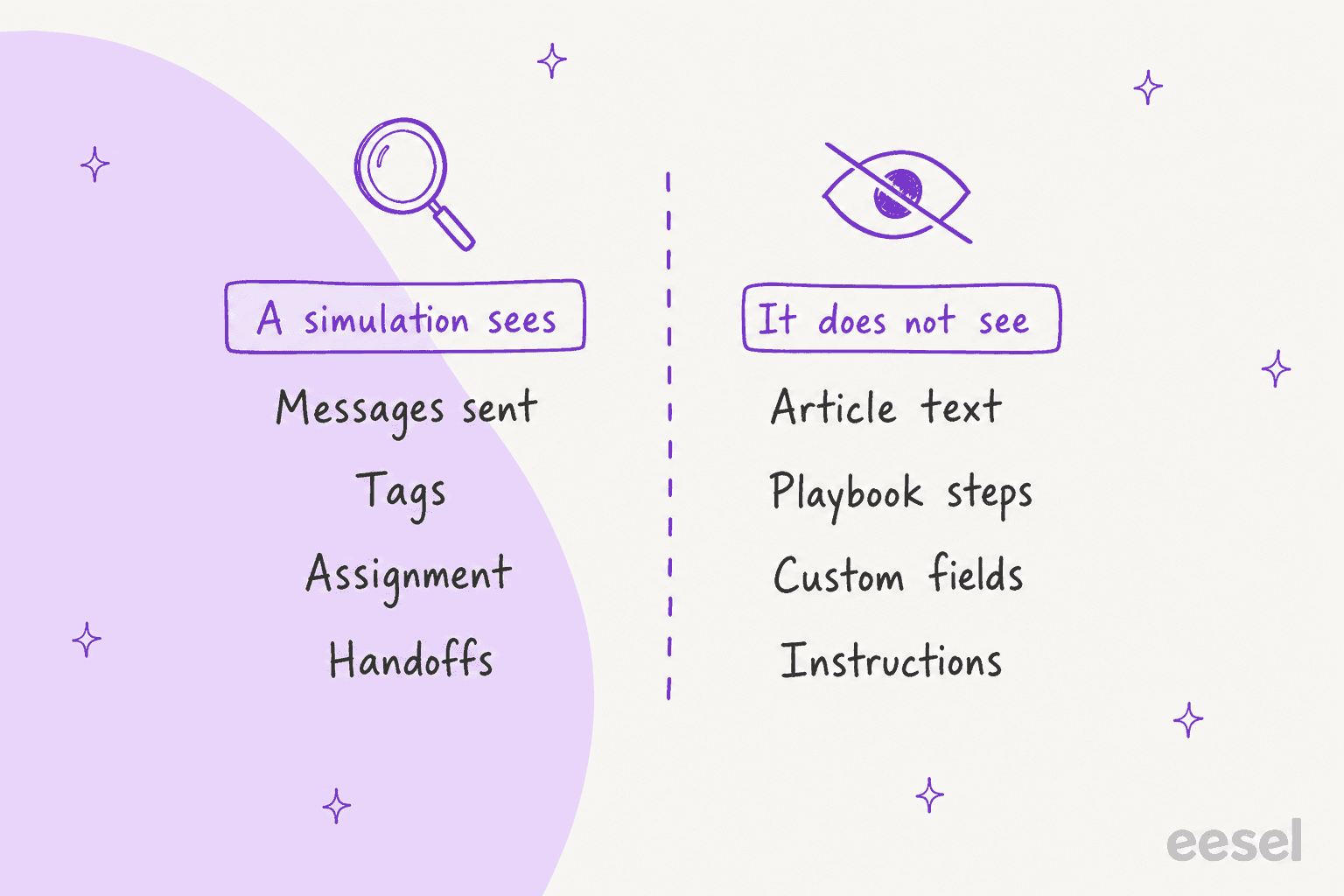
Agent instructions, guidelines and tone settings are also hidden unless the agent references them without stating them. Front's FAQ says plainly that criteria cannot verify answers against knowledge sources or Playbooks, so its advice is to write behavior based criteria and read the transcript for accuracy. A passing simulation proves the agent acted the way you described, not that its answer was right. The article lists tone and formatting as the Smart QA scorecard's job and tells you to keep them out of criteria.
For a refund question, that means "escalates to a person when the customer asks for money back" is a good criterion, and "quotes the correct 30 day window" is not testable, because the article text is invisible to the validator. You would catch the second one by reading the transcript, and my guide to adversarial testing and the glossary entries on AI hallucination and AI grounding cover why that read matters.
How do you read a simulation result?
Open a simulation and you get the transcript, the criteria and a verdict. Front's article says the detail view shows a conversation preview and results, with run history and re-runs on the three dot menu, and arrow indicators that compare the current run with earlier ones to show progress or regressions.
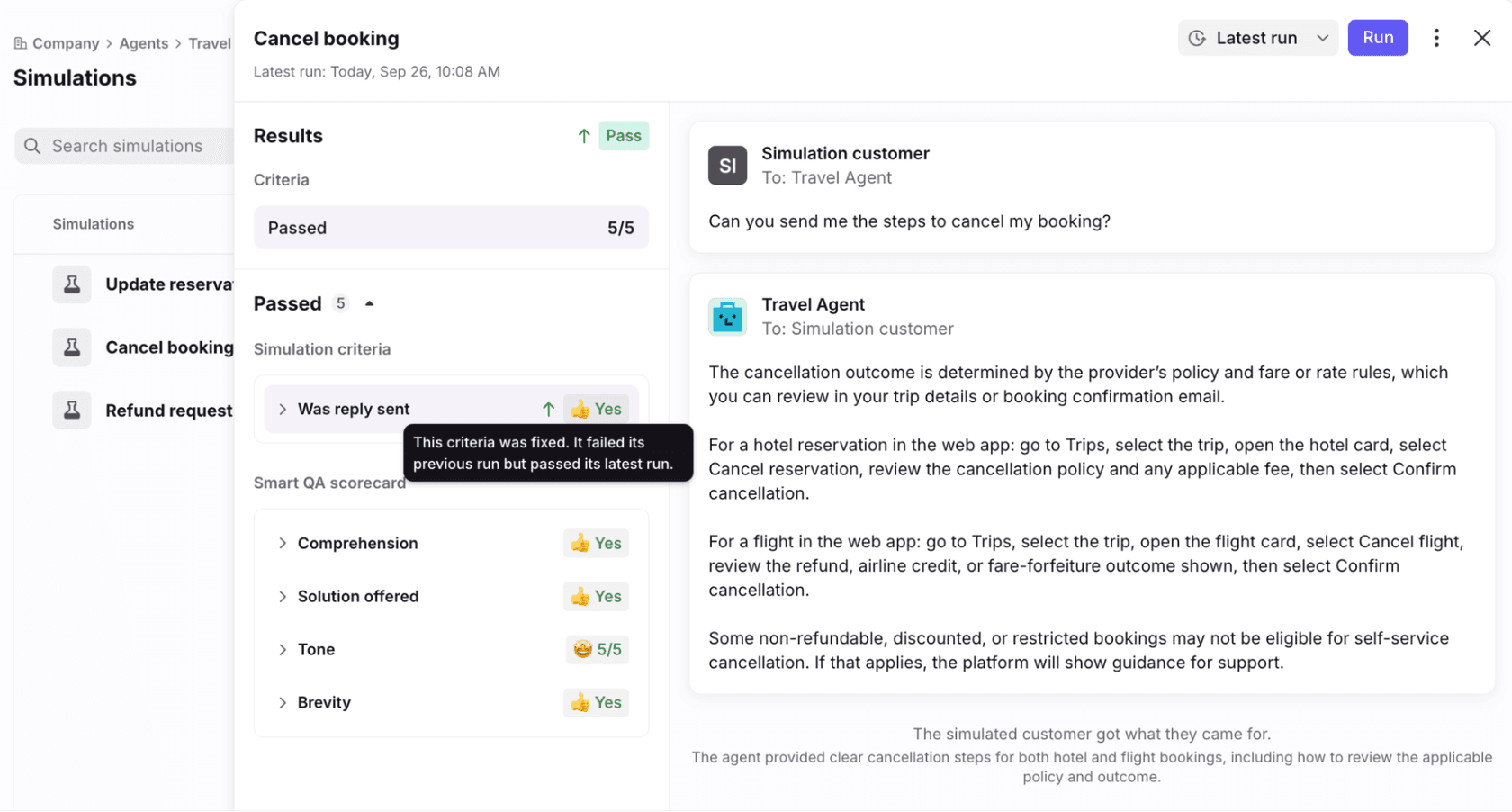
In the screenshot, a criterion that failed the last run and passed this one carries a tooltip saying it was fixed, and the Smart QA scorecard is attached underneath. That is the loop Front is designing for: change the instructions or knowledge, re-run the same set, and watch for regressions as well as fixes. Smart QA only evaluates replies, so if the agent correctly stays silent and escalates, the scorecard does not apply, but your criteria still do.
What does Compass measure once the agent is live?
Compass grades each reply as No Signal, Good, Okay or Poor, built from five signals. The Compass article names them:
- Smart CSAT. Runs automatically on AI replies in resolved conversations and infers satisfaction. Human teammates are not evaluated by this path.
- Smart QA. Runs 24 hours after resolution on AI replies, with a default scorecard of Brevity, Tone, Solution offered and Comprehension.
- Draft edit level. Detects whether an AI draft was sent as is, lightly edited, heavily edited or discarded.
- Teammate feedback. Thumbs up or down on drafts and replies, with optional details only admins can see.
- Inferred feedback. Front's AI infers a signal from corrections or heavy edits.
The Performance tab pulls these together with resolution and involvement metrics and a list called Opportunities. Front says it helps you judge whether an agent is healthy enough to expand coverage or move from drafts to auto replies, and what to fix first.
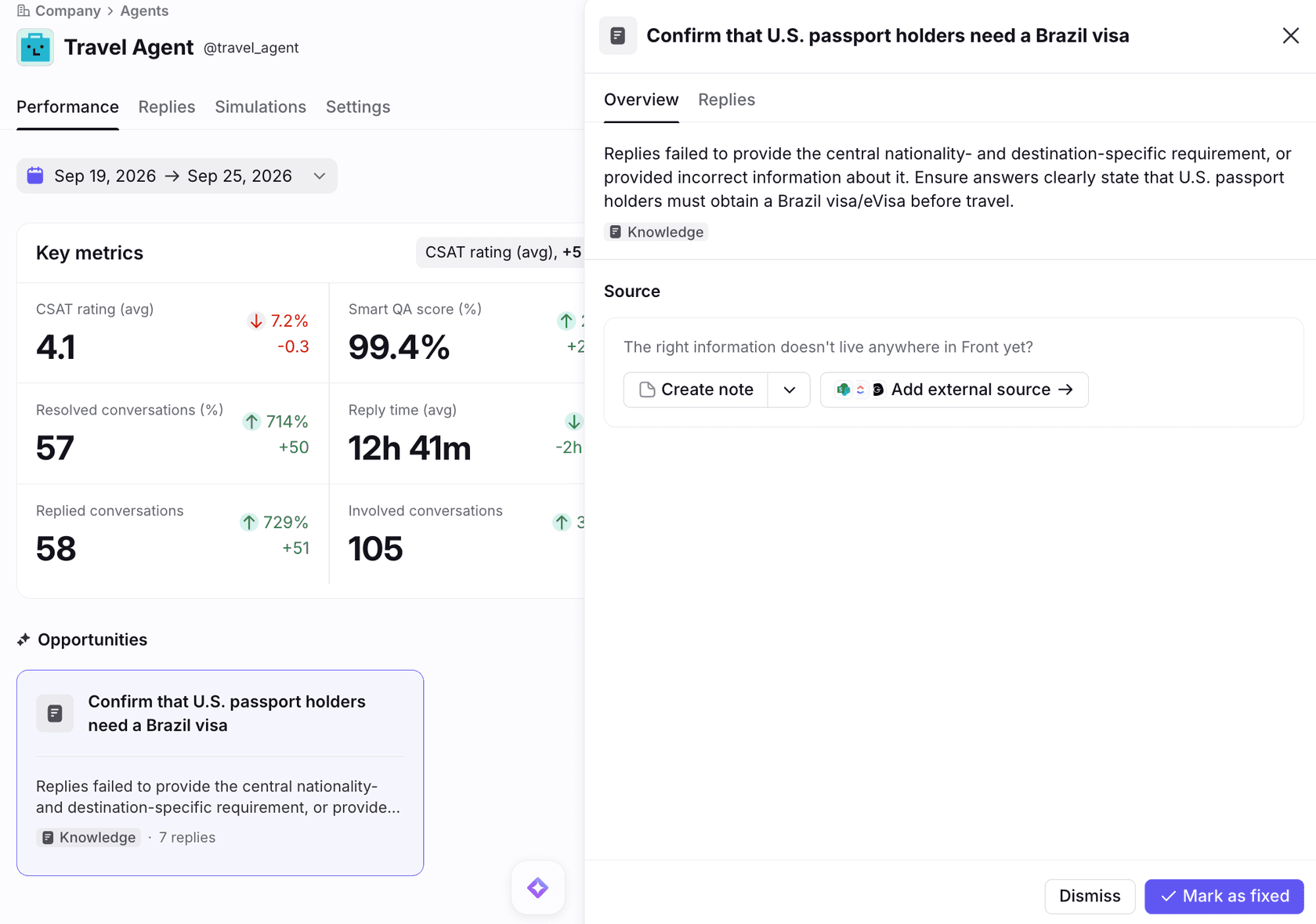
An Opportunity shows a summary, a gap type and how many replies it affects, and the suggested fix usually points at knowledge or agent instructions. In Front's example, replies about a Brazil visa requirement were wrong, and the panel offers to create a note or add an external source. The Replies tab lists every draft and auto reply with filters for inbox, reply type, topic and signal, and shows the sources behind each one. If you lean on CSAT as your headline number, remember it is inferred here, and my AI CSAT post covers how far to trust that.
Front's Smart QA and Smart CSAT articles set the boundaries. Only shared inbox conversations count, each needs at least one inbound and one outbound message, and the conversation must be Resolved or Archived. English is the only officially supported language. Rules are not retroactive, so history before the rule exists is not scored. Front reports about 99% accuracy on factual content for Smart QA and about 90% alignment with customer CSAT for Smart CSAT, which are Front's own figures.
Does evaluation work for external agents like Claude or Sierra?
Partly. Front's launch post says Compass evaluates every conversation handled by agents on Autopilot or another provider, and Compass is free for both. The Compass article says agent testing, the Simulations tab, is for Autopilot agents only, and for external agents the Replies tab sources are the knowledge passed through the MCP. So an external agent gets live scoring, but you test it with your own harness before connecting it. Front's launch post quotes a customer, Next Level Sports, saying Compass gives its support and engineering teams one place to review AI responses and measure quality.
Which Front tool answers which question?
Pick the question you are trying to answer and the tool changes. This widget is my own summary of Front's articles, so the last line of each panel is where to read the detail.
Rule testing is the odd one out, which is why I list it. Front's rule testing article checks whether a conversation passes a rule's conditions and actions, on any plan, with an option to build a simulated conversation from scratch. It is worth running on the rule that assigns conversations to your agent, as my Front load balancing post explains for assignment limits.
How would I roll out a Front AI agent with these tools?
Start with drafts, test in sets, and widen only when the signals agree. Front's Autopilot agents article describes a drafting agent that creates drafts on new conversations, set up with drafting only guidance and a rule built from the Assign to AI agent template. From there:
- Build one set of 15 to 20 conversations. Mix easy questions, refund requests, angry customers and things the agent should refuse. Front says a varied sample gives broader coverage, and I would pull from your last month of real traffic.
- Add the three starter criteria. Never claims an action it did not take, escalates when it should, does not escalate when it should not.
- Run, read every transcript, fix, re-run. Watch the regression arrows after each change to instructions or knowledge.
- Go live as a drafting agent. Check the Replies tab for draft edit level and teammate thumbs, not just the average score.
- Move topics to auto replies one at a time. Use the Performance tab and Opportunities list to decide, and keep rules and time goals as your scoreboard. My Front time goal rules and SLA best practices posts cover that side.
The handoff behavior deserves its own criteria. If the agent escalates, the conversation needs to land with the right person with context, which my AI agent handoff best practices and AI escalation posts walk through. The glossary has entries on escalation rate and AI guardrails.
What do Front's docs not say about evaluating AI agents?
A fair amount, and each gap is something I would ask Front or test before relying on it.
- Plan gating for Smart QA on AI replies. Included on Enterprise per one article, enabled automatically per another, and no page reconciles them for a Professional customer with Autopilot.
- Whether simulations call live systems. The validator can see connector calls, but the docs do not say whether a simulated run hits real tools or sandboxed ones.
- A pass threshold. There is no suggested pass rate or set size beyond "use a varied sample".
- Comparison to what your team sent. Criteria describe behavior. The article does not describe scoring against the reply a person actually wrote on that conversation.
- Languages in Compass. The Compass article is silent. The Smart QA and Smart CSAT articles say only English is officially supported.
- Export or API access. I found no mention of exporting simulation results or running sets through the API.
- Outside voices. Front's Compass post in the community had 0 replies and 122 views when I read it, so I have no practitioner review to quote yet.
None of that makes Compass a poor tool. A criteria based simulator with a validator, run history and regression arrows is a real testing harness. It is a different design from replaying history, which is the comparison I care about next.
How does eesel test an AI agent before it answers Front customers?
eesel tests against your own past conversations, and Front tests against criteria you write. The two are complementary, and I would not pick one on that alone. The eesel simulation replays past tickets with sending turned off, drafts a reply to each, compares it with what your team actually sent, groups the results by theme and ranks fixes by impact. The report separates matches, partial misses, correct handoffs and outright misses. eesel's own docs example is 20 resolved tickets with 17 matching the team's reply quality.
| Front Compass simulations | eesel simulation | |
|---|---|---|
| What it tests | Behavior against criteria you write | Answers against what your team actually sent |
| Test input | Conversation IDs from your inboxes | Past tickets, or generated cases without a helpdesk |
| Customer side | Simulated customer, 10 exchanges max | One drafted reply per past ticket |
| Applies to | Autopilot agents only | The eesel agent |
| Sends to customers | No | No |
| After a run | Re-run the set, read arrows | Corrections saved as plain sentence rules, then rerun |
Front's multi turn simulated customer is the thing eesel's replay does not copy, and eesel's own simulation page says multi turn chats with AI played personas are better served by a helpdesk's own simulator. Going the other way, Front's article does not describe checking an answer against a reference reply, which is where replaying history helps.
The earned part, for me, is the rollout order. eesel has run AI on live support queues for years, and the habit that stuck is that nothing answers a customer until it has been replayed against that team's own history and then drafted on live tickets for a week or two. Norden-Frisia, a German ferry line, used a trial week on the last three months of tickets and macros before subscribing. Textla started with a trial in which eesel only left internal notes so the team could see what it would have said, and Innr still reviews every draft and is working toward autonomous replies for a chosen set of topics. None of the three runs Front, so read them as the same method on other helpdesks.
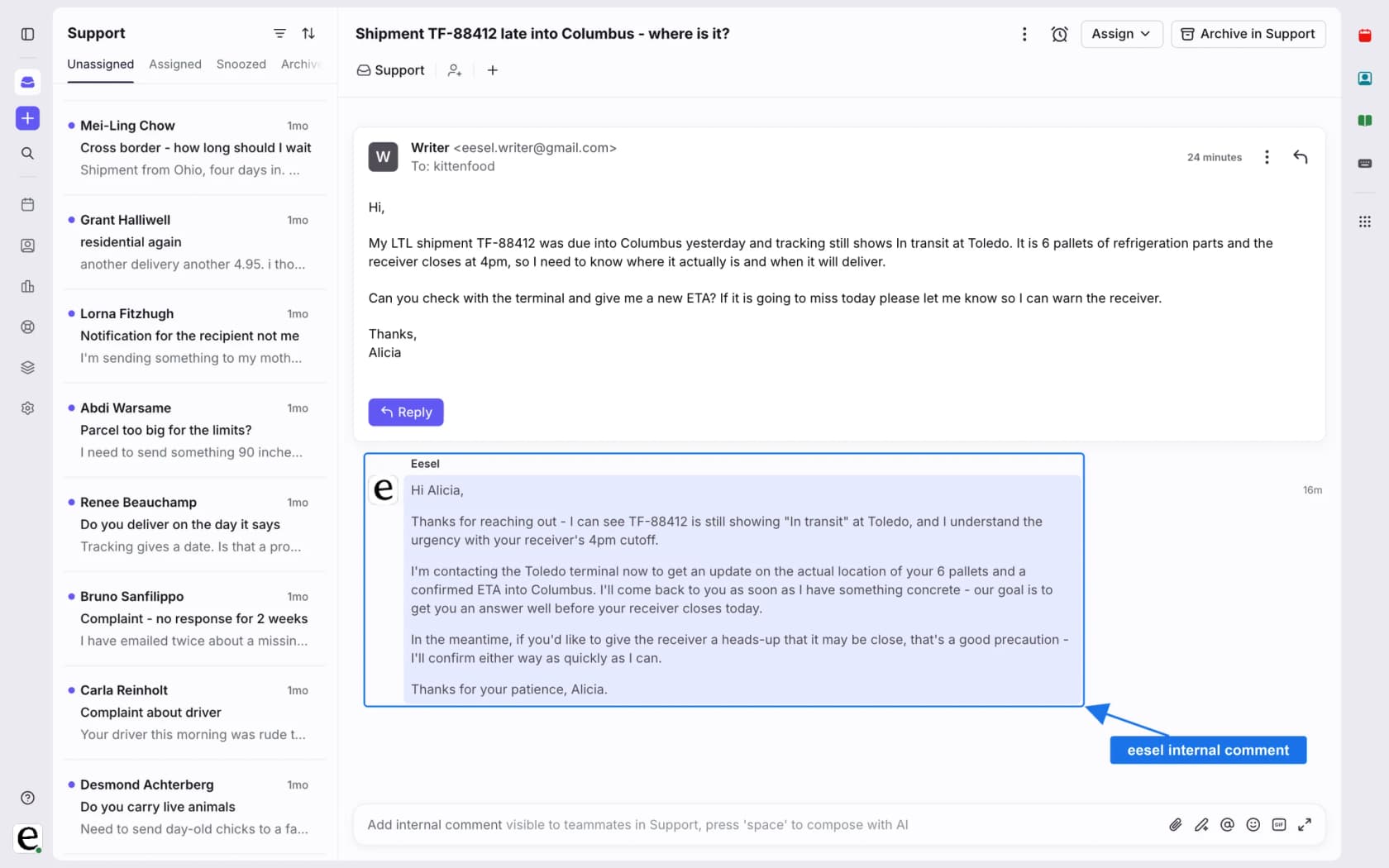
On Front, eesel's integration docs list triggers for a customer message, a first message, an @eesel mention and an archived conversation, with actions to reply, leave an internal comment, tag, assign, update fields and archive. The docs recommend starting with internal comments and do not describe a Front specific simulation, so I would run the replay on a small batch and read the report. The CLI helps with that loop. eesel files upload ./refund-policy.pdf adds approved knowledge, eesel chat "what's our refund policy?" tests an answer, eesel approvals lists held actions, and --dry-run previews a write. The CLI docs do not mention simulations, so those runs happen in the dashboard.
Try eesel in your Front inbox
If you want the replay-first version of this process, eesel joins your Front shared inbox as an AI helpdesk teammate. It reads your help center and past conversations, drafts replies as internal comments, and can tag and assign, so your team reviews real drafts before anything is sent. Run the simulation on your own history, keep your rules and time goals as the scoreboard, and widen to direct replies once the drafts match what a person would write. Paid plans start at $299 a month for 500 credits, and there is a free plan with 100 credits to try it on a few real conversations (eesel pricing).
For setup, see my guide to adding AI to Front, the best AI for Front roundup and Front vs eesel. To compare tools, see my Front review and Front alternatives. For the rest of the Front setup, Front ticket status rules, Front shared inbox ownership and Front required resolution fields show where an agent's work lands, and the glossary explains shared inbox, support quality assurance and resolution rate. Try eesel on a handful of real conversations before you decide.