


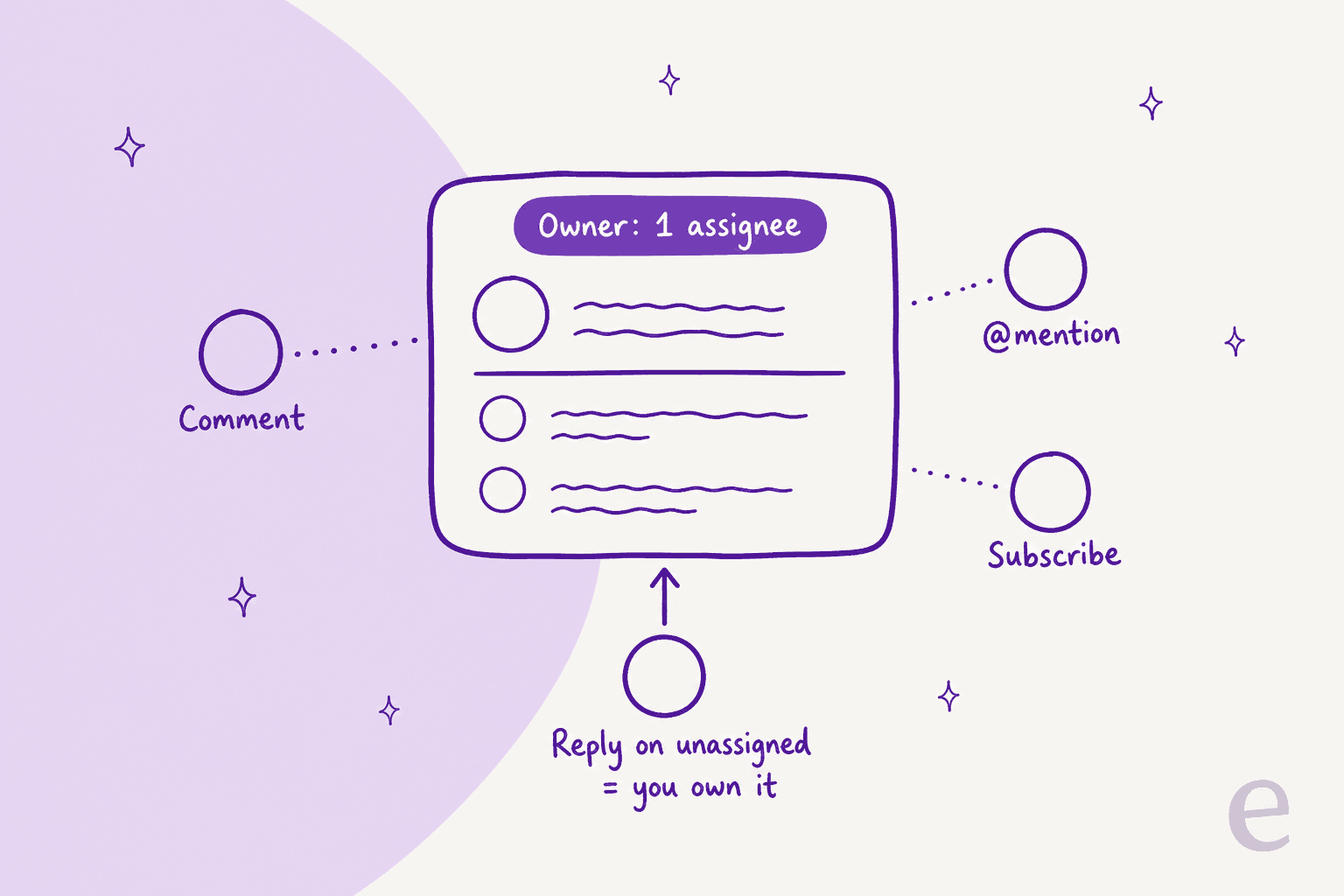
In a Front shared inbox, the owner is the assignee, and there is only ever one. Everyone else who comments, gets @mentioned or subscribes is a helper. The catch is that ownership moves without anyone clicking Assign: replying to an unassigned conversation makes you the owner, setting yourself to Out of office drops your conversations back into the queue when customers reply, and an inactivity setting can unassign quiet threads. Decide those three settings on purpose, pick load balancing over round robin if your team is ever fully offline, and the "who has this one?" question goes away. If you want every new conversation to arrive with a drafted next step, eesel works as an AI teammate inside Front and can be assigned conversations like anyone else.
What does "ownership" mean in a Front shared inbox?
Ownership in Front is assignment. Front's own help center puts it plainly: assigning conversations gives "every message a clear owner", and "a conversation can only be assigned to one user at a time." Once assigned, it shows up in that person's Assigned to me section.
I build AI agents that sit inside helpdesks like Front, so I spend a lot of time reading how each shared inbox tool decides who is responsible for a conversation. Front's answer is cleaner than most: one assignee, plus as many helpers as you like. Helpers are people who:
- Comment on the thread (only your team sees comments).
- Get @mentioned, which pulls the conversation into their view.
- Subscribe, which bumps the conversation into their Subscribed section on new activity.
The split matters because Front's subscribe rules say the assignee can't unsubscribe: "you must unassign or reassign the conversation first." Helpers can drop out any time. The owner can't quietly walk away.
That's the theory. In practice, the reason teams search for this topic is that a conversation they thought was owned turned out not to be. Here is where that comes from.
What changes the owner without anyone clicking Assign?
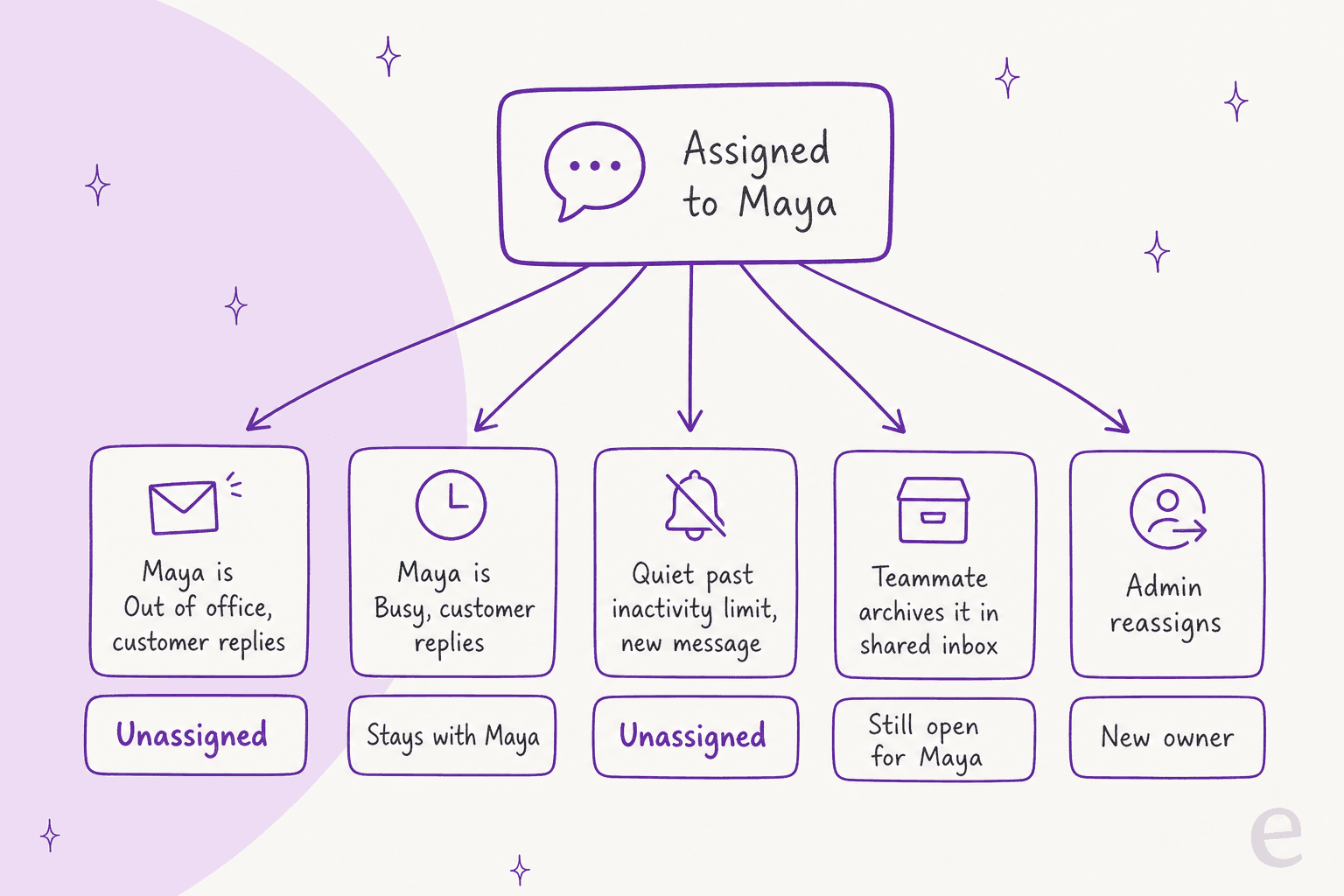
Five things move or drop the owner in a Front shared inbox, and only one of them is a person deliberately reassigning.
1. The first person to reply becomes the owner
Front channels have a setting called Assign conversations on first reply. With it on, "any time a teammate starts a new conversation or replies to an unassigned conversation from a shared channel, the conversation will automatically be assigned to that teammate." It is on by default.

This is a good default for small teams. It is also how, on a cross-team inbox, a sales rep who sends one quick "let me check with support" reply ends up owning a billing dispute for three weeks. Two details from Front's docs: it only fires on unassigned conversations, and it only works when you send from Front, not from outside it.
2. Out of office hands conversations back to the queue
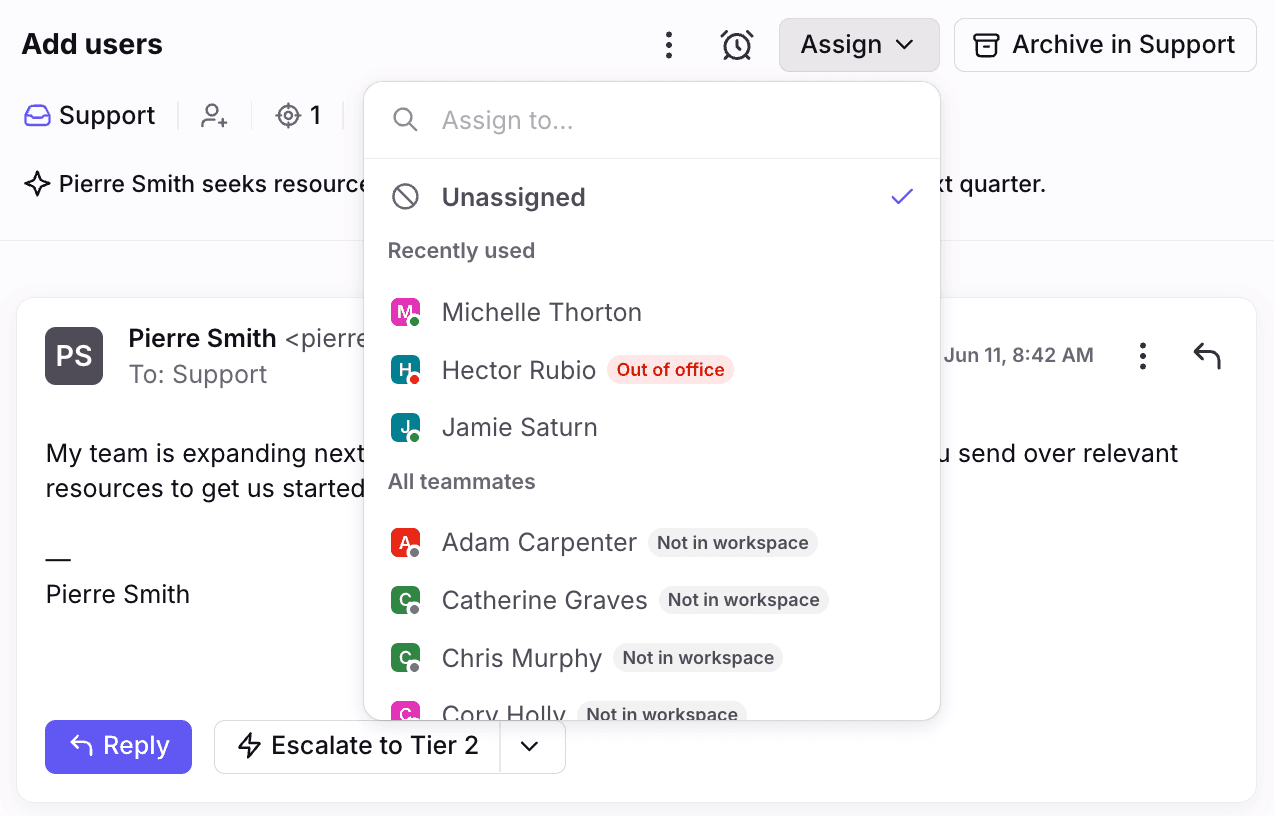
When a teammate is set to Out of office, "any replies they receive to conversations that originated in a shared inbox will automatically get unassigned." Conversations that don't get a new reply stay assigned to them. Automatic assignments pause, but a teammate can still assign to them manually.
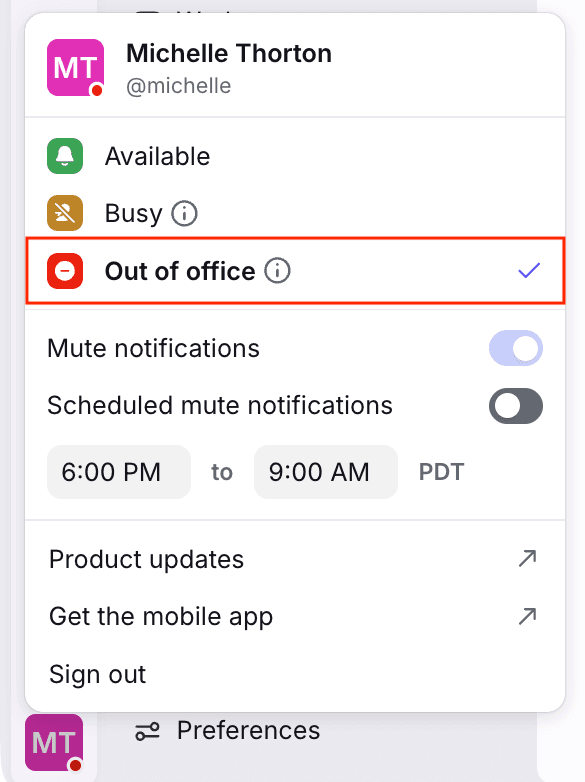
Busy is different. Per Front's teammate status guide, Busy pauses new rule assignments, but conversations stay assigned when there are new activities. So the practical rule for any support team handoff: Busy for a lunch break, Out of office when you log off for the day. Grey, meaning no device connected, does not pause anything, so a teammate who closes their laptop without changing status can still receive rule assignments.
3. The inactivity timer unassigns quiet conversations
Shared inboxes have an inbox setting called Unassign conversation if inactive for. Set a period, and when a conversation that has been quiet longer than that gets a new message, Front unassigns it. You can pick Never. If your company bump settings count replies, outbound messages trigger it too; if not, only inbound ones do, according to Front's notes on bump settings.
This one surprises people, and it can wreck your SLA tracking, because nothing happens at the moment the timer runs out. The owner only disappears when the customer finally writes back.
4. Someone else archives it
Archiving looks like a shared action, but Front tracks views separately. From the conversation status guide: "If a teammate who is not the assignee changes a conversation's status from a shared inbox, then the conversation will stay open in the assignee's Assigned to me section." The owner keeps it on their list even after a colleague tidies the shared view. That is a safety net, not a bug, but it explains why owners see things the rest of the team thinks are done.
5. A rule or an admin reassigns it
The deliberate one. Like group assignment in other helpdesks, rules can assign, unassign and reassign, and load balancing rules can re-assign a conversation that was dropped because its owner went Out of office or Busy, as long as the rule has an Assignee is removed trigger (Front load balancing docs).
The one switch that overrides most of this is the shared-inbox setting Keep assignments when teammate is out of office or busy. Turn it on and new conversations can still be assigned to unavailable teammates, existing ones stay put on new activity, and the inactivity unassign setting is disabled.
What happens to ownership in each situation?
Here is the same logic as a quick lookup. Pick the situation you are trying to explain to your team.
How do helpers work without taking ownership?
The cleanest Front teams separate "I own this" from "I'm helping on this", and Front gives you the tools for the second part. The trick is that helpers should comment, not reply.
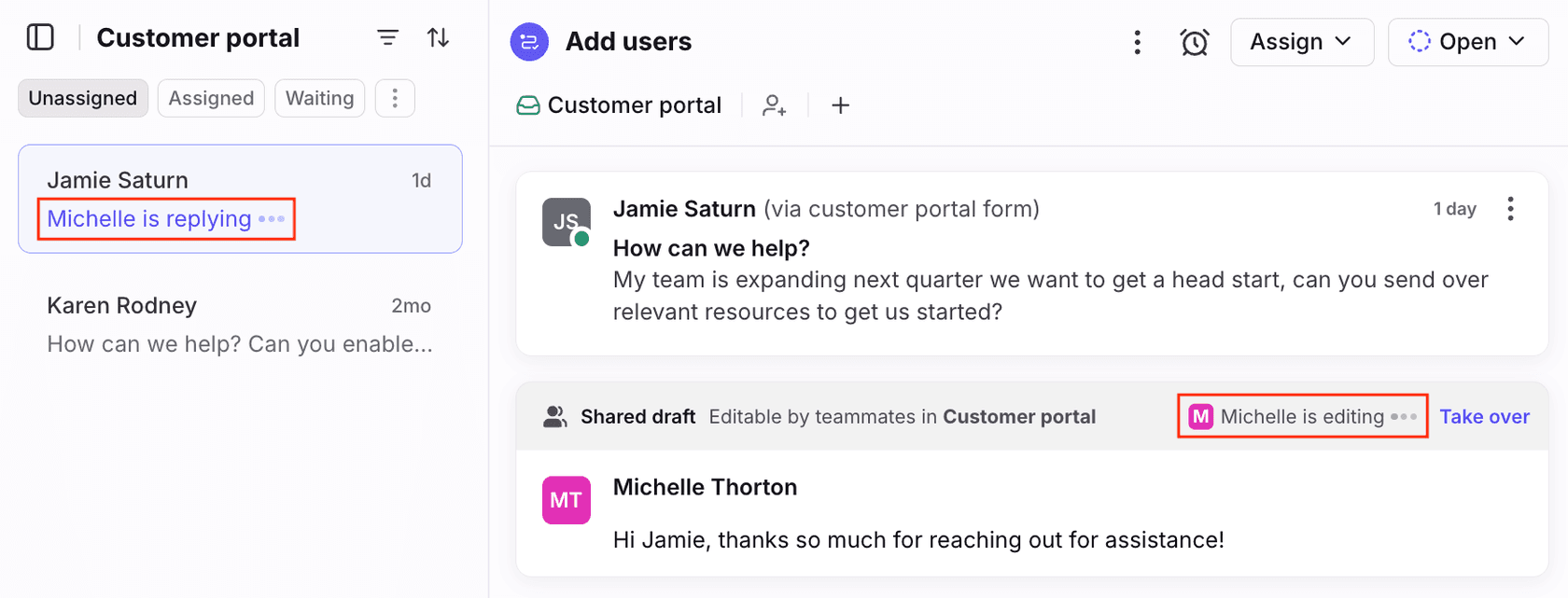
Front's real-time collision detection helps here: if a teammate is working on a reply in a shared inbox, you see an indicator that they are replying, and draft content is shared as they type. It stops the double reply. It does not decide who owns the thread, which is why the settings above matter.
Reviewers on G2 describe the payoff in almost the same words:
"We can assign conversations, jump in when someone needs help, and avoid that awkward moment when two people reply to the same email. It sounds simple, but it saves a surprising amount of time."

One more subscribe detail worth knowing: the personal preference Unsubscribe on unassign only applies when you manually unassign yourself. When a rule unassigns you, you stay subscribed until you unsubscribe yourself. That is why people who went Out of office come back to a Subscribed section full of threads they no longer own.
Round robin or load balancing: which keeps ownership clear?
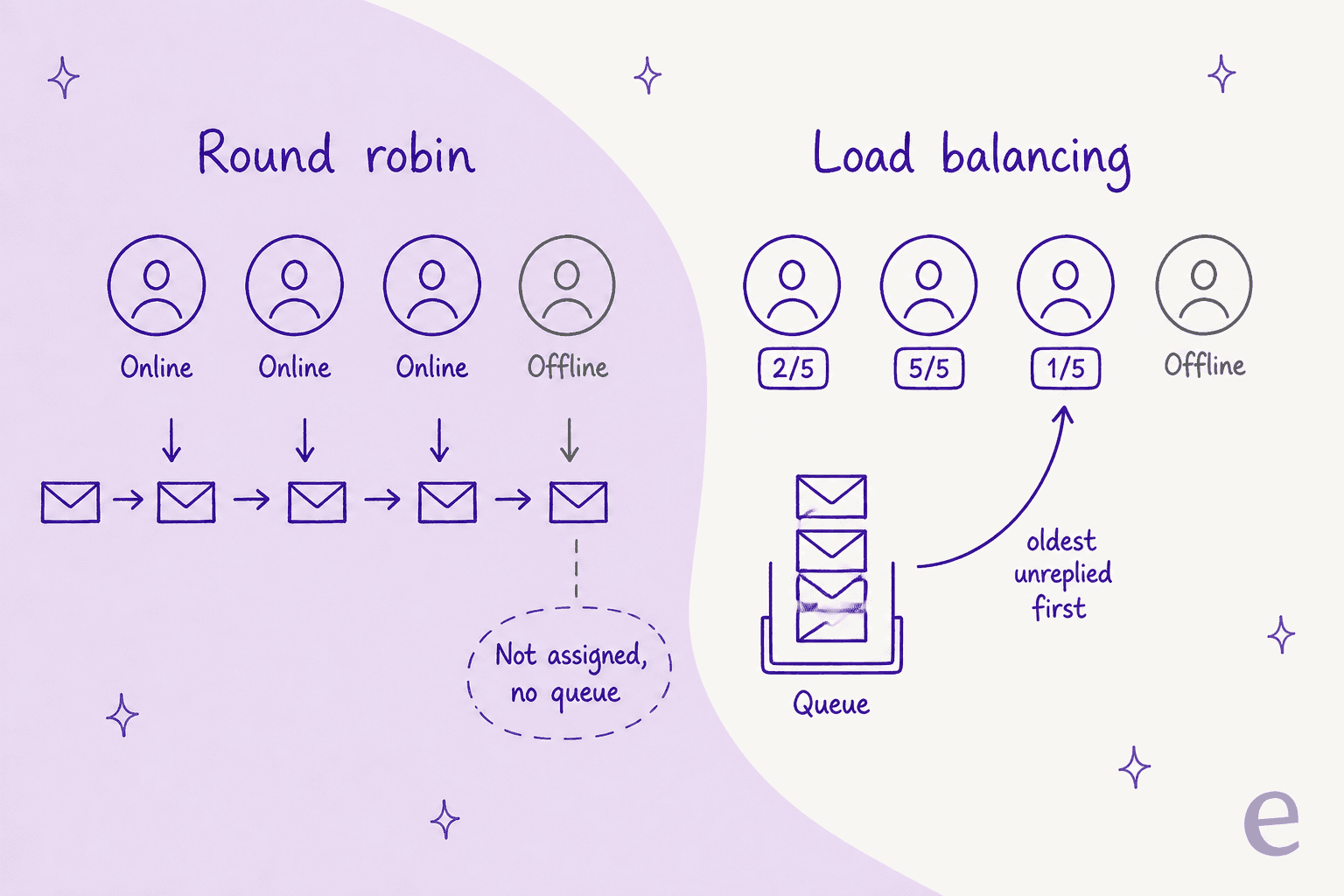
If a rule assigns your conversations, the method decides what happens when nobody is around. Front's comparison of the two is blunt about the difference.
| Round robin | Load balancing | |
|---|---|---|
| Who gets the next conversation | The next online teammate in sequence | The teammate with the fewest open assigned shared conversations |
| Everyone offline | Not assigned, and no queue | Queued until someone has room |
| Teammate comes back online | No catch-up on skipped conversations | Gets the oldest unreplied conversation first |
| Caps per person | None | Per-workspace limit, maximum and default 100 |
| Snoozed conversations count toward the cap | n/a | No |
| Plan | Rules (Starter allows up to 10) | Professional and above |
Sources: round robin vs load balancing, load balancing rules, Front pricing.
Two load balancing details catch people out. First, limits are per workspace, so Front's own example has Hector at 4 in one workspace and 5 in another, which means up to 9 conversations at once. Second, Front's rules engine "does not re-assess rule conditions when a conversation reaches the front of a load balancing assignment queue." A conversation that has since been retagged still gets assigned by the rule it originally matched.
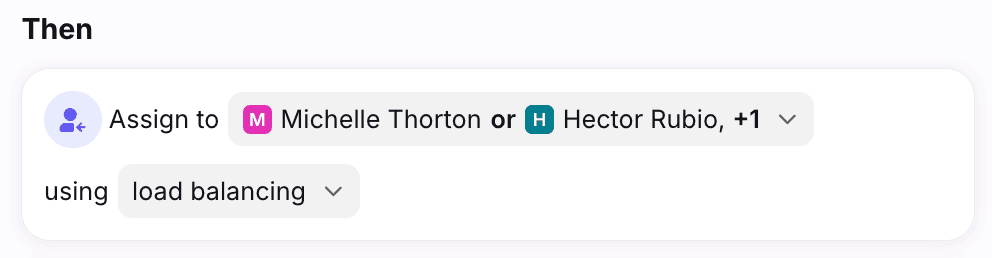
My take: round robin is fine for a team that is always staffed during inbox hours. If your team ever goes fully offline (nights, weekends, a small team across time zones), load balancing is the safer pick, because round robin simply leaves those conversations unassigned. Load balancing needs Professional at $65 per seat per month on annual billing, and the shifts feature that flips statuses automatically is on Enterprise ($105 per seat per month).
The same trade-off shows up in Zendesk round robin, Freshdesk round robin and Gorgias round robin setups.
Which ownership model should your team pick?
There are three models that work in Front. Which one fits depends on team size and how often everyone is offline at once.
| Model | How the owner is set | Settings to check | Fits |
|---|---|---|---|
| Claim by reply | Whoever replies first | First-reply auto-assign on, helpers comment instead of replying | 2 to 5 people, same hours |
| Rule-assigned | Load balancing rule on inbound | Assignment limits, Assignee is removed trigger, Out of office discipline | Steady volume, shifts or time zones |
| Triage lead | One person assigns each morning or hour | First-reply auto-assign off, inactivity unassign set | Mixed teams (support plus sales or ops) |
Whichever you pick, write down three decisions and share them with the team, because these are the ones that cause "I thought you had it":
- Does replying claim it? If not, turn off Assign conversations on first reply on each shared channel.
- What does Out of office do? Either let it unassign (the default) or turn on Keep assignments when teammate is out of office or busy. Pick one, and tell people which status to use at the end of a shift.
- How long can an owned thread sit quiet? Set Unassign conversation if inactive for to a real number or to Never, not whatever someone picked during setup.
Rules can make this tidy, but more rules is not always better. One G2 reviewer put the trade-off well:
"If you create too many rules, you end up having to check why each message ended up in a different place. We had to simplify the setup so that everyone understood how to work with it."
If Front's model isn't clicking for your team, my Front alternatives list and small-team ticketing roundup are the next stop.
If you are still deciding whether Front's shared-inbox model or a ticket queue fits better, my shared inbox vs ticketing system guide and Front vs Hiver comparison cover the structural differences. Front also has optional ticket statuses (Open, Waiting, Resolved) on shared inboxes, which help track progress but do not change who owns a conversation.
Where does an AI teammate fit into Front ownership?
An AI teammate in Front works best as another assignee or helper, following the same rules as everyone else, rather than as a separate system the team has to watch. That is how eesel's Front integration is built: it can be assigned conversations, leave a drafted reply as an internal comment for a person to send, tag, assign to a specific teammate, or archive. It can also run when a teammate types @eesel in a comment, which fits the "helpers comment, owners reply" model above.
Front's native Front AI suite, with Autopilot and Copilot, is the other route if you'd rather stay inside one vendor.
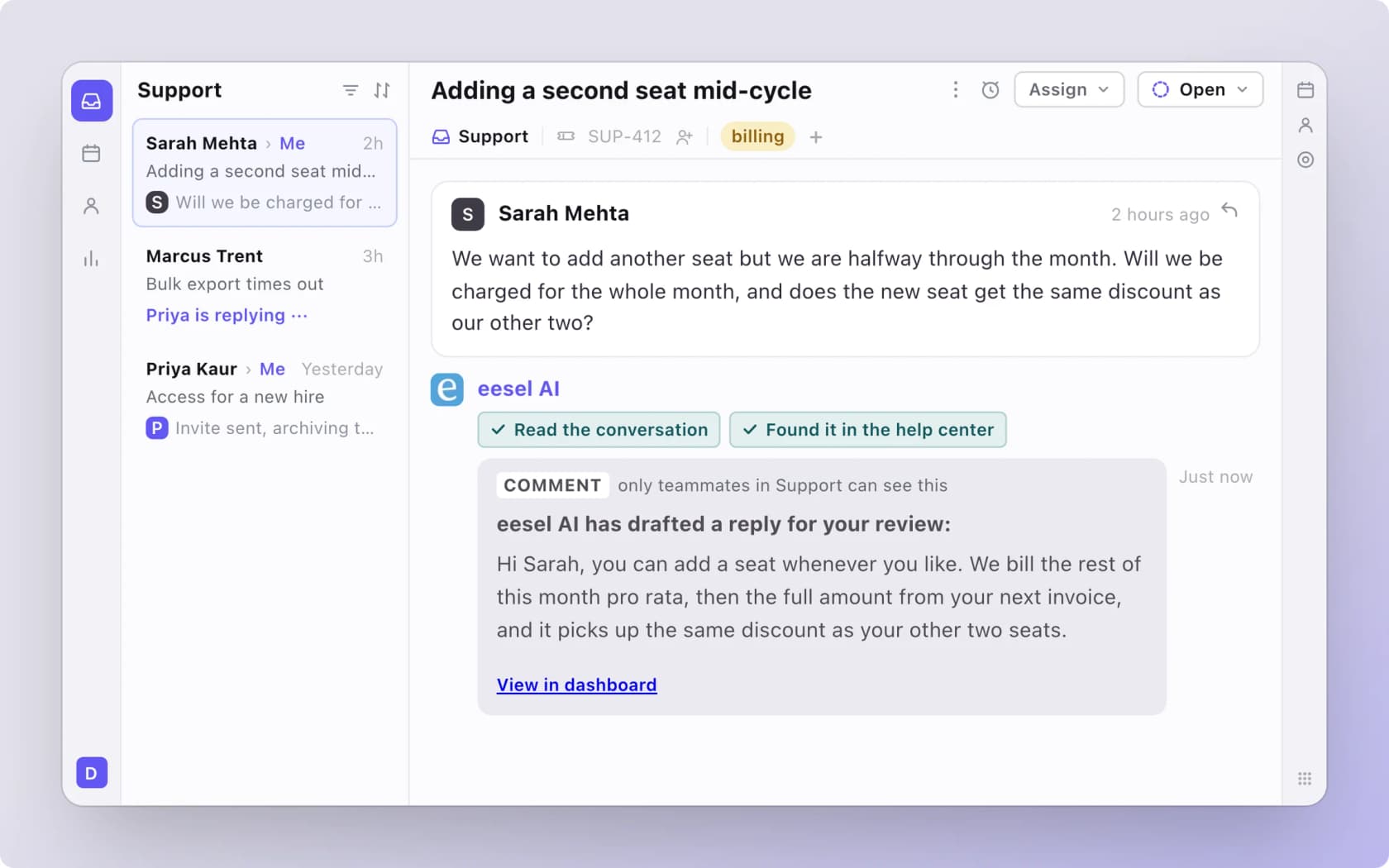
One honest limit from the eesel Front docs: eesel assigns to one named teammate, not a team or group. Routing to a group stays with your Front rules, so your load balancing setup keeps doing its job.
The pattern I see work most often is the one Xap runs on Freshdesk: misdirected student tickets get a full referral reply drafted as an internal note, and a person sends it. eesel never replies to a student itself. Adverscale is the @mention version: an agent writes @eesel in a note, the AI teammate answers everyday questions, and anything out of scope gets a note explaining why it stopped (AI escalation done the boring, reliable way) plus an assignment to the right group. Across 2,400 tickets a month, that left 2,700 internal notes for the team. Both are on other helpdesks, but the ownership idea carries straight over to Front: the AI does the first pass, and the owner stays a person.
If your team sets things up from a terminal, the eesel CLI lets a coding agent like Claude Code connect Front with npx @eesel/cli integrations connect front, check what it synced, and test an internal-comment draft on a test conversation before any automation goes live. Approving the Front connection itself still needs a person with the rights to authorize apps in Front.
Try eesel in your Front shared inbox
If your Front team keeps asking "who has this one?", the fix starts with the three settings above. eesel adds the next layer: every new conversation gets read, drafted and, if you want, assigned to the right teammate before anyone has to claim it, with the draft waiting as an internal comment so your owner still decides what goes out. It learns from your past Front conversations and help center, and you can start with drafts only. Try eesel on your Front inbox, or compare options in my roundup of the best AI for Front.