What counts as a billing ticket (and why it's its own beast)
"Billing support" is a grab-bag, and treating it as one thing is the first mistake. On any given day the billing queue holds at least five different jobs:
- Invoice and receipt requests ("can you send me my invoice for March?")
- Charge explanations ("why was I charged $90, I thought it was $79?")
- Payment and card updates ("my card was declined, here's the new one")
- Refund and cancellation requests ("I want to cancel and get last month back")
- Disputes and chargebacks ("I never authorised this, I'm calling my bank")
These look similar in the inbox but they are wildly different in risk. Sending a copy of an invoice is read-only and reversible. Issuing a refund moves money. A chargeback is a legal-ish process with a clock on it. Any approach to AI billing support automation that treats all five the same is going to either be too timid to help or too reckless to trust.
That's also why billing is different from the rest of your queue. A shipping-status question or a "how do I reset my password" answer is low-stakes if the AI gets it slightly wrong. A billing answer that's wrong, telling someone they won't be charged when they will, or refunding the wrong amount, lands straight in a complaint, a chargeback, or a churn. So the bar for accuracy and control is higher here than almost anywhere else in customer support automation, and higher than for a general-purpose AI helpdesk agent handling everyday questions.
The mistake most teams make: automate billing first, trust it blindly
Here's the counterintuitive part. Billing is often where teams start automating, because the questions are repetitive and the volume is high. But it's the worst place to flip on full autonomy without a safety net, precisely because the downside is money.
I've watched this play out from the support side for years, and the pattern that kills trust is always the same: a confident-sounding bot that answers a billing question wrong, or worse, narrates that it "processed your refund" when it never hit the payment API at all. Once that happens once, the team rips the AI out and goes back to doing everything by hand.
The fix isn't "use AI less." It's confidence-based routing. One CX lead at a DTC supplements brand running about 7,000 tickets a month put the principle to me more clearly than any vendor deck ever has:
"The AI will never be able to answer 100% of the questions, but if it tries and just answers 'sorry I don't know this,' I cannot go and check all my tickets to see if the AI actually made a good answer. I need an AI who is only handling the tickets that it's confident to handle and all the other ones, leave them alone."
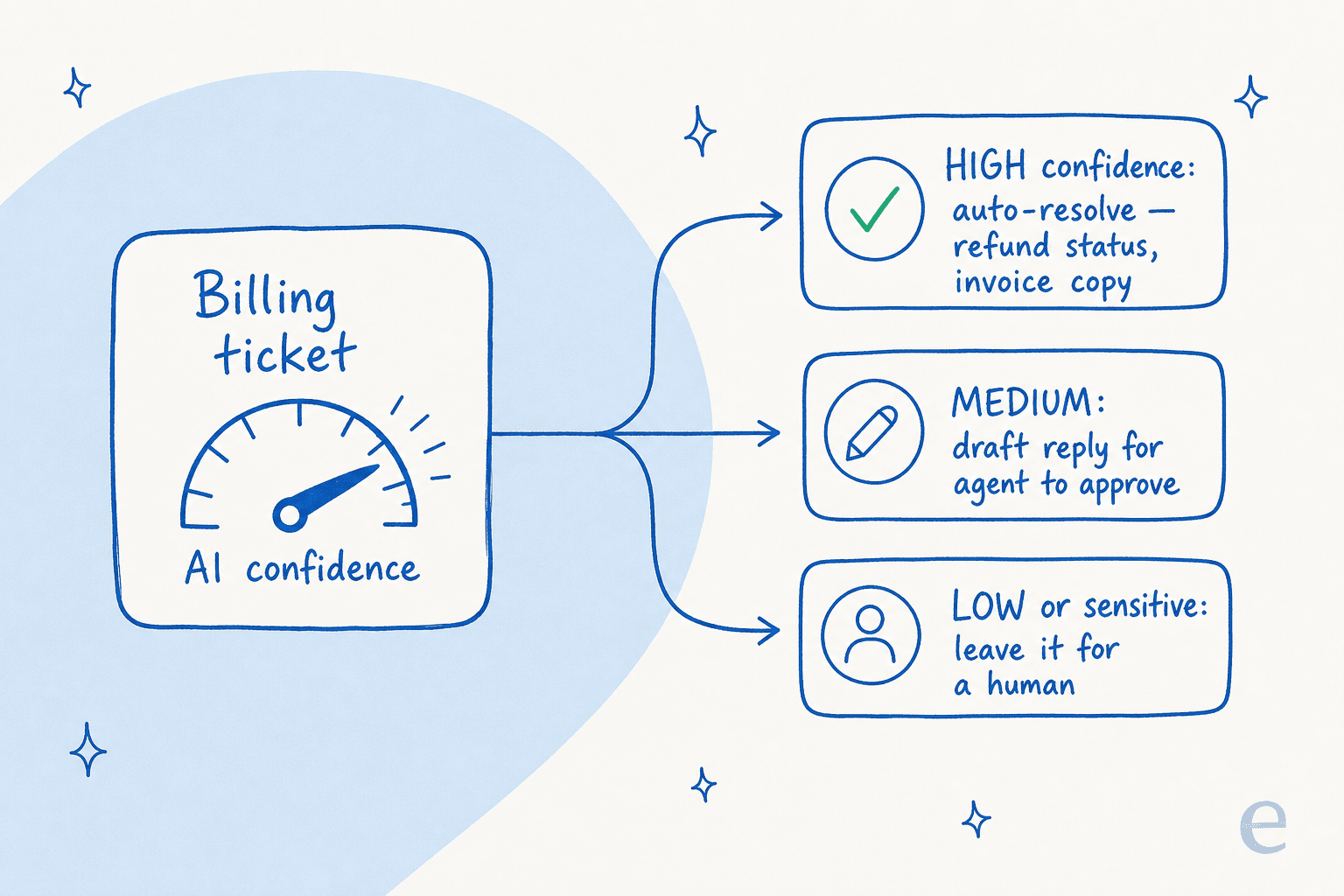
That's the thesis of this whole guide. The right question isn't "can AI handle billing?" It's "how do I let it handle the billing tickets it's sure about, and only those?" The answer is confidence-based handover, and a good tool makes it a setting, not a science project.
How AI billing support automation actually works
Under the hood, an AI support agent doing billing work needs three things, and it's worth understanding them because the gaps between tools live here.
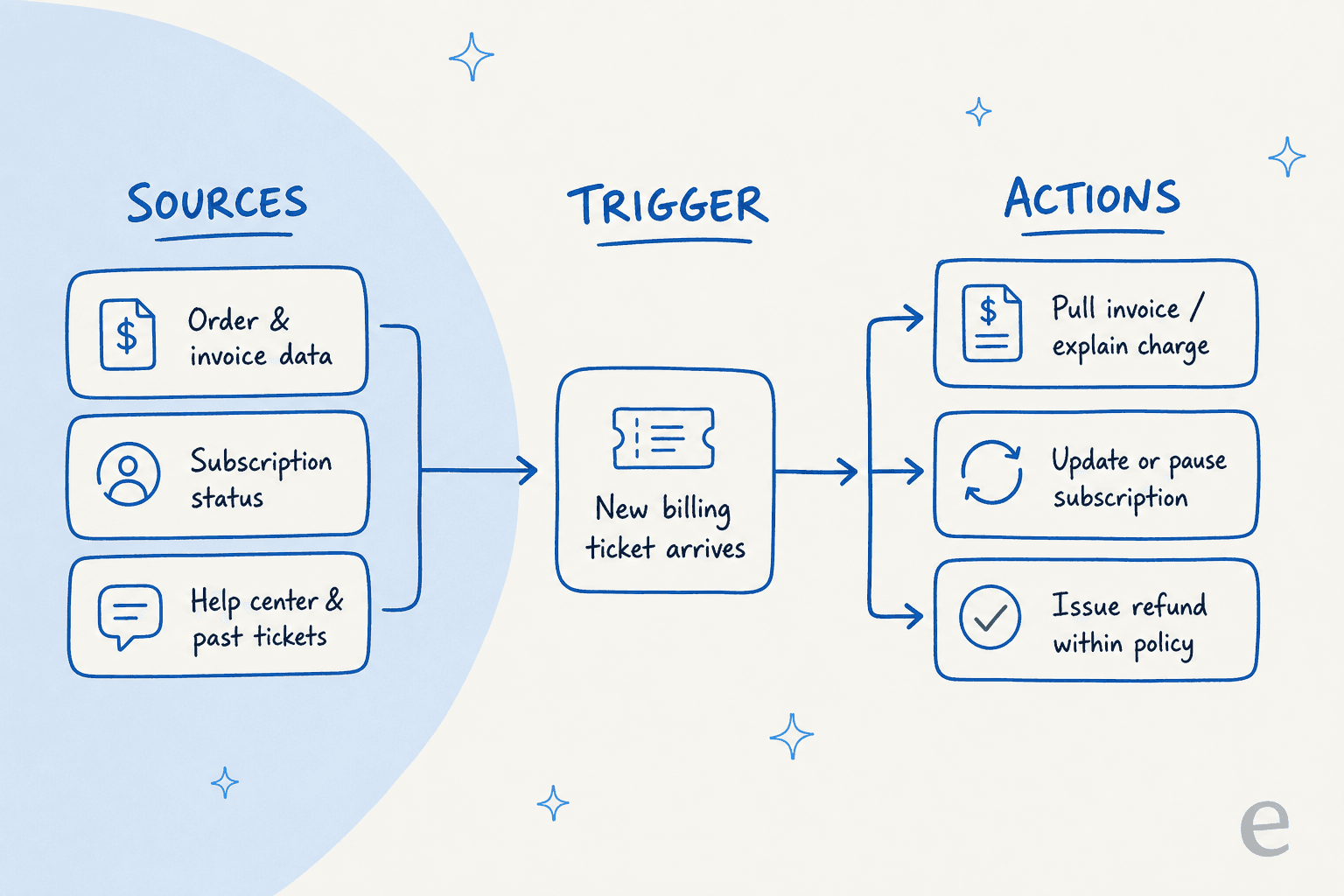
- Sources, the data it can read. To answer "why was I charged twice", the AI has to see the actual order, the subscription state, and the invoice, not just your help center. That means a live connection into your commerce and billing stack: Shopify order data, subscription tools, Stripe records, plus your past tickets and macros so it answers the way your team already does.
- Triggers, the reason it wakes up. A new ticket lands, a customer messages the chat widget, or an agent @-mentions it. This is less glamorous than the AI itself but it's where half the real engineering pain sits, every helpdesk fires events differently.
- Actions, the thing it does. Draft a reply, send a reply, tag and route the ticket, pull an invoice, or, when you allow it, update a subscription or issue a refund within your policy.
The important nuance: actions are gated by confidence and by your rules. A well-built agent doesn't have a single "autonomy" switch. It has a threshold ("only act when you're this sure"), a scope ("you may issue refunds under $50, escalate the rest"), and exclusions ("never touch a ticket tagged dispute"). If a tool only offers on/off, that's a red flag for billing specifically.
What you can safely hand to AI today
Here's how I'd actually carve up the billing queue, from "turn it on now" to "keep a human in the seat." The deciding factor each time is the same: is the action reversible, and how confident is the AI?
| Billing ticket type | Risk | Recommended mode | Why |
|---|---|---|---|
| Invoice / receipt copy | Low | Auto-resolve | Read-only, no money moves |
| "What's this charge?" | Low-medium | Auto-resolve with citation | AI explains using real order data |
| Refund status ("where's my refund?") | Low | Auto-resolve | Lookup, not an action |
| Payment method / card update | Medium | Auto-resolve or guided | Customer-initiated, low blast radius |
| Cancellation / pause request | Medium | Draft for agent | Retention judgement often needed |
| Refund execution | Medium-high | Auto under a $ cap, else draft | Reversible only with effort |
| Payment dispute / chargeback | High | Escalate to human | Legal/compliance, time-sensitive |
| Fraud / unauthorised charge | High | Escalate to human | Needs investigation |
This isn't a rule you set once. The point of confidence-based routing is that the AI itself scores how sure it is, and you decide the line. Real-world numbers back this up: in one trial on a German jewelry retailer running about 1,000 tickets a month on Zendesk and Shopify, AI drafts for refund-status questions were 100% useful and returns-and-refunds drafts were 93.8% useful, with 93% triage accuracy and zero false positives on spam. That's the profile of a queue where the easy stuff is genuinely safe to automate and the hard stuff is genuinely worth flagging.
If you want the deeper mechanics of stopping wrong answers, I went into them in this piece on hallucination prevention for support.
Setting it up without breaking anything
The good news is that a sane rollout looks nothing like a six-month integration project. Here's the sequence I'd follow.

1. Connect your helpdesk and your commerce data. The AI is only as good as what it can read. Link your helpdesk (Zendesk, Gorgias, Freshdesk, Help Scout) plus your store and subscription tools, so it can pull real order and invoice data, not just FAQ text.
2. Train it on your own history. Point it at your past billing tickets and macros, plus your knowledge base. This is the step that makes it sound like your team instead of a generic bot, and it's the capability support leads ask for most often. The agent learns your refund policy, your tone, and your edge cases from how you've actually handled them.

3. Simulate before you go live. This is the non-negotiable one for billing. Run the AI over thousands of your historical tickets in a sandbox and read what it would have replied and would have done, before a single customer sees it. You get a real forecast of resolution rate and accuracy per ticket type, so you turn on automation with evidence instead of hope.
4. Start narrow, expand on data. Turn on auto-resolution for one low-risk type first, say invoice copies, with everything else as drafts. Watch a week of results, then widen the scope. The eesel team simulates every rollout against historical tickets first precisely because we've seen confident bots give wrong answers, and billing is the worst queue to learn that lesson on live.
5. Keep humans on the hard cases by design. Set exclusions so disputes, chargebacks, and anything over your refund cap never auto-resolve. A clean handover with full context beats an AI that bluffs its way through a dispute.
What it costs, and why the pricing model matters more than the sticker
Billing automation has a pricing twist worth flagging: a lot of helpdesk AI is sold per seat or per resolution, which punishes you exactly when it's working. If you're automating thousands of repetitive billing tickets, a per-resolution fee can quietly balloon.
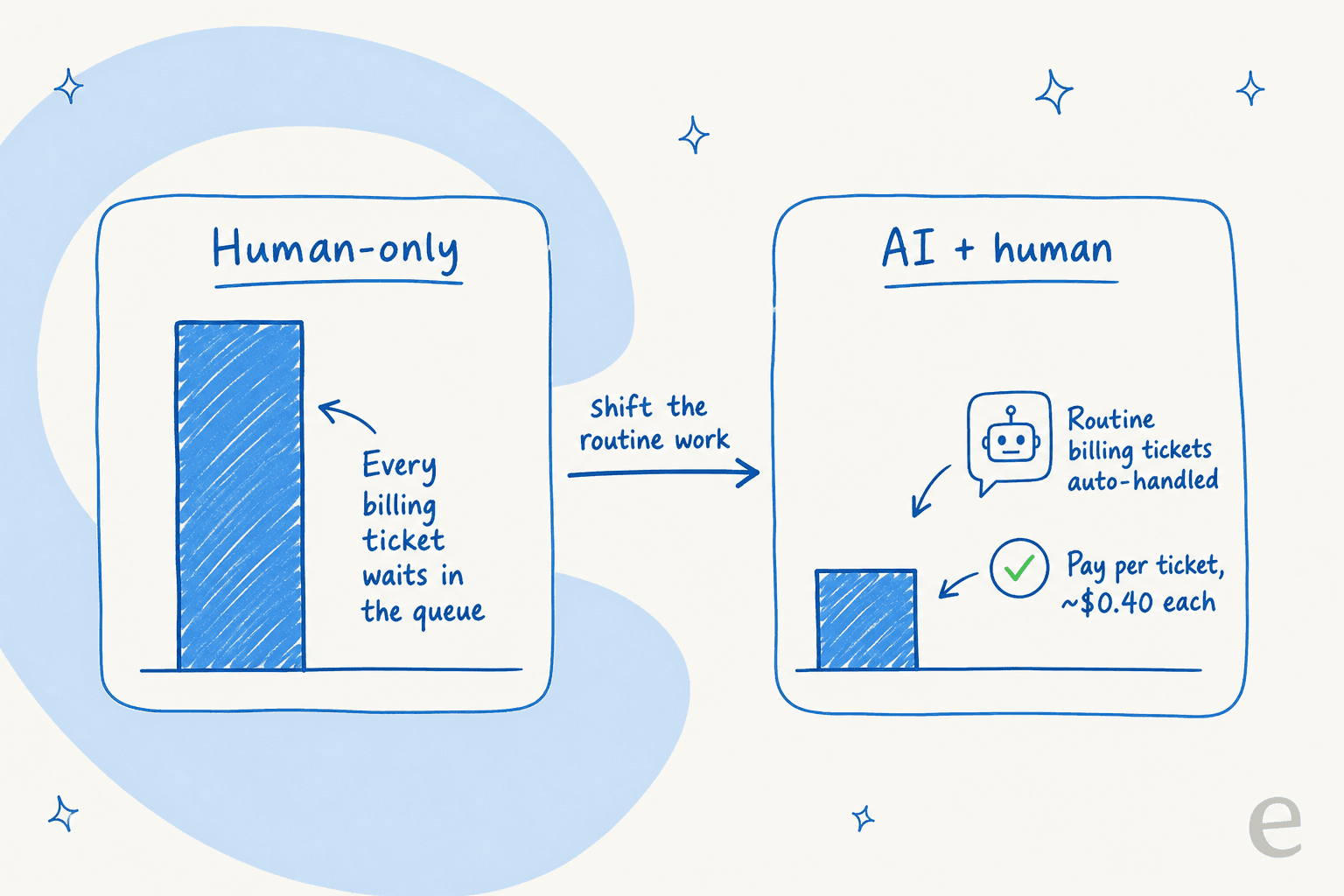
A quick worked example. A fashion e-commerce brand on Gorgias and Shopify handling roughly 700 tickets a week ends up around $1.07 per ticket on a flat monthly plan once you do the division, and that's before you count the AI add-on per reply. Move the routine billing volume to a usage-based agent and the math flips: you pay for what the AI actually touches.
| Pricing model | What you pay | The catch |
|---|---|---|
| Per agent seat | Flat monthly per human agent | You pay the same whether AI helps or not |
| Per resolution | A fee each time AI resolves a ticket | Costs scale up exactly as automation works |
| Per ticket (usage-based) | A flat rate per ticket the AI handles | Predictable; you only pay for real volume |
eesel AI sits in the last bucket, around $0.40 per ticket with no platform fee and no per-seat charge, so a team automating billing isn't penalised for succeeding. (Pricing changes, so check the pricing page for current numbers.) The general rule: for high-volume, repetitive work like billing, predictability beats a clever per-outcome model that makes your bill jump every time you automate one more ticket type.
The other quiet cost is build-vs-buy. Plenty of technical teams figure they'll just wire up the Stripe and OpenAI APIs themselves. Sometimes that's right, but as one engineering lead at a crypto-hardware company told us when they chose to buy instead, "we could try to write our own LLM application but we didn't want to invest our time into that. We wanted something that we would not have to maintain." Billing logic, confidence routing, and helpdesk webhooks are a lot more code than the demo makes it look.
Try eesel for billing support
If your billing queue is drowning your team in the same five questions, eesel AI is built for exactly the careful-automation approach this guide argues for. It plugs into Zendesk, Gorgias, Shopify and your other tools in minutes, trains on your past tickets so it answers like your team, and lets you simulate the whole thing on historical billing tickets before it touches a live customer.

The differentiator that matters for billing is control: confidence thresholds, per-ticket-type scopes, refund caps, and exclusions for disputes are all settings, not custom engineering. You decide what the AI is allowed to do, prove it works on your own data, and only then let it loose, on the tickets it's sure about, leaving the rest for a human. It's free to try, and you can have it answering invoice and refund-status questions the same afternoon.
Frequently Asked Questions
What is AI billing support automation?
Can AI handle refunds and billing questions on its own?
How much does AI billing support automation cost?
Is it safe to let AI answer billing questions?
Which billing tickets should I automate first?


Article by
Riellvriany Indriawan
Riell is a designer and writer at eesel AI with about two years of experience researching CX platforms, AI chatbots, and helpdesk software. She combines her design background with a sharp eye for how these tools actually look and feel in practice — making her comparisons unusually visual and user-focused.