What "chatbot as a service" actually means
Chatbot as a service is the SaaS version of a support bot. Rather than standing up your own model, hosting, and retrieval pipeline, you sign up for a platform that runs all of it and hands you a bot you configure. It sits somewhere between an old-school rule-based chatbot and a fully custom build, and for most teams it is the sensible middle: you get an AI agent trained on your knowledge base without hiring an ML team.
The catch is that "as a service" is also how you get billed. Because the vendor carries the compute cost of every answer, the pricing model is where they protect their margin, and that is exactly where your budget can leak. Two tools with the same $99 sticker can bill you wildly differently once real tickets start flowing, so the unit of billing is the thing to understand first.
If you want the wider category context before we get into money, our guides on conversational AI benefits and AI chatbot examples cover what these bots can actually do.
The five ways chatbot as a service gets priced
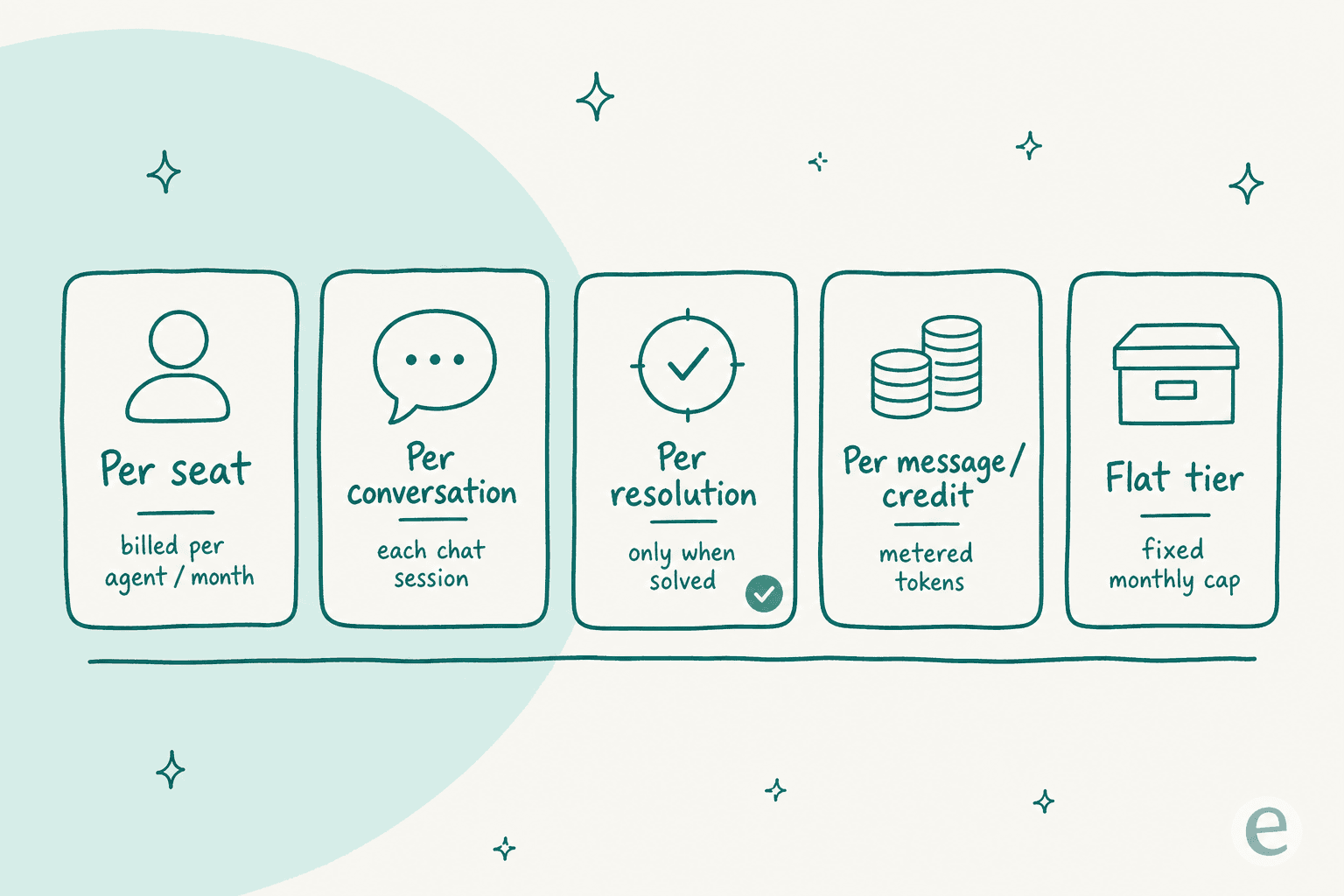
Almost every CaaS quote you will see reduces to one of five billing units. Get these straight and any pricing page becomes readable.
| Model | What you're billed for | Predictable? | Best for | Typical example |
|---|---|---|---|---|
| Per seat | Each human agent / builder, monthly | High (until you add people) | Small teams, blended human + bot | Zendesk Suite |
| Per conversation | Every chat session, resolved or not | Low at scale | Steady, moderate volume | Botpress, Tidio Lyro |
| Per resolution | Only chats the bot actually solves | Medium | Deflection-focused teams | Ada, Aisera |
| Per message / credit | Metered messages or token credits | Low | Builders, prototypes | Chatbase |
| Flat tier | A fixed monthly bundle with a cap | High (until you hit the cap) | Predictable low volume | Most SMB widgets |
| Credit plan per ticket | A fixed monthly plan; 1 credit per ticket or chat, no seats | High | Scaling teams | eesel |
A quick word on each, because the labels hide real differences.
Per seat is the oldest model and still the default for the big helpdesk suites. You pay for every agent login. It is clean and predictable right up until the AI is doing the work of five agents and you are still paying for five seats, which is a strange thing to be charged for when the whole point was to need fewer people.
Per conversation charges for each chat session the bot opens, whether or not it helps. It feels fair in a demo and punishes you at volume, because your busiest, highest-value months are exactly when the meter spins fastest.
Per resolution is the outcome-based pitch: you only pay when the bot closes something. That aligns incentives nicely, but the per-unit rate is higher to compensate, and "resolution" is a slippery word, so read the definition carefully.
Per message or credit is common with the developer-first builders. You buy a bucket of message credits or tokens and burn them down. It is great for prototyping and miserable for forecasting a support budget.
Flat tier is the SMB widget model: a fixed monthly fee with a usage cap baked in. Predictable, until you cross the cap and get bumped to the next tier or throttled.
Real chatbot as a service price points in 2026
Here is what the models look like with actual numbers attached. All figures are from each vendor's own pricing page as of July 2026.
Botpress is the clearest per-conversation example. Its Plus plan is $150/mo with 250 conversations included, then extra conversations in packs of 100 at $0.65 each; the Team plan is $750/mo with 1,500 conversations included and overage at $0.50 each. Notably, Botpress absorbs the underlying LLM cost rather than marking it up, which is rarer than it should be.
Chatbase runs the message-credit model: a free tier with 50 message credits a month, then Hobby at $40/mo (500 credits), Standard at $150/mo, and Pro at $500/mo, with annual billing knocking those down to roughly $32, $120, and $400. You are metering credits, so a chatty user costs more than a quick one.
Zendesk is the seat model, and its AI sits on top of it. Suite Team is $55 per agent per month paid yearly and Suite Professional is $115 per agent per month, with AI agents billed as automated resolutions on top of the seat fee. If you want the full picture there, we wrote a Zendesk AI agents cost guide.
Tidio's Lyro AI agent is per-conversation, sold in monthly buckets from 50 up to 1,000+ AI conversations, and it can bolt onto an existing helpdesk. Freshworks' Freshchat blends per-agent seats with metered bot sessions. And the outcome-priced players like Ada and Aisera quote per resolution, usually behind a "talk to sales" wall.
Then there is the credit-per-ticket model, which is where eesel sits: you pick a fixed monthly plan (500 credits for $299, 1,000 for $499, 2,500 for $999), each ticket or chat the AI actually works on uses 1 credit, and there is no per-seat fee and no charge for the back-and-forth inside a single ticket. More on why that unit matters in a moment.
Plug in your own volume
Sticker prices are useless without your volume attached. Set your monthly chat volume and expected resolution rate below and see roughly what each model costs. Rates are illustrative 2026 mid-market figures, so treat the shape of the curve as the takeaway, not the exact dollar.
Play with the volume slider and you will see the point of this whole guide: the ranking of models flips as you scale. That flip is not an edge case, it is the single most expensive mistake I see teams make.
Where the bill actually comes from
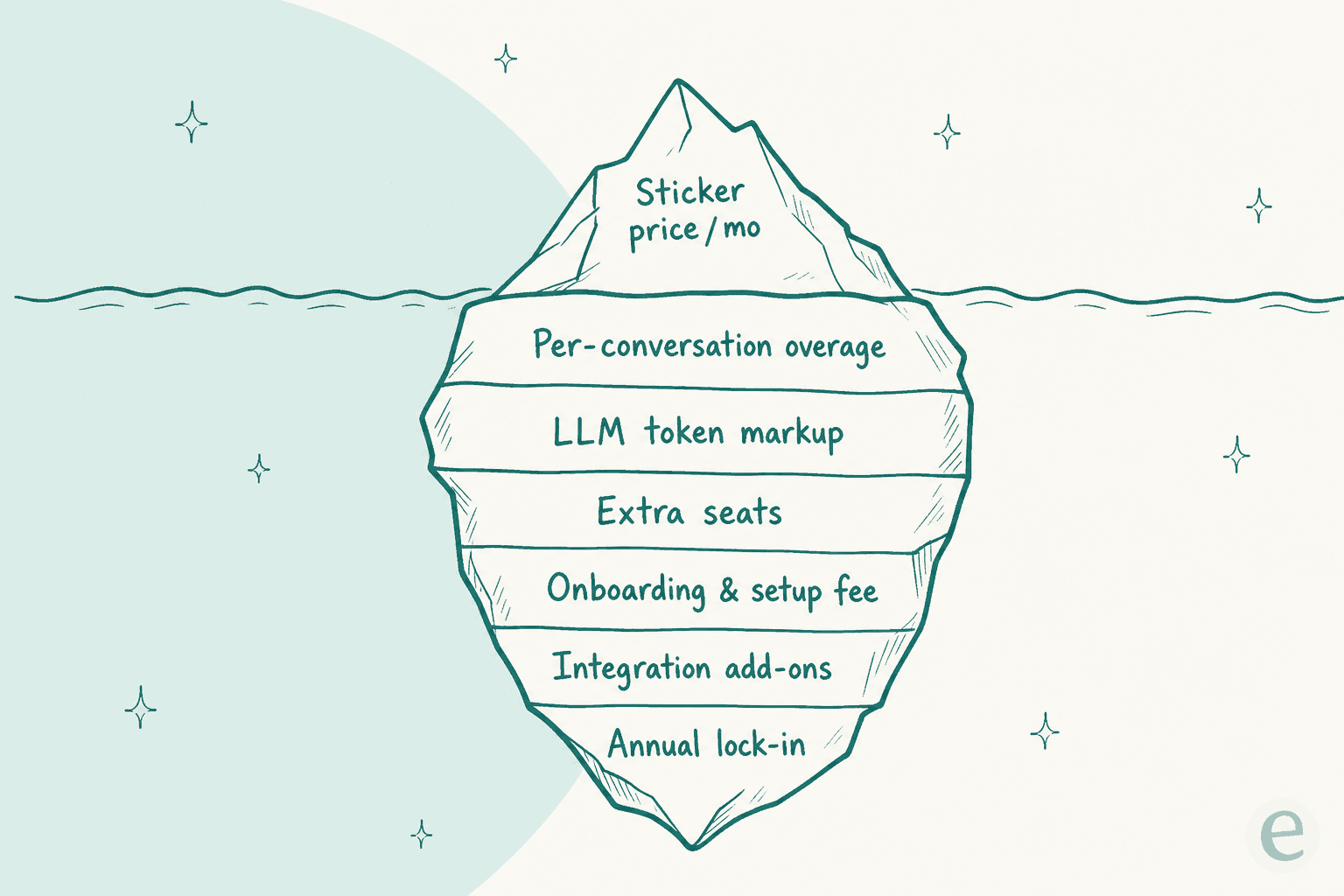
The sticker tier is the tip of the iceberg. The costs that decide your real annual spend are usually below the waterline, and they rarely show up until the second invoice.
The usual suspects:
- Overage packs. Your bundle covers 250 or 1,500 conversations, and everything past that is billed per unit, often at a higher rate than the bundle implied.
- LLM token markup. Some vendors resell the model cost with a margin on top. Botpress is upfront about paying it for you; plenty of others quietly bake a markup into every message credit.
- Extra seats. On seat-based tools, growth means more logins, even when the AI is doing more of the work.
- Onboarding and setup fees. Enterprise and outcome-priced plans often carry a one-time implementation charge that never appears on the public page.
- Integration add-ons. Connecting the bot to your CRM, order system, or a second helpdesk can sit behind a higher tier.
- Annual lock-in. The best headline rates require a yearly commitment, which matters if your volume is seasonal.
That last point is not theoretical. In our own customer research, a budget-conscious B2B hardware team told us they had watched a previous vendor's price more than double, and by the time they were shopping again they wanted contractual price locks before they would even trial anything. When a pricing model creates that kind of scar tissue, it is doing real damage to the vendor's own funnel.
Which model wins at your volume
Here is the shape the calculator draws, made explicit. Cost is not linear across these models, and the lines cross.
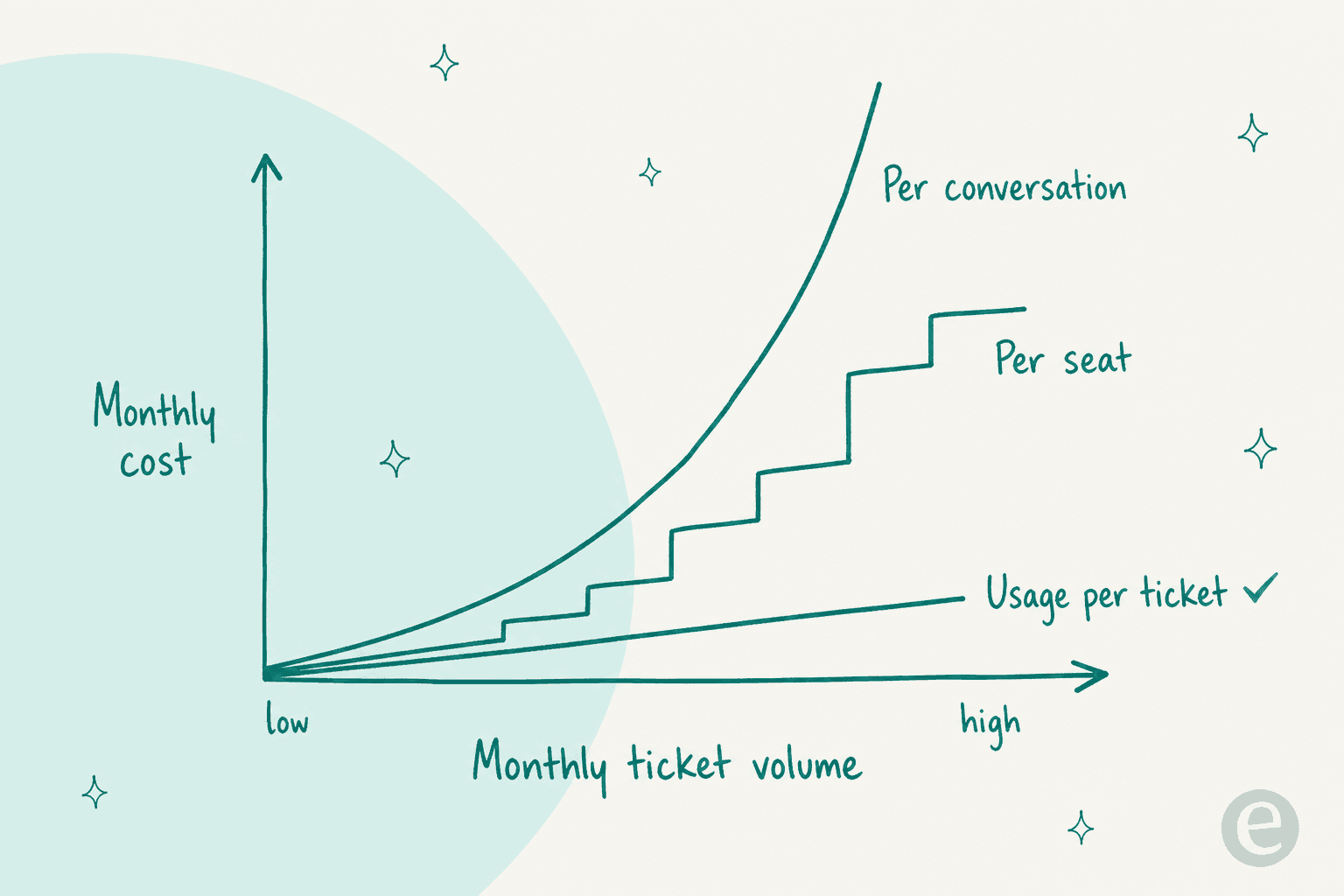
At low volume, flat tiers and per-seat plans are usually cheapest, because a single seat or a small bundle covers everything. As volume climbs, per-conversation pricing turns brutal, since it charges for every chat including the ones the bot fumbles. Per-resolution softens that by only charging for wins, but the higher unit rate means it is not automatically cheaper. And a fixed credit plan stays a predictable step no matter how busy a month gets, as long as you pick the batch that fits.
This is not a hypothetical. Talking through pricing with a multi-company e-commerce operator scaling toward 150,000 tickets a month, the numbers got confusing fast, and once we worked it out the projection landed near $30,000 a month even at roughly 20 cents a ticket. At that scale, the difference between billing units is not a rounding error, it is a headcount.
Per-interaction pricing was a straight non-starter for us. At our volume we needed something session-based, or the meter would have eaten the whole savings.
An ops lead at a payouts and money-transfer fintech running 7,000-8,000 escalated tickets a month
We heard the same thing from the other end of the market too: an email-security team on Freshdesk burned through 200 API calls in a single test day and immediately started worrying about what per-interaction pricing would do at their real annual volume. The pattern is consistent. Per-conversation and per-message models feel cheap in a trial and scale badly, which is exactly backwards from what a growing team needs.
This is why eesel counts one credit per ticket or chat. When we researched what actually kills chatbot adoption, the finding was blunt: price in units customers already think in, and never charge for the follow-ups, iterations, or internal steps inside a single ticket, because that back-and-forth anxiety is what makes people ration the tool instead of leaning on it. "Interaction" was ambiguous and even "resolution" was unclear. A ticket is a thing a support manager already counts, so one credit is one ticket or chat, however long.
How to evaluate a chatbot as a service quote
Before you sign anything, run the quote through this short checklist:
- Name the billable unit out loud. Seat, conversation, resolution, message, or ticket? Everything downstream depends on it.
- Model your real volume, not the demo. Take last quarter's ticket count and multiply. The demo volume is never your volume.
- Ask what happens past the bundle. Get the overage rate in writing, and check whether it is higher than the in-bundle rate.
- Ask if LLM cost is marked up. If the answer is vague, assume yes.
- Add the one-time fees. Onboarding, implementation, migration, and integration unlocks.
- Test on your own tickets first. The only way to know your real cost is to run the bot against historical tickets before you commit. A tool that lets you simulate on past tickets is telling you it is confident in the number.
If you want to go deeper on the wider buying decision, our guides on the best AI chatbot for customer service, AI customer service software, and the best AI helpdesk software for 2026 all weigh price against what you actually get. And if you are comparing against people rather than tools, AI vs offshore support cost is the honest version of that math.
Try eesel for predictable chatbot pricing
If the through-line of this guide is that the billable unit decides everything, eesel is built around the one unit support teams already count: the ticket. You pick a fixed monthly plan from $299 for 500 credits, each ticket the AI works on uses 1 credit, and there are no per-seat fees and no charge for the follow-up messages or internal steps inside a ticket, so your bill scales with work done rather than with headcount or chattiness.
The part that makes the price real is the simulation: eesel runs against your own historical tickets before you turn it on, so you see the exact resolution rate and the exact monthly cost on your actual volume, not a demo estimate. That is the "test on your own tickets first" step from the checklist above, built in. It plugs into Zendesk, Freshdesk, Gorgias, and your knowledge base in a few minutes.

You can try eesel free with 100 credits and simulate your own numbers before you spend a dollar.
Frequently Asked Questions
What is chatbot as a service pricing?
How much does a chatbot as a service cost per month in 2026?
Is per-resolution or per-conversation chatbot pricing better?
How is eesel's chatbot pricing different?


Article by
Kurnia Kharisma
Kurnia is a software engineer and writer at eesel AI with two years of SEO experience, writing about AI tools, helpdesk software, and customer support. He pairs a developer's understanding of how these products are built with search-driven research into what actually ranks and resonates with the people searching for them.