To be fair, the promise of AI chatbots was massive. We all pictured seamless, intelligent conversations that would solve customer problems in a flash. The reality? A lot of us got stuck with clunky, robotic scripts that felt more like a frustrating phone tree than a helpful assistant. Getting them to do anything useful often meant hiring a whole team of developers and waiting on a six-month project plan.
But things are finally changing. We are moving away from basic, rule-based bots and into the era of true AI teammates. These new chatbots can actually understand context, learn from past conversations, and genuinely solve problems without making your customers want to pull their hair out.
The market is crowded, though, and it is tough to know what is real and what is just marketing fluff. This is why we are cutting through the noise. This article will show you real-world AI chatbot examples that are actually making a difference in customer service and ecommerce. We will break down what makes them great, their pros and cons, and help you figure out which one might be the right fit for your business.
What exactly are AI chatbots?
In simple terms, an AI chatbot is a piece of software built to have a conversation with a human. But unlike the chatbots of a few years ago, modern ones are powered by some seriously smart tech, like Natural Language Processing (NLP) and Large Language Models (LLMs), which is the same kind of technology that powers things like ChatGPT.
The biggest difference is how they "think." Older, rule-based chatbots were basically just flowcharts. They followed a very script: if a customer says "refund," show them the refund policy link. They could not handle typos, slang, or any question that was not pre-programmed.
Today's AI chatbots are different. They can understand intent, meaning they can figure out what you really want even if you do not use the exact right words. They can learn from every conversation, getting smarter and more helpful over time. The best ones are more like an AI teammate than a simple tool. They do not just sit on your website answering questions; they plug into your other tools, access data to give personalized answers, and work alongside your human agents to make everyone's job easier. This infographic illustrates the key differences.
How we chose the best AI chatbots for this list
Not all chatbots are created equal, and a tool that is perfect for one company could be a total nightmare for another. We put this list together by focusing on the things that actually matter when you are trying to use this tech in the real world, especially for busy support and sales teams.
-
Ease of setup and training: How fast can you get it working without calling in a developer? Does it learn from the knowledge you already have, like old conversations and help docs, or do you have to spoon-feed it information?
-
Integration capabilities: Can it actually connect to the tools you already use? A chatbot is way more useful if it can talk to your help desk, like Zendesk or Freshdesk, your ecommerce store, or your internal wikis.
-
Customization and control: Can you make it sound like your brand? Can you control its personality, tone, and what it is allowed to do? You should be able to tell it exactly how to handle specific situations.
-
Human-in-the-loop (HITL) supervision: Does it give you a safe way to get started? The "turn it on and pray" approach is terrifying. A good platform lets the AI draft replies for a human to approve first, so you can build trust before letting it talk to customers on its own.
-
Use case focus: Is it a jack-of-all-trades, or was it built specifically for a job like customer support, lead generation, or driving online sales? Specialized tools often perform much better than generic ones.
The best AI chatbot examples in 2026 at a glance
For those who just want the highlights, here is a quick look at our top picks. We have compared them based on what they do best and how they charge.
| Chatbot | Best For | Standout Feature | Pricing Model |
|---|---|---|---|
| eesel AI | An AI teammate for support and sales teams | Learns from past tickets; human-supervised rollout | Per interaction |
| Zendesk AI | Teams looking for a powerful, integrated solution within the Zendesk ecosystem | Seamless native integration with Zendesk Suite | Included in higher-tier plans; Copilot is a paid add-on |
| LivePerson | Enterprise retail and conversational commerce | Strong focus on driving sales through conversation | Custom/Quote-based |
| HubSpot Chatbot Builder | Sales, marketing, and customer service automation | Deep integration with HubSpot's CRM | Free builder; AI Agents on Pro+ plans |
| Zapier Chatbots | DIY automation across thousands of apps | Connects to 8,000+ apps via Zapier | Per chatbot |
| Amazon Lex | Developer teams building custom voice and text bots | The same deep learning tech that powers Alexa | Usage-based (per request) |
A detailed look at the 6 best AI chatbot examples
When you are looking at these tools, it helps to see how they actually function in a day-to-day workflow. Some are meant to be set up in minutes, while others are massive projects that take months to deploy.
1. eesel AI
eesel AI flips the script on how you think about chatbots. You do not "build" or "configure" it; you invite it to your team like a new hire. Connect it to your help desk, and it immediately starts learning from your past support tickets, your help center articles, and your internal docs. It is designed to be rolled out gradually and safely, starting as an assistant and earning more autonomy over time, just like a real person.
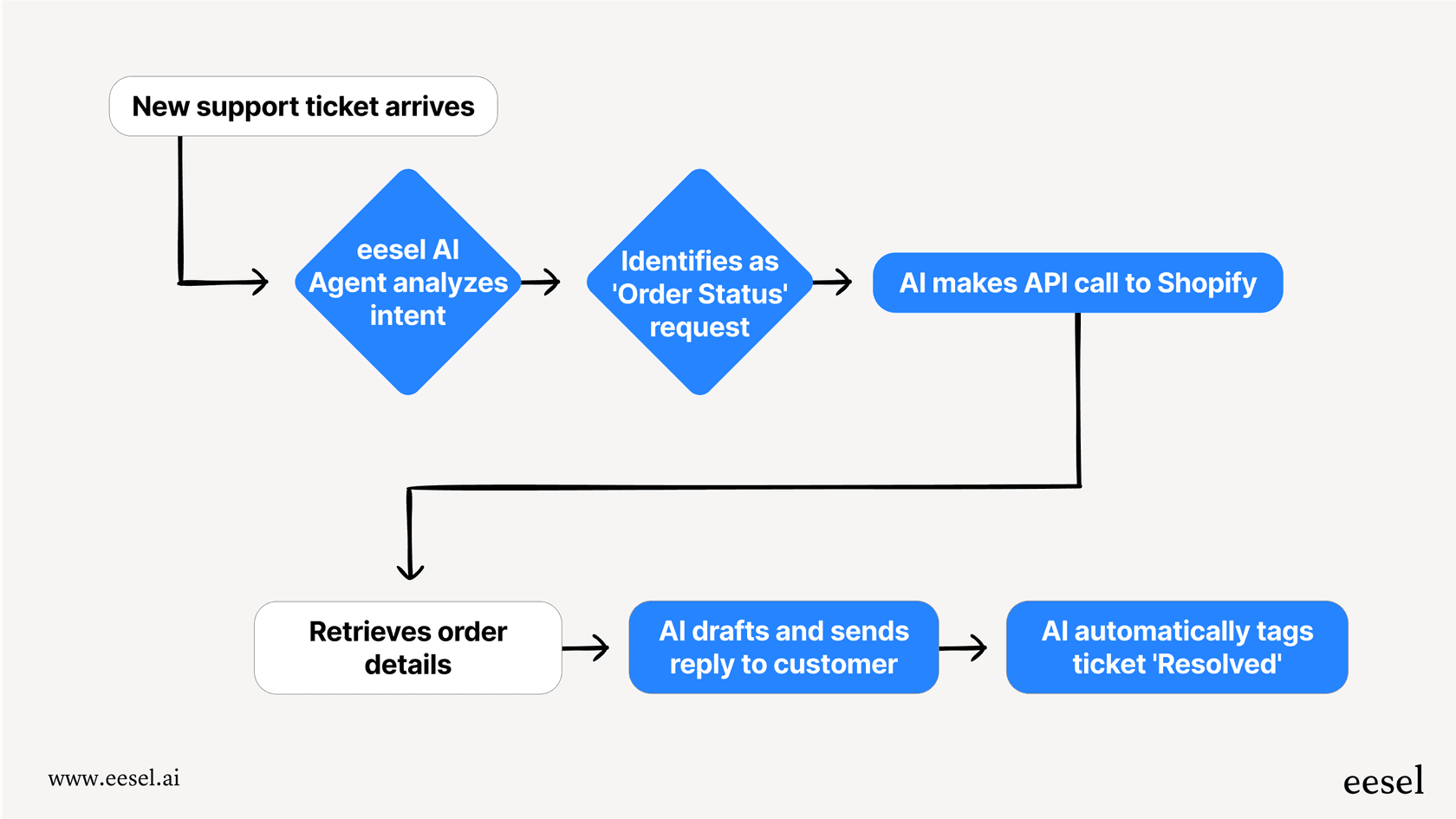
Pros and Cons: Its biggest advantage is how quickly you can get started and the built-in safety net of its human-in-the-loop default. You can get value on day one by having it draft replies for your agents to review and approve. This completely removes the anxiety of unleashing a rogue AI on your customers. It also has powerful, deep integrations with platforms like Shopify, allowing it to act as a knowledgeable sales assistant that can look up orders, process returns, and recommend products. Unlike some platforms that are hard to customize, eesel AI gives you full control over its tone and actions using plain English. The pricing is also super transparent, you pay for interactions, not confusing fees that can spike unexpectedly. Its main limitation might be for massive, global enterprises that have a strict requirement for a fully self-hosted solution, though custom enterprise plans are an option.
Pricing:
-
The Team plan starts at $299/month ($239/mo annually) and includes up to 1,000 AI interactions.
-
The Business plan is $799/month ($639/mo annually) and unlocks key features like training on your past tickets and advanced AI Actions.
-
Custom plans are available for larger teams with particular requirements. You can see all pricing details.
Best for: Customer support and ecommerce teams who want a seriously powerful AI that feels more like a collaborative teammate than a complex piece of software you have to wrestle with.
2. Zendesk AI

For any team that lives and breathes Zendesk, their built-in Zendesk AI is the most straightforward option. It is baked right into the platform you already use every day, with features like AI Agents that can handle conversations from start to finish and a Copilot that helps your human agents work faster.
Pros and Cons: The main strength here is the seamless native integration. There are no third-party apps to connect or APIs to worry about. It works perfectly with all of your Zendesk tickets, macros, and reporting. It is a solid choice for automating answers to common questions by pulling from your existing Zendesk knowledge base. Because it is so deeply optimized for the Zendesk ecosystem, it offers an exceptionally unified experience for support teams. It excels at leveraging your core help center articles to ensure high-quality and verified automated responses, making it a reliable pillar for enterprise-grade customer service.
Pricing:
- Basic AI features are included in Zendesk Suite plans, which generally start with the Suite Professional plan at $115 per agent, per month (billed annually). The more advanced Copilot features are a paid add-on, costing an extra $50 per agent, per month.
3. LivePerson
LivePerson has been in the game for a long time, and they have carved out a space as the go-to for large, enterprise-level companies focused on what they call "conversational commerce." Their whole platform, the Conversational Cloud®, is built to turn customer chats into sales, and they have the stats to back it up, with some customers reporting a 90% automation rate.
Pros and Cons: LivePerson is a powerhouse for massive retail and sales operations. It can handle over a billion conversations a month and provides incredibly deep analytics to track performance. Their generative AI and agent-assist tools can deliver huge efficiency gains for large teams. But all that power comes with a hefty dose of complexity and cost. This is not a self-serve tool you can get up and running in an afternoon. It typically involves a significant implementation project with their team and is priced for the enterprise market, which puts it out of reach for most small to medium-sized businesses.
Pricing:
- Pricing is not public. You have to contact their sales team for a custom quote, which is usually a sign that it is geared toward large, custom deployments.
4. HubSpot Chatbot Builder
Part of HubSpot's Breeze AI offering, their chatbot builder is a mature and highly capable tool designed for marketing, sales, and service teams. Its main job is to capture leads, ask qualifying questions, book meetings, and ensure all that data flows seamlessly into the industry-leading HubSpot CRM.
Pros and Cons: The standout feature is its flawless integration with the HubSpot CRM. Every chat is logged, and contacts are automatically created or updated, which is a massive productivity boost. The visual builder is intuitive, making it easy to create effective conversation flows. HubSpot's AI capabilities are incredibly robust and designed to scale with your business. While it is a powerhouse for qualifying leads, HubSpot also offers dedicated AI Agent capabilities that can efficiently manage technical support inquiries. It is a versatile, trusted platform that ensures your entire customer journey is perfectly synced.
Pricing:
- HubSpot offers a free chatbot builder that provides great value for getting started. For teams needing more advanced power, the AI Agent capabilities are available on Professional and Enterprise plans, offering a tiered system that allows you to match your investment to your team's growth.
5. Zapier Chatbots
Zapier Chatbots is for the ultimate automator. It lets you build a custom chatbot and then connect it to the more than 8,000 apps in the Zapier ecosystem. You can train it on your website or a set of documents, and then use the conversation to trigger workflows in pretty much any other tool you can think of.
Pros and Cons: The main draw is its incredible connectivity. If you want a chatbot that can take a customer request, create a Trello card, add a row to a Google Sheet, and send a notification to a Slack channel all at once, this is the tool for you. The setup is relatively simple if you are already comfortable building Zaps. The biggest limitation is that it is more of a framework than a complete, specialized solution. It is not an out-of-the-box AI agent designed for the specific workflows of a support or sales team, you are the one who has to build all the logic and connect all the pieces.
Pricing:
- There is a free plan that lets you build 2 chatbots. Paid plans start at $20/month ($13.33/mo when billed annually) for more chatbots and advanced features.
6. Amazon Lex

Amazon Lex is the tech that powers Amazon's Alexa. AWS makes this same powerful technology available for developer teams who want to build highly sophisticated, custom conversational bots for both text and voice.
Pros and Cons: For companies with the engineering resources, Lex offers almost limitless power and flexibility. You can design incredibly complex conversational flows and integrate them deeply with the entire suite of AWS services. However, this is absolutely not a plug-and-play solution. Building a useful bot in Lex requires a deep understanding of conversational design, AI principles, and AWS infrastructure. It is the polar opposite of a no-code platform like eesel AI, which is designed for a support manager or ecommerce owner to set up themselves in just a few minutes.
Pricing:
- Lex uses a pay-as-you-go pricing model. For text-based conversations, you pay $0.004 per request. For voice, it is $0.01 per request.
4 tips for choosing the right AI chatbot for your team
The "best" chatbot really depends on your goals, your team, and your budget. Here are a few practical tips to help you make the right call and avoid common pitfalls.
AI chatbots are now a must for customer support; fast, scalable, and cost effective. For small teams, tools like Tidio or Freshchat work well, while larger companies lean on Ada or LivePerson for deeper automation. The best choice depends on your support volume and budget.

-
Start with the job to be done: What is the number one thing you need this bot to do? Are you trying to deflect common support tickets, qualify marketing leads, or actively help customers buy products? An ecommerce chatbot built for sales has a completely different set of skills than one designed for IT support. Define the main goal before you even start looking.
-
Prioritize a safe rollout: The fear of a chatbot going rogue is real. Look for platforms that let you start in a human-in-the-loop mode. Having the AI draft replies that your team can approve, edit, or reject is the safest and fastest way to get value while building trust.
-
Test the learning process: Ask how the bot actually gets smarter. The most effective systems learn from real, messy human conversations and direct feedback. A platform that can analyze thousands of your past support tickets will sound like your team from day one, while one that only learns from a static FAQ page will always sound a bit robotic.
-
Scrutinize the pricing: Watch out for hidden costs. Clear, per-interaction or tiered models, like those offered by eesel AI and HubSpot, give you predictable costs and much better control over your budget. Look for models that match your expected volume without making "resolution" definitions overly complicated.
Why the future of AI chatbots is about collaboration
If you look at the best AI chatbot examples today, there is a clear trend: we are moving away from rigid, standalone bots and toward flexible, integrated AI teammates. The goal is no longer just about deflecting tickets or closing chats as fast as possible. It is about collaboration.
Seeing these tools in action can help illustrate their potential.
It is about giving your human team an intelligent assistant that can handle all the repetitive, time-consuming tasks. This frees them up to focus on the complex, high-value conversations where a human touch really makes a difference. The right AI does not replace your team; it makes them better.
If you are looking for an AI you can invite to your team today (not one you have to build over the next six months) give eesel AI a try. You can run a simulation on your own past tickets and see exactly how it would perform, all before it ever interacts with a single live customer.
Frequently asked questions
What are some common AI chatbot examples for small businesses?
Small businesses often use tools like eesel AI or HubSpot Chatbot Builder. These AI chatbot examples are great because they are easy to set up without a developer and can handle tasks like answering FAQs or qualifying leads right away.
How do these AI chatbot examples improve customer service?
These AI chatbot examples improve service by providing instant answers 24/7. By handling repetitive questions, they free up human agents to focus on more complex issues, which reduces wait times and keeps customers happy.
Can these AI chatbot examples integrate with my existing tools?
Yes, most modern AI chatbot examples are built to connect with popular tools. For instance, eesel AI integrates with Zendesk and Shopify, while Zapier Chatbots can connect to over 8,000 different apps to automate your workflow.
Are there any free AI chatbot examples available?
Yes, HubSpot offers a free version of its chatbot builder, and Zapier has a free plan that allows you to build up to two chatbots. These are excellent AI chatbot examples for teams that want to test the technology before committing to a paid plan.
How do I start testing these AI chatbot examples?
The best way to start is by using a tool that offers a simulation or a "human-in-the-loop" mode. In many AI chatbot examples, like eesel AI, you can let the AI draft responses for your team to review before they ever go live to a customer.
What makes these AI chatbot examples different from old chatbots?
Unlike old bots that used rigid scripts, these AI chatbot examples use natural language processing to understand what a user actually means. This allows them to handle typos and conversational language much more effectively than older technology.