


AI for Stripe billing support works when it treats Stripe as the source of truth, not the help center. Most Stripe billing tickets are a customer asking what Stripe already did: a trial converted, a card retry ran, an upgrade added a proration line, a cancellation is set for the end of the period. An agent that reads the subscription can explain those in one reply.
The split I'd set: AI explains, sends the customer portal link for card updates, plan changes and cancellations, and holds refunds for a person to approve. Stripe's own default approval rules for agent keys draw the same line. That's how I'd run eesel on a Stripe queue, and the eesel CLI lets a coding agent check its Stripe action settings before go-live.
What lands in a Stripe billing support queue?
Billing tickets from Stripe customers look varied, but they come from a short list of states a subscription can be in. Stripe's subscription docs list eight statuses, and almost every confused customer is sitting in one of them without knowing its name.
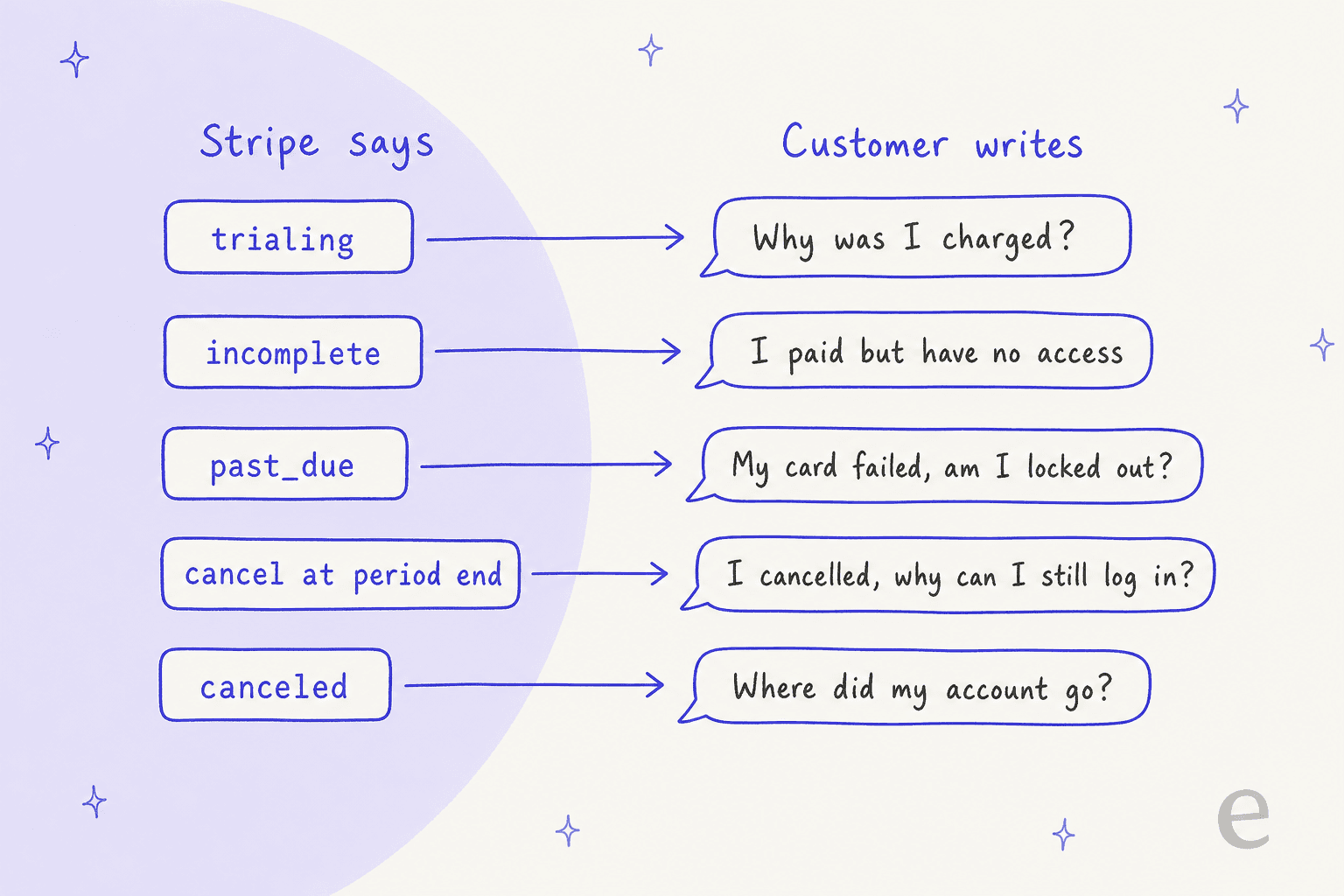
Here's what each status means in Stripe's words, and what I'd have an AI tell the customer:
| Stripe status | What Stripe says it means | What the customer usually needs to hear |
|---|---|---|
trialing | In a trial; moves to active when the first payment succeeds | The trial ended on this date, and this is the first paid period |
incomplete | First payment hasn't succeeded; the customer has 23 hours to pay | Your first payment didn't go through; here's how to finish it |
incomplete_expired | First payment never succeeded within 23 hours; nothing is billed | No charge went through, and you'll need to subscribe again |
past_due | Latest invoice failed or wasn't attempted; retries may continue | Your renewal failed, here's the next retry date, update your card here |
unpaid | Retries ended and your settings chose to keep the subscription open | Payment stopped; settle the open invoice to restore access |
canceled | Ended; a terminal state that can't be updated | Your plan ended on this date; you can subscribe again |
paused | Trial ended with no payment method, set to pause | Add a payment method to resume |
active | In good standing | Then the question is about a specific invoice line |
Two of these trip up more customers than the rest. incomplete catches people who think they paid: Stripe notes that Smart Retries don't retry the first payment while a subscription is incomplete, so nobody will try again on their behalf. And "cancel at period end" isn't a status at all, it's a flag on an active subscription, which is exactly why "I cancelled but I can still log in" is one of the most common billing questions on any SaaS queue.
I've seen the cost of getting this wrong from the merchant side, because eesel bills its own customers through Stripe. One eesel customer, a US events business on a $799 a month plan with 4,065 messages through its agent and no product complaint anywhere in eesel's records, churned purely because a declined card was never followed up. Stripe tried the card five times over 21 days, then cancelled the subscription. The customer kept using the bot through the retries and visited our plans page twice after the cancellation. Nobody at eesel followed up. That's a billing support failure, not a billing system failure, and it's the kind an AI reading past_due would have caught.
What does Stripe already handle before a ticket arrives?
A lot, and that changes what your AI should do. Stripe Billing ships with its own recovery and self-serve tools, and the AI's job is to point customers at them and explain what they did, not to rebuild them in chat.
| What Stripe does on its own | The detail that matters for support | Source |
|---|---|---|
| Retries failed renewal payments | Smart Retries are on by default for new accounts, up to 8 retries within 2 weeks | Smart Retries |
| Stops retrying on hard declines | No retry without a new payment method | Smart Retries |
| Emails customers after a failed payment | Sent after each failure, with a link to update the card, when enabled | Customer emails |
| Warns about expiring cards | Sent 1 month before the default card expires, when enabled | Customer emails |
| Sends renewal reminders | Only for charge_automatically subscriptions | Customer emails |
| Hosts each invoice online | Customers can pay and download PDF copies; links expire 30 days after the due date | Hosted invoice page |
| Runs a customer portal | Update cards, change or cancel plans, download invoices | Customer portal |
Notice what's left over. Stripe sends the emails, but customers ignore emails, open them a week later, or reply to them asking a human what they mean. A G2 reviewer who runs Stripe Billing put the upside of all this automation well:
"Reduced involuntary churn with built-in dunning, retries, and card updates, decreasing manual collections and support tickets related to failed payments."

Fewer tickets, not zero. The ones that still arrive are the hard version of the question, from customers who already got the email and didn't understand it. That's where an AI that can read the same record earns its place, and why I'd treat billing support automation as translation, not replacement. Several of those leftover tickets have an expired invoice link behind them, too: once a hosted invoice URL expires, Stripe sends the customer to a page telling them to contact the business, which is a ticket by design.
What should the AI read in Stripe before it replies?
The customer, the subscription, the latest invoice and the payment behind it, in that order. No reply about money until the agent has looked at the money. A help center can explain how proration works in general; only the invoice explains why this customer paid more this month.
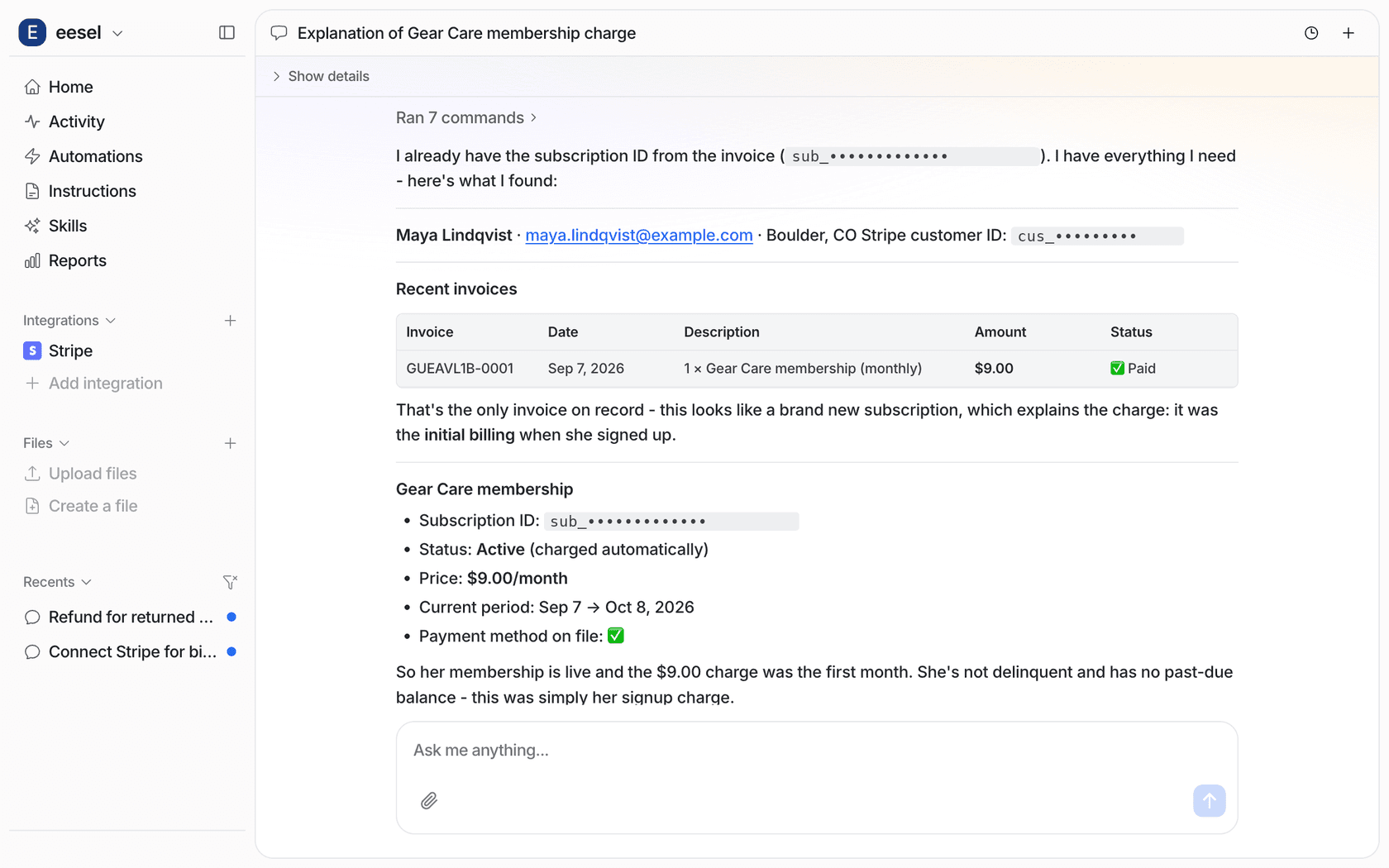
That screenshot is the whole idea in one reply: invoice, status, price, period, payment method, then a plain-English conclusion that the charge was the first month. eesel's Stripe integration reads customers, invoices, payments and subscriptions live at the moment it's asked, and adds no knowledge source of its own. Your billing policy still comes from your knowledge base; the facts about this customer come from Stripe.
"Why was I charged more this month?"
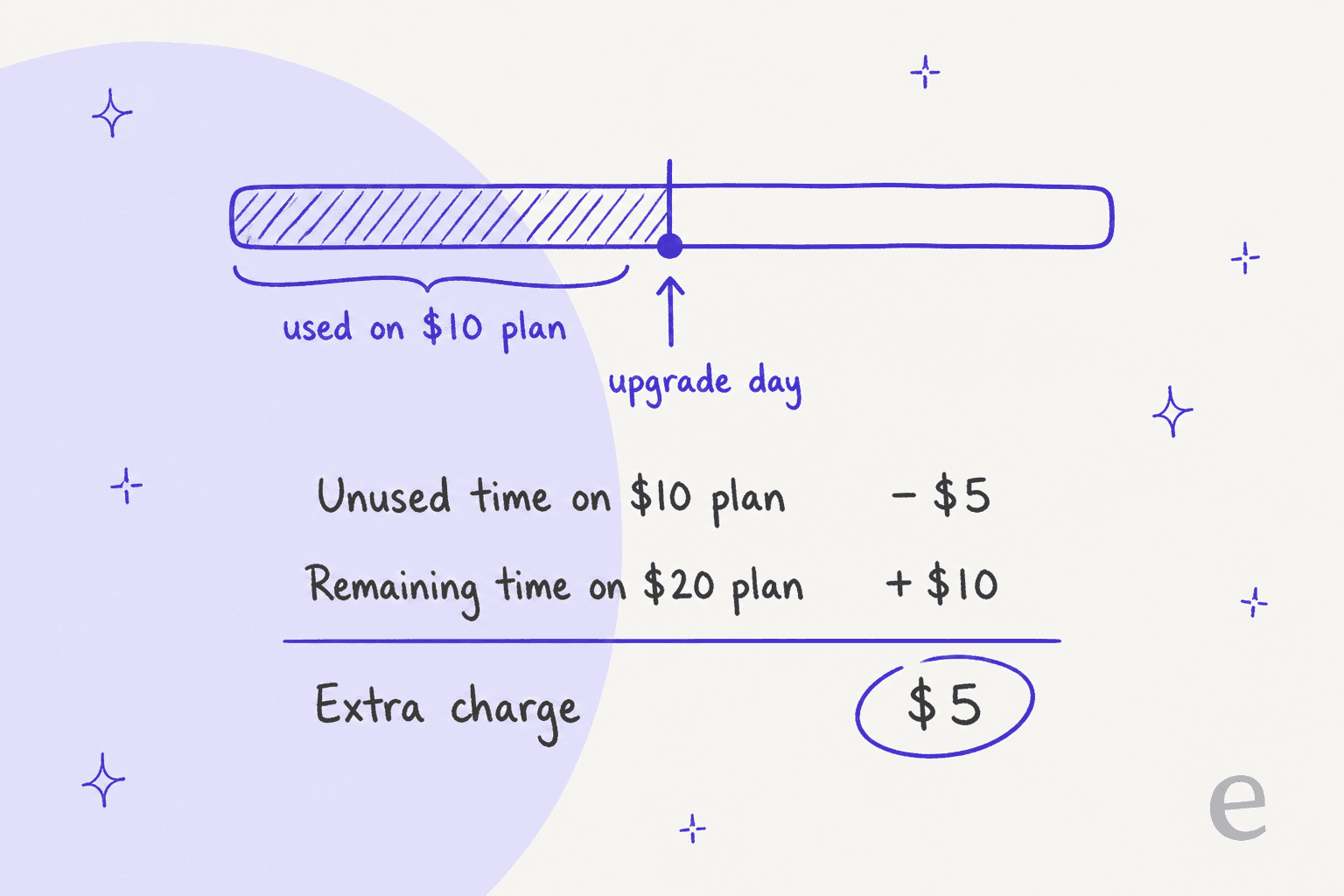
This is the proration ticket, and it's the one I'd most want an AI to handle, because the explanation is arithmetic and customers rarely do it themselves. Stripe's proration docs give the cleanest example: upgrading from a $10 monthly plan to a $20 one halfway through the period bills an extra $5.
Two details from the same page are worth putting in the agent's instructions word for word. Negative prorations aren't automatically refunded and positive prorations aren't immediately billed, so a downgrade usually shows up as credit on the next invoice, not money back. And Stripe marks proration lines with a proration flag on the invoice line item, so an agent reading the invoice can point to the exact line rather than guessing. A customer who downgraded and expected a refund is the classic case where a confident wrong answer becomes a refund request you didn't need.
"My card failed, am I locked out?"
For a past_due subscription, the useful facts are on the invoice: Stripe's attempt_count says how many tries have run, and next_payment_attempt says when the next one is. So the reply can be specific: "Your renewal on 3 November didn't go through. Stripe will try again on 6 November, and you can update your card here before then." What happens after the last retry is your setting, not Stripe's default, so the agent's instructions need to say whether your account cancels or marks the subscription unpaid.
This is the ticket my own churn story was missing. A failed payment is a customer who still wants the product, and the first reply decides whether they stay. The churn risk guide covers how to flag the ones who go quiet.
When should the AI send a portal link instead of acting?
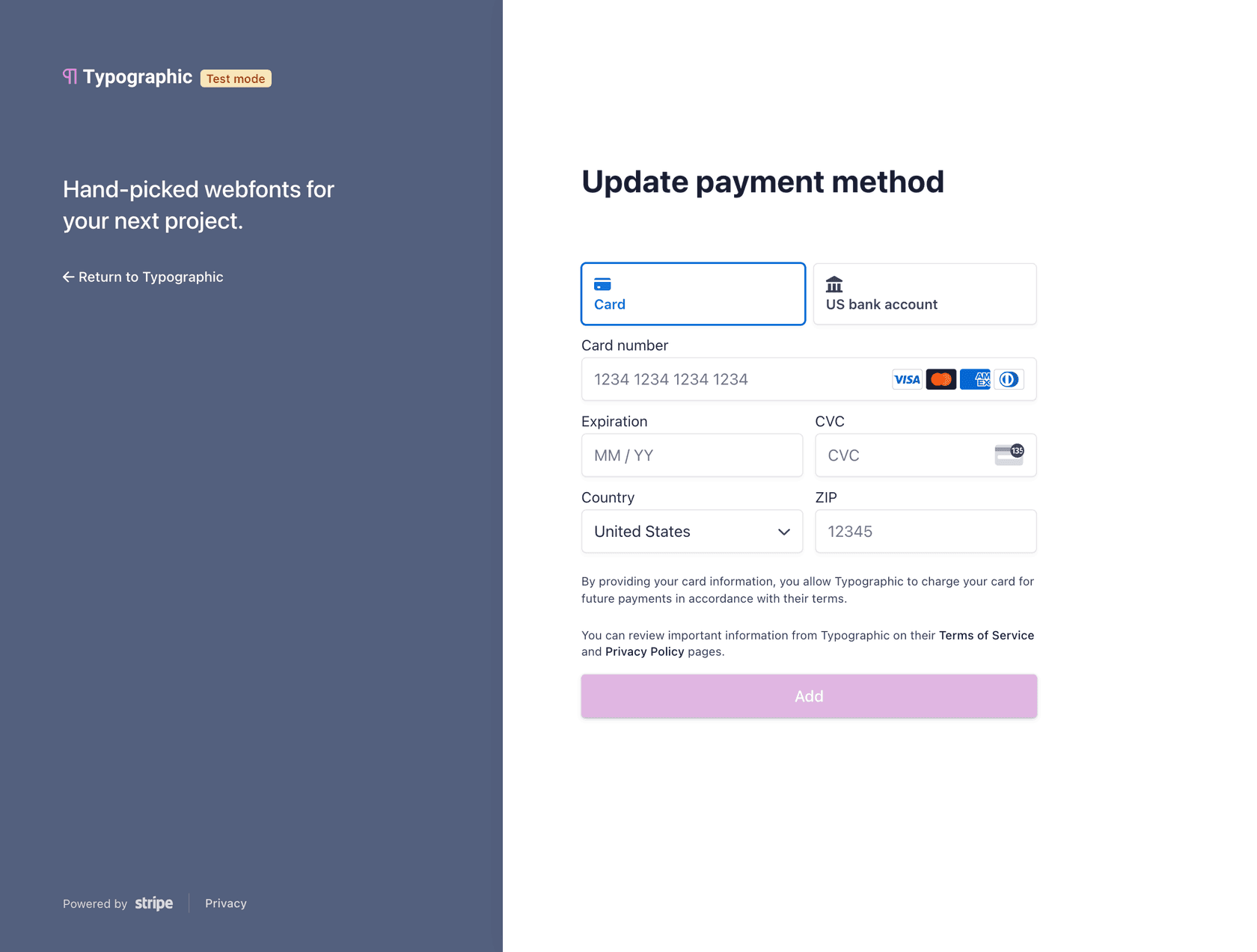
Whenever the customer can do it themselves in Stripe's customer portal: updating a card, changing a plan, cancelling, downloading past invoices. This is the move most AI billing setups skip, and it's the one I'd make the default. The safest action an AI can take on a Stripe account is often a link, not a write.
Three reasons I'd route through the portal:
- Card numbers never touch your helpdesk. The customer types them into Stripe's page, not into a ticket. Your AI should never ask for a card number or security code, and should redact one if a customer sends it anyway; the security review guide explains why.
- The customer confirms their own change. A plan switch or cancellation done in the portal is unambiguous. "Can you downgrade me?" in a ticket can mean three different plans.
- Stripe handles the edge cases. Proration on plan changes, cancel-at-period-end versus immediate, and retention coupons are all portal settings, configured once by you, not improvised per ticket.
The simplest version needs no code. Stripe's no-code portal gives you one login link: the customer enters their email and Stripe emails them a link into their own portal session. You can even prefill their email with a prefilled_email parameter. Put that link in the agent's instructions, and "how do I update my card?" becomes a one-line answer with the next retry date attached.
If your app creates portal sessions through the API, Stripe also supports deep links straight into one flow: payment_method_update, subscription_update, subscription_cancel and a pause flow. That's what you'd want behind an in-app "fix my billing" button.
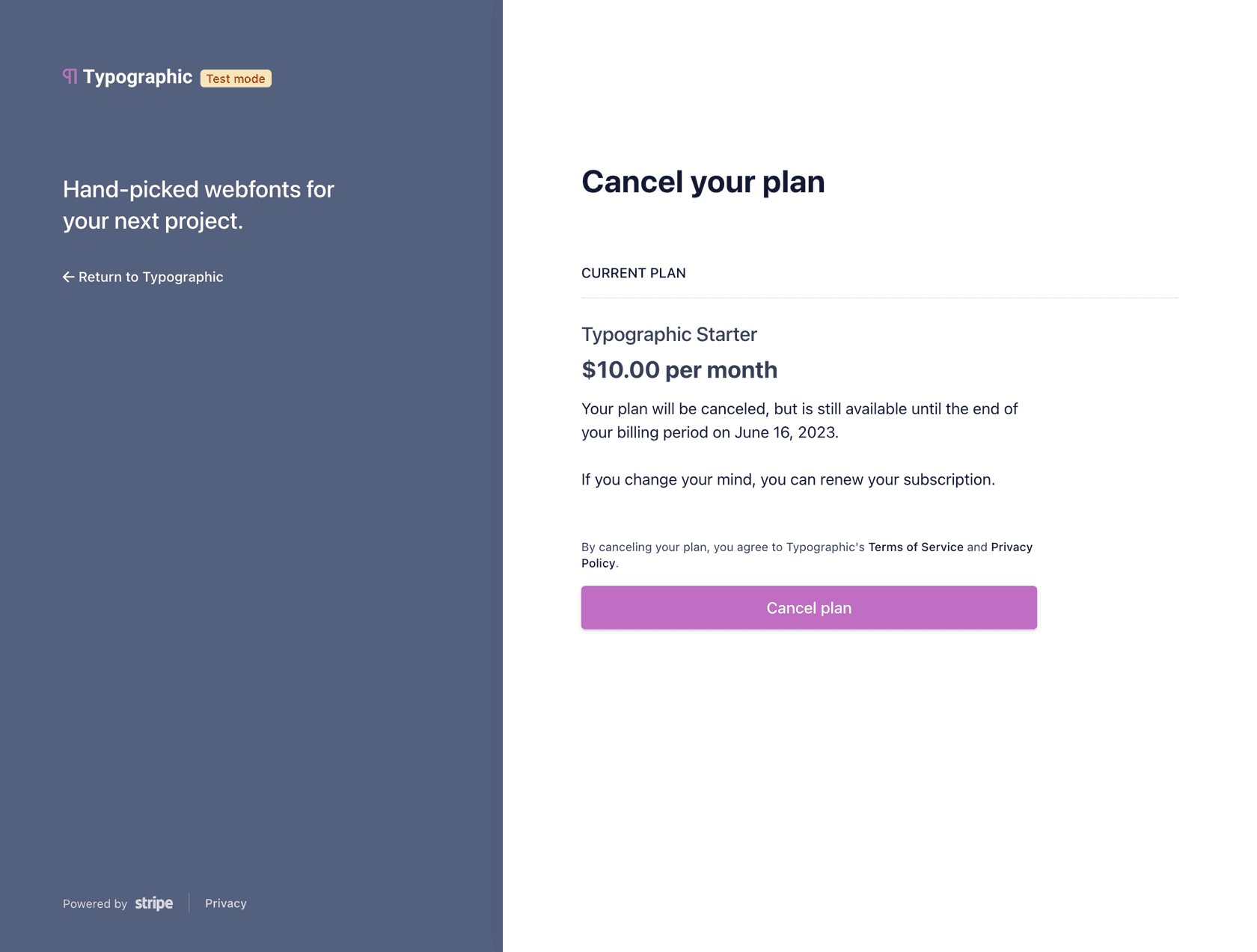
Cancellation deserves its own note. I'd still let the AI handle the conversation before the link, because a customer leaving over a fixable problem is worth one honest question, which the cancellation retention guide covers. But the link has to come in the same reply when they ask for it. Two Hacker News comments, eight years apart, make the case better than I can:
"You have to make it both easy to cancel, and easy to find out how to cancel. If they have to look for more than a few seconds or you make them jump through hoops, they're going to just do a chargeback."

"In more than 10 years, I've seen less than a dozen "accidental" chargebacks. Most are from users who are too lazy to login and hit the cancel button. I don't believe in using dark patterns as a retainment strategy, so I make it very easy to cancel from the same screen they signed up on."
An AI that answers "how do I cancel?" in ten seconds with the right link is the cheapest chargeback prevention you'll ever buy. Stripe's $15 dispute fee is the expensive alternative.
Which Stripe actions should need a person's approval?
Anything that moves money or ends a subscription now: refunds, immediate cancellations, credit notes, voided invoices. I'm not inventing that line. Stripe ships it as a default: when you create an agent-tagged API key, Stripe applies default approval rules that cover "Refund is created" and "Subscription is canceled", along with payouts and transfers. A designated reviewer approves or denies each one, and requests not approved within 14 days expire.
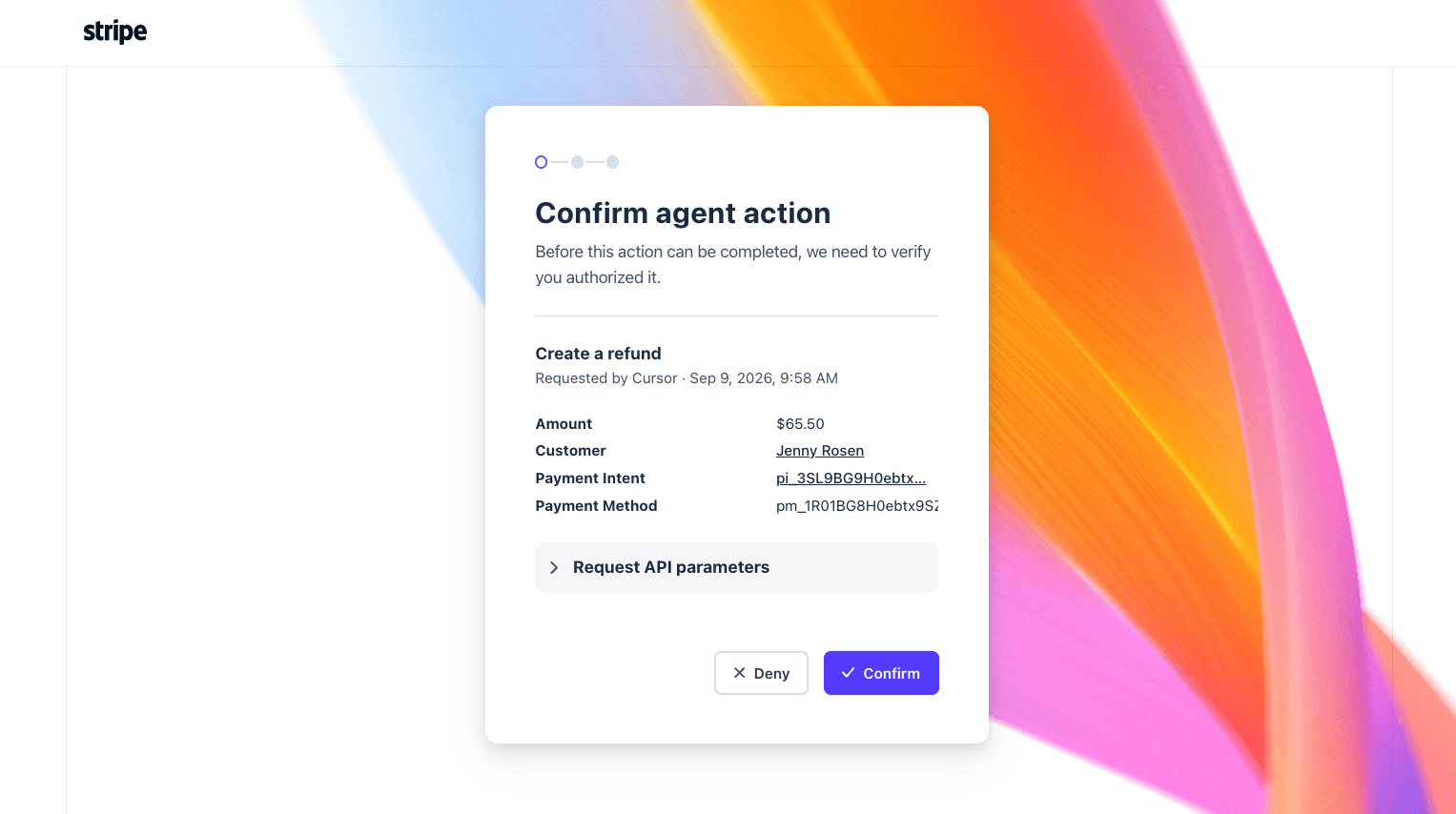
The rules support conditions too, so a team can require approval only for refunds above an amount, or only for actions taken by agent keys. Stripe's MCP server leans the same way: it tells you to turn on your MCP client's tool approval setting, and Stripe says that starting in December 2026 the MCP server stops accepting full-access secret keys and untagged restricted keys, leaving agent keys or OAuth. If you're wiring Stripe into an agent yourself, the Stripe agent toolkit guide and Stripe with n8n cover the build side.
Here's why each of these sits behind approval, from Stripe's own docs:
| Action | Why a person should approve it | Source |
|---|---|---|
| Refund | Processing fees from the original payment aren't returned, and the customer sees the credit 5-10 business days later | Refunds |
| Cancel immediately | canceled is terminal; the customer needs a new subscription to come back | Subscriptions |
| Cancel on a custom date | Stripe won't let you provide a refund with a custom cancel date | Cancel subscriptions |
| Cancel at period end | Lower risk: reversible any time before the period ends | Cancel subscriptions |
| Credit note or void | Changes what the customer owes on a finalized invoice | Approvals |
Cancel-at-period-end is the exception I'd consider moving to automatic first, since Stripe lets you undo it by setting cancel_at_period_end back to false. Refunds are the opposite: eesel's Stripe agent is taught that Stripe stores amounts in cents and refunds can't be undone, so it states the dollar amount back before proposing one. The refund approval matrix shows how to graduate one refund type at a time, and approval workflows covers who signs off.
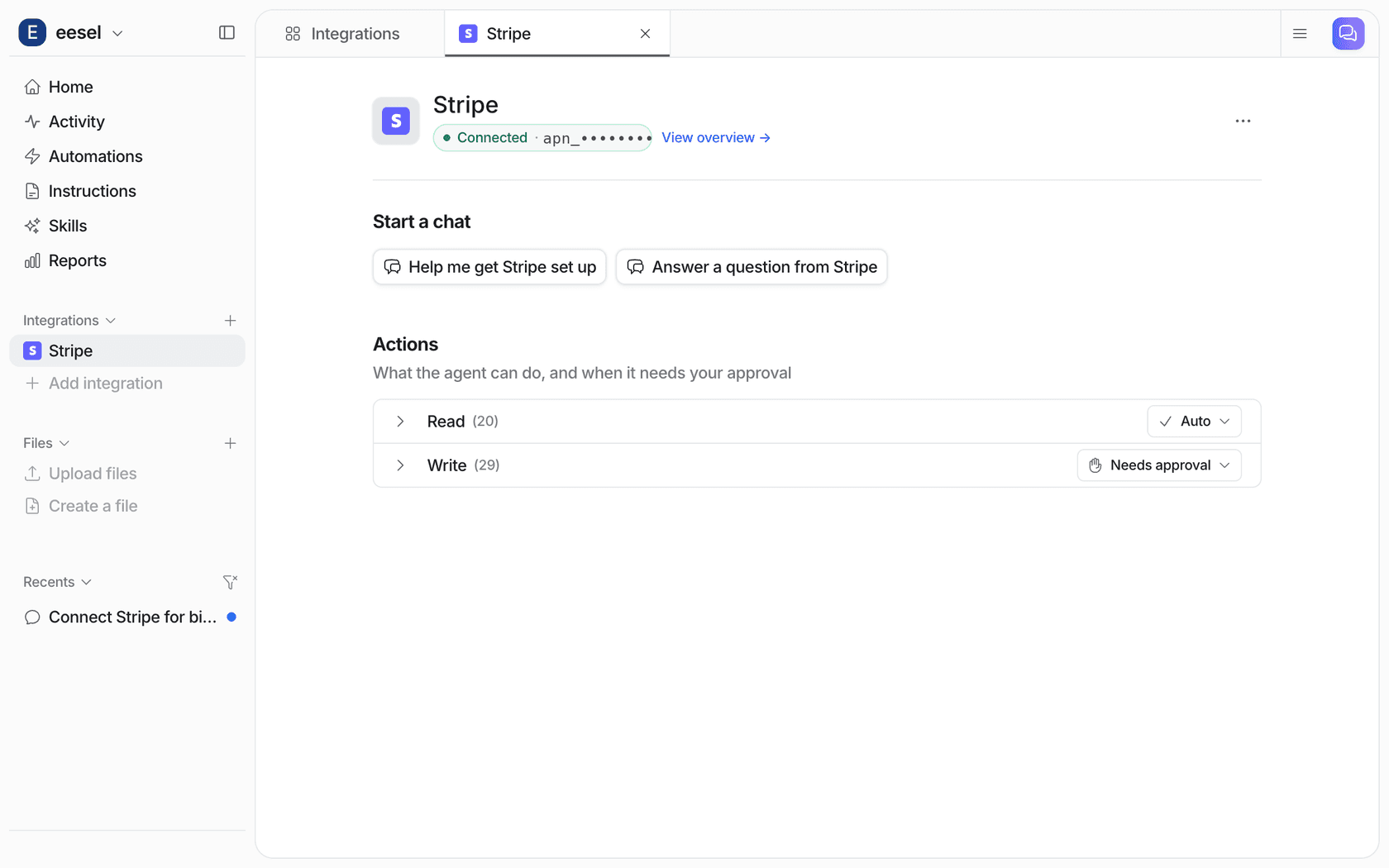
In eesel, every action runs on its own, asks first, or stays off, set per agent in actions and approvals. The Stripe integration groups 20 read actions and 29 write actions, and the sensible start is exactly the screenshot above. Held actions show up as an approval card in the dashboard, in the Slack thread when the run started there, and in a terminal with eesel approvals. If you also use a Stripe agent key, its approval rules are a second lock on the Stripe side; pick which one your team works from, so a refund doesn't wait in two queues.
Which Stripe billing tickets can AI close on its own?
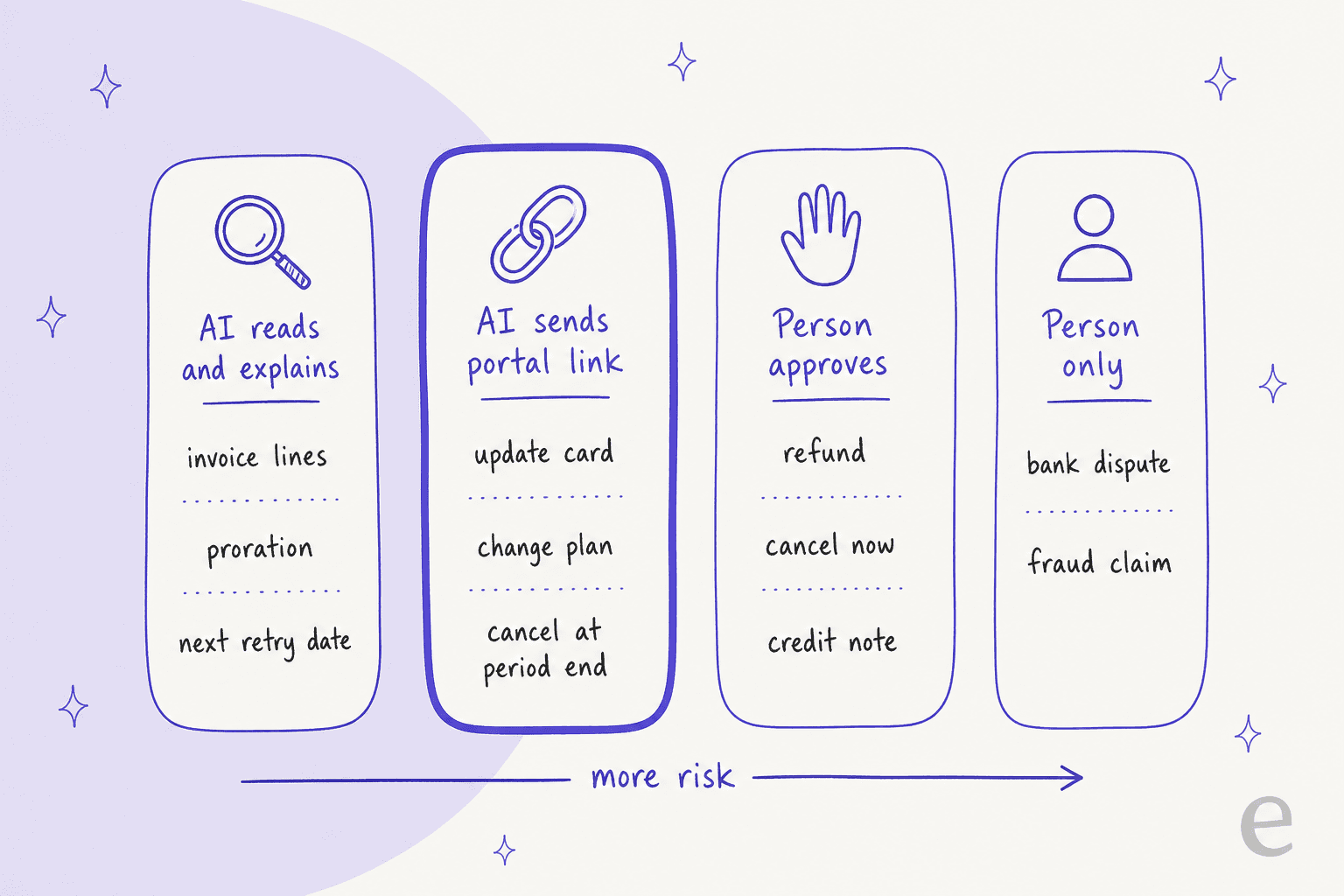
Put the last three sections together and you get four lanes, ordered by how much can go wrong.
Pick a ticket below to see what the agent should read, what it should do, and who owns the outcome. It's the same sorting I'd write into the agent's instructions, so it doubles as a first draft of yours.
Stripe billing ticket sorter
What did the customer ask?
Pick a ticket above to see what to read in Stripe, what the AI does, and who owns it.
Read: the latest invoice and its line items, looking for lines flagged as prorations.
AI does: names the plan change and date, and walks through the credit and the charge. A downgrade usually means credit on the next invoice, not a refund.
Owner: the AI. A person only if the customer still disputes the maths.
Read: subscription status, the open invoice's attempt count and next payment attempt.
AI does: says when Stripe retries next and what happens after the last retry, then sends the portal link to update the card. Never takes card details in the ticket.
Owner: the customer fixes it in Stripe; the AI follows up.
Read: the customer's invoices and the hosted invoice link.
AI does: sends the portal link, where past invoices can be downloaded, or resends the invoice if your setup allows it. Old links expire 30 days after the due date.
Owner: the AI.
Read: the subscription, its period end, and whether it's already set to cancel at period end.
AI does: asks one honest question if your policy allows, then sends the portal cancel link in the same reply and states the date access ends.
Owner: the customer. Immediate cancellation with a refund goes to a person.
Read: the payment, its amount in cents, any existing refunds, and whether a dispute is open.
AI does: checks your refund policy, states the exact amount and payment back, and queues the refund for approval.
Owner: a person approves. Customers see the credit 5-10 business days later.
Read: the disputed payment and the customer's history, pulled into a note.
AI does: no refund. Stripe recommends accepting or challenging a disputed payment instead of refunding it.
Owner: whoever handles disputes in Stripe, fast. The response window is short.
Pick what the customer said to see what the agent should read in Stripe, what it should do, and who owns the outcome.
Which Stripe billing tickets should stay with a person?
Disputes, fraud claims, and anything that sounds legal. These aren't tickets where speed of a reply matters as much as the judgment behind it.
- A bank dispute. Once the customer goes to their bank, the bank has already taken the money back and Stripe has charged its
$15dispute fee on US accounts. If a refund is created while a dispute is pending, Stripe's refund docs say to accept or challenge the dispute instead. That's processor work, covered in the payment disputes guide and the chargeback inquiries guide. eesel's Stripe integration has no dispute or evidence action, and I think that's the right call. - An inquiry before a dispute. Stripe's dispute docs describe an inquiry phase where the bank asks for clarification, often because the customer doesn't recognize the charge, and a full refund resolves it without a dispute fee. A person should make that call, with the AI's note in front of them.
- "I never made this purchase." That's a fraud review, not a billing explanation. Route it with the payment facts attached.
- Legal threats and regulators. Escalate on sight; the AI escalation guide covers the triggers, and sentiment analysis helps catch the angry ones early.
The AI still has a job here: write the handoff note. A note like "Disputed $49 payment from 3 October, subscription active since March, three logins this week, no prior tickets" saves the person handling it a fresh investigation. The handoff guide shows what a good note carries, and the billing disputes guide covers the "charged twice" and "I cancelled" claims that come before a dispute.
How do real support teams draw the billing line?
Conservatively, at first, and then they open it up as the drafts prove themselves. Two eesel customers sell subscriptions and show both ends.
MentorShow is a French online learning platform sold on a yearly subscription, with support run entirely in HubSpot through the HubSpot integration. Before drafting, eesel reads each member's record: subscription status, next renewal date and past tickets, because a login problem from someone with no active subscription isn't really a login problem. Between 8 August and 8 September 2026 it read about 1,200 conversations and tickets and wrote 432 reply drafts. Refunds, billing checks and account changes go straight to a person, and it never promises a refund. Cancelling is one of six narrow topics where it may answer a brand-new ticket on its own, which is exactly the portal-link lane above.
SE Ranking runs support for three subscription software products through Zendesk, 4,650 conversations in a month. Refunds and trial extensions go to the team with the customer's name and email, and billing email tickets never get a drafted reply, only a note on what eesel found for the billing specialist. If your billing team wants full control on day one, that's a reasonable place to start; the Zendesk SaaS billing guide covers the field setup.
The pattern across both is the one Stripe's approval rules encode: the AI explains from the record, a person decides about money. For more on how SaaS teams split the rest of the queue, see AI for SaaS support and the B2B SaaS version.
How do you set up AI for Stripe billing support?
Six steps. The order matters more than the tool.
- Create a restricted key, not a secret key. Stripe's API key docs recommend restricted keys for new use cases, because you control the permissions. Start in test mode while you write instructions and approvals; eesel's Stripe setup page lists the exact permissions its agent needs.
- Turn reads on, writes on approval. Customers, invoices, payments, subscriptions and refunds should be readable from day one. Refunds, cancellations, credit notes and voids start on approval.
- Write the billing rules in plain language. Your refund policy, what happens after the last retry, whether downgrades get credit or refunds, and the portal login link. Upload the policy document too, so the agent answers the "why" from your words.
- Teach the four Stripe habits. Read before write. Amounts are in cents. Cancel isn't delete, so "cancel my account" means cancelling the subscription, never the customer record. And no card details in tickets, ever.
- Test on last month's billing tickets. Run the agent against real historical tickets before it touches a live one; the simulation testing guide covers how many per topic you need, and the implementation timeline shows how long each stage takes.
- Measure recovered payments and disputes alongside tickets closed. Track
past_duesubscriptions that recovered after a ticket, and your dispute count over time, in your support reporting.
If a coding agent like Claude Code or Cursor is doing the setup, the eesel CLI covers most of it: eesel integrations stripe actions lists every Stripe action with its approval setting, eesel files upload adds your billing policy, and eesel chat lets it ask test questions and check the answers before anything goes live. Creating the Stripe key itself still needs a person in the Stripe dashboard.
For comparing vendors, I'd ask each one three things: does it read the subscription status before replying, can refunds sit on approval with the amount shown, and does it send the portal link for self-serve changes. The vendor evaluation checklist has the rest, and best AI for subscription businesses compares the options.
Try eesel for Stripe billing support
If your SaaS bills through Stripe and billing tickets keep landing in your helpdesk, eesel joins it like a support teammate who can actually see Stripe. It finds the customer by email, reads their subscription, invoices and payments, explains the trial charge, the proration line or the next retry date in plain words, and sends the portal link for card updates and cancellations. Refunds and immediate cancellations wait for your approval, with the exact payment named. It works inside Zendesk, HubSpot, Slack and the rest, and you can run it against your past billing tickets before it answers a live one.
Pricing is one fixed monthly plan: a ticket is 1 credit however many Stripe lookups it takes, plans start at $299 a month for 500 credits, and the free trial gives you 100 credits for 7 days. Check the pricing page, then Try eesel and point it at last month's "why was I charged?" tickets first.
Frequently Asked Questions
Can AI answer Stripe billing support tickets on its own?
What should an AI support agent read in Stripe before replying?
Should AI issue refunds in Stripe automatically?
How should AI handle a failed payment ticket in Stripe?
Can the AI cancel a Stripe subscription for the customer?
What happens if a customer disputes a charge with their bank?
$15 dispute fee in the US, and recommends accepting or challenging a disputed payment rather than refunding it. The payment disputes guide and the chargeback inquiries guide cover that side.Is it safe to connect an AI agent to Stripe?
How much does AI for Stripe billing support cost with eesel?
1 credit however many Stripe lookups it takes. Plans start at $299 a month for 500 credits, and the free trial gives you 100 credits for 7 days to test it on your own billing tickets. Details are on the pricing page.