The 7 best AI tools for tech support in 2026

Rama Adi Nugraha
Written by

Rama Adi Nugraha

Katelin Teen
Reviewed by

Katelin Teen

Last edited July 10, 2026

Expert Verified
Illustration of AI tools working across a tech support and IT help desk

What "AI for tech support" actually means now

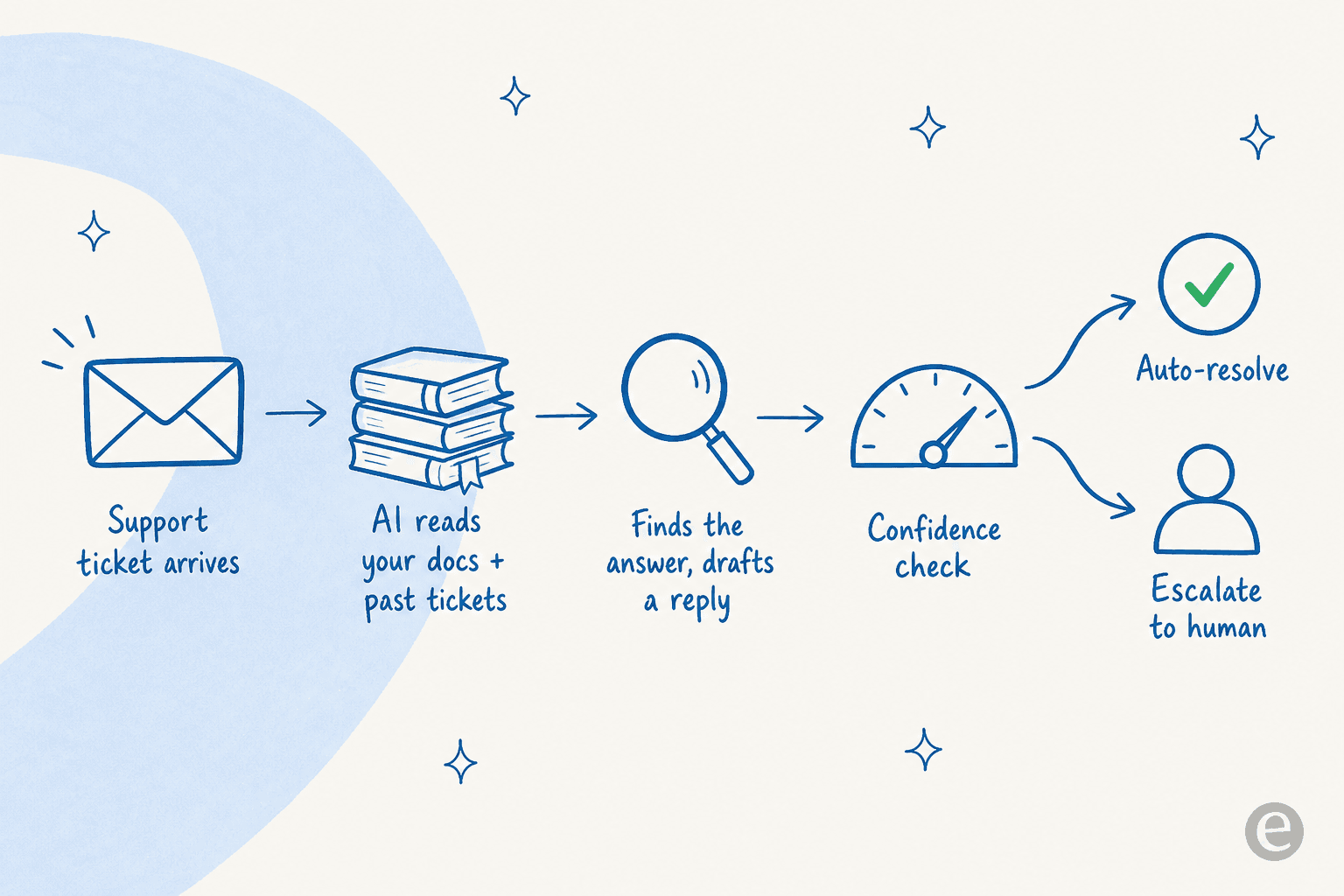
A couple of years ago, "AI tech support" meant a chatbot that matched keywords to help-center articles and, when it got confused, dumped the customer into a queue. That era is over. The AI agents running tech support in 2026 read your documentation and your solved ticket history, draft an actual answer in your voice, and increasingly take the action themselves: reset the password, pull the order status, restart the service, then close the ticket and note what they did.

The mechanics are more similar across tools than the marketing suggests. Here's the loop nearly all of them run.

How an AI agent resolves a tech support ticket, from ticket arrival through a confidence check to auto-resolution or human handoff

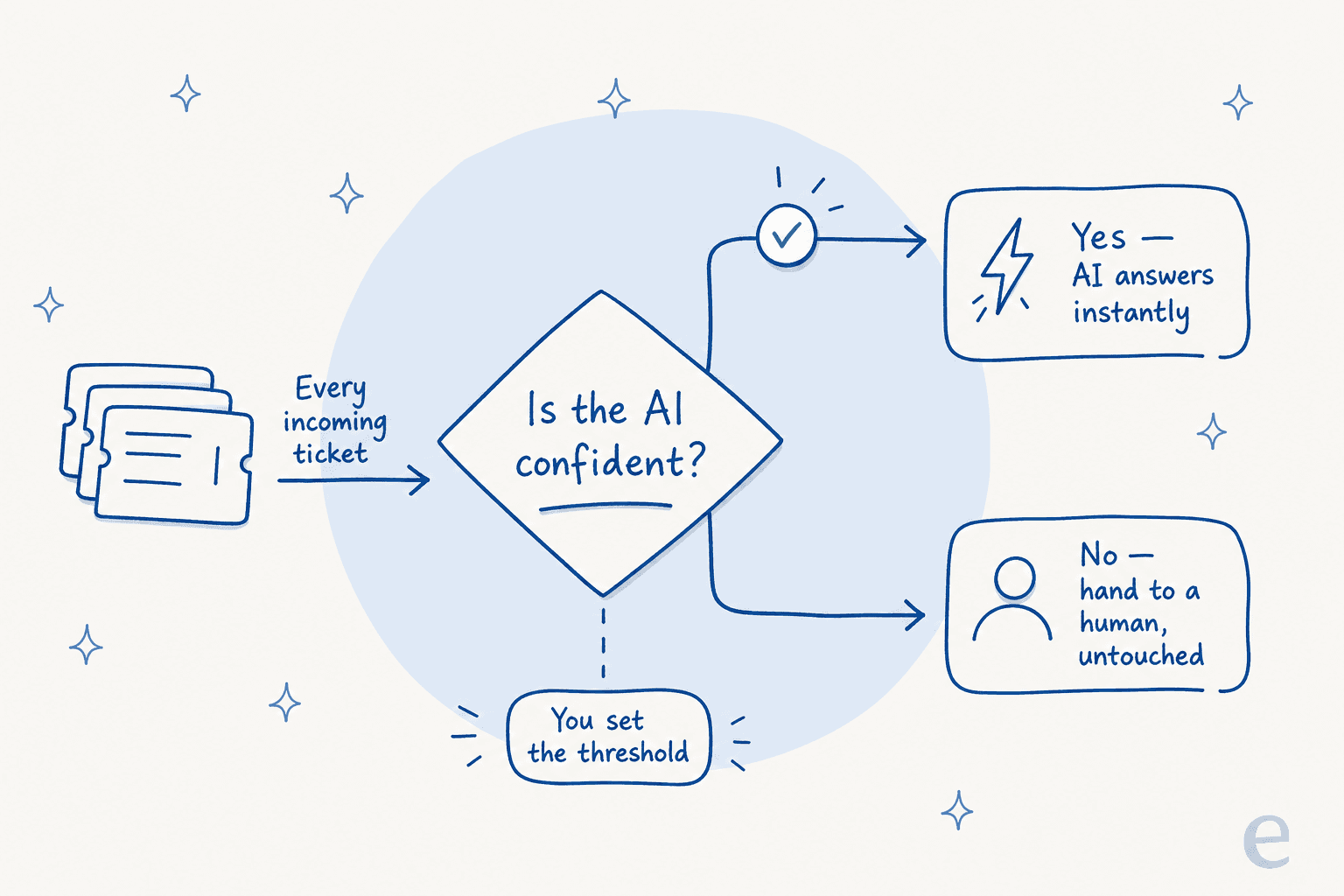
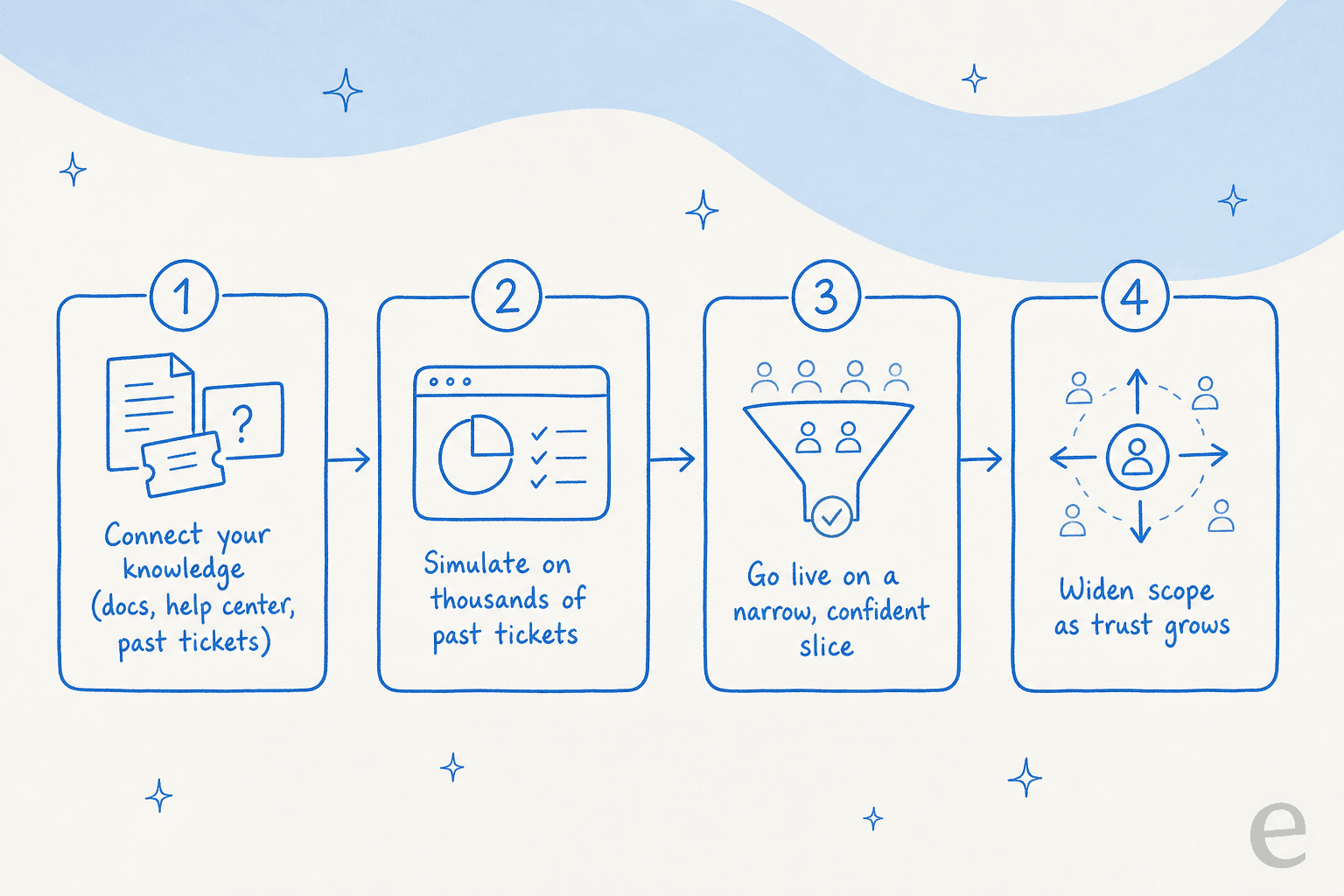
The part that separates a good tool from a demo-ware one is that confidence check in the middle. A tool that answers everything, including the questions it half-understands, is how you end up shipping wrong answers to customers. In building eesel, I've watched a confident-sounding bot quietly give a wrong answer more than once, which is why the whole team now simulates every rollout against historical tickets before it goes anywhere near a live queue. If a tool can't show you what it would have said to the last thousand tickets, that's a red flag worth taking seriously.

One more thing worth saying up front, because it comes up in almost every sales call I sit in on. A CX lead at a US healthcare platform told me they'd "kicked the tires in Zendesk AI solutions and found it largely inadequate and overpriced," and were shopping for something that could actually bring automation to the process. That gap between what native helpdesk AI promises and what it delivers is the whole reason this category is crowded. So let's get into it.

The best AI for tech support at a glance

Here's how the seven tools compare on the dimensions that actually change the decision. The billing unit column is the one I'd read first.

| Tool | Best for | AI capability | Billable unit | Starting price | Free trial | Works on your existing helpdesk? | | --- | --- | --- | --- | --- | --- | | eesel AI | Adding AI to an existing helpdesk | Autonomous agent + copilot, simulation mode | Per ticket handled | $0.40 / ticket, no seat fees | $50 free usage, no card | Yes (Zendesk, Freshdesk, Freshservice, Gorgias, more) | | Zendesk AI | Large CX teams already on Zendesk | AI agents, Copilot, intelligent triage | Per agent seat + per resolution | $55/agent/mo (Suite Team) | 14 days | No (it is the helpdesk) | | Freshservice | Internal IT service desks | Freddy AI Agent, Copilot, Insights | Per agent seat + Freddy add-ons | $19/agent/mo | 14 days | No (it is the ITSM) | | ServiceNow | Large enterprise IT | Now Assist, Virtual Agent, AI agents | Quote-based, per fulfiller + Now Assist SKU | ~$100/fulfiller/mo (est.) | Demo only | No (it is the platform) | | Atera | MSPs and IT departments | AI Copilot + Robin autonomous agent | Per technician (unlimited devices) | $149/tech/mo | 30 days | No (it is the RMM/PSA) | | Moveo.ai | Regulated, multilingual enterprise | Generative AI agents, 100+ languages | Per meaningful conversation | Quote-based | Demo only | Partly (integrates with Zendesk, Front) | | Kommunicate | Budget-conscious SMBs | Model-agnostic bot + live chat | Per conversation | $40/mo (250 convos) | 30 days | Partly (widget + integrations) |

Notice how many different things you can be charged for: a seat, a resolution, a technician, a conversation, a ticket. That single choice does more to your annual bill than any feature.

Comparison of AI tech support billing models: per agent seat, per resolution, per technician, per conversation, and per ticket handled

Now the detail on each, in the order I'd shortlist them.

1. eesel AI: best for adding AI to the helpdesk you already have

eesel AI helpdesk dashboard showing the AI agent working across connected tickets

I'll be upfront that I work on eesel AI, so read this section with that in mind. What I can tell you from the inside is what it's built to do differently: instead of being another helpdesk you migrate to, it's an AI layer that plugs into the one you already run and starts learning from your solved tickets on day one.

That's the real distinction for tech support. Your best troubleshooting knowledge isn't in your help center; it's buried in three years of resolved tickets where an agent figured out the actual fix. eesel trains on that history, so it answers the way your team already answers, not the way your marketing site does.

How it works: you connect your helpdesk (Zendesk, Freshdesk, Freshservice, Gorgias, and more), point it at your docs and past tickets, and it starts drafting. You can keep it in copilot mode (it drafts, a human sends) and then hand it full autonomy on the easy stuff once you trust it. The simulation mode I keep mentioning runs the agent against your historical tickets so you can see coverage and accuracy before a single customer sees a reply.

  • Best for: teams on an existing helpdesk who want AI without ripping out their stack, and who care about testing before they trust.
  • Pros: works on top of your current tools, learns from real solved tickets, confidence-based control over what auto-sends, transparent per-ticket pricing, 80+ languages.
  • Cons: it's an AI layer, not a full helpdesk, so if you don't already have a ticketing system you'll want one underneath it. SOC 2 is in progress rather than certified (HIPAA and BAA are available on Enterprise).
  • Pricing: usage-based at $0.40 per ticket handled, with no per-seat and no platform fee. Dashboard lookups are free, and there's $50 of free usage to start. Enterprise adds a $1,000/month platform fee for SSO, HIPAA, and a dedicated engineer.

The proof I'd point to: Gridwise saw 73% of tier-1 requests resolved in the first month, and Smava runs a fully automated agent on 100,000+ German-language tickets a month. That second number matters for tech support specifically, because volume plus language coverage is exactly where a keyword bot falls over.

Verdict: if you already have a helpdesk and the thought of a migration makes you tired, start here. The per-ticket pricing also means you're never paying for a seat that isn't resolving anything, which is a genuinely different economic model from everyone below.

2. Zendesk AI: best for big CX teams already living in Zendesk

Zendesk AI agent answering a customer question by drawing on a connected knowledge graph

Zendesk has spent the last two years rebuilding itself around what it calls the Resolution Platform, folding in its Forethought acquisition for self-improving AI agents. If your CX org already lives in Zendesk, the native AI is genuinely capable: AI agents that resolve across channels, a per-role Copilot for agents, and intelligent triage that routes and tags. It claims up to 80% automation and processes billions of AI interactions, so this is not vaporware.

The catch is the pricing model, and it's the single most common complaint I see. Seats run from $19/agent/mo (Support Team, no AI) up to $115/agent/mo for Suite Professional, and the AI agents are billed separately per Automated Resolution on top of that. Zendesk users on Reddit have done the math:

Reddit

"From what I can see in regards to this new 'Automated Resolution' pricing model, we'll be paying about $1.50 ~ $1.20 per resolution. And what Zendesk counts as a resolution can be ... subjective... If you have 500 AR per week, the bill blows out to be $650, where there wasn't a charge before."

The "subjective resolution" thread is worth reading in full, because the tech-support implication is real: a customer who gives up and abandons the chat can still be counted as a resolution you paid for. That's the incentive misalignment to watch.

  • Best for: established CX teams already standardized on Zendesk who want AI without adding a second vendor.
  • Pros: deeply integrated, mature AI capabilities, huge marketplace, strong analytics and QA.
  • Cons: layered pricing (seat + per-resolution + $50/agent add-ons) gets expensive fast; the resolution definition is disputed; enterprise pricing is sales-gated.
  • Pricing: Suite Team $55/agent/mo, Suite Professional $115/agent/mo, plus per-Automated-Resolution AI billing (around $1.20-2.00 each, up to $2 without a plan).

Verdict: the right call if Zendesk is already your system of record and you'll use the wider suite. If you mostly want the AI, layering a per-ticket tool onto Zendesk often costs less than switching on native per-resolution billing, so run that comparison before you commit. Zendesk also has plenty of alternatives worth a look if the bill is the sticking point.

3. Freshservice: best for internal IT service desks

A Freshservice IT ticket with a Freddy AI Copilot-generated summary of the issue

If your "tech support" is an internal IT team fielding VPN errors and access requests, Freshservice is purpose-built for you in a way the customer-service tools aren't. It's Freshworks' ITSM platform, and its AI layer, Freddy, splits into three: Freddy AI Agent (the autonomous, employee-facing bot), Freddy Copilot (agent-assist with summaries and suggested replies), and Freddy Insights (analytics). The screenshot above shows Copilot summarizing a stuck Jamf sign-in into a two-line brief, which is exactly the grunt work it's good at.

Freshworks cites its own benchmark numbers (66% ticket deflection, 77% faster resolution), but the community is more measured. One r/Freshservice thread that stuck with me:

Reddit

"Autoresolve is maybe 25% which is fine i guess. But our MTTR actually went UP. About 20%... Freddy tries, fails, agent picks it up but has to scroll thru the full back-and-forth before they can respond."

That handoff-cost problem is the thing to test for. It's also why the quality of the human-handoff context (does the agent get a clean summary or the raw transcript?) matters more than the headline deflection rate.

  • Best for: internal IT and enterprise service management teams that want ITSM and AI from one vendor.
  • Pros: genuine ITSM depth (assets, change, incidents), clean UI, fast time-to-value for sub-500-employee orgs.
  • Cons: Freddy AI Agent is effectively Enterprise-only and priced per agent, not per employee; no choice of LLM; community calls the AI "advanced automation, not cutting-edge ML."
  • Pricing: Starter $19, Growth $49, Pro $99 per agent/mo (annual); Enterprise is custom and bundles Freddy. Freddy Copilot is a $29/agent/mo add-on; the Freddy AI Agent is billed by session.

Verdict: the strongest native option for internal IT if you're buying the whole platform. If you only want better AI on Freshservice tickets and don't want to jump to Enterprise, an external agent that plugs into Freshservice is worth pricing against the Freddy add-ons.

4. ServiceNow Now Assist: best for large enterprise IT

Diagram showing ServiceNow's Now Assist AI as a premium add-on layered on top of the base ITSM licence, adding roughly a 60% uplift

ServiceNow is the enterprise IT standard, and if 85% of the Fortune 500 run on it, there's a reason. Its AI layer, Now Assist, is embedded across the ITSM workflow: Virtual Agent for self-service, incident summarization, AI Search over the CMDB, and a growing set of agentic workflows for password resets and provisioning.

For genuinely large IT organizations with the data model and the budget to match, it's powerful. For everyone else, two things bite. First, pricing is entirely quote-based and Now Assist is a premium SKU sold at roughly a 60% uplift over the underlying license, with average contracts around $130k a year. Second, the AI's tier-1 performance divides users:

Reddit

"We bought Now Assist expecting it to actually handle the tier 1 stuff that eats our team alive. Access requests, password resets, basic app provisioning. What we got instead is a slightly smarter virtual agent that still kicks most things to a human. The knowledge base answers are either too generic or flat out wrong."

In fairness, defenders in the same threads point out that most of these failures trace to messy knowledge base and CMDB data, not the model, which is the same lesson as everywhere: garbage in, garbage out.

  • Best for: large enterprises already standardized on ServiceNow with clean data and a real implementation budget.
  • Pros: unmatched workflow depth, single platform for all of IT, agentic roadmap, strong analyst recognition.
  • Cons: opaque and expensive licensing; Now Assist adds a steep premium; overkill and heavy for simple ticketing; long implementations.
  • Pricing: no public list; ITSM roughly $100-160/fulfiller/mo via advisors, Now Assist as a Pro Plus / premium add-on, contracts commonly starting around $30k.

Verdict: if you're already deep in ServiceNow, Now Assist is the path of least resistance, provided you can fund it and clean your data first. If the licensing model is the blocker, there are cheaper alternatives that bring AI to IT support without the six-figure floor.

5. Atera: best for MSPs and IT departments doing device support

Diagram of Atera's per-technician pricing: one technician seat covering unlimited endpoints, with AI Copilot included and Robin as a paid add-on

Atera is the odd one out on this list, and deliberately so. It's an all-in-one RMM and PSA platform: remote monitoring, ticketing, patch management, and remote access in one subscription, built for internal IT departments and MSPs doing hands-on device support. The pricing model is its signature move: per technician with unlimited endpoints, so your cost scales with headcount, not with how many machines you manage.

On the AI side, every plan includes an AI Copilot (ticket summaries, script generation, troubleshooting) and there's Robin, its patented autonomous agent that does smart intake and takes approved actions on devices end-to-end. Atera claims AI agents can cut IT workload by up to 40%.

  • Best for: MSPs and internal IT teams doing device-level tech support who want monitoring, ticketing, and AI in one per-tech seat.
  • Pros: unlimited-endpoints pricing is a real cost win at scale (G2 reviewers cite $200+/month savings vs Kaseya or NinjaOne); Copilot included in every plan; genuinely broad RMM feature set.
  • Cons: per-tech entry cost stings a 1-2 person shop; reviewers on G2 grumble that the autonomous agent and advanced reporting are paid add-ons and that AI is being "bolted on" ahead of core fixes.
  • Pricing: IT Department plans run $149 (Professional), $189 (Expert), $219 (Master) per technician/mo billed annually; MSP plans start at $129/tech/mo. Robin and some AI/automation features are metered add-ons on top.

Verdict: if your tech support is device support (endpoints, patching, remote fixes) rather than a ticket inbox, Atera is the natural fit and the pricing rewards you as you grow. If you're doing customer-facing support, it's the wrong shape of tool.

6. Moveo.ai: best for regulated, multilingual enterprise

Diagram of Moveo.ai's billing model: incoming messages funnel through an intent filter so only meaningful conversations are metered

Moveo.ai builds generative-AI agents aimed squarely at regulated, high-volume enterprises: banks, insurers, telecoms, and collections agencies. It leans hard into 100+ language support, private and on-premise deployment, and a "Customer-to-Cash" memory layer that carries context across channels. If your tech support is multilingual and your compliance team has opinions, this is built for you.

Its billing is worth understanding: you pay per meaningful conversation (one that carries real intent), not per message, across quote-based Pro, Growth, and Enterprise tiers. There's no public per-conversation rate, so budget for a sales conversation. On G2 it sits at 4.0/5 on a small review count; reviewers like deploying it as an after-hours agent inside Front to handle FAQs without hiring, while flagging that complex custom logic can need engineering effort and the admin panel feels cumbersome for non-technical staff.

  • Best for: regulated, multilingual enterprises that need private deployment and are fine with quote-based pricing.
  • Pros: strong multilingual and compliance story, private/on-prem options, proprietary models plus bring-your-own-model.
  • Cons: no pricing transparency; thin public review base; heavier lift for non-technical teams.
  • Pricing: quote-based across three tiers (2 / 5 / 100 AI agents; 100 / 1,000 / 10,000 meaningful conversations per month).

Verdict: a serious option for enterprise support in regulated verticals, especially where language coverage and data isolation are non-negotiable. For a mid-market team, the lack of self-serve pricing and the setup lift make lighter tools a faster start; Moveo has alternatives worth comparing if that's you.

7. Kommunicate: best for budget-conscious SMBs

The Kommunicate Kompose agent builder, showing a welcome-message setup with a live chatbot preview

Kommunicate is the value pick. It's a model-agnostic (OpenAI, Anthropic, or Gemini) AI chatbot and live-chat platform pitched at SMB support teams who want something live in days without a big budget. Its whole thesis is "controllable" automation: you decide what the AI handles and where a human steps in, which is a sane stance for a smaller team dipping into AI support.

The Kompose builder above is genuinely no-code, and the omnichannel reach (web, WhatsApp, mobile, Messenger) is the most consistent praise in reviews. On G2 it holds a 4.8/5:

G2

"Kommunicate is exactly what we had been searching for a long time. It offers a wide range of automations, the pricing is very reasonable for what the software can actually do, and most importantly, it comes with a human fallback option which is extremely valuable."

The honest counterweight: Capterra reviewers flag weak analytics, occasional instability, and one surprise, a bot counting as a billable user. Read the plan limits carefully.

  • Best for: SMBs on a tight budget who want controllable AI chat live quickly.
  • Pros: cheap entry point, model-agnostic, no-code builder, strong omnichannel, human handoff built in.
  • Cons: weak analytics/reporting, conversation-based billing can surprise you, less depth than enterprise tools.
  • Pricing: Starter $40/mo ($34 annual, 250 conversations), Professional $200/mo ($167 annual, ~2,000-2,500 conversations), Enterprise contact sales. Billed per conversation, with overage at $10-15 per 1,000.

Verdict: the best starting point for a small team that wants to try AI support without a platform-sized commitment. You'll likely outgrow the analytics, but you'll have learned what you actually need by then. Kommunicate also has alternatives if you need more depth later.

How to actually choose

The seven tools sort cleanly once you plot them on two axes: how big is the org, and is this customer support or internal IT?

Positioning quadrant of the seven AI tech support tools by company size (SMB to enterprise) and support type (customer support to internal IT)

But the axis that quietly decides your budget is the billing unit, so here's the worked example I run for teams. Say you handle 2,000 tech-support tickets a month.

  • On eesel, at $0.40 a ticket, that's about $800/month, flat, no seats.
  • On Zendesk, you're paying for seats and per-resolution AI: 10 agents on Suite Professional is $1,150/month before the AI agents, and 2,000 automated resolutions at ~$1.50 adds up to ~$3,000 more.
  • On Freshservice, you need Enterprise for the full Freddy AI Agent, plus per-session billing on top of per-agent seats.
  • On ServiceNow, you're in a quote-based contract that averages ~$130k/year all-in.

The numbers move with your exact setup, but the shape holds: usage-based per-ticket pricing stays flat as your team grows, while per-seat-plus-per-resolution pricing compounds. That's the lever most buyers underweight.

My honest guidance, having built on and against most of these:

  • You already have a helpdesk and want AI fast: eesel AI, layered on top.
  • You're all-in on Zendesk's suite: Zendesk AI, budgeting for per-resolution billing.
  • You're internal IT: Freshservice for mid-market, ServiceNow for large enterprise, Atera if it's device support.
  • You're a small team on a budget: Kommunicate.
  • You're regulated and multilingual: Moveo.ai.

Whatever you pick, the non-negotiable is testing on your own tickets before you go live. A tool that can't show you its would-be answers on your history is asking you to trust a demo, and tech support is exactly the place where a confident wrong answer does real damage.

Try eesel for your tech support

eesel AI dashboard showing activity across connected Zendesk tickets

If the throughline in this post resonated (you already have a helpdesk, you want AI on your tech-support queue, and you don't want to gamble on a black box), that's the exact problem eesel AI is built for. It plugs into Zendesk, Freshdesk, or Freshservice in minutes, learns from your real resolved tickets, and lets you simulate on your ticket history so you can see the resolution rate before a customer ever gets an AI reply. Pricing is $0.40 per ticket with no per-seat fees, so it stays flat as you scale. You can try it free with $50 of usage, no card required.

Frequently Asked Questions

What is the best AI for tech support in 2026?
There isn't one winner for every team. If you already run a helpdesk like Zendesk or Freshdesk and want AI on top without switching, eesel AI is the fastest route. For enterprise IT already on ServiceNow, Now Assist is the native option, and for MSPs doing device support, Atera fits. Match the tool to your stack, not the other way around.
How much does AI tech support cost?
It depends entirely on the billing unit. Per-seat tools like Freshservice and Zendesk start around $19-115 per agent per month before AI add-ons, ServiceNow runs on quote-based contracts that average around $130k a year, and usage-based tools like eesel charge about $0.40 per ticket handled. For most teams, the AI add-on is the line item that surprises them, so read the AI pricing before the seat price.
Can AI actually resolve tech support tickets, or just deflect them?
Modern AI support agents do more than deflect. They read your docs and past tickets, draft or send a real answer, and take actions like password resets through an API. The honest caveat is that resolution rates depend on your knowledge base quality, which is why you should simulate against historical tickets before going live.
What should I look for in an AI tech support tool?
Four things: how it's billed (per seat, per resolution, or per ticket), whether it works on your existing helpdesk or forces a migration, how much control you have over what it auto-answers, and whether you can test it on real tickets first. A tool that lets you gate autonomy by confidence is safer than one that goes all-or-nothing.
Do I have to replace my current help desk to add AI tech support?
No. Some tools are full platforms you migrate to, but layer-on options like eesel AI plug into the helpdesk you already use, whether that's Zendesk, Freshdesk, or Freshservice, so you keep your ticket history, macros, and workflows and just add the AI layer.

Share this article

Rama Adi Nugraha

Article by

Rama Adi Nugraha

Rama is a software engineer at eesel AI with two years of experience writing about B2B SaaS, AI tools, and customer support technology. Based in Bali, Indonesia, he brings a developer's perspective to product comparisons — cutting through marketing copy to what the integrations and APIs actually do.

Related Posts

All posts →
What is AiseraGPT? A complete overview for 2025
Guides

What is AiseraGPT? A complete overview for 2025

AiseraGPT promises “ChatGPT for the enterprise,” but how does it actually perform? This guide breaks down its features, real-world challenges, and the pros and cons compared to modern AI tools.

Kenneth PanganKenneth PanganAug 26, 2025
A complete guide to Prestashop pricing in 2025
Guides

A complete guide to Prestashop pricing in 2025

PrestaShop is advertised as free, but what's the real cost to run a store? This complete guide to PrestaShop pricing uncovers every expense, including modules, themes, maintenance, and the operational costs you can't ignore.

Stevia PutriStevia PutriSep 14, 2025
AI pretraining
Guides

AI pretraining

Ever heard that AI is "trained on the whole internet"? That's AI pretraining, the foundational step for models like GPT. But for customer support, this general knowledge isn't enough. This guide breaks down what pretraining really is and explains why specializing an AI on your company's knowledge is the key to unlocking its true potential.

Kenneth PanganKenneth PanganOct 23, 2025
A complete overview of Applaud HR AI in 2025
Guides

A complete overview of Applaud HR AI in 2025

Thinking about using Applaud HR AI? We review its agentic AI, knowledge management, and case triage features. Discover its limitations and why a more flexible AI layer might be a better fit for your support team in 2025.

Stevia PutriStevia PutriOct 9, 2025
Nouple io: A complete 2025 overview of Coupler.io
Guides

Nouple io: A complete 2025 overview of Coupler.io

Explore our deep dive into Coupler.io (nouple io), the no-code platform for data reporting. Learn about its features, pricing, and see how it compares to action-oriented AI tools.

Kenneth PanganKenneth PanganOct 19, 2025
A practical guide to intents and sentiments in customer support
Guides

A practical guide to intents and sentiments in customer support

Understanding customer intents and sentiments is no longer optional. This guide breaks down what they are, why they matter, and how to use them to elevate your support.

Kenneth PanganKenneth PanganOct 27, 2025
A complete guide to Customer.io pricing in 2025
Guides

A complete guide to Customer.io pricing in 2025

Thinking about using Customer.io? Our complete guide to Customer.io pricing covers everything you need to know about their plans, overage fees, and the real cost of their platform, helping you make an informed decision for your business in 2025.

Kenneth PanganKenneth PanganOct 8, 2025
A complete guide to Worknet AI pricing in 2025
Guides

A complete guide to Worknet AI pricing in 2025

Searching for clear Worknet AI pricing? We analyzed their costs across multiple sources to give you the full picture, from their $75/user fee to their performance-based model, and explore a more transparent alternative.

Stevia PutriStevia PutriSep 9, 2025
A complete guide to Shift4Shop pricing in 2025
Guides

A complete guide to Shift4Shop pricing in 2025

Thinking about using Shift4Shop? Before you commit, it's crucial to understand the full picture. Our guide breaks down the official Shift4Shop pricing tiers, transaction fees, and the often-overlooked operational costs like customer support that can impact your bottom line. Discover how to build a realistic budget for your e-commerce store in 2025.

Kurnia Kharisma Agung SamiadjieKurnia Kharisma Agung SamiadjieSep 14, 2025

Ready to hire your AI teammate?

Set up in minutes. No credit card required.

Get started free