

Gladly routes by customer, not by ticket: a conversation enters through an Entry Point, lands in one Inbox, and goes to an available agent, with Rules and People Match deciding order and who. Its AI agent sits in front of all that, and Gladly's docs say Rules do not fire while the AI is handling a conversation. So handoff reasons, not Rules, decide what reaches your queue first. People Match scores only Email and Messaging, never Voice or Tasks. eesel has no Gladly connector; its helpdesk teammate works inside tools like Freshdesk and Gorgias instead.
I work the support queue at eesel every day, so routing is where I check any AI tool first: what does it do before a person sees the conversation? I read Gladly's help center end to end to answer that. With the eesel CLI, a coding agent can upload approved routing and escalation policy as knowledge, then ask test questions and check the answers before anything goes live. Connecting a helpdesk still needs someone with admin access to approve it.
How does Gladly route a conversation?
Gladly's routing overview contrasts itself with ticket-based tools, where each channel can spawn a separate ticket and several agents end up on one issue. In Gladly the customer profile is the unit, and a conversation is assigned to one agent at a time.
The default flow, per Gladly's How Routing Works page:
- The customer reaches out on a channel.
- Gladly checks the channel. Dedicated Hero and People Match logic runs if you use them.
- The Lookup Adaptor pulls custom attributes from systems like Shopify.
- Rules run and can move the contact to another Inbox or assign an agent.
- If an agent in that Inbox is available, the conversation is offered or assigned to them.
Gladly describes this as a push and pull model. The engine pushes work to available agents, and agents pull more by clicking Next. Across channels the order is fixed: phone first, then messaging (chat, SMS, Facebook Messenger), then email, tasks and voicemail, according to routing priority by channel. Rules can't override that channel order, per Gladly's Rules limitations.
"I also like how all the actions with conversations are tracked so everyone can see what's going on with routing."

Where does the AI sit in Gladly's routing order?
In front of it. Gladly's AI agent (formerly Sidekick, now called Gladly AI in the docs) is connected to each Entry Point, and you choose which agent and which saved version answers there. You can also split traffic between configurations as an A/B test.
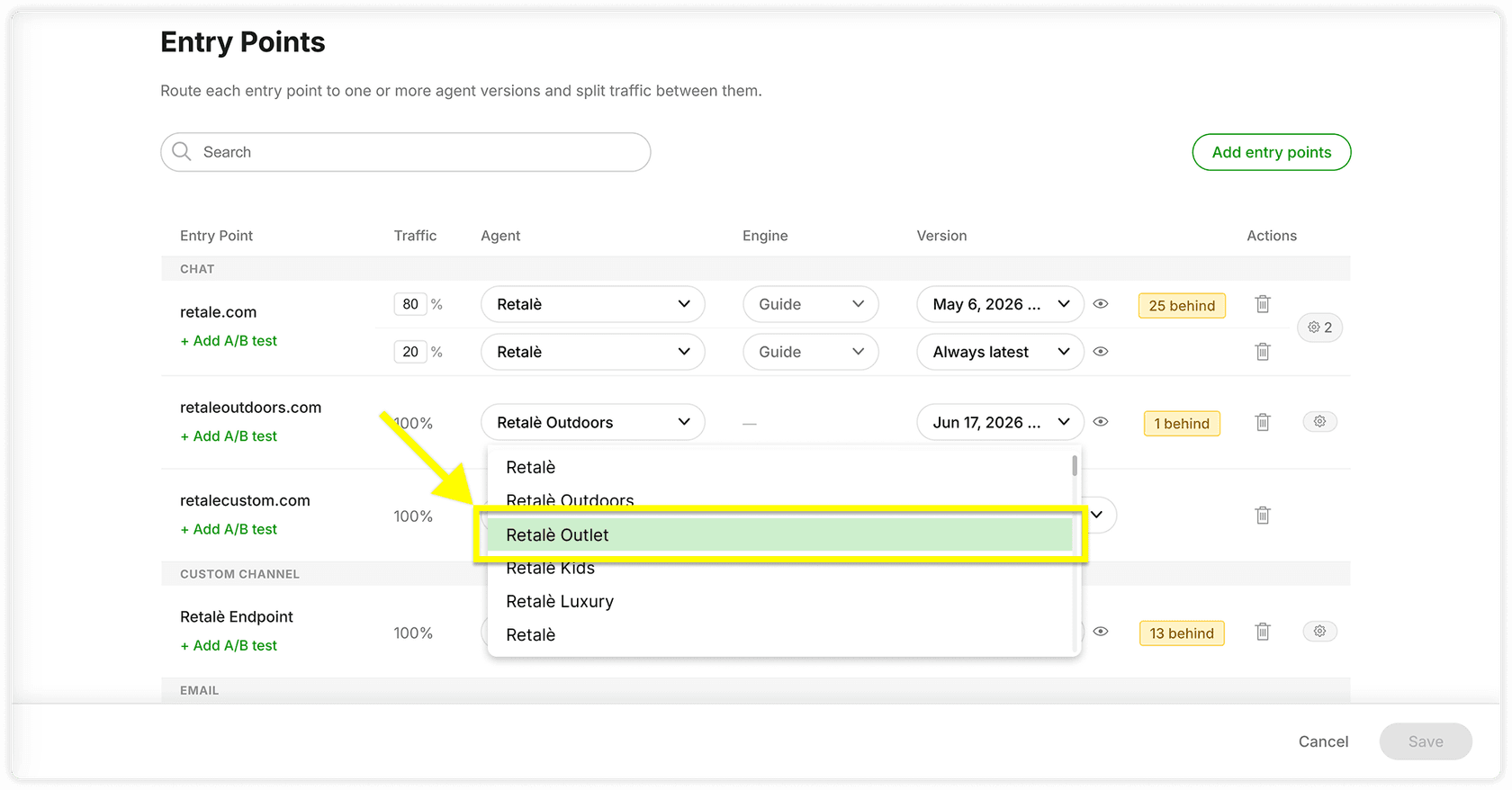
The sequence that matters most is this one: the AI answers, then either resolves or hands off, and only after a handoff does the normal machinery start.
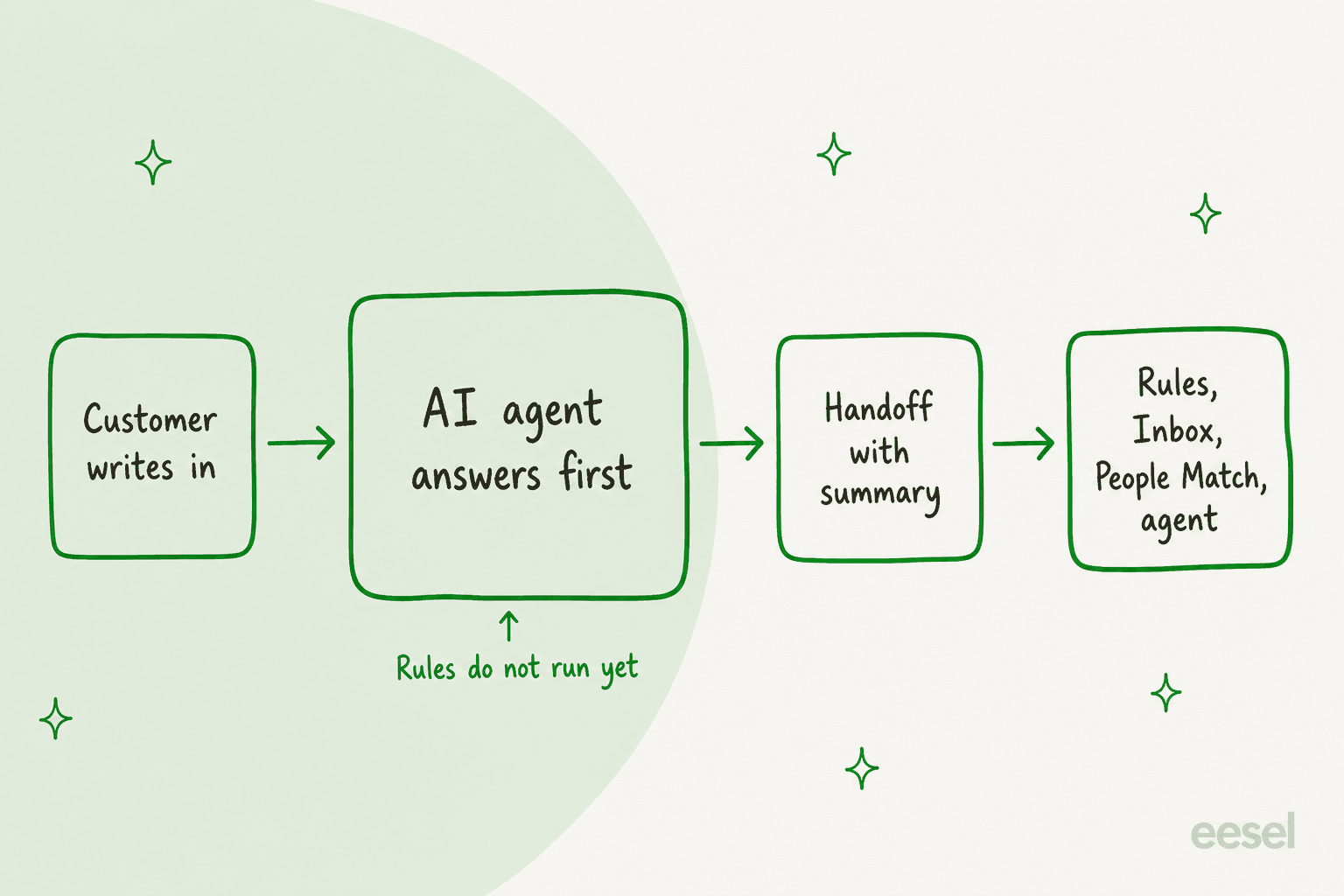
Rules do not fire on a conversation while Gladly AI is handling it. Gladly's docs list keyword routing, Topic application, spam filtering and auto-close as rules that wait until handoff. For a lead who built a clean Rules library on the old setup, that is the biggest surprise.
What triggers a handoff from the AI to a person?
Three things, per Gladly's When to get more help setup page:
- Global reasons. The defaults are a legal threat, an explicit request for a human and a non-English language. Gladly's docs both say the defaults can't be removed and that they can be edited, so check the tile in your own workspace.
- Guide-level handoffs. You write a statement such as "if the order is outside the delivery window, then handoff" and attach a reason. Gladly's Author Handoffs page says the reason shows up in the handoff summary on the Conversation Timeline.
- Inability to answer accurately. Gladly's agent experience page says that when it can't respond accurately, it sends an optional handoff message, writes a summary, then routes the customer to an agent.
The summary can be translated, a pattern I also covered in Help Scout conversation summaries, and Gladly reviews agent replies on handed-off conversations to suggest new Public Answers. If an immediate-handoff reason matches, the AI doesn't engage at all but still sends the handoff message, unless you blank it out.
If you want certain emails never to reach the AI, Gladly's AI FAQs give two options: point them at an address with no AI automation, or add a transfer scenario. That is routing by address, the same pattern as Freshdesk routing by group.
How do Inboxes and Entry Points decide where work lands?
An Inbox is Gladly's closest thing to a support queue or shared inbox. A customer sits in one Inbox at a time, and agents only receive work from Inboxes they belong to. Entry Points, such as a phone number, email address or chat site, point to an Inbox, with exceptions per entry point.
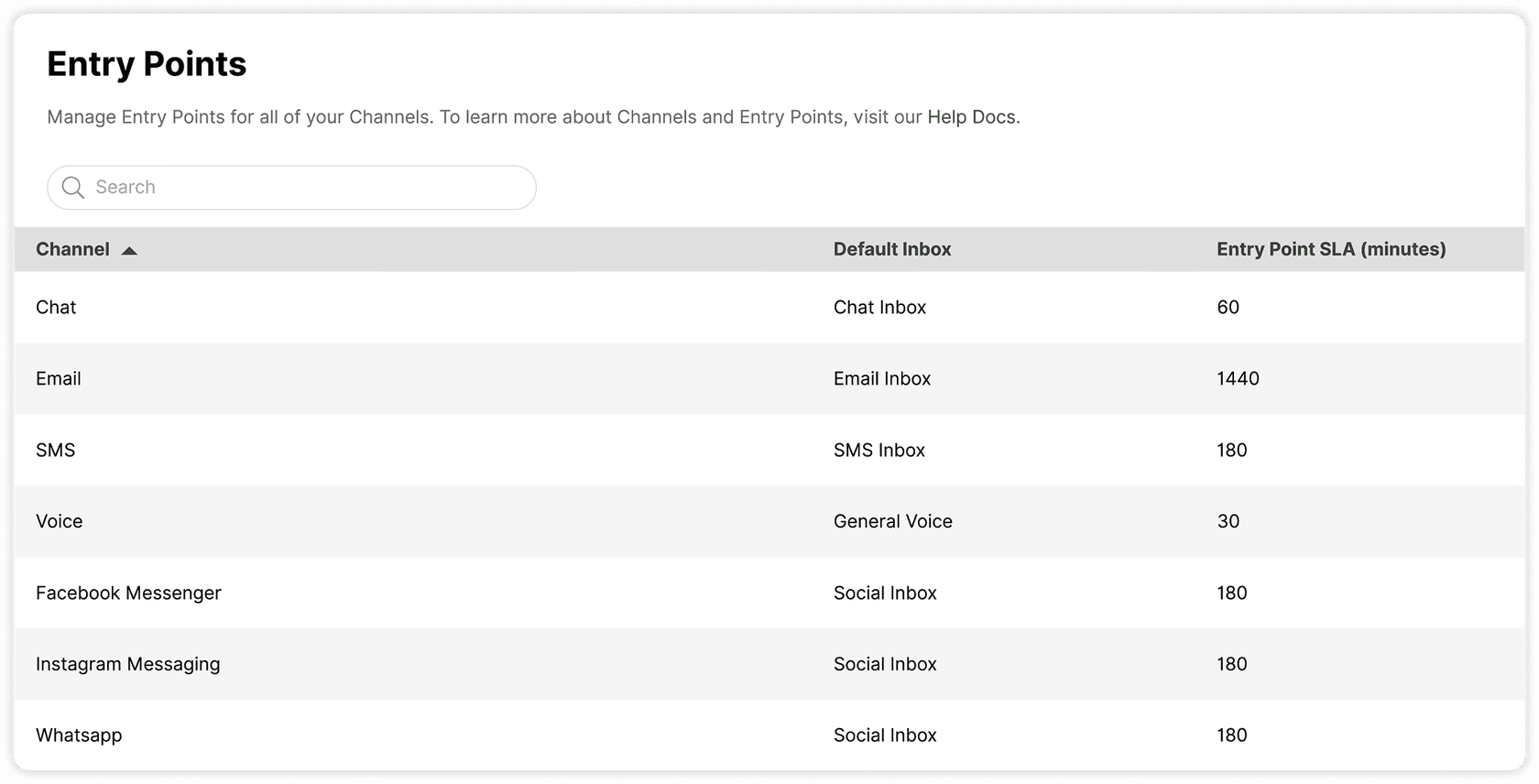
Two details are easy to miss. SLA can be set on the Inbox or on the Entry Point, and the SLA clock starts when the contact enters the queue, not after Rules finish, so a slow lookup eats into your target, per Gladly's How SLA Impacts Routing page. And email replies can be pinned to the same agent while a conversation is open, which keeps context but can pile mail on one person.
For comparison, Front's load-balancing assignment Gorgias assignment rules, and Freshchat AI routing solve the same problem with different knobs. If you want a platform walkthrough from a neighbour, my Salesforce Omni-Channel routing post is the closest structural cousin.
How does People Match decide who gets the next customer?
People Match is Gladly's patent-protected routing layer for Email and Messaging. You build Priority Boost scenarios, a Rules-like screen with conditions and a boost size: Small is 1 point, Medium 3, Large 5, Very Large 10. A customer's scenarios add up, and when an agent frees up, the waiting customer with the highest total goes to them. Ties and unscored customers fall back to the due date.
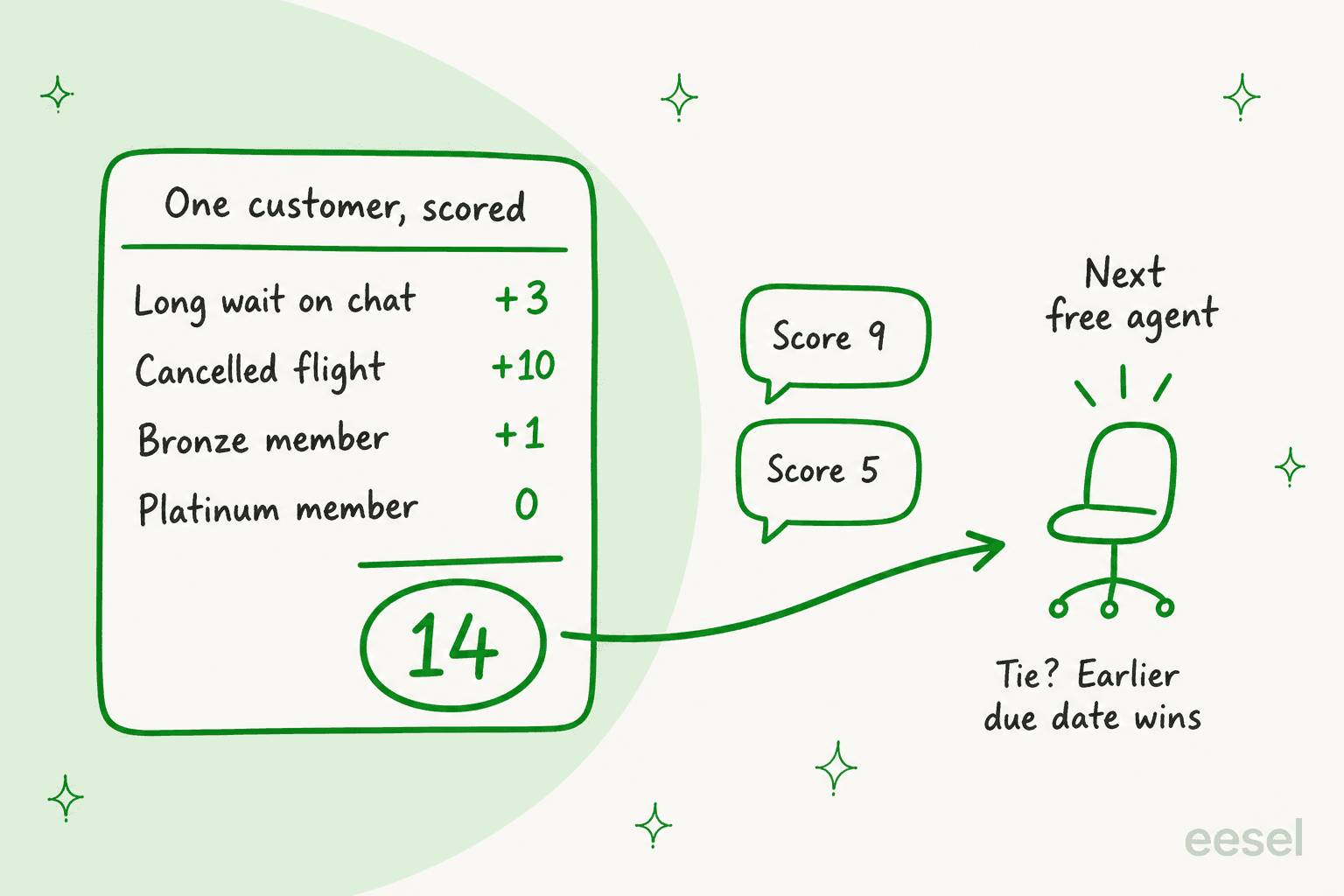
Conditions include Skills, Channel, Inbox, Transfer Status, Due Date, Wait Time, Topics and custom attributes. Three behaviours are worth knowing before you build:
- Scores re-evaluate. If an agent applies a "de-escalation" Topic and sends the customer back to an Inbox, the boost can apply again, and a Rematching condition keeps transferred customers from restarting at the back.
- Totals are invisible. Gladly notes tallied scores aren't shown in the UI, and the point scale may change.
- Broad boosts can starve Tasks. A boosted email routes ahead of an unboosted Task however overdue the Task is, per People Match and Voice.
Gladly's pitch is that routing can use history, situation and needs: VIP status, an abandoned cart, a cancelled flight, a language. That is real, but note what produces the signal: your Rules, Topics and custom attributes. Gladly's docs describe People Match as scenarios you configure, and I found no description of a model choosing the agent on its own.
When should you use Skills, and when a separate Inbox?
Skills is only for People Match, and it is additive. Gladly's What is Skills? page says it raises the chance of a match rather than guaranteeing one, and that it covers Messaging and Mail only. For rigid requirements, Gladly itself recommends a dedicated Entry Point and Inbox staffed by the right people.
My rule of thumb: if a wrong match is costly (lighting questions to someone who doesn't know lighting), use an Inbox. If it is a preference (Spanish speakers should go to Spanish speakers when possible), use a Skill. Compare how Freshdesk skill-based routing and Zendesk skills-based routing handle the same split, or my ticket routing for ecommerce guide for a store-focused version.
How do Topics let the AI feed routing?
This is the closest Gladly gets to AI-driven routing signals. Enhanced Automatic Topics is a beta, turned on per Gladly agent. At the end of a session, right before a handoff or when it resolves, the AI reads the full transcript against your Topic descriptions and adds up to 1 to 5 Topics. Those Topics then flow into Rules, People Match boosts and reporting like human-applied ones.
The limits are specific. Each agent holds up to 250 active Topics with descriptions under 250 characters. Topics are added once, at the end, not mid-conversation. The AI doesn't see data returned by Actions such as order details, and its knowledge base answers are separate from Topics. Catch-all Topics like "Other" don't work, Gladly says non-English sessions haven't been tested, and you shouldn't rely on Topics to route Voice, because Rules don't run before a call routes.
The practical takeaway: a Topic the AI adds before handoff can boost the customer for People Match, which is how "AI intent detection" and "priority routing" connect in Gladly. See my take on intent detection for routing and the glossary entry on intent classification.
How would I set Gladly routing up, in order?
- Start with Entry Points and Inboxes. One Inbox per real specialisation, SLAs set per channel. This does most of the work.
- Connect the AI per Entry Point. Pin a version while you test, then switch to Always latest.
- Write handoff reasons before go-live. Keep the defaults you agree with, add your own, and read best practices for wording.
- Add Rules for the post-handoff path. Remember they run only after the AI lets go, and see ticket triage automation for rule ideas.
- Add People Match last, one or two boosts, with a time-based boost so unscored customers can't wait forever.
- Review AI sessions weekly. Look at "handed off" and "did not resolve" outcomes, per Gladly's own advice, and add or remove handoff reasons.
My AI support SLA management guide and the SLA glossary and reviewing AI conversations cover steps 1 and 6 in more depth.
Where does Gladly routing fall short?
| Gap | What Gladly's docs say | Why it matters |
|---|---|---|
| Rules blind to AI-handled chats | Rules fire only after handoff | Keyword and spam rules don't protect the AI stretch |
| Voice | Calls route ahead of Rules; People Match and Skills don't cover Voice | Phone is the highest-priority channel and the least tunable |
| Channel order | Rules can't put SMS ahead of chat | Order is fixed: phone, messaging, then email and tasks |
| Tasks | Boosted email beats an unboosted Task | Broad boosts can delay follow-ups |
| Business hours | SLAs run on calendar hours | A 10 PM text with a 5 hour SLA is overdue at 3 AM |
| Skills | Additive only | Needs Inboxes for hard requirements |
| Topics | Beta, English tested only | Don't build critical routing on it yet |
Fairly, this is a model that favours continuity over strict queues. Gladly's own reviews on G2 mention a steep learning curve and dense screens, and a Reddit practitioner's advice about AI in general applies here too:
"it makes more sense to let it handle the easy 30-40% of tickets and route everything else to a human."

In Gladly, that means your handoff list is the real routing policy (and a rule-based chatbot behaves differently from an agent), so spend your setup time there. For deflection numbers and omnichannel support, see my Gladly AI deflection post.
What does Gladly routing cost?
Gladly publishes no platform price list, so you need a quote. The one public number set is its Shopify App Store listing, which shows a $250 a month spending cap with $1.50 per AI Resolution, $0.25 per AI Assist and $120 a month per team member, per Gladly's Shopify listing. The AI FAQs also note that a workflow closing a session without replying isn't billable, which helps for spam. People Match and Dedicated Hero sit in the platform, and Dedicated Hero needs Gladly Support to activate. See my Gladly pricing write-up and the Gladly chatbot overview.
Where does eesel fit if you run Gladly?
Honestly, not inside it. eesel has no Gladly connector: the helpdesk integrations list names Zendesk, Freshdesk, Gorgias, HubSpot, Help Scout, Front, Salesforce and more, and Gladly isn't there. Shared-inbox buyers can compare shared inbox software. Gladly's own AI also plugs into other helpdesks, with Gorgias and Zendesk listed as partners in its docs. If you are choosing between layers, the practical question is the same one this post keeps landing on: what happens before a person sees the conversation, and how clean is the handoff.
Where eesel does apply, it works as an AI helpdesk teammate in your existing queue. SamCart runs eesel on Freshdesk tickets and a website chat, with separate agents for each. Freshdesk automations decide which groups the agent replies to, and only while no person is assigned. When a seller asks for a person, or the question goes beyond the help center, the ticket is tagged for handoff and the agent stops. The workspace has 4 agents answering from about 280 help center articles. That is the same handoff discipline as above, expressed in a queue instead of an Entry Point.
The eesel chat bubble can also hand a visitor to a person, via Zendesk Messenger or Freshchat or by creating a ticket or sending an email. Gladly isn't one of those targets, so I wouldn't assume it works there. Related reading: AI chat escalation, Zendesk AI agent handoff, Gorgias handover control, HubSpot channel handoffs and Gorgias ticket tagging and routing.
Try eesel for helpdesk handoffs
If your queue lives in Zendesk, Freshdesk, Gorgias, Front or HubSpot rather than Gladly, eesel joins it as an AI helpdesk teammate: it tags, routes and replies on the tickets you allow, then steps back when a person takes over. Start with drafts, test on past tickets, and widen scope later, with a clear escalation path and permissions set per action. See pricing, or open the Freshdesk and Gorgias pages. Try eesel.