

Freshchat routes a new conversation with three rule-based tools, not an AI that reads the message: assignment rules (first match wins, including "message text contains refund"), Topics the visitor picks, and IntelliAssign, which picks the agent by load or round robin and by skill only on Enterprise ($79 per agent per month billed annually). Freddy's AI touches chat routing in two places: the chatbot detects intent and sends the customer to the right bot flow, and the Freddy AI Agent hands a chat to your team when it hits a topic you told it to skip. Freshworks' AI that does predict a ticket's group, Auto Triage, is documented for Freshdesk tickets from email and portals, not chats.
If you want a chat routed by what the customer actually wrote, without keeping a keyword list, an AI agent like eesel can read what the customer wrote in Freshchat and assign it to the right group or agent by rules you write in plain language. A coding agent such as Claude Code can set most of that up with the eesel CLI, though a Freshchat admin still has to paste in the API token and webhook.
Which Freshchat routing tool fits your job?
Pick the job you need done in a chat's first few seconds.
Pick the job you need done to see which Freshchat tool handles it and what it costs.
How does Freshchat decide who gets a new chat?
Freshchat checks in a fixed order: assignment rules beat Topics for the group, and IntelliAssign picks the agent for whatever a rule hasn't already assigned. Freshworks' assignment rules guide says a new message is "first checked against Assignment Rules", that a matching rule overrides the group a Topic is mapped to, and that if no rule matches the message goes through IntelliAssign.
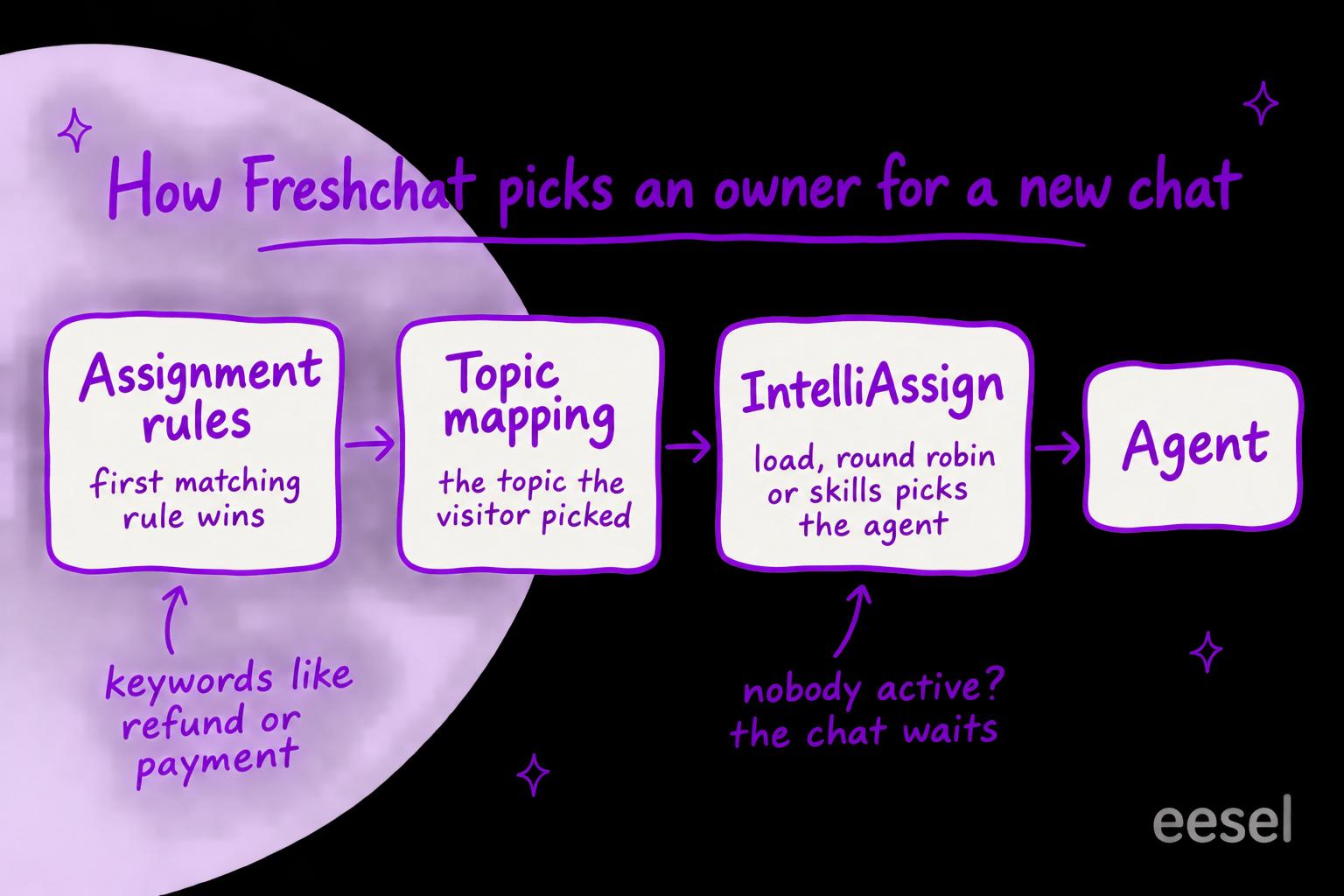
That order is the whole design. Rules are where you encode the exceptions (refunds go to Billing, Californian visitors go to Pro Support), Topics catch what the visitor tells you up front, and IntelliAssign shares out the rest among whoever is online. None of the three reads the message with a model. It is the same ticket routing most helpdesks have run for years, built for chat.
How do assignment rules route by keyword?
An assignment rule is an IF/THEN: if a conversation matches your conditions, then assign it to a named agent or group. You build them under Admin Settings > Configuration and Workflows > Conversation Assignment Rules. The help article lists what a rule can match on:
- Message properties: the message text, the email body and the message source (the channel or topic it came from).
- Conversation properties: priority and skill.
- App properties: median response time and the number of agents online.
- User and account properties: language, total sessions, company name, industry, tags, plus your own custom properties.
Freshworks' own example is a refund rule: if the message text contains "refund" or "payment", and the chat came from one of three channels, assign it to the Billing support group.
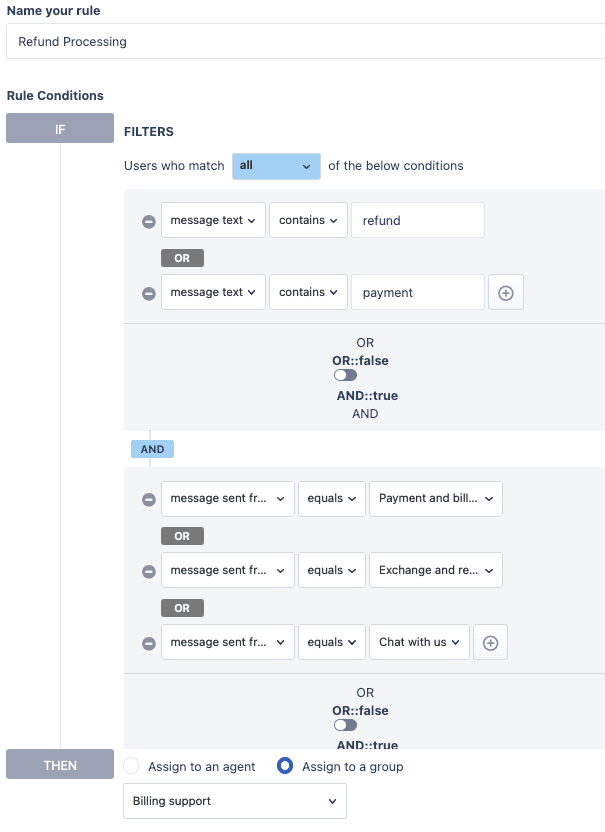
Two details matter once you have more than a handful. Messages are assigned on the first rule that matches, so the order of the list is a decision, and within a rule Freshchat checks conditions in the order you wrote them. And a keyword rule is literal: "my money hasn't come back" contains neither "refund" nor "payment", so it falls through to the next rule or to IntelliAssign. That is the gap teams usually mean when they ask for AI routing. If you're coming from Freshdesk, its automation rules work the same way on tickets.
What do Topics do?
Topics are the menu a visitor sees when they open your Freshchat widget: Customer Support, Billing, Order Tracking and so on. Each topic can be mapped to a group (or a bot), so a chat started on "Billing" goes to your billing team. Freshworks' Topics guide describes them as "an IVR for chat conversations", and you set them up under Admin Settings > Web Chat Topics.
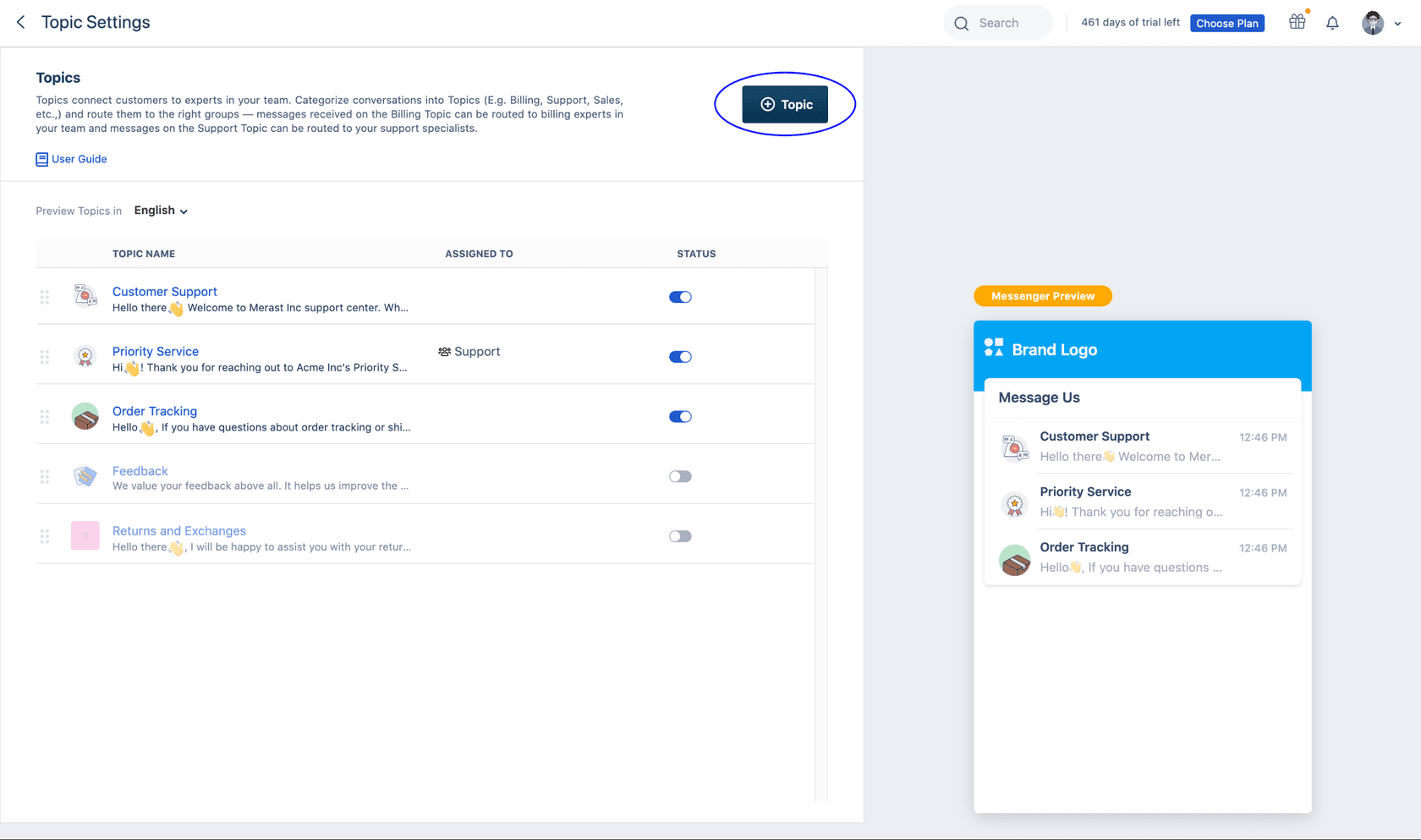
Topics are the cheapest routing you can get, because the customer does the classifying. They also inherit the customer's guesswork: someone with a billing problem who taps "Customer Support" lands with support. You can show different topics on different pages with tags (a "Pricing Enquiry" topic only on your pricing page, for example), which helps more than adding more topics to one menu.
How does IntelliAssign pick the agent?
IntelliAssign decides which agent inside a group gets the chat, once a rule or topic has decided the group (or nothing has). The IntelliAssign guide offers three kinds of logic:
| Logic | How it picks | Plan |
|---|---|---|
| Load-based | The agent with the most spare capacity, then whoever has waited longest since their last chat | Pro and Enterprise in Freshdesk Omni's plan table |
| Round robin | Whoever has waited longest since their last chat, within their active conversation limit | Pro and Enterprise in Freshdesk Omni's plan table |
| Skill-based | The agent whose skill matches the chat, in the skill's priority order | Enterprise only |
Freshworks' load-based example: if Agent A can take 10 conversations and Agent B can take 5, four new chats go three to A and one to B. You can group agents into load levels (Beginner, Intermediate, Expert) with different limits, so new hires get fewer chats at once.
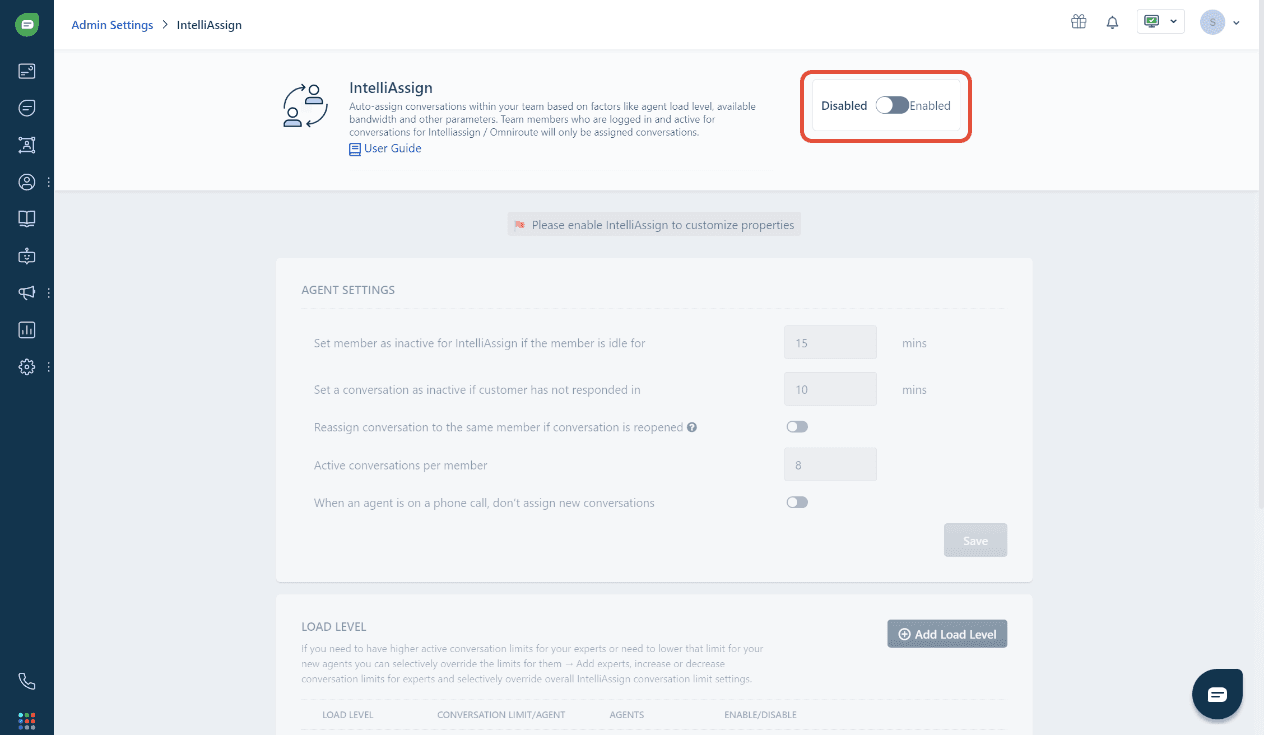
The rule that trips teams up: IntelliAssign only assigns chats to agents who are logged in and have switched on Set active on IntelliAssign, in a group where IntelliAssign is enabled. Freshworks notes that if every agent in a group is inactive at the same time, the conversations stay open until one of them comes back. If IntelliAssign is on for a group, chats can reach agents before a bot you meant to sit in front has filtered them. One Freshchat customer put it this way on the Freshworks forum:
"We use freddy self service in freshchat and it is not filtering the conversations that are attributed to analysts. All customers contacted via chat are assigned directly to analysts by IntelliAssign."
How does skill-based routing work?
Skill-based routing matches each chat to agents who have the skill it needs. It has two halves, set up under Admin Settings > Configuration and Workflows > Conversation Skills (guide): skill rules, which attach a skill to a conversation by conditions (Freshworks' example is "French" for French conversations from Instagram), and agent skills, which you give each agent in a priority order. Then you pick Skill-based as the IntelliAssign logic.
Priority is the useful part. Freshworks' example has John with "Damaged product" as his first skill and "Refund request" as his second. When John frees up, he gets the next damaged-product chat ahead of an older refund chat, because of the skill order. You can also create a custom property for VIP customers and make it everyone's first skill, so those chats jump the queue.
Skill-based routing is on the Enterprise plan, and the skill is still attached by a condition you wrote. If your condition can't tell a damaged-product chat from a refund chat, neither can the routing. Freshdesk's skill-based routing works the same way on tickets.
Where does Freddy's AI actually route chats?
Freddy's AI touches chat routing in two documented places, and a third Freddy feature routes tickets. None of them picks which person gets the chat.
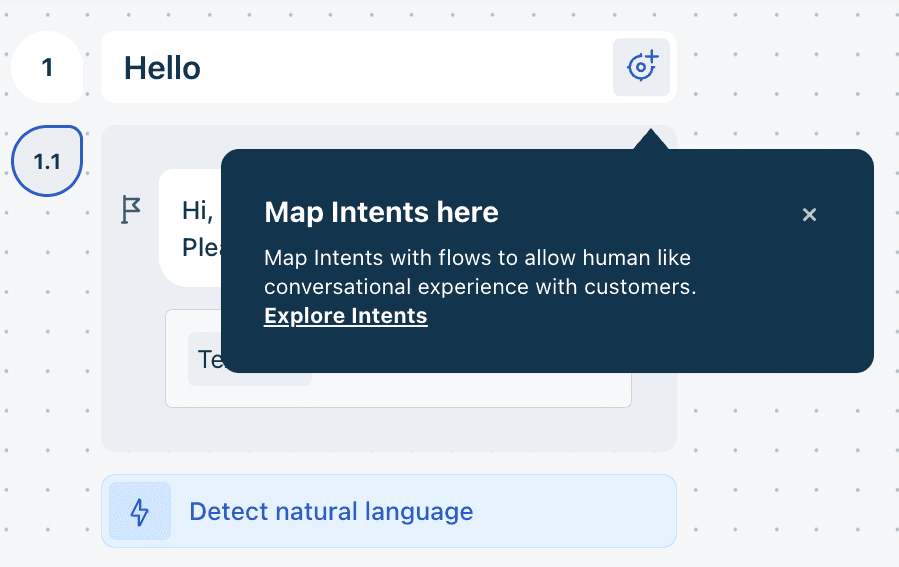
1. Bot intent detection. In Freshdesk Omni's current bot builder, a chatbot can read a customer's free-text message and match it to an intent, then send the customer to the bot flow mapped to that intent. Each intent needs at least five example phrases (utterances) before you can map it to a flow, there's an intents library with templates by industry, and you have to train or publish the bot before changes go live. This is real intent detection, but its output is a bot flow, not an agent or group. A flow can end in a handoff, and then your rules pick the human.
2. The Freddy AI Agent's handover. The Freddy AI Agent answers chats itself and hands them to people when it should. In its handover settings you list sample queries or topics it should skip ("Payment failed", "Refund issue"), and a matching chat is transferred. Outside business hours it can make the chat available for assignment or send it to one designated group. The transfer settings name no person, so your normal assignment takes over from there. On Freshchat the AI Agent costs $49 per 100 sessions after 500 free ones (see the Freddy AI pricing breakdown), and a session is everything one customer says to it within 24 hours (Freshchat pricing).
3. Auto Triage, which is for tickets. Freddy's Auto Triage is the feature that does predict the routing field: it fills Priority, Group, Type and custom dropdowns from your ticket history. Freshworks documents it for Freshdesk tickets that arrive by email and portals, on Pro or Enterprise, with about 2,000 past tickets recommended. It isn't described for Freshchat conversations. If your chats become Freshdesk tickets, the Freshdesk Auto Triage guide covers it.
So the honest answer to "does Freshchat route conversations with AI?" is: Freddy decides which bot flow a customer sees and when the AI Agent hands over, and your normal assignment decides which person gets the chat.
Which Freshchat plan do you need?
Standalone Freshchat, per agent per month billed annually, from the Freshchat pricing page (checked 20 November 2026):
| Plan | Price | What it adds for routing and AI |
|---|---|---|
| Free | $0, up to 10 agents | Chat widget, shared inbox, email |
| Growth | $19 | Freddy AI Agent at $49 per 100 sessions, social and messaging channels |
| Pro | $49 | Intelligent routing, multilingual conversations, multiple SLA policies, agent availability dashboard |
| Enterprise | $79 | Skill-based routing, audit logs |
Freddy AI Copilot is an add-on at $29 per agent per month on Pro and Enterprise. If you're on Freshdesk Omni, Freshchat's chat sits inside a bigger plan (the Freshchat vs Freshdesk Messaging post untangles the names): Omni's pricing page lists Growth at $29, Pro at $79 and Enterprise at $119, with IntelliAssign, round robin and load-balanced assignment ticked for Pro and Enterprise and skill-based assignment for Enterprise. The Freshchat pricing breakdown covers the add-ons.
How to set up routing in Freshchat
If I were setting up a Freshchat account from scratch, this is the order I'd build in, because it matches the order Freshchat checks:
- Create your groups. One per team that should own a kind of chat (Billing, Support, Sales). Every other step points at them.
- Set up Topics under Admin Settings > Web Chat Topics and map each to a group. Keep the list short, and use tags to show page-specific topics.
- Add assignment rules for the exceptions under Configuration and Workflows > Conversation Assignment Rules: keywords that must always reach one team, VIP accounts, a country or language. Put the most specific rule first.
- Turn on IntelliAssign under Configuration and Workflows > Conversation Routing, pick load-based or round robin, set each agent's active conversation limit and enable it for each group.
- Tell your agents to mark themselves active on IntelliAssign, and check the live dashboard during the first few days. An unassigned queue usually means nobody's switched on. Freshdesk's version of this step is in the guide to auto-assigning Freshdesk tickets.
- Add Freddy where you want a bot in front: intent detection for self-service flows, or the AI Agent with handover topics for what it should never handle. Check that IntelliAssign isn't assigning chats before the bot has had its turn, and follow the usual AI handoff practices so the person who picks it up sees what the bot already asked.
Where Freshchat's routing falls short
Keywords are literal. A rule that catches "refund" misses "I was charged twice" and "where's my money", and a long keyword list starts catching chats it shouldn't. Every new product or policy means editing rules by hand, and a chat that sits in the wrong group eats into your SLA before anyone notices.
Topics rely on the visitor. They pick the closest-sounding button, and a topic mapped to a group is overridden by any rule that matches, which makes a wrong route harder to trace.
The AI stops at the bot. Intent detection picks a bot flow and handover settings pick when to transfer. Who on your team gets the chat is left to your normal assignment. That's a reasonable design, and it means the "AI routing" box is ticked by something that doesn't choose the person.
Skills cost Enterprise. Routing by expertise or language needs the $79 plan, and the skill still comes from conditions you wrote.
Nobody active, nobody assigned. IntelliAssign waits for an active agent in the group rather than moving the chat on, so a group with everyone at lunch holds its chats.
Routing Freshchat conversations with eesel
eesel works differently from Freddy's bot: it reads the conversation so far (up to 50 messages) and follows routing rules you write in plain language, like "billing questions go to the Billing group; anything about a damaged order goes to Returns with priority High; a German-speaking customer goes to Lena". Its Freshchat integration gives it what it needs for that. It sees the chat so far, the topic the visitor picked, the chat's status, priority, group and assignee, and your custom contact and conversation fields. It can list your groups and how chats are routed to each, check business hours and how many agents are online in a group, and then update the chat: assign it to a group or agent, or set its status, priority, type or custom fields. It learns from your Freshdesk help centre, canned responses and past tickets, so it can also answer the chat itself before it hands over.
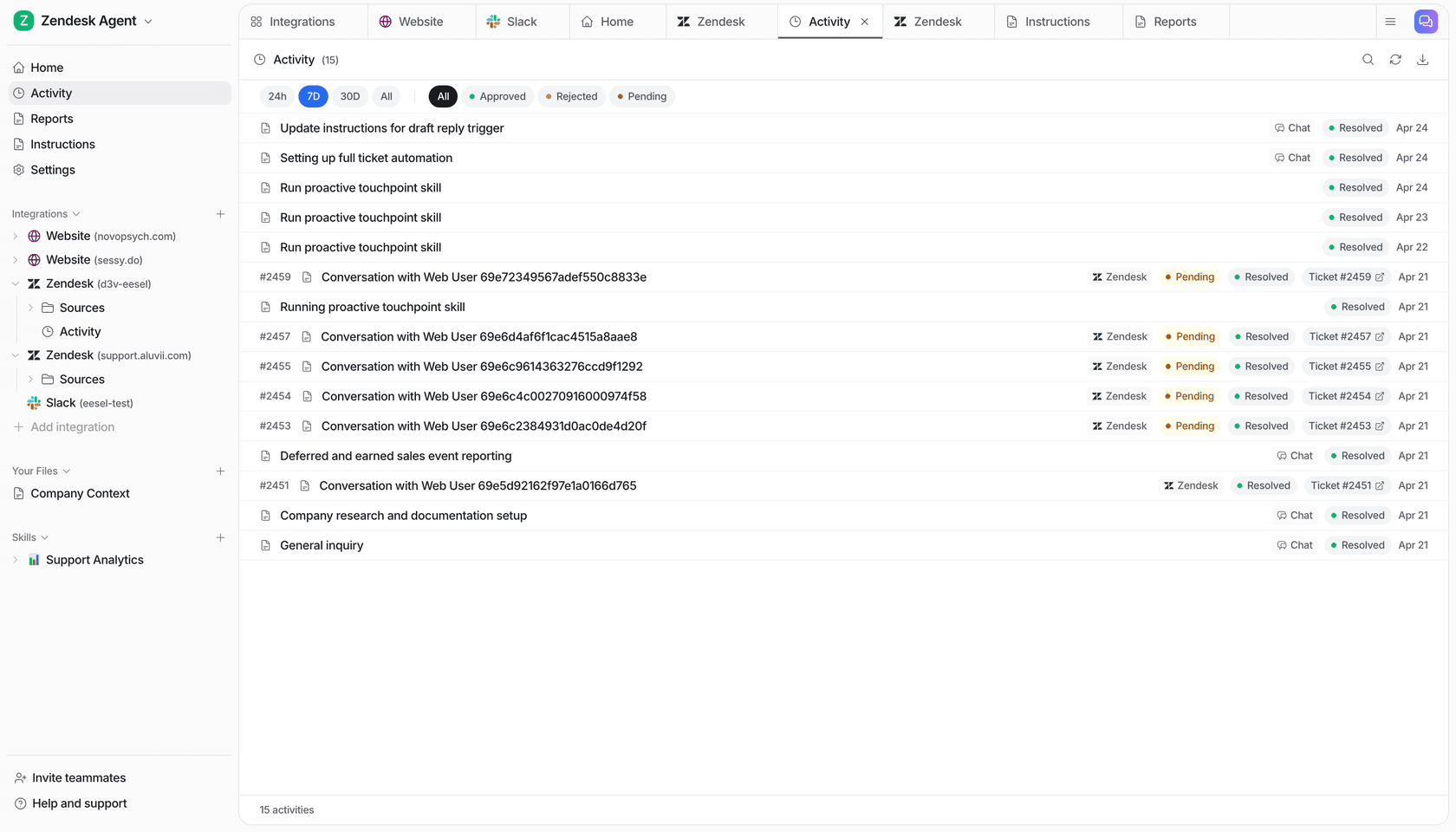
It's the kind of intelligent routing a person does, with your rules in front of it. On the Freshdesk side, SamCart already runs eesel on its tickets: it sends first replies in the groups it covers, and a teammate picking up the ticket, or a seller asking for a person, ends the agent's part.
Know the limits before you start. Freshchat is a channel on eesel's Freshdesk integration, so you connect Freshdesk first, and a Freshchat admin has to enter an API token and save a webhook. Live chat actions in eesel, including handing a chat to a person, are always on: nobody can stop a live chat to approve them, so they can't be set to ask first (actions and approvals). And assigning a chat doesn't stop Freshchat sending the customer's next messages to eesel, so add "stop replying once a teammate has replied" to its instructions.
Try eesel next to Freshchat
If your keyword rules keep missing chats, or your bot answers well but hands everything to whoever IntelliAssign picks, try eesel next to Freshchat. Write your routing rules once in plain language, keep IntelliAssign as the catch-all for what eesel leaves alone, and use the automation's instructions to limit it to one topic while you test. A chat is 1 credit however long it runs: the free trial gives you 100 credits over 7 days with no card, and plans start at $299 a month for 500 credits, with no per-agent fee.

Try eesel on one Freshchat topic, or read the best AI for Freshchat roundup first if you're still comparing.