


Re:amaze does AI ticket tagging and routing with three features: AI Pre-Filter tags new conversations from prompts you write, AI Intents (Pro plan, $49 per team member) recognise a topic from a short description, and Workflows assign the result to a person or department. The rule that decides how they fit together is easy to miss: when a Pre-Filter matches a conversation, Re:amaze skips your Workflows for it, and the AI Agent too. So use Pre-Filter for noise and for topics you want kept away from the bot, and Intents plus Workflows for anything you want sent to a specific team.
If you'd rather describe your routing once in plain words than build an Intent and a Workflow per topic, an AI teammate such as eesel reads each Re:amaze conversation, sets its tags and assignee, and leaves an internal note saying why. With the eesel CLI, an AI coding agent can set up eesel and check its work from a terminal, though a person still pastes the Re:amaze API token into eesel's secure form.
What does Re:amaze use for AI ticket tagging and routing?
It uses three features that each do one part of the job, plus Smart Assign to pick the person at the end. I build integrations at eesel, and when I map a helpdesk I start with which part runs first, because that decides what the others ever see. In Re:amaze, a conversation is a ticket: email, chat, social and SMS all land in the same shared inbox. If you are new to the product, my colleagues' Re:amaze review covers the rest of it.
| Feature | What it does | Plan (per team member, monthly) |
|---|---|---|
| AI Pre-Filter | Reads each new conversation against your prompts, applies a tag and one action | Basic and up, with the AI Agent on (resolutions left or overage on) |
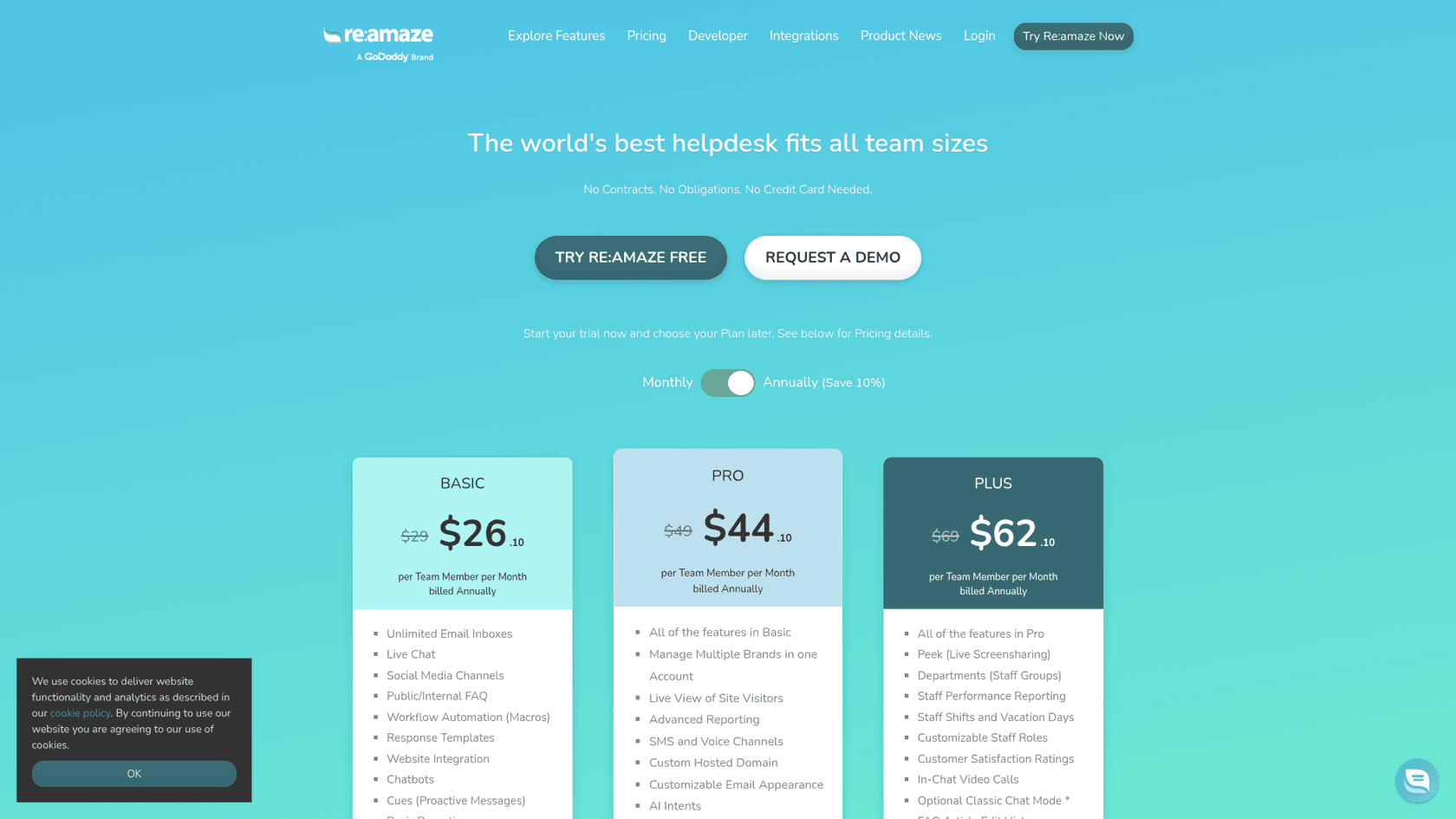
| AI Intents | Decides whether a message matches a plain-language description | Pro ($49) and up |
| Workflows | When, If, Then rules that tag, assign, reply or leave a note | Basic ($29) and up |
| Departments | Assign to a team instead of a person | Plus ($69) |
| Smart Assign | Gives the conversation to the least-loaded teammate on shift | Any plan with Workflows; shifts need Plus |
Prices are from Re:amaze's pricing page on 20 November 2026. Annual billing takes 10% off ($26.10, $44.10 and $62.10). There is also a Starter plan at $59 a month flat, with Basic's features and up to 500 responded conversations a month. For the full plan breakdown, see Re:amaze pricing.
How does AI Pre-Filter tag conversations?
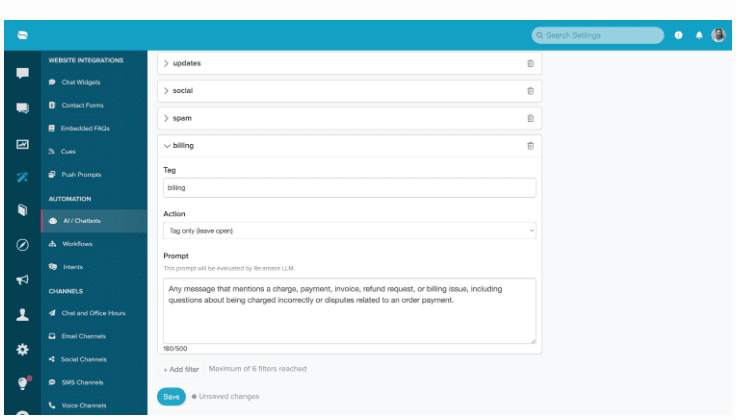
AI Pre-Filter reads every new conversation as it arrives and checks it against a list of filters, each with a prompt, a tag and an action. Re:amaze announced it in August 2026, and its setup guide describes the parts:
- Prompt: a plain-language description of what to look for, up to 500 characters.
- Tag: applied to every conversation the prompt matches.
- Action: one of four. Tag only and leave it open, tag and mark done, tag and mark spam, or tag and archive.
You find it under AI > Manage Bots, on the Pre-Filters tab. Five filters come pre-written (Marketing, Purchases, Updates, Social and Spam), and you can keep, edit or delete each one.
Two rules come with every match, whichever action you pick. The conversation is not handled by the Re:amaze AI Agent, and "Pre-filters also take priority over Workflows. If a conversation matches both, the Pre-Filter runs and the Workflow is skipped."
The first rule is the point of the feature. Re:amaze suggests it for billing and payment issues, cancellation requests and VIP customers: topics you want a person to see before a bot replies (the Re:amaze chatbot guide covers the bot side). The second rule is the one that bites. A billing Pre-Filter that tags and leaves the conversation open keeps the bot away, but it also stops the Workflow that would have assigned billing conversations to your billing team. The conversation sits in the inbox with a tag and no owner.
One more condition from the same guide: Pre-Filter needs the Re:amaze AI Agent enabled "with resolutions remaining or overage enabled". Plans include 5, 10 or 20 AI Agent resolutions per user a month on Basic, Pro and Plus, and each extra resolution is $0.85 (Re:amaze's billing guide). If you run with overage off, check your filters are still tagging late in the month.
How do AI Intents work?
An Intent is a short description of what a customer is trying to do, and Re:amaze's AI decides whether each message matches it. It is intent detection without training data. You create one under Settings > Automations > Intents: give it a name, pick the brand, and write one to three sentences. Re:amaze's Intents guide gives this example: "Customers asking about order status, shipping updates, delivery timing, or tracking information."
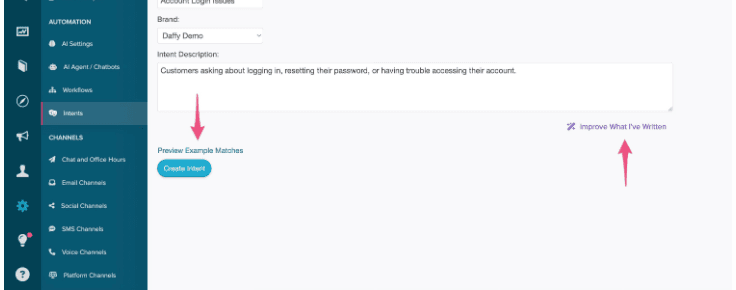
Two buttons help. Improve What I've Written has the AI rewrite your description, and Preview Example Messages shows the kinds of messages it would match, which is the closest thing to a test before it goes live.
This is newer than it looks. Intents used to be a machine learning model that needed at least 30 example messages per intent, per Re:amaze's 2025 Intents post. Re:amaze's April 2026 update replaced the examples with the description, and replaced the confidence score with a yes or no: "the message either matches the Intent or it does not." That makes setup faster, and it also means there is no threshold to raise when an Intent catches too much. You rewrite the description instead. (The false positives guide covers how to tighten one.)
An Intent on its own does nothing. "Creating an Intent alone does not trigger any actions," says Re:amaze. It becomes useful as a condition in a Workflow.
How do Workflows route the conversation?
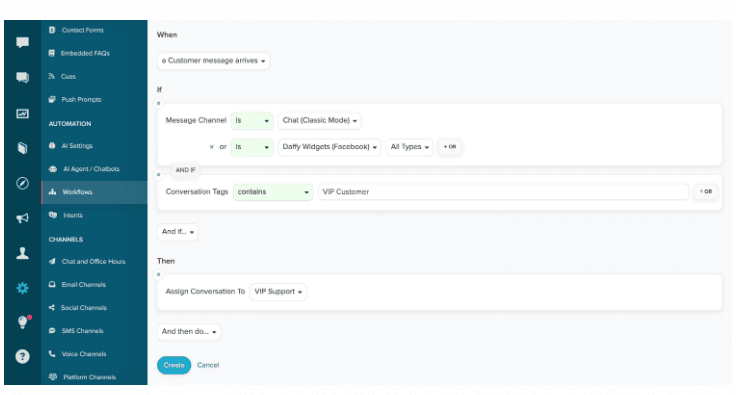
A Workflow is a When, If, Then rule: when something happens, if conditions hold, then run actions. You build them under Settings > Automation > Workflows, per brand, and choose whether each one runs automatically or only when someone triggers it by hand. The Workflows guide lists the common actions: tag the conversation, assign it to an agent or department, respond, and leave an internal note.
Conditions can be combined with And and Or. Re:amaze's own example assigns chat and Facebook conversations tagged VIP Customer to VIP Support:
If you sell on Shopify or BigCommerce, Workflows can also get customer and order conditions, such as total order value. That is how Re:amaze's example tags any customer whose total order value is over $2,000 as "VIP Customer", the same idea as VIP routing in Zendesk. Social messages are another common rule, and a reminder that plenty of ticket routing needs no AI: assign everything from Facebook, Instagram and X to the marketing team and tag it.
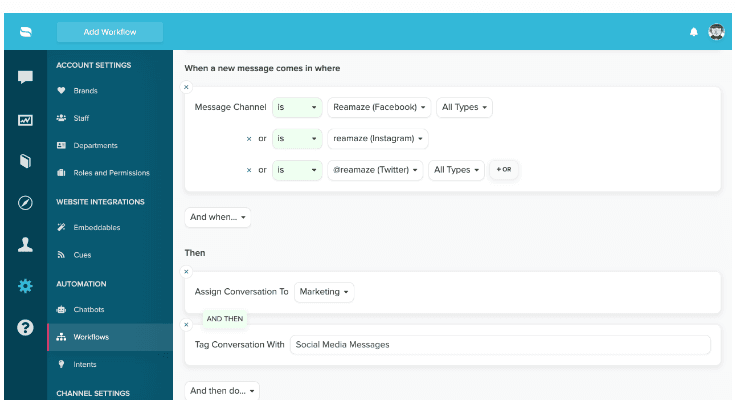
Re:amaze adds a warning worth taking seriously: "Workflow rules are evaluated exactly as configured," and each extra If condition can narrow when a Workflow runs.
Picking the person with Smart Assign
Assigning to a department puts the conversation in a team's view, and Smart Assign picks who in it gets the conversation. Smart Assign gives it to the eligible staff member with the fewest unresolved conversations. It skips anyone who is off shift, on vacation, or hasn't sent a message in that brand in the past week, and on a tie it picks whoever resolved a conversation least recently. It is load balancing, not skills-based routing: it never looks at who knows the topic. To use it within a team, add two Workflow commands: assign to the department, then assign to Smart Assign.
Without any of this, Re:amaze's default, per its assignment guide, is that the first agent to reply becomes the assignee.
Which Re:amaze feature should you use?
Use Pre-Filter for what should skip both the bot and your rules, and Intents with Workflows for anything that needs an owner.
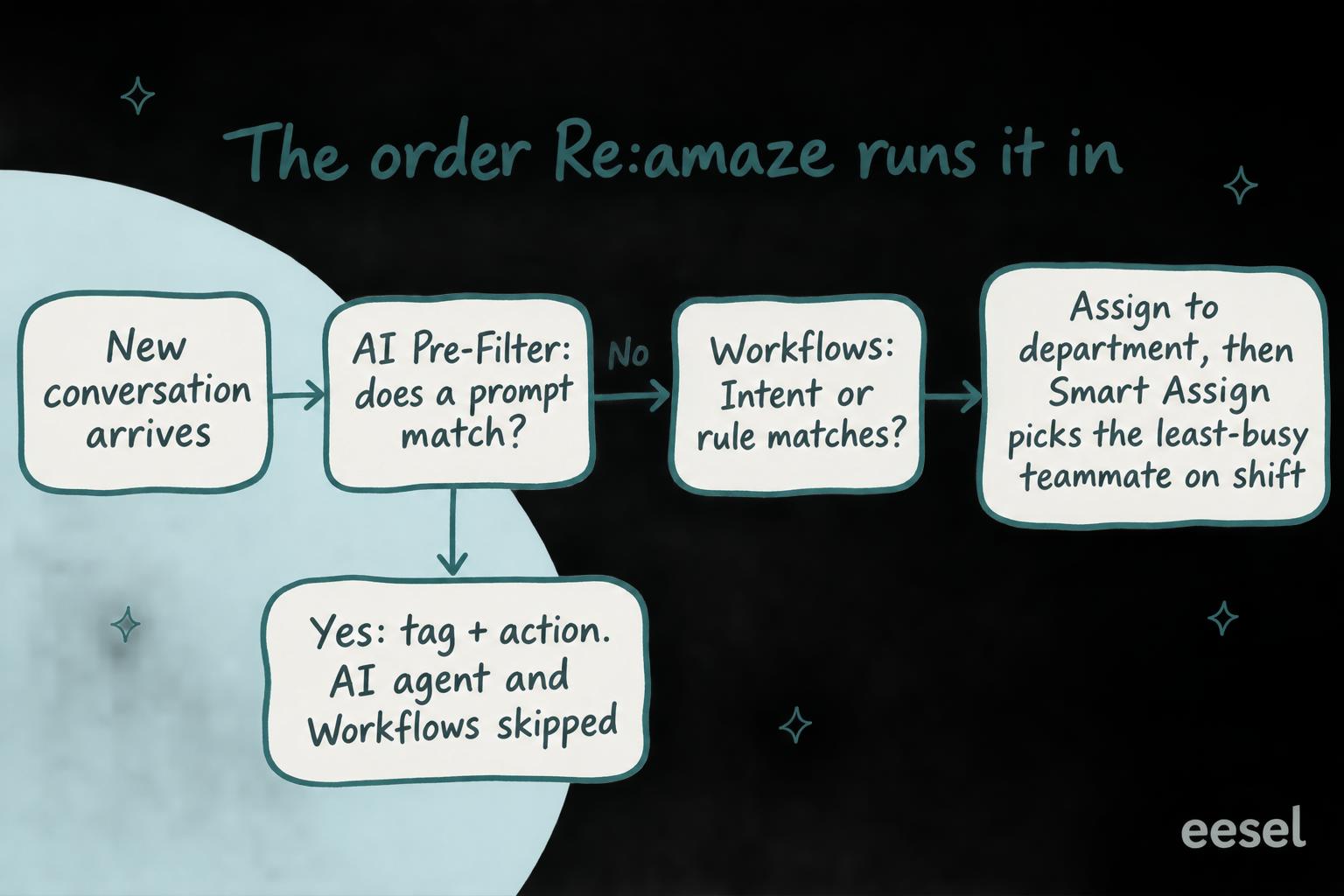
Pick the job you have to see which Re:amaze feature does it, and the catch that comes with it.
Where does Re:amaze tagging and routing fall short?
It falls short where the decision needs more than the first message or a single topic.
Pre-Filter and Workflows don't combine. You can't have a Pre-Filter keep billing away from the bot and a Workflow assign it to billing, because a match skips the Workflow. Pick one per topic.
Each topic is its own setup. A topic that needs tagging and routing is an Intent plus a Workflow, and a team with 15 topics maintains 30 pieces. One G2 reviewer, on Re:amaze generally, put it plainly:
"The features in the platform are rigid and sometimes limited"

Others like the builder. "Ease of creating workflows and templates is pretty intuitive," wrote a store owner on Capterra in 2019, after five years on Re:amaze with Shopify. Both are fair: each rule is simple to build, and you build a lot of them.
The spam filter reads one message. Re:amaze's separate AI spam filtering for chat and email looks only at "the first message" of a conversation.
There's no reasoning on the conversation. An Intent matches or doesn't, and a Workflow assigns. Nothing tells the agent who picks it up why it landed with them, unless you add a fixed internal note as an action. The AI ticket routing for ecommerce guide covers what a good handover note holds.
None of this is unusual. Help Scout, Kustomer and Zoho Desk split the same job into similar pieces, as does Gorgias. The Zoho Desk version is the closest match, with AI tags on Standard and AI field predictions on Professional. For the broader picture, see routing with intent detection. Store teams can start from AI ticket tagging for ecommerce.
Tagging and routing Re:amaze conversations with eesel
eesel is an AI teammate that joins the tools your team already uses, and on Re:amaze it does the tagging and routing as one decision. You describe the rules in plain words ("refunds over $100 go to Sam, anything mentioning a chargeback is tagged chargeback and assigned to Priya, wholesale is tagged wholesale and goes to Dan"), and eesel reads each conversation, sets the tags, the assignee and the status, and leaves an internal note saying what it saw.
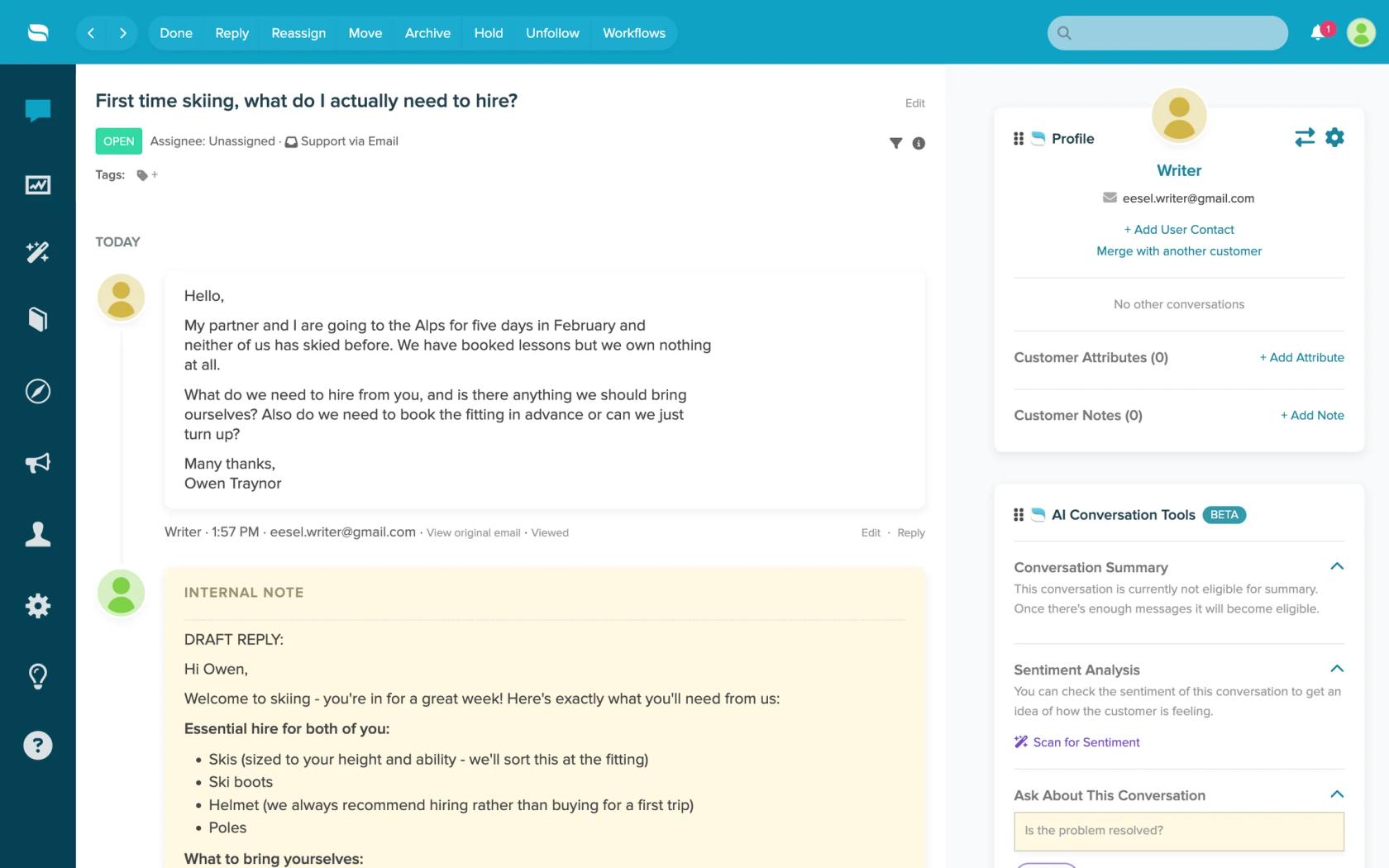
From eesel's Re:amaze docs, here is what it works from:
- The thread: up to the newest 40 messages, with who wrote each one and whether the customer could see it, so internal notes count.
- Your history: your response templates and past conversations (by default, resolved and archived ones from the last 30 days), plus help center articles read live.
- The actions: update a conversation's tags, assignee and status, leave an internal note, or send a reply. Each one can run on its own, wait for a person's yes, or stay off.
Be clear on the limits. Re:amaze has no event triggers in eesel, so eesel works on a schedule, as often as every ten minutes. Pre-Filter and Workflows act the moment a message arrives. eesel also doesn't read attachments or custom fields. If your routing has to be instant, keep Re:amaze's own rules for that part.
This is how Question Beauty runs eesel on Gorgias and Shopify: every ticket gets a topic tag first, order questions are checked in Shopify (ecommerce support automation in practice), and refunds, complaints and wholesale requests are assigned to a person with a note saying what the customer asked and what eesel found. It handled 990 Gorgias tickets in a month (8 August to 8 September 2026) that way.
Try eesel next to Re:amaze
Start where Re:amaze's rules run out of room: the topics where the right owner depends on what the customer actually said. Connect Re:amaze with an API token, write your routing in plain sentences, and set eesel to tag and leave a note on every open conversation with no staff reply, without assigning anything yet. After a day, read its notes against where your team would have sent each one.

A conversation is 1 credit however long it runs. The free trial gives you 100 credits over 7 days with no card, and plans start at $299 a month for 500 credits. Try eesel on your Re:amaze inbox. Still comparing? The best AI for Re:amaze roundup and Re:amaze AI alternatives cover the options.