


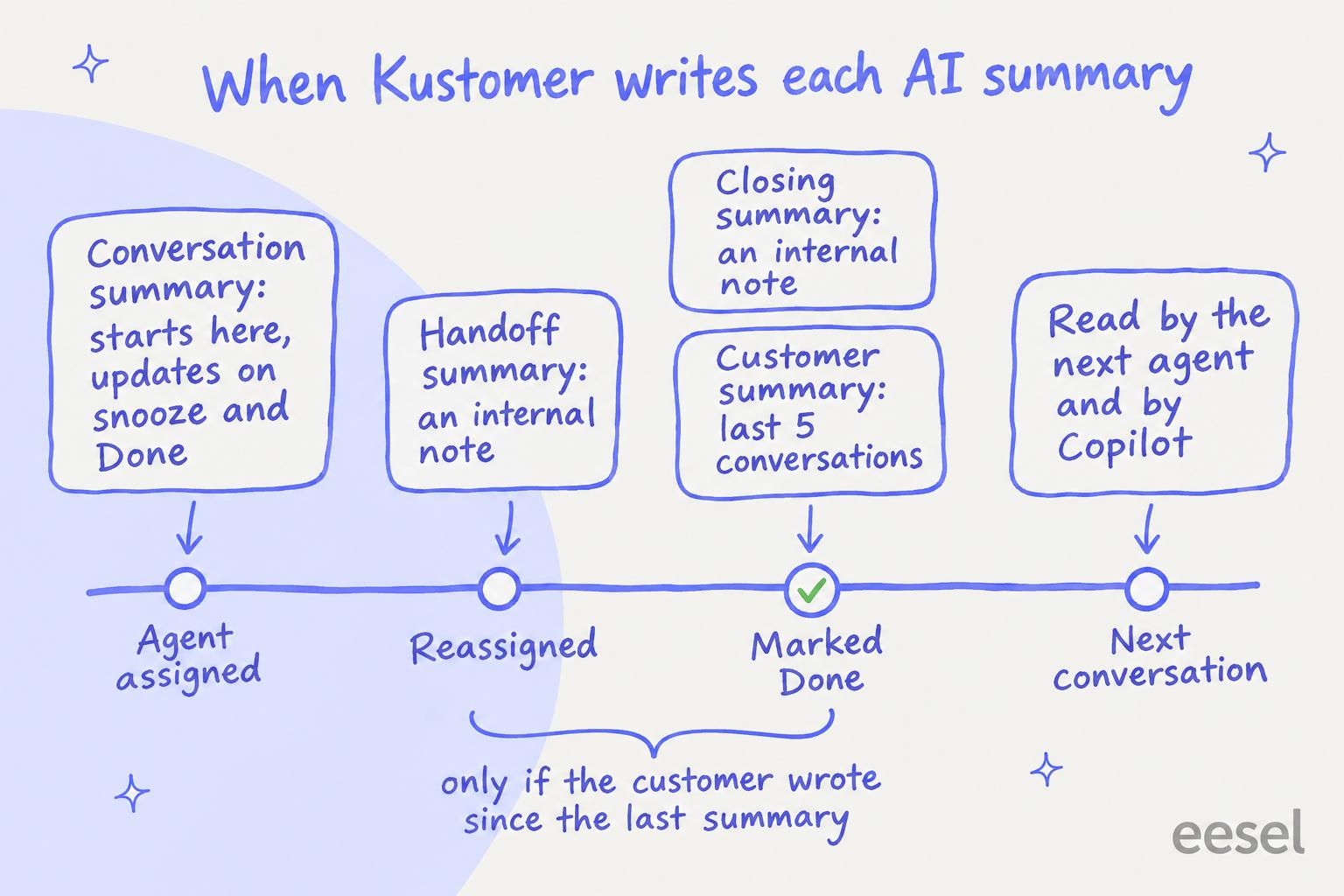
Kustomer AI conversation summaries come with Envoy, an add-on Kustomer lists at $50 per user per month, and once switched on they write five kinds of summary by themselves: a conversation summary when an agent is assigned, a handoff note when it is reassigned, a closing note when it is marked Done, a customer summary across the last five conversations, and summaries of custom objects such as orders. They are a solid reading aid for the agent picking a conversation up. Before you lean on them, check three things Kustomer's own help center states: handoff and closing notes are only rewritten if the customer has written since the last one, PCI redaction does not reach the summaries, and everyone with Read access sees them.
On Zendesk, Freshdesk, Gorgias or Help Scout, an AI helpdesk agent such as eesel can leave an internal note saying why it handed a ticket to a person; it has no Kustomer integration. With the eesel CLI, an AI coding agent can upload approved help articles and ask test questions before anything goes live, though an admin still has to approve the helpdesk connection.
What are Kustomer AI conversation summaries?
They are short, AI-written overviews that Kustomer drops into a customer's timeline so an agent sees the gist before reading the thread. Kustomer files them under Envoy, its set of AI tools for human agents ("reps"), alongside Copilot and Signals; the rest of Kustomer AI faces customers. Its AI Summaries article lists five types:
| Summary | Where it shows | What it reads |
|---|---|---|
| Conversation | At the top of the conversation | Messages and internal notes in that conversation |
| Handoff | A note in the conversation | Messages and internal notes, at the moment of reassignment |
| Closing | A note in the conversation | Messages and internal notes, when it is marked Done |
| Customer | On the customer's profile | The five most recent conversations and object summaries |
| KObject | On a custom object, such as an order | That object, internal comments included |
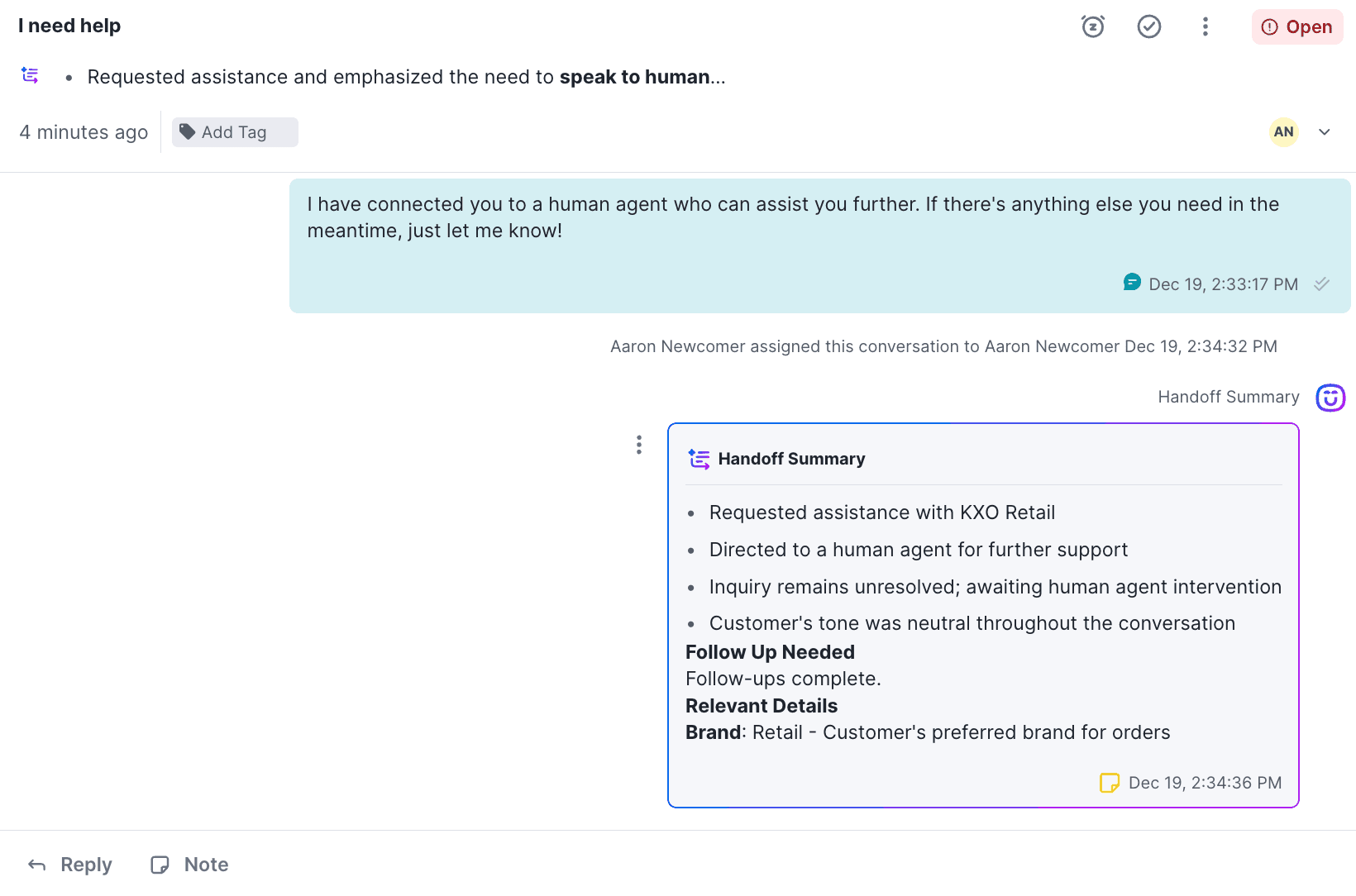
The handoff note is the one I would care about most. I work on eesel's support team, and the worst moment in a support conversation is the second agent opening it cold and asking the customer to repeat themselves, which every human handoff guide warns about. Kustomer's version is structured: a few bullets, then "Follow Up Needed" and "Relevant Details" built from the attributes you choose.
If you are new to the idea, AI ticket summarization explains why teams want it and can AI summarize support tickets covers how well it works in general.
When does Kustomer write each summary?
Each summary has its own trigger, and conversations already snoozed or marked Done before you switched the feature on are not summarized automatically. Per the help center:
- Conversation summaries start when an agent is assigned and update when the conversation is snoozed or marked Done.
- Handoff summaries are written as a note when the conversation is assigned to another agent.
- Closing summaries are written as a note when it is marked Done.
- Customer summaries appear once at least one of the customer's conversations is marked Done.
- KObject summaries are generated for the custom objects you select.
Three details change how you use them. A summary stays on the conversation, customer or object for 60 days, and regenerating it resets the clock. Anyone with Update access can generate or refresh one from the Options menu, which is how you get a summary for an older conversation. And since a 20 January 2026 update, summaries are translated into each user's language in Kustomer automatically, so a Spanish-speaking agent can read a summary of an English chat.
Which Kustomer plan includes AI summaries?
Kustomer's pricing details page, last updated 12 October 2026, prices its two current plans, Enterprise and Ultimate, as "Talk to Sales", and lists Envoy (AI Agents for Reps) as an add-on at $50 per user per month on both. The help center articles on summaries point to that page for plan availability, and Signals says outright that Envoy must be on to use it.
The maths for one team: 25 agents on Envoy is 25 x $50 = $1,250 a month, or $15,000 a year, on top of the platform. That buys Copilot and Signals as well as the summaries, so judge it on all three. Kustomer's main pricing page also lists Envoy among what its packages include, so ask your account manager whether your contract already has it before you budget for it. eesel's Kustomer pricing guide covers the rest of the bill.
Other AI add-ons are metered separately: Concierge, the customer-facing AI agent, at $0.75 per engaged conversation, and Conversation Intelligence at $0.02 per execution, per the same page. Kustomer AI deflection works through those numbers.
How do I set up AI summaries in Kustomer?
You need access to the Reps page. The steps from Kustomer's setup article:
- From the left navigation, open Kustomer AI, then Reps, then the Summaries and Signals tab. (Newer help pages call this area Envoy.)
- Switch on Turn on AI Summaries. Every summary type is on by default, and you can switch each off on its own.
- Decide on AI tone and sentiment analysis. It is on by default; Kustomer says to switch it off for GDPR compliance, which removes tone and sentiment from conversation, closing and handoff summaries and from Signals.
- Pick up to five standard or custom attributes the AI should use. Kustomer recommends two or three. With none picked, the handoff and closing summaries leave "Relevant details" empty.
- Describe each attribute under Settings > Platform > Klasses, telling the AI how to use it.
- Add a KObject summary for any custom object you want summarized, such as orders or refunds.
The attribute descriptions are where the quality comes from. Kustomer's Copilot guidance says clear guidance on each attribute gives better summaries, and its retail example picks one or two attributes for conversation and customer summaries, three or four for handoff and closing, and order number plus price or refund amount on the Order and Refund objects. I would start there and only add an attribute when an agent asks for it.
Pick what you need the summary for to see which Kustomer setting does it, and the catch.
Where do Kustomer summaries go wrong?
Mostly at the edges of the triggers, and in who can read them. Five things I would test before a team relies on them:
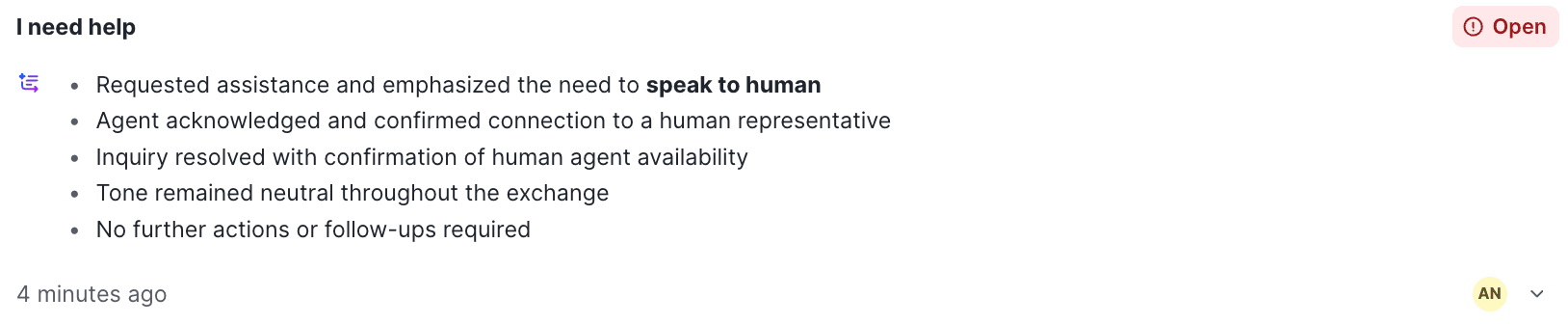
Two summaries of one chat can disagree. In Kustomer's own help-center screenshots of an "I need help" chat, the conversation summary says "Inquiry resolved with confirmation of human agent availability" and "No further actions or follow-ups required", while the handoff summary underneath says "Inquiry remains unresolved; awaiting human agent intervention". Both are fair readings of a bot saying it has found a human. But an agent who reads only the top line would close a conversation that is still waiting. Treat the summary as a pointer to the thread, not a status.
A handoff without a new customer message gets no new note. Handoff and closing summaries are only regenerated when the customer has written since the last one. If a conversation bounces from billing to tech to a team lead with the customer waiting, the third agent reads the note written for the first handoff, and anything the second agent learned is in the thread only. Ask agents to leave their own one-line note on internal transfers. The support shift handoff post has a template.
Redaction stops at the timeline. Kustomer is explicit that PCI redaction workflows do not extend to AI-generated summaries, and that handoff summaries may include sensitive data that was redacted in the conversation. If customers paste card numbers into chat, the clean-up has to cover AI_Handoff and AI_Closing notes through the API, since the interface has no delete option for them.
Read access is enough to see everything in a summary. Summaries are shared with everyone who can read conversations and customers, and Kustomer warns they "may include attributes they don't usually have permission to view". If you lock down a VIP flag or an internal risk score, don't pick it as a summary attribute.
Tone and sentiment are on by default. That suits most teams, and sentiment analysis in a handoff note is useful context. For EU customers, decide at setup rather than after legal asks.
None of these is a reason to skip the feature. They are reasons to keep the thread one click away, which Kustomer does well, and to review AI conversations for a week before trusting any summary as the record.
How does Kustomer Copilot use the summaries?
Copilot is the other half of Envoy, and the summaries are part of what it reads. Per Kustomer's Copilot article, when an agent asks about a customer or asks for a draft, Copilot draws on the current conversation, the available summaries, customer information, objects on the timeline, shortcuts, knowledge base articles and public URLs, and cites what it used. The setup guide adds that it never acts on its own: the agent confirms every action.
So the attribute descriptions you write for summaries also shape Copilot's answers. A vague description of "Order Status" gives you a vague summary and then a vague Copilot reply. That is the same agent assist pattern every helpdesk now ships, and AI copilots for customer service compares how others do it.
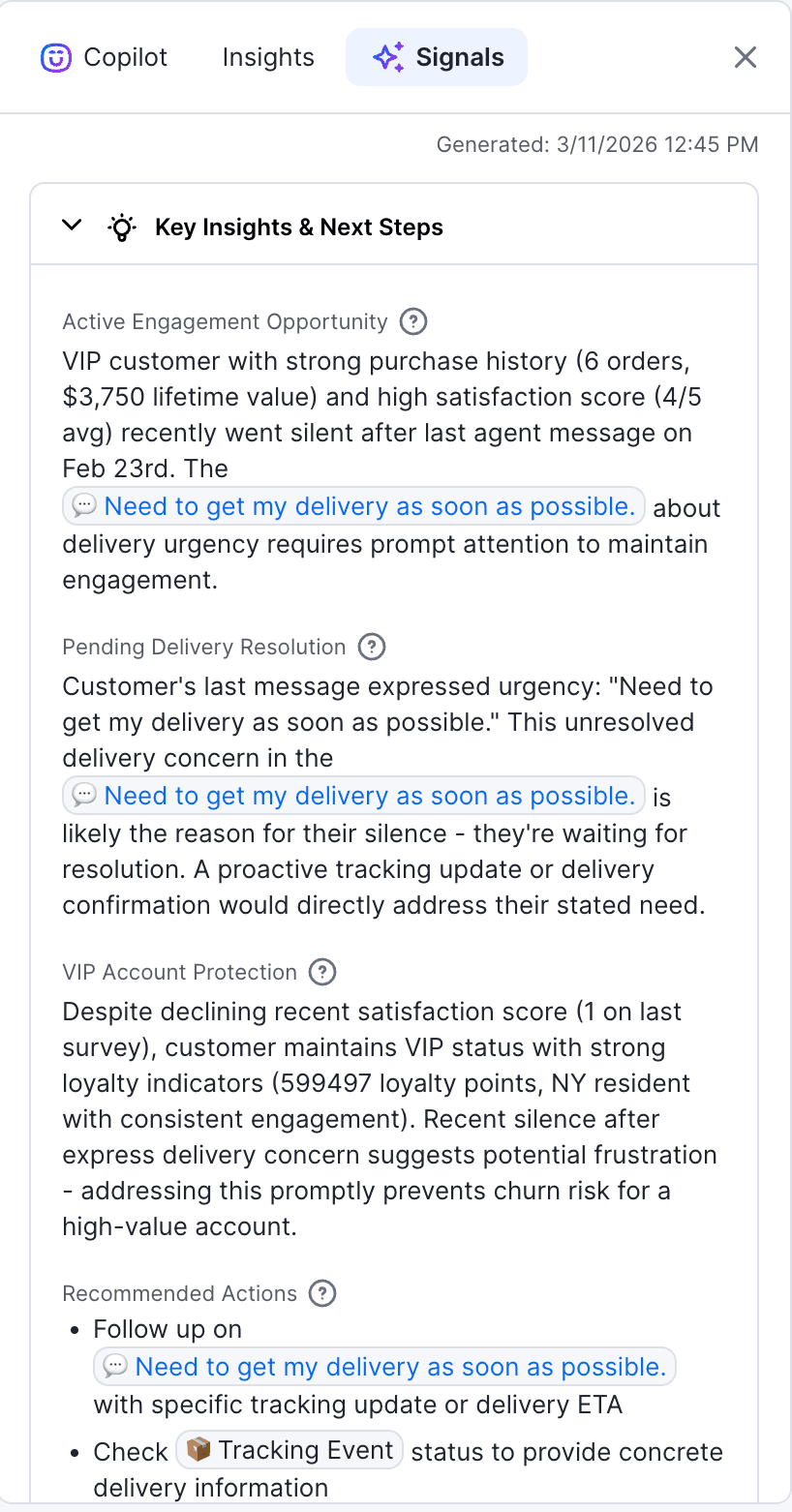
Signals, the third piece, reads the whole customer timeline and suggests what to do next: in the example above, a VIP waiting on a delivery update. It begins after someone first opens the Signals tab and refreshes on new activity, a change to the customer record, or every seven days.
Where does eesel fit with Kustomer summaries?
eesel fits a team weighing a move off Kustomer, or running a second helpdesk. eesel is an AI teammate that joins the tools a team already uses; on support it works inside your helpdesk queue, learns from past tickets and is tested against them before it replies. On the helpdesks it connects to, such as Zendesk, Gorgias and Help Scout, it can leave an internal note only your team sees. You tell it in plain language what a handoff note must hold (what the customer wants, what it already tried, what is blocked), and it writes one whenever it hands over, not only when a summary trigger happens to fire.
eesel has no Kustomer integration: Kustomer is not in eesel's helpdesk docs, so this post cannot tell you to connect it to your Kustomer timeline. If you are staying on Kustomer and want summaries, Envoy is the native answer, and my advice is the setup above with the five checks.
SamCart shows the handoff shape on Freshdesk. Its agent answers sellers from about 280 help center articles and replies only while no person is assigned. When a seller asks for a person or the question is beyond the help center, the ticket is tagged for handoff and the agent stops replying, so a person picks up a ticket that is clearly theirs.
On cost, eesel's pricing is by credits: a ticket that wakes the agent is 1 credit, and plans start at $299 a month for 500 credits. That is a different bill from Envoy's per-agent seat, so compare them on the job you want done: a reading aid for every agent, or an agent that answers and hands over with a note.
Try eesel next to your helpdesk
If what you really want from summaries is fewer cold handoffs, I would test an agent that writes the handoff note itself, on a queue it can connect to. Try eesel on one topic, run it against past tickets first, and read the notes it would have left before it touches a live conversation.
Still comparing platforms? The best AI for Kustomer roundup covers the options, and Kustomer AI conversation routing covers what happens before a summary is ever written.