

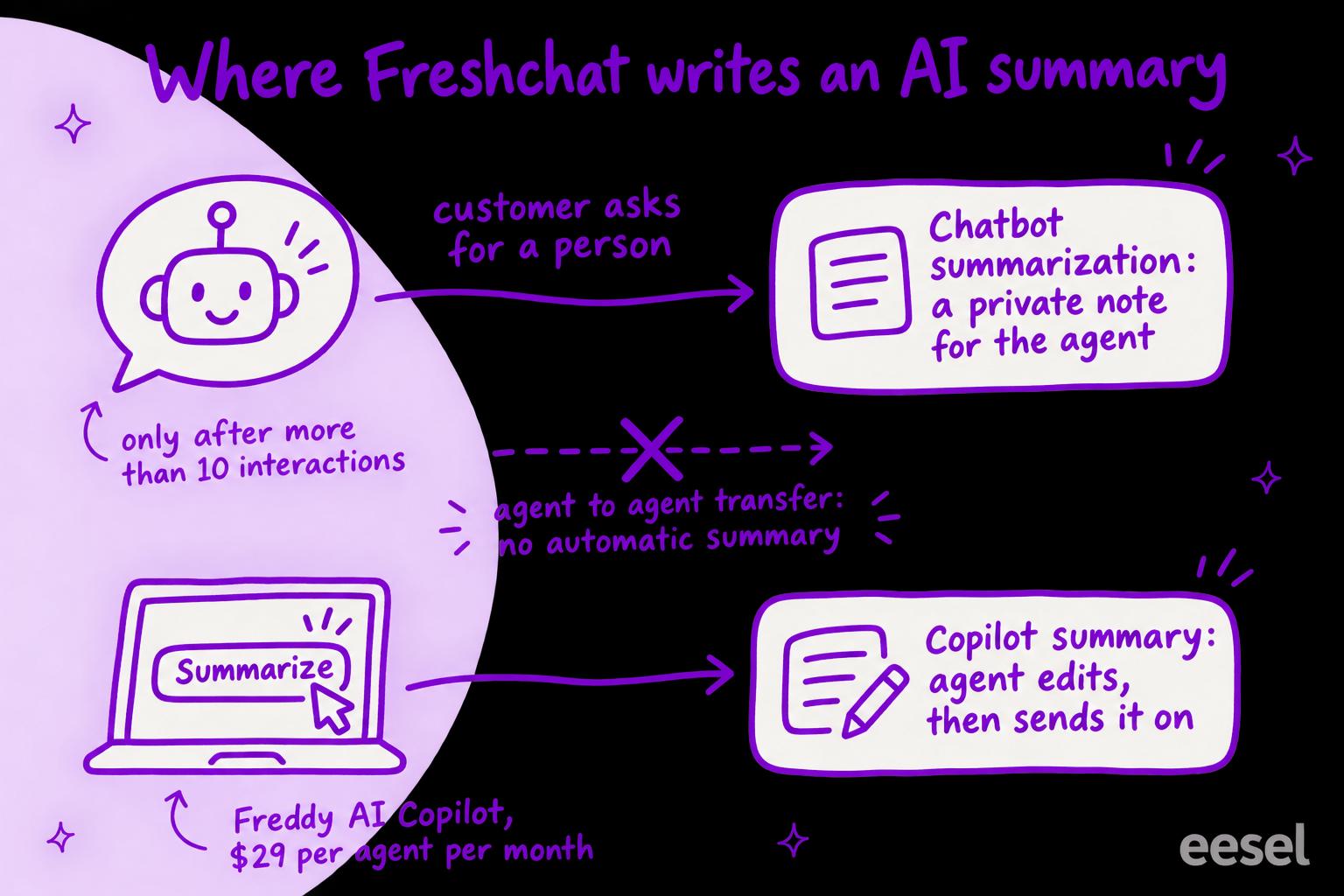
Freshchat AI conversation summaries come from two Freddy features: Copilot's Summarize conversation button, a $29 per agent per month add-on on Pro and Enterprise, and Chatbot summarization, a private note left when a bot hands over a chat of more than ten interactions. Both work. I'd switch on the bot note first, because it arrives without anyone clicking. The catch is coverage: short bot chats get no note, an agent-to-agent transfer gets a summary only if the agent clicks Summarize, and Freshworks' handover article for its newer Freddy AI Agent mentions no summary at all.
If what you want is a chat that reaches a person already understood, an AI agent for Freshchat such as eesel reads the conversation so far, answers what it can and assigns the rest to the right group, and your team can ask it about any chat from Slack. With the eesel CLI, an AI coding agent can connect Freshdesk and test answers before anything goes live, though a Freshchat admin still has to enter the API token and webhook.
What are Freshchat AI conversation summaries?
They are short, model-written recaps of a chat, so the agent picking it up doesn't scroll through the whole thread. They matter most in live chat, where the customer is still waiting while the agent catches up. Freshchat has two of them, and they are triggered differently.
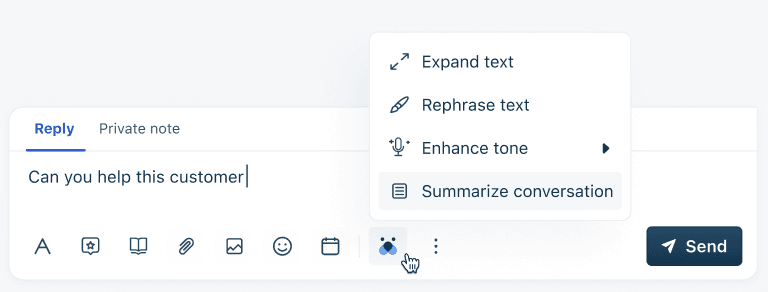
The first belongs to Freddy AI Copilot, Freshworks' assistant for human agents. Once an admin switches on Summarize conversation, an agent opens the Freddy menu in the reply editor and picks it. Freshworks' Summarize article says the agent can edit the result and then click Send "to share it with other teams or the next agent for further action".
The second is Chatbot summarization. When a customer has been talking to a Freshchat chatbot and the chat moves to an agent, Freddy writes what happened into a private note. Freshworks' bot summarization article says agents can use that note to start a private thread and talk it over internally while they reply.
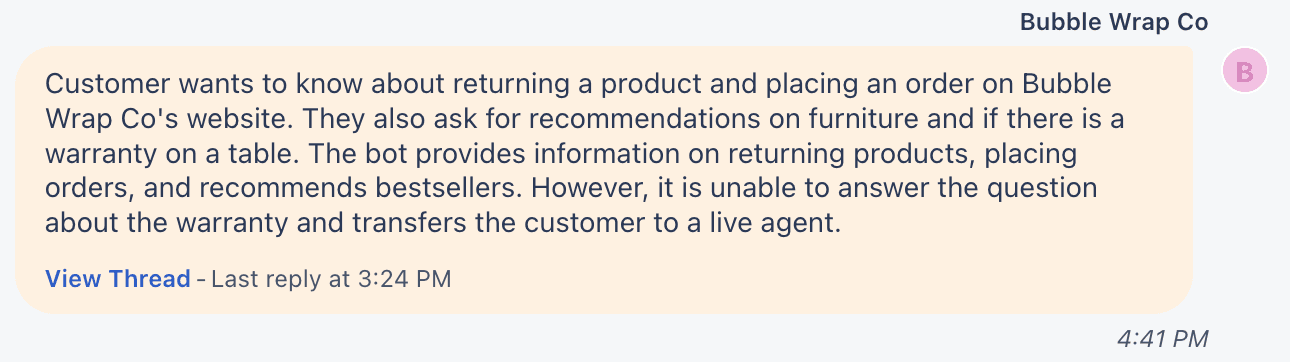
That example is the job done well: the agent learns the warranty question is the open one before reading a single message. Both features are forms of ticket summarization, built for chat, and they sit alongside Freddy's other agent tools such as the reply suggester.
Which Freshchat summary fits your job?
It depends on who hands the chat over: a bot gets the automatic note, an agent has to click Summarize.
Pick where your chats lose context to see which setting covers it.
Which Freshchat plan includes AI summaries?
Freshchat's pricing page sells Freddy AI Copilot only as an add-on on Pro and Enterprise, at $29 per agent per month. The help articles for both summary features list every Freshchat plan, Free included. The articles were last updated in late 2024 and the pricing page is current, so treat the pricing page as the rule and confirm what your own admin shows.
| Freshchat plan (billed annually) | Price per agent per month | Freddy AI Copilot |
|---|---|---|
| Free (up to 10 agents) | $0 | Not listed as an add-on |
| Growth | $19 | Not listed as an add-on |
| Pro | $49 | $29 per agent per month |
| Enterprise | $79 | $29 per agent per month |
Two details from the pricing page FAQ help with the bill. Copilot "can be purchased and assigned to any number of agents of your choice", so you don't have to license the whole team. And there are no day passes for Copilot, so a part-timer either has a license or doesn't.
For 10 agents on Pro, that is 10 × $49 = $490 a month for Freshchat, plus 10 × $29 = $290 for Copilot: $780 a month, billed annually. License only the four agents who take handovers and it is $490 + $116 = $606. The Freddy AI pricing breakdown covers the rest of Freddy, including AI Agent sessions. For Freshdesk, Freddy pricing per agent does the same maths.
How do you turn on Freshchat AI summaries?
Both switches sit on the same Freddy page in admin settings.
- Go to Admin settings and open Freddy AI.
- Under Freddy AI Copilot, switch on Summarize conversation. Agents now see it in the Freddy menu of the reply editor.
- Under Chatbots, switch on Chatbot summarization, described as "Summarize the conversation user had with the chatbot, when the conversation reaches an agent".
- Run a bot conversation of more than ten interactions on a test account, ask for an agent, and read the private note that arrives.
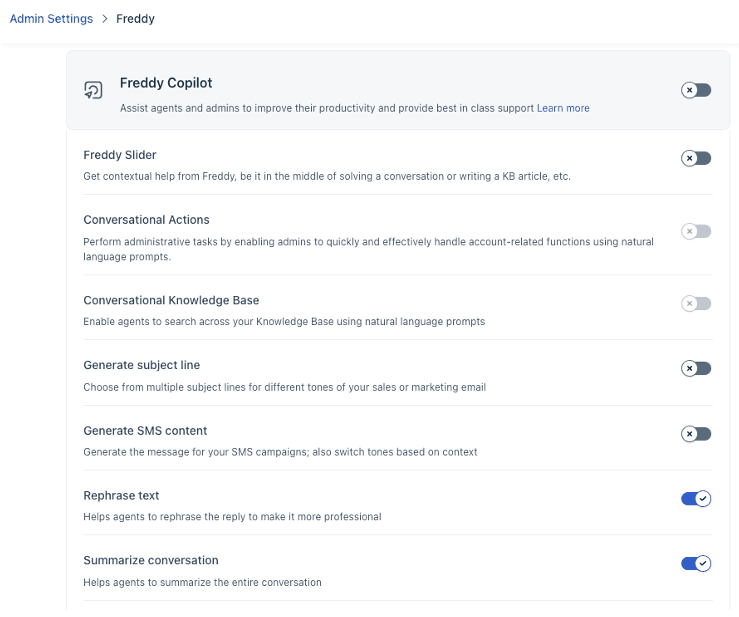
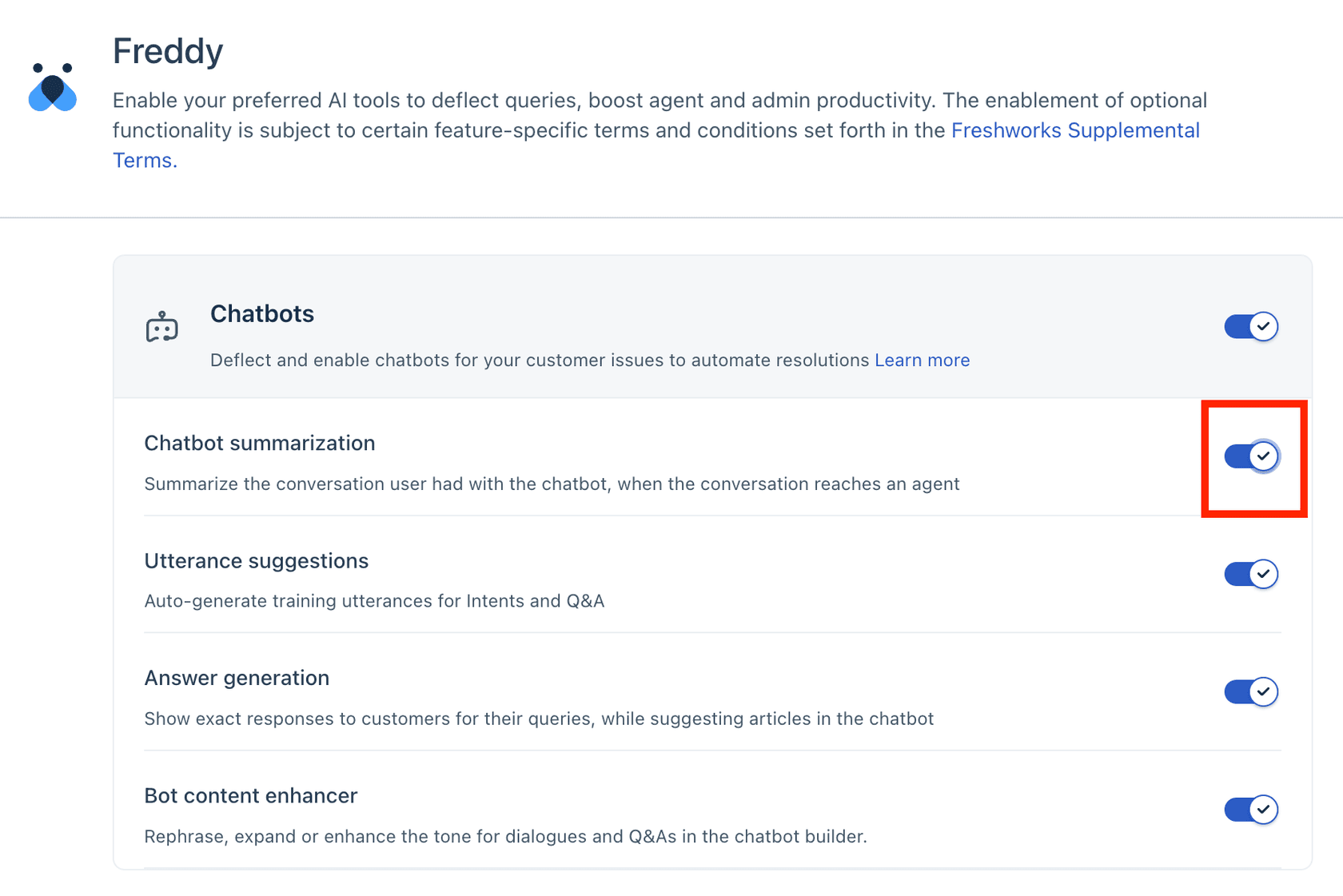
If your account URL looks like accountname.freshchat.com, Freshworks says you are on an older Freshchat with a prompt-based bot builder and points to a separate article, so the screens above may not match yours.
Where do Freshchat summaries fall short?
They fall short on coverage: short bot chats, agent-to-agent transfers and Freddy AI Agent handovers can all reach a person with no automatic note.
Short bot chats get no note. Freshworks says Freddy treats a conversation as long only once it passes ten interactions, and it is those that get the private note. A customer who tells the bot two things and asks for a person reaches the agent with nothing summarized. That is often fine (two messages are quick to read), but it means the note is not a field you can rely on in a report or a workflow. It is the same gap most chatbot escalation setups leave: the handover is designed, the context is not.
Agent-to-agent transfers depend on the agent. Copilot's Summarize is a button. When an agent reassigns a chat at the end of a shift without clicking it, the next agent starts from the thread. If your problem is shift handovers, the summary is only as reliable as the habit.
The Freddy AI Agent's handover describes no summary. Freshworks' newer Freddy AI Agent is set up in AI Agent Studio, and its handover settings (updated 6 April 2026) cover the phrases that trigger a transfer ("Talk to an agent", "Refund issue"), the message the customer sees, and collecting customer details first. Chatbot summarization is documented under Chatbots. Before you tell agents to expect a note from the AI Agent, test a transfer.
The note follows the customer's locale. "Currently, Summarize bot conversations works in the language set as the user's locale," says Freshworks. For a multilingual queue, that can put a summary in front of an agent who can't read it. Teams already juggling languages in Freshdesk will recognise the problem from AI ticket summarization more generally.
One Freshchat customer says the payoff is real. Michael Hobba, Care Lead at Felix, is quoted on the Freddy AI Copilot page: "The bot and the chat summaries have been a massive time-saver for our agents while handling difficult conversations and issues."
How is it different from Freshdesk's ticket summary?
Freshdesk's ticket Summarize is more structured. On Freshdesk Pro and Enterprise (and Freshdesk Omni Pro and Enterprise), it writes a summary with Issue, Steps Taken and Outcome sections, reads private notes for Steps Taken, and saves the summary to the ticket. When new replies arrive, the agent regenerates it, which replaces the old one. It is written in the agent's profile language, and it can't be generated on child tickets.
So a team running email on Freshdesk and chat on Freshchat gets two different summaries for the same customer. Other helpdesks split it their own way too, as Zendesk's AI summaries show. If that matters to you, the Freshdesk summary guide walks through the ticket side. Why the two products overlap at all is in Freshchat vs Freshdesk Messaging.
Summarizing Freshchat conversations with eesel
eesel is an AI teammate that joins the tools a team already uses. On Freshchat it connects through your Freshdesk integration, and it approaches the summary problem from the other end: the chat reaches a person with less to summarize, because the agent has already answered what it could and handed over only what it couldn't.
In a live chat, eesel reads the conversation so far (up to 50 messages, each marked as the visitor's, a bot's or a named teammate's, with private notes marked as notes), plus the topic, group, assigned agent and your custom fields. It answers from your help center, canned responses and past Freshdesk tickets, the way an AI copilot for customer service drafts from them, except it sends the reply itself. When a person should take over, it assigns the chat to a group or an agent, and it can set a custom conversation field on the way, so a "handoff reason" field you create gets filled whenever its instructions say to hand over.
For a summary on demand, a teammate can ask eesel in Slack or the dashboard to read any Freshchat conversation and say what happened. That works from outside Freshchat, on any chat, with no per-agent license. eesel does not write Freshchat private notes, so if your agents want the summary inside the chat itself, Chatbot summarization is the native answer.
SamCart shows the handoff shape on Freshdesk. Its agent answers sellers from about 280 help center articles and replies only while no person is assigned. When a seller asks for a person or the question is beyond the help center, the ticket is tagged for handoff and the agent stops replying, so a person picks up a ticket that is clearly theirs.
Try eesel next to Freshchat
If the summaries you want are really about cold handoffs (the AI handoff practices post lists what a warm one needs), test an agent that handles the first part of the chat and hands over the rest. Connect Freshdesk, add Freshchat, and limit eesel to one topic in its automation's instructions while you watch. A chat is 1 credit however long it runs: the free trial gives you 100 credits over 7 days with no card, and plans start at $299 a month for 500 credits, with no per-agent fee.

Try eesel on one Freshchat topic. Still comparing? The best AI for Freshchat roundup covers the options. For what decides who gets the chat in the first place, read Freshchat AI conversation routing.