Help Scout AI conversation summaries: plans, limits, and handoffs

Kurnia Kharisma

Katelin Teen
Last edited November 20, 2026

Help Scout AI Summarize gives you a bulleted summary of a long conversation in one click, and it comes with Plus ($45 per user per month, billed annually) and Pro ($75), not Standard or Free. It is a reading aid for the person picking a conversation up: it is manual, English-only, web-only, and Help Scout warns it can be inaccurate. I would use it for handoffs and quality reviews, then verify the facts that cost money, and add an AI agent such as eesel when you want a note written at the moment a conversation escalates, not whenever someone remembers to click.
With the eesel CLI, an AI coding agent can run npx @eesel/cli integrations connect helpscout_v2 to see the Help Scout connection options, upload approved knowledge, and test the agent's answers before it touches a live reply. Someone with admin access still has to authorize the mailbox connection.
What does Help Scout AI Summarize do?
You open a conversation, click the AI Summarize button at the top, and Help Scout reads the whole history and returns a concise bulleted summary of the key points, per its AI features overview. When new threads arrive, you refresh the summary instead of rereading.
The docs name three uses: handing a conversation to a teammate, coaches skimming for quality reviews, and teams outside support checking in on a conversation. That list matters, because it tells you the summary is written for a human reader after the fact. It is not a field on the conversation, not a tag, and not something a customer sees.
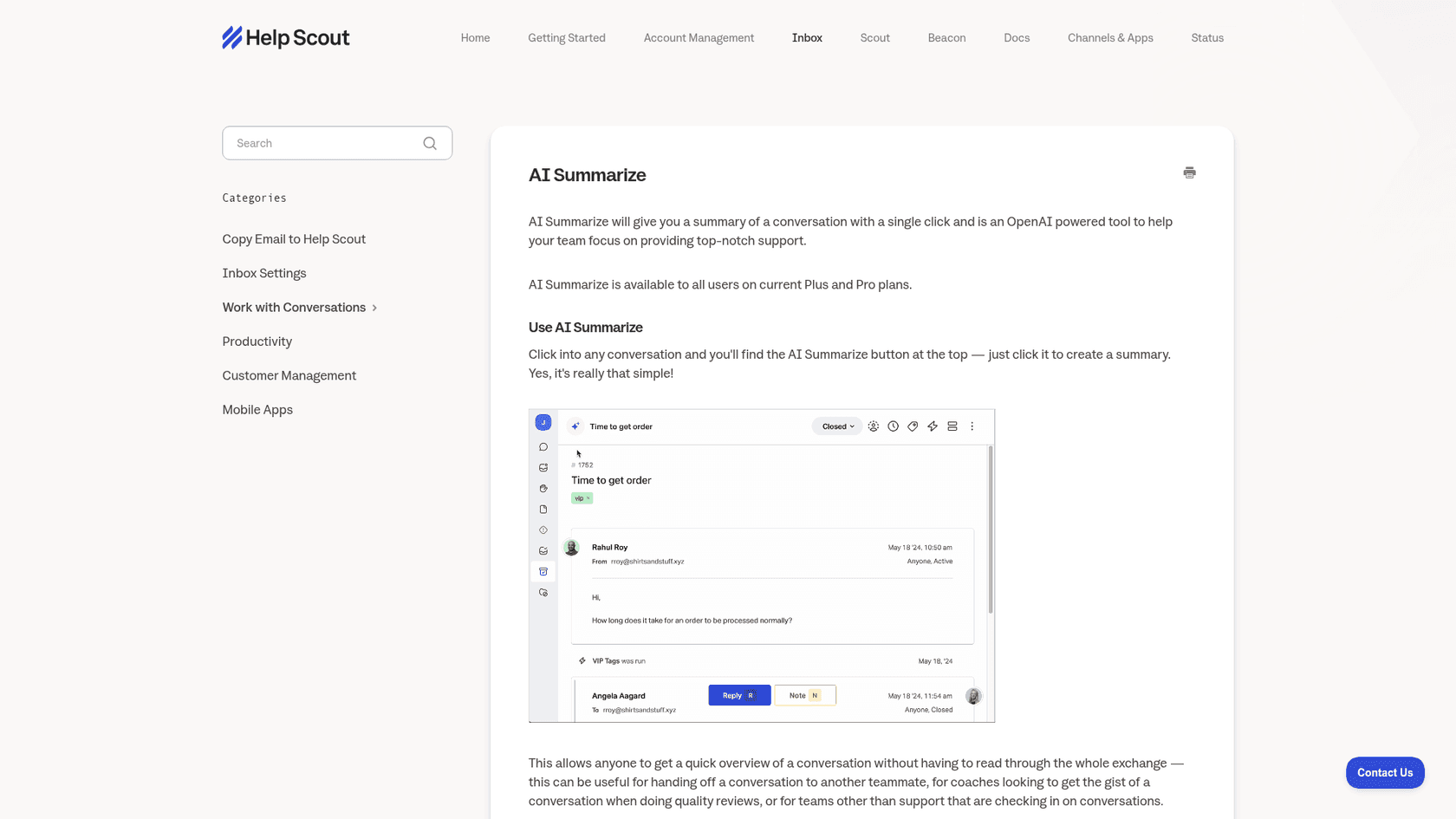
Summaries sit alongside AI Drafts, which writes a reply, and AI Assist, which rewrites your text. If you are mapping the whole set, my Help Scout features post covers the rest of the product.
The saved replies guide covers the manual side of consistent answers. If you work with a shared inbox, summaries matter most when many hands touch one thread.
Which Help Scout plans include AI summaries?
The docs say AI Summarize is available to all users on current Plus and Pro plans. Help Scout's pricing page agrees: the Free plan lists no AI tools, and the comparison table shows AI Summarize as unlimited on the two top tiers.
| Plan | Price (per user per month) | AI you get |
|---|---|---|
| Free | $0 | No AI tools |
| Standard | $25 billed annually, $30 monthly | AI Inbox assistant |
| Plus | $45 billed annually, $54 monthly | Adds AI Summarize and unlimited AI Drafts |
| Pro | $75 billed annually, $90 monthly | Everything in Plus |
| Envoy add-on | $0.75 per resolution | AI that answers customers directly |
The practical read: summaries are a Plus feature in a Standard-sized budget conversation. If your team of eight is on Standard at $25, moving to Plus at $45 costs $160 more per month on annual billing, and the summary button is one reason among several (advanced workflows and unlimited AI Drafts are others). It is worth checking whether the summary alone justifies that. One Trustpilot reviewer was unhappy about being moved up a tier for AI features:
"They just announced they are 'upgrading' our plan from 1500 a year to over 7500 a year. So that we can use AI drafts and have 'unlimited seats'."

That is one review, not a pattern, but it shows why I check the plan table before promising a team a feature. The full tier breakdown is in my Help Scout pricing guide.
What are the limits of AI Summarize?
Help Scout lists them itself, which I appreciate:
- Accuracy. Summaries can be inaccurate or misleading, so you check the conversation when something looks wrong.
- Language. You can request a summary of conversations in many languages, but the summary is always in English.
- Where it runs. Web browser app only at this time.
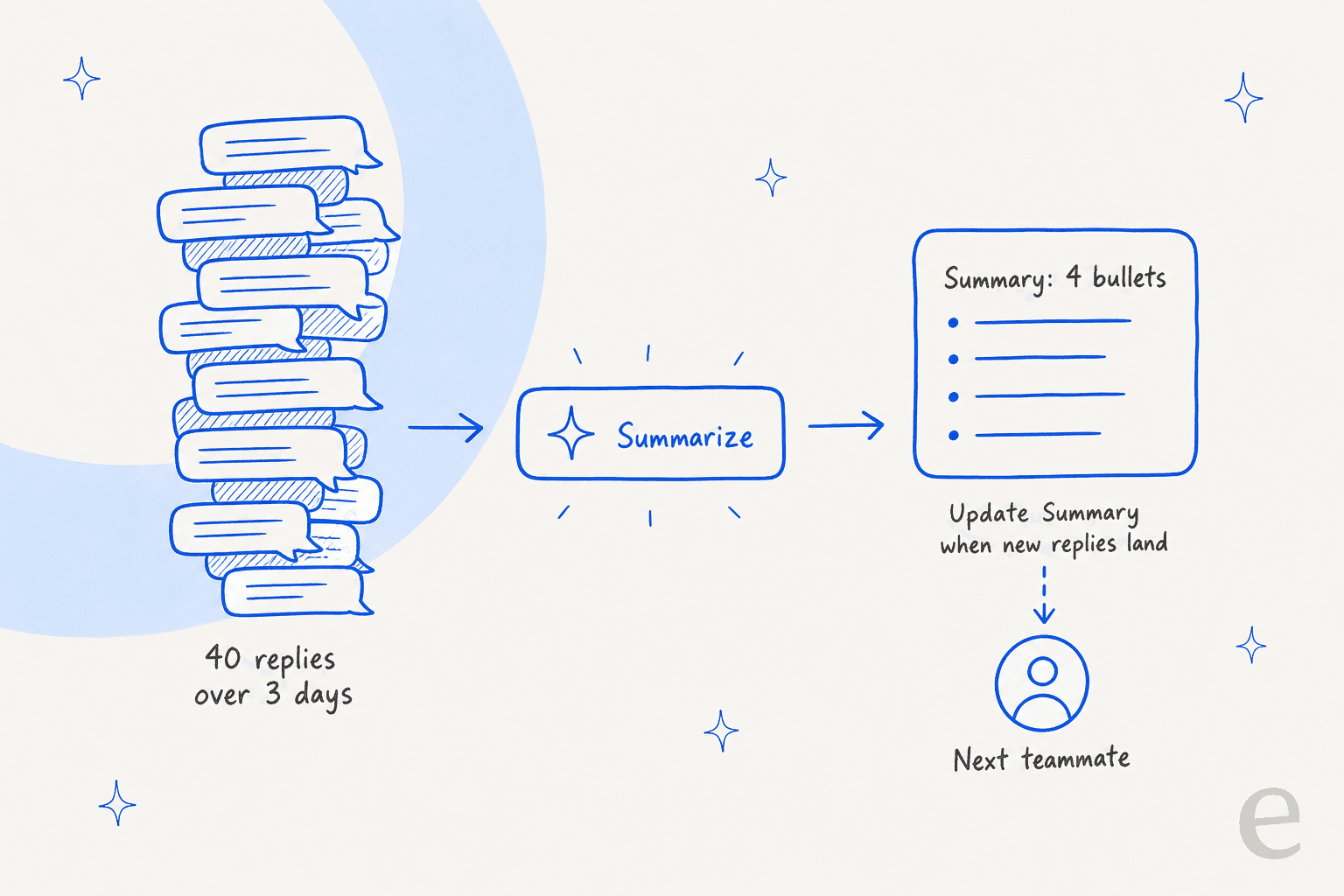
- Freshness. It does not update by itself. An Update Summary option appears when there are new replies.
- Data. It runs on the OpenAI API. Conversation data is not used to train the model but is stored by OpenAI for up to 30 days.
- Opt-out. If your organization does not want it, the Account Owner contacts Help Scout to have it turned off.
Two of these bite in handoffs. A summary that went stale after the last reply is the summary of a conversation that no longer exists, and an English-only summary of a Spanish thread helps the next agent only if they read English.
How do I use summaries for handoffs and escalations?
Here is the routine I would set for a team on Plus or Pro. Total setup is about 20 minutes.
- Summarize at the moment of handoff, not before. Click Summarize after the last reply, so the bullets include what was just promised.
- Check three facts against the thread. Amounts, dates, and any commitment made to the customer. These are the lines where an inaccurate bullet costs money.
- Paste the bullets into an internal note. The summary lives in the button; the note lives on the conversation. If the summary is the handoff, write it into a note so it survives the next reassignment.
- Add the one thing a summary cannot know. Why you are escalating and what you want the next person to do first.
- Refresh when the customer replies. If the next agent opens a thread where the customer wrote back, click Update Summary before acting on old bullets.
Summaries pair well with the routing basics. Set auto-assignment workflows so the right person gets the conversation, and keep collision detection in mind so two people do not summarize and reply at once.
Watch your SLA policy order so an escalated thread does not breach while it waits. A snoozed conversation is the one to refresh before it wakes up.
For the broader process around who owns what at each step, my ticket escalation process guide and the glossary entries on escalation and ticket summarization are the places I would start.
My notes on AI conversation summarization and whether AI can summarize support tickets cover the general case.
Where do AI summaries fall short on handoffs?
A summary is written when someone clicks. A handoff note is needed when work stops. Those are different moments, and that gap is where context gets lost.
Think of a Friday evening escalation. The agent who knows the case closes their laptop, and the thread has 40 replies. On Monday the next agent can click Summarize and get a decent recap, but only of what is in the thread. The reason for the escalation, the refund the first agent was about to approve, and the customer's tone on the phone are not in the thread, so they are not in the summary either. Help Scout's docs say as much by suggesting the summary "replaces the need to write detailed internal notes", and I would read that as the case for convenience, not completeness.
A G2 reviewer describes why notes matter in the first place:
"Internal notes help us discuss issues without involving the customer or having to pass emails back and forth, which also prevents the conversation thread from getting lost."

So I keep both: the summary to read fast, the note to carry intent. My AI agent handoff best practices post goes deeper on what a good handoff contains.
Can Help Scout's other AI features write the handoff?
Partly. Here is how the pieces line up for a handoff job:
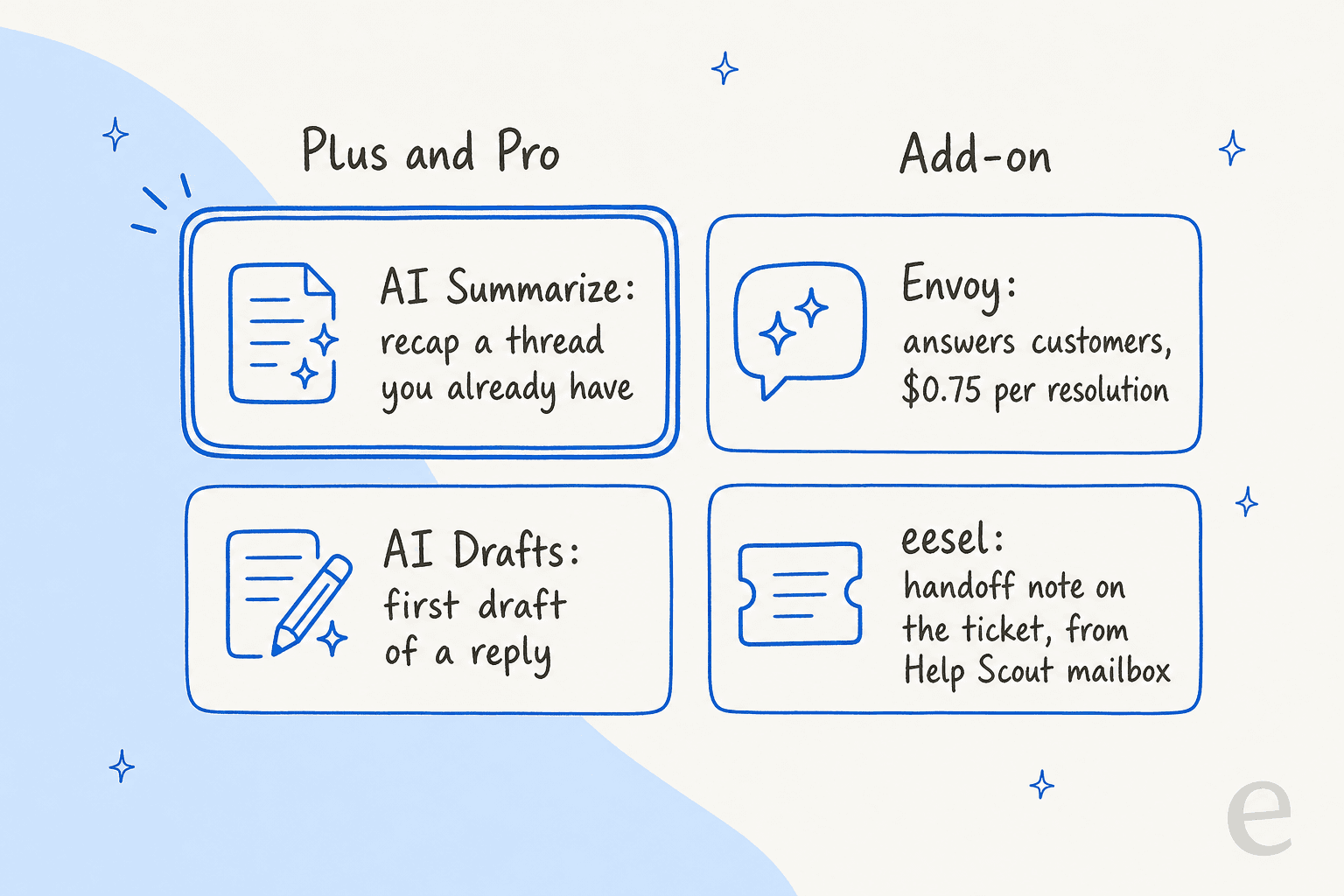
- AI Drafts writes a reply from your knowledge base and past replies. It can be created by workflows, but it drafts to the customer, not to the next teammate.
- Envoy answers customers directly at $0.75 per resolution on the pricing page. It is for deflection, which I cover in Help Scout AI ticket deflection.
- Topics categorizes incoming conversations automatically. Useful for routing and reports, not a recap.
- The MCP server lets AI tools such as Claude, ChatGPT and Cursor search your conversations read-only, and Help Scout lists "a summary of what a specific customer has contacted you about" as one use. That is a good pre-call brief, and it needs someone to ask.
None of these is documented as writing an internal note when a conversation changes hands. If a Help Scout team asks me for that specific job, I look outside the native set. If you are still choosing a helpdesk, see Help Scout vs Front and Zendesk vs Help Scout.
For more head-to-heads there is Freshdesk vs Help Scout and Gorgias vs Help Scout.
My Help Scout AI alternatives and best AI for Help Scout posts compare the AI options, and adding AI to Help Scout covers the connection routes.
Where does eesel fit with Help Scout summaries?
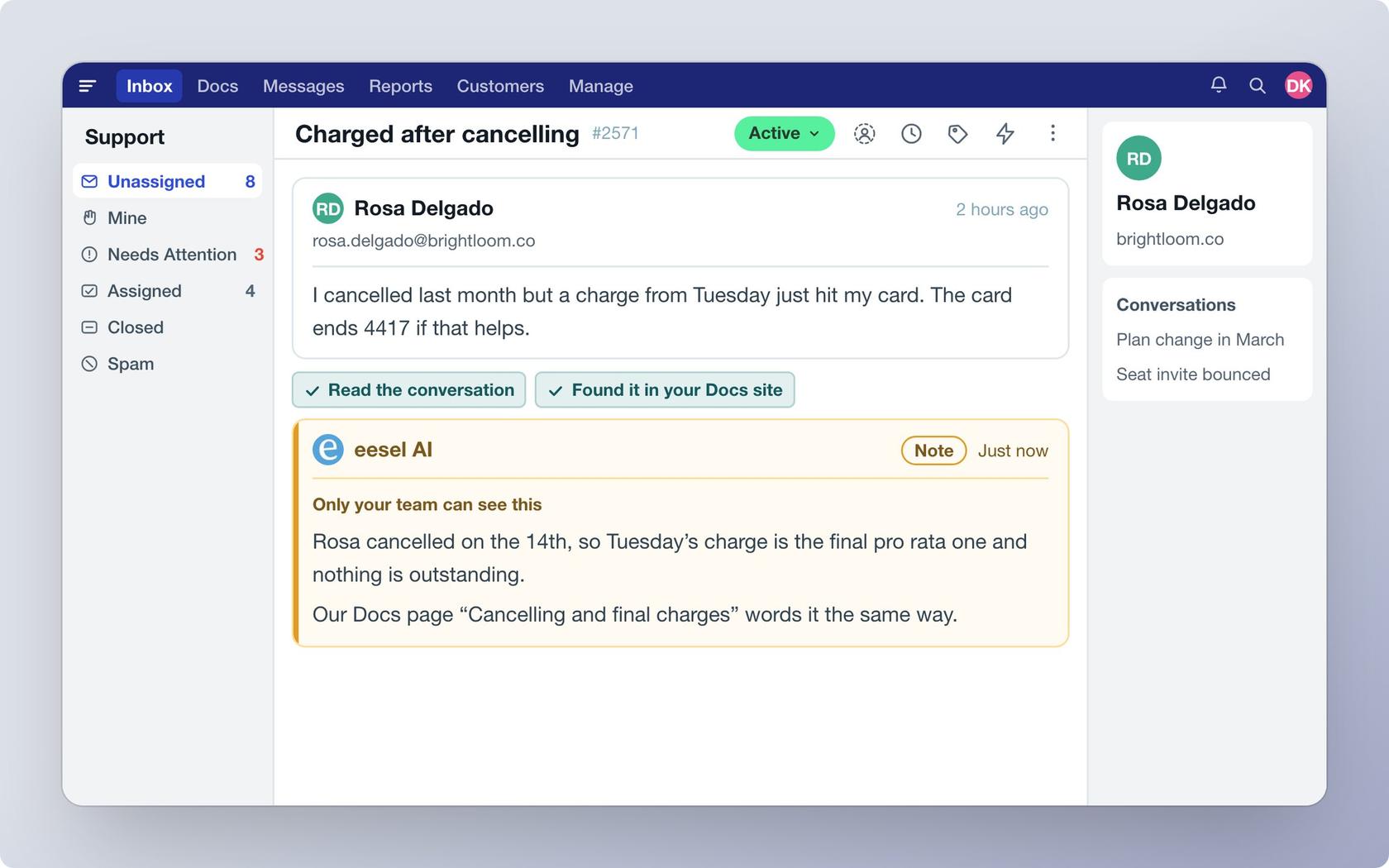
eesel is an AI teammate platform, and the one that matters here is the AI helpdesk teammate. It integrates with Help Scout: per the setup docs, it works inside your mailboxes, can leave a draft reply, send a reply, or add an internal note, and learns from your Docs site and past conversations. It reads every customer message and team reply oldest first, so it starts from the same thread a human would.
What I would not claim: eesel does not have a documented "summarize this thread" button that replaces AI Summarize. For a human skimming a long thread, use Help Scout's own button. Where eesel earns its place is the other end of the problem. When the agent stops and hands over, it leaves an internal note your team sees, and you can ask it in plain language to end each note with what the customer wants, what it already tried, and what is blocked. I would test that wording on past conversations before turning on live replies, since the note is only as good as the instruction.
The pattern works in the field. SamCart runs eesel on Freshdesk, not Help Scout, but the handoff design is the useful part: the agent answers from about 280 help center articles, replies only while no person is assigned, and when a seller asks for a person or the question is beyond the help center, the ticket is tagged for handoff and the agent stops. Two agents, one for email tickets and one for website chat, share the same help center. The same shape fits a Help Scout mailbox, where assignment and tags are native.
On cost, eesel's pricing is by credits: a ticket that wakes the agent is 1 credit, and plans start at $299 a month for 500 credits per the pricing docs. Compare that with a Plus upgrade for the whole team and with Envoy's per-resolution rate, and decide which problem you are paying to solve.
Try eesel for Help Scout
If your handoffs lose context between Friday and Monday, I would put an agent on the mailbox that writes the note when it stops. eesel connects to Help Scout in a few steps, reads your Docs and past conversations, and leaves internal notes your team sees, so the next person starts from a written reason and not a guess.
I also wrote about email to chat workflows, AI for Help Scout, and an AI chatbot for Help Scout, if the deflection side matters to you.
Knowledge base quality drives every one of them, and Help Scout translation settings are worth a look for the English-only summary gap. You can run it against past conversations before it touches a live one.
Try eesel free, or read how it compares in my Help Scout review.