


Salesforce Omni-Channel routing pushes each case, chat or messaging session to a rep who is online, has the right skills and has spare capacity, instead of leaving reps to grab work from a queue. Nothing moves until four pieces exist: a queue with a routing configuration, a service channel, a presence status tied to that channel, and a rep with capacity. Start queue-based and add skills only when a queue can't say who should take the work. Omni-Channel Routing isn't in the $25 Starter Suite, per Salesforce's pricing page. An AI teammate such as eesel can draft the reply on each new case, while Omni-Channel stays the traffic controller.
I build integrations at eesel, so I spend my days at the seam where an AI agent meets a helpdesk's own routing. In a 2026 sales-call review, a CX lead handling about 7,000 tickets a month told us the AI should only touch tickets it is confident about and "leave them alone" otherwise. That is a routing requirement as much as an AI one, and it is why I read Salesforce's Omni-Channel docs end to end. With the eesel CLI, a coding agent can upload approved routing playbooks and escalation policy as knowledge, then ask test questions and check the answers before anything goes live. Connecting the Salesforce org itself still needs someone with admin rights to approve it.
What is Omni-Channel routing in Salesforce?
It is Salesforce's engine for pushing work to the most available and qualified rep. Salesforce's Omni-Channel overview says it "routes work requests to the most available and qualified support reps", so reps stop picking and choosing from a queue by hand. The work can be a case, a chat, a messaging session, a voice call, a lead or a custom object.
Two things changed recently, and both affect an old guide you might be following. First, Salesforce says Standard Omni-Channel is retired with the Summer '26 release and orgs are upgraded to Enhanced automatically during that rollout. The comparison page says Enhanced drops support for Chat (Live Agent), standard Messaging channels and Salesforce Classic, and adds Omni Mobile, a wallboard, a paused status and a higher cap on queued items. Second, the product name moved: Salesforce's help still files this under Service Cloud, and the newer branding is Agentforce Service, so search for both.
The overview also carries a line that explains a lot of confusion later: "Routing logic is applied when work is assigned to an owner. If field values on the work item are changed after the item is routed, the routing logic isn't reapplied." Routing happens once. Hold that thought for the gotchas section.
What has to be set up before work gets routed?
Four things, in this order: Omni-Channel on, a service channel, a presence status, and a queue with a routing configuration. Skip one and the work item sits unrouted, which looks a lot like Omni-Channel being broken.
Here is the setup path from Salesforce's docs:
- Turn it on. In Setup, open Omni-Channel Settings and enable Omni-Channel. The enable article says you need the Customize Application permission, and that Omni-Channel Settings needs
cdn.jsdelivr.netallowed or the page and the Enhanced setting fail. Licence-wise, it comes with the Service Cloud product license or an add-on such as Digital Engagement, Enhanced Chat, Salesforce Voice or Workforce Management. - Create a service channel. Salesforce's service channel article says channels turn almost any object, such as a case, lead or custom object, into routable work.
- Create a presence status. A presence status says whether a rep is online or busy, and which channels they can receive. Salesforce's example is "Available for Web Support", covering chats and emails.
- Create a routing configuration and attach it to a queue. The routing configuration article says to make one per service channel and then associate it with queues. A queue with no routing configuration isn't routed at all, per the lifecycle page.
- Add the Omni-Channel component to the app. Reps need it in their Lightning app to see and accept work.
Some optional switches live on the same settings page: skills-based and Direct-to-Agent routing, secondary routing priority, the status-based capacity model, and what happens when a rep opens a second tab. That last one matters. Each rep can have one Omni-Channel session, and Salesforce warns that logging in on a second tab can end the first session and lose in-progress work, including active voice calls. Their recommended setting is the one that leaves the original session alone.
For the underlying queue concept, my Salesforce ticketing system guide covers how cases arrive, and the Service Cloud overview covers the product around it.
How does a case actually get routed?
A queue-owned case becomes a pending routing record, then an assignment, then a rep's accepted work. Salesforce's routing lifecycle page names two objects: PendingServiceRouting, a transient record created when work is routed, and AgentWork, created when the system finds a potential rep. The pending record is deleted when a rep accepts. AgentWork is never deleted automatically.
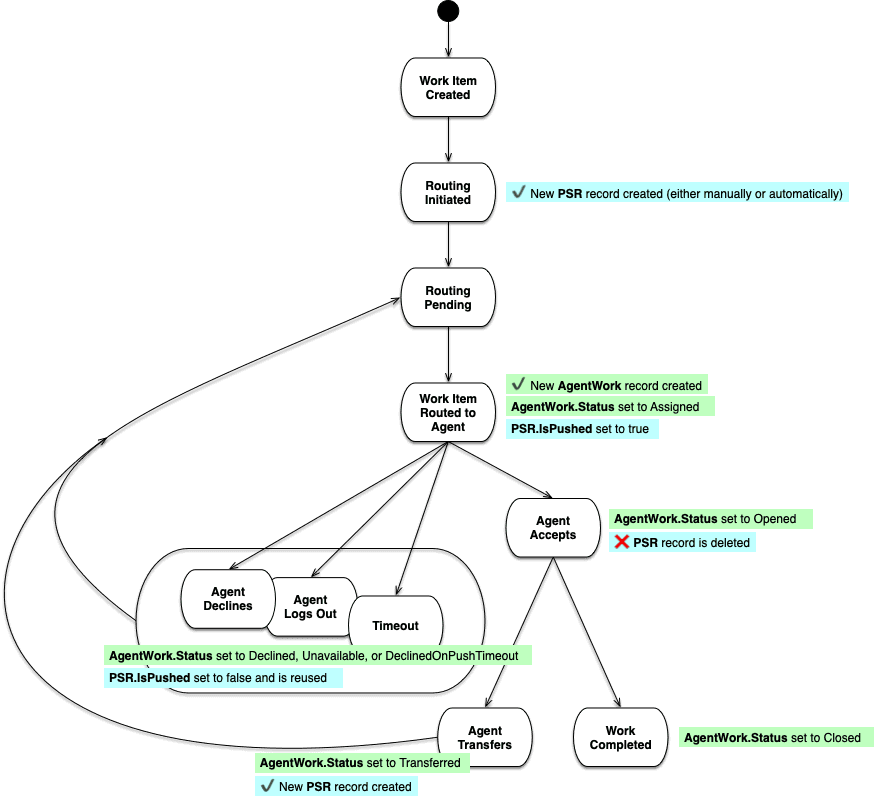
The Route to a Queue article describes two triggers. A new item entering an Omni-Channel queue is routed by queue priority first, then by how long it has waited. And whenever a rep logs in, finishes work or changes status, Omni-Channel looks for waiting work that rep can take. If nobody is online, or everyone online is full, the item stays in the list.
Three details I'd pin above my desk:
- Priority order. In a routing configuration, a lower Routing Priority number routes first. Within a queue it is first in, first out, unless you enable secondary routing priority, which lets a field such as Status jump escalated cases (priority 1) ahead of new ones (priority 2). Salesforce says it only applies to work opened after you enable it.
- Push time-out. A routing configuration can set how many seconds a rep has to respond before the item is pushed to someone else. Salesforce notes that with Amazon Connect and no Unified Routing, the value is limited to 20 seconds.
- No automation on routing. Assignment, auto-response, escalation and workflow rules don't fire when Omni-Channel routes work and the rep accepts it. They fire when the rep edits and saves the record afterward.
How do Least Active and Most Available pick a rep?
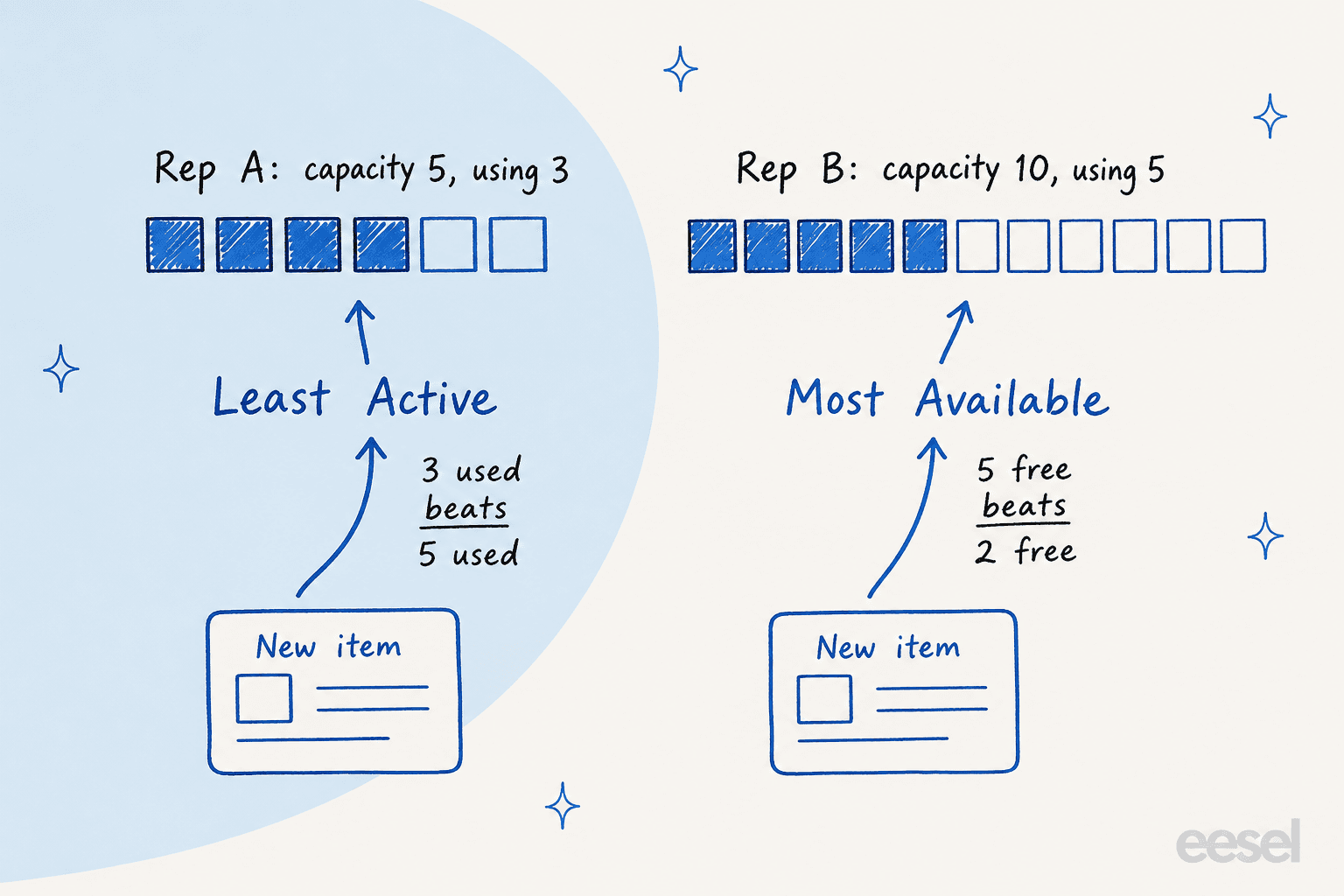
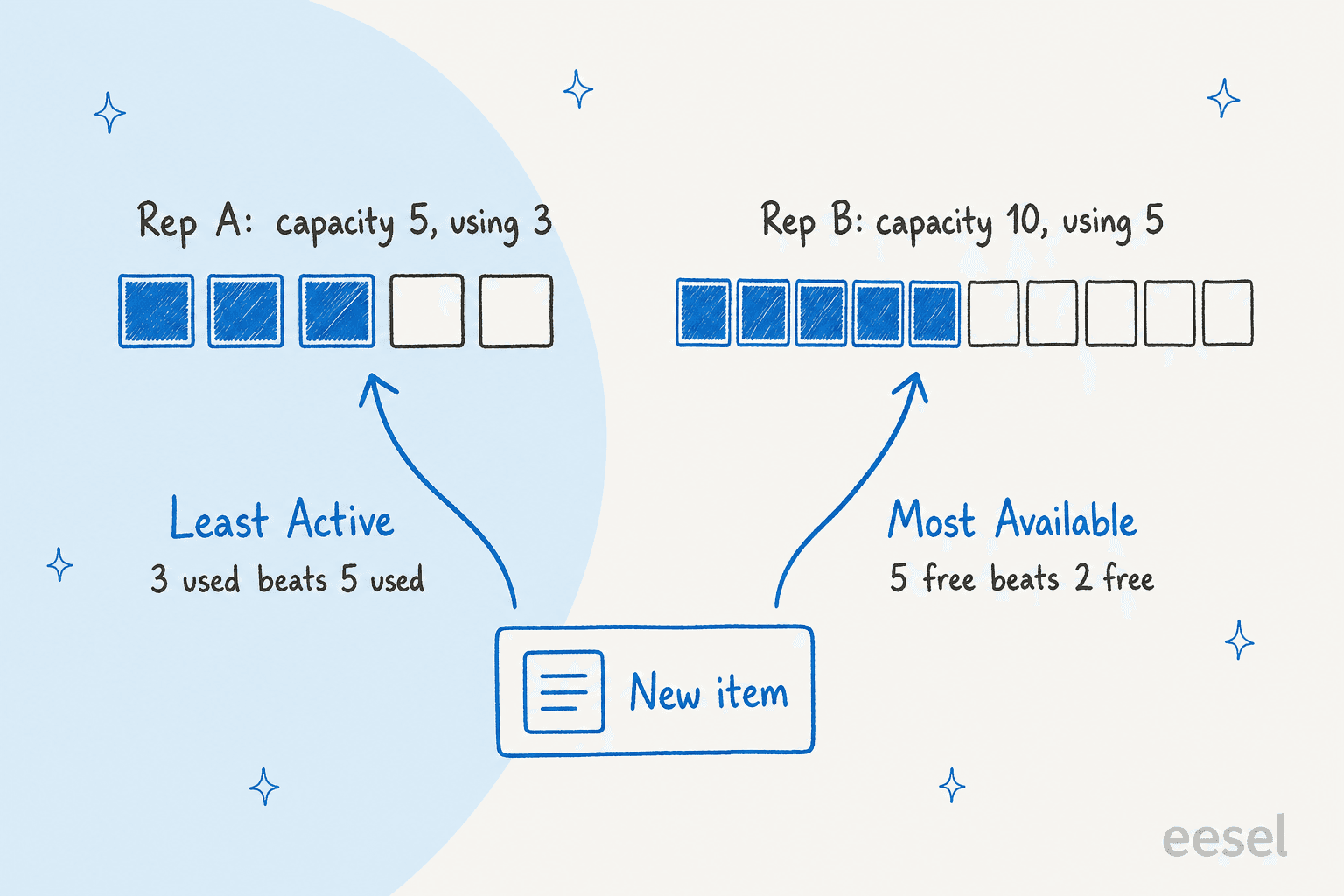
They answer different questions: who is using the least capacity, or who has the most left. Salesforce's routing model article works one example both ways. Rep A has a capacity of 5 and is using 3. Rep B has a capacity of 10 and is using 5.
| Model | Picks | In the example |
|---|---|---|
| Least Active | The rep whose work consumes the smallest amount of capacity | Rep A, with 3 used against 5 used |
| Most Available | The rep with the greatest amount of available capacity | Rep B, with 5 free against 2 free |
My rule of thumb: Least Active evens out work, Most Available favors your bigger-capacity reps. If everyone has the same capacity the two behave almost identically, so I'd choose Most Available only when you deliberately give senior reps a larger number. Ties go to the rep who has gone longest without work. One more line from the same page that surprises people: Omni-Channel counts work as assigned the moment it routes it, whether the rep accepts or declines.
How does capacity work, and what is the difference between tab-based and status-based?
Capacity is a number on the rep's presence configuration, and each queue's routing configuration says how much of it a work item uses. Salesforce's capacity model article defines two ways to count it:
| Tab-based | Status-based | |
|---|---|---|
| What counts | Console tabs open in the rep's session | The status of each assigned work item |
| Logging out | Work is treated as closed and capacity resets | Capacity isn't reset until the work reaches a completed status |
| Paused work | Not available | Available only in Enhanced Omni-Channel |
| Standard navigation apps | Not supported | Supported |
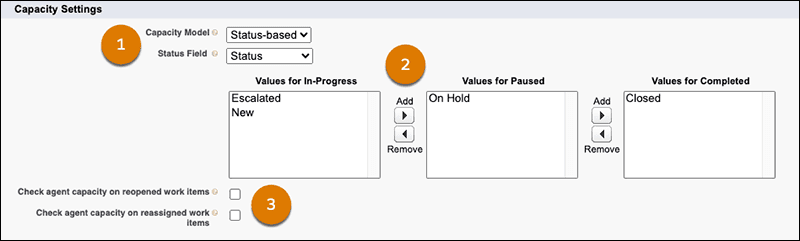
The hard ceiling is 100 open work items per rep, whichever model you use. You size items in units or a percentage, never both, and voice is special: a Voice Call queue's work item must be the rep's full capacity. Paused work defaults to zero capacity, so a rep who parks a case can take more.
The model you pick decides whether your reps' real workload matches the number on the screen. A 2018 r/salesforce thread shows the pain. An admin asked what happens when two reps each hold 8 open cases but one rep's cases are mostly waiting on the customer, and a commenter replied:
"That’s correct - it’s based on the tabs you have open not any sort of status you have on those cases. We use it simply to just auto assign cases, but for actual workload it’s not the best"

That thread is old, and the status-based model in the setup article exists to fix it: work stays assigned until its status says it is done, and you map picklist values to in-progress, paused and completed. It has its own limits. After Conversation Work isn't compatible with it, voice reps can't set their own status, and callbacks aren't supported with Unified Routing.
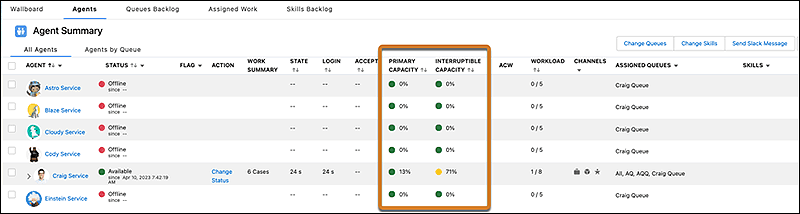
A second capacity idea is worth knowing. Interruptible capacity splits work into primary (a call or chat you shouldn't interrupt) and interruptible (a long-running case). Salesforce's example: a rep handles one call and four cases at once, with primary capacity of 1 and interruptible capacity of 4. Four cases fill the interruptible side, but a call still arrives because primary capacity is free.
Queue-based or skills-based routing: which should you use?
Use queue-based routing until a queue can't describe who should take the work. Salesforce's comparison article says queues are designed to represent one skill, like a Spanish-speaking queue or a Level 3 queue, and the work goes to a member. Skills-based routing sends the item to a rep who has all the required skills and available capacity.
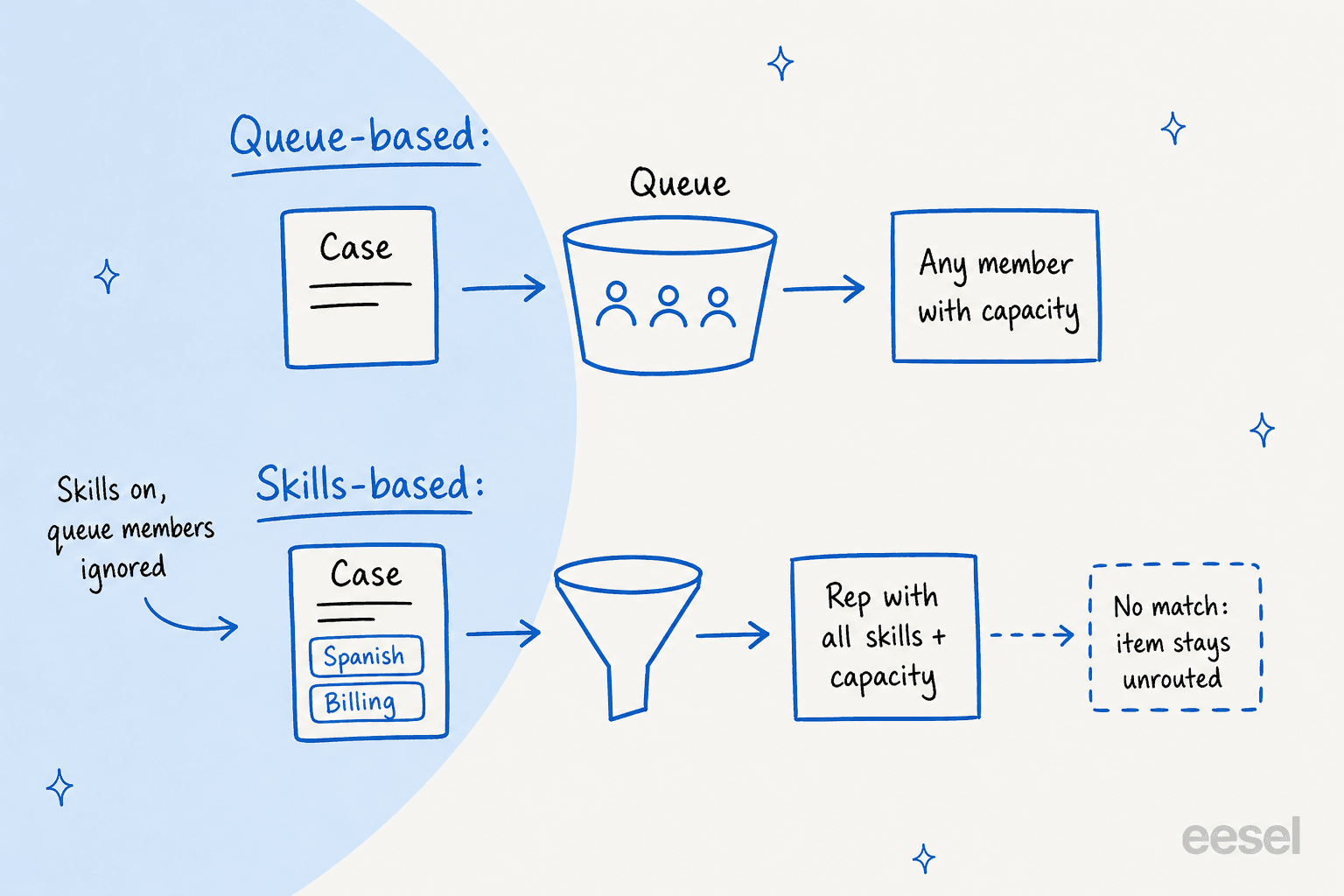
The skills-based routing article says skills come from two places: static skills on the routing configuration, which apply to every item, and dynamic skills added by skills-based routing rules or an Omni-Channel flow. A few behaviors to know before you commit:
- Skills override queue membership. If you enable skills-based routing rules on a routing configuration attached to a queue, Salesforce says the queue's membership no longer applies. If no skills are on the item, it goes to any available rep in the org.
- No match means no route. If no rep has the required skills, the item isn't routed. Supervisors see it in a Skills Backlog tab. Salesforce lets you configure additional skills to be dropped in a set order until a rep matches.
- Skills are read once. They're evaluated when the record enters the queue. Edit the record later and nothing changes until you reassign it.
- Limits. The limitations page says skills-based routing isn't supported for external routing, doesn't support estimated wait time, and supports voice only with Unified Routing.
Here is a quick picker I'd use with an admin. Choose the sentence that sounds most like your queue.
If you run another helpdesk, Freshdesk skill-based routing, HubSpot skill matching and Zendesk routing solve the same job with different knobs.
How do Omni-Channel flows change routing?
They move your routing rules into Flow Builder, so one flow can route chats, voice calls, messaging sessions, cases, leads and custom objects. Salesforce's Omni-Channel flows page says the flow ends in a Route Work action that targets a queue, a skill, a rep or a bot. Its sample reads the customer's contact, checks the language, and routes to an English or a French queue.
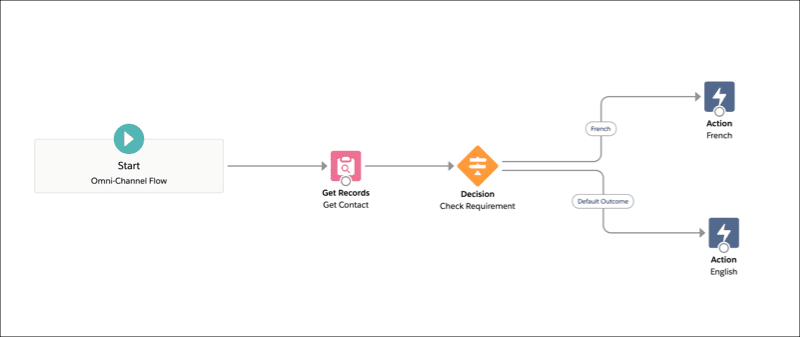
You assign a flow to the service channel. For cases, which aren't real-time, Salesforce's guide has you call the Omni-Channel flow as a subflow from a record-triggered flow, such as one that runs when a case is created. For Email-to-Case, it says to use an Omni-Channel flow directly instead. To send work to a preferred rep, the Direct-to-Agent article picks Agent in Route Work, and if you tick Required Agent the item waits for that rep. Leave it off with a backup queue and it moves on.
The flow considerations page is where I'd slow down:
- If an error occurs while the flow runs, the item goes to the fallback queue set on the service channel.
- Apex in an Omni-Channel flow supports asynchronous callouts only. Synchronous callouts can make bots decline sessions or work not route.
- Migrating from sandbox is manual in places: skills referenced by actions aren't migrated, skills-based routing rules can't be migrated, and service channels can't be migrated. Updating actions to version 2.0 removes some of that work.
A community comment shows how easily the declarative path trips people. In a 2026 r/salesforce thread about assignment rules and Omni-Channel, a self-described expert answered:
"So this is a tricky example of Case Assignment rules and having your page layout or lightning page set to have the run assignment rules checked or not."
Salesforce's own pricing page lists Flow Builder at 5 flows per org on Pro Suite and unlimited on Core, Advanced and Max. I couldn't find a statement on whether Omni-Channel flows count against that cap, so I'd ask before building routing logic on the lowest tier.
What can supervisors see in Omni Supervisor?
Salesforce now calls it Command Center for Service, and the tabs depend on how you route. The tabs article lists a Wallboard, Service Reps, Queues Backlog, In-Progress Work, Skills Backlog, Agentforce and Reports. The Skills Backlog tab shows only if skills-based routing is on. If you only use queue-based or external routing, the Service Reps tab doesn't show a Skills column.
Supervisors can also change a rep's queues and skills from the Service Reps tab. Salesforce's AI agent page says a supervisor can do the same from the Agentforce conversational interface with an Update Omni-Channel User Configuration action, for example assigning idle reps to the busiest queues. The Command Center overview also covers monitoring conversations, watching Agentforce agents, and a flag a rep or a conversation rule can raise.
For one-off capacity checks, the Agents tab shows primary and interruptible capacity per rep, which is the screenshot in the capacity section. Pricing pages and the editions list still say Omni Supervisor, so expect both names for a while.
Which Salesforce plans include Omni-Channel routing?
Omni-Channel Routing starts at Pro Suite on the pricing page, and some parts need Professional or higher in the docs. Salesforce's service pricing page lists Starter Suite at $25 per user per month, Pro Suite at $100, Core at $195, Advanced at $395 and Max at $550. The comparison table marks Omni-Channel Routing and Omni Supervisor as included from Pro Suite up and not in Starter Suite, while case auto-assignment, escalation rules and queues are in all five.
The supported editions page gives the edition-level detail:
| Feature | Editions per Salesforce's docs |
|---|---|
| Omni-Channel | Essentials, Pro Suite, Professional, Enterprise, Performance, Unlimited and Developer |
| Omni Flows | Professional, Enterprise, Unlimited and Developer with Service Cloud |
| Skills-Based Routing | Professional, Enterprise, Unlimited and Developer with Service Cloud |
| Omni Supervisor | Essentials, Professional, Enterprise, Performance, Unlimited and Developer |
Two gaps I'd get answered in writing. The editions page doesn't list Pro Suite or Performance for Omni Flows and Skills-Based Routing, and the pricing page doesn't split those features from the main Omni-Channel row, so I can't tell you whether Pro Suite covers skills. And on top of the edition you need a licence: the Service Cloud product license or an add-on such as Digital Engagement, Enhanced Chat, Salesforce Voice or Workforce Management. For current seat prices and add-ons, my Service Cloud pricing post tracks them.
What goes wrong with Omni-Channel routing?
These are the rules behind most of the surprises, and the ones I'd test in a sandbox:
- A queue without a routing configuration isn't routed. Salesforce says so plainly on the lifecycle page.
- Routing happens once. Change a field after routing and the logic isn't reapplied. Reassign the record to trigger it again.
- Declined work has two documented stories. The route-work article says a declined item stays owned by the declining rep until it is routed again and that Omni-Channel won't offer it to that rep again. The Route to a Queue article says the owner goes back to the queue and the item can reach the first rep again if the second declines. I'd test it.
- Skills with no matching rep stall. The item waits in the Skills Backlog.
- One session per rep. A second tab can end the first session, including a live call, unless you pick the safe setting.
- Rules don't fire on routing. Assignment and escalation rules wait until the rep edits and saves.
- The routing service can be down. Salesforce's degraded service page offers waiting, Fallback Mode for external routing on Enhanced, or downgrading to Standard.
There is also a limits page worth a look: from Setup, search Omni-Channel and open Limits to see Pending Service Routing record usage against your org's limit. The pages I read don't state the hourly number.
On the upside, one small-business G2 reviewer wrote:
"Omni-Channel routing is another feature I didn’t realize I’d rely on so heavily. It’s not perfect, but the fact that it distributes load across agents based on capacity rather than just round-robin has made a real difference in team morale—nobody feels like they’re getting buried while someone else is coasting."

Where does an AI agent fit next to Omni-Channel?
Next to it, not instead of it. Omni-Channel decides which rep gets a case. An AI teammate decides whether that rep has to start from a blank page. Salesforce's own AI follows a similar split: its Agentforce routing page says routing to an Agentforce agent or enhanced bot skips the pending routing record and opens the AgentWork record already accepted, since agents are always available. For the bot side, see my posts on Salesforce AI bot routing and Salesforce AI escalation.
eesel's Salesforce integration reads cases and Knowledge articles, adds drafts as internal case comments, and can update a case or send an email. It runs from triggers like a new case or a case update, and its docs say the agent skips records your instructions don't describe. I found no eesel documentation about pulling items off an Omni-Channel queue or setting presence, and Salesforce says later field changes don't re-run routing. So I'd let your Omni-Channel flow own the routing and let eesel draft the reply the rep will find waiting.
The closest named proof I have isn't Salesforce, so I'll say so. SE Ranking runs eesel on Zendesk for three products with one agent each, and in a month it handled about 4,650 conversations. It handed about 1,260 chats to the team and created about 400 tickets for tier 2 and weekend cases, each handover carrying the customer's name and email. That is the pattern I'd copy: a clear rule for what the AI answers, and a clean handover for the rest. Original Bootcamp filters Freshdesk tickets so eesel only answers what the website and past tickets can support, and anything touching a booking or an account goes to a person.
The CX lead from my intro put the principle best, asking for an AI "only handling the tickets that it's confident to handle and all the other ones, leave them alone." In Salesforce terms that means Omni-Channel gets the cases the AI leaves, with the draft and context already attached. My posts on AI agent handoff and AI ticket routing for SaaS go deeper on that line, and eesel simulates on your own past cases before going live, covered in AI support simulation testing.
What would I set up first?
Start small and make routing boring before you make it clever:
- One queue, one channel, one config. Cases only, Most Available or Least Active, one unit per case.
- Pick the capacity model on purpose. If reps park cases for days, use status-based and map your statuses to in-progress, paused and completed.
- Add a fallback queue. Flow errors and unrouted work need somewhere to land.
- Test with three dummy reps. Decline a case, go offline, open a second tab, and watch what each does to ownership and capacity.
- Add skills last. One skill, one rule, and a Skills Backlog check each morning.
- Give supervisors the Command Center. If you can't see the backlog, you can't fix it.
- Add the AI draft on top. Start in draft mode on one queue.
If your reps are drowning in volume, my notes on AI ticket prioritization and AI ticket classification show where AI cuts work before a case is routed. For the general idea, read intelligent routing.
Weighing Salesforce against other tools? Try Service Cloud alternatives or Service Cloud vs Zendesk.
Try eesel for Salesforce Service Cloud
If your Omni-Channel setup works but reps still start every case cold, eesel for Salesforce works like a new teammate in Service Cloud. It reads each new case with the account's history and past cases, and adds a draft reply as an internal comment, so the rep Omni-Channel picks starts with the work done. It doesn't change your queues, skills or capacity.
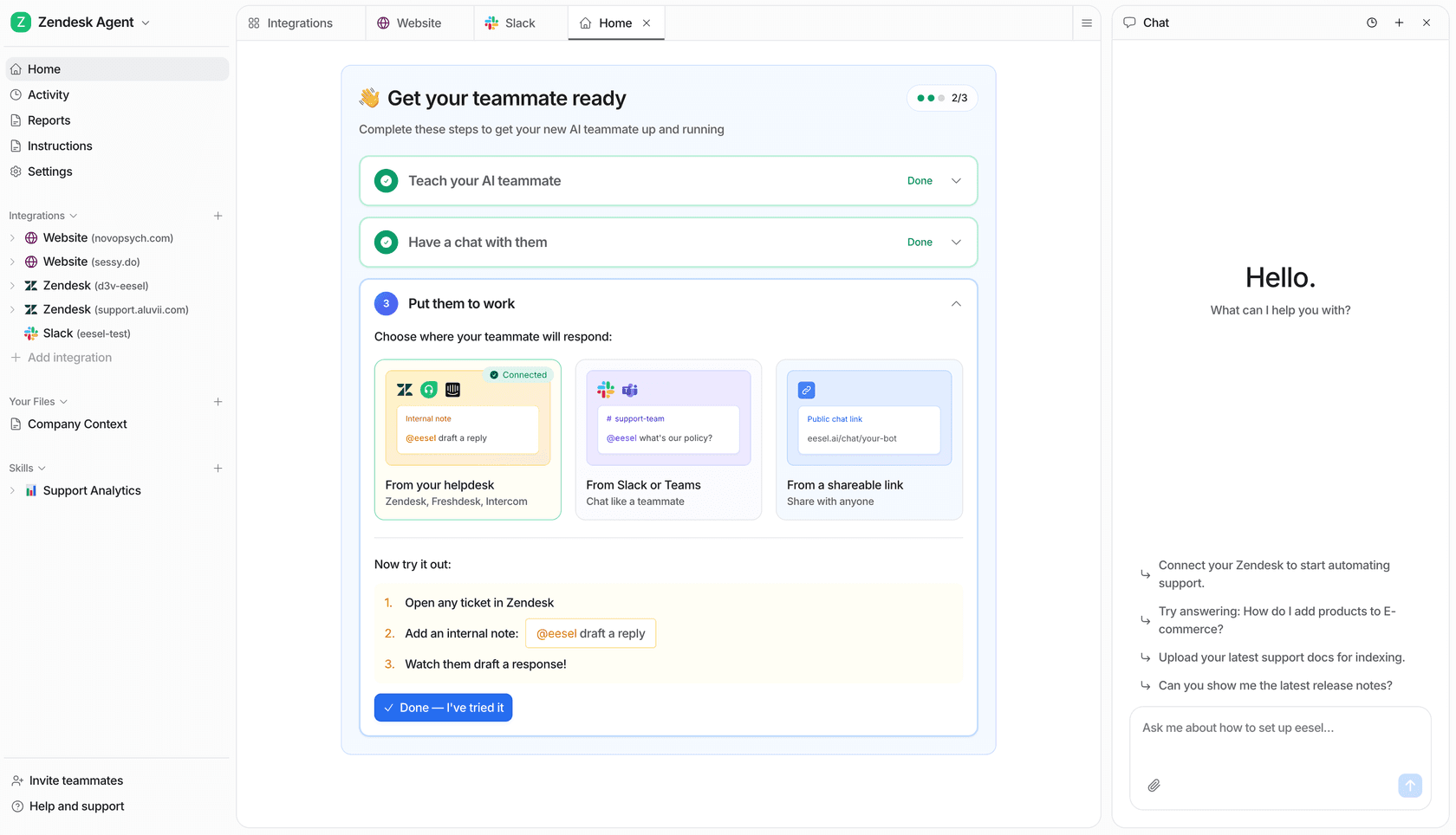
Begin in draft mode on one queue, compare the drafts with what your reps would have written, and turn on auto-reply only when the answers hold. See how an AI helpdesk agent joins a queue, or the best AI for Service Cloud roundup, then Try eesel.