

Salesforce case merge folds up to three duplicate cases into one master case, and the merge can't be undone. Admins switch it on under Setup, choose whether duplicates are kept with a "Merged" status or deleted, and add the Merge Cases action and list button. Related lists, feed items and child records move to the master. Milestones, Case Share and Case Team don't, and attachments may be lost. Prevention matters more than cleanup: most duplicates trace back to email threading. An AI teammate such as eesel can spot the likely original and leave a note, so a rep merges with the context already in front of them.
I work the eesel support queue, so duplicates are a daily annoyance for me rather than an abstract data-quality topic. Every second case about the same problem splits a customer's history across two records and sends two people to answer one question. I read Salesforce's merge and email threading docs end to end for this guide. With the eesel CLI, a coding agent can upload approved merge and duplicate-handling policy as knowledge, then ask test questions and check the answers before anything goes live. Connecting the Salesforce org itself still needs someone with admin rights to approve it.
What does Salesforce case merge actually do?
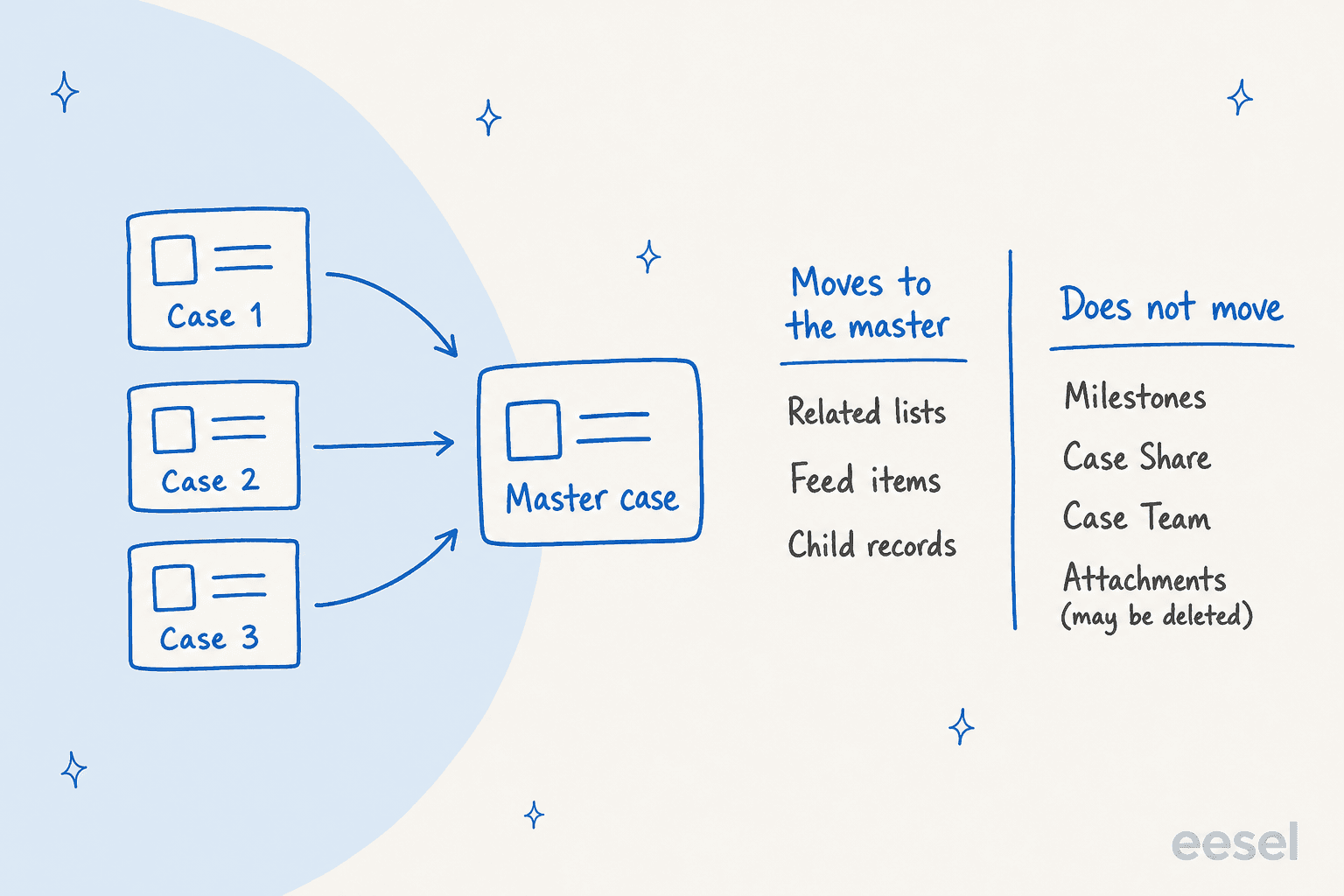
It combines up to three cases into one, keeping the one you choose as the master. Salesforce's merge article says you compare field values, select the ones you want on the master, and that "all related lists, feed items, and child records are added to the master."
What happens to the other cases is an admin decision. If the org is set to delete duplicates, they are soft deleted and sit in the recycle bin for 15 days. If it keeps them, the word "Merged" is appended to the subject in the Highlights panel, and a link on the duplicate takes you to the primary case.
Salesforce still files this under Service Cloud, but the newer product name is Agentforce Service. The Case object and the merge feature are the same, so search for both names when you hunt for docs. If you are new to the object itself, my Salesforce ticketing system guide covers how cases arrive and move.
How do you merge duplicate cases step by step?
There are three entry points, and all of them cap the selection at three cases. Salesforce documents each one on the same merge page:
- From the Cases list view. Select up to three cases, click Merge Cases, pick the master in the Compare Cases window, choose the field values, then click Next and Merge.
- From a Case record home. Open the case, use the menu in the highlights panel, click Merge Cases, and search for the cases to merge. This is the one to use when the duplicate isn't in your current list view.
- From a related list on any standard object. Open an account, choose View All on the Cases panel, select up to three cases and click Merge Cases.
Reps need Read, Create, Edit and Delete on cases, per the permissions table on that page. If the button is missing, the first suspect is the admin setup below, not the rep's profile.
How do you set up case merge in Lightning?
Turn the setting on, choose what happens to duplicates, then put the action where reps can find it. Salesforce's setup article says you need both Manage Cases and Customize Application, then:
- In Setup, enter
Case Mergein Quick Find and select Case Merge. - Toggle Merge Cases to reach the settings.
- Choose Delete duplicate cases after merge, or keep them and assign a status from the Merged Case Status picklist (or add a unique one with Add a Case Status).
- Add the Merge Cases action to the case record page and the Merge Cases button to the list view.
- Optionally add a Merged Cases related list to the case layout, from Object Manager like any other related list.
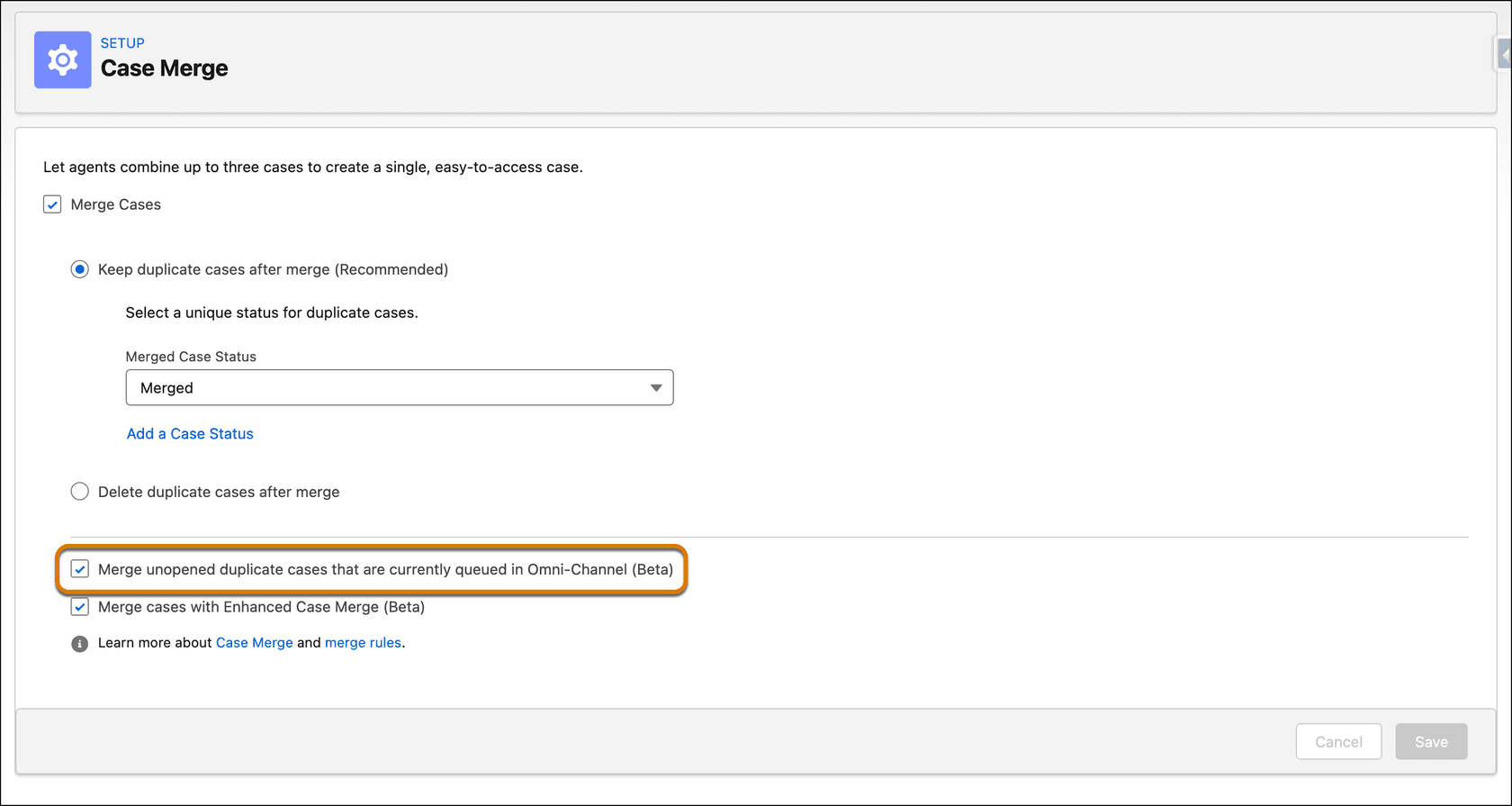
In that screenshot the Keep option is labelled recommended. I agree: keep the duplicates with a Merged status until you trust your process. Deleted duplicates leave the recycle bin after 15 days, and since a merge can't be undone, a kept duplicate is the only audit trail you will have if a rep picked the wrong master.
What gets lost or left behind in a merge?
Quite a lot is documented, and some of it is easy to miss. The setup article lists these limitations:
| Limitation | What it means for you |
|---|---|
| You can't undo a merge | Check the master and field choices on the compare screen before clicking Merge |
| Case Milestones, Case Share and Case Team aren't merged | The master keeps only its own SLA clock and team |
| Attachments aren't supported and may be deleted | Save any file you need from the duplicate first |
| The Compare Cases window shows only the first 35 lookup fields on the layout | A lookup beyond that can't be picked at merge time |
| Actions and Recommendations on the primary case are duplicated | Expect doubled suggestions after a merge |
| Cases pending in an Omni-Channel queue, or assigned with an Opened or Assigned status, can't be merged | See the Omni-Channel section below |
Two of these change how I would choose a master. Because milestones don't move, pick the case whose entitlement and SLA clock is the real one, which is usually the oldest. My entitlements and milestones guide explains why a case with no entitlement gets no clock at all. And because attachments are at risk, treat the merge as the moment to move files by hand. A merged case can end up with a long feed, so AI case summaries help the next rep catch up quickly.
One email detail matters too. Salesforce's threading considerations say that after two cases are merged, all further incoming emails attach to the parent case, even if they were about the child, and the rep who merges decides which case is the parent.
Can you merge a case that is waiting in an Omni-Channel queue?
By default no, and a beta setting changes that for unopened cases. The default limitation blocks duplicates that are pending in an Omni-Channel queue or assigned to reps with an Opened or Assigned status. Salesforce's beta article adds a checkbox in Case Merge setup that permits Pending Routing and Assigned cases, and still blocks Opened ones.
Can this duplicate be merged?
Pick the beta setting and where the duplicate sits in Omni-Channel. The answer follows Salesforce's documented rules.
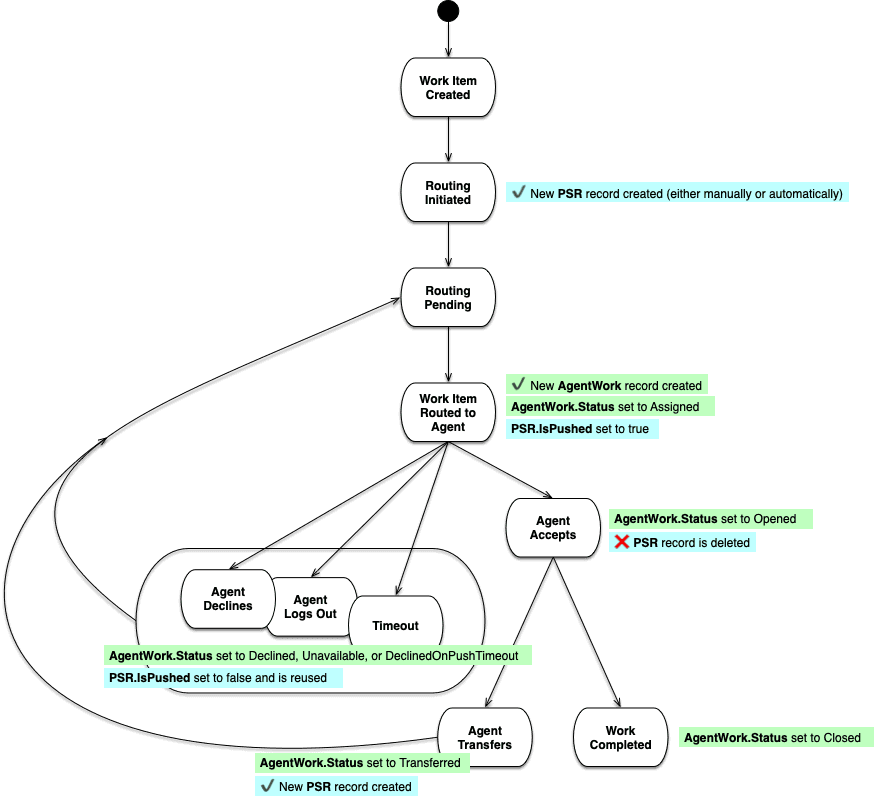
The reason for the line is the routing lifecycle. Once a rep accepts a work item, the case is in progress, and a merge by someone else could overwrite that rep's session. The error reads "We couldn't merge these cases. One or more of the duplicate cases is currently being worked on," and the fix is for the rep to close the tab or release the work item. Salesforce labels the feature a beta under its Beta Services Terms, so I would test it in a sandbox first. My Omni-Channel routing guide covers the pending routing and assignment records behind those states.
Where do duplicate cases come from?
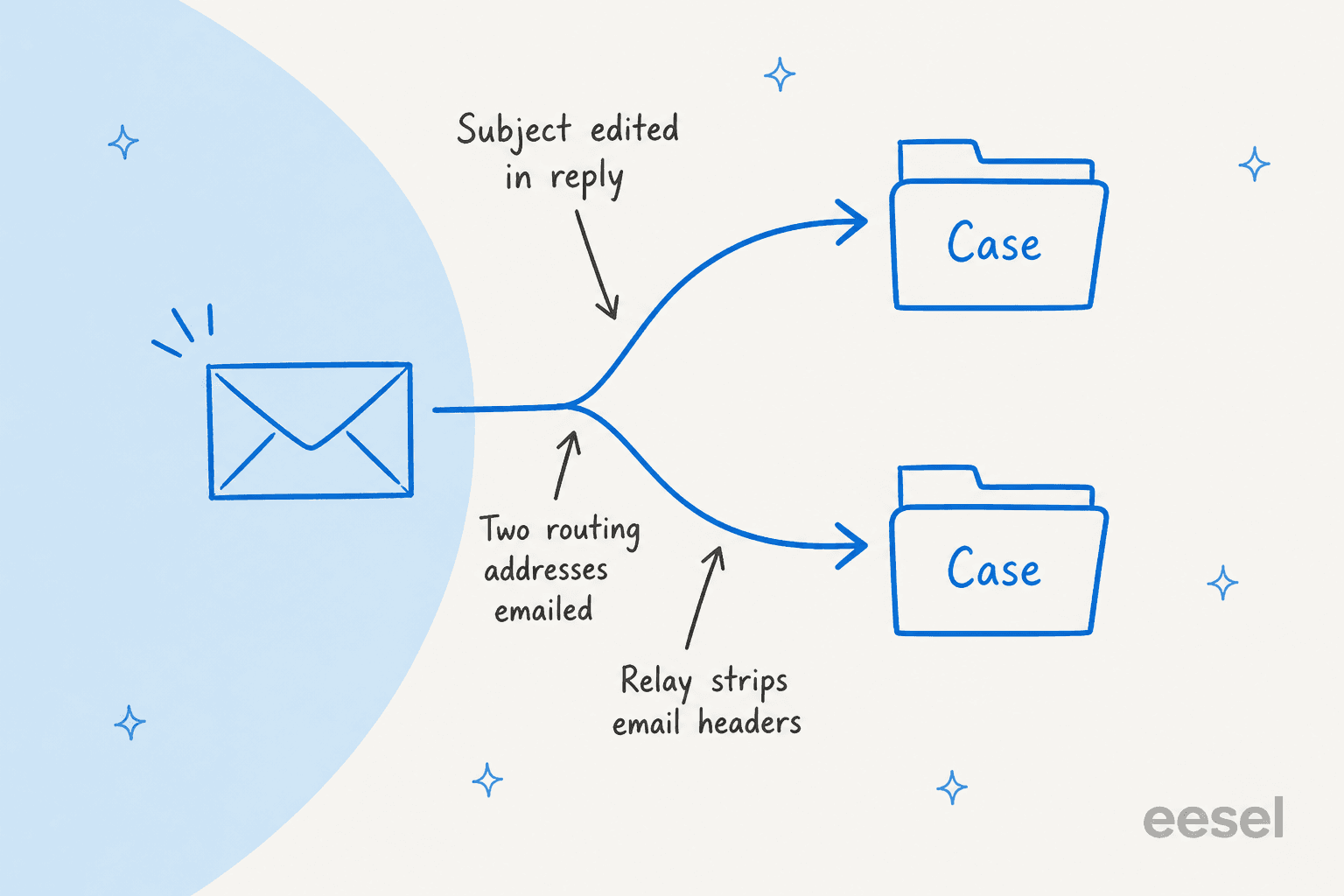
Mostly from email that fails to match an existing case. Salesforce's Email-to-Case threading page explains the matching order. Under Lightning threading, an incoming email is first matched by a 23-character token in the subject or body. If that fails, Salesforce checks the In-Reply-To, References and Thread-Index headers. If both fail, it creates a new case.
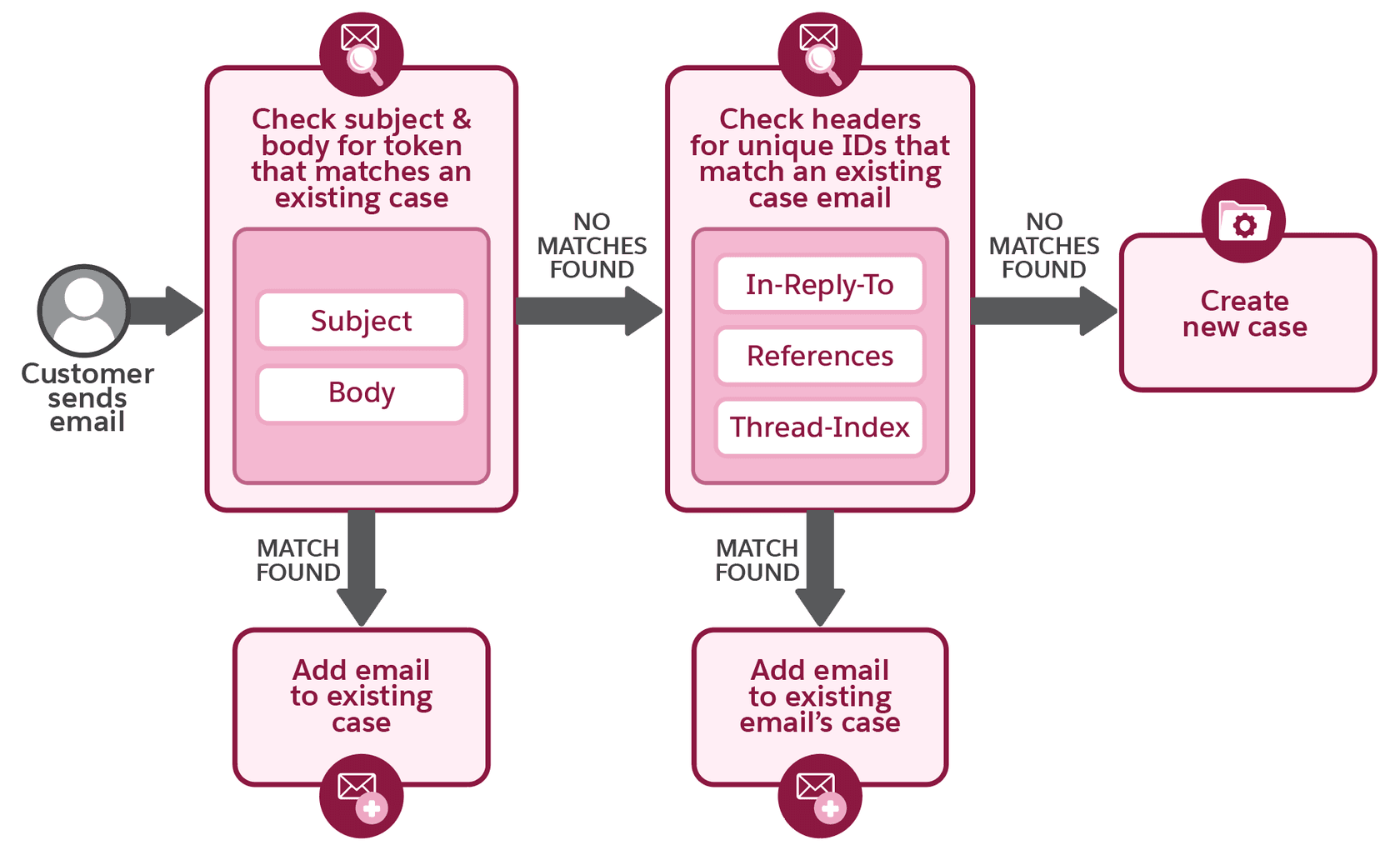
The limitations page names the ways that match breaks:
- A customer edits the subject. Depending on the email client, changing the subject can strip the threading token and cause a new case.
- More than one routing address. Salesforce says to ask customers to email only one address and says sending to several causes unexpected results and isn't supported.
- Relays and mail servers that touch headers. A relay that changes the Salesforce Message-ID must move the original into the References header, and a custom mail transfer agent that removes References or In-Reply-To can cause new cases.
- Old Ref ID threading. Without Lightning or header-based threading, a reply missing its Ref ID creates a new case. Salesforce calls Ref ID threading maintenance-only and recommends switching.
- A refreshed sandbox. If the org ID changes, the token tied to the old org ID stops working.
Threading covers email. For web forms and messaging channels I didn't find a comparable matching mechanism in the Salesforce docs I read, so I would assume a customer who submits twice, or starts a second session, can end up with a second case. Check that against your own org before you rely on it. If duplicates come from several people watching one inbox, ticket swarming is a related problem. For where those channels land, see my guide to Enhanced Messaging.
Can Salesforce suggest duplicates before reps find them?
Yes, in a beta called Enhanced Case Merge. Salesforce's Enhanced Case Merge article describes moving "from manual, reactive cleanup to proactive prevention" in three steps:
- In Case Merge setup, tick Merge cases with Enhanced Case Merge.
- Under Duplicate Rules, give each rule a name, choose a matching rule that decides how duplicates are identified, and set the conditions a case must meet before the rule runs.
- Drag the Duplicate Cases component onto the case record page in Lightning App Builder.
The component then lists likely duplicates with case number, subject, contact and date opened, plus a button that opens the merge window with the current case preselected as primary. It is a beta, so the same sandbox-first advice applies. It also still leaves the merge to a person, which is where I would keep it.
How can AI reduce duplicate cases?
By answering sooner and by pointing at the original, not by merging on its own. A merge can't be undone, so I would never let an agent run one unattended. What an agent can do safely is read the new case, search your other cases, and leave a private note such as "this looks like the case opened this morning by the same contact". eesel's Salesforce integration works inside the org this way: it reads cases and Knowledge articles, drafts replies as internal case comments, and can look up the account and search other cases first, per its docs. Your agent only sees what the authorized Salesforce user can see, so object and field permissions stay the real limit.
That boundary fits any AI governance review you already run. Salesforce's own AI limitations are worth reading before you pick a layer.
Two customer stories show the pattern on other helpdesks. Rúngne runs three agents on Gorgias, where email, chat and social comments share one queue. In one month its agents handled about 2,100 tickets, tagged about 880, left about 580 draft replies as internal notes, and answered about one ticket in seven directly. Noise such as ad comments, out-of-office replies and spam is tagged and closed, so it never becomes a second record to clean up, a job closer to ticket classification than to merging. At SamCart, a Freshdesk agent sends the first reply only when no teammate is assigned yet. My read is that a quick first answer cuts the "any update?" follow-ups that so often become duplicates, though neither story measures duplicates directly.
For faster replies, see my first-response automation guide. For fewer tickets overall, see ticket deflection.
For the same idea on other stacks, see my ticket deduplication guide. Freshdesk's version of this job is in Freshdesk ticket merging.
If your queue is noisy before it is duplicated, start with spam filtering. My shared inbox comparison covers the intake side.
What would I set up first?
Prevent first, then make the cleanup safe. This is the order I would use on a Service Cloud org:
- Check your threading method. If Setup shows "Insert thread ID" settings, you are on Ref ID threading. Move to Lightning threading, and turn on both the token and header options.
- Reduce routing addresses. One address per customer-facing inbox, and tell customers not to copy several.
- Enable Case Merge with Keep selected. Add a clear Merged status, the action, the list button and the Merged Cases related list.
- Write a master-case rule. Mine is: oldest case with a valid entitlement, and move attachments by hand first.
- Train reps on the Omni-Channel rule. Opened cases can't be merged, so release the work item before a merge.
- Trial Enhanced Case Merge in a sandbox. Start with one narrow duplicate rule.
- Add an AI note layer. Let an agent flag likely originals, and keep the merge click with a rep. Hand the truly tricky ones on with AI escalation.
If your concern is what Service Cloud costs once these add-ons pile up, my pricing breakdown covers the editions. For what else you can automate on the Case object, see Salesforce case automation. For the wider view, start with helpdesk AI.
Try eesel for Salesforce Service Cloud
If duplicate cases are eating your reps' time, eesel works like a new hire that plugs into your Service Cloud org, reads each new case with the account's history, and leaves a draft or a "possible duplicate of" note as an internal comment. Your reps keep the merge decision, and your admin keeps control of what the agent can see. Free to try.