


Salesforce Enhanced Messaging is the Service Cloud (now Agentforce Service) layer that brings WhatsApp, Facebook Messenger, Apple Messages for Business, SMS and LINE into the Service Console, with Enhanced Chat covering web and in-app. Salesforce's pricing page lists it as an extra $75 per user per month on Core and Advanced, so a rep on Core costs $270, not $195. Everything routes through Omni-Channel, and AI agents work inside it. If your real bottleneck is the case that comes out the other end, I'd add eesel there, because it works on Cases, not the live chat window.
I build integrations at eesel, and two mid-market Service Cloud prospects in early 2026 told our sales team the missing native Salesforce connection was a dealbreaker, which is why I read Salesforce's messaging docs closely. With the eesel CLI, an AI coding agent can upload approved knowledge, such as your WhatsApp reply templates and policies, then ask test questions and check the answers before go-live, though a Salesforce admin still approves the connection.
What is Salesforce Enhanced Messaging?
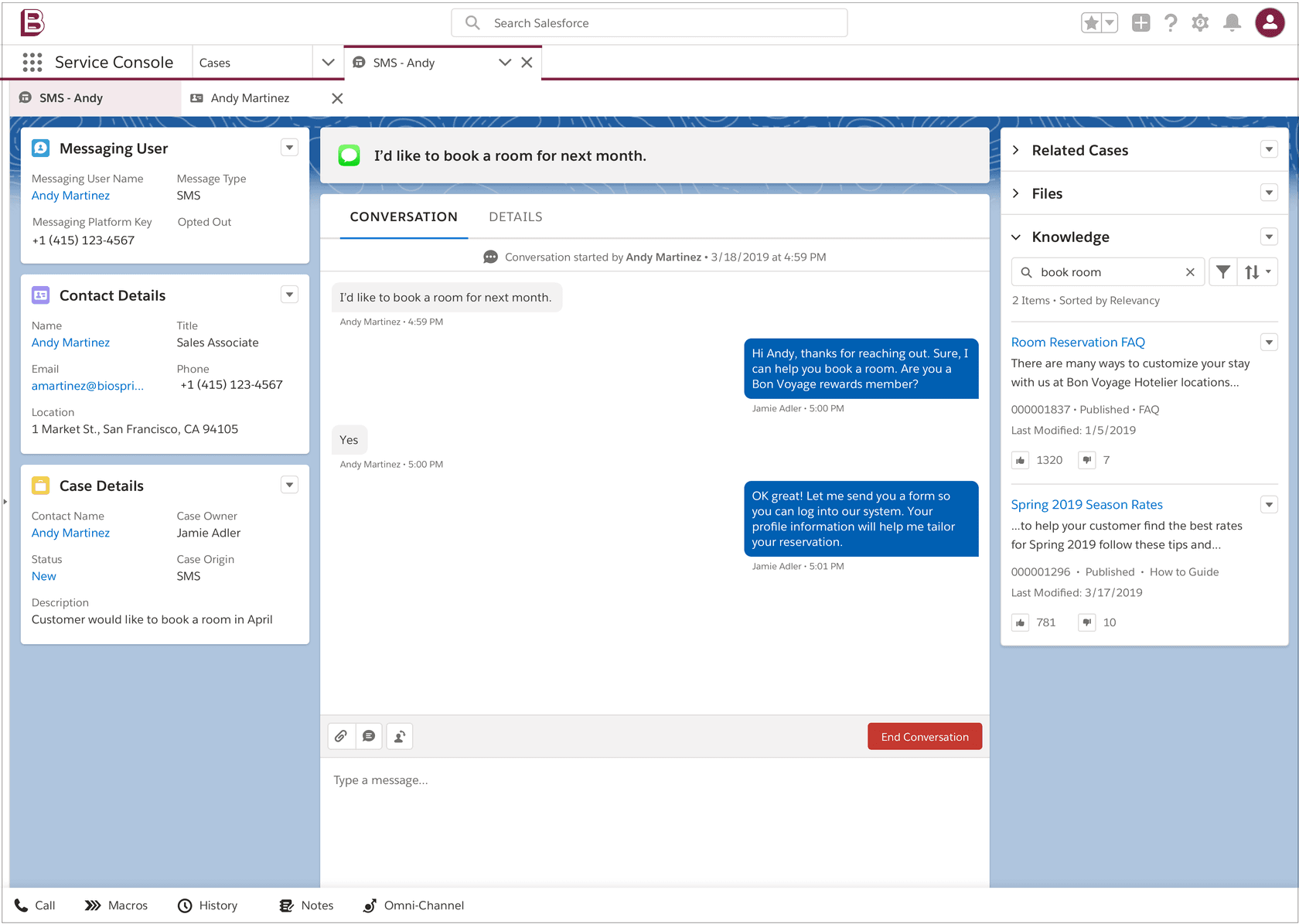
It is the messaging channels built on Salesforce's newer conversation platform, and "enhanced" describes the platform, not one product. Salesforce's messaging overview covers Enhanced In-App Chat, Enhanced Web Chat, Enhanced WhatsApp, Enhanced Facebook Messenger, Standard and Enhanced SMS, Enhanced Apple Messages for Business, Enhanced LINE and Bring Your Own Channel. Reps handle all of them in one browser tab, next to phone calls.
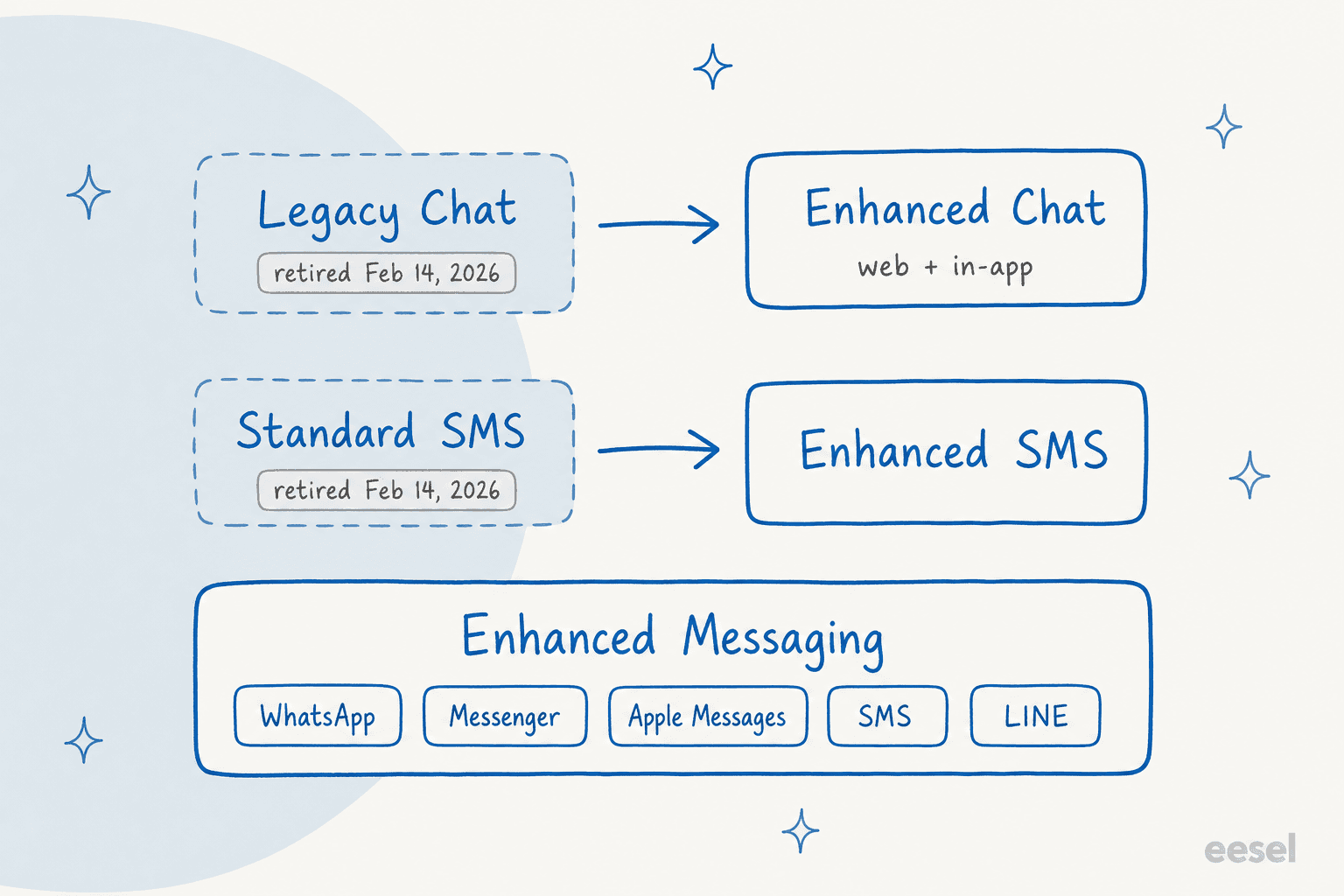
The product names changed more than once, so here is the map. Messaging for In-App and Web became Enhanced Chat in June 2025, per Salesforce's chat migration page. Salesforce still labels most of its help pages Service Cloud, while the newer Agentforce Service name shows on the pricing page, so search for both.
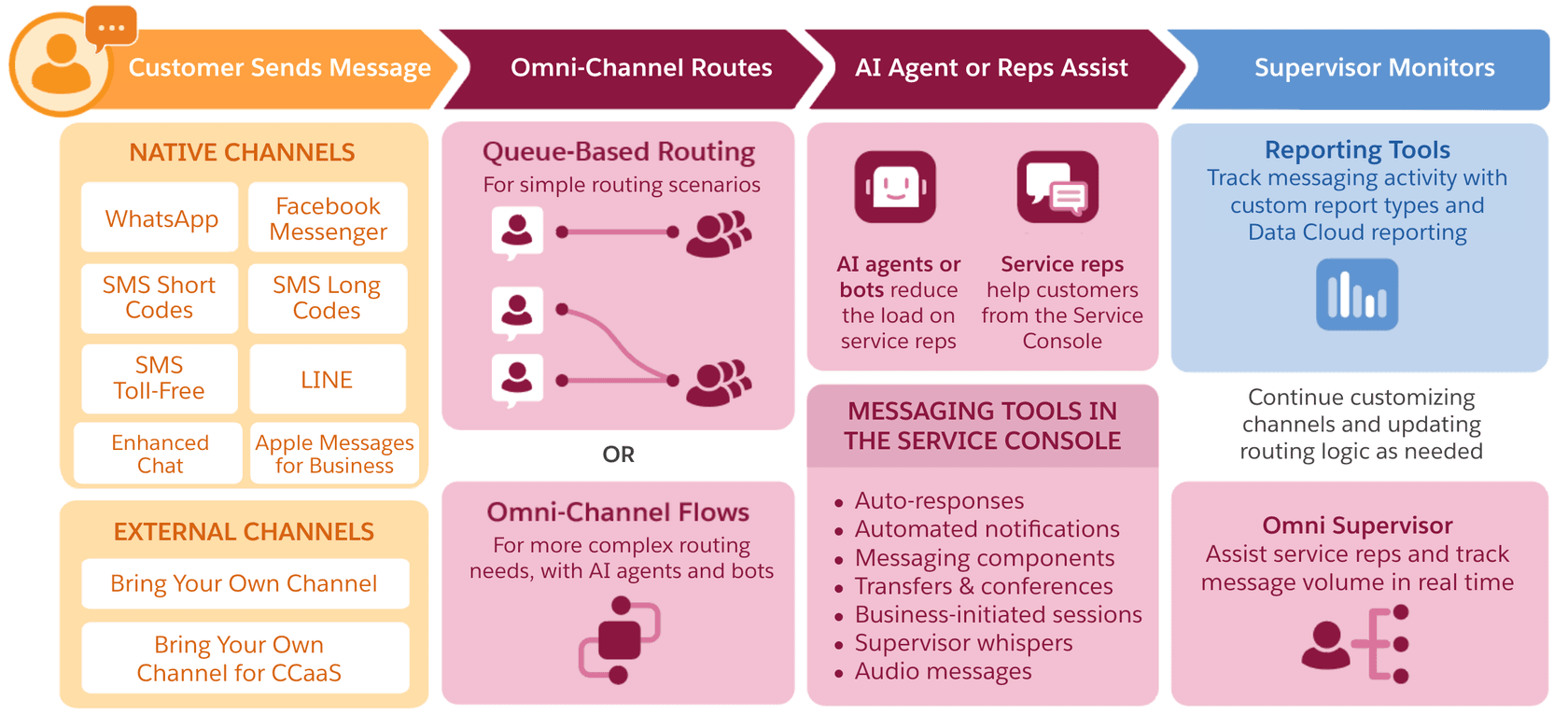
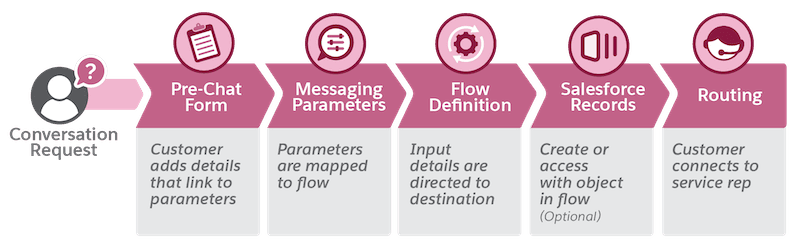
Salesforce's channel diagram shows the same journey on every channel:
How is it different from Legacy Chat and standard messaging?
Conversations persist, and AI agents can finally join. Legacy Chat was session-based, so the conversation ended when the customer closed the window. Salesforce's comparison shows Enhanced Chat with persistent, asynchronous, cross-device conversations when user verification is on.
The retirement dates are the part admins miss:
- Legacy Chat was retired on February 14, 2026, per Salesforce's replacement guide.
- Standard SMS channels were retired the same day. The upgrade article says they stop working in the week of October 1, 2026. That date has passed, and I can't see your org to confirm what happened to yours.
- Legacy Chat and standard channels work with standard bots only. Enhanced channels also take AI agents such as Agentforce Service Agent.
| Feature | Legacy Chat | Enhanced Chat |
|---|---|---|
| Persistent history (with user verification) | No | Yes |
| AI agent compatibility | No | Yes |
| Business hours to hide the window | No | Yes |
| Estimated wait time shown to customers | No | Yes |
| Read and delivery receipts | No | Yes |
| Delete data API | No | Yes |
| Inbound file attachments | Yes | Yes |
Salesforce's table also lists a few Legacy features with no Enhanced Chat equivalent, such as queue position and IP blocking on the web channel. It keeps a page of alternative solutions for those. If you are still weighing the older Einstein bot approach, note that enhanced bots can only be routed to through Omni-Channel flows.
Which channels does it support, and what does each one limit?
Seven, plus a partner option, and every channel carries the rules of the network behind it. Salesforce's capability comparison and per-channel considerations pages give these:
| Channel | Message length | The rule that matters |
|---|---|---|
| Enhanced WhatsApp | 4,096 characters | Replies after the 24-hour customer care window need pre-approved templates |
| Facebook Messenger | 2,000 characters | A rep has up to 7 days to respond to a message |
| Apple Messages for Business | 50,000 characters | Can't import history or contact IDs from another provider |
| SMS long code and toll-free | 912 characters (396 with special characters) | Registration takes 1-2 weeks for toll-free and 1-4 weeks for long codes |
| SMS short codes | 160 characters | US and Canada only |
| LINE | 5,000 characters | Several rich components fall back to plain text |
| Enhanced Chat (web and in-app) | not published in the limits table | Rich components, wait time, push notifications on in-app |
The WhatsApp rules deserve a second read in Salesforce's WhatsApp considerations. Group chats aren't supported, locations, contacts and polls can't be shared, and you can create up to 250 message templates per WhatsApp Business account. Business verification raises your phone number limit from 2 to 25, and one account can't be linked to more than one Salesforce org, so a sandbox and production need separate numbers. My WhatsApp support window post covers the 24-hour rule from the support side, and my WhatsApp API pricing guide covers Meta's charges.
For the same job in other channels, see my guides to SMS support, Messenger support and automating WhatsApp.
What does Enhanced Messaging cost?
On the list price, $75 per user per month on top of the seat. The Salesforce service pricing page now lists five editions: Starter Suite $25, Pro Suite $100, Core $195, Advanced $395 and Max $550 per user per month, and says Core replaces Enterprise, Advanced replaces Unlimited, and Max replaces Agentforce 1. Its comparison table lists Enhanced Messaging as "Additional $75 USD/user/month" in the Core and Advanced columns. The Max column leaves that row blank and lists digital channels among its contact center features, so ask your account executive what Max bundles.
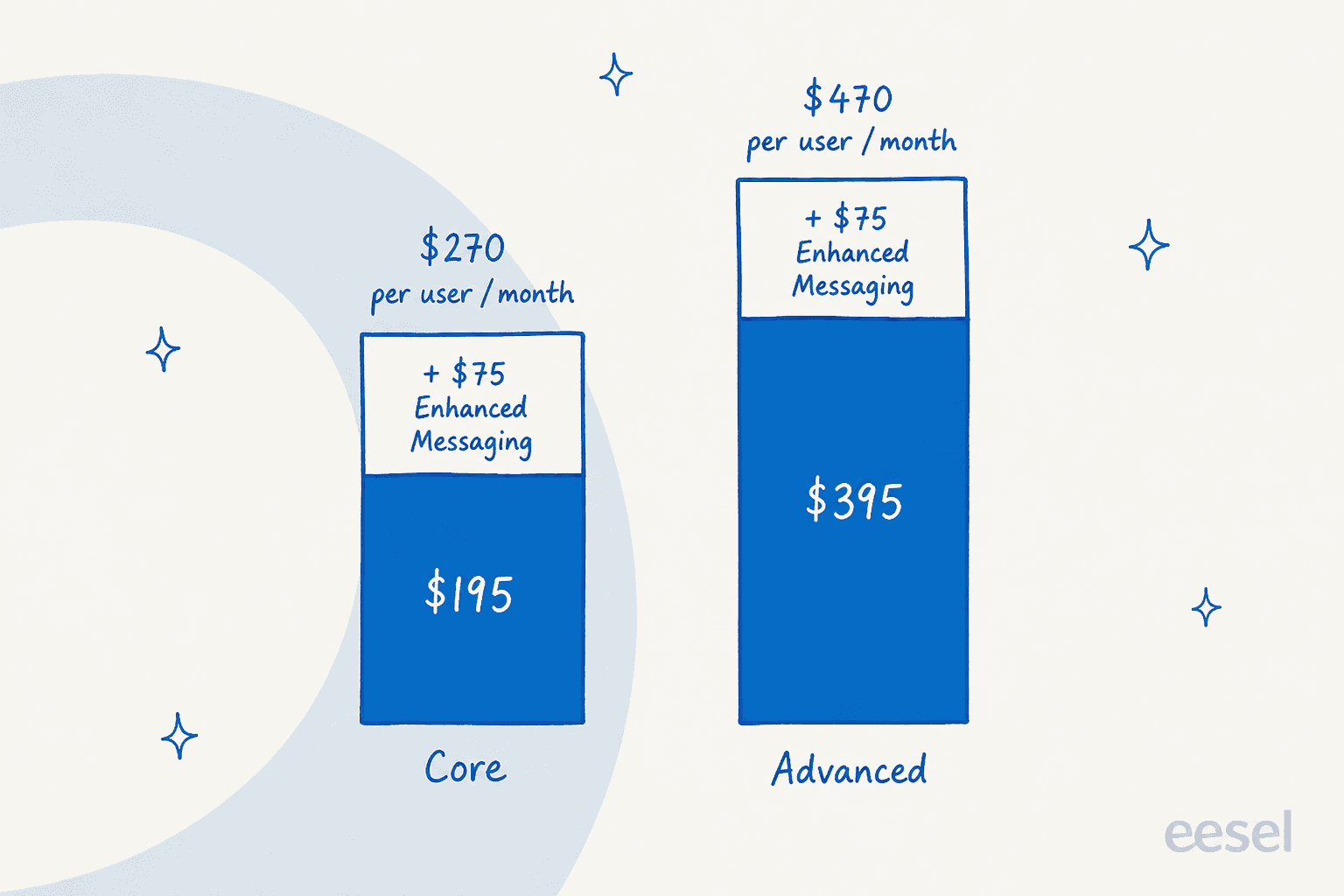
Worked example, for a team of 10 reps messaging customers: Core is $270 times 10, or $2,700 per month before any message fees, and Advanced is $4,700. That is list price, annual contract, and nothing else.
Here are the costs that sit outside that line, all from Salesforce's own help pages:
- Add-ons. The editions page says enhanced channels need the Digital Engagement add-on or the Agentforce Contact Center Digital add-on. Salesforce's help still names the Enterprise and Unlimited editions here, the tiers the pricing page now calls Core and Advanced.
- Message credits. Since February 23, 2026, Contact Center Digital bills through message credits in Digital Wallet, per the credits article. WhatsApp and SMS credit requirements started March 27, 2026, with more SMS changes on May 1, 2026. I found no per-message rate on the pricing page.
- SMS paperwork. Long codes and toll-free numbers need country-specific lease, setup, brand and campaign licenses.
- AI usage. Salesforce says Agentforce, Slack and Data 360 are included in every edition, with
500KFlex Credits per org per year on Core,1Mon Advanced and2.75Mon Max. My Flex Credits guide and Agentforce pricing post explain how those are consumed.
How do you set up Enhanced Messaging?
In a fixed order, and the first mistake is turning things on out of sequence. Salesforce's default settings page lists two switches, Turn on Omni-Channel and Turn on Messaging, both required for enhanced channels. Then:
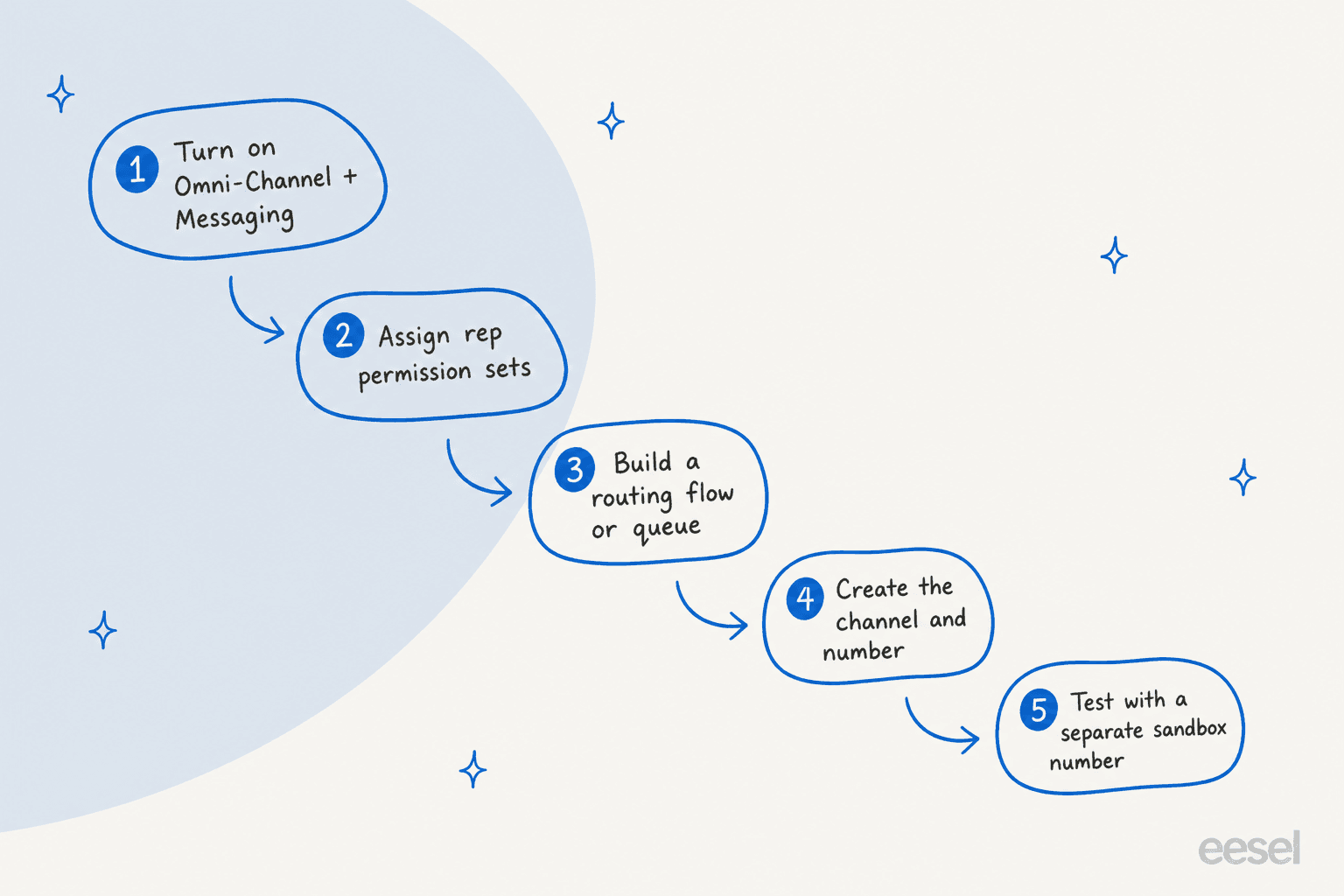
- Turn on both switches. If you still run standard channels, Salesforce says Messaging enables standard Omni-Channel, while orgs without them get Enhanced Omni-Channel.
- Give reps access. Create and assign a permission set for messaging reps. For Enhanced Chat, the setup stages call for Customize Application plus Modify Metadata Through Metadata API.
- Prepare routing. Build an Omni-Channel flow or a queue, and add the Enhanced Conversation component to the Messaging Session page layout.
- Create the channel. For WhatsApp, that means a number you own, which can be migrated from another provider. Enhanced Chat has a quick-start flow, and v2 is the default for new orgs turning on chat.
- Test it. Salesforce's sandbox guide recommends separate numbers for sandbox and production, and testing as a rep set to an online Omni-Channel status.
Two warnings from the docs. Enhanced Omni-Channel is not an upgrade to switch on casually while old channels run, because the upgrade article says to upgrade it after your last standard channel. And enhanced bots can't be used in standard channels at all. If you upgrade SMS, the guide says to replace message templates with notification messaging components sent by a flow.
For Enhanced Chat specifically, a pre-chat form feeds parameters into your flow, which can create or find a Salesforce record before the rep connects:
How does Omni-Channel route messaging sessions?
Four ways, and the capacity model you pick changes how sessions behave. Salesforce's routing article lists queue-based routing for simple setups, Omni-Channel flows for dynamic logic, routing everything to one user, and routing directly to an Agentforce Service agent. Enhanced Chat has its own routing documentation.
Capacity is the quiet decision:
| Tab-based capacity | Status-based capacity | |
|---|---|---|
| What counts as load | Open tabs and sessions | Status of accepted work |
| Maximum per rep | 100 tabs | 100 work items |
| Rep closes a session tab | Prompted to end or mark inactive | Session and ownership unchanged |
| Customer returns to an inactive session | Routed as a new session | Goes back to the same rep |
| Rep goes offline | Sessions return to Waiting and reroute | Sessions stay active |
I'd pick status-based for any team where the same customer returns to the same rep, which is most WhatsApp queues. Tab-based reroutes a returning customer unless you write extra flow logic. Salesforce also says standard Omni-Channel was retired with the Summer '26 release and orgs were upgraded automatically. If your routing predates that, test it. My notes on AI routing in Salesforce and handoff best practices cover where a bot should stop, and the SLA clocks on the resulting case are a separate setup.
What limits should admins plan around?
The org-wide ones. Salesforce's limits page says the starred limits apply collectively across all channels, so WhatsApp and Enhanced Chat share one pool.
| Limit | Value |
|---|---|
| Messaging channels per org | 2,000 |
| Simultaneous active sessions (enhanced) | 11,000, with up to 4,000 of unused slots usable for outbound |
| New sessions per second (enhanced) | 50, then up to 1,000 messages per second |
| Outbound session counts as active | Only if the customer replies within 5 minutes |
| Idle session stops counting | After 30 minutes without activity |
| Reps in a conference | Enhanced Chat 5, enhanced messaging channels 2 |
| Rep session expiry | 10 seconds after closing the Service Console |
When a limit is hit, Salesforce retries sending for 24 hours, and the delay typically doesn't exceed 10 minutes. Two quirks from the channel pages. If a rep opens one session in two console tabs, transferred sessions leave stale AgentWork records and the inactivity timer fails, and Meta can delay or refuse messages with no stated reason.
For reporting, Salesforce's messaging reporting article builds on the MessagingSession and MessagingSessionMetrics objects. Metrics records exist only for sessions created after September 30, 2024, and Salesforce says six are generated per completed session. Pair them with the metrics that matter for AI-assisted support.
Where does AI fit: Agentforce or eesel?
Agentforce answers inside the messaging session, and eesel works on the case afterward. Those are different jobs, and I'd say so plainly. Salesforce says an AI agent "functions as an autonomous member of your support team" in enhanced channels, while bots follow scripted conversations. You can route a channel straight to an Agentforce agent, no flow required.
That is a real advantage if you want Salesforce to own the whole conversation. The trade-off is that you configure Agentforce, its topics and its credits inside Salesforce. My Agentforce limitations and Agentforce alternatives posts go through them.
eesel's Salesforce integration joins as an agent that works on Cases: it reads each case with the contact and account context, drafts or sends replies, adds internal notes and updates fields. I found no eesel documentation about reading messaging session objects, so I'd treat it as the layer for the case a WhatsApp or SMS conversation creates, such as a handoff the chat could not finish. For the case side, my guides to Salesforce case automation, AI escalation and AI messaging summaries show where each fits.
My closest proof isn't Salesforce, and I'll say so. SE Ranking runs Zendesk live chat for three products through eesel, with an agent per product. In one month, from 8 August to 8 September 2026, it handled about 4,650 conversations, including about 2,100 live chats, and passed about 1,260 chats to the team. Rúngne shows the quieter pattern: email, live chat and social comments land in one Gorgias queue, and eesel left about 580 draft replies for people to send. Both start with the AI answering or drafting, and a person taking the rest.
Draft mode first, then auto-reply once the answers hold, is the pattern I hear most. eesel simulates on past cases before going live. If you are choosing between options, my best AI for Service Cloud roundup and AI for Salesforce Service Cloud guide compare them, and the enterprise helpdesk roundup goes wider.
What would I do before turning this on?
Here is the short version I'd give an admin:
- Price the whole stack. Seat,
$75add-on, message credits, SMS licenses. Ask for the credit rates in writing. - Pick channels by customer, not by availability. WhatsApp for global ecommerce, SMS for appointment-style work, Apple Messages if your customers skew iPhone.
- Choose status-based capacity unless you have a reason not to.
- Use separate numbers for sandbox and production, since one WhatsApp account can't serve two orgs.
- Decide who owns the AI. Agentforce in the session, or an agent on the case, or both, but name an owner.
- Test the retirement edges. Confirm no Legacy Chat or standard SMS dependency remains.
- Read the numbers weekly. Watch response time, handoff rate and outbound sessions against the shared limits.
For the wider picture, see my omnichannel software guide, the omnichannel versus multichannel explainer, and Salesforce ticketing. If chat is the entry point, the AI chatbot versus live chat piece helps you decide. For first replies, read AI first response and the containment rate guide.
Try eesel for Salesforce Service Cloud
If your messaging channels are live and the cases behind them are piling up, eesel for Salesforce works like a new teammate in Service Cloud. It learns from your knowledge articles and past cases, reads each new case with the account context, and drafts or sends the reply, so your reps start with the work done. It doesn't replace Enhanced Messaging or Omni-Channel, and it keeps working inside them.
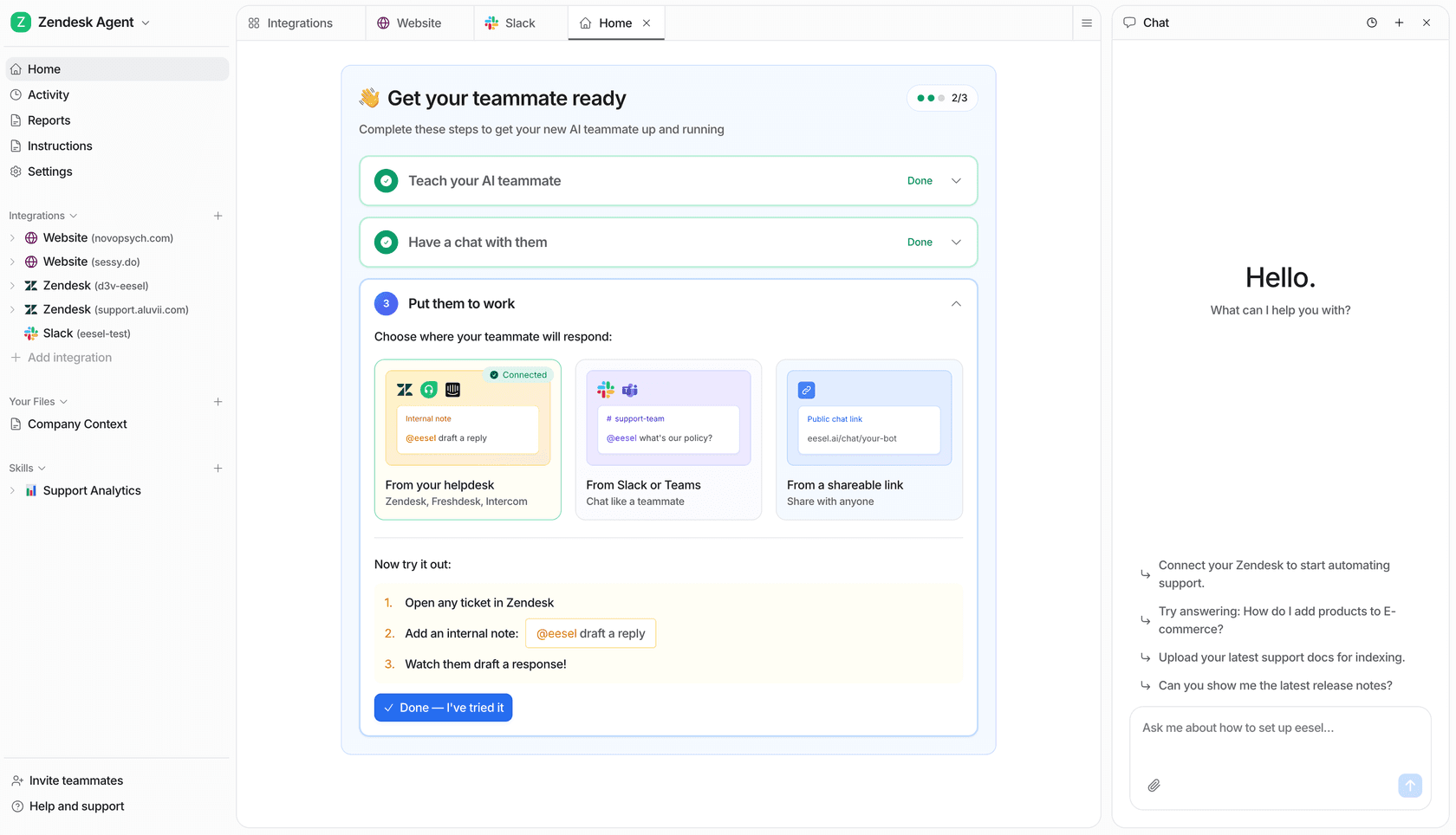
Start in draft mode on one queue, compare it with your own past cases, and turn on auto-reply once the answers hold. See how an AI helpdesk agent joins a queue, then Try eesel.