

Lightning Knowledge is Salesforce's article library for Service Cloud: reps write articles, record types separate FAQs from policies, data categories decide who finds what, and a rep must still click Publish even after approval. Enabling it is one-way, it needs a Knowledge User license for anyone who writes, and the cap that bites first is article versions, not articles. Plan the categories before the first article. Once the library exists, an AI agent such as eesel for Salesforce can read those articles when it drafts a case reply.
What is Lightning Knowledge?
I work the support queue at eesel, and the question I get most about Salesforce Knowledge is "where does the answer actually come from when a rep is mid-case?" Lightning Knowledge is that place. With the eesel CLI, an AI coding agent can upload your approved article text, such as exported Knowledge articles and policies, then ask it test questions and check the answers before anything goes live, though a Salesforce admin still approves the connection itself.
Salesforce's Knowledge overview says your knowledge base is built from articles, which are documents of information such as how to reset a product or how much storage it supports. Experienced reps and internal writers write them, and articles can be published internally or externally to customer and partner sites, public websites, and social posts and emails. Orgs new to Knowledge use Lightning Knowledge, per the same page.
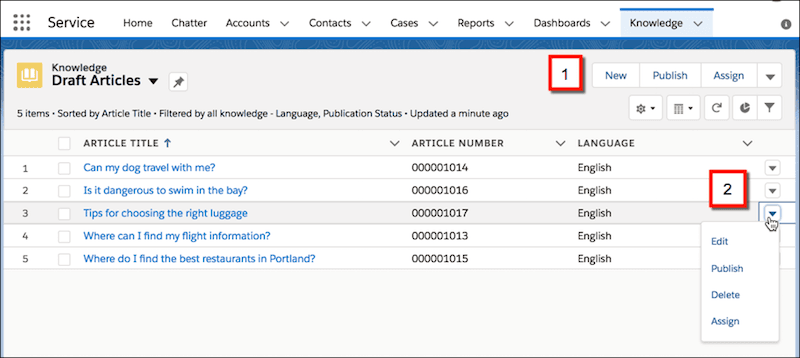
Two things make it different from a folder of Google Docs. Articles are real Salesforce records, so you can report on them, attach them to cases and control them with the same permissions as any other object. And every article moves through a lifecycle of draft, published and archived versions, which is where most of the admin work lives. If you are mapping the rest of the product, my Service Cloud overview and ticketing system guides sit next to this one.
How is Lightning Knowledge different from Classic Knowledge?
Lightning Knowledge replaces custom article types with standard record types, and it changes who can do what. Salesforce's limitations page says enabling it changes your data model to use record types rather than article types, and you can't disable it afterwards. Classic permissions came from public groups and article actions. In Lightning, user profile permissions or permission sets replace them.
The same page flags a dated instruction I would not skip: it says orgs must run the migration tool before June 1, 2025 to keep access to Knowledge. If you are reading this on a Classic org, ask your Salesforce admin where that stands. Salesforce's migration page says to log a request with Support, allow 1 to 2 weeks of notice, and test in a sandbox first.

The limitations page also lists what did not make the jump, and a few of these surprise people:
- Star ratings are gone. Only thumbs up and thumbs down exist, and old 3, 4 and 5 star ratings become thumbs up.
- Lightning Knowledge doesn't support federated search, and the Public Knowledge Base package can't be used.
- Archiving can't be scheduled for a future date. Salesforce suggests a Flow that archives articles by a date field.
- The Printable View action isn't available.
- After you enable it, the Article Type field can't be reached through SOQL or the API, which breaks custom code that queries it.
How do you set up Lightning Knowledge?
In five moves, and the first one has no undo. Salesforce's enable page and setup overview give the sequence.
- Test in a sandbox or trial org. Salesforce says to do this before production because enabling is permanent. Delete any installed packages that contain article types first, per the limitations page.
- Enable it. In Setup, enter Knowledge in Quick Find, click Knowledge Settings, click Edit, select Enable Lightning Knowledge and save. You need one article type to enable it, and the Knowledge User license to see the page.
- Give people access. Salesforce's user access page says all internal users with Read permission can read published articles by default. To do more than read, reps need the Knowledge User license, ticked on the user record.
- Create record types and page layouts. One record type per kind of content, each with its own layout.
- Plan categories, then publish. Set up data category groups, decide which channels each type goes to, and write the first articles.
A permissions detail that saves a support admin an afternoon: to see categories on draft articles, standard users need both Knowledge User and Manage Article, and deleting archived articles needs Modify All Records. My macros guide has the same lesson for a different feature: test as a rep, not as admin.
Salesforce also offers a guided setup flow that enables Lightning Knowledge, picks article authors and creates data category groups, and it auto-enables a default FAQ record type and layout, per its setup flow page.
How do record types, page layouts and data categories work?
Record types decide what an article contains, and data categories decide where it can be found. Salesforce's record type page puts it plainly: your FAQ pages differ from tutorials, which differ from policy statements, and a record type controls an article's content and layout. A page layout then decides which fields reps see and edit, per record type and profile.
Data categories are the filter layer. Salesforce's best practices article lists the limits:
| Data category limit | Value |
|---|---|
| Category groups | Up to 3 |
| Hierarchy levels per group | Up to 5 |
| Categories per group | Up to 100 |
| Categories on one article, from one group | Up to 8 |
| Visibility settings | Roles, permission sets or profiles, set to All, None or Custom |
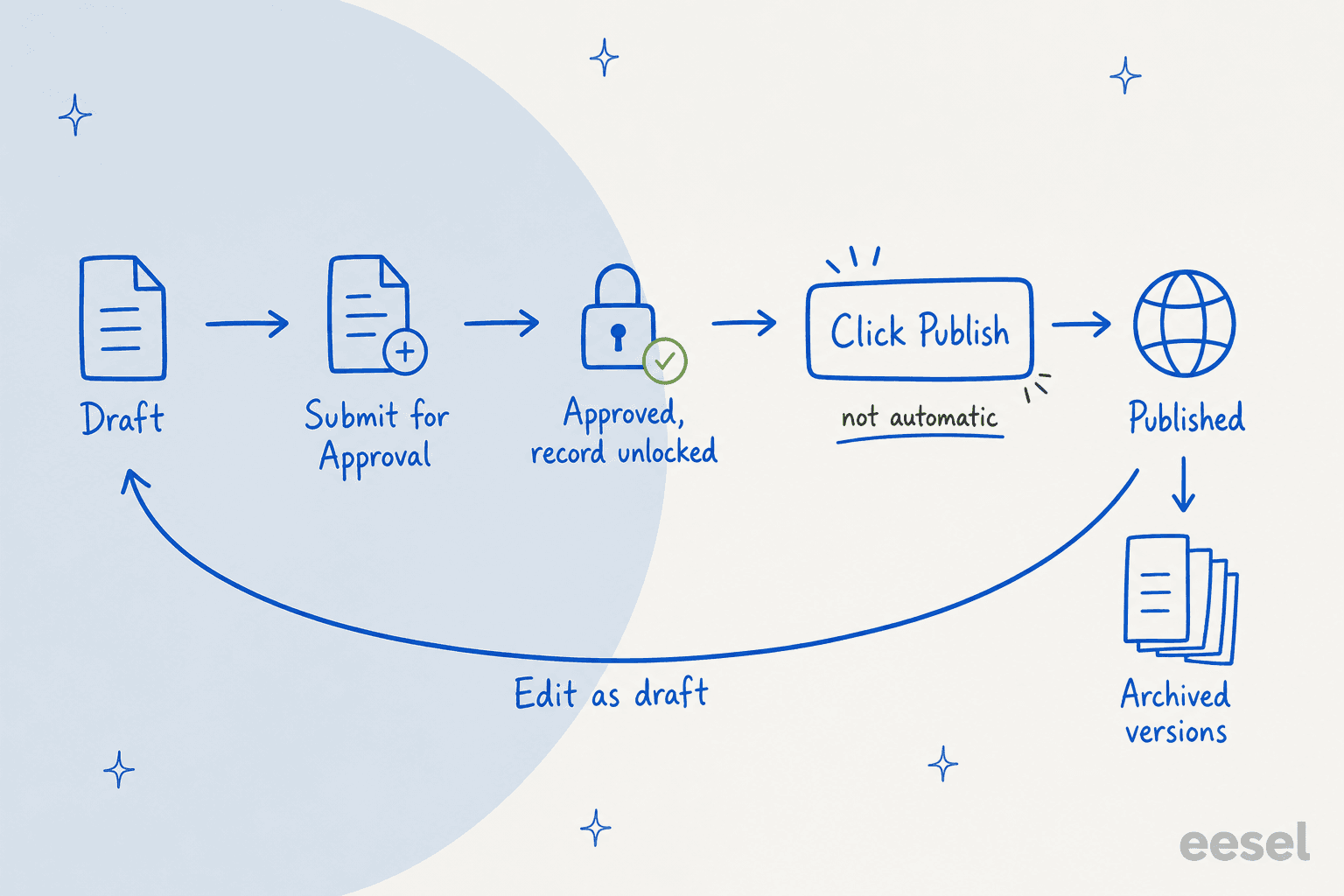
The example on that page is worth remembering. An article with no category won't show when a product filter is set, while an article tagged to All Products shows both with and without the filter. Salesforce's create page adds that users find an article only through its applied category, that category's parent or one of its children, so choose categories a person would naturally look for. It also warns that data categories don't show in Knowledge list views, so build a report that filters by category instead.
My advice, from the queue side: keep the first category group to one question, such as "which product is this about?" Three groups on day one is how articles end up in none of them. Salesforce's planning page agrees on the order of work, telling admins to plan category hierarchies and how they map to the role hierarchy before setting them up.
How do channels decide who sees an article?
Channels are visibility switches on each article. Salesforce documents four fields in Lightning Knowledge: Visible in Internal App, Visible to Customer, Visible to Partner and Visible in Public Knowledge Base, and its channels article says they are hidden by default and must be added to the page layout before authors can edit them. Publishing makes an article visible in all channels selected, and publishing an article with translations publishes the translations too, per the publish page.
For outside readers, Salesforce's limitations page says you can share Lightning Knowledge articles in Experience Cloud and Salesforce Sites, and use Help Center to share with unauthenticated users. Because Title and URL Name are required, they can't be removed from a layout, which also applies to Experience Cloud sites.
If you are comparing this with other help centers, my posts on the Gorgias knowledge base, HubSpot knowledge base and Freshservice knowledge base show the same job done with fewer moving parts.
How do approvals and publishing work?
Approval gates the content, but it never publishes it. Salesforce's approval page says articles aren't published automatically at the end of an approval process, so a rep must click Publish. It also says to set the final approval action to "Unlock the record for editing" so that can happen.
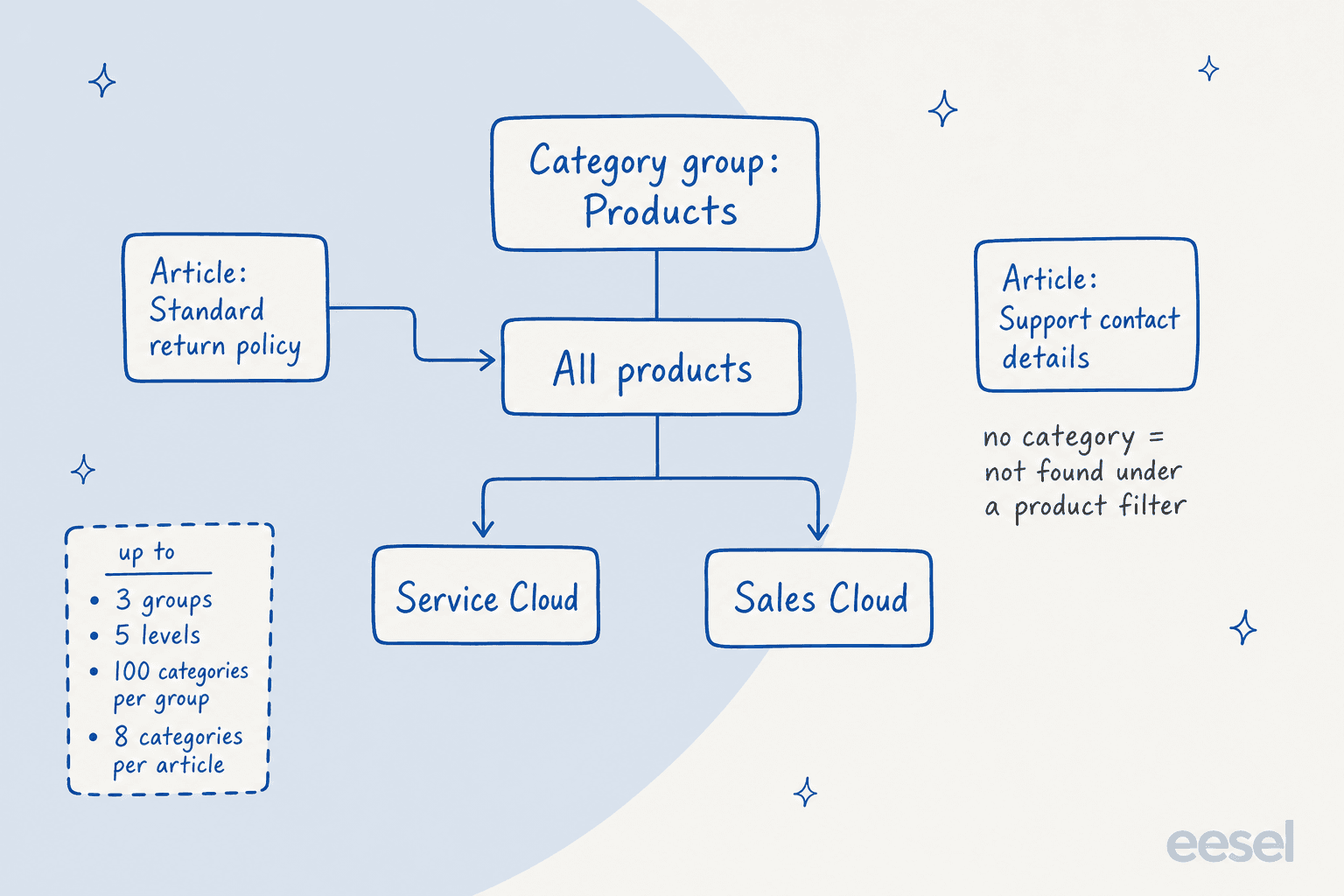
Other rules from that page and the publish page:
- Approvers can be chosen manually, assigned from a hierarchy field, sent to a queue, or set to specific users, with up to
25per step. - Approval processes cover the draft to publication stage only. Salesforce says they aren't available for translation or archiving.
- A rep with the Publish Articles action sees both Publish and Submit for Approval, so limit that action to a small group if you want the approval to mean something.
- You can't unlock an article that is in an approval process, and articles scheduled for publication before approval go live regardless of approval status.
- Scheduled publishing runs in 15-minute intervals, so the exact minute isn't guaranteed.
One place Salesforce's own pages disagree: the publish page says to click Cancel Publication to cancel a scheduled publication, but it also says the button isn't available from a draft in Lightning Experience, and the limitations page says you can't cancel a scheduled publication at all. Test it in a sandbox before you promise authors they can pull a scheduled article back.
Workflow rules are separate. They can send email alerts, update fields or send outbound messages when an article meets criteria, but Salesforce notes tasks aren't supported for article workflow. If a stale article is your problem rather than a slow one, my guides to an AI knowledge base audit and detecting outdated help content are the checks I would run.
How do article versions work?
Every article can have one draft, one published and several archived versions. Salesforce's versions page says to save the previous version you tick Flag as new version when publishing, and the new version gets the next sequential number.
The case link is the clever part. When an article is attached to a case and a new version is published, the attached version is flagged as outdated, so Version 2 becomes "Version 2 (outdated)" and the case keeps a permanent record of what the agent actually read. By default the system stores up to 10 versions per article, plus any attached to cases, and those case-linked versions don't count against the per-article limit.
Two Lightning quirks: you can delete archived and draft versions only, and for articles with more than 30 versions, the ones above 30 appear in Classic but not Lightning, per the limitations page. Several reps can also edit the same article at once and overwrite each other without warning, so Salesforce says to tell authors to edit only articles assigned to them.
What does Lightning Knowledge cost and who needs a license?
Salesforce doesn't list a standalone price for Knowledge on its Service pricing page. It appears as a "Knowledge Management" feature row in the edition comparison, and I could not confirm from the page text which edition columns include it, so check with your rep. The per-user list prices on that page are:
| Edition | List price per user per month |
|---|---|
| Starter Suite | $25 |
| Pro Suite | $100 |
| Core | $195 |
| Advanced | $395 |
| Max | $550 |
Two AI add-ons relate directly to articles: the page shows Knowledge Creation and Enterprise Knowledge as "Available for purchase" under Core and Advanced. For writers, the license that matters is the Knowledge User license, which Salesforce says is required to do more than read articles. Salesforce's current Service Cloud prices are broken down in my pricing guide, and AI usage is metered separately in Flex Credits.
What limits should admins plan for?
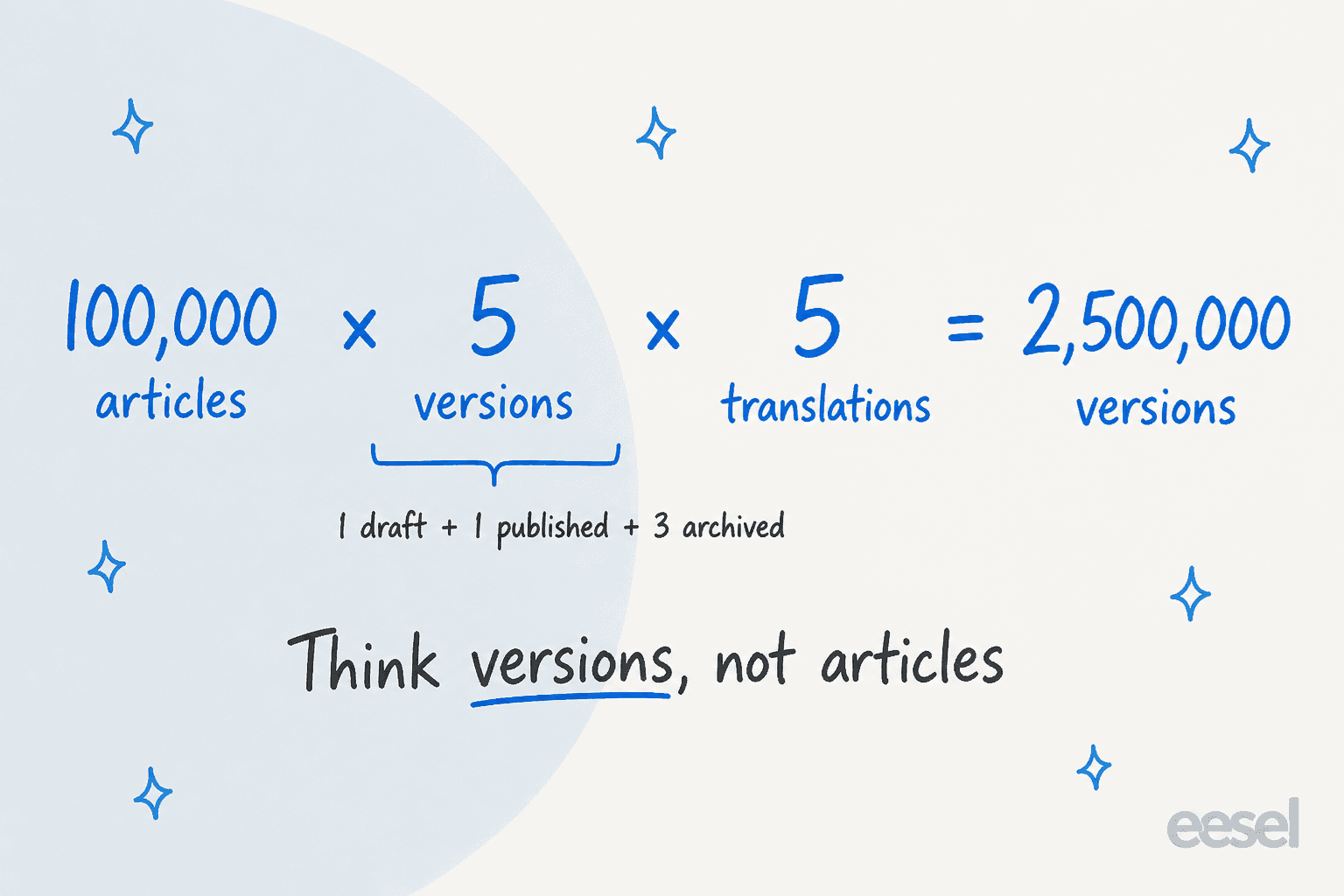
The cap that surprises people is versions, not articles. Salesforce's scalability page says total versions equal articles times retained versions per article times translations per version, and gives an example of 100,000 articles with 5 versions and 5 translations each, which is 2,500,000 versions.
Default allocations by edition, from the same page:
| Edition | Articles | Versions per article | Languages |
|---|---|---|---|
| Essentials | 500 | 10 | 1 |
| Professional | 500 | 10 | 1 |
| Enterprise | 50,000 | 10 | 5 |
| Developer | 50,000 | 10 | 5 |
| Unlimited | 150,000 | 10 | 10 |
One honest caveat: that table uses the older edition names, while the pricing page now shows Core, Advanced and Max, and neither page maps one to the other. You can ask Salesforce Support to raise the limits, and orgs created before Spring '18 default to 16 languages. Classic Knowledge allowed 25 article types, while Lightning Knowledge allows up to 200 record types per object.
Other limits on that page that affect support teams: one rich text field can hold up to 100 links to other articles, the Knowledge footer isn't in the Lightning Service Console (add the Knowledge component to a record page instead), and the option to create an article while closing a case exists only in Classic. And as promised in the FAQ, you can't use macros with Knowledge articles or insert articles into macros, so my macros guide and this one describe two separate libraries.
How do AI agents use Lightning Knowledge?
Articles feed the AI features Salesforce sells for Service, and third-party agents read them too. Three Salesforce details matter.
Writing. Salesforce's Einstein Knowledge Creation lets reps draft articles from a case, incident or work order using prompt templates, then review, edit and save. Salesforce says it charges only for the articles you generate.
Grounding. In Ground with Knowledge, title and summary fields are required. Salesforce says indexing can take several hours, new articles are indexed once every 24 hours, and users only see grounded answers from fields and versions they can access. Only String and Text Area fields are supported, and encrypted fields aren't.
Outside sources. Salesforce's Unified Knowledge page says it is scheduled for retirement with the Summer '27 release, with Enterprise Knowledge powered by Data 360 as the replacement.
My take: the quality bar for an AI agent is the same as for a rep, only less forgiving. Title and summary are the required grounding fields, so a vague summary like "Returns info" will cost you more than any model upgrade. My guides to AI hallucinations in support and knowledge base training go deeper.
smava shows the other side of it, on Zendesk rather than Salesforce. Between 8 August and 8 September 2026, eesel handled about 27,000 tickets for smava and its sister brand, ran about 14,400 searches across the macros and help center, and prepared about 15,300 draft replies for people to approve. SaunaSpace does the same on Gorgias, drafting from its help center and past tickets in a calm, direct voice, with a person always sending. In both, the agent works from help content a person already wrote. That is why I would fix articles before buying any AI.
On Salesforce itself, eesel's integration runs as an agent on Cases: it reads the case with contact and account context, drafts or sends replies, adds internal notes, updates fields and routes to queues, and its page says it learns from past cases and knowledge articles. Pricing is on the eesel pricing page: fixed credit plans where a ticket or chat is 1 credit, from 500 credits at $299 a month, with 100 free credits for 7 days. If you would rather have Salesforce own the AI, see Agentforce agents, the Agentforce alternatives roundup and best AI for Service Cloud.
What would I do before writing the first article?
Here is the checklist I would hand a support admin:
- Run it in a sandbox first. Enabling is permanent, and Salesforce repeats that warning across its pages.
- Pick three record types at most: FAQ, how-to and policy. Add more only when a layout really differs.
- Start with one category group and plan it against your role hierarchy.
- Add the channel fields to the layout on day one, or authors can't set them.
- Decide who can publish. If approvals matter, restrict the Publish Articles action and set the final approval step to unlock the record.
- Write the summary field for an agent, not just for a rep. Title and summary are the two required fields for grounding.
- Review versions and case links monthly, and archive what no one reads. My AI knowledge management guide has a review rhythm.
If your articles feed a bot, my posts on writing articles with AI, connecting AI to company knowledge and help center search pair well with this one. Neighbouring Service Cloud guides: case merge, Omni-Channel routing, Enhanced Messaging and case summaries. For multilingual libraries, see multilingual support and Salesforce translation, and for an outside view, best knowledge management software.
Try eesel for Salesforce Service Cloud
If your reps already have the articles but still retype the answer, eesel works like a new hire that plugs into your Service Cloud org, reads each new case with the account's history and your knowledge articles, and leaves a draft reply as an internal comment for your rep to approve. Your admin controls what it can see, and you can simulate it on past cases before it touches a live one. Free to try with 100 credits.