


Salesforce entitlements say who gets support, and entitlement processes turn that into a clock: milestones like First Response and Resolution Time, each with success, warning and violation actions. To run it, enable entitlement management, build milestones, create and apply a process, and make sure every case carries the entitlement, because nothing starts without one. Milestones don't complete themselves, so plan a trigger or a Mark Completed habit. I'd pair the clock with a teammate such as eesel that drafts the first reply.
I build agent features at eesel, and the Salesforce questions I hear most are about timers, not AI. In an early 2026 demo review, a mid-market support team handling roughly 900 tickets a month called a missing native Salesforce connection a dealbreaker, which is why I read Salesforce's entitlement docs end to end: an AI agent working a Service Cloud queue has to live inside the SLA clocks the admin already built. With the eesel CLI, a coding agent can upload approved first-response policy as knowledge and ask test questions before go-live, though a Salesforce admin still has to approve the connection.
What are Salesforce entitlements and milestones?
An entitlement is a unit of support, and a milestone is a deadline-bearing step on a case. Salesforce's entitlements overview describes entitlements as units like "phone support" or "web support", usually modeling service agreement terms. You attach them to accounts, assets, contacts and service contracts, so a rep can check a caller is covered before opening a case.
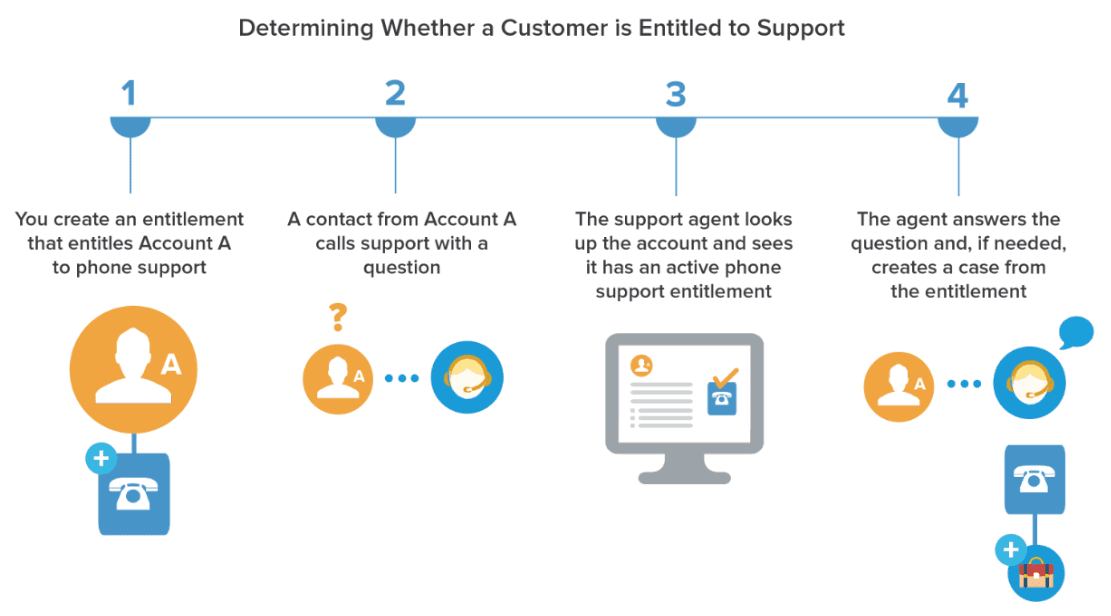
Entitlements work on their own as a yes or no. The clock arrives with an entitlement process, which Salesforce's terms page defines as a timeline of milestones, each a required step like First Response or Resolution Time. Milestone actions are the time-dependent automations on each step. Salesforce's help still calls the product Service Cloud, while the Agentforce Service name appears in newer branding, so search both.
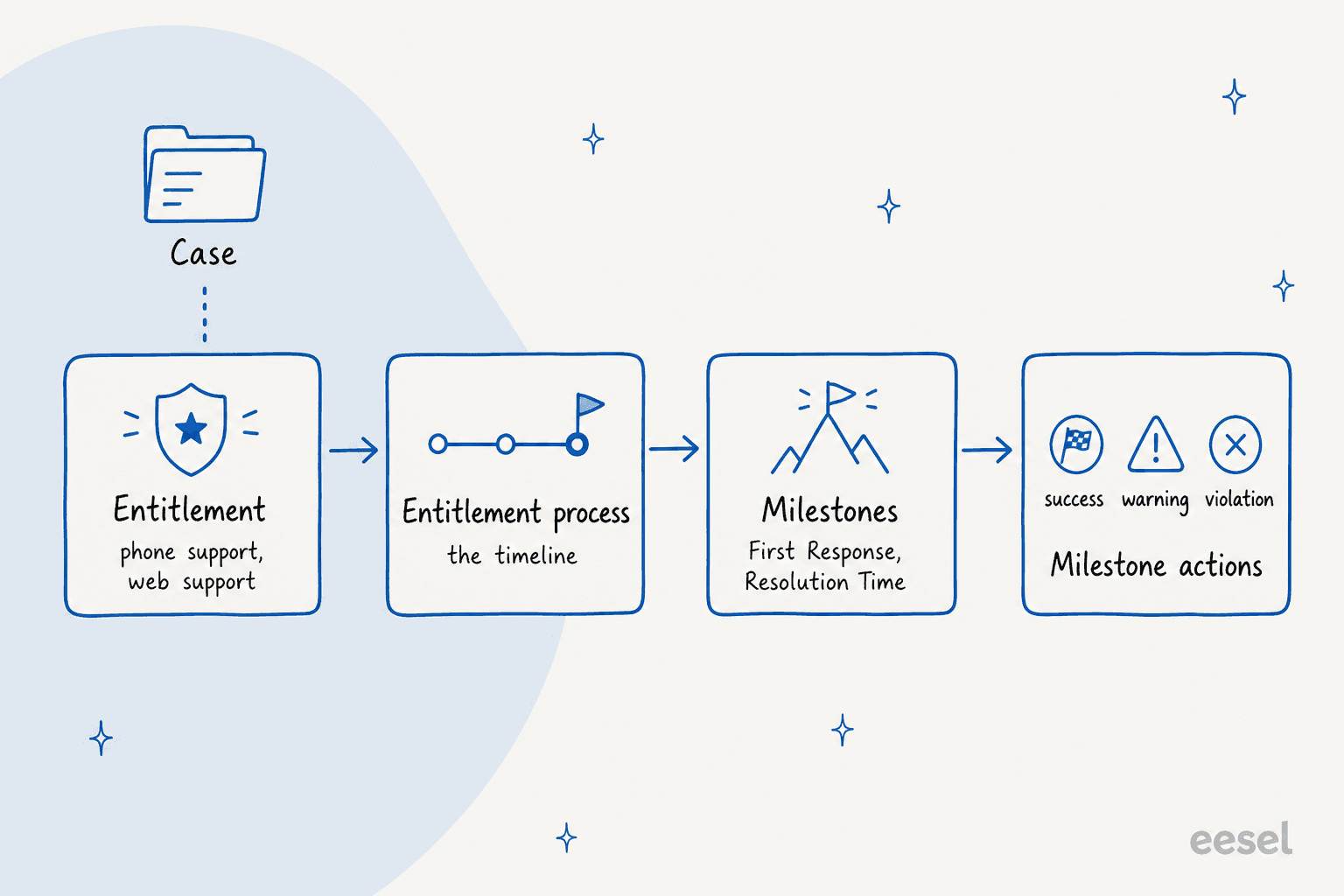
Four objects, one direction. The entitlement sits on the case, points to a process, the process assigns milestones by criteria, and each milestone fires actions. If a case has no entitlement, the chain never starts. That one fact explains most "my SLA isn't working" complaints.
Which Salesforce editions include entitlement management?
Professional, Enterprise, Performance, Unlimited and Developer editions with Service Cloud. That comes from Salesforce's supported editions page, which lists Service-Level Agreements (Entitlement Management) and adds that entitlement process monitoring isn't available in Professional.
Salesforce's service pricing page has a "Service Contracts and Entitlements" row in its comparison table, but the tick marks didn't come through when I scraped it, so I can't tell you which of its current plan names carry the feature. The pricing page also uses newer names than the editions page. Ask your account executive to confirm the plan in writing. My Salesforce Service Cloud pricing post tracks the seat prices.
How do you enable entitlement management?
Turn it on in Setup, then build the pieces in a fixed order. Salesforce's enabling article gives the path: open Entitlement Settings, select Entitlement Management, and save. It adds that only users with a standard System Administrator profile can enable it, so a custom admin profile won't do.
The setup checklist then lists customizing fields and page layouts, lookup filters on cases, user access, entitlement templates, auto-adding entitlements, and reports. My order:
- Enable entitlements and, if you'll ever change a live process, tick Enable Entitlement Versioning now. Salesforce says you can't disable versioning later.
- Give users access and add the entitlement fields to case layouts.
- Create milestones under Entitlement Management in Setup.
- Create the entitlement process, add milestones, add actions, then activate.
- Apply the process to entitlements, or to an entitlement template so new entitlements inherit it.
For comparison with other tools, Freshdesk and Zendesk SLAs are a policy per ticket. Salesforce builds the clock from several linked objects, which gives more control and more places to go wrong.
How do you create an entitlement process and its milestones?
Create the milestones first, because Salesforce's process article says you must have them before you make a process. Then follow the steps on that page:
- Setup, Entitlement Processes, New Entitlement Process.
- Pick the type, Case or Work Order. A process only runs on records of its type, and it can't be changed later.
- Name it, and leave Active off until the milestone actions are in. Salesforce warns you can't update or delete milestone actions after activation and use on a record.
- Choose when records enter (created date, or a custom date/time field) and exit (closed, or custom criteria).
- Optionally set business hours for every milestone Target Date.
Next, the add a milestone article covers the milestone fields. The ones that matter:
- Time Trigger (Minutes): how long users have to complete the milestone. You can instead point to an Apex class that implements
Support.MilestoneTriggerTimeCalculatorto compute it per case. - Start: Milestone Criteria calculates the Target Date when the milestone applies to the record, for recurring milestones. Entitlement Process calculates it from when the process starts, which fits First Response and Resolution Time.
- Order and criteria: a filter or formula such as
Priority equals Highdecides which milestone applies when several match.
Salesforce also defines three recurrence types. No Recurrence fits First Response and Resolution Time, Independent fits something like an engineering handoff that can recur, and Sequential repeats in order. Only one occurrence of a recurring milestone is active at a time.
What do success, warning and violation actions do?
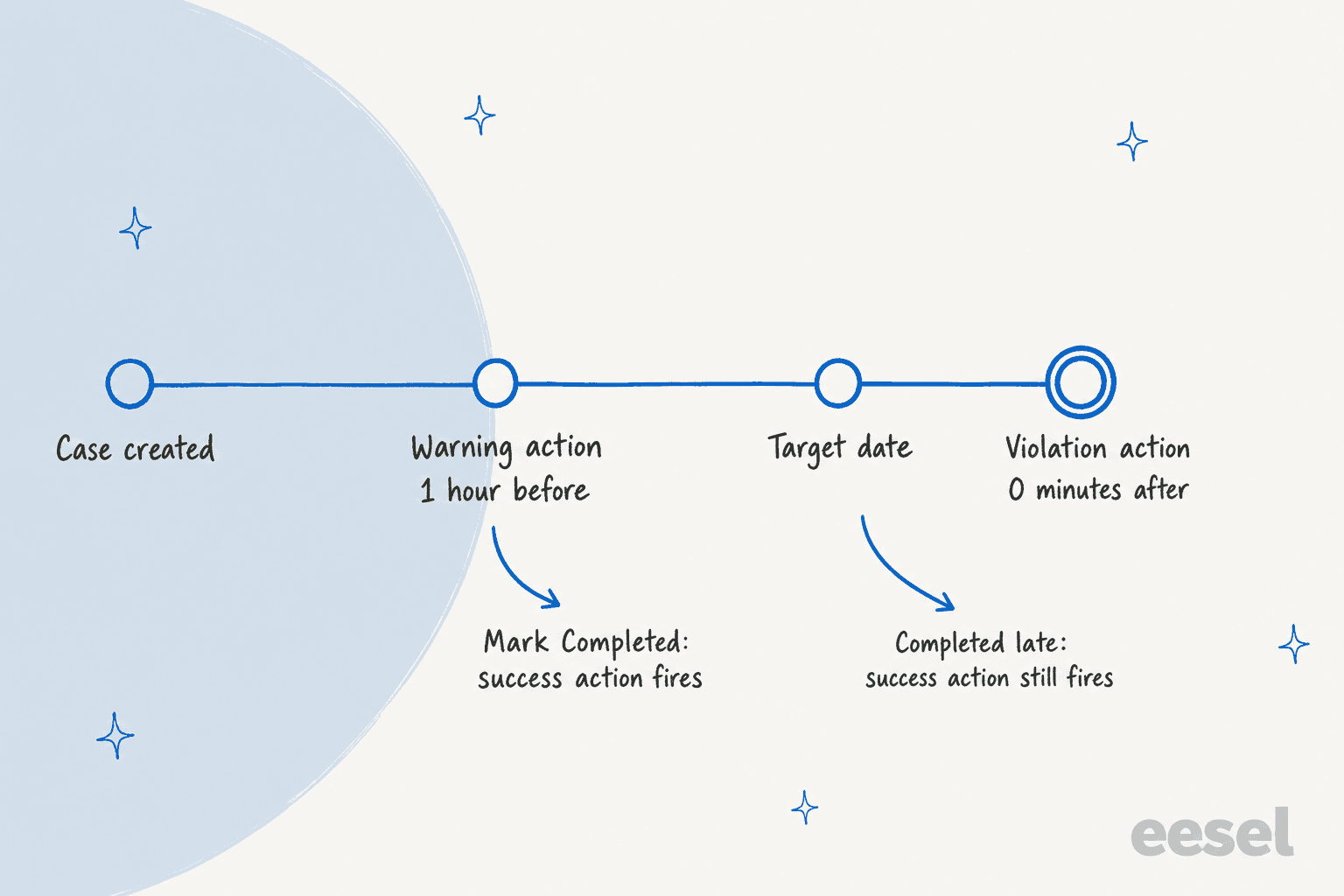
They are the automations on a milestone's timer, and they're where an SLA does something. Salesforce's milestone actions overview lists three types: success actions fire when a milestone completes, warning actions when it is near violation, and violation actions when it's violated. Success actions still fire on milestones completed late.
Each action can be one of these:
| Workflow action | What it does | Salesforce's example |
|---|---|---|
| New Task | Creates a task | Call the customer when First Response is violated |
| New Email | Sends an email alert | Notify the case owner near violation |
| New Field Update | Updates a field | Set Priority to High near violation |
| New Flow | Launches an autolaunched flow | Send a Slack notification near violation |
| New Outbound Message | Sends data to an external system | Send parts data after completion |
| Select Existing Action | Reuses an action | Reuse an email alert |
The Flow option arrived in Winter '25. Salesforce's release note says it covers Professional through Developer editions with Service Cloud. One tip from the add an action article: for a violation action that fires right away, set its time trigger to 0 minutes.
Three behaviors to know before you promise anything:
- Actions can fire a few seconds before the target date. Salesforce's limits page says a 0-minute violation action can run in the minute before.
- Field updates have a 10-second processing limit, and longer ones fail without an error.
- Don't schedule actions to run at case creation or update. Salesforce says that may give inconsistent results.
How do business hours work for milestones?
The most specific hours win. Salesforce's business hours article says milestone hours override the entitlement process's, which override the case's.
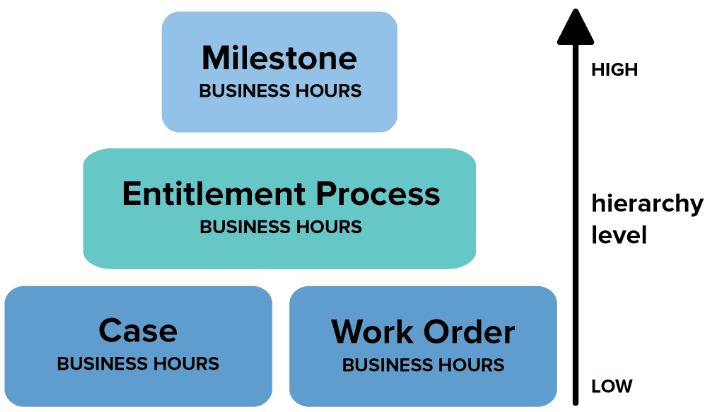
Salesforce's practical advice: set hours on the process when many cases share one process, and on a milestone when severity changes the rhythm, such as a 24/7 "Update Customer" milestone inside a weekday process. To change hours on an active process, create a new version, edit the hours there, and push the update back with a new update rule.
Here the docs disagree with themselves. The add-an-action page says time-triggered actions only occur during your org's business hours. The actions overview says warning and violation actions don't honor business hours and run on a 24-hour clock. Its example: a warning set "2 Days Before" on an 8-hour business day becomes 2,880 minutes, so on a case opened Monday at 9 AM with a Thursday target it fires immediately. I'd build a test case before relying on either reading. For how other tools handle calendars, my Zendesk business hours post is a useful contrast.
How do reps see the clock on a case?
Through the milestone tracker, which you add to the case. Salesforce's tracker article says a running milestone shows as a green circle that winds down, then turns red once overdue.
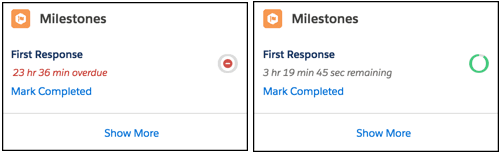
In Lightning, add the Milestones component in App Builder. The tracker shows actual hours by default; you can switch it to business hours in Entitlement Settings. A record's overall milestone status is one of three values:
| Status | Meaning |
|---|---|
| Compliant | Complete or not in violation |
| Open Violation | A milestone was violated and the step is still undone |
| Closed Violation | A milestone was violated but the step was later completed |
For reporting, the Case Milestones report type lets you track violations. My AI customer service metrics post covers which numbers to put next to it, and the HubSpot SLA goals guide shows the same job in another tool.
What limits and gotchas should admins plan for?
The case needs an entitlement, the process needs to match the record, and nobody completes milestones for you. Salesforce's limits page is short and worth reading in full. The numbers:
1,000entitlement processes per org, and10milestones per process10actions and10time triggers per action type on a milestone50,000entitlement queue entries per hour
The gotchas that hurt in practice:
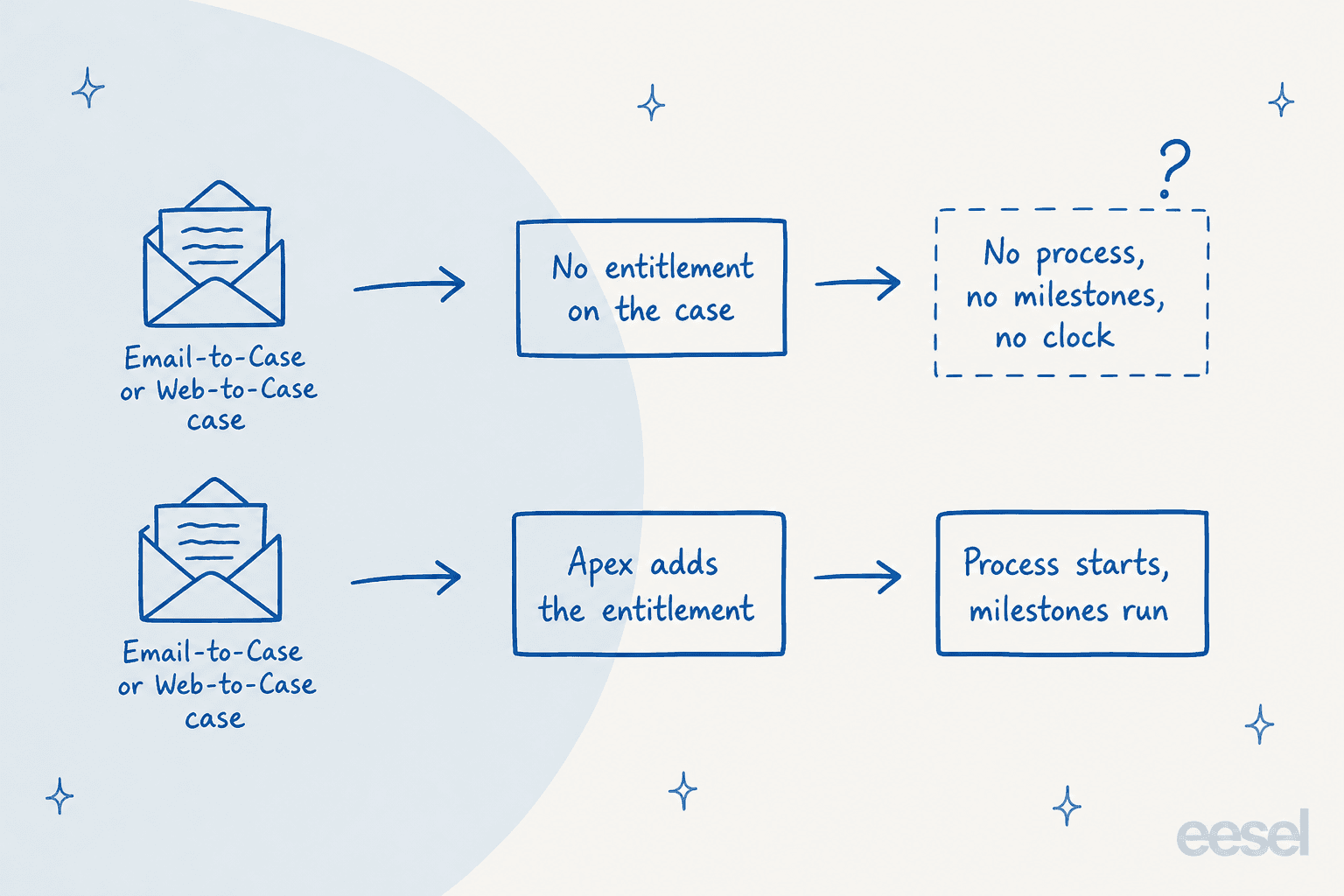
- Entitlements aren't added to emailed or web cases. Salesforce's auto-add article says Web-to-Case, Email-to-Case and experience cases don't get one automatically, and gives sample Apex to add it. Contacts also don't inherit the account's entitlements.
- Milestones aren't auto-completed. The auto-complete article provides Apex triggers: Resolution Time when a case closes, First Response when an email goes to the contact, or when a public comment is made. Reps can use Mark Completed. I found no flow-based recipe in these docs.
- One process per record type. A Case process doesn't run on work orders, so keep them on separate entitlements.
- Activation freezes actions. After activation you can't delete milestones or create actions. Use versioning: on a version in use you can add milestones but not edit existing ones.
- Precision is the minute. Milestones are measured in minutes and seconds, but start and end times are accurate to the minute, so some seconds get lost outside 24/7 hours.
- Queue violation emails don't reach members. If a queue has an email address, the violation goes there, and Salesforce says queue members don't receive it.
- Mobile and Lightning gaps. The tracker doesn't appear in the Salesforce mobile app, and Case Milestone has no fields showing who completed it.
If you also run Zendesk or Help Scout, none of these will feel familiar. Salesforce's model is flexible, and it asks the admin to wire it carefully.
Where does AI fit when the First Response clock is running?
An AI teammate can shorten the first response, but it doesn't replace the process. I'd say that plainly: eesel does not replace entitlement processes. Your entitlements, milestones and actions keep running. What eesel changes is how long a rep spends before the reply is ready.
eesel's Salesforce integration joins Service Cloud as an agent that reads cases and drafts or sends replies, adds internal notes, and updates fields, using contact and account context from the docs. Its page says it works alongside your entitlements and existing automations. I found no eesel documentation about reading milestone objects, so I'd check how your completion trigger counts a reply before you count on it.
That check matters. The documented First Response triggers complete on an email sent to the contact or a public comment. A draft saved as an internal note won't satisfy either, so a drafting setup helps only when a person sends the draft fast. A sending setup completes the milestone the way your trigger defines it.
My closest proof isn't Salesforce, and I'll say so. SamCart runs one eesel agent on Freshdesk tickets and another on its website chat, answering from 280 help center articles, and the ticket agent replies only while no teammate is assigned. That's the shape a first response target wants. smava shows the other end: about 27,000 Zendesk tickets handled in a month, with about 15,300 draft replies prepared for people to approve.
The pattern I hear most from buyers is draft mode first, then auto-reply once the answers hold up. eesel simulates on your own past cases before going live, and my guides on AI first response and Salesforce AI escalation cover the handoffs. For options, see my best AI for Service Cloud roundup, the ChatGPT for Service Cloud and Claude for Service Cloud posts, and my AI for Salesforce Service Cloud guide.
What would I do with this in my own org?
Here is the short version I'd hand an admin:
- Start with two milestones. First Response and Resolution Time, No Recurrence, one process. Add recurring ones after you trust the data.
- Fix the entitlement gap first. Add Apex so emailed and web cases always get one, or your clocks only cover part of the queue.
- Write the completion triggers before go-live. Decide what counts as a first response: an email, a public comment, or both.
- Don't activate early. Add every warning and violation action, then activate, because you can't add actions afterward.
- Enable versioning now. Changing a live process without it is painful.
- Test the business-hours behavior. Make a dummy case and watch a warning fire against the docs' two readings.
- Report on violations. Build the Case Milestones report and review Open Violations weekly.
If your queue is the real bottleneck, my notes on AI ticket prioritization, ticket classification and ticket summarization show where AI cuts time before a clock starts. The escalation management and SLA best practices posts help you set targets, and Front offers a lighter version of the same idea.
Try eesel for Salesforce Service Cloud
If missed first responses are a queue-size problem, eesel for Salesforce works like a new teammate in Service Cloud. It learns from your knowledge articles and past cases, reads each new case with the account context, and drafts or sends the reply, so your agents start with the work done. It won't change your entitlements or milestones, and it keeps working inside them.
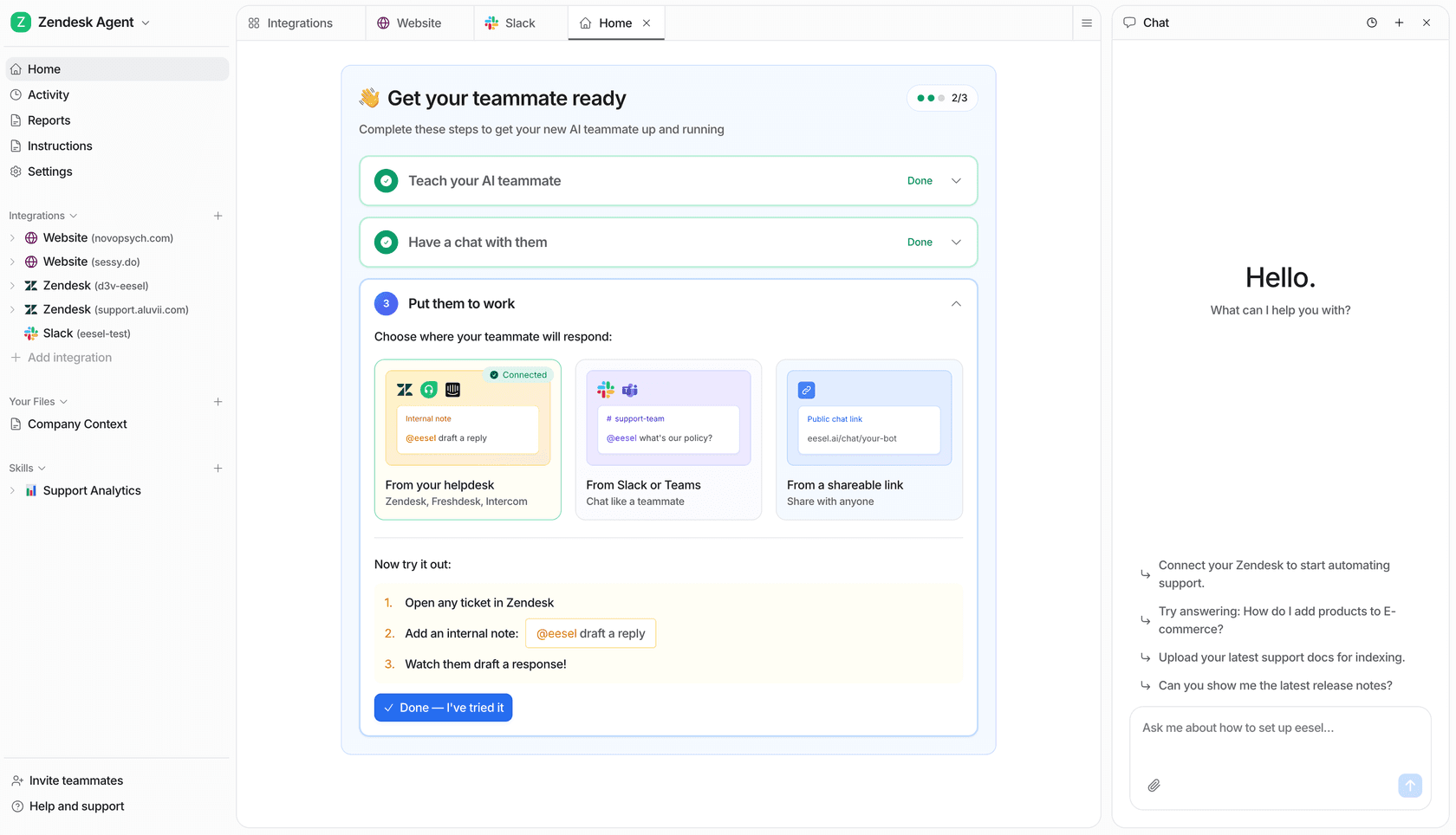
Start in draft mode on one queue, compare it with your own past cases, and turn on auto-reply once the answers hold. See how an AI helpdesk agent joins a queue, or compare AI helpdesks for enterprise, then Try eesel.