HubSpot ticket record associations: contacts, companies, deals, labels, and limits

Rama Adi

Katelin Teen
Last edited November 8, 2026

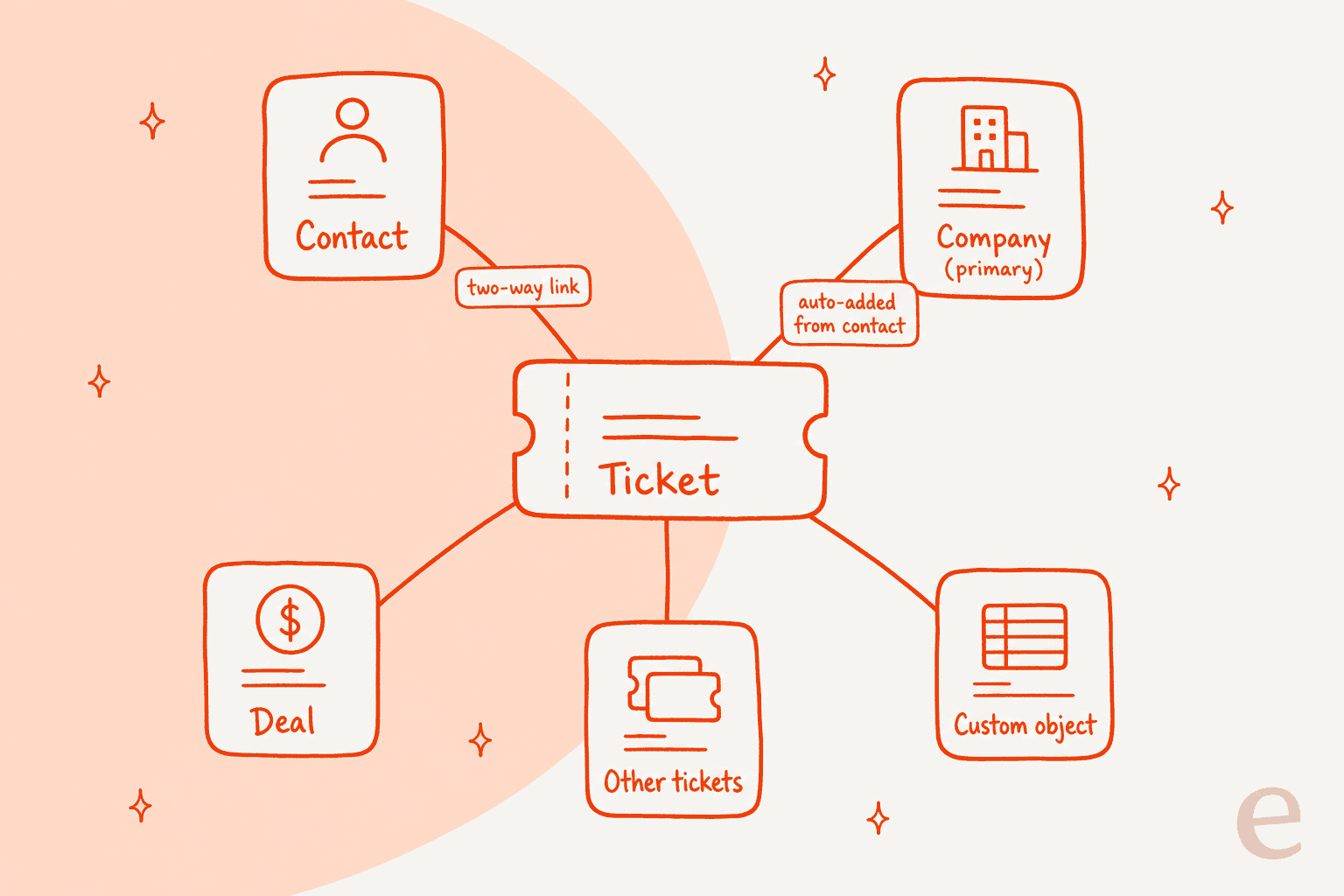
A HubSpot ticket is linked to other records through two-way associations: contacts, companies, deals, and other tickets or custom objects your account allows. Add them from the ticket's right sidebar, in bulk by import, API or workflow, and HubSpot adds the contact's primary company for you by default. Labels (up to 50 per object pair) describe the relationship but need Professional or Enterprise. I'd set the contact link first, because eesel uses the contact's record and past tickets to draft better replies. With the eesel CLI, an AI coding agent can upload approved account-handling rules as knowledge, then ask test questions and check the answers before anything goes live.
What is a ticket association in HubSpot?
An association is a link between two records, and it always works in both directions. HubSpot's associate records guide says that if record A is associated to record B, then B is associated to A, and the link shows in each record's right sidebar. You can associate records of different objects, like a ticket and a company, or of the same object.
I read that guide, HubSpot's pages on association labels, workflow associations, automatic activity associations, the help desk ticket article, and the Associations API guide. I haven't run any of this in a live portal, so what follows is what HubSpot says it does, with the gaps flagged. I come at it as an engineer who works on eesel's integrations, so I read associations the way an API consumer does.
HubSpot's own ticket example is the one that matters for support: a customer complaint comes in by email from two people who are also mid-sale, so you associate the ticket with both contacts and the deal. That single link set tells an agent who wrote in, which account it belongs to, and what revenue is attached. It's also what a good CRM ticketing system is for.
How do you associate a ticket with other records?
From the ticket itself, in four short steps. HubSpot's steps for any record are:
- Open the ticket and go to the right sidebar.
- Click +Add [object] on that object's association card. If the card isn't shown, customize the right sidebar.
- To create a new record, use the Create new tab. To link an existing one, search and tick the checkboxes.
- Optionally add an association label, then click Save.
Two details deserve attention. If you create a record from the panel, HubSpot says you set the label after the record exists. And you need Super Admin or the Edit associations permission to manage associations, which is a permission I'd check before you tell a new agent to fix a missing link.
When you create a ticket from CRM > Tickets, you can also pick the contact or company in the Associate ticket with section and tick a box to copy timeline activity onto the new ticket. HubSpot says calls, emails, notes, meetings and tasks are copied, up to the 2,000 most recent per associated record, and marketing activity like page views is not. My HubSpot customer portal post covers who can see those tickets afterward.
What does HubSpot associate automatically?
Less than people assume, so it's worth knowing the exact list. HubSpot documents these automatic behaviors:
| What happens | What HubSpot says |
|---|---|
| Ticket gets a company | The associated contact's primary company is automatically associated, unless Associate Ticket to a Contact's Primary Company is turned off |
| Activity logged on a ticket | Associated with the ticket's primary company, and one-to-one emails and outbound calls also go to the contacts emailed or called |
| Email or WhatsApp via help desk | Associated with the contacts messaged, not with other records on the thread's first message |
| Ticket created by splitting | The new ticket is associated with the original ticket's contact and enrolled in matching workflows |
| Contact and company from a form | A contact is created, and depending on form setup, companies are created too |
| Companies by domain | A setting can auto-associate contacts and companies by company domain |
The help desk row is the one I'd highlight. HubSpot's activity article says emails and WhatsApp messages created in the conversations inbox or help desk are associated with the contacts messaged only, and you add other objects to each thread by hand. So a ticket linked to a deal doesn't mean every message on it appears on the deal. My ticket splitting post covers the split row in detail.
How do association labels work?
Labels describe the relationship, and they're the part gated by plan. HubSpot says a Professional or Enterprise subscription is required to use them, and Super Admin permission is required to create them. You can create up to 50 labels per object pair, for example ticket to contact.
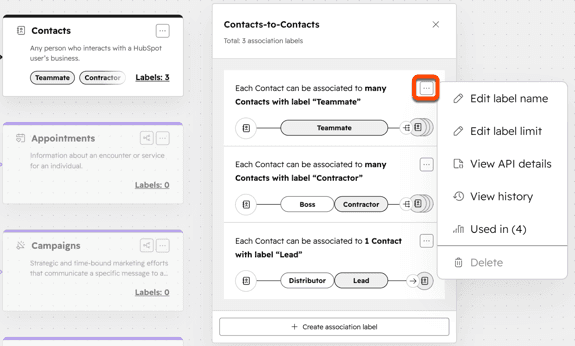
The details from HubSpot's guide:
- Single or paired. A single label applies to both sides, like Colleague. A pair uses different words per side, like Manager and Employee, and counts as one label toward your limit.
- Limits per direction. Each direction can be Many records can have label or a custom number.
- Internal name is permanent. It's used by integrations and APIs, and can't be edited once the label exists.
- Some objects are unsupported. HubSpot gives line items as an example where you can't create custom labels.
- Avoid semicolons. Non-alphanumeric characters in a label name can break imports, because semicolons separate multiple values.
Once labels exist, HubSpot says you can filter segments by them, use them as workflow enrollment triggers in ticket-based workflows, branch on them, and build custom reports. Labels for companies, deals, tickets and custom objects also sync through the HubSpot-Salesforce integration. Plan details are in my HubSpot pricing breakdown and the HubSpot review.
For a support team, a useful label might separate a ticket's Reporter from its Account owner. HubSpot's docs give labels like Buyer and Decision maker as examples but don't give a ticket-specific list, so I'd design that set yourself.
How do you associate tickets in bulk?
There are four documented routes, and the workflow route has the most rules. HubSpot lists import, API, domain linking and workflows.
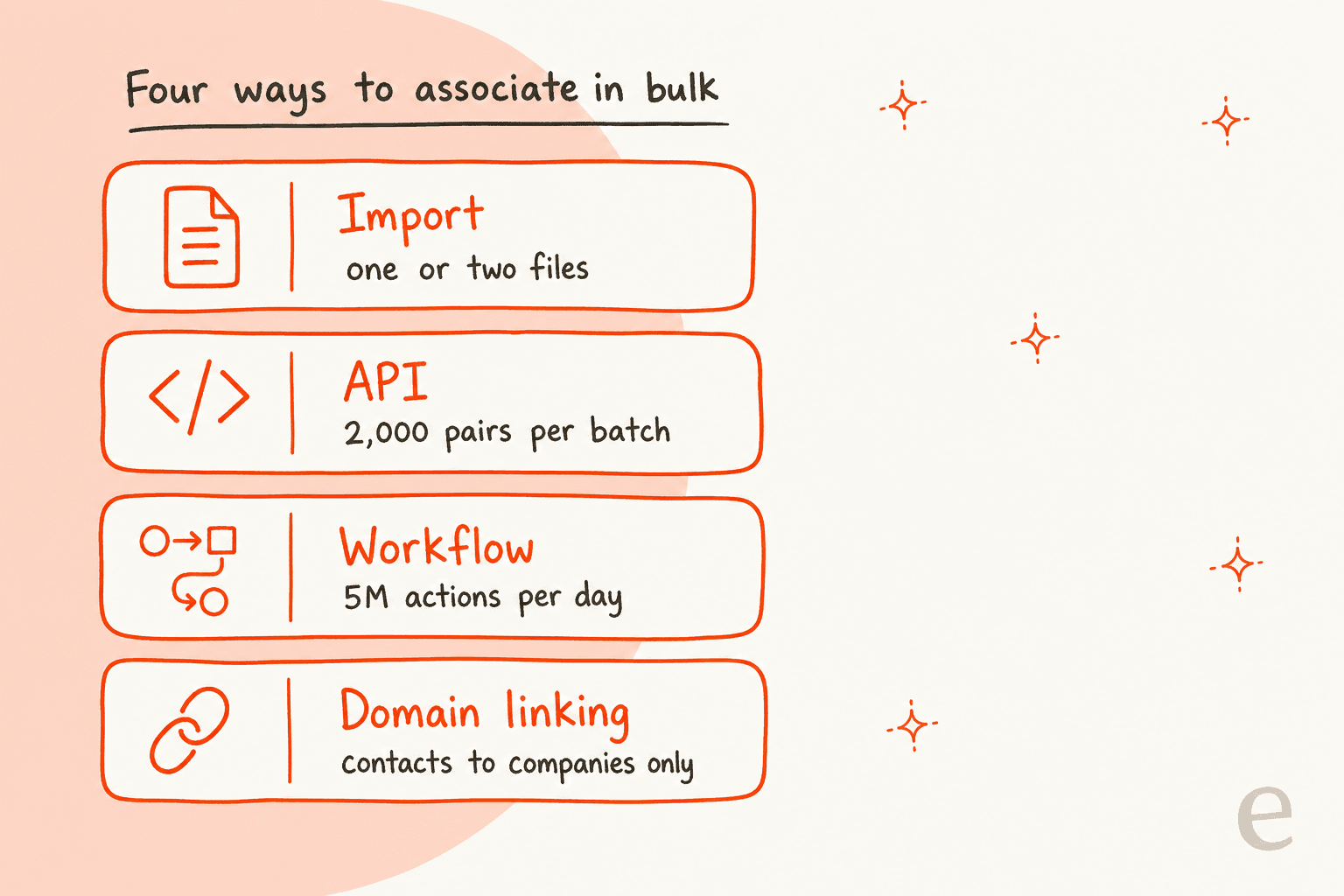
Import. You can use one or two files to associate records and optionally update labels.
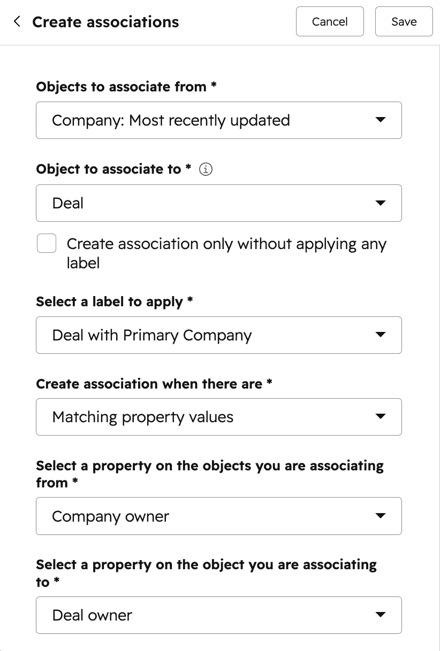
Workflows. The Create associations action matches property values. HubSpot's own ticket example is a custom ticket email field matched to a contact's Email property, which creates a direct ticket-to-contact link. The rules from the workflow guide:
- Matching works on single-line text, multi-line text, phone number, number, single checkbox and single select properties.
- Matching is case-sensitive and exact.
- You can target other associated records, not only the enrolled one, and HubSpot lists options such as all associated records (up to the
100most recently associated), first created and records with a specific label. - The action has a daily limit of
5 millionexecutions. If you don't tick the no-label box, the action also adds a label and counts as2executions. - Workflows can't remove associations that have no label. HubSpot points to the remove and batch-delete API endpoints for that.
If you're building workflows to route tickets, my HubSpot ticket routing guide and the ticket automation post pair well with this.
What do the HubSpot API limits look like?
The Associations API has a clear set of endpoints and limits, all in HubSpot's developer guide. For a ticket and contact, the pieces are:
| Task | Endpoint pattern |
|---|---|
| Unlabeled link | PUT /crm/objects/2026-09/{fromObjectType}/{fromObjectId}/associations/default/{toObjectType}/{toObjectId} |
| Labeled link | PUT /crm/objects/2026-09/{objectType}/{objectId}/associations/{toObjectType}/{toObjectId} with associationCategory and associationTypeId |
| Read labels | GET /crm/associations/2026-09/{from}/{to}/labels |
| Batch read | POST /crm/associations/2026-09/{from}/{to}/batch/read, up to 1,000 inputs |
| Batch create | POST .../batch/create, up to 2,000 inputs |
| Batch remove all | POST .../batch/archive, up to 100 unique from inputs |
HubSpot says association API calls are capped at 500,000 requests a day for Professional and Enterprise accounts and 150 requests per 10 seconds, and that buying an API limit increase raises the daily maximum to 1,000,000. Custom labels use USER_DEFINED and default ones use HUBSPOT_DEFINED.
A subtle one: when you update labels, a request that includes only the new label replaces the old one, and a request that includes both appends. Deleting the default unlabeled type removes all other associations too. I'd test both on a dummy ticket. For other helpdesks' API rules, my AI helpdesk API guide is a useful comparison.
What are the limits on ticket associations?
The number of associated records per object pair depends on your subscription, and HubSpot's docs don't print it on the pages I read. The associate records guide points to the product and services catalog. The API guide says there are technical limits on how many associations a record can have and gives one example, a company with up to 50,000 contacts, along with a report of records at 80% or more of their limit.
What I did find stated:
- Bulk review is capped at 100 records. On an index page, you can select up to
100records, click Review Associations, and dissociate, typing the number of associations to confirm. - Merges can fail on limits. HubSpot's merge guide says a merge can fail if the result exceeds your association limits. See my ticket merging post.
- Contacts need a primary company. On a contact with several companies, removing the primary means choosing another one.
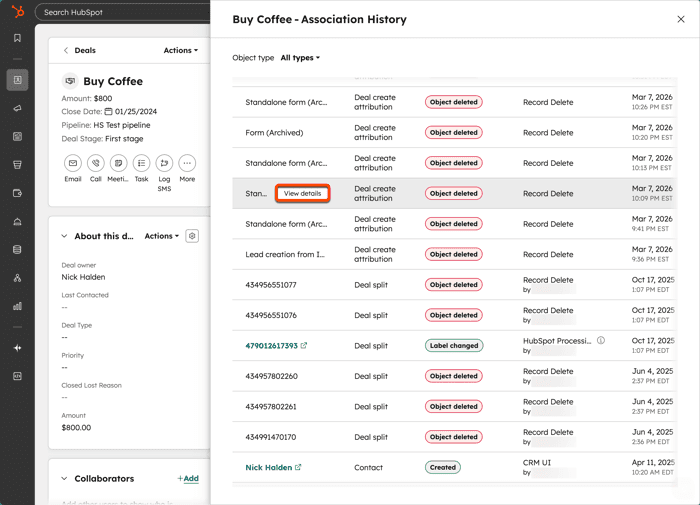
To audit changes, use View association history on the ticket. HubSpot says it lists each associated record or activity, whether it was created or removed, the date, and the source, which is either a user or an object deletion. The panel above is HubSpot's example on a deal, and the help desk has the same view for tickets. That's the first place I'd look when a ticket loses its deal link.
Which association do I need?
Pick by the question you want the ticket to answer. Use the picker below.
What do you need the ticket to tell your team?
Where does AI fit with ticket associations?
An AI teammate gets sharper when the ticket already points to the right contact. eesel's documented HubSpot actions are replying, adding internal comments, creating tickets, and updating ticket titles, descriptions and priority (eesel HubSpot docs). Editing associations isn't on that list, which keeps the link setup in your hands.
MentorShow, a French online learning platform, runs its whole support team in HubSpot and told eesel it gets between 5,000 and 13,000 tickets a month depending on the period. eesel reads each conversation and ticket, and it pulls the member's subscription status, renewal date and past tickets from the HubSpot contact before it writes. Between 8 August and 8 September 2026 it read about 1,200 HubSpot items and wrote 432 drafts, and a person reads, edits and sends every one.
That lookup only works if the ticket is tied to the right contact, which is why the contact association is the one I'd fix first. Where HubSpot's docs are silent, I won't guess: they don't say whether a ticket eesel creates gets a contact association by default, so I'd test that on a dummy ticket. For more, see my AI for HubSpot Service Hub guide and the AI response for HubSpot post.
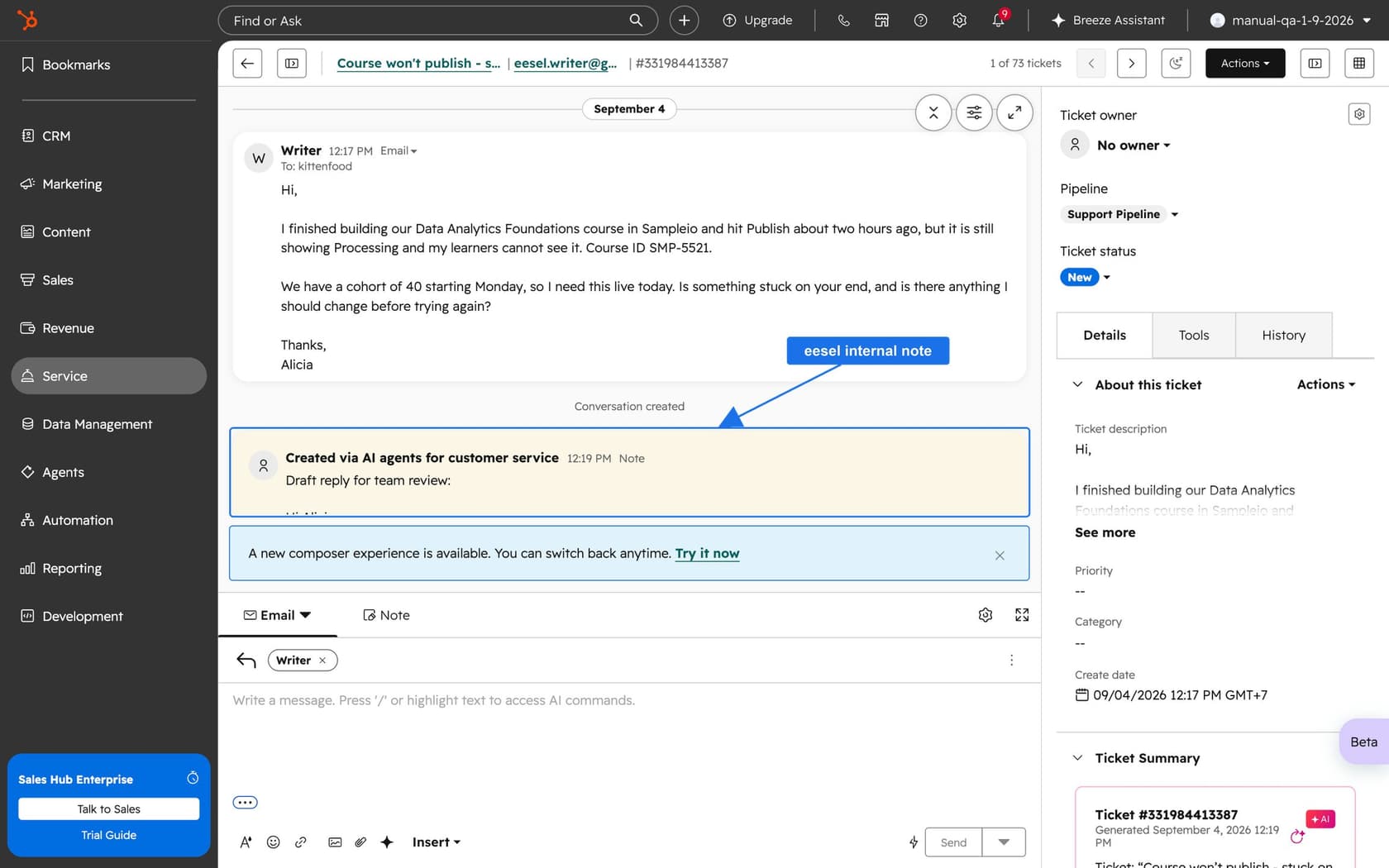
The HubSpot AI agent post and the Service Hub AI alternatives roundup widen the view, and ticket summarization shows what a linked record enables.
What would I do with this in my own queue?
Here's the short version I'd hand a support lead:
- Make the contact link non-negotiable. Every ticket gets one, because the company and the history hang off it.
- Check the primary company setting. Know whether it's on, since it decides whether tickets get a company.
- Add a deal only when revenue matters. HubSpot's own example does, for a customer mid-sale.
- Use labels sparingly. Plan and permission gate them, and the internal name is permanent.
- Match on exact values in workflows. Matching is case-sensitive, so normalize the email field first.
- Audit with association history. It shows source and date for every change.
For related reading, see ticket classification, ticket prioritization, SLA best practices, and customer service KPIs.
On the structure side, the help desk management, multi-channel help desk and team structure guides help. For B2B setups, my B2B support and AI support for B2B SaaS posts cover account-level routing.
Try eesel for your HubSpot help desk
If your tickets are well linked and the queue still runs behind, eesel for HubSpot works like a new teammate in Service Hub. It learns from your HubSpot knowledge base and past tickets, reads each ticket with its contact record, and drafts replies as internal comments for your team to review and send. It doesn't edit associations, but it uses the contact link you set. Compare options in my best AI for HubSpot roundup, or read the AI teammates overview.
If you're weighing HubSpot's own AI, my eesel vs HubSpot Breeze comparison is the place to start, and AI tools for HubSpot lists the wider field.
The eesel CLI lets Claude Code, Codex, or Cursor upload your approved account-handling rules as knowledge, adjust the agent's instructions, and ask test questions to check the answers before they go live. Connecting HubSpot itself still needs someone with the App Marketplace Access permission to approve it in the browser.
Frequently Asked Questions
How do I associate a ticket with a contact, company or deal in HubSpot?
Does a HubSpot ticket automatically associate with a company?
How many association labels can I create in HubSpot?
Can I create ticket associations with a workflow?
How do I associate tickets with the HubSpot API?
PUT request to /crm/objects/2026-09/ticket/{ticketId}/associations/default/contact/{contactId} for an unlabeled link. Batch create takes up to 2,000 inputs per request. See my AI helpdesk API guide for comparison with other helpdesks.