B2B customer support is a different beast entirely. When your customers are other businesses, you're not just answering questions about refunds or shipping delays. You're dealing with complex technical issues, multiple stakeholders per account, and problems that can literally halt your customer's operations. That's why companies search for Zendesk B2B support solutions. They need tools that can handle the complexity of business relationships, not just consumer transactions.
This guide breaks down how Zendesk approaches B2B support, what features matter most, what it costs, and where it falls short compared to modern AI alternatives. We'll look at real outcomes from companies using Zendesk for B2B, and explore whether it's the right fit for your team.

What makes B2B support different from B2C
Before diving into Zendesk specifically, let us clarify what makes B2B support unique. Understanding these differences helps explain why certain features matter more in a B2B context.
Multiple stakeholders per account. Unlike B2C where you talk to one person, B2B relationships involve entire teams. A single enterprise account might have technical contacts, procurement teams, executives, and end users all reaching out about different issues. Your support tool needs to track who is who and their relationship to the account.
Longer, more complex relationships. B2B contracts often span years, not single transactions. This means your support history with a customer becomes incredibly valuable. You need visibility into every past interaction, not just recent tickets.
Business-critical issues. When a B2B customer's software goes down, their business stops. The stakes are higher, response times matter more, and you need SLAs that reflect this urgency.
Integration requirements. B2B support doesn't happen in a vacuum. Your support tool needs to talk to your CRM, your product analytics, your engineering tools, and often your customer's systems too.
These differences mean B2B teams need support software with robust account management, flexible workflows, and deep integration capabilities.
How Zendesk handles B2B support
Zendesk has built a comprehensive platform that addresses many B2B requirements through several key features.
Organizations and customer hierarchy
Zendesk's Organizations feature lets you group users by company or account. This is foundational for B2B support. When a ticket comes in, you immediately see which company it's from, their contract tier, and their complete ticket history.
You can set up parent/child relationships for complex account structures. If you're supporting a multinational corporation with regional subsidiaries, you can organize contacts accordingly. This matters when you need to escalate issues or understand the full scope of a customer's relationship with your company.
Custom ticket fields and forms
B2B support requires capturing information that consumer support doesn't. Zendesk lets you create custom ticket fields for plan type, account tier, contract value, or any other data point your team needs.
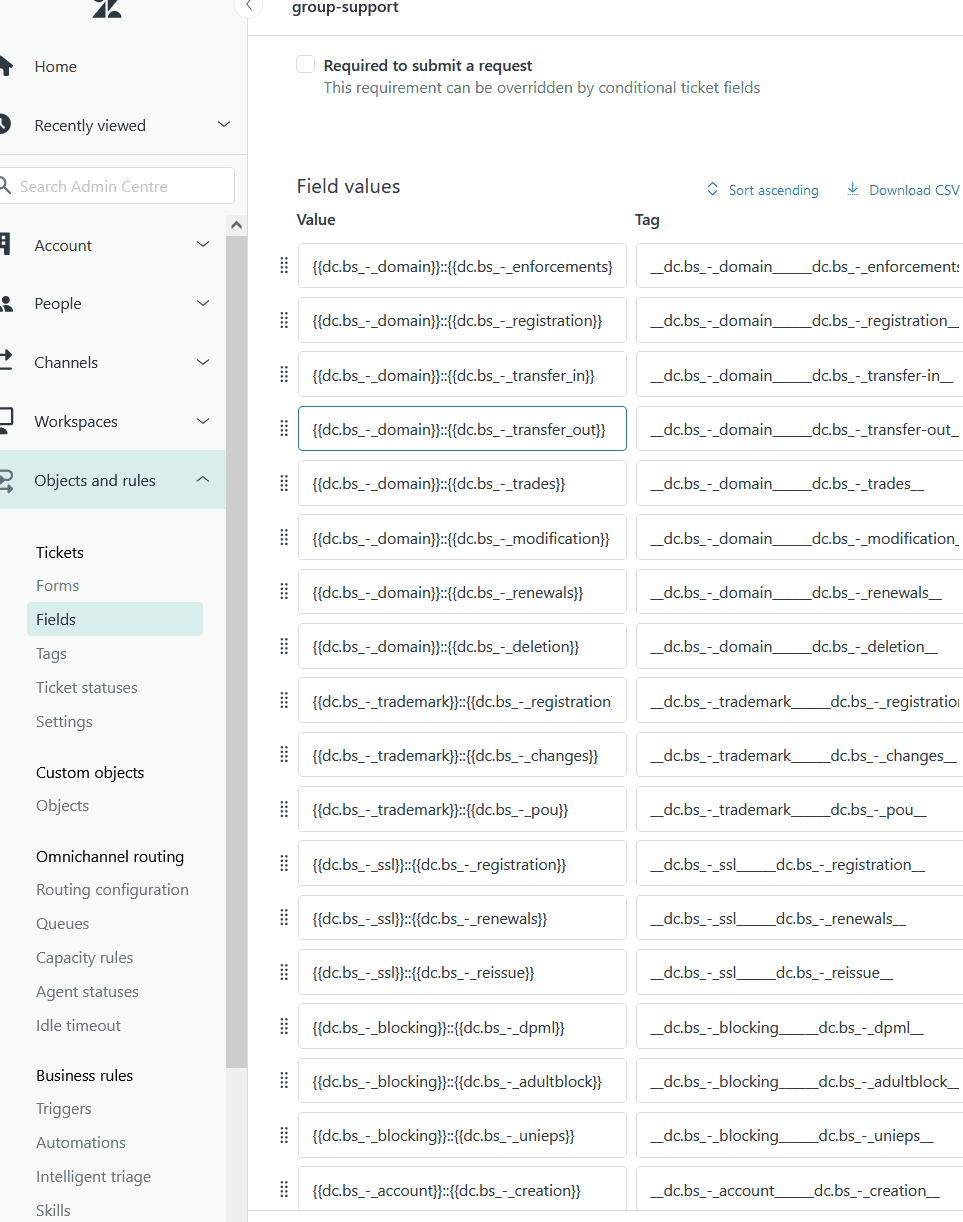
These fields aren't just for display. You can use them to route tickets automatically. A ticket from a Platinum customer gets routed to your senior support team. A billing inquiry goes straight to finance. This kind of intelligent routing is essential when you're handling hundreds of tickets daily across different customer segments.
Business rules and automation
Zendesk's triggers and automations handle the repetitive work of B2B support. You can set up rules that:
- Escalate tickets that haven't been updated in 24 hours
- Notify account managers when high-value customers submit tickets
- Auto-assign tickets based on organization or keywords
- Send follow-up emails when customers don't respond
SLA management is built in. You define your service level agreements, and Zendesk tracks whether you're meeting them. Breach notifications alert managers before SLAs are missed, giving you a chance to intervene.
Multi-channel support
Modern B2B customers expect to reach you however they prefer. Zendesk offers email, messaging, live chat, voice, and social media channels, all feeding into a unified ticketing system.
The Web Widget lets you embed support directly in your product. When a customer hits an error, they can start a conversation without leaving your app. Context like their user ID and current page gets passed to the agent automatically.
Integrations for B2B workflows
Zendesk's marketplace has over 1,000 integrations. For B2B teams, the most important ones include:
- Jira: Link support tickets to engineering issues so your product team sees customer impact
- Salesforce: Sync customer data between CRM and support for complete account visibility
- Slack: Route notifications to team channels for real-time collaboration
These integrations matter because B2B support rarely stays within the support team. You're coordinating with sales, engineering, and customer success. Zendesk acts as the hub that connects these departments.
Zendesk pricing for B2B teams
Understanding Zendesk's pricing is crucial because costs scale quickly with team size. Here's the breakdown:
| Plan | Annual Price/agent/month | Monthly Price/agent/month | Key B2B Features |
|---|---|---|---|
| Support Team | $19 | $25 | Email/ticketing, basic automations, 1000+ integrations |
| Suite Team | $55 | $69 | AI agents (Essential), messaging, 1 help center, phone support |
| Suite Professional | $115 | $149 | SLA management, custom ticket forms, skills-based routing, 5 help centers |
| Suite Enterprise | $169 | $219 | Sandbox, custom agent roles, approval workflows, 300 help centers |
Source: Zendesk Pricing
The Suite Professional plan is where B2B features really kick in. SLA management, custom ticket forms, and skills-based routing are essential for handling complex accounts. Suite Enterprise adds sandbox environments for testing changes before they hit production, which matters when you're managing dozens of workflows.
Hidden costs to consider:
- Add-ons: Advanced AI agents, Copilot ($50/agent/month), Quality Assurance ($35/agent/month), and Workforce Management ($25/agent/month) all cost extra
- Implementation: Complex B2B setups often require professional services
- Training: Getting agents proficient with custom workflows takes time
- Integrations: Some marketplace apps have their own subscription fees
For a 20-person support team on Suite Professional with a few add-ons, you're looking at roughly $3,000-4,000 per month before implementation costs.
Real-world results: Zendesk B2B case studies
Numbers on pricing pages tell one story. Actual customer outcomes tell another. Here are documented results from B2B companies using Zendesk.
Reprise case study
Reprise, a demo creation platform for enterprise sales teams, switched to Zendesk from another platform. The results were significant:
- 95% decrease in average resolution time (from 40 days to 2 days)
- 98% CSAT score maintained consistently
- 71% decrease in ticket update time (from 72 hours to 21 hours)
Reprise built custom integrations with Jira and Salesforce, creating a scorecard dashboard that pulls data from multiple systems. This unified view helps their small team deliver personalized, timely support to enterprise clients.
Other documented outcomes
- HeliosX: Reduced staffing costs by over 50% while improving efficiency and CSAT
- Conservice: Automated schedule generation based on ticket volume, replacing manual processes
- Jigsaw: 35% reduction in overall ticket volume and 20% reduction in response time using Zendesk AI agents
These results show what's possible when Zendesk is fully implemented with proper integrations and workflows. But they also hint at the effort required to achieve them. Reprise's VP of Customer Success noted they needed "the ability to customize our help center with the right themes and consistency" and went "deep into the HTML" to get what they wanted.
Where Zendesk falls short for modern B2B support
Zendesk is powerful, but it's not without limitations. Understanding these helps you evaluate whether it's the right fit or if you should consider alternatives.
Configuration complexity. Setting up Zendesk for B2B use cases takes weeks, not days. You need to configure organizations, custom fields, triggers, automations, and integrations. This isn't plug-and-play software. It requires dedicated admin resources or professional services.
AI as an add-on. While Zendesk has invested heavily in AI, the features can feel like bolt-ons rather than native capabilities. Advanced AI agents require separate add-ons. The AI doesn't learn from your existing data automatically. You still need to configure and train it.
Limited Slack integration. For teams that live in Slack, Zendesk's integration is primarily one-way notifications. You get alerts in Slack, but managing tickets from Slack is limited compared to modern alternatives built with Slack-native workflows.
Rigid workflows. Zendesk's trigger and automation system is powerful but inflexible. Want to handle edge cases differently based on customer context? You'll need complex workarounds. The system doesn't adapt dynamically to customer behavior.
Account intelligence gaps. Zendesk tracks tickets, but it doesn't provide built-in customer health scoring or predictive analytics. You won't get automatic alerts when an account is at risk of churning based on support patterns.
These limitations have led some B2B teams to look elsewhere. Companies like AssemblyAI and Aptible migrated away from Zendesk specifically because of these constraints, seeking more modern, AI-native alternatives.
Modern alternative: AI-native B2B support with eesel AI
This is where we come in. At eesel AI, we approach B2B support differently. Instead of a ticketing system you configure, we offer an AI teammate that learns your business.

Here's how we differ from traditional platforms like Zendesk:
Progressive autonomy. Start with eesel drafting replies for your team to review. As it learns your tone and policies, level up to full automation for specific ticket types. You control the pace based on performance, not a configuration timeline.
Learns in minutes, not weeks. Connect eesel to your help desk, help center, and documentation. It reads your existing data and understands your business context immediately. No manual training or knowledge base uploads required.
Plain English instructions. Instead of complex trigger conditions, tell eesel what to do in natural language: "If a Platinum customer asks about refunds over $1,000, escalate to the account manager." eesel follows those instructions.
Built-in account intelligence. eesel tracks customer health automatically. It identifies at-risk accounts, surfaces upsell opportunities, and provides insights that would take hours to compile manually.
| Capability | Zendesk | eesel AI |
|---|---|---|
| Setup time | Weeks of configuration | Minutes to connect and learn |
| AI approach | Add-on features | Native AI teammate |
| Workflow control | Complex triggers/rules | Plain English instructions |
| Account intelligence | Limited | Built-in health scoring |
| Learning curve | Steep | Minimal (learns from your data) |
We're not saying Zendesk is wrong for everyone. It's a mature platform with extensive features. But if you want AI that works from day one, adapts to your business without complex configuration, and provides proactive insights, eesel AI offers a fundamentally different approach.
Choosing the right B2B support approach
So which path should you take? Here's a practical framework.
Zendesk makes sense if:
- You have dedicated admin resources for configuration and maintenance
- You need extensive customization and control over workflows
- Your team is already trained on Zendesk
- You require specific enterprise features like sandbox environments
Consider modern alternatives like eesel AI if:
- You want AI that works immediately without weeks of setup
- Your team lacks resources for complex configuration
- You need proactive account intelligence, not just ticket tracking
- You prefer natural language instructions over complex rule builders
Key evaluation criteria for any B2B support tool:
- How quickly can you get value? (Time to first resolved ticket)
- Does it integrate with your existing stack?
- Can it scale with your team without proportional admin overhead?
- Does it provide insights that help prevent issues, not just resolve them?
The best approach is often to test both. Most tools offer free trials. Set up a pilot with real tickets and measure outcomes: resolution time, agent satisfaction, and customer feedback. The data will tell you which approach fits your team better.
Ready to see how an AI-native approach could work for your B2B support? Try eesel AI free or book a demo to see it in action.