


Freshchat has no AI that tags a conversation for you, and no AI can choose its labels either: conversation labels are picked by an agent when they resolve the chat, and Freshchat's public API can export them but documents no way to set one. The field you can tag with AI is a conversation property, ideally a custom dropdown (Growth plan and up, $19 per agent a month billed annually), which bots, widget code and apps can all write, and which assignment rules, SLAs and reports read. That's where an AI teammate like eesel does its tagging: it reads each new customer message and sets the chat's type, priority, group or your own dropdown from rules you write. If you use an AI coding agent such as Claude Code, it can use the eesel CLI to connect Freshdesk, check your automations and ask eesel to draft the tagging instructions, though a Freshchat admin still enters the API token and webhook.
Where can you tag a Freshchat conversation?
Freshchat has two places a team can record what a chat was about, and they behave very differently.
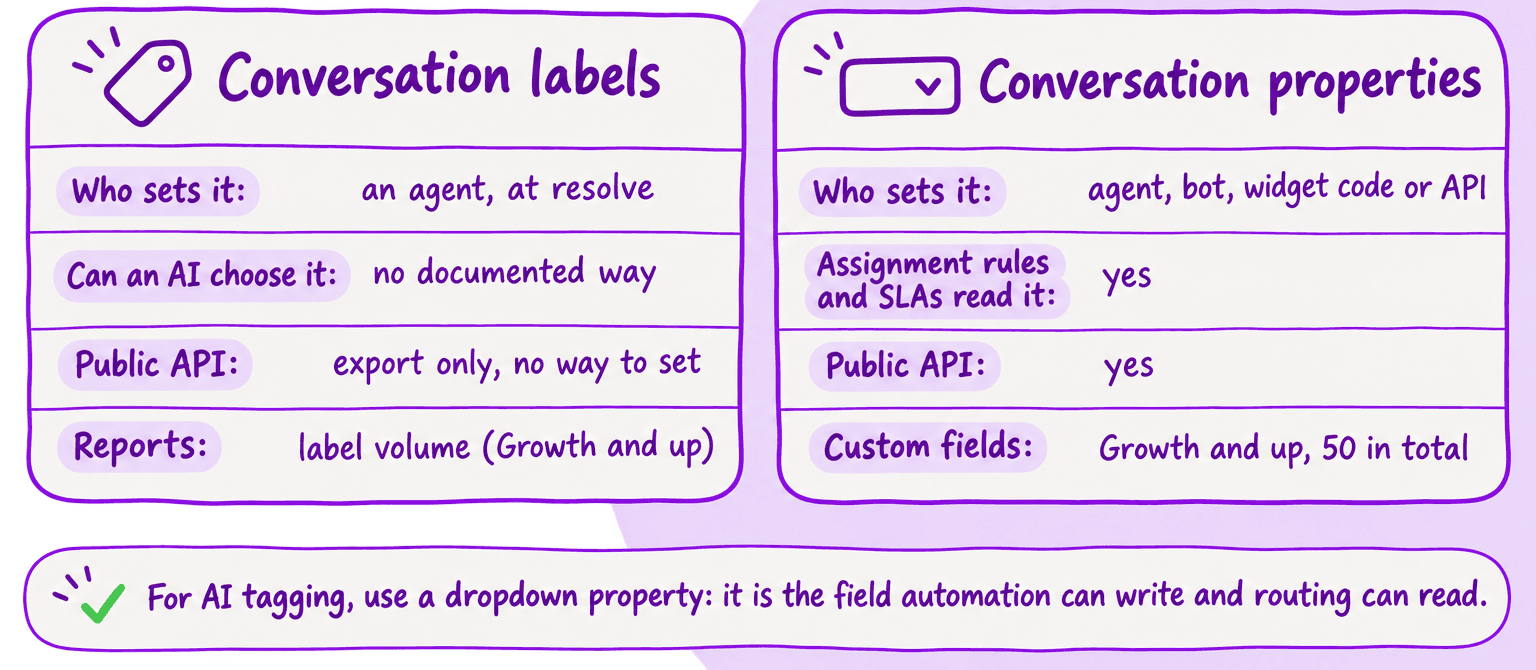
| Conversation labels | Conversation properties | |
|---|---|---|
| What it is | A category and optional sub-categories | Fields: Group, Agent, Status, Priority, plus custom fields |
| Who sets it | An agent, when resolving the chat (auto-resolve can also attach one) | Agents, a chatbot, your widget code or apps through the API |
| Can routing read it? | No, it's set at the end | Yes: assignment rules, SLAs and automations |
| Plan | Labels from Free, label reports from Growth | Defaults on Free, custom properties from Growth |
| In the public API | Export through a raw report; no documented way to set one | Yes |
Most teams reach for labels first because the name sounds right, and AI support tagging guides usually talk about tags. Freshworks' own examples for labels are "Feature Request", "Bug Report", "Churn Feedback" and "Happy Customer", which is the classic tagging job. But the way labels work rules them out for AI.
How do conversation labels work?
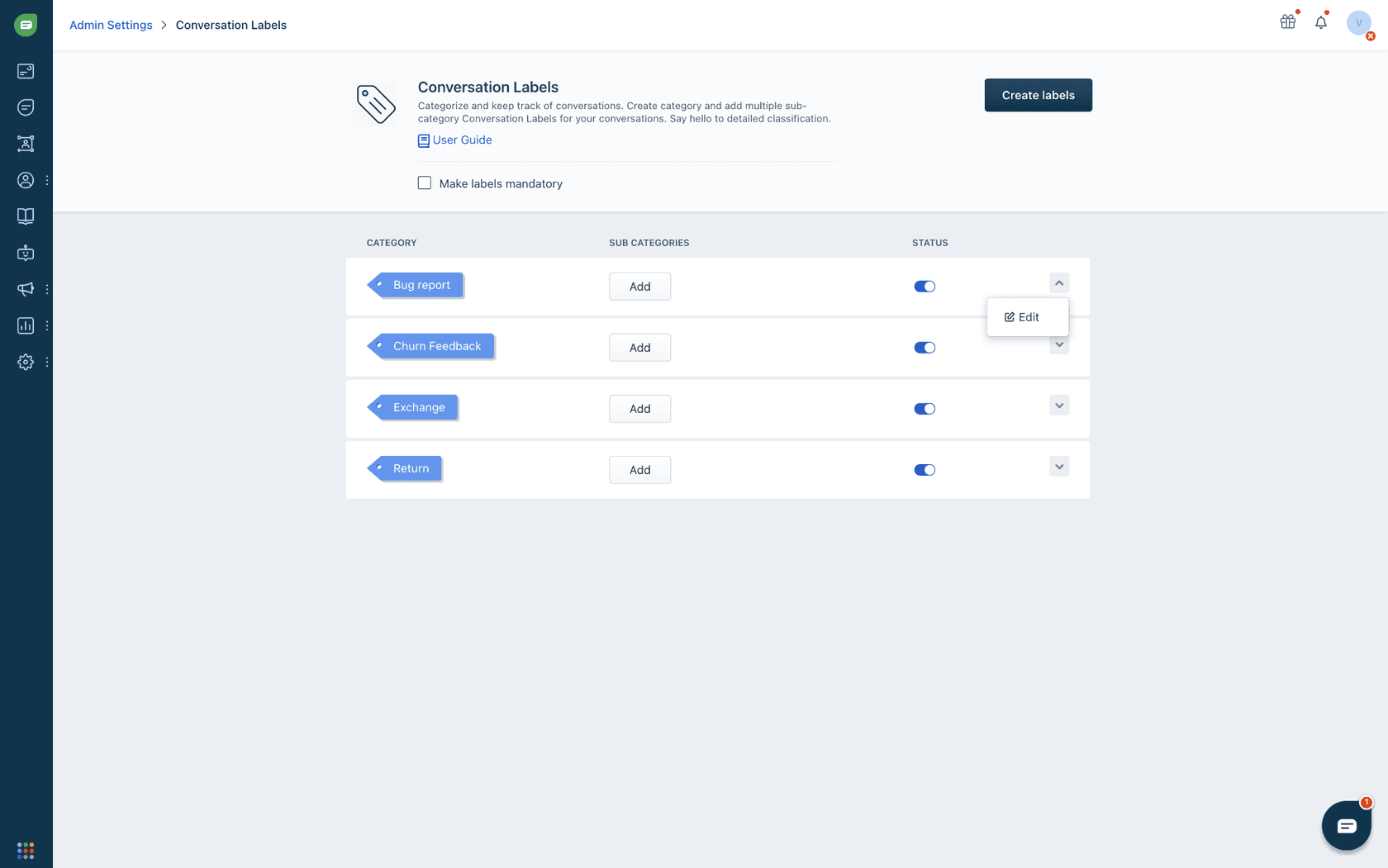
An admin creates labels under Admin Settings > Configuration and Workflows > Conversation Labels, each with multiple sub-categories, per Freshworks' labels article. Only an Account Owner or Admin can create them.
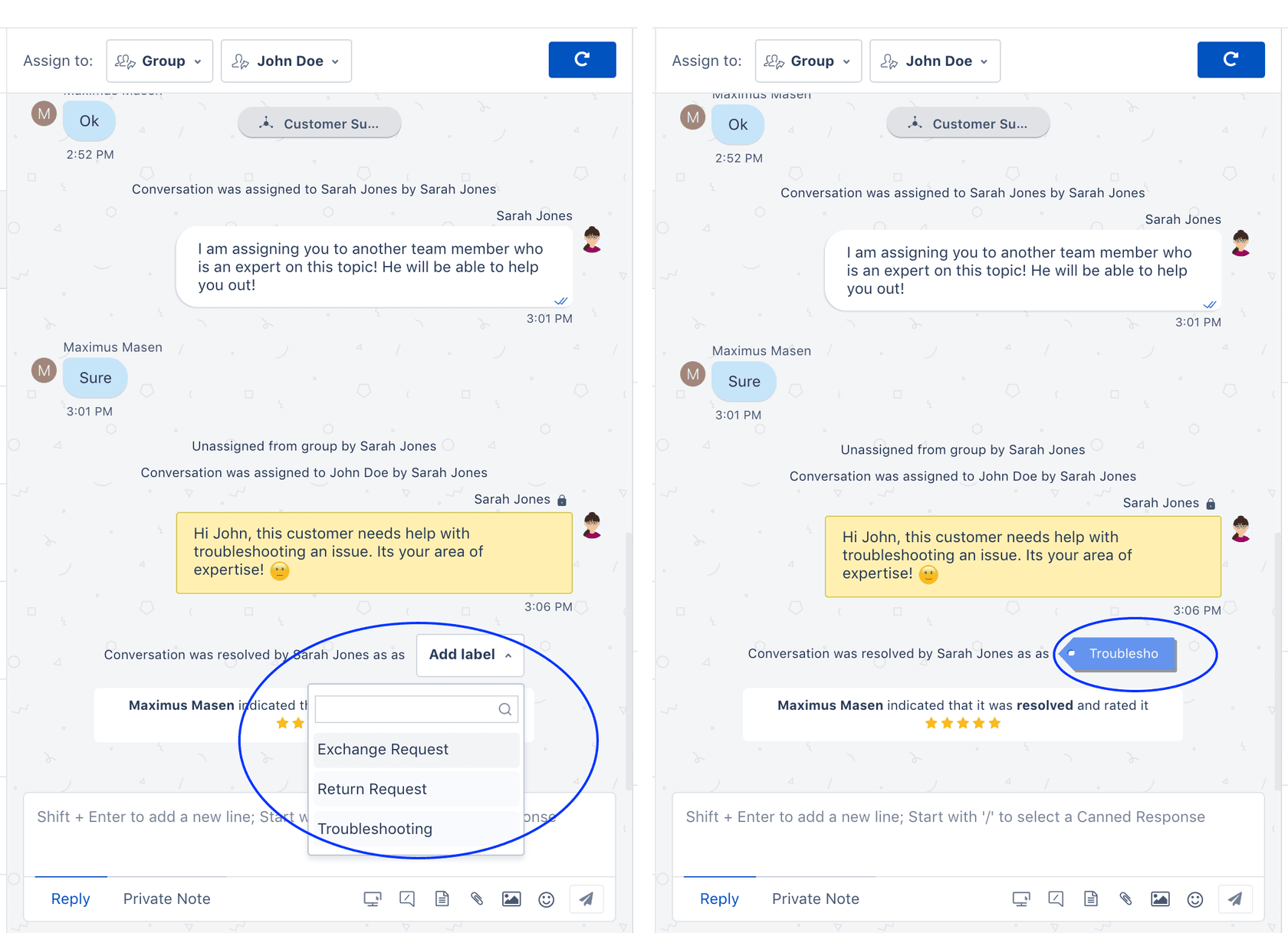
The label goes on at the end. In Freshworks' words: "When you resolve (close) a conversation you will be able to add a conversation label to the conversation." You can make labels mandatory, so an agent can't resolve without picking one, with these caveats from the article:
- Agents on the mobile app "can still resolve conversations without adding a label, even if the label is marked as mandatory".
- Conversations closed by auto-resolve and the offline experience aren't affected by mandatory labels.
- Agents can remove a label only when labels aren't mandatory.
Label reports, on Growth and above, show volume under Chat reports > Chat analytics > Conversation overview report > Volume analysis. One limit users raise: on Freshworks' community, a user pointed out that the report shows the number of chats per label but not the chats themselves. The suggested workaround was adding a Conversation ID column, which they called tedious for 50 conversations.
Can AI apply Freshchat labels?
Not by choosing one, and not because of the AI. Freshchat's public API reference can export labels after the fact, through its Conversation-Resolution-Label raw report, but lists no way to set one. Freshchat itself can attach a label when auto-resolve closes a chat: the Advanced Automations article has a "System assigns the label" trigger for that case. Neither lets an AI decide which label a chat gets. On Freshworks' developer forum, a developer asked in March 2025 "How to retrive all the Conversation Labels from freshchat? from the documentation there are no APIs mentioned for this. and similarly how to Update a conversation with the label?" A second developer replied that they had the same need. Nobody posted an answer.
Freddy doesn't fill the gap either. Freddy's Auto Triage, the feature that predicts field values from history, is documented for Freshdesk tickets, not Freshchat conversations. None of the Freddy features I found documented for Freshchat (summaries, sentiment, Quality Coach, the AI Agent and bot tools, several sold through Freddy AI Copilot) labels a chat. If your chats become Freshdesk tickets, Freshdesk AI Auto Triage covers tagging them there.
So if "AI tagging" means "an AI reads the chat and picks its label", nothing Freshworks documents does it, with Freddy or with an app. The question becomes which field to tag instead.
Why tag with conversation properties instead?
Conversation properties are the fields in the inbox's right pane. Group, Agent, Status and Priority come on every plan, including Free. From Growth you can add custom ones, up to 50 in total, per Freshworks' conversation properties article:
| Custom property type | Most you can create |
|---|---|
| Dropdown | 50 |
| Single line text | 50 |
| Date | 30 |
| Checkbox | 30 |
| Number | 20 |
| Multiline text, multiselect dropdown, decimal | 10 each |
A dropdown can also have dependent fields, up to 3 levels, which gives you the category and sub-category structure labels have.
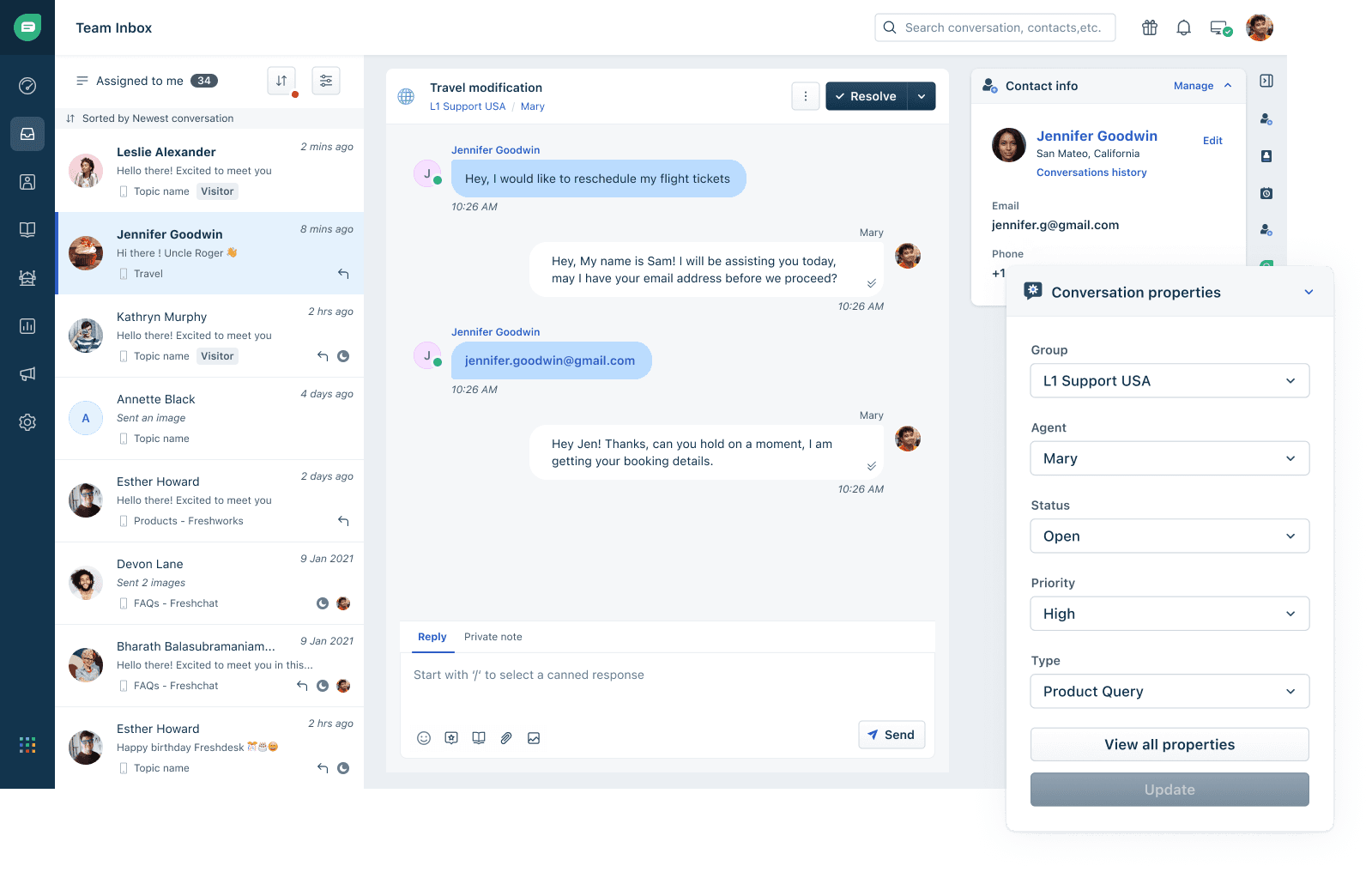
Three things make a property the better tag:
- More than agents can write it. Freshworks lists three ways to fill a property: the chatbot, your widget code, and agents in the inbox. Each property also gets an internal name, which Freshworks says is "used to update conversation properties via widget code or public APIs".
- Routing reads it. Assignment rules, SLAs and Advanced Automations all work on property values. A tag set when the chat arrives can send it to the right group, and a label set at the end never can.
- Reports read it. Admins can filter and group Freshchat analytics by any property, just as they would by label.
You can still make a property "required when resolving the conversation", so agents fill it in if nothing else did.
Can Freshchat's own bot set the tag?
Partly. A Freshchat chatbot can set a conversation property with a Set property action, and Freshworks' examples are values the customer gives the bot: an order ID, or a WhatsApp menu choice (press 1 for New Bookings, 2 for Cancellations) stored as a Type property (bot properties guide). That works when the customer picks from a menu you designed.
Two limits matter for tagging. The bot tags from the flow, so a customer who picks "Cancellations" and then writes about a damaged item keeps the "Cancellations" tag. And per the properties article, values are case-sensitive: "If an incorrect property value is set, the bot flow will fail, and the conversation will be moved to the agent queue in Freshchat." Keep your dropdown values and your bot's values in sync, or a typo silently ends the bot's part of the chat.
Which tag fits your goal?
What you want the tag for decides which field to use and who should set it.
How do you tag Freshchat conversations with AI?
To tag from what the customer actually writes, not from a menu, you need an AI that reads the conversation and writes a property through the API. This is what I'd set up with eesel.
eesel joins Freshchat as a channel on its Freshdesk integration. Its Freshchat trigger fires when a customer sends a live chat message, and with each one eesel sees the chat so far (up to 50 messages), its topic, status, priority, group and assignee, and your custom conversation fields. Among its actions, Update chat properties changes a chat's group, agent, status, priority, type or custom fields, and List chat fields reads your conversation fields and the values each accepts, so it picks from your real dropdown values instead of guessing their spelling.
A setup that tags without answering looks like this:
- In Freshchat, create a custom dropdown such as "Contact reason" with the values your team reports on, and make it required when resolving so a person fills any gap.
- In eesel, turn on the Freshchat trigger and write the rules in plain words: "Set Contact reason to Damaged item when the customer describes something arriving broken", "Set Priority to Urgent when they mention a chargeback", "Don't reply, only set fields."
- Let your assignment rules route on the field, as they already would for a value an agent picked (Freshchat AI conversation routing covers the rules).
- Read the fields on a day of chats and correct the rule wording where a value is wrong.
Because the trigger fires on every customer message, the tag can change as the chat does: if the customer moves from a delivery question to a refund, the next message can update the field. Know the limits first. eesel can't set conversation labels, for the API reason above, so it tags through properties only. And it tags as new customer messages arrive, so it doesn't go back through chats that ended before you turned it on.
Is Freshchat's tagging enough?
For reporting on what agents saw, labels are fine and free: a mandatory label with a few sub-categories gives you a monthly breakdown with no setup beyond the list. Just don't count on them for routing, and expect gaps from mobile and auto-resolved chats.
My take: if you want tags to drive anything (routing, SLAs, a weekly report you trust), move your categories into a custom dropdown property now, even before adding AI. Fill it with your bot where customers pick from a menu, and with an AI teammate where they write freely. Keep labels, if you like them, as the agent's closing note on top. The same split between tags and routing runs through Help Scout AI tagging and routing, if you are comparing tools.
Try eesel for Freshchat tagging
If your Freshchat categories live in labels no AI can choose, eesel is the tagger I'd add. It connects through your Freshdesk account, reads each new chat message, and sets the type, priority, group or custom dropdown your instructions call for, so your assignment rules and reports work from the first message instead of the last. Start with one dropdown and three rules, and read a day of results before adding more.

Try eesel free, or book a demo to see it tag your own Freshchat conversations.