What ProProfs Help Desk pricing looks like in 2026
Most weeks I am reading how AI support tools meter themselves, and the same pattern keeps turning up: the number on the card and the number on your invoice answer two different questions. ProProfs is a clean example of it. Five tiers published, a ticket cap published on all five, and no published relationship between the two once you cross a line.
That gap costs something. A buyer I sat with burned 200 interactions in one test day, then spent the rest of the call trying to work out what 9,000 a month would come to, because the vendor's page would not tell them. Sticker price was never the problem here. The problem was not being able to model the meter.
So, the ladder, with both billing periods, since the page loads on annual by default. I have written the same read-through of Freshdesk pricing if a per-agent comparison is what you want.
| Tier | Annual rate | Monthly rate | Seats included | Ticket cap / month | Published AI limit | Support channels |
|---|---|---|---|---|---|---|
| Free | $0.00 | $0.00 | 1 agent | 100 | none listed | not stated |
| Essentials | $19.99/user/mo ($239.88/yr) | $39.99/user/mo | 1 | 1,000 | 50 AI-drafted replies | Email, live chat |
| Business | $29.99/user/mo ($359.88/yr) | $49.99/user/mo | 1 | 6,000 | none published | Chat, email, phone |
| Business Complete Elite | $59.99/seat/mo ($719.88/yr) | $59.99/seat/mo | 3, sliding to 15 | 15,000, sliding to 75,000 | none published | 24/7 chat, email, phone, dedicated AM |
| Customer Delight Suite | $499/mo flat ($5,988/yr) | $499/mo flat | Unlimited | 60,000 | none published | Named success manager |
A few notes the table cannot carry by itself.
Elite's headline reads $179.97 /mo. That is a three-seat total, not a per-user rate. Directly under it, the same card prints $719.88 annually/user, the per-seat annual figure. So /mo means per user on Essentials and Business, and per account on Elite. Read that card twice.
"Save up to 50%" holds on exactly one tier. Essentials, 50% off monthly. Business comes to 40%. Elite and the suite carry identical monthly and annual rates in the page's own pricing data, which means the annual toggle saves nothing whatsoever on the two priciest tiers. Vendors do this often enough. The toggle wording still sits above all four.
Across nine currencies, prices are geo-set rather than converted. Essentials: £15 in GBP, €17 in EUR, A$30 in AUD, ¥2,999 in JPY. Hand-picked rates, in other words, so the same plan costs a different amount depending on where you buy it.
One structural detail catches people out: the AI-first tiers are annual-only. Elite sells on annual billing, so anyone who wants to pay monthly is capped at Business in practice, $29.99 a seat and 6,000 tickets. Monthly billing as a hard requirement decides your ceiling before any feature comparison gets a look in.
The ticket cap is the real meter
Every helpdesk ticketing system has a unit it counts. Seats, for some. Resolutions or conversations, for others. ProProfs counts tickets per month, and it counts them per plan, not per agent.
So the cap is the number to model first. It forces the next upgrade, not your headcount. Same trap that makes the cost of AI customer service hard to compare vendor to vendor. Take a three-person team doing 8,000 tickets a month: Business at $29.99 a seat is closed to them, and they land on Elite no matter how few people are logged in.
What the page publishes, then what it does not.
Published: 100 tickets/month on Free, 1,000 on Essentials, 6,000 on Business, 15,000 at Elite's default (climbing in 5,000-ticket steps to 75,000, adding one seat per step), then 60,000 on the Customer Delight Suite.
Not published anywhere: what happens at ticket 1,001. I went looking properly for it, through the pricing page, then the pricing FAQ, then the Account & Billing category in the support center. Nothing. No overage rate, no per-ticket price, no stated throttle, no soft-limit warning, no auto-upgrade language. Helply publishes a per-ticket rate outright, for contrast. The FAQ does answer who counts as a user, how to cancel, which cards are accepted, how the 15-day money-back guarantee works. The cap it never mentions.
Get that in writing before you sign. It is the one line separating a predictable bill from a surprise one. A support inbox in November looks nothing like the same inbox in March, which is the whole reason Black Friday support planning is a thing.
Elite's slider is the one place where the cap-to-price relationship shows up, so it is worth reading in full.
| Tickets/mo | Seats you get | Monthly total | Annual total |
|---|---|---|---|
| 15,000 | 3 | $179.97 | $2,159.64 |
| 30,000 | 6 | $359.94 | $4,319.28 |
| 45,000 | 9 | $539.91 | $6,478.92 |
| 60,000 | 12 | $719.88 | $8,638.56 |
| 75,000 | 15 | $899.85 | $10,798.20 |
Look at what the slider is doing: you do not choose seats, you choose ticket volume and the seats are derived from it, one extra seat for every 5,000 tickets. Five people handling 40,000 tickets? The tier still charges for eight. And at 75,000 the slider just stops, with no price stated past it.
Why an unpublished cap matters more than it sounds
A cap you cannot model is one you learn about from your inbox instead of your invoice. This is a general pattern, not a ProProfs-specific report, and the clearest description of it I have read comes from a sysadmin talking about a different capped tool in the r/sysadmin ticketing thread:
"Small two man team and I hit the email limit immediately within the first week of usage and ended up having to buy. Very decent non profit discount though!"

Two people. One week. They are not even annoyed, which is the part that makes it useful: a cap sized for evaluation instead of a working queue does its job, only faster than anyone plans for. On ProProfs' Free plan, 100 tickets a month works out to roughly five a working day. Do that division before you treat the free tier as a pilot instead of a demo. Teams shopping down at that end usually weigh it against Spiceworks. The other regular free-tier candidate is Chatwoot.
Elite costs more than the suite above it
If I were the buyer, this is the finding I would want, so I will put it plainly.
At 60,000 tickets a month, Business Complete Elite costs $719.88/mo and hands you 12 seats. One tier up, the Customer Delight Suite is $499/mo flat. Same 60,000 tickets, unlimited users, plus four more products bundled in (Live Chat, Knowledge Base, Survey Maker and Qualaroo). And Elite is the tier wearing the MOST POPULAR badge.
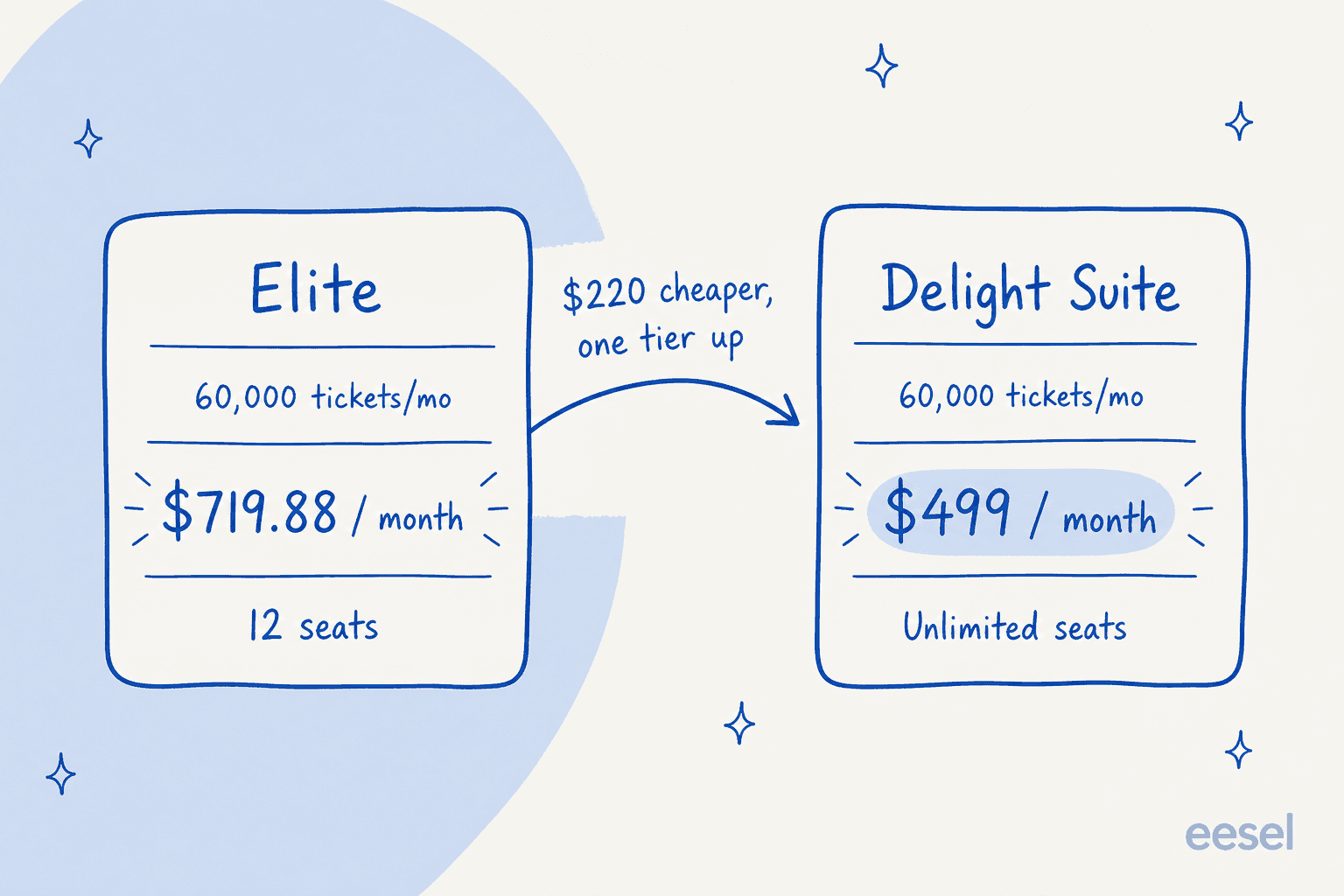
Both figures come off the same page, so there is no arguing with the arithmetic: $220.88/mo, call it $2,650 a year, in the buyer's favour, going up a tier. The catch: the suite is Contact Us only, no self-serve checkout, so the $499 rate arrives through a sales conversation and a Calendly link rather than a card form. Quote-gated top tiers are common enough, and Salesforce Service Cloud works the same way. It does mean the suite's ticket ceiling (60,000) sits below Elite's (75,000), so the very top of Elite's slider has no suite equivalent.
The crossover sits lower than most people expect. Elite passes $499/mo at nine seats and 45,000 tickets ($539.91). Anything at or above roughly 45,000 tickets a month is cheaper on the suite than on Elite, with more seats and more products in the box. In that band, ask for the suite quote before you buy Elite. Worth running the same arithmetic against Zendesk pricing while you are still comparing platforms. Same goes for Jira Service Management.
Work out which tier your volume actually lands on
Seat rate, easy arithmetic. The cap is the hard part, because it interacts with your headcount in three different ways depending on which tier you land on, and that is exactly what a flat help desk system comparison table hides. So, the calculator I would want on this page.
Dragging those sliders surfaces two things a table will not. Once your volume climbs, Elite quietly bills for seats you never asked for. And the cheapest published tier flips over to the suite well before the ladder implies it should.
Where the AI actually turns on
Read this part most carefully. "AI help desk" sits on the homepage, and the AI you actually get depends entirely on the tier. Most of the buying decision lives in the gap between an AI helpdesk agent and a reply-drafting sidebar.
One AI number is published on the entire pricing page. Essentials carries it, and the wording is exact: "Generate up to 50 AI-drafted replies per month, pulled from your Knowledge Base, past resolved tickets, and conversation context." That same tooltip closes on the vendor's own framing, that it is "included in Essentials to give solo agents a taste of AI before upgrading."
Fifty drafts, set against that plan's 1,000-ticket allowance.
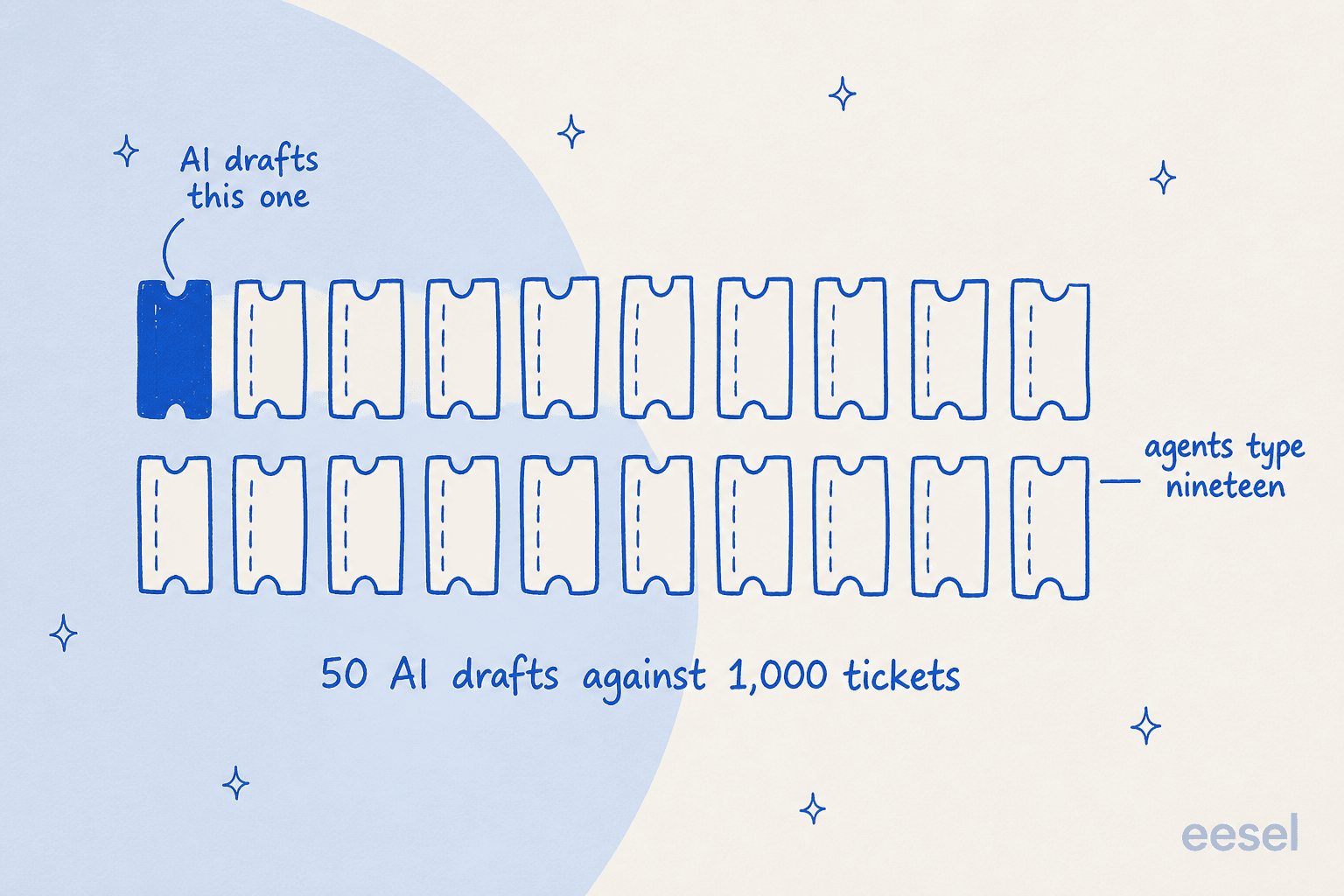
Fifty drafts a month will not move a ticket deflection number, and ProProfs does not sell it as if it would. Above Essentials, though, the picture gets vaguer instead of sharper. Business, Elite and the suite all list AI features, with no quantity attached to any of them. An absence of a number is not a stated unlimited. Treat it as a question for sales, not an assumption.
What each tier adds, using the vendor's own feature names:
- Essentials: AI Response Drafts (50/mo), AI Ticket Categorization, AI Grammar & Spell Check.
- Business: AI First Response Generator, AI Tone Rewriting.
- Elite: AI Emotion & Sentiment Detection, AI Tone & Redaction (auto-redacts card numbers and personal identifiers), plus SLA escalation workflows.
- Customer Delight Suite: "AI Resolves 50%+ Tickets", plus Agentic AI in the help desk chatbot.
Read that list as a ladder and one thing jumps out: everything below $499 is agent-assist, and the autonomous resolution claim only appears on the suite. The suite's own wording says the AI "reads every incoming ticket, finds the right answer from your knowledge base, responds to the customer, and closes the ticket, without any agent involvement." Right there is the line between an assistant and a real AI agent.
One wrinkle to raise with sales. ProProfs' help center documents AI Auto Reply as a plain per-inbox toggle, no plan note attached at all, while the nearest equivalent on the pricing page sits at $499. Those two pages do not reconcile. So get the tier confirmed in your order form instead of inferring it from a doc.
What the AI trains on, and what it cannot reach
Of the whole documentation set, the AI Training Manager pages are the most specific, and they name exactly four sources: your ProProfs Knowledge Base, public website URLs, uploaded files, and past resolved tickets.
Past-ticket training on that list is a real strength, and it is the capability I get asked about most, because a knowledge base on its own never covers the awkward half of a queue. Two limits sit around it, both of them stated in the docs:
- File uploads cap at 10 MB per file, in
.txt,.doc,.docxor.pdf. It is the hardest number anywhere in the AI documentation set. - Website sources must be public. The doc puts it as "private and login-protected pages cannot be processed", which means a gated Confluence space or internal portal has to be exported into a file under that 10 MB ceiling.
Worth knowing about the Knowledge Base connection in advance, too. The doc walks you through entering your ProProfs Knowledge Base email and password, then "Sign In & Fetch Products". A credential handoff, then, not OAuth and not an API key. It also needs a separate ProProfs KB account.
One thing I went looking for and could not find: a documented dry run. No simulation, no backtest, no preview of AI behaviour against your historical tickets before AI Auto Reply goes live on a production inbox. The docs describe a toggle you turn on. I have watched a confident-sounding bot quietly give wrong answers on a live queue, so that is the step I want before flipping anything, and it is why I simulate every rollout against past tickets before it goes near a queue. It is also what separates shipping AI from shipping support quality assurance.
What the free plan actually includes
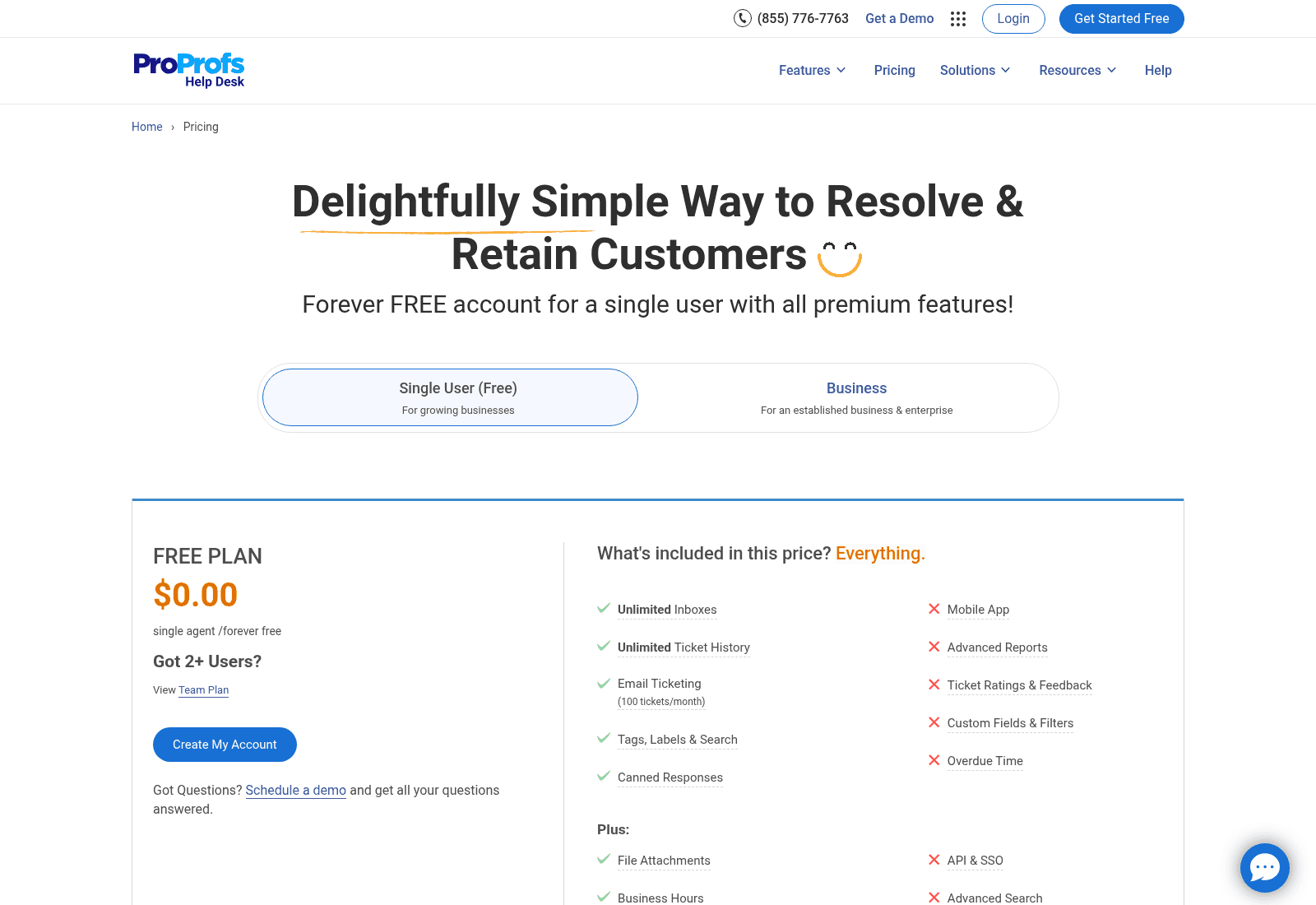
The free tier is a real one, and for a solo inbox it is workable: one agent, unlimited inboxes, unlimited ticket history, tags, labels, search, canned responses, file attachments, business hours, plus 100 email tickets a month.
The framing around it wants careful reading. The page's sub-headline runs "Forever FREE account for a single user with all premium features!", and the heading over the Free card's own feature list asks "What's included in this price? Everything." Then, on that same card, eight items carry no tick: mobile app, advanced reports, ticket ratings and feedback, custom fields and filters, overdue time, API and SSO, advanced search, integrations. And no AI feature shows up on the Free card at all.
A gap between "everything" and eight unticked rows is the kind of thing that costs a trial. One Capterra reviewer ran into it on a feature I would not have picked:
"When we started using ProProfs Help Desk, we started with its free plan. The only thing I regretted was that it didn't have labels in the free plan. Obviously, after we shifted to the paid plan we did get access to the feature, but it would have been nice to have seen that feature in the free plan too."

Inside the free card there is also a View Team Plan link, sitting under "Got 2+ Users?", and no plan on the page is named Team. The Free plan's Email Ticketing tooltip, meanwhile, ends on "Essentials plan includes 1,000 tickets/month", which is the tier above's figure printed inside the free tier's description. Small things. They are also the reason to price off the tier cards rather than the copy around them, and the reason I would run this same check on any shortlist.
What reviewers say about the price
ProProfs Help Desk sits at 4.7 out of 5 across 18 reviews on G2. On Capterra, 4.9 across 14. Small samples, and the recency is the bigger issue: the newest G2 review dates to March 2022. Nothing in the public review corpus evaluates the current AI tiers or the ticket caps, and nothing evaluates the 2026 rate card.
Read the distribution before you read the average. On G2, 94% of those 18 reviews are five-star, and none sit at three stars or below. Two of them G2 itself flags as coming from a business partner of the seller, and excludes from the score. Over on Capterra, four of the 14 are disclosed as incentivized or vendor-referred. The 18 and the 14 are also not 32 independent voices: one reviewer, Ashutosh P., appears on both platforms on the same day in October 2021, under two different job titles. None of this makes the reviews false. A 4.7 built that way is just a weaker signal than a 4.7 built from 300, and that is why I would weight the vendor's own published numbers and your own trial above the badge.
Independent operator chatter to cross-check against is also thin. I went looking on Reddit, Hacker News, X and LinkedIn. Hacker News turns up one true ProProfs mention, from 2011, about their quiz product. On Reddit, every ProProfs Help Desk recommendation I could verify across four subreddits over ten months traces back to a single undisclosed account, and the one comment that reads as organic reports no first-hand use. Then compare the 2024 r/sysadmin "cheap ticketing system" thread: past 230 comments, unprompted first-hand notes on Freshdesk, SupportPal, BoldDesk, ManageEngine, JitBit and Spiceworks, and ProProfs never comes up. None of that is evidence the product is bad. It is evidence you will have to evaluate it yourself instead of leaning on a crowd, which is what makes the free tier and the 15-day refund window worth more here.
Inside that limit, the theme is consistent: it is cheap for what it does. One review pushes back on the pricing model, and it is worth quoting in full, being the only critical pricing note in the whole set:
"When starting up, it takes a while to understand their pricing model. Once you add all the modules, it can get costy. When compared to competitors though, not that much."

Fair read of a five-tier ladder that comes with two suites, three add-ons and a volume slider. Elsewhere the recurring complaints are about scope, not cost: no mobile app on the cheaper tiers, thin third-party integrations, no social channels at the time of writing.
"They don't have a mobile app for this tool, so I'd like to see that in the future. Also I found very few integrations in ProProfs Help Desk Software."
Both of those have moved since. Elite now lists the mobile app and the 40+ integrations, which is exactly the drift that makes an old review a starting point and not a verdict. And no review anywhere in the set evaluates AI answer quality or resolution rate, so any claim about how well the AI performs comes from the vendor or from your own trial.
"Your subscription also includes Knowledge Base", checked
That line sits in the pricing FAQ. It is the kind of sentence that changes a budget, so I followed it.
The FAQ answers: "Of course! Your Help Desk subscription also includes Knowledge Base." Then the integration article it links to describes a connector, not a bundle. Settings, then Integrations, then Knowledge Base, and "enter the URL of your knowledge base". The article's own note settles it: "If you do not have a knowledge base, you can learn how to create a brand new knowledge base site here", pointing at proprofskb.com, a separately priced product with its own plan ladder. Help Desk inclusion is never mentioned on the Knowledge Base pricing page at all.
So what is included is the connector, not the knowledge base. The connector is tiered too: the Help Desk feature row reads "Basic: integration with Survey Maker, offline chat messages. Advanced: all basics + integration with ProProfs Knowledge Base, Chat, Salesforce…", which lands the KB integration on the Advanced side, not the free one.
Knowledge Base carries its own free tier (1 author, 25 pages), then external-facing plans at $49, $69 and $79 per author per month on annual billing. Price that against the wider knowledge base tools market before assuming the in-house one is the cheap option. Live Chat is a third subscription on top, per operator at $19.99 and $29.99 annually, and it runs its own AI meter: 100 AI conversations a month on the entry paid tier, 300 on the next, 1,500 on its Elite. A per-conversation meter behaves very differently from a per-ticket one, which is the same distinction I drew in Chatbase pricing.
Which matters if you are assembling the stack piece by piece. A three-seat team buying ticketing at Elite, a branded knowledge base, and AI chat à la carte lands around $627 a month, over the $499 floor of the suite that bundles all five products. Past about three seats with white-labelling, the pieces cost more than the bundle. The bundle being the one you cannot buy with a card.
Add-ons, and the ones that are not on the page
Three add-ons sit in the page's own pricing data. A reader only ever sees one of them.
| Add-on | Shown on the page | In the page's pricing data |
|---|---|---|
| White Label Package | "just $300/year" | $30/mo or $300/yr |
| SDK | not shown at all | $29.99/mo or $99.99/yr |
| AIBot | not shown at all | $50/mo or $450/yr |
The white-label package strips "Powered By" links, and you can attach it at checkout. AIBot is the Live Chat AI automation add-on. How it relates to the AI conversation allowances already printed on the Chat plan cards is not stated on either page, so ask before assuming the two stack. Double meters like that turn up often in AI chatbot pricing. The SDK and AIBot line items carry real rates in nine currencies while having no card, no label and no mention in the rendered page, so if either one matters to you, ask for it by name.
Some commercial terms that will never show up in a feature comparison:
- 15-day money-back guarantee, with a full refund if you cancel inside 15 days.
- No credit card for the trial, per the pricing FAQ. The page does not state the trial length.
- Visa, MasterCard and Amex only. No PayPal. Purchases over $3,000 can go by ACH or cheque, each carrying a $100 processing fee.
- Cancellation is by email to
billing@proprofs.com. No self-serve cancel is described anywhere.
On security, Elite's wording is "AES-256 encryption at rest and TLS in transit, SOC2-aligned operational controls, and regular penetration testing". Aligned is doing real work in that sentence, and it is not the same word as certified. No ISO 27001, GDPR or HIPAA claim appears anywhere on the pricing page. If your procurement gates on a certificate rather than a posture, ask for the report early. I have watched deals stop dead on exactly this line: one mid-market platform that could not proceed at all without SOC 2 in hand, and a healthcare team that hard-blocked on a BAA. Same gate shapes most service desk buying.
Should you buy it, and what to ask first
ProProfs Help Desk fits reasonably well for a small team that wants a Gmail-shaped shared inbox, cheap seats and human support on the phone, provided your ticket volume is stable enough that a monthly cap is not a live risk. Reviewers are consistent about the ease of use, and the free tier is real. On that profile it competes with Hiver far more than with the enterprise suites. The other obvious shortlist entry is Help Scout.
The fit gets harder if AI coverage is the reason you are shopping at all. Below $499 the AI is agent-assist. The only published quota is 50 drafts a month. And nothing documented lets you test behaviour against your own tickets before it goes live. If autonomous resolution is the goal, the shortlist to price against sits nearer the Zendesk alternatives end of the market.
Get these five in writing before you sign anything:
- What happens at ticket 1,001 on your tier. Blocked, queued or billed, and at what rate.
- The AI allowance on your specific tier, as an actual number, because nothing above Essentials publishes one.
- Which tier turns on AI Auto Reply, since the docs and the pricing page disagree.
- Whether Elite or the suite is cheaper at your volume. Ask for the suite quote if you are anywhere near 45,000 tickets.
- What "SOC2-aligned" means concretely, and whether a report actually exists.
If the meter is the problem, change the meter
All of the above is modelling somebody else's units, and that is most of what makes help desk automation hard to budget. There is a version of this where you skip the whole exercise.
I build eesel. It prices per ticket or chat handled, at 40 cents, with no seat fees, no platform fee and no monthly cap to bump into. Adding an agent costs nothing. A quiet March and a brutal November bill differently, in the direction you would expect. And the "what happens at ticket 1,001" question never comes up, because the answer is 40 more cents. It plugs into Zendesk, Freshdesk, Gorgias, Front, Help Scout, HubSpot, Salesforce and Jira Service Management, and it trains on your past tickets instead of a public crawl.
It also does the step I could not find documented on the ProProfs side. It replays your past tickets, scores what the AI would have said against what your team actually sent, then hands back the gaps before anything touches a live queue. That is how tier-1 deflection gets sized on evidence rather than on a slider. Want the arithmetic on your own numbers instead of mine? The trial comes with $50 of free usage and no card.

Try eesel on your last 30 days of tickets, or book a demo and I will price it against your real volume on the call.
Sources
Frequently Asked Questions
How much does ProProfs Help Desk cost in 2026?
What is the ProProfs Help Desk ticket limit on each plan?
Is ProProfs Help Desk really free?
How much AI do you get on ProProfs Help Desk pricing?
Which ProProfs plan resolves tickets automatically?
Does annual billing actually save 50% on ProProfs Help Desk?
Is ProProfs Help Desk SOC 2 certified?
What do ProProfs Help Desk reviews say about the price?


Article by
Kurnia Kharisma
Kurnia is a software engineer and writer at eesel AI with two years of SEO experience, writing about AI tools, helpdesk software, and customer support. He pairs a developer's understanding of how these products are built with search-driven research into what actually ranks and resonates with the people searching for them.