LiveHelpNow's pricing, in one screen
Here's what the pricing page looks like today, so you can see the three-plan layout and the "add AI when you're ready" framing for yourself.
I've spent the last few years watching teams roll AI onto live support queues, and the one pricing pattern that trips people up every time is exactly this one: a low base price, with the AI you were actually shopping for sold as a layer on top. LiveHelpNow is upfront about it (the page literally says add AI "when you're ready"), but it means the number you budget from the homepage is rarely the number on your invoice.
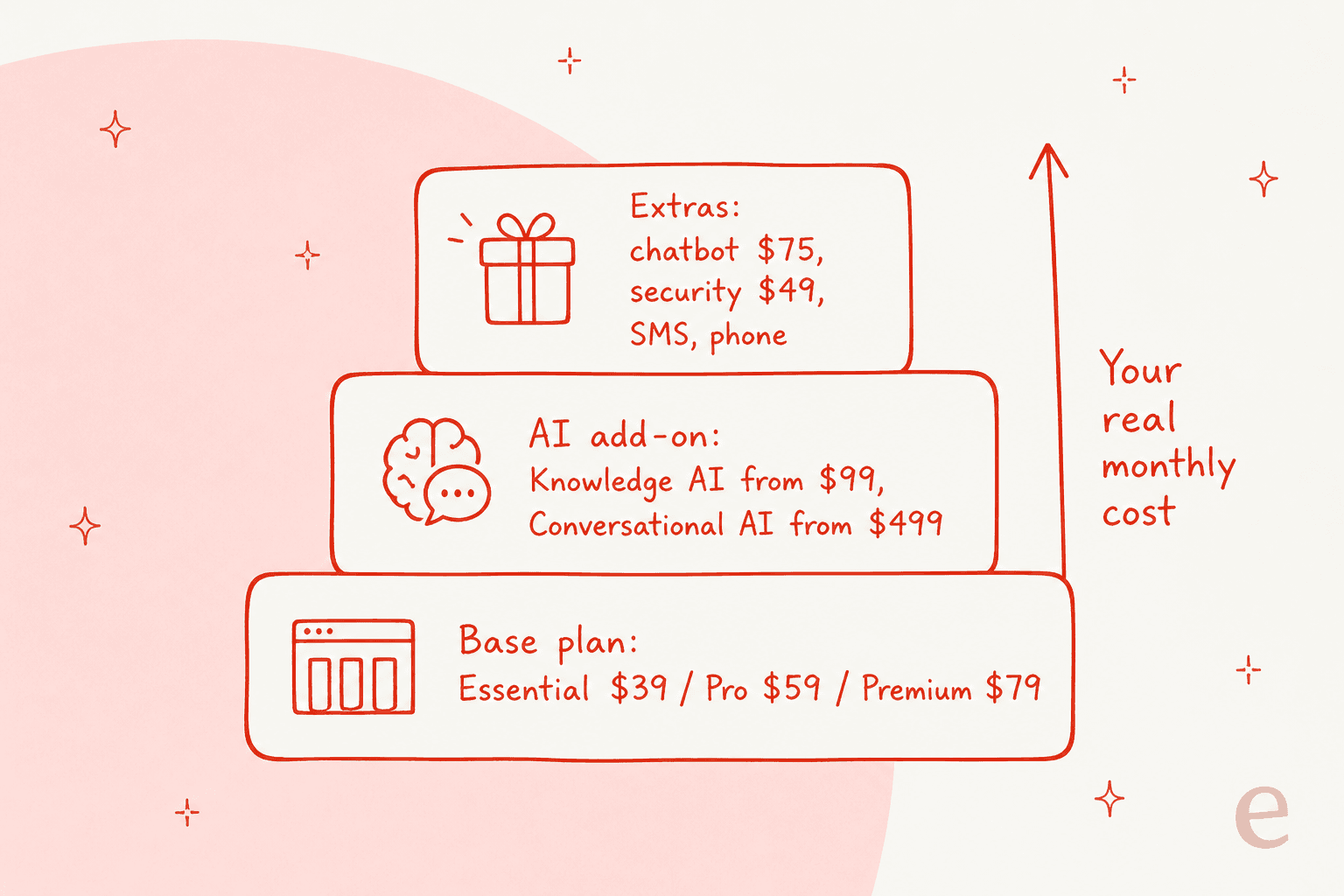
The bill stacks up in three layers, and it helps to picture it that way before we get into the tables.
The three core plans
The base plans are feature-tiered, not usage-tiered: each step up unlocks more of the help desk feature set rather than a higher volume allowance. All three are quoted "from $X/mo."
| Plan | Price | Best for | What's included |
|---|---|---|---|
| Essential | from $39/mo per seat | Small teams starting with chat + knowledge base | Live chat, knowledge base, customer support portal, unlimited articles, surveys, canned responses, secure forms, conversion tracking, social channels, basic automations and reporting, one chat domain |
| Professional (Most popular) | from $59/mo per seat | Teams that need ticketing, WFM and real reporting | Everything in Essential, plus ticketing, workforce management, advanced automations, performance dashboards and KPI reporting, data export, call logging, and phone routing via Zoom |
| Premium | from $79/mo per seat | Teams wanting onboarding, no branding, higher limits | Everything in Professional, plus white-glove onboarding, a monthly success call, priority support, LiveHelpNow branding removal, extra knowledge base capacity, and higher automation/reporting/storage limits |
| Enterprise | Custom | Large or complex requirements | "Talk to sales" for unlimited flexibility and deeper control |
A few things worth flagging honestly. The jump from Essential to Professional is the meaningful one for most teams, because ticketing and proper KPI reporting both live behind it, and (as we'll see) so does the ability to add customer-facing AI at all. Premium's headline extras are onboarding, branding removal, and higher limits rather than new core capabilities.
Is LiveHelpNow per seat or not?
This is the one murky part of LiveHelpNow pricing. The current pricing page and the official pricing schedule both quote the plans as "from $39/$59/$79/mo" without printing the words "per agent" anywhere. Its G2 pricing listing still describes three editions "starting from $39 to $79," and older LiveHelpNow grids were explicitly per-agent. The safe read is that the plans are billed per seat and the "from" reflects an entry annual rate, but it's the kind of thing I'd confirm in writing with sales before signing, because it changes your total by a multiple. The add-ons below are the opposite: they're billed flat, per account.
The AI ladder: the part that changes your budget
If you came to LiveHelpNow for AI, this is the section that matters. Only a single internal capability, AI Agent Assist, is bundled at no extra usage cost. Everything customer-facing is a paid tier, and each of those tiers requires a Professional or Premium base plan underneath it.
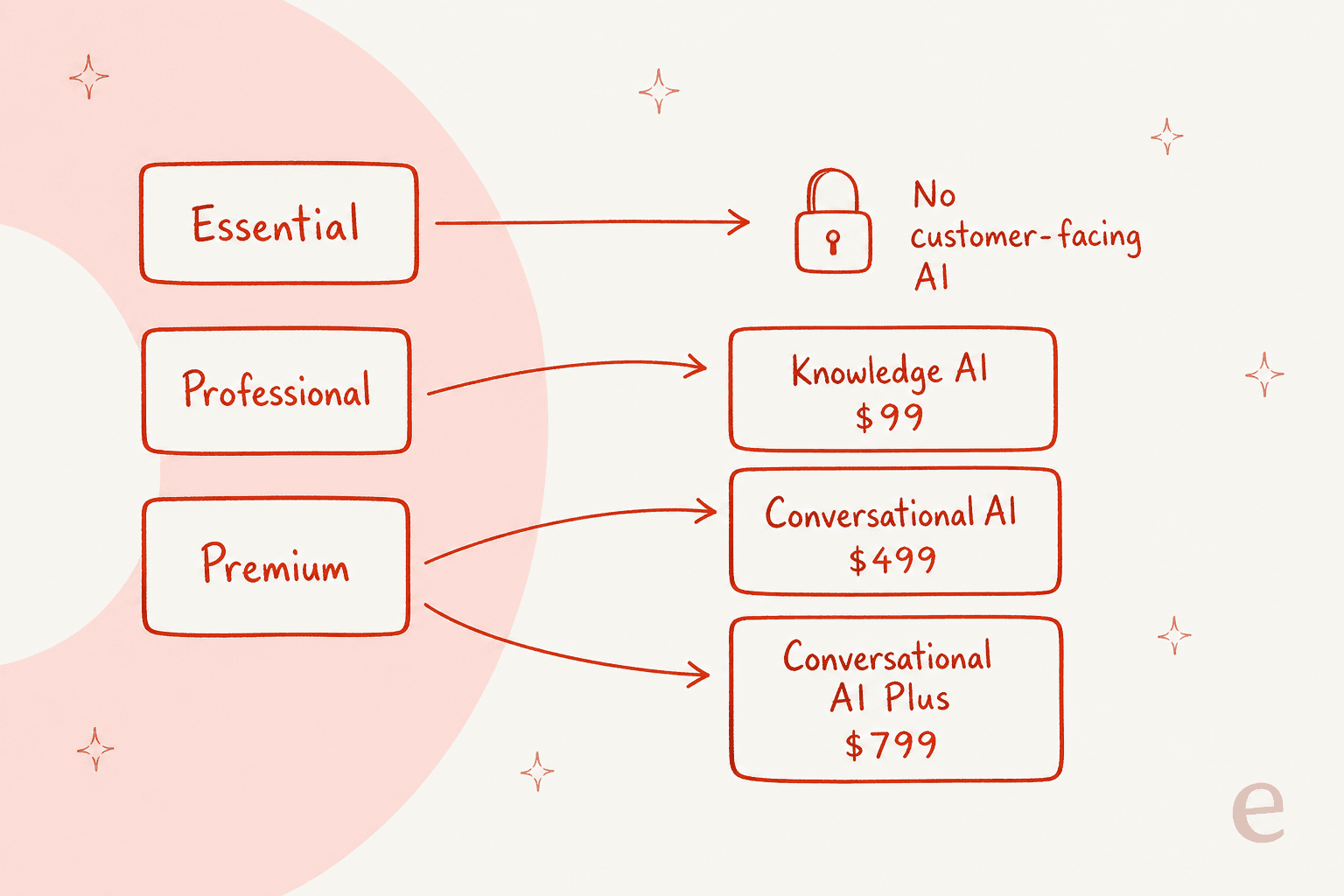
LiveHelpNow's AI is branded hue AI, and here's how the ladder is priced:
| AI tier | Price | Requires | Included usage | What it does |
|---|---|---|---|---|
| AI Agent Assist | Included, unlimited | Any plan | Unlimited | Internal-only. Suggests replies, summaries, and next steps to your agents. Never customer-facing |
| Knowledge AI | from $99/mo | Professional or Premium | 2,000 AI Answers (Pro) / 5,000 (Premium) | Customer-facing, knowledge-base-grounded answers and an AI FAQ bot |
| Conversational AI | from $499/mo | Professional or Premium | 1,000 AI Conversations (Pro) / 3,000 (Premium) | Autonomous, AI-powered conversations |
| Conversational AI Plus | from $799/mo | Premium | 7,000+ AI Conversations | Autonomous conversations for high-volume chat |
The detail that catches teams out is the unit. LiveHelpNow runs two separate AI meters: Knowledge AI is billed in "AI Answers," and Conversational AI is billed in "AI Conversations." They're not the same thing, they don't share a pool, and both are sold as fixed monthly bundles rather than pay-as-you-go.
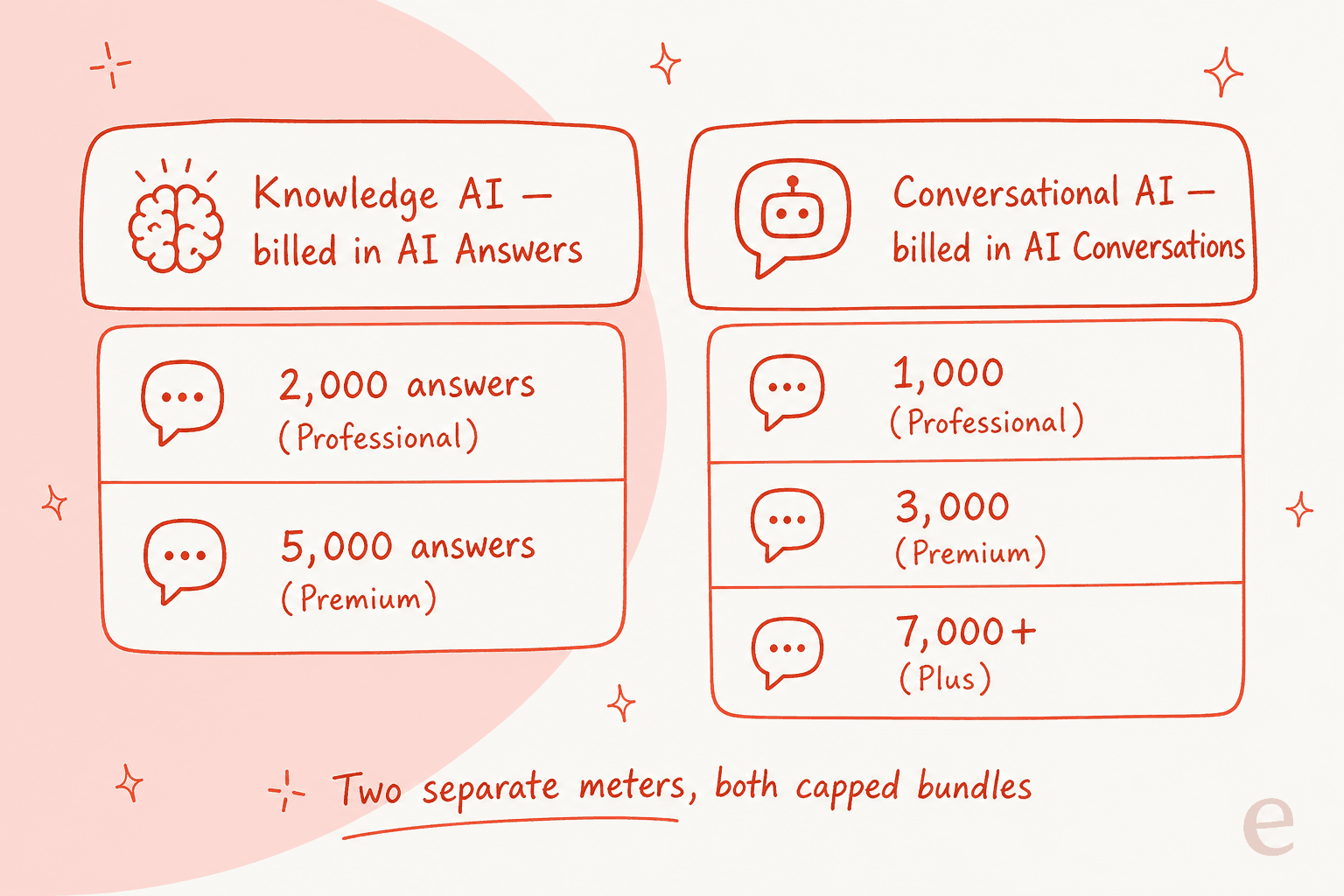
That bundle model is worth understanding before you commit. A capped bundle is easy to budget when your volume is steady, but it means you're pre-paying for a block of AI usage whether or not you use all of it, and you need to know what happens when you run past 2,000 answers or 1,000 conversations in a busy month. This is the classic trade-off against pure usage-based tools: a bundle protects you from a runaway bill on a spike, but you carry the cost of the headroom you're not using. It's also why I always tell teams to pull a few months of real ticket volume before picking a tier, rather than eyeballing it.
Add-ons, billed per account
On top of plan and AI, LiveHelpNow has a menu of à la carte add-ons. These are billed flat per account, not per seat, which is the friendlier way to charge for them.
| Add-on | Price | Notes |
|---|---|---|
| Decision Chatbot (rules-based) | $75/mo | Up to 5 actions per step; structured automation, not AI |
| Security & Compliance Pack | $49/mo | SSO, IP restrictions, HIPAA features (BAA required), domain restrictions; caps of 10,000 chats and 2,500 IPs per month |
| SMS Messaging | $75 per 2,500 messages | Messages expire monthly; $50 one-time fee per local number |
| Basic Phone | $9/mo | Call logging, tracking, routing, callback flows |
| Advanced Phone | from $19/mo | Adds auto-SMS on missed calls and Zoom Phone integration |
| Branding Removal | $50/mo | Included free in Premium |
Two of these deserve a callout. The Security & Compliance Pack is where HIPAA and SSO live, so regulated teams (healthcare, finance, public sector) should assume a mandatory +$49/mo on top of everything else, and note the hard caps of 10,000 chats and 2,500 IPs per month. And SMS is truly usage-metered: $75 buys 2,500 messages that expire at month end, scaling up to $450 for 15,000, plus $50 per phone number. If SMS is core to your support, price it separately.
SMS bundle pricing
| SMS messages / month | Cost |
|---|---|
| 2,500 (minimum with SMS) | $75 |
| 5,000 | $150 |
| 7,500 | $225 |
| 10,000 | $300 |
| 12,500 | $375 |
| 15,000 | $450 |
What a real team actually pays
Sticker prices are one thing; the invoice is another. Here are three realistic setups, so you can see how the layers compound.
- Tiny team, chat only. 3 agents on Essential, no AI. That's
3 × $39 = $117/mo. This is LiveHelpNow at its most competitive, and honestly a fair deal for a reliable live chat and knowledge base. - Small team, customer-facing AI. You want the AI FAQ bot, so you need Professional. 3 agents at $59 is $177, plus Knowledge AI at $99 = $276/mo for 2,000 AI Answers. Add the security pack and you're at $325.
- Growing team, autonomous chat. 5 agents on Premium at $79 is $395, plus Conversational AI at $499 = $894/mo for 3,000 AI Conversations. Need more volume? Conversational AI Plus is $799 on top of Premium for 7,000+.
The pattern is clear: the moment "customer-facing AI" enters the picture, LiveHelpNow roughly doubles for a small team and can more than triple for a growing one. That's not a knock, it's just the shape of a base-plus-AI-ladder model, and it's exactly why the calculator below matters more than the headline price.
Price your own setup
Plug in your seats and toggle the pieces you'd actually buy to see a rough monthly total. (These are LiveHelpNow's published "from" rates; your real quote can vary, especially on Enterprise.)
What LiveHelpNow buys you, and where it wears thin
Pricing only makes sense next to what you get. LiveHelpNow is a long-tenured, all-in-one platform, and the community reflects that: 4.3/5 across 158 reviews on G2 and 4.7/5 across roughly 69 reviews on Capterra. The praise is remarkably consistent, and it's almost always about the same four things: price, channel coverage, reliability, and a support line staffed by real humans.
"Great pricepoint. Support is very responsive and helpful. Feature requests never feel like they dissappear into the aether. Permissions granularity is fantastic."

The value story is real. But two things temper it if AI is your reason for buying. The first is the admin experience, which reviewers repeatedly describe as dated and fiddly to configure.
"The admin interface feels dated, and some of it is not super intuitive to non-technical people... My only other issue is not being able to have an 'admin' user that doesn't have rights to chat, email, etc and having to pay for that seat instead."
That last point is a pricing point in disguise: if you can't create an admin-only seat, you pay a full agent seat for someone who never touches a chat. The second is reporting depth, where at least one reviewer flagged a specific gap.
"The Live Help platform only measure wait time and does not calculate service level, percent of chats/tickets answered in X seconds. This is a very common feature, this system lacks."
None of this makes LiveHelpNow a bad buy. For a small team that wants reliable live chat software with real humans on the vendor's support line, it's a fair, affordable pick. It just means the AI is the newer, thinner part of the story, and the part you're paying the most extra for.
How the AI cost compares
Here's where I'll be direct, because it's the whole reason a pricing post exists. LiveHelpNow prices AI the way a lot of incumbents do: capped bundles of a proprietary unit (Answers, Conversations), gated behind a specific base plan, layered on top of per-seat costs. That's fine if your volume is predictable and you like the safety of a fixed cap.
The alternative model is one fixed monthly price sized to volume. That's the lens I work in day to day at eesel, where the AI helpdesk teammate starts at $299/month for 500 credits, with no per-seat fee, no platform fee, and no separate "you must be on the higher plan first" gate. One credit covers one ticket or chat, regardless of how many replies it takes. It's a different shape entirely: instead of separate meters for Answers and Conversations, you have a single credit count, and questions asked in the dashboard are mostly free.
Neither model is universally better. A bundle wins when your volume is flat and you want a hard ceiling; a single credit plan is simpler when you want one number to budget, with optional overage capped at a limit you set. The point is to price your own volume against both before you decide, which is exactly what the calculator above is for.
Try eesel for AI on your existing help desk
If the thing pushing you toward LiveHelpNow is customer-facing AI rather than the chat widget itself, it's worth knowing that eesel takes a different route. The AI helpdesk agent works like a new hire that plugs into the help desk you already run (Zendesk, Freshdesk, Gorgias, Help Scout, and more), learns from your past tickets and knowledge base, and starts drafting or resolving in minutes, no rip-and-replace.

The part I'd flag most for anyone burned by "flip the switch and hope" AI: eesel lets you simulate the agent against hundreds of your real past tickets first, so you can see how it would have replied and what it would have cost before a single customer sees it. Pricing starts at $299/month for 500 credits (1 credit per ticket or chat) with no seat or platform fee, and the free plan gives you 100 credits with no card. If you're weighing this as a switch, our LiveHelpNow alternatives rundown walks through the field in more detail.
Frequently Asked Questions
How much does LiveHelpNow cost?
Does LiveHelpNow include AI in its plans?
Is LiveHelpNow priced per agent?
Does LiveHelpNow have a free trial?
What is the cheapest way to get customer-facing AI on LiveHelpNow?


Article by
Kurnia Kharisma
Kurnia is a software engineer and writer at eesel AI with two years of SEO experience, writing about AI tools, helpdesk software, and customer support. He pairs a developer's understanding of how these products are built with search-driven research into what actually ranks and resonates with the people searching for them.