Why I went looking in the code
I build integrations at eesel, so most of my week is spent reading other people's APIs and shipped JavaScript. That habit is why this piece exists. SleekFlow's pricing page shows you two prices at a time, gated behind a pair of toggles, and it never shows an annual total. The bundle that renders that page ships the whole rate card: four regional tiers across nine currencies, plus the full feature gate matrix. So I read it.
The reason I care about invisible meters is a support call I sat in on earlier this year. A buyer at an email-security company was trialling us on Freshdesk, scaling towards roughly 20,000 tickets a year, and he burned through 200 interactions in a single day of testing. He was not upset about the price. He was upset that he had no way to know what a normal month would cost him until he had already run one. That is the exact shape of problem SleekFlow's rate card creates, and it is the lens I used for everything below, the same one we apply to chatbot cost generally.
Everything here is checkable. Prices are the US, UK and EU tier as served in USD, and I have flagged where your own tier will differ.
SleekFlow pricing at a glance
SleekFlow does not sell three plans. It sells three plans, times two AI states, times two billing intervals, which is eight purchasable line items before you touch a single add-on. The "Unlimited AI usage" switch is not a feature flag, it renames the plans: with it on you are buying Pro AI, Premium AI or Enterprise AI.
Here is the whole US, UK and EU card in one table, with the annual totals worked out. SleekFlow never displays those; the page quotes the yearly rate as a monthly figure and leaves the multiplication to you.
| Plan | Billing | Rate quoted /month | Annual total | Discount vs monthly | MACs included | MAC ceiling | Seats | Channels | Ticketing | API | Analytics dashboards |
|---|---|---|---|---|---|---|---|---|---|---|---|
| Pro AI | monthly | US$199 | US$2,388 | n/a | 500 | 2,000 | 3 | 3 | No | No | 2 of 5 |
| Pro AI | yearly | US$149 | US$1,788 | 25.1% | 500 | 2,000 | 3 | 3 | No | No | 2 of 5 |
| Pro | monthly | US$149 | US$1,788 | n/a | 500 | 2,000 | 3 | 3 | No | No | 2 of 5 |
| Pro | yearly | US$119 | US$1,428 | 20.1% | 500 | 2,000 | 3 | 3 | No | No | 2 of 5 |
| Premium AI | monthly | US$399 | US$4,788 | n/a | 1,000 | 12,000 | 5 | 10 | Yes | Yes | 5 of 5 |
| Premium AI | yearly | US$349 | US$4,188 | 12.5% | 1,000 | 12,000 | 5 | 10 | Yes | Yes | 5 of 5 |
| Premium | monthly | US$349 | US$4,188 | n/a | 1,000 | 12,000 | 5 | 10 | Yes | Yes | 5 of 5 |
| Premium | yearly | US$299 | US$3,588 | 14.3% | 1,000 | 12,000 | 5 | 10 | Yes | Yes | 5 of 5 |
| Enterprise | either | Custom | not published | n/a | Custom | Custom | Custom | Unlimited* | Yes | Yes | 5 of 5 |
* Every "Unlimited" on the page carries an asterisk to a Fair Use Policy whose only published number is that it affects "less than 1% of users".
Two structural notes before the meters. Pro is the only plan with a self-serve button, a 7-day trial. Premium is demo-gated even though its price is public, so the plan most teams would actually buy needs a sales call to start. And bank transfer or cheque only becomes an option on invoices over US$10,000, which is the single line on the page that hints at real contract sizes.
The AI upgrade costs exactly the annual discount
This is the finding I would want if I were buying. For every plan, in every currency, in every regional tier, the yearly-with-AI price is identical to the monthly-without-AI price. Pro in USD: US$199 monthly with AI, US$149 yearly with AI, US$149 monthly without AI, US$119 yearly without AI. That middle pair is the same number twice.
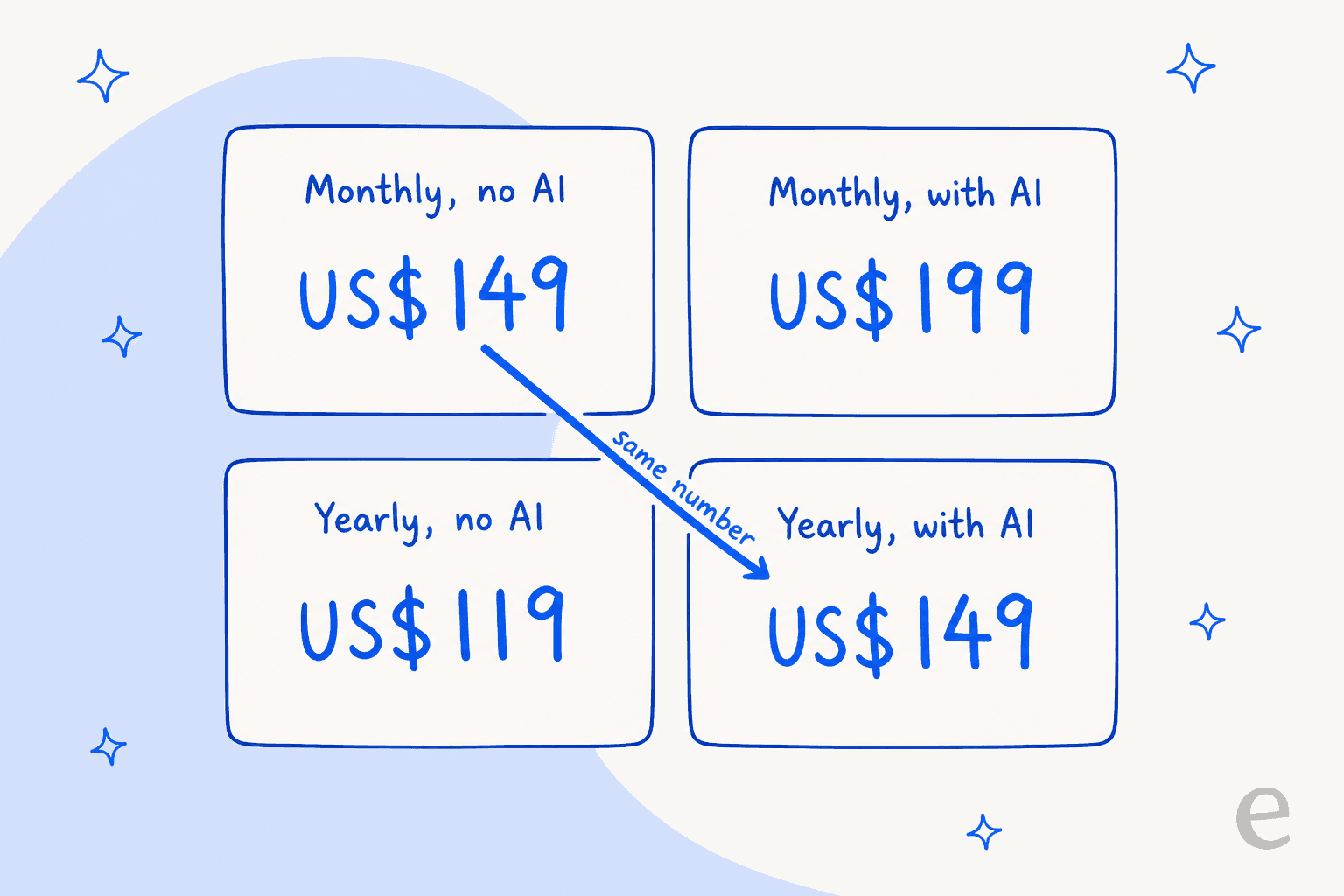
It holds 18 times out of 18 across the rate card, so it is not a rounding artefact. SleekFlow says so themselves in the pricing FAQ, where they state that a yearly plan with unlimited AI costs the same as a monthly plan without it.
I actually like the honesty of putting it in writing, and the practical read is useful. The real decision is not "do I want the AI", it is "will I commit to a year". Commit and the AI comes free. Stay monthly and the AI costs you precisely what the annual commitment would have saved. Which is worth knowing if you are the kind of buyer who wants to test before locking in, and it is the same tension we hear on our own calls: one budget-conscious buyer we spoke to had watched a previous vendor's price more than double and wanted contractual locks before he would sign anything annual.
The other half of the toggle story is the discount headline. "Save up to 25%" is true in exactly one of the eight cells. Pro with AI on the Western tier goes 199 to 149, which is 25.1%. Everything else saves less, and Premium with AI, the plan the demo funnel points you at, saves 12.5%.
| Line item | Monthly | Yearly | Real discount |
|---|---|---|---|
| Pro AI | US$199 | US$149 | 25.1% |
| Pro, no AI | US$149 | US$119 | 20.1% |
| Premium, no AI | US$349 | US$299 | 14.3% |
| Premium AI | US$399 | US$349 | 12.5% |
Work out your own SleekFlow bill
The point of the calculator below is not the total. It is the second column. Plug in your real numbers and watch which lines resolve to a figure and which resolve to "ask sales", because that split is the whole story of SleekFlow pricing.
At the default numbers, a growing brand messaging German customers, the WhatsApp pass-through is roughly three times the subscription. Change the market to Turkey and it collapses to a rounding error. That single dropdown moves the bill more than the choice between Pro and Premium does, which is why a plan-tier comparison on its own tells you almost nothing about what you will pay.
Five meters, and three with no published rate
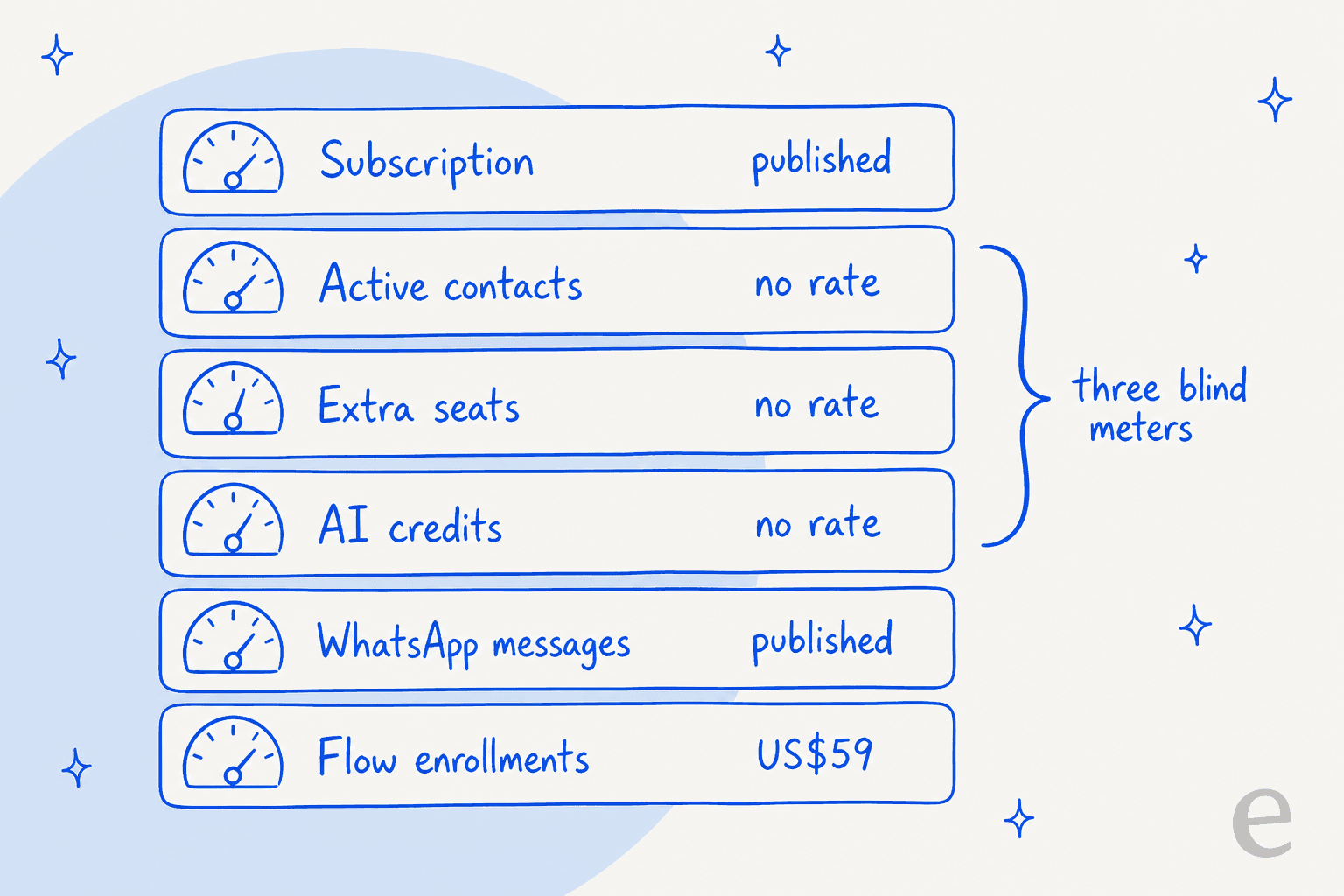
SleekFlow's own help centre is clear that the platform tracks five metered dimensions which reset with your billing cycle: monthly active contacts, AI agent credits, broadcast messages, flow enrollments and API calls. Three more limits do not reset at all: user accounts, contacts and channels.
| Meter | Unit | Where the rate lives |
|---|---|---|
| Platform subscription | Per month, flat per plan | On the pricing page, one state at a time |
| Monthly active contacts | Per unique contact, per billing month | Allowance published, per-contact rate not published |
| User accounts | Per seat, per month | Included count published, rate not published |
| Per delivered template, plus per-number hosting | Rates in the help centre; hosting fee not published | |
| SMS | Per outbound message, plus per-number hosting | From US$0.005; hosting fee not published |
| AI agent credits | Per AI reply, billed regardless of outcome | No rate on the pricing page or in the help centre |
| Flow enrollments | 0.5 or 1 credit per enrollment | US$59 for 1,500, the one published add-on price |
The pattern is worth sitting with. The meters with published prices are the ones that do not grow with your success. The subscription is flat. Meta's message fees are Meta's, and SleekFlow passes them through honestly. But active contacts, seats and AI replies, the three lines that go up when the tool is working, are the three you cannot price. That inverts how most AI customer service costs are usually laid out.
For comparison, this is the opposite arrangement from the pay-per-outcome model, where the per-unit number is the headline and the tier is the footnote. Zendesk AI pricing works that way. So does Gorgias Automate. Freddy is priced the same way.
Both models have real drawbacks. Per-resolution billing punishes you for resolving more, which we have written about in our own cost-per-resolution analysis and in the pay-per-resolution guide. An allowance model with an unpublished marginal rate has a different problem: you cannot build the spreadsheet at all.
What counts as a monthly active contact
This is the definition that decides your bill, and it is broader than most buyers assume. SleekFlow's own MAC documentation is admirably direct about it, and the line that matters most is this: a contact does not need to reply to be counted.
A contact burns one MAC if any of these happen in the month:
- They send you a message on any connected channel, live chat included.
- They receive a message from you through the inbox, Flow Builder, the AI agent, WhatsApp co-existence, or Zapier, Make.com and the SleekFlow API.
- They react to one of your messages with an emoji. SleekFlow treats a 👍 as a new inbound message, which matters if you run a busy Instagram channel where reactions are the norm.
And they do not count if they only received a broadcast and never replied, if they exist in your database with no messaging activity, or if the conversation happened in the AI agent playground or the internal testing channel. A contact who chats on Instagram and later on live chat is one MAC, not two. Deleting the contact afterwards does not give the MAC back.
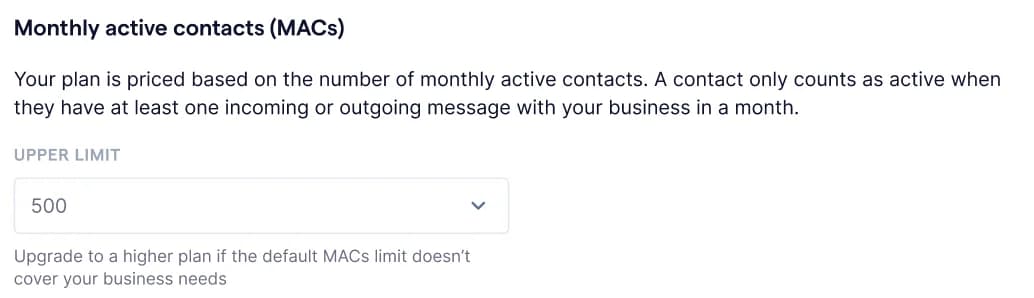
There is an incentive quirk buried in there. Broadcast recipients are free of MAC charge until they reply, so the model charges you for two-way conversation and lets one-way blasting through free. That is a sensible design for a marketing tool and an odd one for a support tool, and it is the first thing I would flag to anyone buying SleekFlow primarily to run their omnichannel support rather than their campaigns. The distinction between the two use cases is the same one we drew in our omnichannel versus multichannel piece.
SleekFlow's own worked example: a business chatting with 20 unique customers a day will typically use about 450 MACs a month. Note the arithmetic there. 20 a day across 30 days is 600 raw conversations, so their model already assumes a quarter of your daily chats are repeat contacts you have paid for once.
The practical consequence for anyone doing WhatsApp ticket deflection is that every contact the AI answers is a billed MAC whether or not the answer landed, so the allowance is spent on attempts rather than on outcomes.
What happens when you hit 100%
Four things stop at once when you exhaust your MAC allowance: inbox messaging to every contact, active or not, plus flow enrollments, AI agent responses and broadcast sending. Incoming messages still land. You just cannot answer them from the tool, which is a worse failure than any handoff design problem because it blocks the humans too.
In practice you rarely hit that wall, because auto-scaling is on by default. Each workspace gets a 20% buffer above its limit for short spikes, and past that SleekFlow automatically upgrades your MAC tier to the next level, effective immediately. Which is a kind answer to the wall, and also the thing to be conscious of: your bill can step up without you touching anything, at a rate you never saw published.
One asymmetry worth noting. You can upgrade a MAC tier yourself; downgrading requires contacting the team. And usage figures refresh every three hours, so if you are watching a spike, you are watching it three hours late. Upgrading mid-cycle also resets your cycle start date to the upgrade date, which quietly reshuffles when everything else resets.
Flow Builder is the one add-on with a real number
Credit where it is due: the flow enrollment documentation is the most honest pricing page SleekFlow has. It publishes the unit, the multiplier, the add-on price and the ceiling.
An enrollment is one contact matching a published flow's trigger. It counts even if you edit or deactivate the flow afterwards.
| Flow type | Definition | Cost per enrollment |
|---|---|---|
| Basic | 5 or fewer nodes, no integration, webhook or API node | 0.5 credit |
| Advanced | More than 5 nodes, or any one advanced node | 1 credit |
Only trigger and action nodes count toward the five. Time delays, condition branches, wait-for-event and end nodes are free. Pro includes 500 enrollments, a 1,500-enrollment add-on is US$59, and Pro hard-caps at 3,000 enrollments a month before you have to move to Premium.
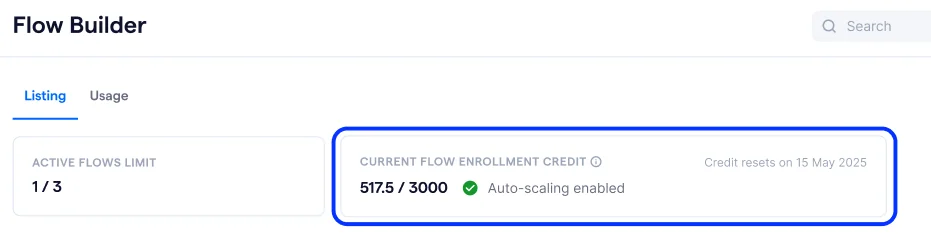
Two details in that screenshot are more informative than the pricing page. The enrollment credit reads 517.5 / 3000, so the half-credits are real and they do accumulate. And ACTIVE FLOWS LIMIT 1 / 3 puts a hard number on a row the pricing page describes as "Unlimited" Flow Builder usage.
There is also no overage here, which I think is the right call. Once you hit the enrollment limit, matching contacts are marked Restricted and simply never enroll. It is a circuit breaker, not a metered overrun, and you get email and in-app alerts at 25%, 10% and 0% remaining. The catch is that "Removed" and "Completed" enrollments both still consume quota, so a flow you manually cleaned up already cost you.
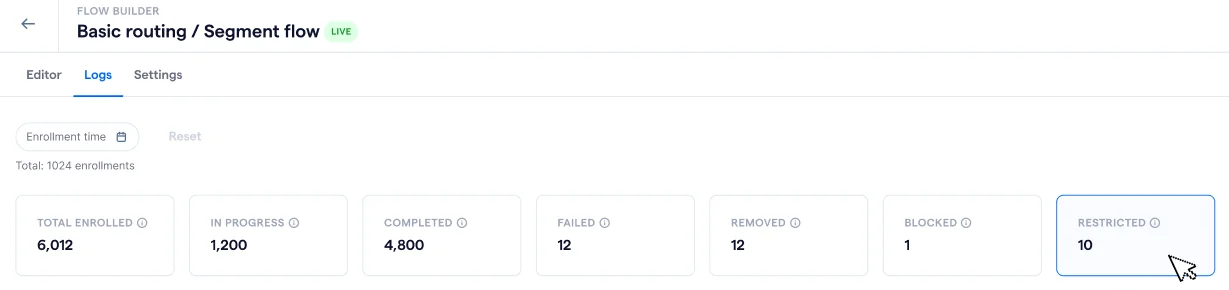
What "unlimited" looks like from inside the product
Six rows in the comparison table say "Unlimited". SleekFlow's own help-centre screenshots of the in-app plan picker put a number behind two of them, and add a meter the pricing page never mentions at all.
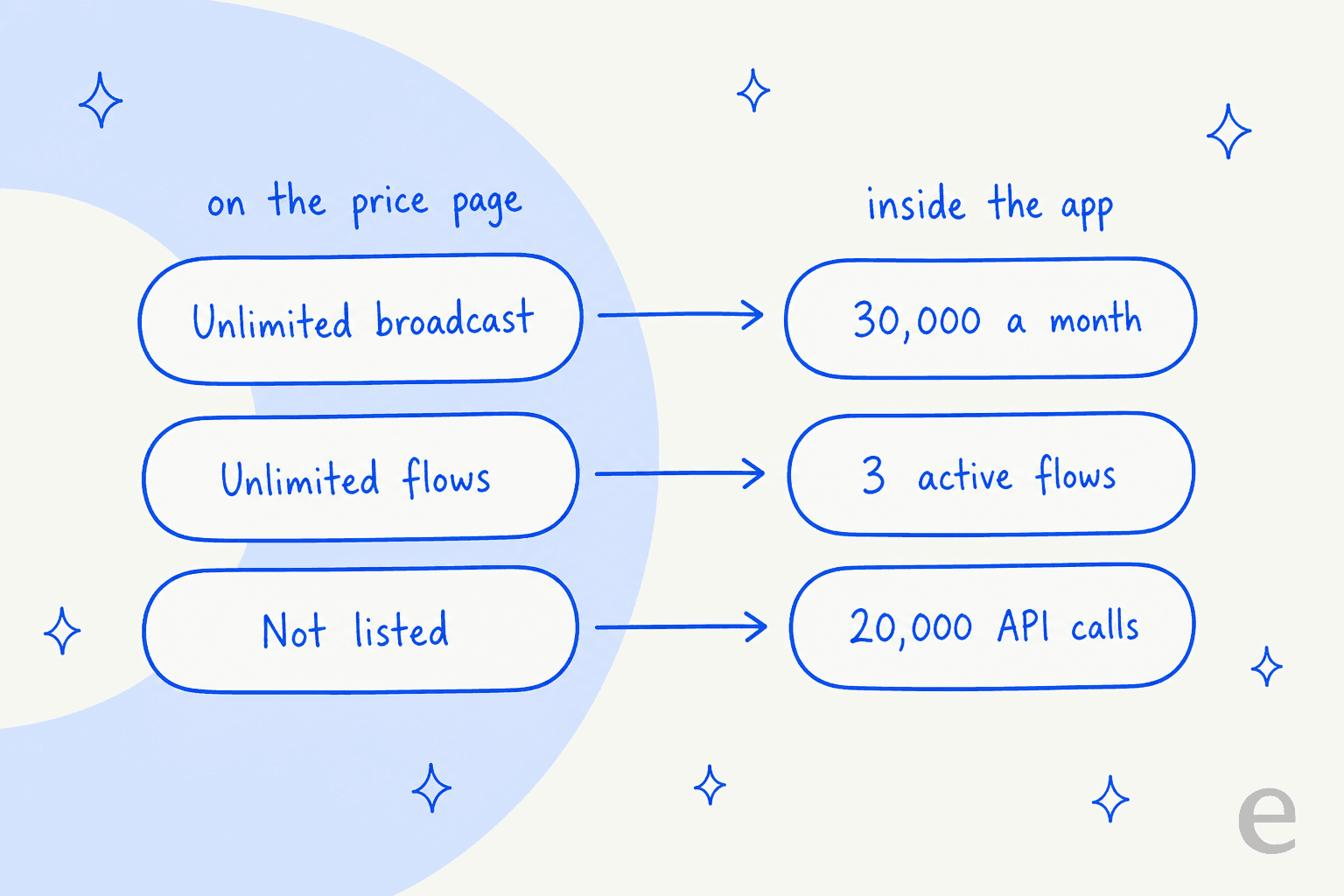
Here is the screenshot those numbers come from. It is SleekFlow's own plans and billing article, and the prices in it (US$149 and US$349 yearly) match today's Western card exactly.
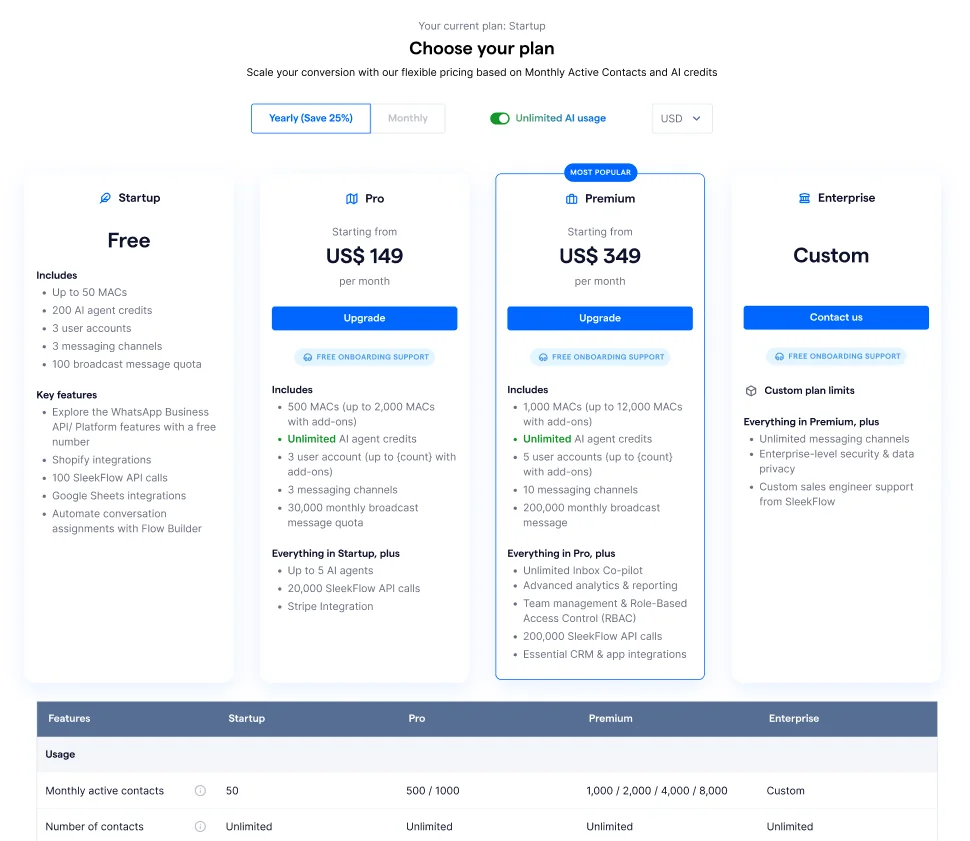
Read the plan cards and you get four things the pricing page will not tell you:
- Broadcast has a monthly quota. 30,000 messages on Pro, 200,000 on Premium. The pricing page's Broadcast row says "Unlimited*".
- API calls are metered. 20,000 on Pro, 200,000 on Premium. The pricing page does not mention API call volume at all.
- The MAC add-on ladder is discrete steps. Premium reads
1,000 / 2,000 / 4,000 / 8,000, so you are buying a tier, not a per-contact top-up. - Onboarding shows as free. All three paid cards carry a "FREE ONBOARDING SUPPORT" badge, where the public page sells 60-day Dedicated Onboarding as a US$499 one-off on Pro.
I want to be careful about what this proves. The usage panel in the same article dates to a 2025 billing window, and a fourth free "Startup" plan appears in these screenshots that no longer exists as a purchasable column on the 2026 page. So the help centre is running behind the pricing page in places. But that is the buyer's problem either way: SleekFlow's two own sources of truth do not agree, and the one with the real numbers is the one nobody reads before signing.
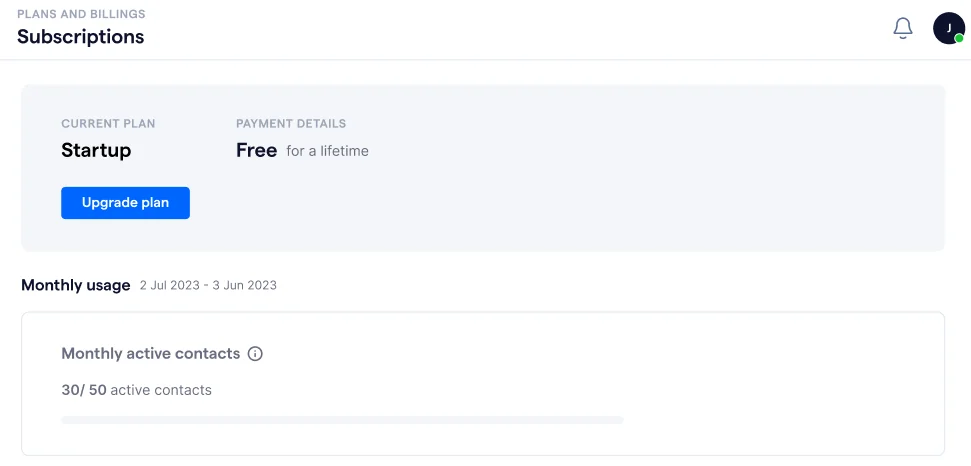
On the AI meter specifically, the shipped pricing bundle sets aiAgentCredits: 500 on all three plans, including the ones sold as unlimited, and never renders it. I cannot tell you from the outside whether that caps the AI plan or just sizes the trial on the non-AI plan. What I can tell you is that SleekFlow's AI agent analytics docs are built entirely around monitoring credit burn, and they state that credits are consumed "regardless of outcome (e.g. successful replies, low confidence exits)". You pay for the answers the AI got wrong and the ones it bailed on, and there is no published rate for either.
That last point is where the AI agent question and the pricing question become the same question. If you cannot see the credit rate and you cannot replay the agent against your own past conversations first, you are buying a resolution rate on trust. It is the practical difference between agents and chatbots, priced.
SleekFlow's knowledge sources are files, website crawls, web search and custom answers, so the whole thing rests on your knowledge base being current. Past ticket history is not one of the inputs, which we covered in detail in the SleekFlow alternatives roundup. The Inbox Co-pilot that would give agents drafted replies is a Premium row, not a Pro one.
WhatsApp and SMS: Meta's meter, not SleekFlow's
SleekFlow is a WhatsApp Business Solution Provider, and it documents Meta's rate card in full rather than marking it up invisibly. That is more transparent than most of its rivals manage. The fees are not SleekFlow's, and SleekFlow says so.
Since 1 July 2025, WhatsApp bills per delivered template message rather than per conversation, one of three policy changes worth reading before you budget. Marketing and authentication templates are always charged. Utility templates are free inside the 24-hour customer service window and charged outside it. Service conversations have been free for everyone since 1 November 2024, and the old 1,000-free-conversations cap is gone.
If you are planning campaigns on top of support, the 2025 platform updates and Meta's rules for third-party AI both shape what you are allowed to automate here.
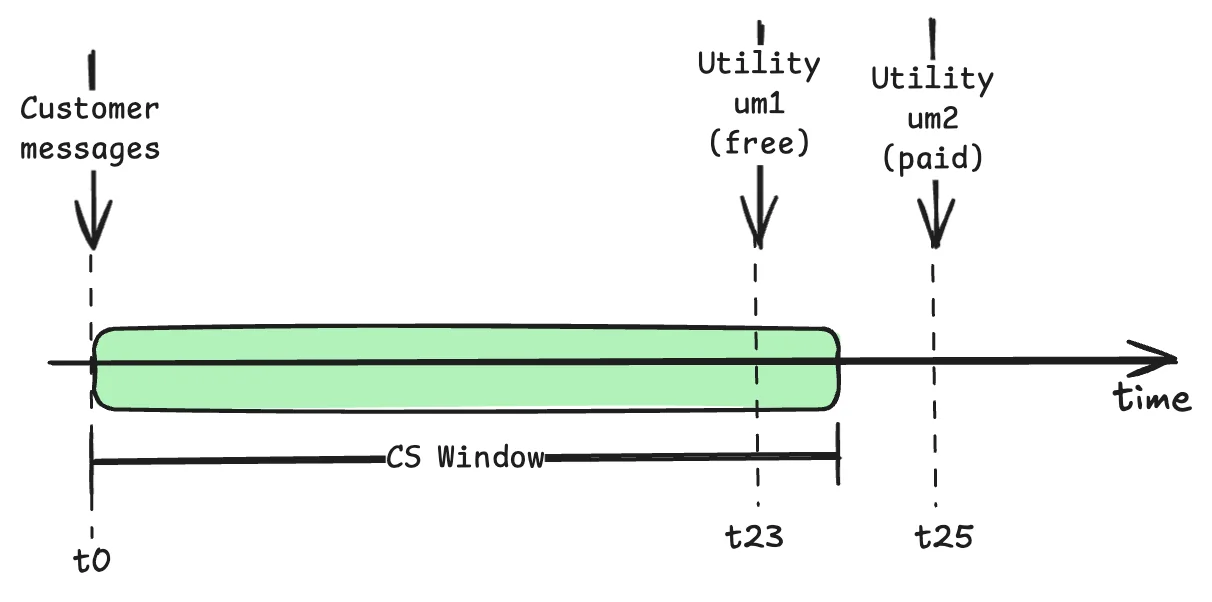
The billing gotcha SleekFlow flags itself is the one that catches everyone: rates are set by your customer's country, not yours. Serve three regions and you get three rates on one invoice.
| Market | Marketing | Utility | Authentication |
|---|---|---|---|
| Netherlands | $0.18366 | $0.05750 | $0.05750 |
| Germany | $0.15698 | $0.06325 | $0.06325 |
| United Kingdom | $0.07303 | $0.02530 | $0.02530 |
| Brazil | $0.07188 | $0.00782 | $0.00782 |
| Indonesia | $0.04727 | $0.02875 | $0.02875 |
| Mexico | $0.03508 | $0.00978 | $0.00978 |
| North America | $0.02875 | $0.00391 | $0.00391 |
| Colombia | $0.01438 | $0.00092 | $0.00092 |
| India | $0.01357 | $0.00161 | $0.00161 |
| Turkey | $0.01254 | $0.00104 | $0.00104 |
The spread is not a rounding difference. A Netherlands marketing template costs 14.6 times a Turkish one, and Netherlands utility is 55 times Colombia's. Indonesia's authentication-international rate of $0.1564 is the single highest cell in the table, 4.5 times its own domestic authentication rate. If your customer base is in Western Europe, the WhatsApp line will beat the subscription line on any real campaign volume, which is exactly what the calculator above shows.
SMS is thinner on detail: outbound messages start at US$0.005, SleekFlow claims rates up to 60% below other providers, and the per-number monthly hosting fee is not published for either channel. High-throughput 10DLC numbers are marked Coming Soon. If you are pricing SMS-heavy support, the honest comparison is against Twilio Flex pricing rather than against a messaging suite.
Your IP address decides your price
The pricing island is hydrated server-side with a hardcoded tier and currency. Four tiers exist. TIER_1 covers the US, UK and EU. TIER_SG and TIER_HK carry identical numbers to TIER_1 for USD, HKD and SGD. TIER_3 is the emerging-markets card, and it is materially cheaper for the same feature set.
| Plan and variant | TIER_1 monthly | TIER_1 yearly | TIER_3 monthly | TIER_3 yearly |
|---|---|---|---|---|
| Pro AI | US$199 | US$149 | US$129 | US$99 |
| Pro, no AI | US$149 | US$119 | US$99 | US$79 |
| Premium AI | US$399 | US$349 | US$349 | US$299 |
| Premium, no AI | US$349 | US$299 | US$299 | US$249 |
The same Pro AI annual plan is US$149 or US$99 depending on which tier the server hands you, a 34% gap on an identical feature set. Premium AI is 14% apart. And there is one feature quantity that moves with the tier rather than the plan: TIER_3 Premium ships 10 seats where TIER_1 Premium ships 5. Double the seats at a lower price.
Regional pricing is normal and defensible, and plenty of software does it. Two things about this implementation are worth flagging. Which countries map to which tier is never disclosed, so you cannot check whether you are being priced correctly. And local-currency buyers pay an FX premium on top: the Indonesian rupiah card is struck at a clean 15,960 IDR per USD across every line, well above the market rate, so paying in IDR costs more than the USD figure it is derived from.
What Pro actually locks you out of
If you are pricing SleekFlow for support rather than marketing, the Pro-to-Premium jump matters more than the sticker gap suggests. Pro is missing a lot of what a support team needs, and the gap is US$200 a month at monthly-with-AI rates.
| Capability | Pro | Premium | Enterprise |
|---|---|---|---|
| Ticketing | No | Yes | Yes |
| SleekFlow API | No | Yes | Yes |
| AI Inbox Co-pilot | No | Yes | Yes |
| AI action: Shopify | No | Yes | Yes |
| AI action: Custom API | No | Yes | Yes |
| HubSpot integration | No | Yes | Yes |
| Zoho CRM integration | No | Yes | Yes |
| Salesforce integration | No | No | Yes |
| Performance, Sales, Conversion analytics | No | Yes | Yes |
| Role-based access control | No | Yes | Yes |
| IP allowlisting | No | Yes | Yes |
| Team management | No | Yes | Yes |
| Export chats | No | No | Yes |
| PII masking | No | No | Yes |
| Dedicated CSM and SLA | No | No | Yes |
A few reads on that table. Ticketing is a Premium feature, so the cheapest SleekFlow plan is a shared inbox rather than a helpdesk. That is a real difference in kind, not degree. Price Premium against a proper ticketing tool rather than against Pro: Zendesk pricing is the usual yardstick.
Role-based access control and IP allowlisting are also Premium, which is a genuine problem if you are a regulated buyer on a Pro budget, and PII masking and chat export are Enterprise-only. No SOC 2, ISO 27001, GDPR or HIPAA claim appears anywhere on the pricing page, and the SLA row is a tick with no percentage behind it. If certifications are a hard requirement, that is a sales-call conversation, not a self-serve one.
There is one asymmetry in the AI gates that surprised me. Shopify and Custom API agent actions are Premium-and-above on the AI plan variant. On the non-AI variant they are blocked on every tier, Enterprise included. So an Enterprise customer who skips the AI upgrade cannot use them at all. If Shopify automation is the reason you are buying, the AI toggle is not optional, and Gorgias for Shopify is the obvious price comparison.
Three teams, three bills
Sticker prices do not tell you much on their own, so here is what the arithmetic looks like at three real shapes of business. All TIER_1, all Pro AI or Premium AI on annual commitment.
A small Shopify store, 400 active contacts, 2 agents, mostly inbound support. Pro AI at US$149 a month, comfortably inside the 500-MAC allowance and the 3 seats. Service conversations are free under Meta's rules, and 500 marketing templates to North American customers add US$14.38. Total around US$163 a month, US$1,957 a year, and nothing is unquoted. This is the shape SleekFlow prices well, and a sensible baseline if you are costing WhatsApp support for ecommerce.
A growing DTC brand, 1,400 active contacts, 4 agents, campaigns into Germany. Pro AI is still US$149, but now three lines go dark: 900 extra MACs at an unpublished rate, one extra seat at an unpublished rate, and 3,000 German marketing templates at US$470.94. The calculable total is US$620 a month, of which 76% is Meta's fee, plus two line items you cannot price without a call. This is the shape where the model breaks down.
A mid-market team, 6,000 active contacts, 8 agents, multi-region. 6,000 blows past Pro's 2,000 ceiling, so this is Premium AI at US$349, which also unlocks the ticketing and RBAC you probably needed anyway. Then 5,000 extra MACs and 3 extra seats, both unquoted, and a WhatsApp bill spread across every country rate you touch. The known number is US$4,188 a year, and every component that scales with the business sits outside it. Premium is also demo-gated, so you cannot get to a total without booking the call.
The pattern across all three: the part of SleekFlow you can price is the part that does not scale. That is fine at the small end and it gets steadily less fine as you grow. If you are trying to model support cost savings from automation, that unquoted middle is precisely the number your business case needs.
What buyers actually say about the price
SleekFlow scores 4.6 out of 5 across 205 reviews on G2, which is a strong number, and worth one caveat: of the ten reviews rendered on that page, six are marked Incentivized, five of those from a seller invite. The praise is consistent and believable, mostly about channel consolidation onto one company number. The price complaints are consistent too.
"The price is too high, especially considering the 24-hour closed window."
Verified User, Small-Business, 4.0/5, G2

That review pairs the price with the 24-hour window, which is the reasoning I see most often. Meta's window is not SleekFlow's fault, but it changes the value of what you are paying for: outside it, following up costs a template fee, and inside it your team may need to work Saturday. Another reviewer put both halves together:
"The cost of Broadcast is pricey, and sometimes we don't get the return on that cost. Also, the 24-hour window closes down the conversation with the customer, which means we can't follow up as we'd like, and we end up needing to work on Saturday."
Verified User in Consumer Goods, Small-Business, 4/5, G2
The sharpest comment I found was not about the amount at all. It was about the structure:
"we were exploring sleekflow earlier but their pricing structure is really weird, don't recommend getting into that we use respond.io since like a few months now"
/u/shrimpthatfriedrice, Reddit

And in fairness, price is also why some people chose it. One Capterra reviewer lists "Better pricing" as his reason for picking SleekFlow over the alternatives he looked at, and on the TIER_3 card at US$99 a year-committed, I can see it.
"Effective for customer support, sales and mass marketing as multiple users can use the same WhatsApp number to reply customers and send personalised messages at scale while linking it up to Shopify."
Chiu Kwan H., Marketing Manager, Capterra

That is the honest summary of the value. You are paying for one number, many channels, and campaigns at scale. Whether the AI on top is worth the upgrade is the part nobody in the reviews can price either.
Is SleekFlow worth it in 2026?
Buy it if you run outbound WhatsApp campaigns, sell through a catalogue and payment links, and want your Instagram, TikTok, Facebook and WhatsApp conversations on one number. At US$149 a year-committed on the Western card, or US$99 on the emerging-markets card, that is a fair price for what is a mature, well-reviewed omnichannel messaging suite. It holds up well against the rest of the WhatsApp chatbot field, and nothing in this piece argues otherwise.
Think harder if support is the actual job. Three things stack up against you. Ticketing and RBAC are Premium-only, so the entry plan is a shared inbox. The AI cannot learn from your past conversations, so it starts from your docs rather than from what your team already answered. And the meter that scales, the active contact, has no published rate, so you cannot forecast the bill or the deflection rate before you commit to it.
That third point is the pattern I keep seeing on our own calls, and it is not unique to SleekFlow. One buyer ran twelve successful test chats with a competitor's agent, was happy with every one, then opened the billing page and immediately filed a cancellation request. The product worked. The pricing model was the thing that lost the deal. Any vendor that makes you discover your unit economics after go-live is running that risk.
On price structure alone, Trengo pricing publishes more of its meters. So does Freshchat. Chatwoot publishes all of them, because you can read the source and self-host it.
Skip it if you need a help desk with a real ticket record, deep reporting, or an AI you can prove out before customers see it. Those are different tools.
The SleekFlow alternatives piece walks through nine of them with the same pricing lens applied. If none of the messaging suites fit, the wider AI customer service software map is a better place to start.
Adding eesel on top of SleekFlow
I work on eesel, so treat this as the interested party talking. But the contrast is the whole reason I wrote the piece, so here it is plainly.
eesel is an AI agent for support that plugs into the helpdesk and channels you already run, including a native WhatsApp integration alongside Instagram, Messenger and SMS. Two things about the pricing are the point:
One meter, one published price. 1 credit per ticket or chat handled. One conversation is one credit no matter how many replies it takes. Plans start at US$299 a month for 500 credits (US$499 for 1,000, US$999 for 2,500, US$1,899 for 5,000), with no platform fee and no per-seat fee. If you run out, agents pause until credits reset, or you can turn on overage at US$0.80 per extra credit with a monthly cap you set, so the number in your head and the number on the invoice are the same number. Pay a year upfront and get two months free. SSO and MFA (from US$199 a month) and data residency (US$500 a month) are add-ons.
You can test before you commit. eesel replays your real past tickets and scores the answers against what your team actually sent, then hands back the gaps and the instruction changes it would suggest. That is the thing the buyer who burned 200 interactions in a test day was really asking for: not a cheaper rate, a way to know the rate before he had to live with it. The free plan is 100 credits, no card needed.

Where eesel is not the answer: it does not do broadcast campaigns, WhatsApp catalogues, payment links or CRM pipelines. If those are why you bought SleekFlow, eesel is not a swap, it is the AI layer underneath. Plenty of teams run both, SleekFlow for the campaign side and eesel for the conversations that need answering.
If you want the same comparison against other helpdesk AI, we have written it up for Gorgias and for Freddy, and there is a broader guide to running a WhatsApp chatbot if you are still choosing the channel stack.
Want to see what the AI would have said on your last thousand chats before you pay for a single one? Try eesel free, or read how the same maths plays out in our best AI for WhatsApp support breakdown.
Frequently Asked Questions
How much does SleekFlow cost per month?
Does SleekFlow have a free plan?
What is a monthly active contact in SleekFlow pricing?
Is SleekFlow's AI usage really unlimited?
What does SleekFlow pricing not include?
Is SleekFlow cheaper than Trengo or Freshchat?
What happens if I go over my SleekFlow plan limits?


Article by
Rama Adi
Rama is a software engineer at eesel AI with two years of experience writing about B2B SaaS, AI tools, and customer support technology. Based in Bali, Indonesia, he brings a developer's perspective to product comparisons — cutting through marketing copy to what the integrations and APIs actually do.