The 9 best SleekFlow alternatives in 2026

Kira

Katelin Teen
Last edited August 20, 2026

Why teams start looking for a SleekFlow alternative
The thing SleekFlow was built for, it does well. It is an official Meta partner. WhatsApp, Instagram, TikTok, Facebook, Telegram, email and calls all land in one omnichannel inbox on a single company number, and the company claims 2,000+ businesses with a million conversations a day. Reviewers back the core product up on this. Consolidating channels is the most consistent praise on its G2 profile, sitting at 4.6 out of 5 across 205 reviews, and onboarding gets named again and again.
The inbox is not what sends people looking. What does is the moment you sit down and try to work out what the AI will cost, and whether it is any good.
The rate card is in the code, not on the page
SleekFlow's pricing page shows two prices at a time, no more. Two toggles sit above them, one for the billing interval and one labelled "unlimited AI usage", and crossing the two gives you eight purchasable line items across three plans. Whichever pair matches your IP address is the pair that renders.
The full list lives in a client-side pricing bundle. Four geographic tiers across nine currencies, 144 prices in total. A few facts fall out of it that a buyer would want up front.
Yearly-with-AI costs exactly the same as monthly-without-AI, in all 18 price pairs, in every currency. SleekFlow says as much in its own FAQ, so this is not me inferring it. Turn that around, though. The AI is not really a product you are buying. It is what committing to twelve months costs you.
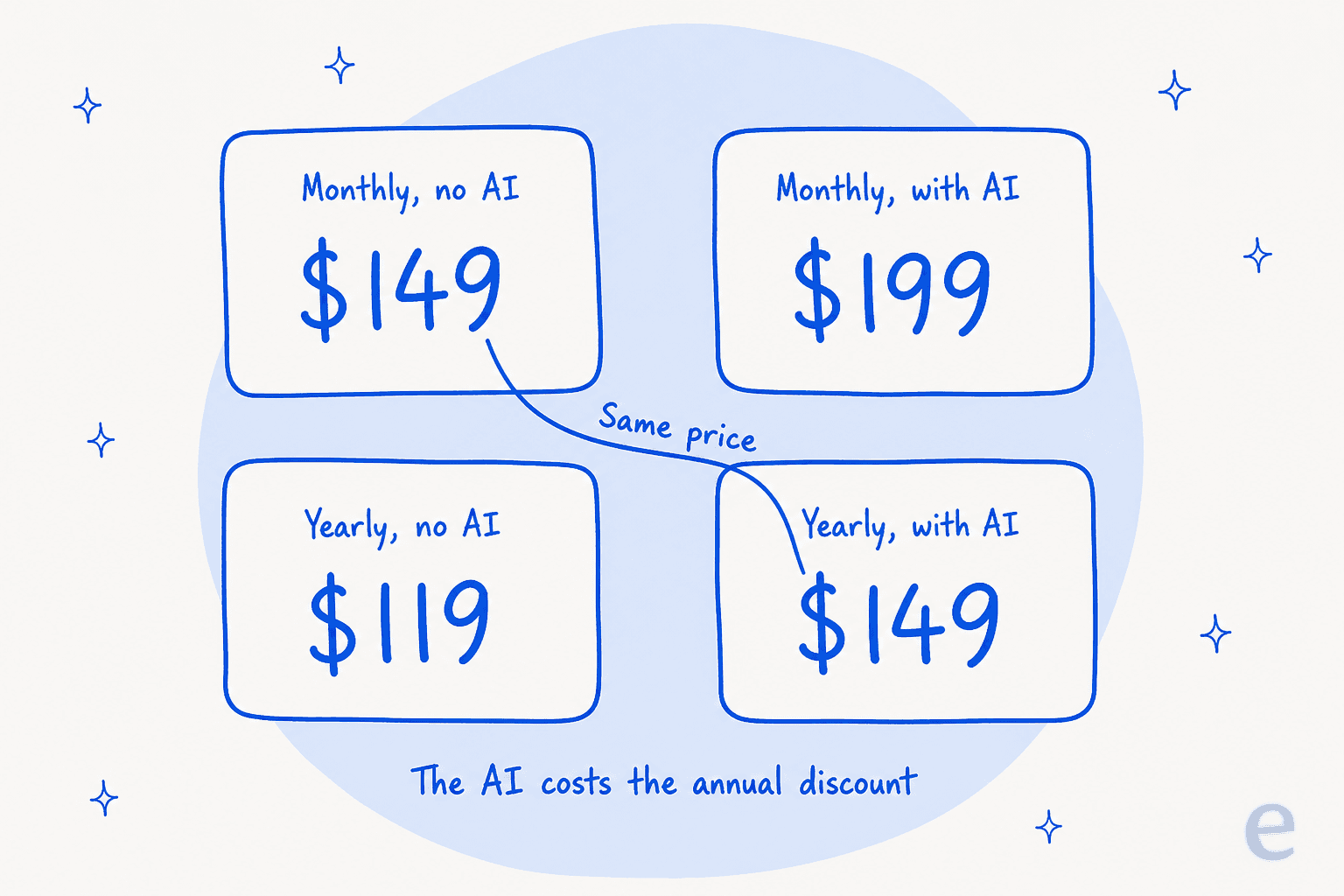
That "save up to 25%" line holds in exactly one cell of the grid: Pro-with-AI on the Western tier, where $199 drops to $149. The plan sitting behind the demo request, Premium-with-AI, saves 12.5% instead. Then there is the regional split, where the same product carries two different prices depending on which tier your IP resolves to. Pro AI yearly is US$149 or US$99. And the lower tier ships 10 seats on Premium where the higher one ships 5, which is the reverse of what you would guess.
Five meters, and the one that matters has no published rate
Five separate meters run here. Two of them, the subscription and the monthly-active-contact allowance, are on the page. The per-contact overage rate is not, and neither is the extra-seat rate or the AI rate.
| Meter | Billable unit | Rate published? |
|---|---|---|
| Subscription | Per month, flat per plan | Yes, for your region only |
| Monthly active contacts | A unique contact per billing month, counted on two-way engagement | Allowance yes, overage rate no |
| User accounts | Per seat | Included count yes, add-on rate no |
| Per template message, plus monthly hosting per phone number | Yes, in the help centre | |
| SMS | Per outbound message, from $0.005 | Yes, in the help centre |
| AI usage | Not defined | No |
The contact meter is the primary one, and the counting is more aggressive than most people expect going in. A contact burns an active-contact credit when they message you and again when they receive a message from you, whether that came through the inbox, a flow, the AI agent or the API. An emoji reaction registers as a new inbound message. SleekFlow's own worked example: chatting with 20 unique customers a day comes out around 450 active contacts a month. Pro includes 500, so you can see how little headroom that leaves.
Hit 100% of the allowance and four things stop together: inbox messaging to all contacts, flow enrolments, AI agent replies, broadcasts. Raising your own tier is self-serve. Lowering it means contacting the team.
The WhatsApp and SMS rows sit outside all of this. Meta sets those rates, and it prices them by the recipient's country rather than by yours. A marketing template to the Netherlands runs $0.18366 where Turkey is $0.01254, so a 14.6x spread on the same message. My note on WhatsApp Business API pricing tracks how that card has moved. Meta's policy changes cover what third-party bots are allowed to do on the channel now.
The AI row is where it gets interesting. Marketing says "unlimited". The comparison table says Unlimited. Every instance of that word carries an asterisk pointing at a Fair Use Policy that publishes no threshold. Meanwhile the plan configuration object rendering that same table sets aiAgentCredits: 500 on Pro, Premium and Enterprise alike, and that number never gets displayed anywhere. It happens to be the only AI quantity SleekFlow has committed to in public. The help centre also confirms you are billed "regardless of outcome (e.g. successful replies, low confidence exits)", which means a failed reply costs what a good one costs.
"we were exploring sleekflow earlier but their pricing structure is really weird, don't recommend getting into that we use respond.io since like a few months now"

The AI ramp is measured in weeks of live traffic
This is the part I care about most. I build the agent side of eesel, and of every failure mode I watch, this is the one that lands hardest on real teams.
The knowledge sources for AgentFlow are a website crawl, uploaded internal documents, custom answers, playbooks, CRM data, and human replies that you promote after the fact. Past conversation history is not on that list. There is a second layer too: retrieval runs against articles SleekFlow generates out of your sources, not against the raw sources themselves, and per the help centre you can only suggest edits to those generated articles, which "will not be accepted" if judged unrelated.
Two named agents are live today, the Inbound Agent and the Data Analyst Agent. Both the Copilot Agent and the Outbound Agent still carry a coming soon label. So the helpdesk copilot pattern, where the AI drafts and a human approves, is unshipped here.
As for the pre-launch check, it is a set of question-and-answer pairs the system generates from your knowledge base for you to look over. The first honest signal about answer quality therefore arrives after go-live:
"I keep running into issues with the AI training part. For example, when we can't update the newest promotions, we end up having to key them in manually because it can't capture them from the website. On top of that, it takes about a month of gradual training before it becomes mature enough to answer customer questions properly."

In fairness to SleekFlow, this kind of feedback gets answered in public. Replying to a separate reviewer about prompt tuning, Sylvia Chan wrote that "there's a newer way to get an AI agent set up through a guided conversation that takes much of the manual work out of it." Setup effort coming down is a real improvement, and I would count it. Knowing what the agent would have said to your last five thousand messages is a different thing entirely.
The two questions that actually separate these tools
Somewhere in the middle of pulling documentation for all nine platforms, I stopped comparing channel lists. Channels are table stakes at this point. Everybody has WhatsApp, Instagram and Messenger. Two questions end up doing all of the discriminating.
What is the AI allowed to learn from? On this the category is uniform to a degree I did not expect. Website crawls, uploaded PDFs, help-centre articles, hand-written question-and-answer pairs: all on every list. Your resolved conversations are on none of them.
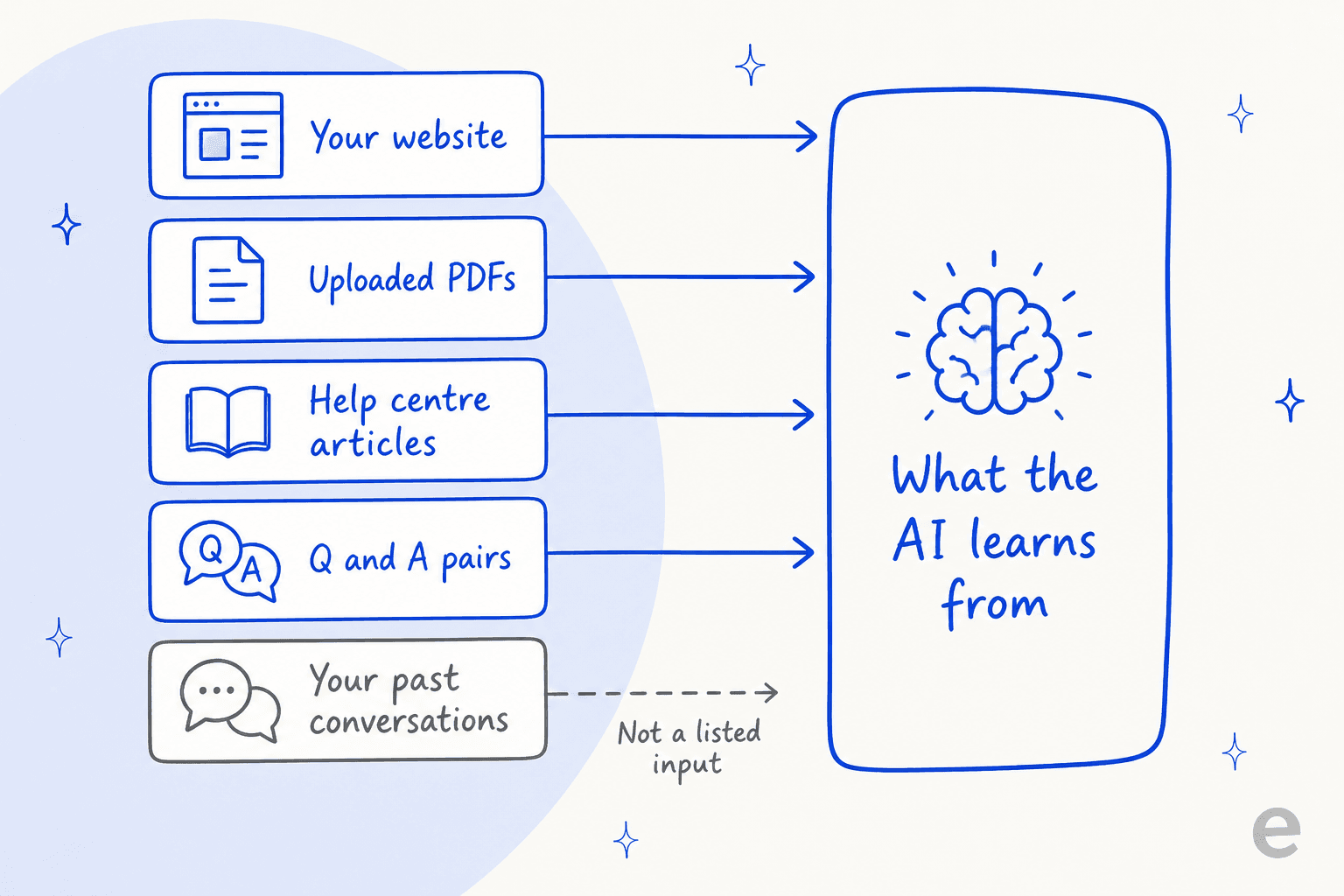
That gap matters more than it sounds. Your help centre is the thing you wrote for a reader who already found your help centre. Your past tickets are what your team actually said to a confused customer at 11pm, exceptions and workarounds included, along with the exact phrasing that stopped the follow-up. Hand an AI the docs, ask it to sound like your team, and you are asking it to guess at the half nobody ever wrote down. On calls it is the single most requested thing I hear. One customer's very first message after signing up was simply "train the bots with zendesk tickets history". For the longer argument, my piece on the AI knowledge base works through why the source list sets your ceiling rather than the model.
Can you test it against reality before a customer sees it? Nearly every tool here ships something called a playground, or a test tab, or a preview. Look at them closely and they split into two completely different things.
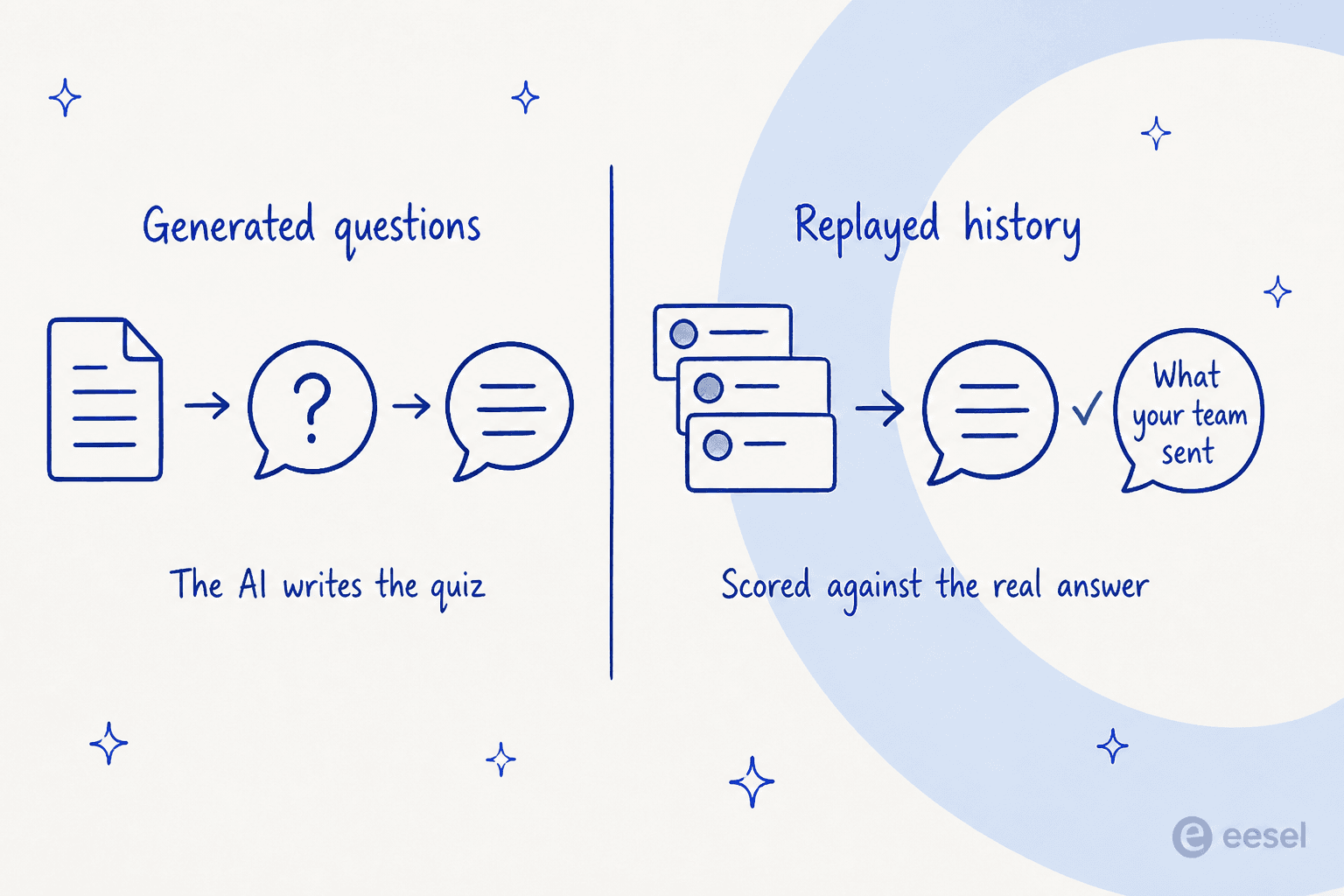
The first kind checks that the AI can answer questions derived from your own documents. That is a coverage check on your docs, and it is useful as far as it goes. The second kind replays conversations that really happened, then puts the AI's answer next to the one your team sent. Only that second kind can tell you the AI is wrong in a way you never anticipated, for the simple reason that you did not write the question.
It is the objection that decides enterprise deals. A buyer put it to me better than I can:
"The AI will never be able to answer 100% of the questions, but if it tries and just answers 'sorry I don't know this,' I cannot go and check all my 7,000 tickets to see if the AI actually made a good answer — then the point is a little bit gone. I need an AI who is only handling the tickets that it's confident to handle and all the other ones, leave them alone."
A DTC supplements team running roughly 7,000 tickets a month on Gorgias
That call cannot be made on faith. You have to see the answers first. Scoping what the AI is allowed to touch is the other half of the job, and that is what AI agent handoff covers. Between them they are the only honest way to move your deflection rate without gambling on live customers.
Filter them yourself
You do not have to take my ranking on trust. Here is the same data as a filter, and SleekFlow sits in it as the baseline so you can see what you would be trading away. Pick a requirement, watch the shortlist collapse.
How I compared these
Everything below came from the vendors' own pricing pages, their help centres and API docs, all checked on 20 August 2026, with review platforms used for user sentiment. Where a price was only reachable through a currency parameter or a client-side bundle, I went and got it, and I say so where that happened. Where a number is not published at all, the table says "not published" rather than carrying an estimate.
Three rules I held to while doing it. Ratings come from the platform's own page and never from a third-party summary, because several aggregator listings I opened were stale by two price changes. Quotes are verbatim with a permalink, or they did not make it in. Last one, I flag where SleekFlow's incentivised review mix should change how you read its score: of the 10 G2 reviews that rendered for me, 6 were marked incentivised.
SleekFlow alternatives compared
| Tool | Best for | Entry price (annual) | Billable meters | Seats included | Trains on past chats | Pre-launch test | AI rate published | Rating |
|---|---|---|---|---|---|---|---|---|
| eesel AI | Proving the AI works first | From $299/mo for 500 credits (1 credit per conversation) | 1 | Unlimited | Yes | Batch replay, scored | Yes | 4.6 (18) |
| respond.io | High-volume B2C sales and voice | $79/mo | 3 + Meta | 5 | No | Typed cases | Yes | 4.8 (530) |
| Wati | The best eval harness on WhatsApp | $59/mo | 3 + Astra | 3 | No | Scored, generated cases | Yes | 4.6 (501) |
| Trengo | European teams, usage-based inbox | €299/mo | 5 | 10 | No | Playground | Yes | 4.3 (246) |
| Gallabox | Choosing your own model | $112/mo | 4 + Meta | 3 | No | Manual test | Yes | 4.6 (169) |
| Chatwoot | Self-hosting and owning the data | $0 self-hosted | 2 | Unlimited (self-host) | No | Playground | Yes | 4.5 (16) |
| Gorgias | Shopify stores wanting per-outcome AI | $77/mo | 3 | 3 to 500, not billed | No | One-ticket re-run | Yes | 4.6 (574) |
| Freshchat | Teams already inside Freshworks | $0 free tier | 3 | 10 free | No | 100-query test tab | Yes | 4.4 (501) |
| DelightChat | Small Shopify stores on a budget | $29/mo | 4 | 5 | No | None documented | Partly | 4.8 (2) |
1. eesel AI
Best for teams who want to see the AI answer their real past conversations before it answers a live one.
What it does
Upfront: I work on this one, so read the specifics here and ignore my adjectives. eesel is the AI layer rather than the inbox. It connects a WhatsApp Business number directly, and it also covers Instagram DMs, Facebook Messenger, SMS, a website widget and email as channels.
Separately, it plugs into whichever helpdesk you already run: Zendesk, Freshdesk, Gorgias, Front, Help Scout, HubSpot, Salesforce, Jira Service Management. The point of that is where the automation lives. It sits where your tickets already are, instead of inside a second AI helpdesk your team now has to learn.
For this comparison the part that matters is the training source list. eesel learns from your resolved tickets and past conversations, alongside your help centre, Google Drive, Notion and the rest. Simulation then replays a batch of those past conversations, drafts what the AI would have said, and scores that against what your team actually sent. What comes back is the gaps, plus the instruction changes that would close them. It does not forecast a resolution rate or a bill for you, and honestly I would not trust a tool that claimed it could.
The honest limit is that eesel is not a marketing platform. No broadcast campaign builder. No WhatsApp catalog, no payment links inside chat, no CRM pipeline. If those are the reason you bought SleekFlow in the first place, then eesel is not a swap for it. It is the automation layer you put underneath it.
Pricing
| Item | Rate | Unit |
|---|---|---|
| Free plan | 100 credits | No card needed |
| Teammate plan | From $299/mo | 500 credits a month. Also 1,000 for $499, 1,500 for $699, 2,500 for $999, 3,500 for $1,349, 5,000 for $1,899 |
| 1 credit | 1 ticket or chat | However many replies it takes |
| Extra credits | $0.80 each | Optional overage with a monthly cap you set |
| Blog post | $4 each | Per blog-length generation |
| Platform fee | $0 | No seat fees, every integration and channel included |
| Pay a year upfront | Two months free | Annual billing |
| Add-ons | From $199/mo | SSO and MFA from $199/mo, data residency $500/mo, priority support from $299/mo |
One meter, one unit, and that unit is a conversation you already count today. Worth flagging that a credit is used when a ticket is handled rather than when it is resolved, which is the reverse of how Gorgias does it, so the stickers alone are not apples to apples. My breakdown of AI customer service cost works the arithmetic through at a few different team sizes.
Pros
- The only tool here that lists past conversations as a training source.
- Batch simulation, scored against your team's real replies instead of generated questions.
- One billable meter, a published price for it, and optional overage with a cap you set.
- No per-seat charge, so adding agents costs nothing.
- 80+ languages, with the first agent live in roughly 30 minutes.
- Real ecommerce depth on the channel, covered in WhatsApp support for ecommerce.
Cons
- Not an inbox. If you need SleekFlow's shared-inbox workflow, you keep it and layer eesel on.
- No broadcast, catalog or payment-link tooling at all.
- Thin review base, at 18 G2 reviews, so weigh that score accordingly.
- No native Zoho Desk, Crisp or LiveAgent integration, which matters if that is your helpdesk.
Verdict: pick eesel if the one thing keeping you from switching the AI on is that you cannot prove it will behave itself. Skip it when what you actually want is a WhatsApp marketing suite. That is a different product.
2. respond.io
Best for high-volume B2C teams whose conversations move between chat, WhatsApp and actual phone calls.
What it does
respond.io is the closest structural match to SleekFlow, and it is the name Reddit users reach for when they leave. Metering is on contacts here, not seats. It claims 10,000+ brands. The real differentiator though is voice: WhatsApp Business Calls, Messenger Calls and VoIP all land in the same conversation record as the chat, which is the practical version of the omnichannel vs multichannel distinction, and its AI Agents take calls in 30+ languages. An on-page counter puts AI Agents at 2,245,651 conversations handled. Per their own changelog the model is GPT-5.
Training sources here are uploaded files, capped at 20MB each and 100 per workspace, plus public website crawls that default to depth 3. Past conversations are not on offer. A help centre only connects as a public crawl, which rules out an authenticated knowledge base.
One published limitation I would want to know about before signing anything: the agent has a 20-message context window. On a long back-and-forth, everything earlier than the last 20 messages is invisible to it. Ad-attribution context arrives only when the ad click falls inside that same window.
Pricing
| Plan | Annual /mo | Monthly | Seats | Extra seat | MAC included | MAC overage | AI credits |
|---|---|---|---|---|---|---|---|
| Starter | $79 | $99 | 5 | $12 | Unlimited | n/a | 5,000 fixed |
| Growth | $159 | $199 | 10 | $20 | 1,000 | $12/100 | 10x MAC |
| Advanced | $279 | $349 | 10 | $24 | 1,000 | $15/100 | 20x MAC |
| Enterprise | Custom | Custom | Unlimited | n/a | Custom | Not published | 40x MAC |
AI runs $15 per 1,000 credits and rounds up per block, so a single credit over the line costs you the full $15. An AI Agent reply is 2 to 5 credits. A voice minute is around 70. On-demand billing cannot be switched off either, though it does hard-stop at 200% of your allowance. WhatsApp fees sit outside every plan.
Pros
- Real voice AI in the same thread as the chat, which nobody else here matches.
- ISO 27001 certified, and a 99.999% uptime claim.
- Strongest review standing of the roundup, 4.8 across 530 reviews.
- The test panel shows which knowledge sources fed each reply.
- AI credit allowance scales with your contact tier, at 10x to 40x.
Cons
- That 20-message context window is a real ceiling once conversations run long.
- Testing consumes the billed meter at 2 to 3 credits per reply.
- Credit allowances stop scaling above 10,000 contacts.
- Prices above the 1,000-contact tier are not published.
- G2's own summary counts 14 mentions of pricing being restrictive as teams grow.
Verdict: the strongest all-round SleekFlow replacement, and an obvious pick when voice is part of your funnel. The testing problem it does not solve. It just gives you a nicer room to type test messages in.
3. Wati
Best for WhatsApp-first teams who want an actual scored evaluation before launch.
What it does
Wati is WhatsApp-native, claiming 16,000+ customers, although its own AI page says 12,000+, so treat both numbers loosely. Category-wise it sits in the WhatsApp chatbot bucket and not the helpdesk one. What gets it this high in the list is Astra, a separate product rather than a plan feature, which ships the best pre-launch harness of any incumbent here. Auto-generated test cases with pass and fail states. Efficiency, Accuracy and Latency scores. Expected-versus-actual answers side by side, and CSV upload if you want to bring your own cases.
That is the closest thing in this category to real evaluation, and it deserves credit. The fair limit sits in where the cases come from. They get generated out of the agent's own instructions, rather than replayed from your past WhatsApp conversations. An agent that contradicts its own brief, this will catch. The question you never thought to write down, it will not.
There are exactly three training sources: website links, documents in PDF, .docx, .txt or .md, and question-and-answer pairs you write. Third-party knowledge bases carry a coming soon label. Astra does sync 60 or 365 days of Wati history depending on your tier, though that history is not a training input.
Pricing
| Plan | Annual /mo | Monthly | Seats | Extra seat | AI Co-pilot credits |
|---|---|---|---|---|---|
| Growth | $59 | $69 | 3 | Not sold | 250/mo |
| Pro | $119 | $149 | 5 | $39 | 500/mo |
| Business | $279 | $349 | 5 | $89 | 1,500/mo |
| Astra (separate) | $0 / $79 / $319 | $0 / $99 / $399 | n/a | n/a | 100 / 5,000 / 25,000 |
Now the sharp bit: the autonomous agent is not in any Wati plan. Pro and Business both list Astra AI Agents as a feature, then footnote it "priced separately", so Pro plus agents lands at $119 plus $99 before a single Meta message fee. Astra bills 1 credit for a text reply, 3 for a rich one and 5 per voice minute, with top-ups at $20 per 1,000. Co-pilot credits reset monthly, do not roll over, and are shared across the whole account, so at 100% the AI stops for everybody at once.
Pros
- The best pre-launch evaluation harness among the incumbents, and it scores properly.
- CSV upload lets you supply your own test cases.
- Cheapest entry point of any WhatsApp-native platform here, at $59 a month.
- Strong review base at 4.6 across 501 G2 reviews.
- Every AI rate is published, down to the per-reply credit cost.
- Ranks well in my roundup of the best WhatsApp chatbot options.
Cons
- The agent is a separate purchase, so the entry cost roughly doubles.
- Three separate AI meters to track, and KnowBot is being retired into Astra.
- Extra-seat pricing contradicted itself on the same page the day I checked, showing $24/$69 in one render and $39/$89 in another.
- No past-conversation training, so the ramp is still live traffic.
- No free plan, only a 7-day trial.
Verdict: staying WhatsApp-native, and you want the most rigorous launch available without changing category? This is it. Just price Astra in from the start.
4. Trengo
Best for European teams who want one inbox priced in euros with conversation-based billing.
What it does
Trengo is the European entrant, priced in EUR with USD and GBP toggles, and it has moved to usage-based conversation pricing instead of pure seats. Its AI agent trains on four sources: manual snippets, a website crawl with optional sub-pages, file upload restricted to PDF, TXT and CSV only, plus a native Trengo Help Centre connector. That last one is a real advantage over crawling your own docs from the outside. Past conversations, again, are not a listed input. Behaviour gets tuned instead by hand-written prompts across three layers.
Worth knowing before you model the bill: a "conversation" resets on a rolling 7-day window. One long-running customer issue can therefore bill more than once.
Pricing
| Plan | Monthly | Annual /mo | Seats | Conversations /mo | Extra seat | Extra conversations |
|---|---|---|---|---|---|---|
| Boost | €349 | €299 | 10 | 500 | €30 / €25 | €18 / €15 per 100 |
| Pro | €599 | €499 | 20 | 1,500 | €50 / €40 | €18 / €15 per 100 |
| Enterprise | Custom | Custom | Custom | Custom | Custom | Custom |
AI comes as a surcharge on top, at €0.30 per AI conversation monthly and €0.25 annually. The detail that lives in the help centre rather than on the pricing page is the split. Trengo divides AI into Suggested Replies, where 50 a month are included on Boost and 100 on Pro, and Autopilot, which has zero included allowance on any plan and bills from conversation one. Read that again and the €299 entry plan includes free credits only for the mode where a human still writes the reply. AI charges draw from the same auto-topping prepaid balance as carrier costs, capped by a €500 buffer ceiling per top-up.
Pros
- A native help centre connector, rather than only an external crawl.
- Conversation-based pricing rather than pure per-seat.
- Generous seat counts, 10 on entry and 20 on Pro.
- Euro-denominated with EU-friendly billing.
- Every AI rate is published once you find the help centre page.
Cons
- The highest entry price in the roundup, €299 a month.
- Autopilot has no free allowance on any tier.
- The 7-day conversation reset can bill one issue twice.
- Third-party AI Actions are not supported on Boost, so the entry-tier agent can talk but not look up an order.
- Lowest G2 rating in the roundup at 4.3, and Capterra sits at 4.1 across 26 reviews.
Verdict: a solid inbox for European mid-market teams. My Trengo pricing breakdown goes further on the meters, and the head-to-heads live in Trengo alternatives. Model the Autopilot surcharge before committing, since the entry plan's included AI does not cover autonomous replies.
5. Gallabox
Best for teams in India and the Middle East who want to choose the model behind the agent.
What it does
Gallabox publishes three currencies side by side, INR, USD and AED, and it is the only tool here that hands you the model choice and the thinking level as dials you can see. Its docs go further and publish a per-reply credit estimate for all 15 available models. The spread there is enormous: roughly 0.3 credits for DeepSeek-V4-Flash, up to about 7.5 for gpt-5.4, so a 25x range.
The transparency cuts both ways though. Advanced's 8,000 credits buy you around 1,067 gpt-5.4 replies, or around 26,667 DeepSeek-Flash ones. Basic's 500 credits buy about 67 gpt-5.4 replies, which works out at fewer than three a day. Picking the good model is a budget decision here. It is not a toggle.
Training sources come to two, exhaustively: website URLs that it scrapes, and uploaded PDF or Word documents. No past-conversation learning. No help-centre connector, and no helpdesk integrations anywhere on the site either, so Gallabox expects to be your inbox instead of sitting behind one. All of which makes it a knowledge base chatbot more than a full AI customer service platform. For a pre-launch check there is one option, a manual Test button at step 7 of the creation wizard, where the scenarios are the ones you type in yourself.
Pricing
| Plan | Quarterly /mo | Annual /mo | Seats | Extra seat | AI credits /mo |
|---|---|---|---|---|---|
| Basic | ₹2,999 / $150 | ₹2,399 / $112 | 3 (hard cap) | Not sold | 500 |
| Essential | ₹6,999 / $331 | ₹5,599 / $248 | 6 | ₹1,200 / $18 | 2,000 |
| Advanced | ₹16,999 / $632 | ₹13,599 / $474 | 10 | ₹1,500 / $24 | 8,000 |
| Enterprise | Custom | Not published | Custom | Negotiable | Custom |
Monthly billing does not exist here at all, only quarterly and yearly. Credits top up at ₹1,000 or $10 per 5,000, so $0.002 a credit. There is also a one-time AI Solutions Engineer setup add-on at ₹41,500 or $499, Advanced-only.
Pros
- Model choice and thinking level are exposed, with published per-model credit costs.
- Three currencies quoted side by side, which is rare.
- Credits are cheap, $0.002 each.
- Solid review base at 4.6 across 169 G2 reviews.
- Extra channels are priced openly at ₹1,200 or $20 per WhatsApp number or handle.
Cons
- No monthly billing, so the smallest commitment is a quarter.
- Basic's 500 credits do not stretch to a frontier model.
- Basic hard-caps at 3 seats with no add-on path, so growth means a tier jump.
- Only two training sources, and no helpdesk integrations at all.
- The docs still gate the AI agent behind "Growth" and "Scale" plans that no longer exist.
Verdict: the best pick when you are regionally aligned and want control over cost-per-reply. Budget for Essential or above though. Basic's AI allowance is a demo rather than a deployment.
6. Chatwoot
Best for teams who want to run the whole thing themselves and keep the conversation data in-house.
What it does
Chatwoot is the open-core option, sitting at 36k GitHub stars, and it is the only route on this list to an omnichannel inbox with no licence fee at all. One nuance is worth getting right. The main repository is MIT licensed, but the enterprise/ directory carves out to a separate Chatwoot Enterprise License, and Captain AI lives behind that one, along with SSO, SLAs, roles and permissions, and custom branding.
Self-hosted Captain is bring-your-own OpenAI key, defaulting to gpt-4o-mini, with an optional OpenAI-compatible endpoint if you want one. Which means the AI cost moves off your Chatwoot invoice, it does not disappear. You are also running Linux, PostgreSQL, Redis and S3 yourself, on a 4GB RAM and 2 CPU minimum.
Pricing
| Plan | Per agent /mo | Conversations | Captain credits /mo | Captain documents |
|---|---|---|---|---|
| Hacker (cloud) | $0 | 500/mo, 2-agent cap | None | None |
| Startups | $19 | Not capped | 300 | 100 |
| Business | $39 | Not capped | 500 | 200 |
| Enterprise | $99 | Not capped | 800 | 300 |
| Community (self-host) | $0 | Unlimited | Not included | Not included |
| Premium Support (self-host) | $19 | Unlimited | Per licence | Per licence |
Only annual rates get published, with no monthly rate anywhere, which is itself worth a note. Captain bills 1 credit per AI action, overage at $20 per 1,000, so $0.02 an action. Chatwoot's own docs are candid that the flat rate holds only because "a fixed model configuration only is supported" today. A second and separate meter covers Captain documents, and its overage rate is not published. Run out of credits and the action simply does not fire: the conversation transfers to a human, which is a reasonable failure mode to pick.
Pros
- Free forever self-hosted, with no seat cap on Community Edition.
- Cheapest published AI action rate in the roundup, at $0.02.
- Credit exhaustion hands off to a human instead of breaking.
- You own the conversation data outright.
- Very active development, with commits landing daily.
- Layering options if you keep the inbox, in best AI for Chatwoot.
Cons
- Captain AI is not in the free tier, cloud or self-hosted.
- Self-hosted AI is bring-your-own key, so the cost moves rather than vanishes.
- Only 16 G2 reviews, on an unclaimed profile, so a thin base.
- No published monthly billing option.
- You are the ops team, on the full Postgres, Redis and S3 stack.
Verdict: the right answer where data residency or budget makes hosting your own inbox attractive, and my Chatwoot alternatives piece covers that trade-off in more depth. On the AI specifically there is Chatwoot Captain, with the full ladder in Chatwoot pricing. Just do not choose it expecting the free tier to include the AI.
7. Gorgias
Best for Shopify stores that would rather pay per outcome than per message.
What it does
Gorgias is ecommerce-native, not WhatsApp-native, so this is a category shift and not a like-for-like swap. It earns the place for two reasons. It is the only tool here billing AI on an outcome, and Shopify order and catalog context arrives in the reply without you wiring anything up.
The AI Agent is a real one. Two mechanics decide the bill though. An AI-resolved ticket is billed twice, once as a helpdesk ticket and once as an automation, where a ticket handed to a human carries the ticket fee only. Then "automated" runs on a 72-hour clock, so an interaction counts as automated only if no human is needed inside three days.
On knowledge, exactly one hard limit is published: 100 guidance entries per store, 30,000 characters each. The article ingestion count is not published. URL sync is single-page with no subpage crawl, and past ticket history does not appear as a training source. The Playground is free and sandboxed, and it can re-run one existing ticket after a knowledge change, which is the closest anyone else here gets to replaying reality. There is still no batch run over your historical volume.
Pricing
| Plan | Monthly | Annual /mo | Tickets included | Extra ticket | AI interactions | AI overage |
|---|---|---|---|---|---|---|
| Starter | $40 | Monthly only | 50 | $0.40 | 30 | $1.50 |
| Basic | $90 | $77 | 300 | $0.40 | 30 | $1.50 |
| Pro | $550 | $471 | 2,000 | $0.36 | 190 | $1.50 |
| Advanced | $1,430 | $1,227 | 5,000 | $0.36 | 530 | $1.50 |
| Enterprise | Quote | Quote | 5,000+ | Not published | Custom | Not published |
Read the AI rate carefully. That $1.50 is the overage rate, in Gorgias's own words "past your limit". The included rate lands at $0.90 per resolved interaction on most plans, and you can confirm it yourself by dividing each tier's AI line item by its interaction count. My Gorgias pricing breakdown carries the full arithmetic.
Pros
- Outcome-based AI billing, which almost nobody else here offers.
- Shopify order and catalog context lands in replies natively.
- Playground can re-run a real past ticket after a knowledge change.
- Largest review base of the nine, 4.6 across 574 reviews.
- Voice and SMS available as add-ons from $25 and $17.
Cons
- The double billing on AI-resolved tickets catches people out.
- The 72-hour automation clock means a late human touch reclassifies the ticket.
- WhatsApp is a channel, not the product's centre of gravity.
- URL sync is single-page only, with no crawl.
- Gorgias's own blog and pricing page disagree on included interaction counts.
Verdict: the best fit for a Shopify store where outcome-based pricing appeals, and worth reading next to eesel vs Gorgias AI. The wider field sits in Gorgias alternatives, with the store-side options in Shopify AI chatbot. Not the pick when WhatsApp campaigns are your main motion.
8. Freshchat
Best for teams already inside Freshworks who want the cheapest path to a working agent.
What it does
Freshchat has the only real free tier in this roundup, covering up to 10 agents, and it is the natural pick when your CRM or helpdesk is already Freshworks. Freddy's four published knowledge inputs are URLs, files, solution articles and question-and-answer pairs. Past ticket history, once again, is not among them. The Test tab does run a scored batch, capped at 100 queries per run, seeded either by hand or from 50 Freddy-generated queries drawn out of your knowledge sources.
Three mechanics I would want flagged before signing anything. Build-time previews burn paid sessions, published or not. Complimentary sessions get destroyed the moment you buy a pack, or in the docs' own framing "removed and replaced". Last one, and it is the worst: on a self-service widget, running out of sessions means the bot stops functioning and does not hand over to a live agent.
Pricing
| Product | Plan | Per agent /mo | Freddy Copilot | Freddy sessions |
|---|---|---|---|---|
| Freshchat | Free | $0 (10 agents) | Not available | None |
| Freshchat | Growth | $19 | Not available | 500 one-time |
| Freshchat | Pro | $49 | $29/agent | 500 one-time |
| Freshchat | Enterprise | $79 | $29/agent | 500 one-time |
| Freshdesk Omni | Growth | $29 | Not available | 500 one-time |
| Freshdesk Omni | Pro | $79 | $29/agent | 500 one-time |
| Freshdesk Omni | Enterprise | $119 | $29/agent | 500 one-time |
The billable unit is a session. Not a message, and not a resolution, and the windows differ by channel. On chat, every interaction within 24 hours of session start counts as one session. Email gets a 72-hour window from the customer's first email. Sessions cost $49 per pack of 100, so $0.49 each, and those 500 complimentary sessions are one-time per account rather than monthly.
Pros
- The only real free tier, at up to 10 agents.
- Cheapest paid entry point, $19 per agent.
- Session windows are generously defined at 24 and 72 hours.
- A scored 100-query test batch, which beats a plain chat box.
- Deep Freshworks integration if you are already there.
Cons
- Freddy Copilot is Pro-and-above on both products, at $29 per agent on top.
- Complimentary sessions are destroyed when you buy a pack, with no rollover.
- Exhausted sessions stop the bot with no human handover on self-service widgets.
- Per-seat pricing scales badly, and it is the top G2 complaint.
- Two overlapping products with different price ladders is confusing, and the Omni ladder in Freshdesk pricing runs higher again.
Verdict: the value pick, and more so if you are already a Freshworks shop. For the AI head to head there is eesel vs Freshdesk Freddy. The full ladder sits in Freshchat pricing, with switching options in Freshchat alternatives. Count your seats before anything else. That is where the cost lands.
9. DelightChat
Best for small Shopify stores who want WhatsApp support cheaply and can live without autonomy.
What it does
DelightChat is the budget entry here at $29 a month, and the pricing has one unusually friendly feature. A billable ticket is a thread that a human replied to, which makes automation-only tickets free. Meta's WhatsApp fees pass through at cost, no markup.
Because those threads are free, this is one of the few places where ticket deflection on WhatsApp lowers the invoice directly instead of shifting the cost sideways.
There are two AI products now rather than one, and only the smaller of them is priced. The GPT AI Assistant handles agent-side drafting and rewriting, at 10,000 free tokens a month and then $1 per 100,000 tokens. The help centre separately documents a fully autonomous AI Agent, which replies to customers on live chat, Instagram DMs, Messenger and WhatsApp, and neither its price nor its billable unit is published anywhere.
Training happens on a curated FAQ knowledge base, built by hand, by CSV import, or by URL crawl with human review, and it also takes Shopify product and order data plus free-text business details. Past ticket history is not an input. The vendor's own docs are unusually candid about the ceiling: the agent cannot create, cancel or modify orders, issue refunds, start returns, apply discounts, upsell, tag conversations or trigger workflows. It answers and it explains. Acting is out of scope.
No dry-run is documented anywhere, and no sandbox or backtest either. The path runs: fill the knowledge base, set scopes and handoff, toggle Enable, save. Then it is live on real customers.
Pricing
| Plan | Monthly | Tickets | Extra tickets | Contacts | Extra contacts | Seats | Channels |
|---|---|---|---|---|---|---|---|
| Startup | $29 | 500 | $10/100 | 2,500 | $10/1,000 | 5 | 3 |
| Scale | $99 | 2,000 | $8/100 | 10,000 | $5/1,000 | 20 | 10 |
| Growth | $299 | 6,000 | $5/100 | 30,000 | $3/1,000 | 50 | 25 |
| Custom | Quote | Custom | Custom | Custom | Custom | Custom | Custom |
Annual pricing is not published at all, just a "30% off annual, contact sales" banner with no rate card behind it. Extra WhatsApp numbers run $25 a month each.
Pros
- Cheapest entry point anywhere in the roundup, $29 a month.
- Automation-only tickets are not billable, which is a real saving.
- Meta fees passed through at cost with no markup.
- Generous seat counts, 5 on the entry plan.
- Volume gating rather than feature gating, so the entry plan is not crippled.
Cons
- The autonomous agent has no published price or unit at all.
- No simulation, sandbox or dry-run of any kind.
- The agent cannot take actions on the store, by the vendor's own admission.
- Only 2 G2 reviews, on an unclaimed profile, so effectively no independent signal.
- No published annual rate card and no published extra-seat price.
Verdict: fine for a small store that wants a tidy WhatsApp inbox on a budget. Building an automation strategy on a product whose AI has no published price, though, I would not do.
So which one should you pick?
Take one thing from all this and make it the sequence. First decide what the AI is allowed to learn from, and how you will verify it. Then compare inboxes. Teams that run it the other way round end up spending a month of live customer traffic to discover what a two-hour test would have told them.
Before signing anything, get clear on which numbers you will judge the rollout by. My rundown of AI customer service metrics covers what to instrument. AI vs human agent cost frames the comparison your finance team will ask for. And if you are still deciding whether you want an agent at all rather than a scripted flow, AI agent vs traditional chatbot is the shorter read.
Concretely, if I were in your shoes:
- Staying on SleekFlow but the AI is the problem? Keep the inbox and change the AI layer instead. It is the cheapest fix on the table, and it is why eesel connects a WhatsApp number directly as well as sitting behind Gorgias, Zendesk and Freshdesk. Setup path is in how to automate WhatsApp support.
- Voice is part of the funnel? respond.io. It is not close.
- WhatsApp-native and you want rigour? Wati, with Astra priced in from day one. The field is compared in best AI for WhatsApp support.
- Data has to stay yours? Chatwoot, self-hosted, on your own model key.
- Shopify store, and you want to pay for outcomes? Gorgias, as long as you understand the double-billing mechanic up front.
- Coming off a per-seat helpdesk? Put Zendesk pricing next to a fixed-price AI helpdesk agent before you renew.
One last note, on the thing I did not find. Not one of the eight incumbents lists your resolved conversations as a knowledge source. Eight separate product teams do not all make the same oversight, so read it as a hard problem instead: past conversations are messy, they contradict each other, and they are full of things you would not want repeated. They are also where your answers live. The tool that reads them is the one that can tell you it is wrong before your customer does.
Try eesel for WhatsApp support

If you are shopping for SleekFlow alternatives because the AI has not earned your trust yet, that is the exact problem eesel was built for. Connect your WhatsApp Business number, or plug into the helpdesk you already run. The first thing you do after that is not go live. You replay a batch of your real past conversations, read what the AI would have said beside what your team actually sent, and fix whatever gaps it surfaces. Then you decide.
Pricing is one fixed monthly price from $299/month for 500 credits (1 credit per conversation handled), with no platform fee and no per-seat charge. The free plan gives you 100 credits without a card, which is enough to run that replay on real history and see the answer for yourself.
Frequently Asked Questions
What are the best SleekFlow alternatives in 2026?
How much does SleekFlow cost?
Is there a free SleekFlow alternative?
Can SleekFlow's AI learn from my past customer conversations?
What is SleekFlow's pricing for small teams?
Which SleekFlow alternative lets me test the AI before customers see it?
Do I have to leave SleekFlow to get better AI on WhatsApp?


Article by
Kira
Kira is a writer at eesel AI with a Computer Science background and over a year of hands-on experience evaluating AI-powered customer service tools. She focuses on breaking down how helpdesk platforms and AI agents actually work so that support teams can make better buying decisions.