The 9 best LiveHelpNow alternatives for 2026

Riellvriany Indriawan

Katelin Teen
Last edited August 27, 2026

Why teams leave LiveHelpNow
I work a support queue every day, so I want to be fair here: LiveHelpNow is a good tool, and a lot of the switching I see is not because it is bad. It is because a team outgrew the shape of it.
Start with what it gets right. It bundles live chat, chatbots, ticketing, a knowledge base, automations and callback into one connected workspace, and its whole brand is "real humans help yours." Reviewers back that up:
"LiveHelpNow makes customer service easy. You can integrate Chat, SMS, Email, Support KB Articles, and callback features all into one platform... I love have fast support responds to issues, and how feature rich the platform is."

So where does it come apart? Two places.
The interface shows its age. This is the single most common complaint across G2, and it comes from people who otherwise like the product:
"Although, LiveHelpnow has an horrendous user interface. I mean, really, really bad. The chat window is awfully small, while the designated space to watch who is chatting is completely disproportionated."
There are smaller papercuts in the same family. One reviewer flagged that the platform measures wait time but does not calculate service level, so you cannot report the percent of chats answered within X seconds, which is table stakes for a lot of support orgs.
The AI is a bolt-on that gets expensive fast. LiveHelpNow keeps AI out of its base plans on purpose and sells it as a ladder on top. The core seats run from $39, $59 and $79 per month on its pricing page. Then the customer-facing AI, hue, sits above that: Knowledge AI from $99/mo (and it requires the Professional or Premium plan first), Conversational AI from $499/mo, and Conversational AI Plus from $799/mo.
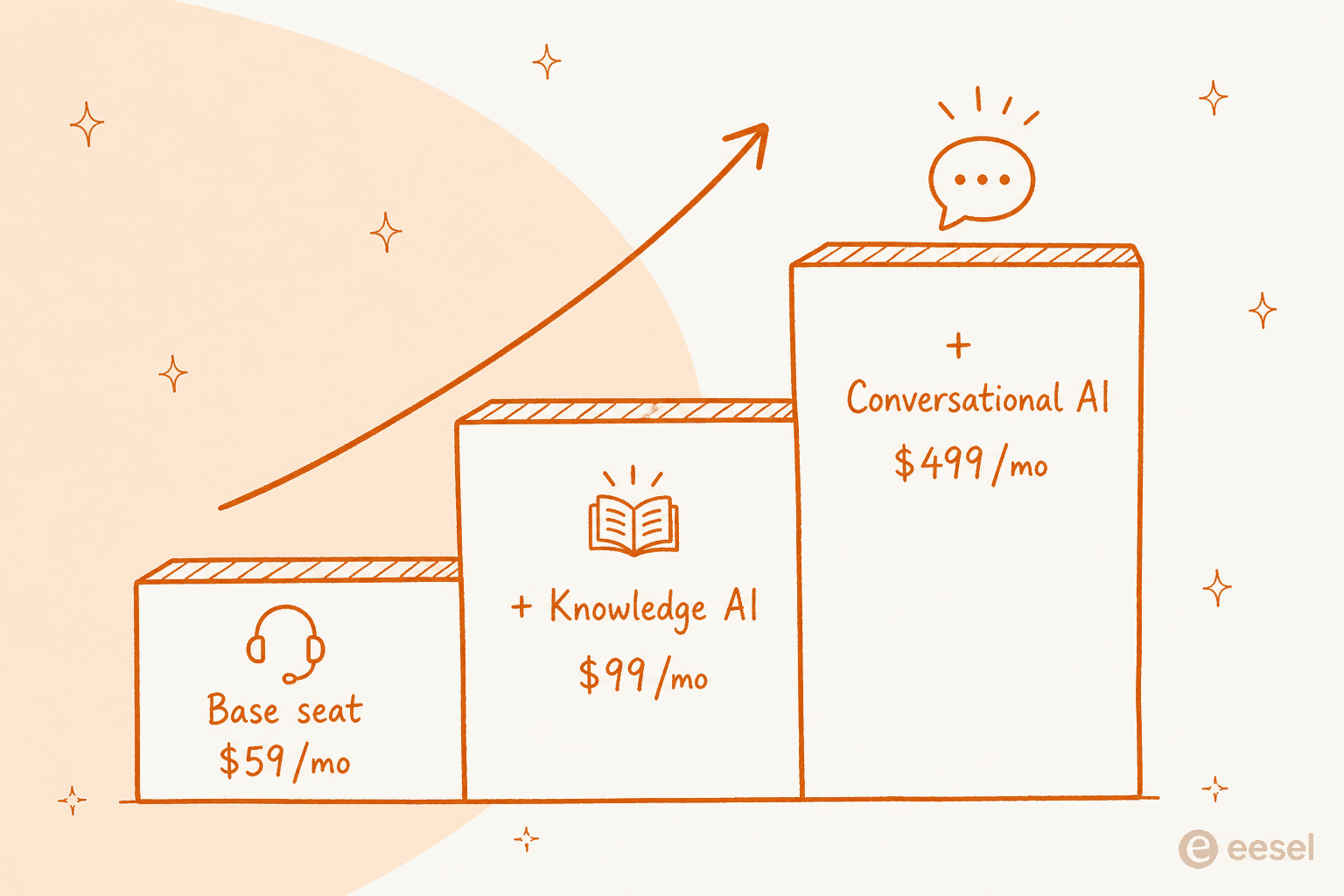
Stack it up and a Professional seat plus real conversational AI is comfortably north of $550/mo before you add SMS, phone, or the security pack. That is not outrageous for what it does, but it changes the math, and it is exactly the moment teams start comparing.
There is a deeper version of this that I hear on sales calls constantly. It is not really about price, it is about trust in the AI. One CX lead running around 7,000 tickets a month put the objection perfectly:
"The AI will never be able to answer 100% of the questions, but if it tries and just answers 'sorry I don't know this,' I cannot go and check all my 7,000 tickets to see if the AI actually made a good answer... I need an AI who is only handling the tickets that it's confident to handle and all the other ones, leave them alone."
That is the bar. When you shop for a LiveHelpNow alternative, the AI question is not "can it chat," it is "can I trust it to know what it does not know, and can I prove that before it talks to a customer." Keep that in mind for the whole list.
How I picked these alternatives
I have spent the last few years watching AI get rolled onto live support queues, including plenty of rollouts that looked great in a demo and then quietly gave a confident wrong answer in production. So the ranking below leans on the things that actually bite once you are live, not the feature-grid stuff.
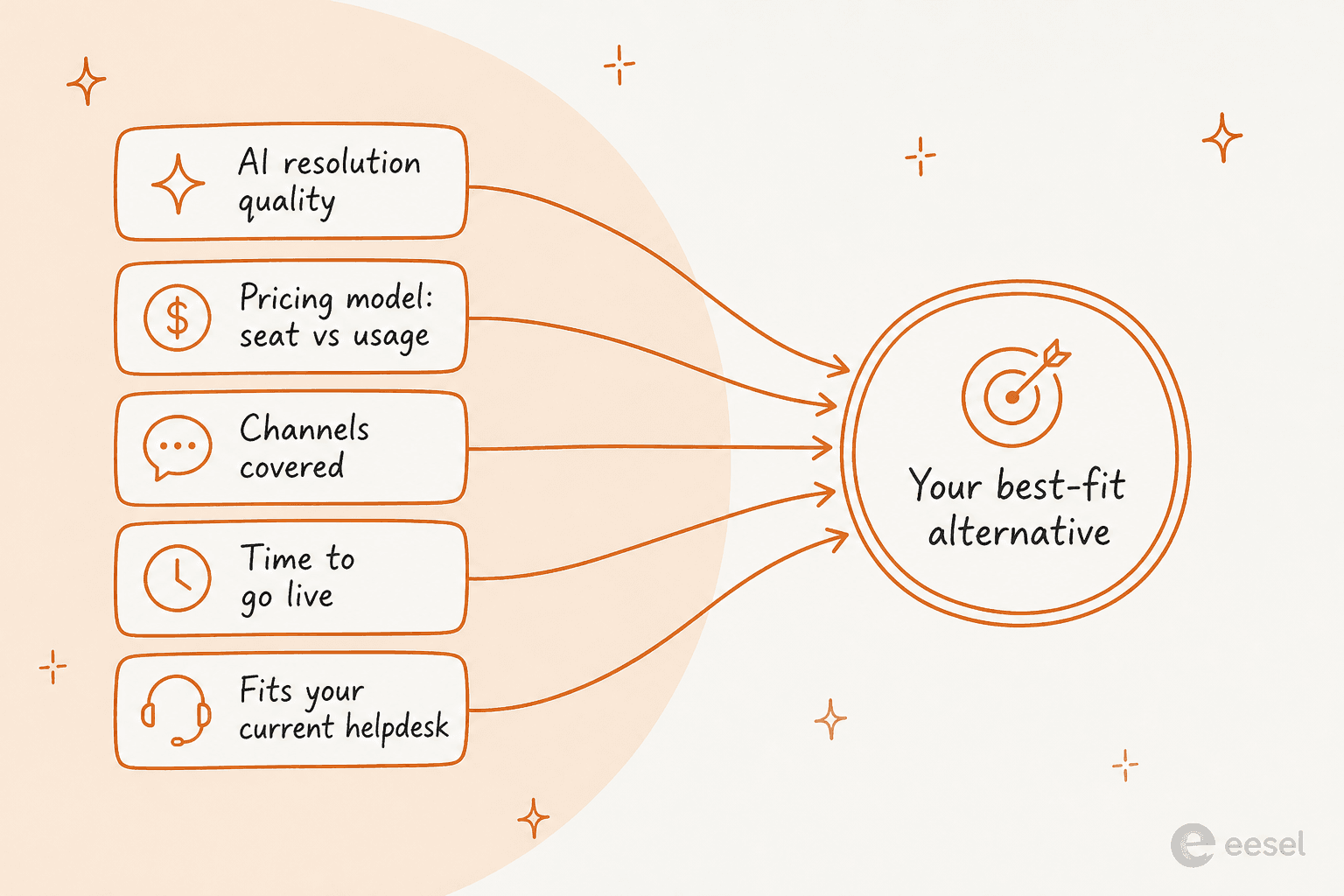
Five things I weighed:
- AI resolution quality, and whether you can test it first. A published resolution rate is nice; the ability to simulate on your own tickets before go-live is better.
- How the AI is priced. Per seat, per resolution, or per conversation. This is the number that decides your bill, so I called it out for every tool.
- Channels covered. Chat, email, SMS, WhatsApp, social, voice.
- Time to go live. A platform migration is a project; an AI layer on your existing stack can be a same-week thing.
- Whether it fits what you already run. Sometimes the best move is not replacing LiveHelpNow at all, just adding a smarter AI agent on top.
Here is the whole list at a glance before we go deep on each one.
| Tool | Best for | Starting price | AI pricing model | AI agent | Channels | G2 rating |
|---|---|---|---|---|---|---|
| eesel | Adding AI to your existing helpdesk | From $299/mo (500 credits) | 1 credit per ticket or chat | Yes, simulates on past tickets | Works across your connected helpdesk + chat, Slack, Teams | See reviews |
| Zendesk | Enterprise omnichannel | $19/agent (Support), $55 (Suite) | Per resolution (AI agents) | Yes | Email, chat, voice, social, WhatsApp | 4.3/5 |
| Freshdesk | Email-first SMB support | $19/agent (standalone) | Per session ($49/100) | Yes (Freddy) | Email, chat, phone, social | 4.4/5 |
| Gorgias | Shopify and ecommerce | $10/mo (50 tickets) | Per resolution ($0.90) | Yes | Email, chat, SMS, social | 4.6/5 |
| Help Scout | Simple shared inbox + KB | $50/mo (bundle) | Per resolution ($0.75) | Yes (AI Answers) | Email, chat, social, SMS | 4.4/5 |
| Tidio | SMB live chat + AI on any stack | Free, paid from ~$29 | Per conversation ($0.50) | Yes (Lyro) | Chat, WhatsApp, Instagram, Messenger | 4.6/5 |
| HubSpot Service Hub | Teams already on HubSpot CRM | $7/seat (Starter) | Per conversation (credits) | Yes (Breeze) | Email, chat, phone, SMS, social | 4.4/5 |
| Zoho Desk | Cost-conscious SMBs in Zoho | Free, paid from $7/user | Bundled by tier | Yes (Zia) | Email, chat, phone, social | 4.4/5 |
| Front | Collaborative shared inbox | $25/seat | Per conversation ($0.05) | Yes (Autopilot) | Email, chat, SMS, social, voice | 4.7/5 |
Now the detail.
1. eesel
Best for: teams that want to keep their current helpdesk and add a trustworthy AI teammate on top, without a migration.
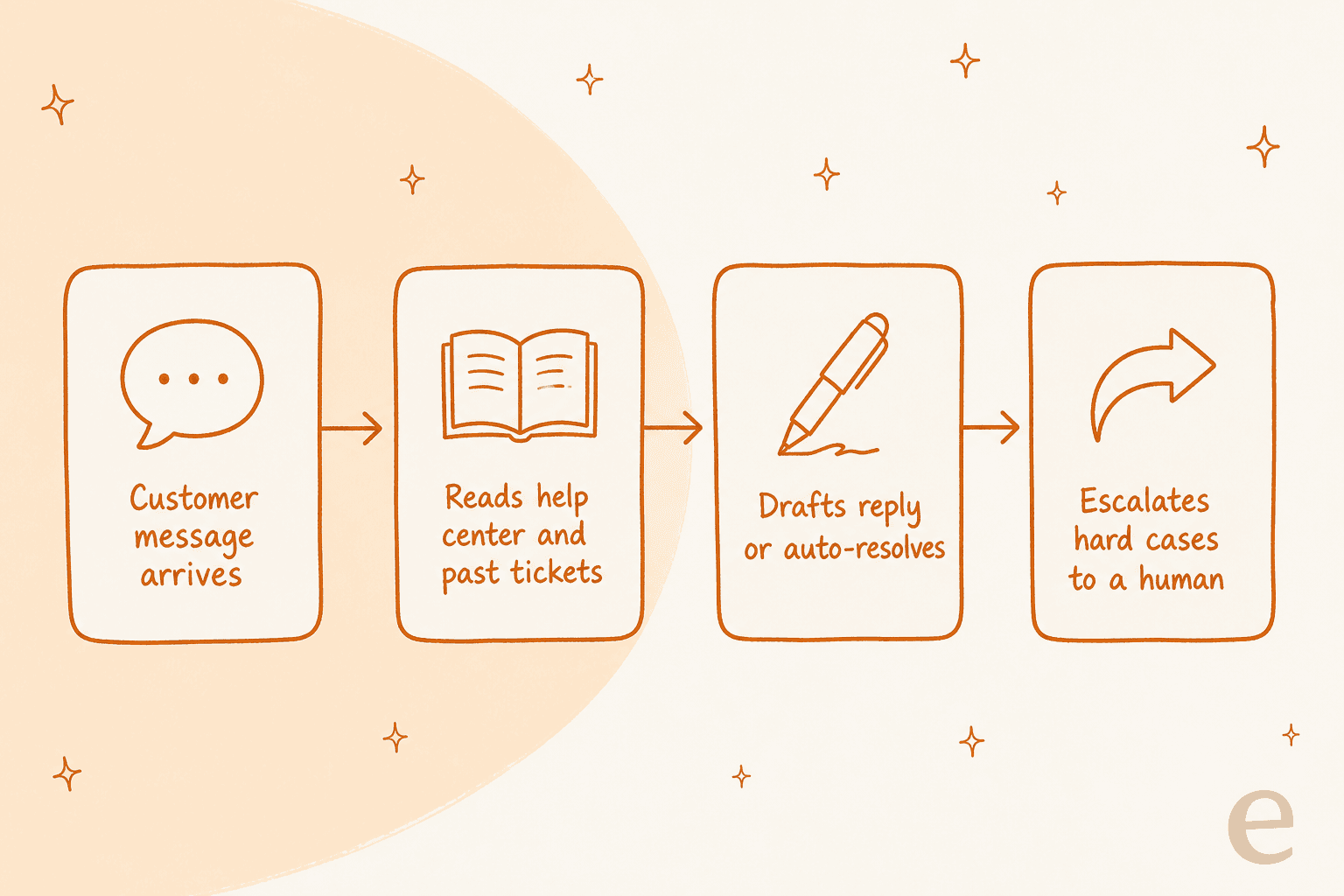
I build and run eesel, so treat this as the house pick, but the reason it leads is specific: it solves the exact objection from the section above. eesel is an AI helpdesk teammate you hire, not a platform you migrate onto. It plugs into the helpdesk you already run, learns from your help center and past tickets, and starts drafting and resolving.
The part that matters most for a LiveHelpNow refugee: before it ever talks to a customer, eesel simulates the agent on your historical tickets, so you see the resolution rate and the actual answers it would have sent. That is the "prove it before it goes live" bar that came up on the call above, and it is the piece most bolt-on AI, LiveHelpNow's hue included, does not give you.
Pros:
- Works on top of Zendesk, Freshdesk, Gorgias, Help Scout and Front, plus Slack and Teams, so there is no rip-and-replace.
- Simulation on your own past tickets means you set an accuracy bar before launch, not after.
- Billed on resolutions, so you pay for outcomes rather than idle seats.
- Real numbers behind it: eesel reports Gridwise resolving 73% of tier-1 tickets in the first month, and Smava running a fully automated agent on 100,000+ tickets a month.
- Most teams are live within about 30 minutes, no implementation project.
Cons:
- It is an AI layer, not a full helpdesk, so if you want to leave LiveHelpNow entirely and need a native ticketing UI, you still pair eesel with a helpdesk.
- It does not currently integrate with LiveHelpNow itself, so this is a "move your helpdesk to a supported one, then add eesel" play, or an add-on to one you are already on.
Pricing: one fixed monthly price with unlimited seats, from $299/month for 500 credits (1 credit per ticket or chat, however long). There is also a free plan with 100 credits, no card. Full details are on the pricing page.
Our take: if your live chat and knowledge base are fine and the real gap is a trustworthy AI customer service agent, this is the least disruptive upgrade on the list. If you need to replace the whole platform, pick one of the suites below and run eesel on top of it.
2. Zendesk
Best for: larger teams that want the most complete, enterprise-grade omnichannel platform.
Zendesk is the tool everyone benchmarks against. It does email, chat, voice, social and WhatsApp, a strong help center and knowledge base that can turn old tickets into articles, and AI agents that resolve autonomously. If LiveHelpNow started feeling small, Zendesk is the "grow into it" direction.
Pros:
- The most mature omnichannel suite here, with deep reporting and a huge app marketplace.
- Published customer proof, like Tesco growing self-service from 30% to 73% over three years.
- AI agents are priced per automated resolution, which is easier to reason about than a flat AI subscription.
Cons:
- The knowledge base and AI agents only start on the Suite Team plan at $55/agent/mo; the $19 Support Team plan does not include them.
- It is genuinely more tool than a small team needs, and the cost climbs quickly with add-ons.
- Buyers do push back on the native AI. As one CX lead at a healthcare platform told us, they had "kicked the tires in Zendesk AI solutions and found it largely inadequate and overpriced," which is a big part of why teams run a separate AI agent on top of Zendesk.
Pricing: Support Team from $19/agent/mo; Suite Team from $55/agent/mo (billed yearly), with a 14-day free trial.
Our take: the safe, complete choice for a scaling org, especially if you will layer a stronger AI agent over it. Overkill and overpriced for a two-person chat team.
3. Freshdesk
Best for: email-first small and mid-size teams that want a proven ticketing core.
Freshdesk started life as a shared-inbox ticketing tool, and email is still where it is strongest. Its AI, Freddy, splits into a customer-facing AI Agent, an agent-side Copilot, and leader-side Insights. It is trusted by 74,000+ businesses, and the free on-ramp is genuinely generous.
Pros:
- Mature email threading, SLAs and routing, not bolted on.
- A no-code Email AI Agent you can switch on when volume justifies it.
- Standalone plans are affordable, starting at Growth $19/agent/mo.
Cons:
- The AI Agent is consumption-priced: 500 free sessions, then $49 per 100 sessions, which can surprise high-volume teams.
- Copilot is a separate $29/agent line item on Pro and up.
- Community reports are honest about limits on complex tickets. One Reddit user found Freshdesk's AI "worked for very simple tickets but anything slightly complex got misclassified," and agents spent more time fixing errors than before.
Pricing: standalone Freshdesk Growth $19, Pro $55, Enterprise $89 per agent/mo (annual); the Omni suite runs $29/$79/$119. Freddy AI Agent is usage-based after the free 500 sessions.
Our take: a strong, affordable ticketing base. If you want the AI to handle more than the easy tickets, pair it with a dedicated agent on Freshdesk rather than leaning on Freddy alone.
4. Gorgias
Best for: Shopify and ecommerce brands that want support tied to revenue.
If you sell online, Gorgias is built for you in a way general helpdesks are not. Orders, customers and store data live natively inside the ticket, so the AI can edit an order or issue a refund inside the conversation. It claims to power 40% of Shopify brands, and its AI Agent is pre-trained on over a billion ecommerce conversations.
Pros:
- The cleanest Shopify integration on this list, plus BigCommerce, Magento and WooCommerce.
- AI Agent can take real store actions, not just answer FAQs.
- Ticket-based pricing means unlimited or high-cap users on most tiers.
Cons:
- It is priced on tickets, so costs climb with volume: Starter is $10/mo for 50 tickets, Advanced is $750/mo for 5,000.
- The AI Agent is a separate usage charge at $0.90 per resolved conversation on annual plans, and each AI interaction also counts as a billable ticket.
- Community consensus is it only pays off once a real chunk of tickets need Shopify actions; for pure FAQ deflection it can be pricey.
Pricing: Starter $10/mo (50 tickets) up to Advanced $750/mo (5,000 tickets), plus $0.90-$1.00 per AI resolution. See the best Gorgias alternatives if it is more than you need.
Our take: the clear winner if you are on Shopify and support is tied to orders. Not the right shape for a non-ecommerce team.
5. Help Scout
Best for: teams that want a clean, simple shared inbox with a solid knowledge base.
Help Scout is the anti-Zendesk: deliberately simple, fast to learn, and pleasant to use. It bundles a shared inbox, a Docs knowledge base, live chat via its Beacon widget, and a customer-facing AI called AI Answers. It is used by 12,000+ companies and lists SOC 2 Type 2 and HIPAA compliance.
Pros:
- Genuinely easy to set up and run, with the knowledge base included on every plan.
- AI Answers publishes a real average resolution rate of 73.19% and lets you set a monthly spend cap.
- Transparent AI pricing at $0.75 per resolution, with a resolution clearly defined.
Cons:
- It is a lighter platform, so very complex, high-volume workflows can outgrow it.
- Voice and SMS are integration-based rather than native.
- AI Answers trains on your knowledge base and web sources, but historical ticket transcripts are not listed as a training source, so it leans on your docs being good.
Pricing: paid plans bundle seats (Standard, Plus, Pro), with AI Answers as a $0.75 per resolution add-on and 3 months of free resolutions for new accounts.
Our take: my favorite "keep it simple" pick. If your knowledge base is strong and you want low overhead, it is a lovely tool; add an AI agent on Help Scout if you want resolution to draw on past tickets too.
Pick the line that sounds most like you. Your best-fit pick shows up below.
6. Tidio
Best for: SMB and ecommerce teams that want affordable live chat plus an AI agent you can run on any stack.
Tidio bundles live chat, ticketing and Flows automation with an AI agent called Lyro. The clever bit is that you can buy Lyro on its own and bolt it onto Zendesk, Salesforce or any other helpdesk, so it doubles as an AI layer the way eesel does. Lyro is powered by Claude plus Tidio's own models.
Pros:
- Lyro answers only from your support content to limit hallucinations, and bills per conversation, not per message.
- A published 67% average resolution rate with a money-back guarantee if it does not lift you to at least 50%.
- Very cheap to start: 50 free Lyro conversations, then $0.50 per conversation.
Cons:
- The cross-platform Lyro integrations require the Premium plan.
- It is aimed at SMBs, so the broader platform is lighter on enterprise controls.
- Multilingual is "dozens of languages" but tied to your content, and auto language detection is not clearly documented.
Pricing: free plan, paid plans from roughly $29/mo, and Lyro at $0.50 per conversation after 50 free. See the best Tidio alternatives for a wider look.
Our take: the best value for a small team that wants both a chat widget and a usage-priced AI agent in one place. The standalone Lyro is a smart way to test AI on your current helpdesk cheaply.
7. HubSpot Service Hub
Best for: teams already living in the HubSpot CRM.
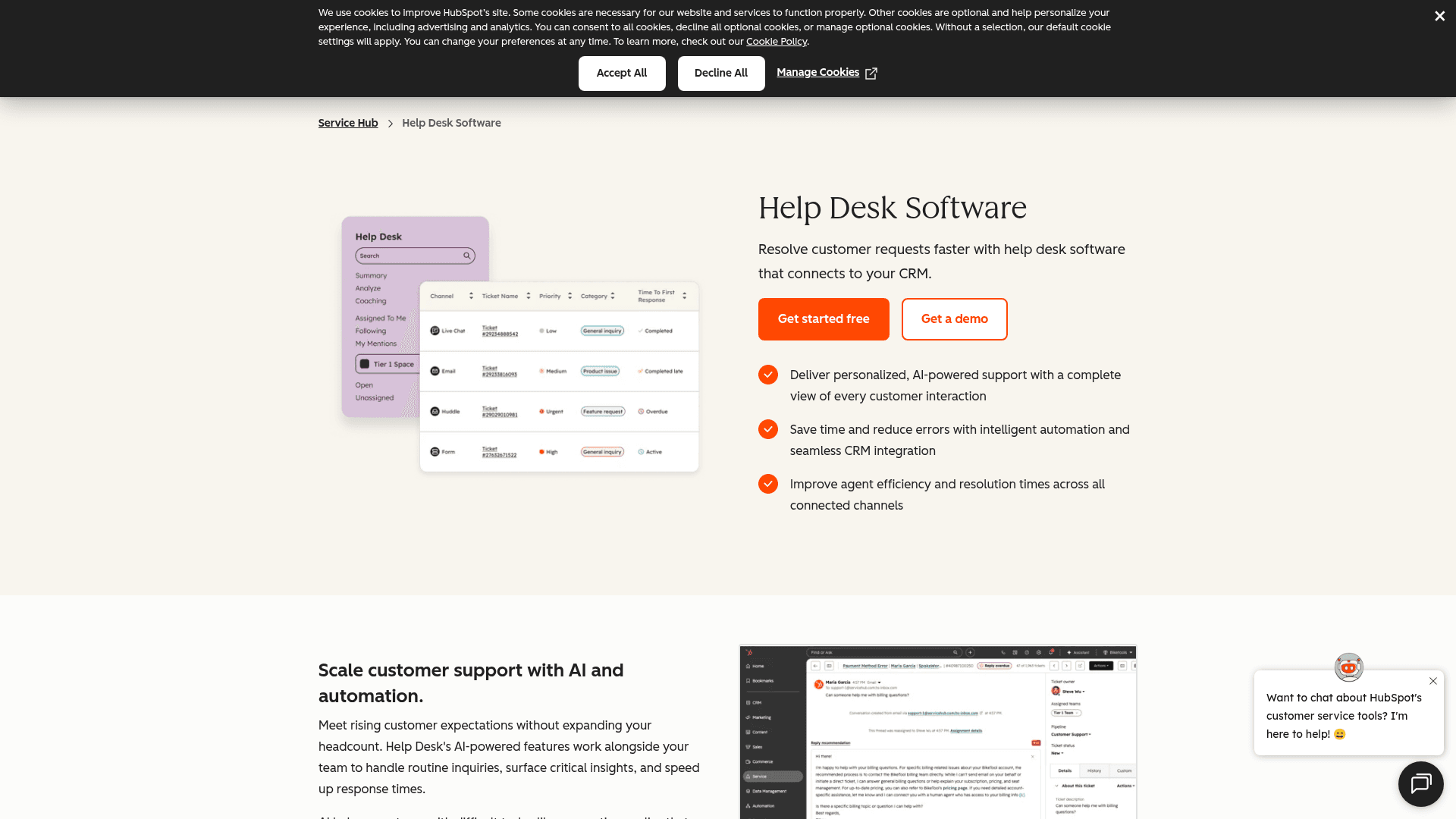
HubSpot Service Hub turns HubSpot's CRM into a support tool: help desk, knowledge base, live chat, surveys, and an AI agent called Breeze, all sharing the same customer record as your sales and marketing data. If you already run HubSpot, the pull is obvious.
Pros:
- Every support interaction sits on the same record as sales and marketing, which is great for retention plays.
- Solid help desk workspace with routing, SLAs and macros.
- HubSpot reports a 57% increase in ticket close rate after six months.
Cons:
- The help desk workspace, knowledge base and Breeze Customer Agent only start on Professional at $90/seat/mo, with a $1,500 one-time onboarding fee.
- Enterprise is $150/seat plus a $3,500 onboarding fee, so it gets expensive fast.
- Reviewers note the knowledge base customization is limited and cost is hard to justify as you scale.
Pricing: Free, Starter $7/seat, Professional $90/seat (+$1,500 onboarding), Enterprise $150/seat (+$3,500 onboarding). Breeze Customer Agent is metered at 50 credits ($0.50) per resolved conversation.
Our take: worth it if you are already a HubSpot shop and want support on the same platform. If you are not, the CRM lock-in and onboarding fees make it a hard sell versus a lighter tool.
8. Zoho Desk
Best for: cost-conscious SMBs already in, or heading into, the Zoho ecosystem.
Zoho Desk is the value play: a deeply omnichannel help desk inside the wider Zoho suite, used by 125,000+ companies, with pricing that undercuts nearly everyone. Its AI, Zia, can turn past tickets into knowledge base articles and surface answers to agents.
Pros:
- Very affordable, with a free tier for 3 users and paid plans from $7/user/mo.
- Deep omnichannel and a knowledge base that auto-translates into 50+ languages.
- Zoho claims it can be implemented 50% faster than competitors.
Cons:
- The strongest AI, the native Answer Bot and full Zia assistant, is gated to the Enterprise plan at $40/user/mo.
- On lower tiers, generative AI requires you to connect your own OpenAI API key.
- Reviewers repeatedly flag a learning curve and a cluttered UI.
Pricing: Free (3 users), Express $7, Standard $14, Professional $23, Enterprise $40 per user/mo (billed annually).
Our take: the best raw value on the list, especially if you already use Zoho apps. Just know the good AI lives on the top tier or behind your own API key.
9. Front
Best for: teams that want a collaborative shared inbox for complex, cross-team work.
Front is built around the shared inbox, and it is excellent at killing the CC-and-forward chaos of a team managing one queue together. It brings email, chat, SMS, social, WhatsApp and voice into one collaborative workspace, with ticketing, rules and SLAs, plus a "Front AI" suite. It holds a strong 4.7/5 across ~2,466 G2 reviews.
Pros:
- The best collaborative inbox here, loved for shared assignment and internal comments.
- Autopilot, its autonomous AI agent, can be tested via simulation and markets up to 70% resolution.
- Autopilot AI is cheap per unit at $0.05 per conversation.
Cons:
- Pricing is the top complaint, and it is complicated. Full assistive AI on the Professional plan ($65 + $20 Copilot + $20 QA + $10 CSAT) actually costs more per seat than Enterprise, where those are bundled.
- Costs escalate as the team grows.
"Extremely overpriced, and the pricing is very complicated. They ask you to pay separately for features."
Pricing: Starter $25/seat, Professional $65/seat, Enterprise $105/seat (billed annually), with AI add-ons on top (Autopilot from $0.05/conversation). You can also run a dedicated AI agent on Front.
Our take: the pick for teams whose real problem is collaboration, not FAQ deflection. Watch the add-on stacking, and price out Enterprise before you load up on AI on Professional.
Try eesel
If the reason you are reading this is the AI ladder, not the live chat, the fastest fix is not a migration at all. eesel drops an AI support teammate into the helpdesk you already run, learns from your knowledge base and past tickets, and is live in minutes.
The one thing I would point to over everything else: you can simulate it on thousands of your real past tickets and see the exact resolution rate and answers before it ever replies to a customer. That is the "prove it before go-live" test that the CX leads I talk to actually care about, and it has one fixed monthly price with unlimited seats, from $299/month for 500 credits. It is free to try with 100 credits.
Frequently Asked Questions
What is the best LiveHelpNow alternative in 2026?
How much does LiveHelpNow cost compared to the alternatives?
Which LiveHelpNow alternative has the best AI agent?
Do I have to replace LiveHelpNow to get better AI?
What should a small team look for in a LiveHelpNow alternative?


Article by
Riellvriany Indriawan
Riell is a designer and writer at eesel AI with about two years of experience researching CX platforms, AI chatbots, and helpdesk software. She combines her design background with a sharp eye for how these tools actually look and feel in practice — making her comparisons unusually visual and user-focused.