What an AI knowledge base for logistics actually is
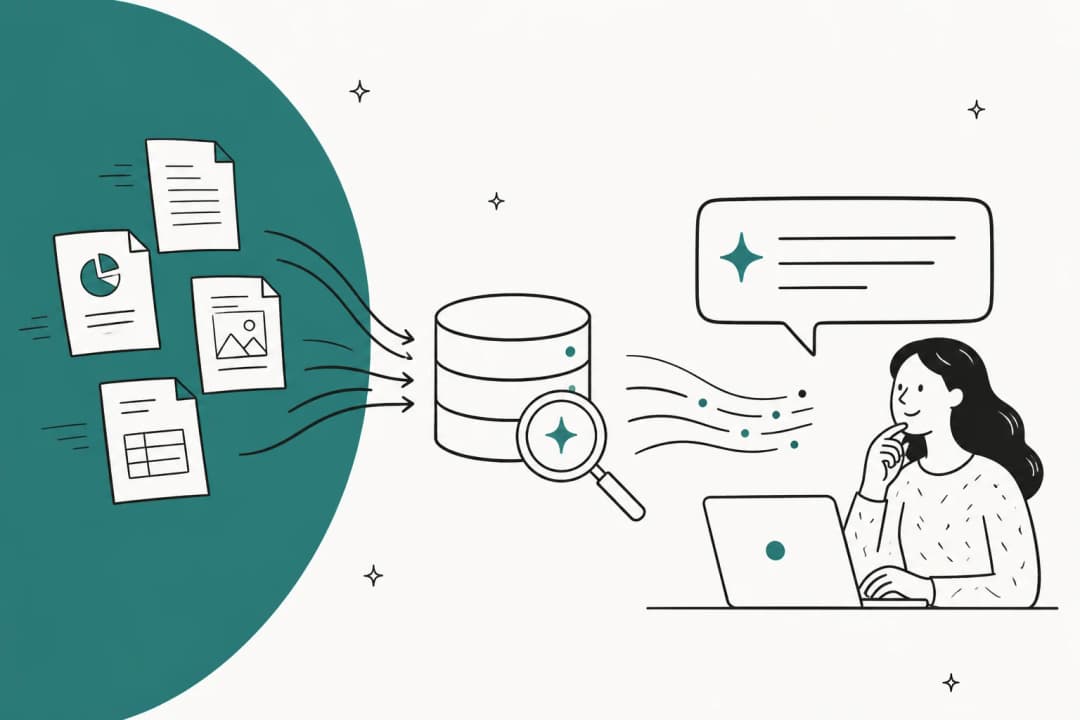
A knowledge base used to mean a help center: a pile of articles a customer (or an agent) reads and applies themselves. An AI knowledge base flips that. Instead of returning ten articles ranked by keyword, it reads everything you've got, your help center, internal SOPs, runbooks, and crucially your past resolved tickets, and writes the one answer this specific customer needs, in their language.
The "past resolved tickets" part is the bit people skip, and it's the most valuable, and it's why I'd weigh AI knowledge base tools on what they learn from, not just what they store. Your help center documents how things are supposed to work. Your resolved tickets document how your team actually answers the weird stuff: the customs hold wording, the "we'll reship and waive the fee" judgment call, the exact tone you use when a pallet is late. Training on that history is what turns a generic bot into one that sounds like your team.
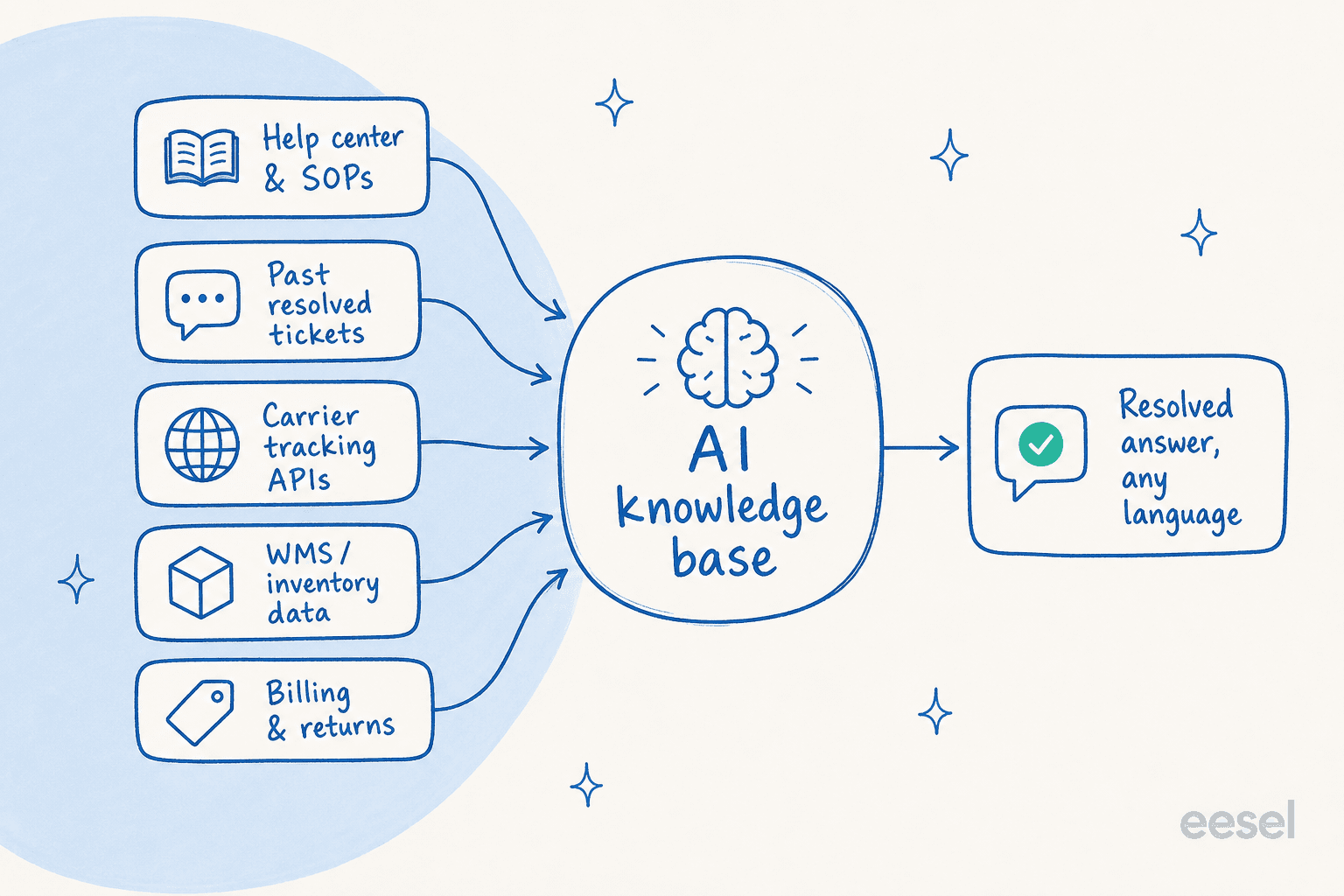
The reason this matters more in logistics than almost anywhere else comes down to one structural fact: most of your questions can't be answered from documents alone.
Why a static knowledge base falls short in logistics
Here's the test I'd apply to any "AI knowledge base" a vendor shows you: ask it where a specific shipment is. If it can only quote your shipping policy back at you, it's a search box with better manners, not a support agent.
In most industries, a static help center covers the bulk of tier-1 questions, password resets, how-to steps, policy clarifications. Logistics is the exception. The dominant ticket categories are about state: where's my parcel, how much stock is in your warehouse, why was I charged this, has my claim been processed. None of those answers sit in a document. They sit in a carrier's tracking system, your warehouse management system, or an accounting platform, and they change constantly.
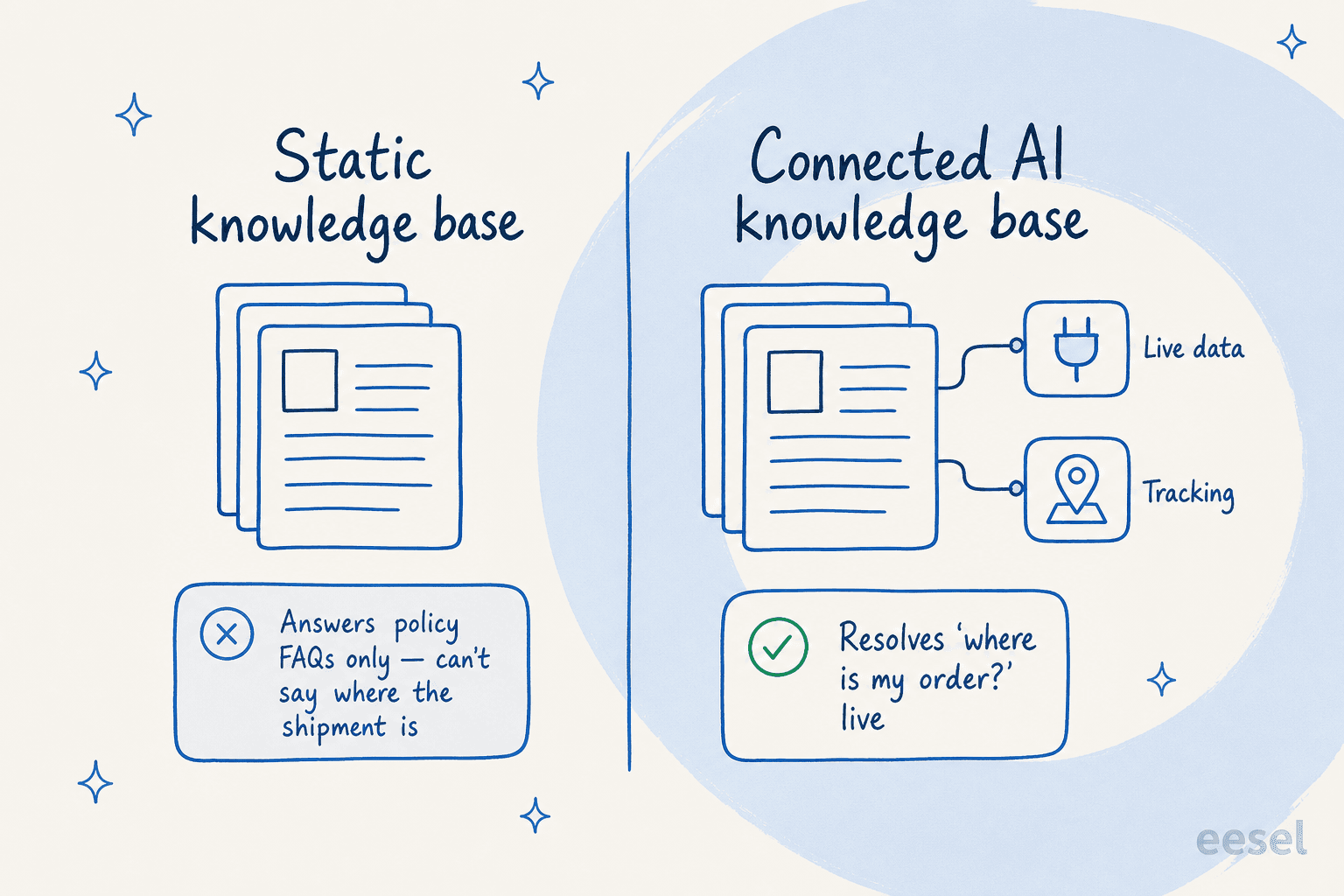
This is why so many logistics teams feel let down by their first AI rollout. They connected their help center, watched the bot answer "what's your returns window?" beautifully, and then watched it faceplant on the actual flood, the WISMO tickets. The fix isn't a better-written help center (though spotting outdated help content still matters). It's connecting the knowledge base to live data so it can answer the questions people actually ask.
The 3PL operators I've read make this point better than I can. Before they had real-time visibility, support was a manual data-retrieval job:
"Having your customers being able to access a portal and see what's happening is a huge reduction in communication on our end. They can go get the answer rather than asking Alex to go access the data, download the data, send it in an email."
Greg Cate, Owner, C&C Warehouse
An AI knowledge base is the chat-and-email version of that portal: the customer asks in plain language, and the AI does the "access the data, send it" loop instantly.
The ticket categories an AI knowledge base can actually handle
Not every logistics ticket is automatable, and pretending otherwise is how you end up with an angry customer and a confidently wrong bot. Here's how the main categories break down, ranked by volume, with an honest read on what each one needs.
| Ticket category | Share of volume | What it needs to resolve | AI-resolvable today? |
|---|---|---|---|
| WISMO / tracking | 30-40% | Live carrier API lookup | Yes, with a tracking integration |
| Delivery exceptions (delay, failed attempt) | 15-20% | Live status + judgment | Partly, AI triages, humans handle the hard ones |
| Inventory & stock visibility (3PLs) | 10-15% | Live WMS query | Yes, with a WMS connection |
| Claims (loss / damage / late) | 10-15% | Multi-step workflow + docs | Partly, AI can initiate and chase |
| Invoice & billing disputes | 8-12% | Accounting lookup + policy | Partly |
| Onboarding & configuration | 8-12% | SOPs + help docs | Yes, this is classic KB territory |
| Returns & exchanges | 5-10% | Eligibility check + label gen | Yes, with a returns integration |
Source for the volume bands: LateShipment.com and Sendcloud.
The pattern is clear. The high-volume, repetitive categories at the top, tracking, stock status, returns, are exactly the ones an AI knowledge base can take off your plate, provided it's connected to the right system. The lower-volume, higher-judgment categories, complex exceptions and multi-party claims, are where you want the AI to triage and draft rather than auto-send.
That split is the whole game. The goal isn't 100% automation, it's clearing the predictable flood so your humans get the complex exceptions. When brands deploy proactive tracking on top of this, the numbers get serious: LateShipment.com reports up to 72% fewer delivery-related support contacts once customers can self-serve their shipment status.
Claims and billing deserve a special mention, because they're where the money hides. Brands auditing carrier invoices recover 6-20% of annual shipping spend across dimensional-weight errors, duplicate charges, and SLA-failure refunds. And on the claims side, support automation can deliver 8x faster claims resolution. One Sendcloud customer put the relief plainly:
"Sendcloud is a magic wand that helps you remove the thorns from your feet on all transport subjects, especially when it comes to invoicing and transport claims."
Cheerz, via Sendcloud
How to build one that doesn't hallucinate a delivery date
This is the part that keeps logistics ops leads up at night, and rightly so. A wrong answer about a returns window is annoying. A wrong answer about where a $40,000 freight shipment is, or a made-up customs clearance status, is a relationship-ending mistake. A CX lead at a DTC supplements brand summed up the only sane operating principle to our team: the AI will never answer 100% of questions, so you want one that only handles the tickets it's confident about and leaves the rest alone.
That's not a limitation to apologize for, it's the design. Here's the mechanism that makes it safe.
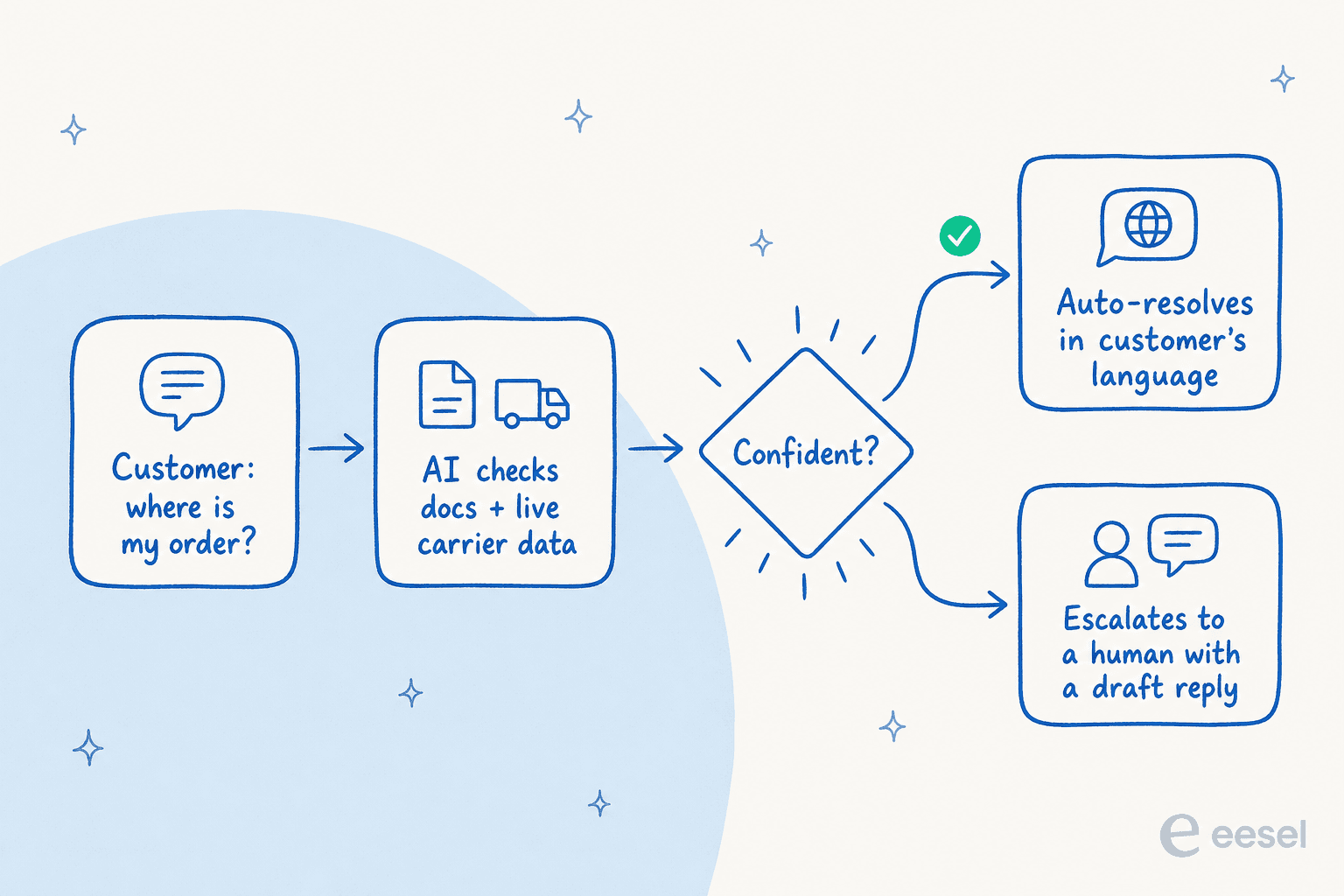
Confidence-based routing. When the AI isn't sure, it doesn't guess. It either drafts a reply for a human to approve or routes the ticket onward. You set the bar: easy, high-confidence categories (WISMO, stock status) can auto-send; anything ambiguous becomes a tier-1 deflection draft instead of a live reply. This is the single most important setting in any logistics deployment.
Simulation before go-live. Before the AI touches a real customer, run it against your last few thousand resolved tickets and see exactly what it would have said. You get coverage by theme, where it's strong, where it's thin, and you fill the gaps before launch instead of discovering them in production. We built simulation mode precisely because we'd watched confident-sounding bots quietly give wrong answers, and the only cure is testing against history first.
Grounding in your real knowledge. The AI answers from your connected sources, not from the open internet. If the answer isn't in your docs, tickets, or connected systems, it says so and escalates, rather than improvising. That's the difference between training AI on your knowledge base and pointing a generic chatbot at your website.
Community sentiment lines up with this cautious-by-default approach. Supply chain practitioners are refreshingly unsentimental about where AI helps and where it doesn't:
"For certain product categories with stable demand patterns the accuracy improvement was noticeable. But for anything with seasonal spikes or external disruption factors like port delays or raw material shortages, the models still struggled without a lot of manual intervention."
rockweller, r/supplychain

The lesson transfers directly to support: let AI own the stable, repetitive queries with full confidence, and keep humans on the disrupted, non-standard ones.
What to watch out for
A few traps I'd flag before you sign anything:
- Integration depth decides everything. An AI knowledge base that connects to your help desk but not your carrier or WMS can only answer policy questions, which leaves the 30-40% WISMO flood untouched. Ask specifically how it pulls live tracking and inventory data before you judge its deflection rate.
- Peak-season pricing. Logistics volume isn't steady; it spikes 3-5x in peak season (CartonCloud). A per-resolution pricing model bills you the most at exactly the worst moment. Usage-based or flat models are kinder to a seasonal business.
- Multilingual reality. Cross-border shipping means cross-border customers. If your tool only handles a handful of languages, you'll still be staffing for the rest. A capable AI knowledge base chatbot answers in the customer's language off your existing ticket history, no separate multilingual team required.
- Don't over-automate exceptions. The temptation is to point the bot at everything. Resist it. Auto-resolve the predictable, draft-and-route the rest. An escalation path that's clean and fast beats a deflection rate that looks great until a customs hold goes sideways, the kind of workflow automation judgment that separates a useful rollout from a risky one.
Try eesel for your logistics knowledge base
If you're running support on Zendesk, Freshdesk, Gorgias, Salesforce, Front, or Help Scout, eesel layers an AI knowledge base on top without ripping anything out, across 100+ integrations. It learns from your help center, SOPs, and past tickets on day one, answers in 80+ languages, and, the part that matters for logistics, you can simulate it on your historical tickets before it ever replies to a customer, so you see the coverage and the gaps up front.

It's the same setup that powers AI support at CartonCloud across 717 knowledge items, helped intralogistics firm viastore connect knowledge for its internal teams, and helped Gridwise resolve 73% of tier-1 requests in the first month. Pricing is usage-based from $0.40 per ticket with no per-seat fees, which keeps the bill sane when peak season hits. You can wire it up and run a simulation on your own tickets for free, no credit card, before deciding whether the answers are good enough to ship.
Frequently Asked Questions
What is an AI knowledge base for logistics?
How much does an AI knowledge base for logistics cost?
Can an AI knowledge base answer "where is my order?" questions?
What's the difference between a static knowledge base and an AI knowledge base?
How do you stop an AI knowledge base from giving wrong shipping information?


Article by
Alicia Kirana Utomo
Kira is a writer at eesel AI with a Computer Science background and over a year of hands-on experience evaluating AI-powered customer service tools. She focuses on breaking down how helpdesk platforms and AI agents actually work so that support teams can make better buying decisions.