


Start with the unit, not the seat. I sit in a support queue most days, and after watching a lot of teams shop this category, that is the one thing I would put on a sticky note. The seat price is the small number on the invoice now. Every platform below ships an AI agent. Each one counts it differently: per ticket, per session, per automated interaction, per engaged conversation, per credit. One customer conversation, and the charge can vary by 4x depending on whose meter is running.
The short version, then. Zendesk remains the most complete platform here and the hardest to forecast, because it stopped publishing any price for an automated resolution. Freshdesk at $55 packs in the most AI per dollar. Gorgias: right for a Shopify store, wrong for a conversational queue, since $0.85 to $1.00 per automated interaction means a four-message thread bills four times. Help Scout at $25 a seat is the kindest option for a small team, and it has the strictest definition of a billable resolution of anyone. Complex cross-team work goes to Front. And Zoho Desk at $7 is the cheapest ticketing system I would actually recommend.
One more path that most roundups skip. If the tool your team already knows is fine and only its AI disappoints, you do not have to migrate at all. eesel sits on top of Zendesk, Freshdesk, Front, Help Scout and the others, learns from your past tickets, then charges one credit for each ticket it handles, from $299 a month for 500 credits. No seat fee. The 100 free credits are the cheapest way to find out whether AI helps your queue before you tear the queue out.
What customer service management software actually covers in 2026
The category used to be simple. A place for incoming email to land, a way to assign it, a report at month end. That is still what most buyers picture when they say customer service management software, and honestly it is still what most vendor pages sell.
What you buy in 2026 is four layers sitting on top of each other. The conversation layer first, which is either a ticket queue or a shared inbox depending on how the vendor thinks about support. Then the knowledge layer, so a help center plus an internal knowledge base and your macros. Then operations: routing rules, SLAs, escalation paths. And on top of all of it now, an AI layer that reads, drafts, tags, and increasingly just sends.
That fourth layer is new enough that nobody has settled on how to charge for it, which is exactly why buying is harder than it was two years ago. When I look at a help desk now, the first thing I check is not the feature grid. It is the unit.
Worth saying what is out of scope here too. This is a roundup of platforms your team works inside all day, so it is not the same list as my AI customer service tools roundup, and it does not cover internal IT ticketing, which has its own buying logic.
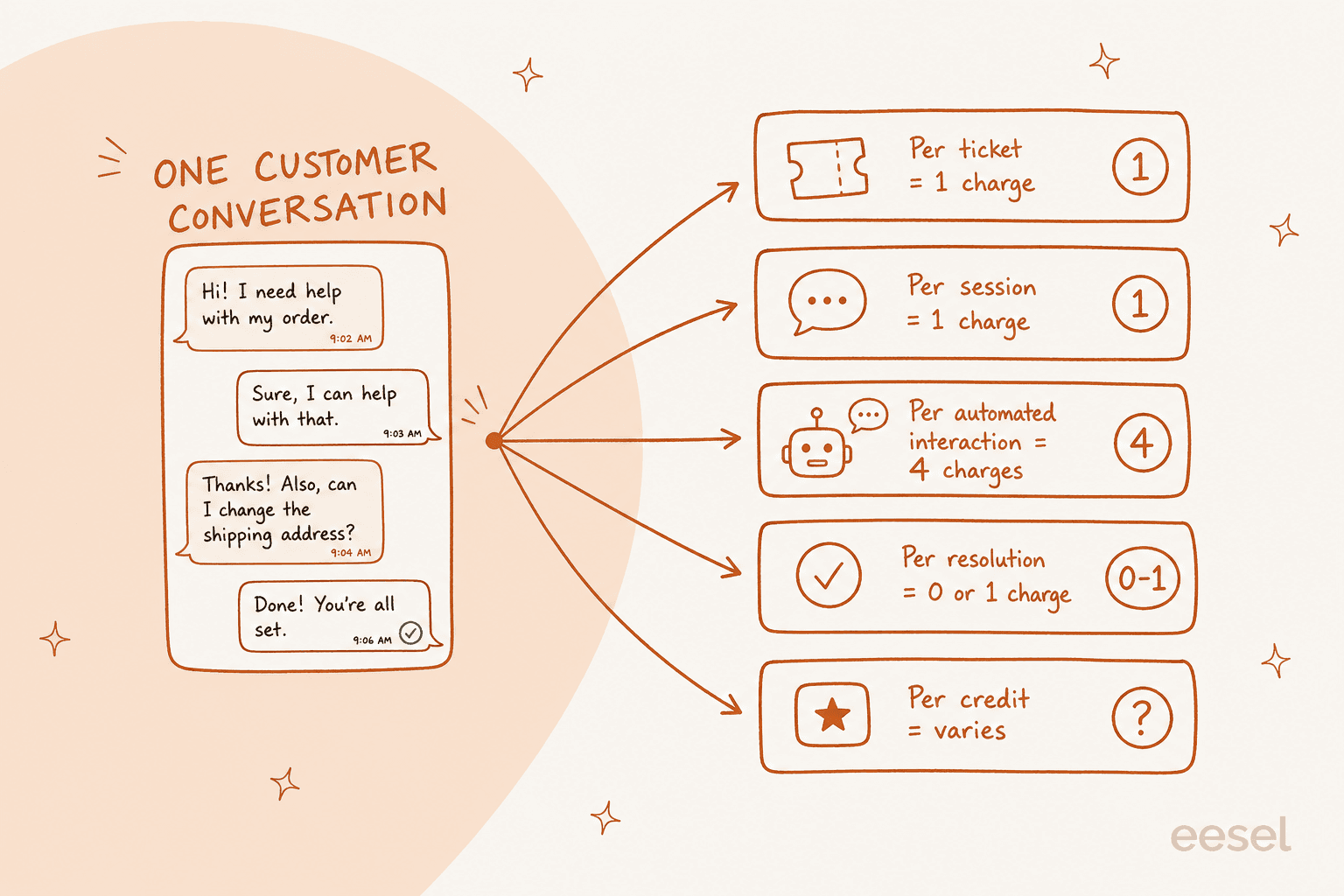
Here is the concrete version of that picture. A customer writes in about a late order. Your AI answers, they ask a follow-up, it answers again, they say thanks. That is one conversation. Zendesk might count it as one automated resolution, or zero if the customer escalated. Freshdesk counts it as one session. Gorgias counts it as three or four automated interactions. Kustomer counts it as one engaged conversation. eesel counts it as one ticket. Same work, and the bill can differ by 4x.
How I picked these ten
I run a support queue for a living, so my bias is toward tools an agent can actually work in at 4pm on a Friday. That said, this roundup is built on research, not vibes, and the rules were the same for every tool:
- Live pricing only. Every dollar figure here was pulled from the vendor's own pricing page on 27 July 2026. Where a vendor has stopped publishing a number, I say so rather than reusing a stale one.
- The AI billing unit gets named explicitly. If a vendor bundles AI, I say what counts as one charge.
- Real product UI. Every tool below shows an actual screen from the product, not a marketing render.
- User voice with a link. Where I quote an operator, the permalink is there so you can read the thread yourself.
- No padding. Ten tools, all of which a real team could plausibly run on. I skipped the AI point solutions that cannot hold a queue, and the ticket deflection widgets that are a feature rather than a platform.
One thing I did not do is score them out of ten. Different teams break in different places, and a tool that is perfect for a 400-ticket Shopify store is miserable for a 40-agent B2B team.
Customer service management software compared at a glance
The AI billing unit column is the one to read first. It is the difference between a predictable invoice and a nasty February.
| Tool | Entry seat price | Top self-serve seat | AI billing unit | Published AI rate | Free tier | Best for | Security highlights |
|---|---|---|---|---|---|---|---|
| eesel AI | No seat fee | No seat fee | Per credit (1 per ticket) | From $299/mo for 500 credits | 100 free credits, no card | Adding AI to your current helpdesk | SOC 2 Type II certified, HIPAA on request, no training on your data |
| Zendesk | $19 (Support Team) | $115 (Suite Professional) | Automated resolution | Not published | 14-day trial | Large, multi-channel operations | SSO, sandbox, custom agent roles, HIPAA on Enterprise |
| Freshdesk | $19 (Growth) | $89 (Enterprise) | Freddy AI Agent session | $0.49 (after 500 free) | Trial only, no free plan | Most AI included per dollar | Audit logs, IP allowlisting, sandbox on Enterprise |
| Gorgias | $40/mo flat (Starter) | $1,430/mo (Advanced) | Automated interaction | $0.85-$1.00 | Trial only | Shopify stores doing order ops | SSO (SAML), SCIM, audit logs on Pro+ |
| Help Scout | $25 (Standard) | $75 (Pro) | AI Answers resolution | $0.75 | Free for 5 users | Small teams that want email feel | HIPAA on Pro, SSO/SAML on Pro |
| Front | $25 (Starter) | $105 (Enterprise) | Autopilot conversation | From $0.05 | 14-day trial | Complex cross-team operations | Enterprise-grade controls on top tier |
| HubSpot Service Hub | $7 (Starter) | $150 (Enterprise) | Breeze credit | $0.009/credit, ~$0.45/resolution | Free tier, 2 users | Teams already in HubSpot CRM | Standard HubSpot enterprise controls |
| Zoho Desk | $7 (Express) | $40 (Enterprise) | Bundled, or your own LLM key | No published rate | Free for 3 users | Cheapest real ticketing | KSA and regional data centres, sandbox |
| Salesforce Service Cloud | $25 (Starter Suite) | $550 (Agentforce 1) | Agentforce conversation | $2.00, or Flex Credits | Trial only | Enterprises standardised on Salesforce | Full Salesforce compliance stack |
| Kustomer | Not published | Not published | Engaged conversation | $0.60 | Not published | CRM-style conversation history | HIPAA at $25/user/mo extra |
All seat prices are per user per month on annual billing unless noted. Gorgias does not sell seats, so its numbers are whole-plan prices.
Work out what the AI layer will actually cost you
Plug in your own volume. This compares only the AI usage layer at each vendor's published rate, so seats are excluded, and it assumes you are past any bundled allowance.
At 1,000 conversations a month with three AI replies each, Freshdesk lands near $245, eesel $499, Help Scout $750, Agentforce $2,000, and Gorgias $2,700. Front's $0.05 floor (the triage rate; handoffs are $0.39 and full resolutions $0.89) prices out lowest of all, which is precisely why I would treat it as a starting quote rather than a rate. Nobody's feature list moves the needle as hard as the unit does.
1. eesel AI
Best for: teams whose helpdesk is fine but whose helpdesk AI is not.
I should be upfront: I work at eesel, so treat my enthusiasm accordingly and go check the pricing page yourself. But the reason it sits first is not loyalty, it is that it answers a question none of the other nine do. Every tool below asks you to move your team onto its platform to get its AI. eesel does not have a platform to move onto. It connects to the helpdesk you already run, reads your past tickets and help center, and starts drafting or sending inside that tool.

The practical version: you connect Zendesk or Freshdesk or Front, point it at your knowledge sources, and run it in draft mode where it leaves suggested replies as internal notes. Nothing customer-facing happens until you flip it. That draft-first path is the reason I trust it on my own queue, and it is the pattern I would want from any vendor selling AI into a live support team.
The billing is the other differentiator. It is one fixed monthly price, and one ticket is one credit no matter how many replies it takes. There is no seat fee and no platform fee. If your AI only handles 200 of your 1,000 monthly tickets, you only use 200 credits, and you can size the plan down.
Pricing
| Item | Price | Notes |
|---|---|---|
| Free plan | 100 credits, no credit card | Every feature unlocked; agents pause when credits run out |
| Teammate, 500 credits | $299/month | 1 credit = one ticket or chat, any number of replies |
| Teammate, 1,000 credits | $499/month | Same |
| Teammate, 2,500 credits | $999/month | Same |
| Teammate, 5,000 credits | $1,899/month | Same; above 5,000, talk to us |
| Blog post | $4.00 each | Per post draft |
| Pay a year upfront | Two months free | Annual |
| Add-ons | SSO and MFA from $199/month | Priority support from $299/month, data residency $500/month |
Pros
- No migration. It runs on your current customer service management stack.
- Credit billing that does not punish long threads.
- Simulation against historical tickets before anything goes live.
- Optional overage with a monthly cap you set, so the bill cannot surprise you.
Cons
- It is a layer, not a helpdesk. If you do not have one yet, you still need one from this list.
- No native Zoho Desk integration, so Zoho teams have to sit it in front of the queue rather than inside it.
- Tasks are billed even when the answer is not perfect, which is honest but worth budgeting for.
"In the first month, eesel is resolving 73% of our tier 1 requests... results quickly during our 7-day trial."
Kim Simpson, Gridwise, on the first month after going live
Verdict: if you already run Zendesk, Freshdesk, Front, Help Scout, Gorgias, HubSpot or Salesforce and the native AI has disappointed you, this is the cheapest test you can run. If you are shopping for your first helpdesk, come back to this after you have picked one.
2. Zendesk
Best for: large support operations that need every channel, every governance control, and have someone whose job is to configure them.
Zendesk is still the most complete thing in this category, and I say that as someone who finds it exhausting to administer. Nothing else covers email, messaging, voice, social, side conversations, skills-based routing, sandbox environments and custom agent roles this thoroughly. If your support org has a dedicated ops person, Zendesk rewards them.
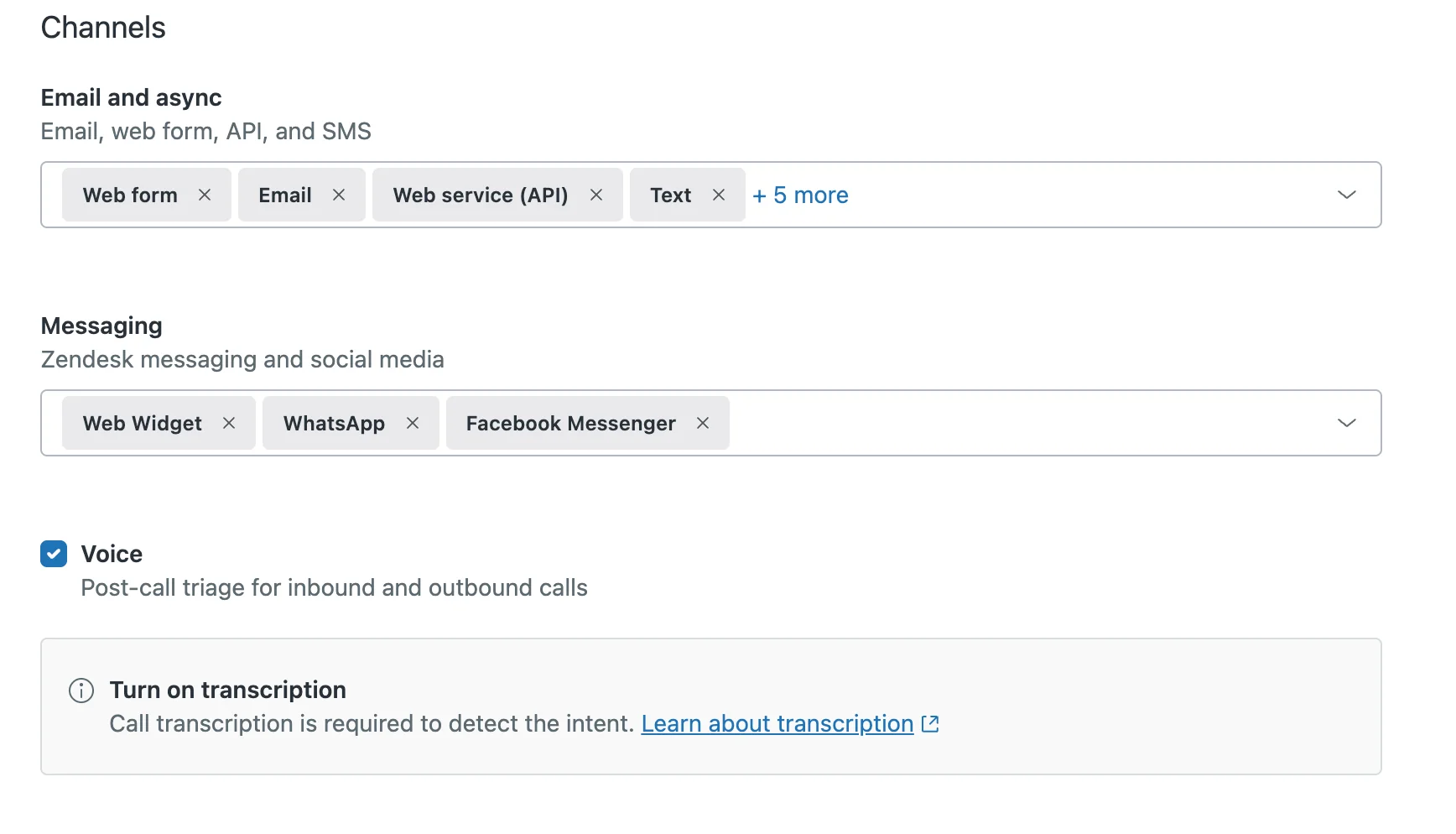
The 2026 lineup is Support Team at $19, Suite Team at $55, Suite Professional at $115, and a renamed top tier called Suite Enterprise + Copilot that is quote-gated. Copilot as a standalone add-on is $50 per agent per month, so a Suite Professional seat with Copilot is $165. Full breakdown in my Zendesk pricing guide.
Here is the part I would flag to any buyer. Zendesk's pricing page no longer publishes a dollar figure for an automated resolution. It names the unit, explains that you pay only for requests the AI resolved without escalation, and then defers the actual rate to a support article and to sales. The same page notes that App Builder, Action Builder and Voice also bill on consumption above plan allowances. Three metered lines, none of them priced in public.
Operators have been arguing about that unit for a while:
"What is defined as a resolution isn't really fair. If it's an abandoned deflection, it shouldn't count. Mechanisms to understand that aren't well-tuned. This creates an incentive misalignment where, theoretically, creating abandonment would make sense as it would maximize 'resolutions' as currently defined."

Pricing
| Plan | Price per agent/month (annual) | AI included |
|---|---|---|
| Support Team | $19 | None listed |
| Suite Team | $55 | AI Agents, knowledge base, Action Builder |
| Suite Professional | $115 | Adds Admin Copilot, writing tools |
| Suite Enterprise + Copilot | Talk to sales | Adds intelligent triage, auto assist, voice AI |
| Copilot add-on | $50 | Stacks on any base seat |
Pros
- The deepest feature set here, especially ticket routing and reporting.
- AI agents are included on every Suite plan rather than gated to Enterprise.
- Enormous app marketplace and a mature API.
Cons
- No published AI resolution rate makes budgeting guesswork.
- Costs climb sharply as you grow, which is a recurring theme in Zendesk alternatives discussions.
- Administration is a real job, not a side task.
Verdict: the right pick if you are big enough that governance and channel breadth matter more than simplicity, and you have the patience to negotiate AI pricing. If you like the platform but not its AI economics, an alternative AI layer on Zendesk is usually cheaper than a migration.
3. Freshdesk
Best for: mid-market teams that want the most AI included for the money.
Freshdesk is the value play. At $19, $55 and $89 per agent per month it sits in the same band as Zendesk, but it does something Zendesk does not: it puts the customer-facing AI agent on every plan, including the cheapest one, with the first 500 Freddy AI Agent sessions included on all three tiers.
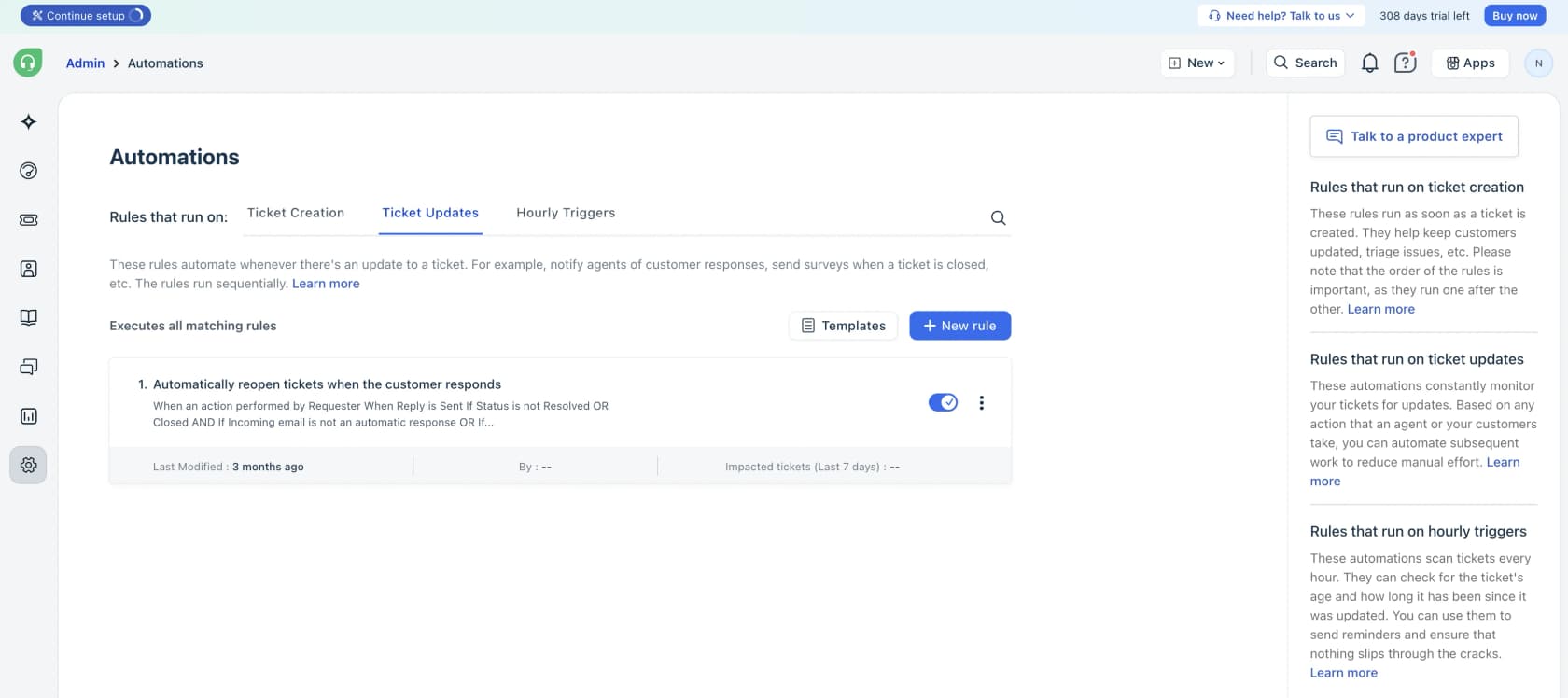
Past those 500, sessions cost $49 per 100, which is $0.49 each. Freddy AI Copilot, the agent-side assistant, is $29 per agent per month and only available on Pro and Enterprise. Note the unit carefully: a session is an interaction, not a guaranteed resolution, so you pay for the bot's attempt whether or not it worked. That is the trade for the generous free allowance.
One change worth knowing before you plan a budget: there is no Free plan on the Freshdesk pricing page any more. The only free entry point is the 14-day trial. If you read an older comparison that mentions a free Freshdesk tier, it is stale.
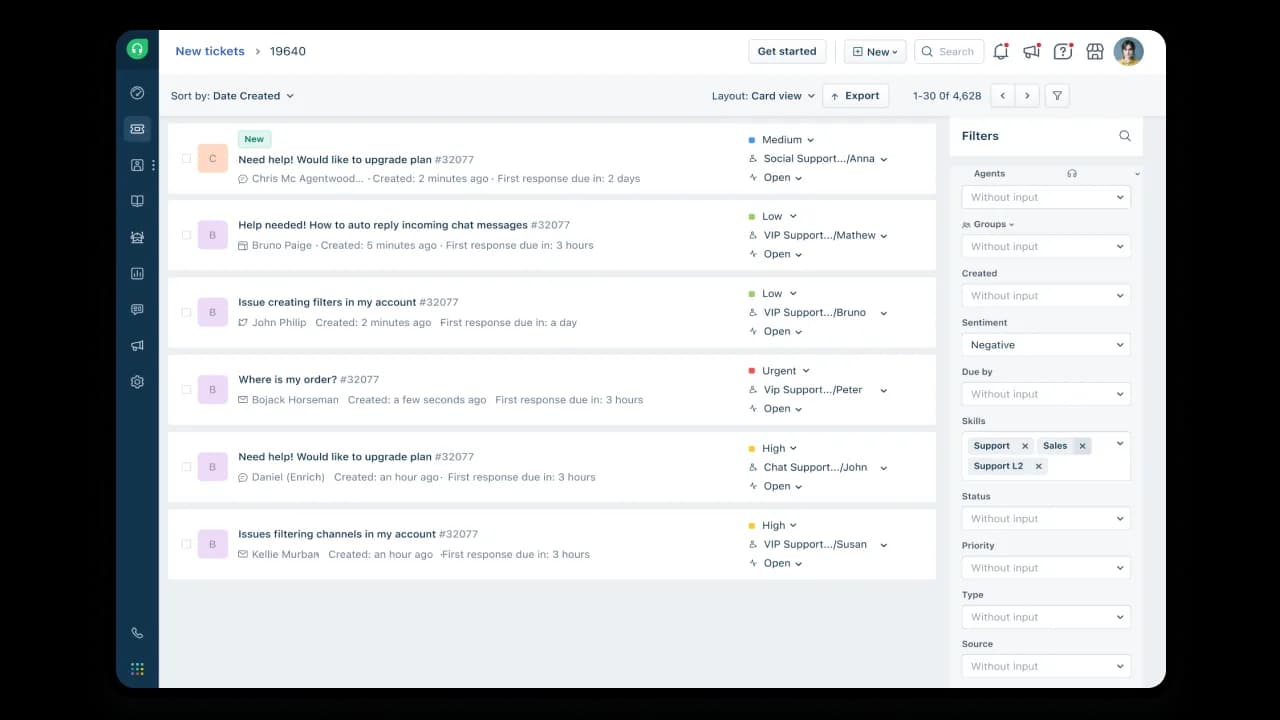
The sentiment view below is the kind of thing that makes Freshdesk feel modern for the price. Filtering a 4,600-ticket queue down to negative-sentiment tickets is a real workflow, not a demo trick.
Not everyone has a smooth run with it. The pattern I hear most from teams who tried Freddy and pulled back is the same one that shows up with any first rollout: simple tickets go fine, anything with nuance gets misclassified, and agents end up spending more time correcting the bot than they saved. That is a training and scoping problem more than a product one, and it is fixable with training on your knowledge base plus a tighter confidence threshold.
Pricing
| Plan | Price per agent/month (annual) | Freddy AI Agent | Freddy AI Copilot |
|---|---|---|---|
| Growth | $19 | First 500 sessions included | Not offered |
| Pro | $55 | First 500 sessions included | $29/agent/mo |
| Enterprise | $89 | First 500 sessions included | $29/agent/mo |
| Extra sessions | $49 per 100 | $0.49 each | - |
Pros
- 500 free AI sessions on every plan, including the $19 tier.
- Strong automation builder and Omniroute load balancing.
- Cheaper than Zendesk at equivalent tiers. My Freshdesk Pro breakdown has the tier-by-tier detail.
Cons
- No free plan any more.
- Sessions bill on attempt, not outcome.
- Copilot is gated above the entry tier, so $19 teams get no agent-side assist.
Verdict: the best AI-per-dollar in this list for a team of ten to fifty. If your volume runs well past 500 sessions a month, do the multiplication before you sign, because $0.49 per attempt keeps adding up with every session, while a credit covers a whole ticket however long it runs.
4. Gorgias
Best for: Shopify stores where support is really order operations.
Gorgias does one thing better than anyone: it puts the customer's order, cart, subscription and refund controls directly inside the ticket, so an agent can cancel a subscription or issue a refund without leaving the conversation. For an e-commerce help desk, that is worth a lot.
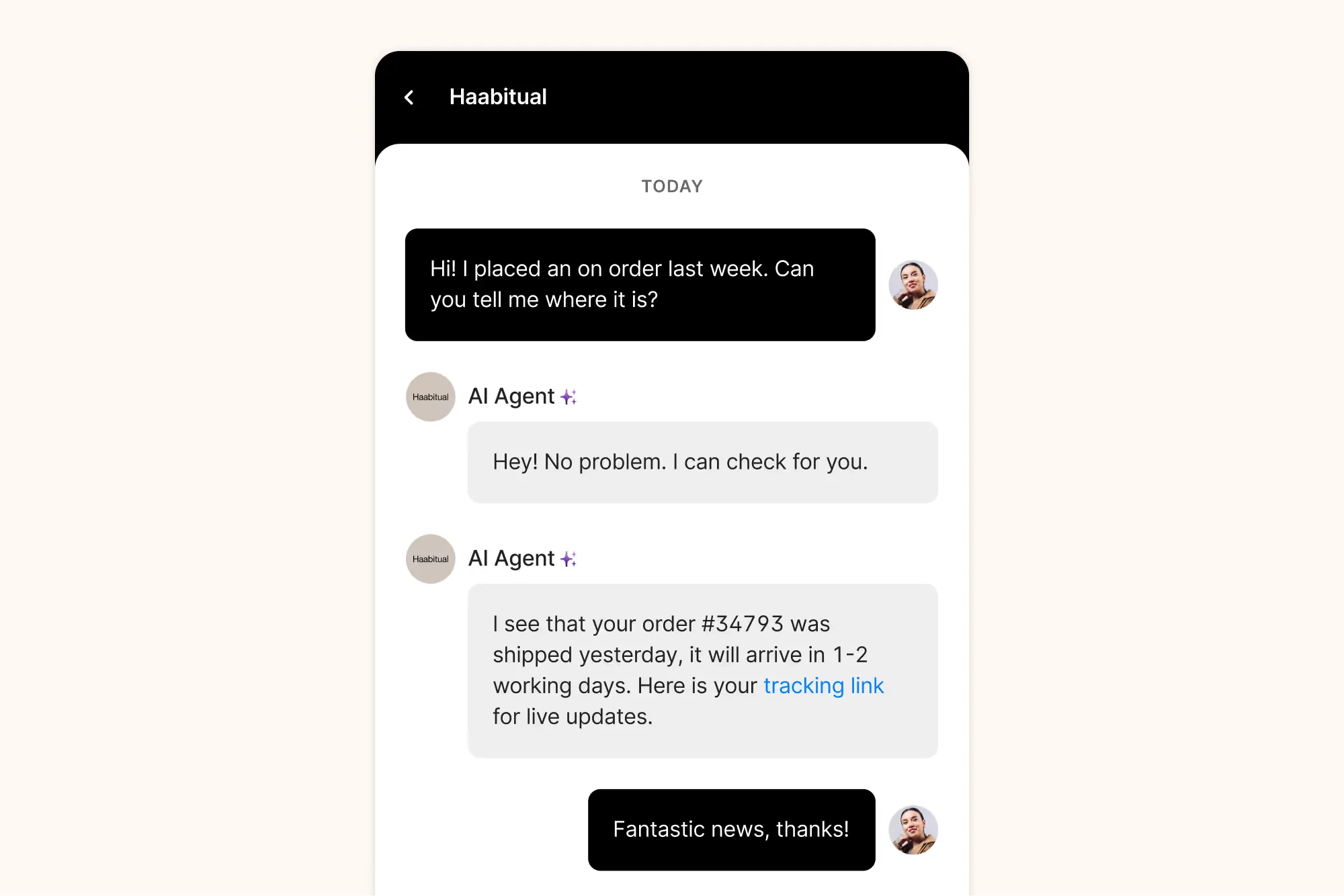
The pricing model is genuinely different from everything else here: no seats at all. Starter is $40 a month for 50 tickets, Basic $90 ($77 annual) for 300, Pro $550 ($471 annual) for 2,000, and Advanced $1,430 ($1,227 annual) for 5,000. Ticket overage is $0.40 on the small plans and $0.36 on the large ones.
Then there is the AI line. Gorgias markets it as "pay only when it resolves a conversation," but the unit printed on the page is the automated interaction, priced at $0.85 to $1.00 depending on the plan. Each plan bundles a fixed count of them: 30 on Starter, 30 on Basic, 190 on Pro, 530 on Advanced. Annual plans list $0.90 per interaction on Basic and Pro and $0.85 on Advanced, while monthly Starter lists $1.00.
That gap between "resolution" in the headline and "interaction" in the meter is the single most important thing to understand before you buy. A four-message AI thread is four interactions.
Operators do rate the product itself, with the same caveat every time:
"If a meaningful chunk is WISMO, address changes, cancels, refunds, exchanges, Gorgias usually feels worth it because the agent can do the work inside the ticket with Shopify context right there. Also, since you're heavy on IG/FB, Gorgias is pretty clean for pulling in DMs + comments (including ads comments)."
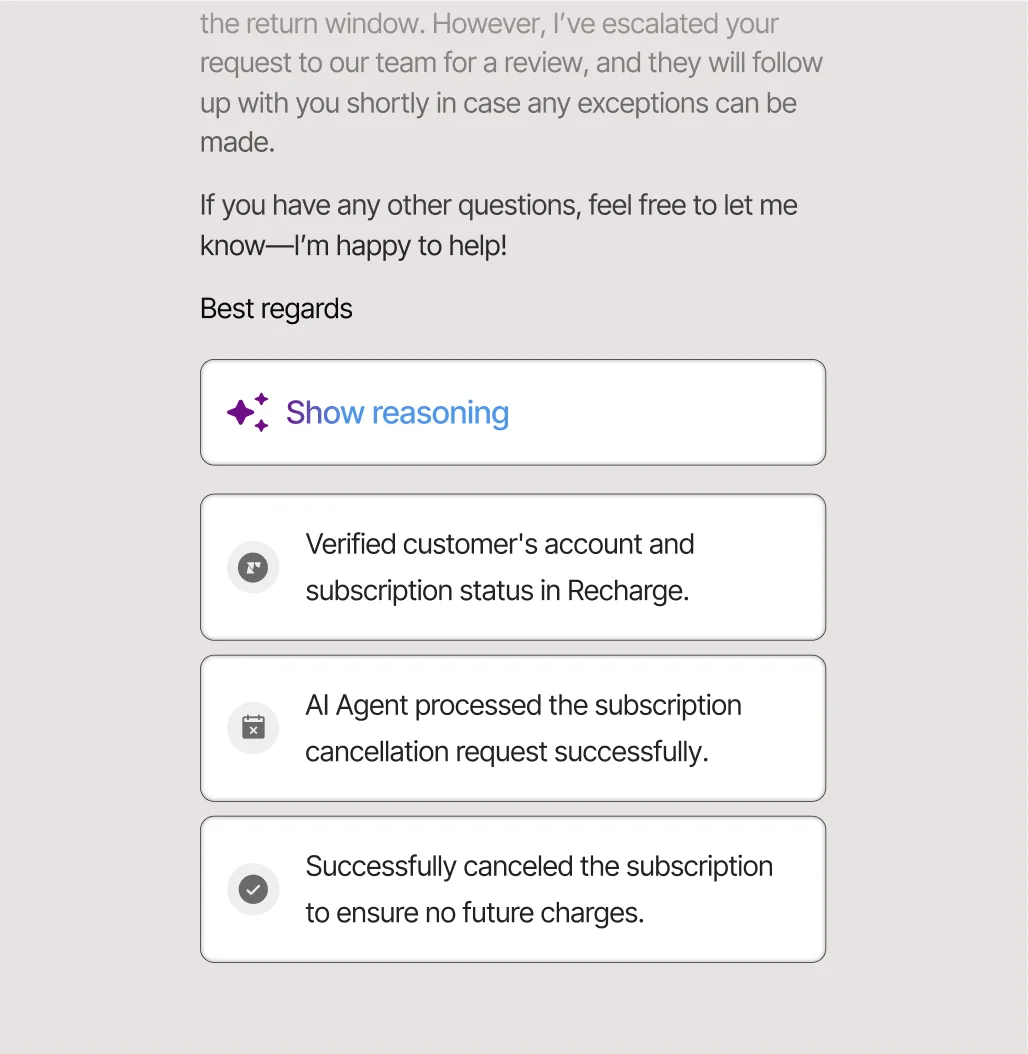
The AI agent does show its work, which I appreciate. The reasoning trace below is the kind of transparency that makes it possible to debug a bad answer instead of guessing.
Pricing
| Plan | Monthly | Annual/mo | Tickets | Automated interactions | Per automated interaction |
|---|---|---|---|---|---|
| Starter | $40 | Monthly only | 50 | 30 | $1.00 |
| Basic | $90 | $77 | 300 | 30 | $0.90 |
| Pro | $550 | $471 | 2,000 | 190 | $0.90 |
| Advanced | $1,430 | $1,227 | 5,000 | 530 | $0.85 |
Pros
- Shopify, WooCommerce and BigCommerce actions live inside the ticket.
- No per-seat billing, so adding agents is free.
- 254 integrations and clean social DM handling.
Cons
- $0.85 to $1.00 per automated interaction is the highest published AI rate here.
- Brand voice, guardrails and actions are all unavailable on Starter.
- Costs escalate quickly with volume, a point that comes up constantly in Gorgias alternatives threads.
Verdict: buy it if 40 percent or more of your tickets need a Shopify action. If your queue is mostly conversational questions, the per-interaction meter will punish you, and a per-ticket AI layer on a cheaper helpdesk will land far below it.
5. Help Scout
Best for: small teams who want support to feel like a human writing an email.
Help Scout is the least ticket-y tool here, deliberately. Customers get a normal email reply, not a ticket number and an auto-responder. For a five-person team supporting a product people care about, that difference in tone is worth more than a feature grid.
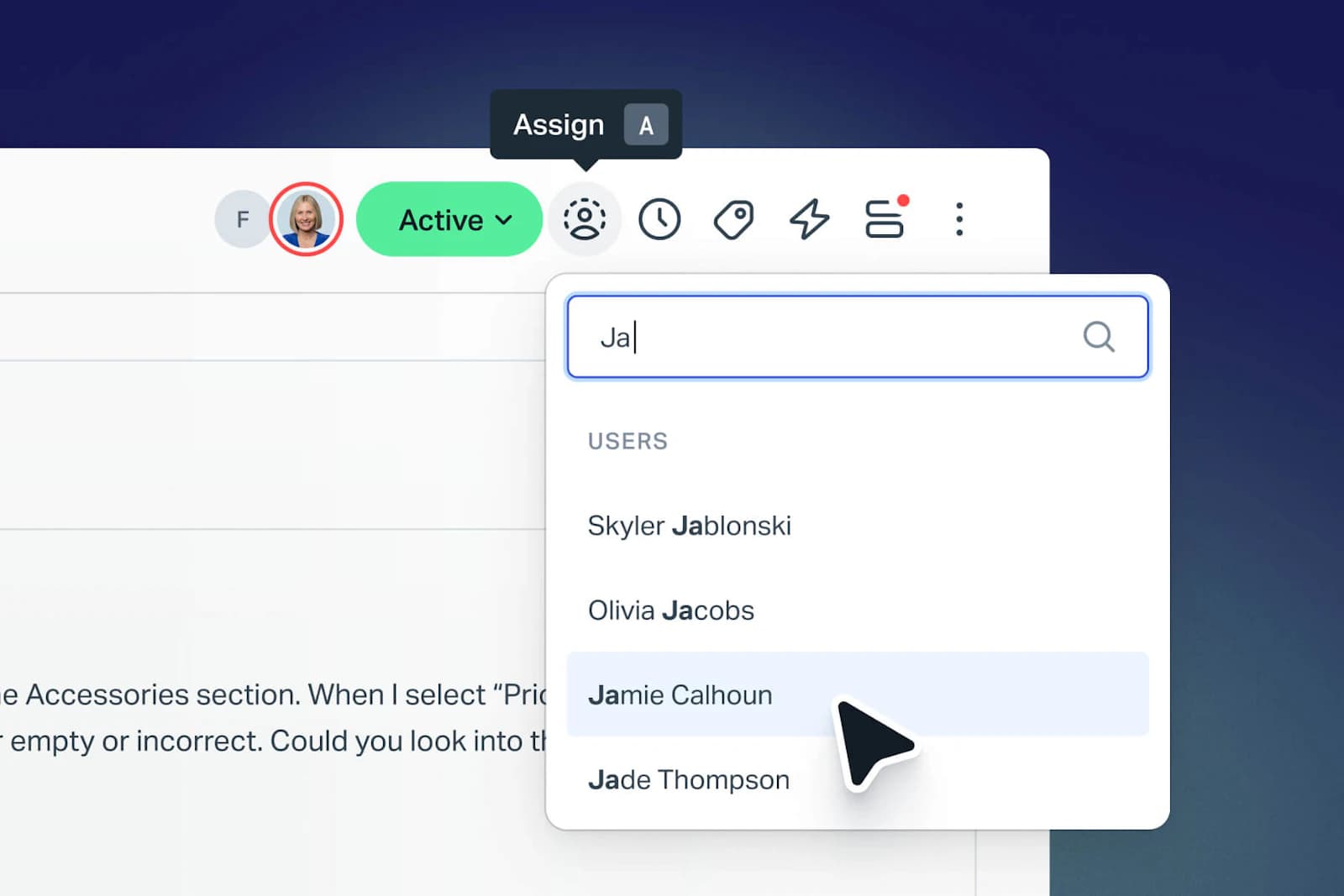
Pricing is $25, $45 and $75 per user per month on annual billing, with a genuinely usable free tier for five users. AI Assist is unlimited on all paid plans; AI Drafts and AI Summarize are unlimited but only on Plus and above.
The customer-facing agent, AI Answers, is $0.75 per resolution, and Help Scout's definition of a resolution is the strictest here. It counts only when the customer gets an AI answer and does not escalate, search the knowledge base, ask again, or click "I still need help." Maximum one per conversation. You are not charged for chats that escalate to a human, which is exactly the alignment the Zendesk thread above is complaining about the absence of.
Worth knowing the history, though, because it explains some lingering distrust. Help Scout moved from seat pricing to per-interaction pricing in 2025, and then moved back:
"We just received an email from HelpScout that they'll change their pricing to a completely new model. Whereas before you'd be charged by seat, you're now charged by customer interaction. It makes the costs unpredictable. It's super annoying because now we'll have to migrate a lot of docs etc. to a new provider."
"HelpScout changed back to user-based pricing. Guess too many people cancelled including me... I'll still stay with Freescout anyways. Helpscout lost all trust with this flip-flopping on pricing."
Pricing
| Plan | Price per user/month (annual) | Users | AI |
|---|---|---|---|
| Free | $0 | 5 | None |
| Standard | $25 | 25 | AI Assist unlimited |
| Plus | $45 | 50 | Adds AI Drafts, AI Summarize |
| Pro | $75 | Unlimited, 10 seat minimum | Everything, plus HIPAA and SSO |
| AI Answers | $0.75 per resolution | Any paid plan | 3 months free, spend caps available |
Pros
- Cleanest definition of a billable resolution in this roundup.
- Agent-side AI is unlimited rather than metered.
- Spend caps that auto-disable the agent, so no surprise invoice.
Cons
- The useful generative helpers are gated to $45 Plus.
- Pro requires ten seats and a sales conversation.
- The pricing-model reversal left real scar tissue with long-time customers.
Verdict: my default recommendation for teams under about fifteen people, especially in SaaS and services. If you are running an e-commerce queue, look at the Help Scout alternatives for e-commerce instead, because order actions are not its strength.
6. Front
Best for: complex, multi-step customer work that crosses departments.
Front picked a fight with everyone else's positioning in 2026, and I think it picked well. Its homepage line is that AI for simple support is everywhere, and complex customer operations demand something else. Logistics, freight, manufacturing, travel: places where a customer request means three internal teams and a system of record, not an FAQ lookup.
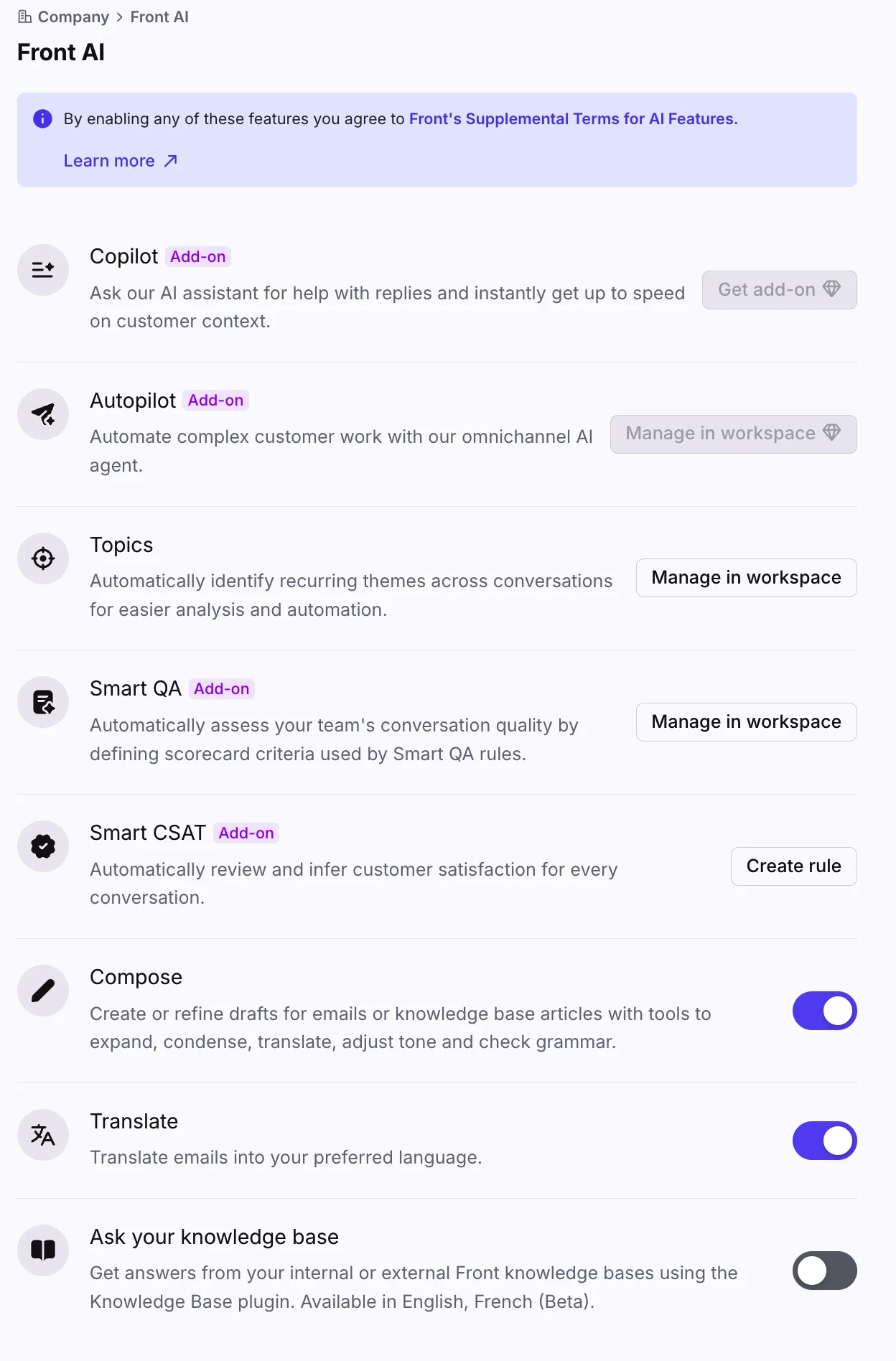
That screenshot is also the clearest illustration of Front's commercial model. Look at how many things carry an "Add-on" badge. Seats are $25, $65 and $105 per month on annual billing, and then the AI is sold separately on top: Copilot $20 per seat, Smart QA $20 per seat, Smart CSAT $10 per seat, or $25 for the QA and CSAT bundle. Enterprise includes those three. Autopilot, the actual autonomous agent, is an add-on on every plan including Enterprise, priced from $0.05 per conversation and quoted by sales.
That $0.05 floor is the lowest published AI rate in this roundup by a wide margin, but Front bills by outcome ($0.05 triage, $0.39 handoff, $0.89 full resolution), so I would treat it as a starting point rather than a typical rate. The included AI on all plans (Topics, Compose, Translate, Summarize) is capped at 200 actions per teammate per day each, which is generous enough that most agents will never hit it.
Pricing
| Plan | Annual per seat/month | Monthly | Seats | AI included |
|---|---|---|---|---|
| Starter | $25 | $35 | Up to 10 | Topics, Compose, Translate, Summarize |
| Professional | $65 | $85 | Up to 50 | Same, add-ons available |
| Enterprise | $105 | Annual only | No cap | Adds Copilot, Smart QA, Smart CSAT |
| Autopilot | From $0.05/conversation | Sales-quoted | Any plan | The autonomous agent |
Pros
- Best-in-class collaboration: comments, drafts and assignment feel natural.
- Autopilot can be tested in simulation before it goes live.
- Rules engine handles genuinely complicated routing.
Cons
- The AI is almost entirely add-on priced, so the seat cost understates the bill.
- Autopilot pricing is not self-serve.
- Enterprise is annual-only.
Verdict: the right answer for operations teams, not FAQ deflection teams. If you like Front's inbox and just want a cheaper autonomous layer, adding AI to Front through its API is a viable path. Teams weighing it against lighter options should read my Front and Hiver comparison.
7. HubSpot Service Hub
Best for: teams whose company already runs on HubSpot CRM.
The argument for HubSpot Service Hub is continuity. Support tickets sit next to the deal record, the marketing email history and the company object, so an agent can see that the angry customer is also a renewal in 30 days. If your sales team is already in HubSpot, that context is free.
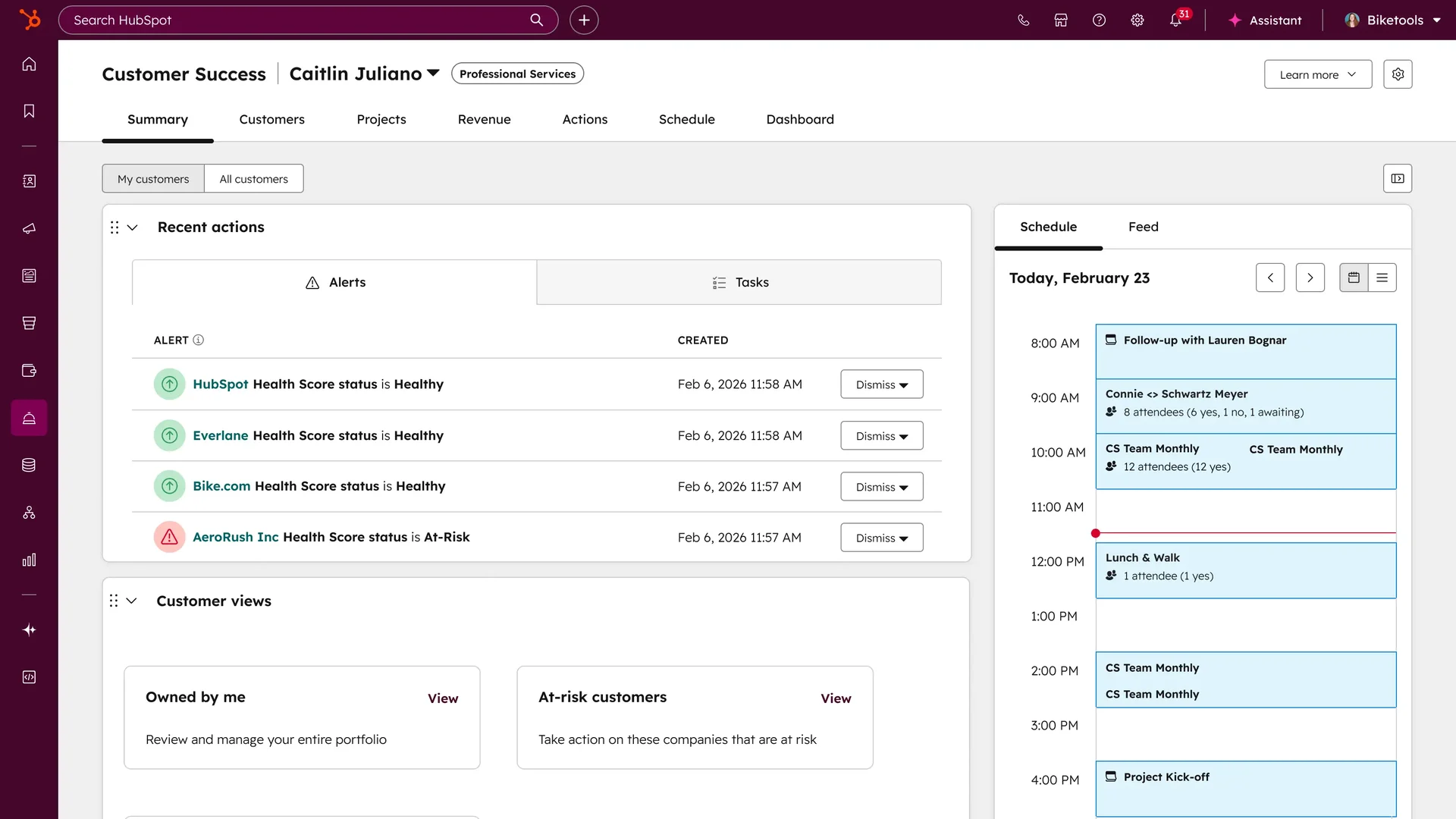
Seats are $7 Starter, $90 Professional and $150 Enterprise per month on annual billing, with a free tier for two users. The catch that nobody mentions until the contract stage: Professional carries a mandatory $1,500 one-time onboarding fee, and Enterprise $3,500. That is a real number to put in your first-year budget.
The AI is billed in HubSpot Credits at $9.00 per 1,000 on annual, so $0.009 each. Breeze Customer Agent burns 50 credits per conversation it resolves, which works out to about $0.45 per resolution. Professional includes 3,000 credits a month, roughly 60 resolutions; Enterprise includes 5,000, roughly 100. Past that you are metered. HubSpot claims over 70 percent auto-resolution and 39 percent faster resolution on its own page, which is a vendor figure, so weigh it accordingly. My HubSpot AI pricing breakdown has the credit math in full.
Pricing
| Plan | Annual per seat/month | Monthly | Credits included | Onboarding fee |
|---|---|---|---|---|
| Free | $0 | $0 | None | None |
| Starter | $7 | $20 | 500 | None |
| Professional | $90 | $100 | 3,000 | $1,500 one-time |
| Enterprise | $150 | Annual/sales | 5,000 | $3,500 one-time |
Pros
- Unbeatable if you already own the CRM.
- $7 Starter is a genuinely cheap entry point.
- Credits are transparent and easy to model.
Cons
- Mandatory onboarding fees on Professional and Enterprise.
- Breeze Customer Agent needs Professional or above.
- Knowledge base customisation is limited compared to purpose-built helpdesks, a recurring complaint in HubSpot versus Zendesk comparisons.
Verdict: an easy yes if HubSpot is already your CRM, and a hard sell otherwise. The $7 Starter tier is tempting, but the AI you actually want starts at $90 plus $1,500.
8. Zoho Desk
Best for: the cheapest path to a real ticketing system.
Zoho Desk is the value floor of this category and it is not close. Free Edition for three users, Express at $7, Standard at $14, Professional at $23, Enterprise at $40 per user per month on annual billing. For a team that has outgrown a shared Gmail account and needs automated ticketing without a five-figure commitment, it is hard to argue with.
The AI story changed this year in a way that favours buyers. Zia moved down from Enterprise to Professional at $23, and the knowledge-base answer bot now starts at Standard at $14. Express at $7 includes AI Agents with 30 million free tokens a month plus a bring-your-own-key route where you connect an OpenAI or DeepSeek API key and pay that provider directly.
What Zoho does not publish is any per-answer or per-prediction price, or what happens past those 30 million tokens. There is no Zia add-on SKU. So while it looks like the cheapest AI here, it is also the least legible, and I would want that clarified in writing before I planned around it.
The consistent complaint is not price, it is density:
"If I am being honest, what I dislike so far is the sheer number of settings and options."

Pricing
| Plan | Price per user/month (annual) | AI included |
|---|---|---|
| Free | $0 | None, 3 users, email only |
| Express | $7 | AI Agents, 30M tokens, BYOK generative AI |
| Standard | $14 | Adds answer bot, knowledge base |
| Professional | $23 | Adds Zia AI, telephony, Blueprints |
| Enterprise | $40 | Adds guided conversations, live chat, sandbox |
| Light users | $6 | Professional and Enterprise only |
Pros
- Cheapest real ticketing in the category by a wide margin.
- Zia now reachable at $23 instead of $40.
- Bring-your-own-key AI keeps the LLM cost off Zoho's invoice.
Cons
- No published price or overage rate for AI usage.
- The interface has a lot of surface area, and reviewers say it takes weeks to learn.
- eesel connects to Zoho Desk (added in September 2026), so the AI layer can work the queue directly rather than sitting in front of it.
Verdict: the correct choice when budget is the binding constraint and someone on the team enjoys configuration. If you want to see what a modern AI layer looks like bolted on, my roundup of AI integrations for Zoho Desk covers the options.
9. Salesforce Service Cloud
Best for: enterprises that have already standardised on Salesforce.
Nobody buys Service Cloud because it is the best support inbox. They buy it because the rest of the company is on Salesforce and the case object needs to live next to the account object. Once that is the constraint, the question is not whether but which edition.
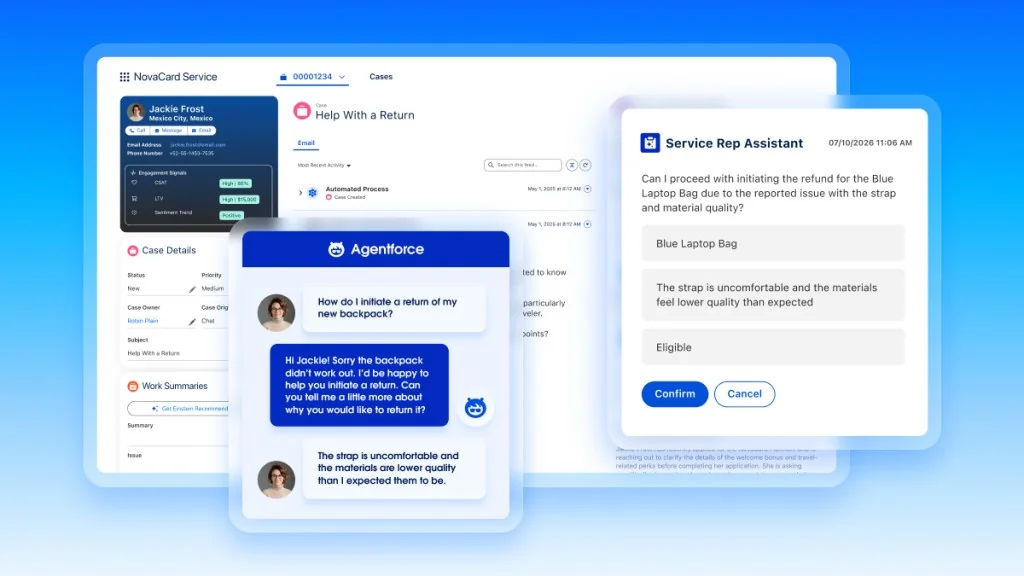
Editions run $25 Starter Suite, $100 Pro Suite, $175 Enterprise, $350 Unlimited, and $550 for Agentforce 1 Service, all per user per month. AI is priced two ways: $2.00 per Agentforce conversation, or Flex Credits at $500 per 100,000, which is half a cent each, with a standard action costing 20 credits or $0.10. Credits do not roll over. There is also an Agentforce User License at $5 per user that still requires credits, and a $125 per user add-on. The Agentforce pricing detail is worth reading before you talk to a rep.
$2.00 per conversation is the highest headline AI rate in this roundup. The Flex Credits route can be much cheaper if your actions are simple, and much more expensive if they are not, which is the whole difficulty with credit models: you cannot forecast them until you have run them.
Pricing
| Edition | Price per user/month (annual) | Notes |
|---|---|---|
| Starter Suite | $25 | Transaction fees apply |
| Pro Suite | $100 | Contract required |
| Enterprise | $175 | AI for customer service, self-service centre |
| Unlimited | $350 | Adds chat and bots |
| Agentforce 1 Service | $550 | Formerly Einstein 1 Service |
| Agentforce | $2.00/conversation or $500/100k credits | Credits expire |
Pros
- Unmatched depth of customisation and reporting.
- Agentforce can take real actions against Salesforce data.
- One compliance and identity stack across the business.
Cons
- The most expensive per-conversation AI rate here.
- Credits expire, so you are buying capacity you might not use.
- Implementation is a project, not a signup.
Verdict: correct for large Salesforce shops, overkill for anyone else. If you are on Salesforce but not committed to Agentforce, note that a per-ticket AI layer on the same case object costs a fraction of $2.00 per conversation.
10. Kustomer
Best for: teams that want a CRM-shaped, timeline-first view of every customer.
Kustomer's original idea was to stop treating support as tickets and start treating it as one continuous customer timeline. That still reads well, and the agent workspace genuinely reflects it. Where it gets awkward in 2026 is the buying process.
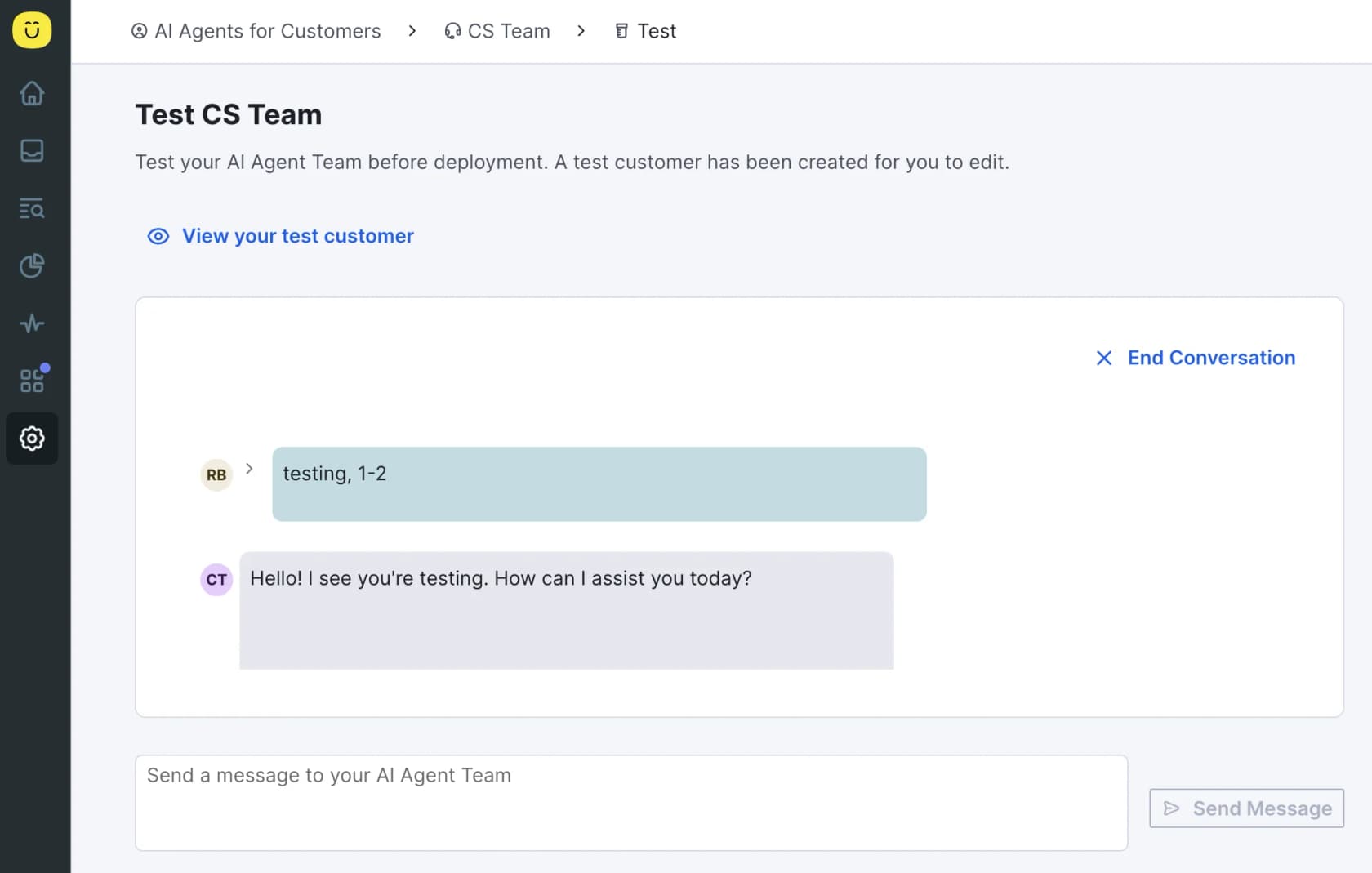
The pricing page is now fully quote-gated: no plan names, no prices, just an ROI lead form. The only surviving public table is a comprehensive pricing details page last updated in December 2025, and even that lists "Talk to Sales" where the seat prices used to be. If you see $89 or $139 per seat quoted for Kustomer anywhere, note that those figures do not appear on Kustomer's own site.
What is published is the AI metering: AI Agents for Customers is $0.60 per engaged conversation, and the agent-side AI Agents for Reps is $40 per user per month. Note the unit again: engaged, not resolved. Other metered lines include HIPAA at $25 per user per month, voice from $0.02 per minute, and a 20 percent surcharge on top of Meta's WhatsApp fees.
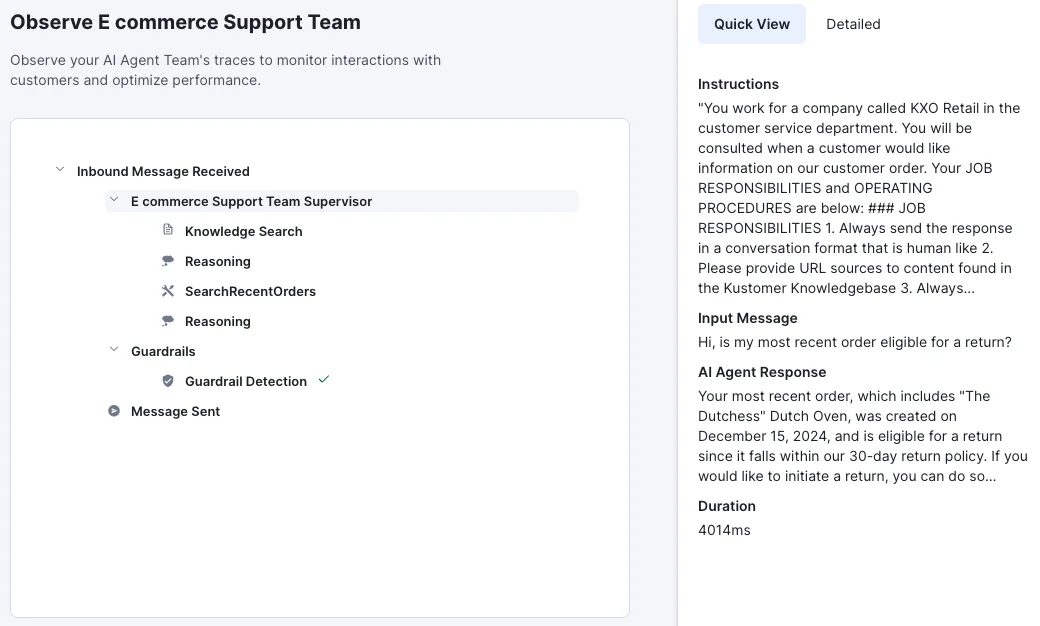
The observability is a real strength. Being able to see the agent's execution tree, guardrail checks and latency is more than most vendors show you.
Onboarding friction shows up repeatedly in operator threads:
"We're trying to onboard with them, but for some unknown and very odd reason, they display emails in RAW format vs. HTML by default - you have to proactively click on a menu for each email to display in the correct format. No other CRM I've ever encountered does this by default - it's so downright odd that it defies logic and makes it untenable for us to use."
Pricing
| Item | Price | Notes |
|---|---|---|
| Seats | Not published | Fully quote-gated as of July 2026 |
| AI Agents for Customers | $0.60 per engaged conversation | Same on Enterprise and Ultimate |
| AI Agents for Reps | $40 per user/month | Agent-side assist |
| HIPAA | $25 per user/month | Add-on |
| Voice | From $0.02/minute | Add-on |
Pros
- Timeline view genuinely beats a ticket list for relationship-heavy support.
- Strong agent observability and multi-agent orchestration.
- Clear published AI rate, unlike several bigger vendors.
Cons
- No published seat pricing at all, so you cannot compare without a sales call.
- Reddit reports of voice channel instability and missing social comment handling.
- Charging on engagement rather than resolution puts the risk on you.
Verdict: worth a call if the customer timeline model matches how your team thinks, and if a quote-only process is acceptable to your procurement. Teams that want auto-reply on Kustomer without the enterprise motion have cheaper routes.
The billing unit decides your bill, not the sticker price
I want to spend a moment on the pattern, because it is the actual takeaway from all ten.
We had a conversation last year with an ops lead at a payouts and money-transfer fintech running Zendesk, handling around 7,000 to 8,000 escalated tickets a month. A vendor's 3,000-interactions-a-month allowance looked fine on the plan card. Then he did the arithmetic out loud: roughly 500 tickets a day, about four exchanges each, so around 2,000 interactions a day. The monthly allowance was gone in a day and a half. Per-interaction pricing was not expensive for him, it was structurally impossible.
That is not a sales objection, it is a modelling failure that the plan card actively invites. And it is why the seat price is a bad proxy for cost now.
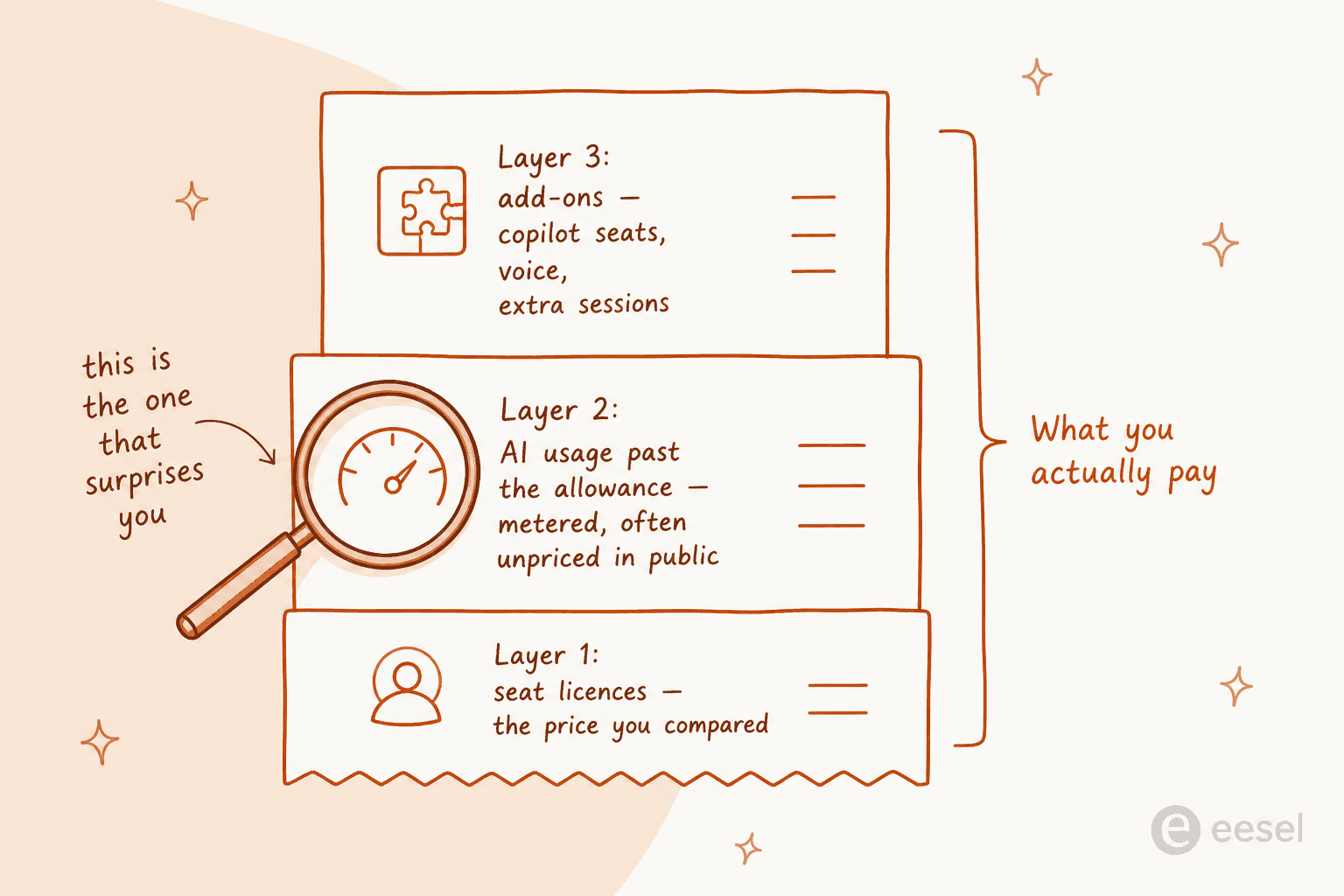
Three questions I would put to any vendor in this category, in writing:
- What exactly counts as one billable unit? Get the definition, not the marketing word. "Resolution" and "interaction" and "session" and "engaged conversation" are four different things, and only Help Scout's definition currently excludes escalated chats by default.
- What is the rate past the bundle? Gorgias prices each automated interaction at $0.85 to $1.00 depending on the plan, and every bot reply in a thread counts as its own interaction.
- What is the rate at all? Zendesk names its unit and declines to price it publicly. Zoho publishes a token allowance and no overage rate. Kustomer publishes an AI rate and no seat price. In each case, the missing number is the one that decides your budget.
The failure mode here is not getting overcharged. It is getting surprised. We have seen a store on Gorgias run a dozen successful test chats, love the results, open the billing page, and file two cancellation requests within the hour. The product worked. The unit did not.
Run a trial that actually tells you something
Most helpdesk trials measure the wrong thing. You spend two weeks clicking around the admin panel and come away knowing whether you like the interface, which is not the question. The question is whether the AI will be right on your tickets.
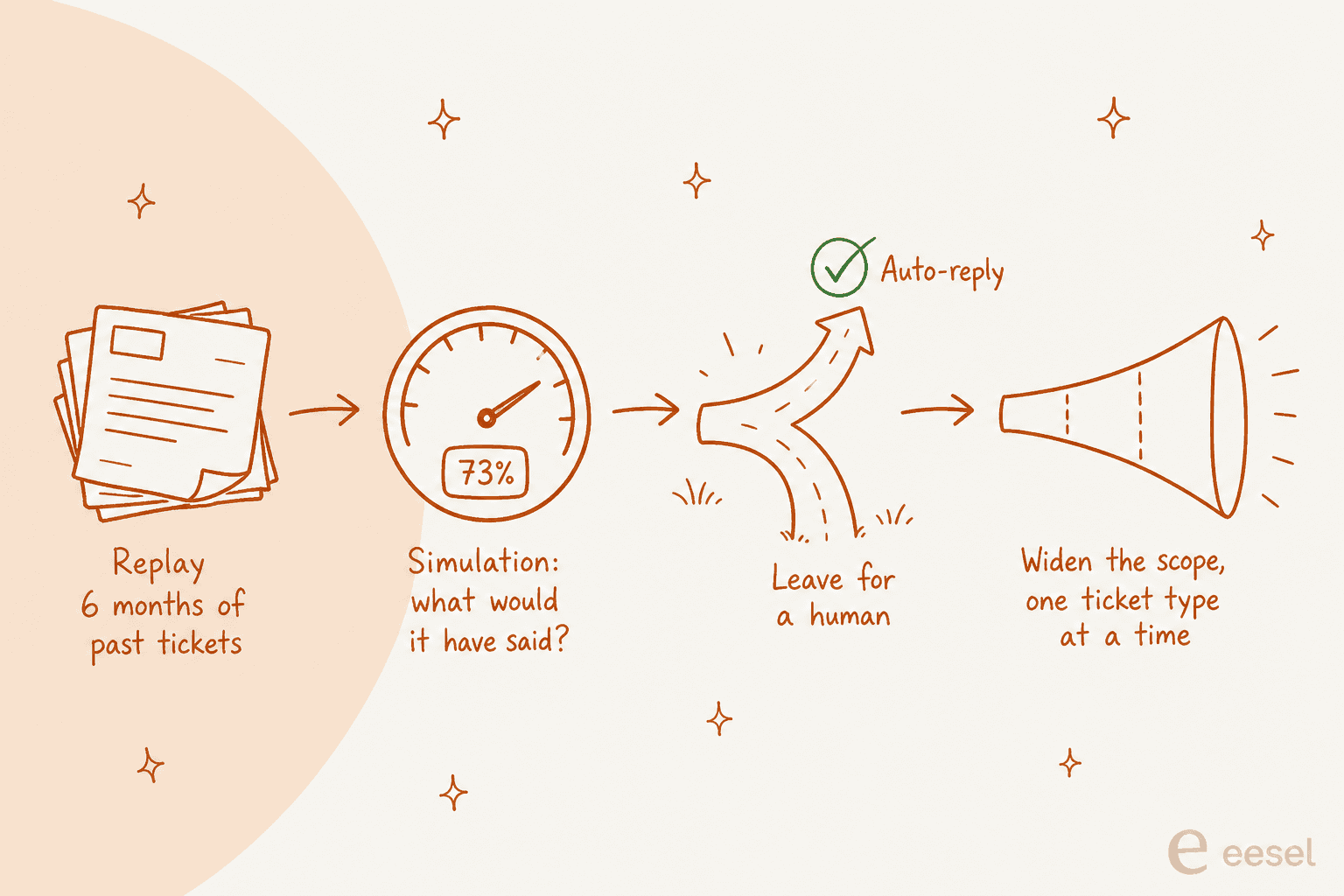
The reason we build eesel this way is that we have watched confident-sounding bots give wrong answers to real customers, and there is no way to un-send that. So the sequence I would run, with any vendor on this list:
Replay your history first. Point the AI at six months of resolved tickets and ask what it would have said. You get an accuracy read on your actual queue, in your actual voice, before a single customer sees anything. Most vendors here support some version of this; Front calls it simulations, and it is the first thing I would ask for in a demo.
Start in draft mode. Let the AI leave suggested replies as internal notes for a week. Your agents will tell you within days whether the drafts are saving time or creating rework, and that beats any vendor benchmark.
Set a confidence threshold and mean it. The single most common thing I hear from support leads considering AI is a version of this: I need an AI that only handles the tickets it is confident about, and leaves the rest alone. That is not a limitation to design around, it is the requirement. Get handoff to a human working before you widen the scope.
Widen one ticket type at a time. Order status first, then returns, then the rest. If your resolution rate holds at each step, keep going. If it drops, you know exactly which category broke it. This is also the fastest honest route to clearing a ticket backlog, because you are not betting the whole queue on one switch.
Do this and the trial answers a real question. Skip it and you are buying on a demo, which is how teams end up switching twice in eighteen months.
Try eesel on the helpdesk you already have
If you got this far and your honest conclusion is "our helpdesk is fine, its AI is not," that is the situation eesel exists for. It connects to Zendesk, Freshdesk, Front, Help Scout, Gorgias, HubSpot Service Hub, Salesforce Service Cloud and Jira Service Management, learns from your past tickets and help center, and starts by drafting replies as internal notes so nothing customer-facing happens until you say so.
The commercial part is the bit that matters after everything above: one fixed monthly price from $299 for 500 credits, no seat fee, no platform fee, and one ticket is one credit no matter how long the thread runs. Route 200 of your 1,000 monthly tickets to it and only those 200 use credits. There are 100 free credits to start with and no credit card required, which is enough to run the historical simulation and find out whether this works on your queue before you spend anything.
Start free at eesel.ai, or take a look at how the helpdesk agent works first.