Dealing with a constant flood of support tickets can be exhausting. It often feels like you are answering the exact same five questions a hundred times a day, whether it is through email, chat, or social media. To be fair, hiring a massive support team is not always an option, especially when you are just starting out or trying to scale on a tight budget.
Hello! I run a small local business and honestly, managing customer support is starting to drain me. Between Instagram DMs, WhatsApp messages, email replies, and website inquiries, I feel like I’m glued to my phone all day.

This is where AI can really save the day. It provides a way to give your customers instant answers without needing to hire more people. I know that diving headfirst into a pricey AI platform feels like a big risk, but you do not have to do that. Starting with free options is a smart, low-risk way to see what the tech can actually do for you. My goal here is to walk you through the 5 best free AI tools for customer service I found during my testing, so you can pick the right starting point for your business.
What exactly are these free AI tools for customer service?
When you hear "AI for customer service," you might picture those clunky, frustrating chatbots from a few years ago that never understood what you wanted. Luckily, things have improved quite a bit since then.
Today’s tools are much sharper. They are systems that can learn from your company's actual knowledge, such as your help center articles, past support tickets, and saved replies. They use that information to do much more than just repeat canned answers. They can handle repetitive tasks like answering common questions, sending complex tickets to the right person, and even figuring out if a customer is frustrated. It is better to think of them as a digital assistant for your support team rather than just a simple bot.
Why it makes sense to start with free AI tools for customer service
Jumping straight into a paid AI platform can feel like a bit of a gamble. Starting with a free tool is a much more sensible move for a few reasons:
-
You can experiment without any financial risk. This is the most obvious benefit. You get to test out different features and see how they fit into your daily workflow without spending a cent. It is the perfect setup for small businesses or teams trying to keep their overhead low.
-
It helps you prove the value to your boss. It is much easier to get approval for a paid tool when you have actual data to show. A free tool lets you track how much time you are saving and if your customers are happier, which makes a strong case for future investment.
-
You can fix the simple problems immediately. You can quickly automate the most common questions that clog up your inbox, like "Where is my order?" or "What is your refund policy?" This allows your human agents to focus on the complicated, high-stakes conversations that actually need a person's touch.
-
You will figure out what features you actually need. Using a free tool is a great way to learn about your own support process. You will quickly see which features are essential and which ones are just extra fluff, making you a much smarter buyer when you eventually decide to upgrade.
By taking this approach, you can learn the ropes without the pressure of a monthly subscription hanging over your head.
My specific criteria for the best free AI tools for customer service
To make this list actually helpful, I did not just pick the first five apps I saw. I set some specific rules to ensure every option here provides real value to a working team.
-
A truly generous free plan. This was a must-have. I looked for tools that have a permanent free tier, not just a short trial that expires after two weeks. The plan had to offer enough usage to actually be useful for a small business.
-
A setup process that is actually easy. You should not need to be a developer to get things moving. I prioritized platforms with simple, no-code setups that a regular person could get running in a single afternoon.
-
The right core functionality. The free plan needed to cover the basics well. That means things like automated responses, connecting to a knowledge base, and a clear way to pass a conversation to a human if the AI gets confused.
-
A clear path for growth. While the tool starts off free, it should not be a dead end. I looked for platforms that have reasonable upgrade paths for when your business starts to grow and you need more power.
A quick comparison of the best free AI tools for customer service
If you are in a hurry, here is a quick breakdown of how these tools stack up against each other.
| Tool | Best For | Key Free Features | Upgrade Starts At |
|---|---|---|---|
| Tidio | Live chat & lead generation | 50 billable conversations/month, 100 Flows visitors/month, 50 one-off Lyro AI credits. | $24.17/month (billed annually) |
| Help Scout | Small teams needing a shared inbox | 5 users, 1 Inbox, 1 Docs site (10 articles), 100 contacts/month, 3-month AI Answers trial. | $25/user/month (billed annually) |
| Zoho Desk | Businesses in the Zoho ecosystem | 3 agents, email ticketing, private knowledge base, mobile apps. | $7/user/month (billed annually) |
| LiveChatAI | Building a dedicated AI chatbot | 1 chatbot, 250 message credits/month, 500K training characters, human handoff. | $39/month |
| Google AI Studio | Custom AI development & prototyping | Free access to Gemini models, ~50 messages/day rate limit for testing. | Pay-as-you-go for API usage |
The top 5 free AI tools for customer service in 2025
1. Tidio
Tidio is a great place to start if your main goal is to have a live chat on your site and collect leads. It combines a clean chat widget with some automation builders that are surprisingly easy to navigate.
You could try tools like Tidio or Crisp fam, they combine AI chatbots with human handoff and support across IG, WhatsApp, and more. We’ve seen small business owners reduce inbox chaos without sounding robotic.
Tidio’s free plan works well for businesses with lower support volumes that still want to offer real-time help. Their visual builder, "Flows," lets you create simple chatbots without writing any code. You can set up basic greetings, check if a lead is qualified, and answer common questions in just a few minutes.
The biggest plus is how user-friendly it feels. You can get it running quickly, and it integrates well with Shopify and WordPress. However, the free plan is a bit tight. You only get 50 "billable conversations" a month (conversations where a human replies). You also get a one-time bonus of 50 credits for their AI agent, Lyro, but after that, it is a paid feature. The free plan includes these basics to get you started, with the Starter plan beginning at $24.17/month if you need more.
2. Help Scout
Help Scout is built for teams that want to keep things simple and human. It is not about aggressive automation; it is about giving your team a clean, shared inbox with some helpful AI features tucked inside.
This tool is perfect for teams that value a personal touch. I was impressed by how much they give away for free to small teams. You get up to 5 users, a shared inbox for emails, and a knowledge base (Docs site) without paying anything. It is a solid way for a small shop to get organized.
The main strength here is simplicity. The free plan allows for one inbox and 10 articles in your Docs site. The catch is the limit of 100 contacts per month. Also, their AI chatbot feature, AI Answers, is only a 3-month free trial. After that, it becomes a paid add-on, so it is not a "forever free" AI solution. You can check their free plan details to see if it fits, with the Standard plan starting at $25/user/month.
3. Zoho Desk
Zoho Desk is a heavy hitter in the free space, especially if you already use other Zoho tools like their CRM. It offers a lot of ticketing features that usually cost money elsewhere.
For a free option, Zoho Desk is quite robust. It provides a real ticketing system for up to three agents, which is great for small teams managing questions from email and web forms. It also integrates perfectly with the rest of the Zoho app family.
The value is great, but there are trade-offs. You get a multi-agent help desk and a private knowledge base for free, but the advanced AI features (like sentiment analysis) are locked behind the expensive plans. The interface can also feel a bit old-fashioned and complicated if you are used to modern, sleek apps. The Free plan supports 3 agents, and the Express tier starts at $7/user/month.
4. LiveChatAI
LiveChatAI is the choice for anyone who wants to build a smart AI chatbot right away. Its whole purpose is to train an AI on your specific website content so it can handle questions automatically.
This tool makes building a custom bot very simple. You can train the AI just by giving it your website URL; it crawls your content and starts answering questions almost immediately. It is a cool way to see a content-aware AI in action without a complex setup.
Speed is the main benefit here. You can have a bot that knows your business live on your site in the time it takes to grab a coffee. The free plan gives you 250 message credits per month, which is a decent amount. Just keep in mind it is strictly a chatbot tool, so it does not have the full help desk features like ticketing. The free plan is a good start, and the Basic plan moves to $39/month when you are ready.
5. Google AI Studio
This one is for the tech-savvy crowd. Google AI Studio is not a "plug-and-play" customer service tool. Instead, it is a free way to access Google’s Gemini AI models so you can build your own custom solutions.
If you have someone on your team who knows a bit of code, Google AI Studio is a goldmine. You can prototype custom tools, like an internal bot for your staff or a custom Q&A system for customers, without paying for the AI model itself.
The power and flexibility are unmatched, but it is definitely not an out-of-the-box product. You need some development skills to make it work as a real application. It is a playground for developers with a limit of about 50 messages per day for testing. Once you want to go live, you move to a pay-as-you-go model based on your actual usage.
While the tools listed above provide excellent starting points, watching a quick overview can help you see how different AI solutions function in a real-world setting. The video below offers a look at several top AI customer service software options, giving you a broader perspective on what's possible.
Moving beyond free AI tools for customer service to find an AI teammate
Free tools are a great starting point, but you might eventually hit a wall. You might run into usage limits, find that you cannot connect to your other apps, or realize you are spending too much time babysitting a bot that is not actually learning. When that happens, you do not just need a new tool, you need a teammate.

This is where eesel AI fits in. Instead of a long, painful setup, you just invite eesel AI to your help desk like you would a new employee. It gets to work right away, reading your old tickets, help articles, and macros to learn your tone and your policies.

Unlike basic bots that you just turn on and pray for the best, eesel AI starts by drafting replies for your team to check. This human-in-the-loop style means you get help immediately without any risk of the AI saying something weird to a customer. As you work together, eesel AI learns from your edits until you feel comfortable letting it handle tickets on its own. It is an intelligent partner that can organize tickets and even tell you when your help docs are missing information.
How to choose the right free AI tools for customer service for your specific team
Now that you have seen the options, here is a quick checklist to help you make a decision.
-
Identify your biggest headache. What is the one thing you need to fix right now? If you need more leads from your site, Tidio is a good shout. If your email inbox is a mess, Zoho Desk might be better.
-
Look at what you already have written down. AI needs info to learn from. If you have a great help center, most of these tools will work well. If you want something that learns from your past conversations, eesel AI is a very strong choice.
-
Check your communication channels. Where do your customers actually talk to you? Make sure the tool you pick works there, whether it is a website chat, email, or social media.
-
Have a plan for the handoff. No AI can answer everything. You need to make sure there is a very easy way for a customer to talk to a real person if the AI gets stuck. A bad handoff can ruin a customer's day.
-
Look a few months down the road. The free plan might work today, but what about in six months? Take a quick look at the paid plans to make sure you can afford to grow with the tool.
set it up so the AI handles the super basic stuff (hours, location, pricing) but anything that needs nuance gets escalated to you. that way you're not completely out of the loop but you're not answering 'what time do you close' 50 times a day.
Getting started with free AI tools for customer service
Using free AI tools for customer service is a low-risk way to start automating your support. These tools can take a lot of weight off your team's shoulders and make life easier for your customers almost instantly.
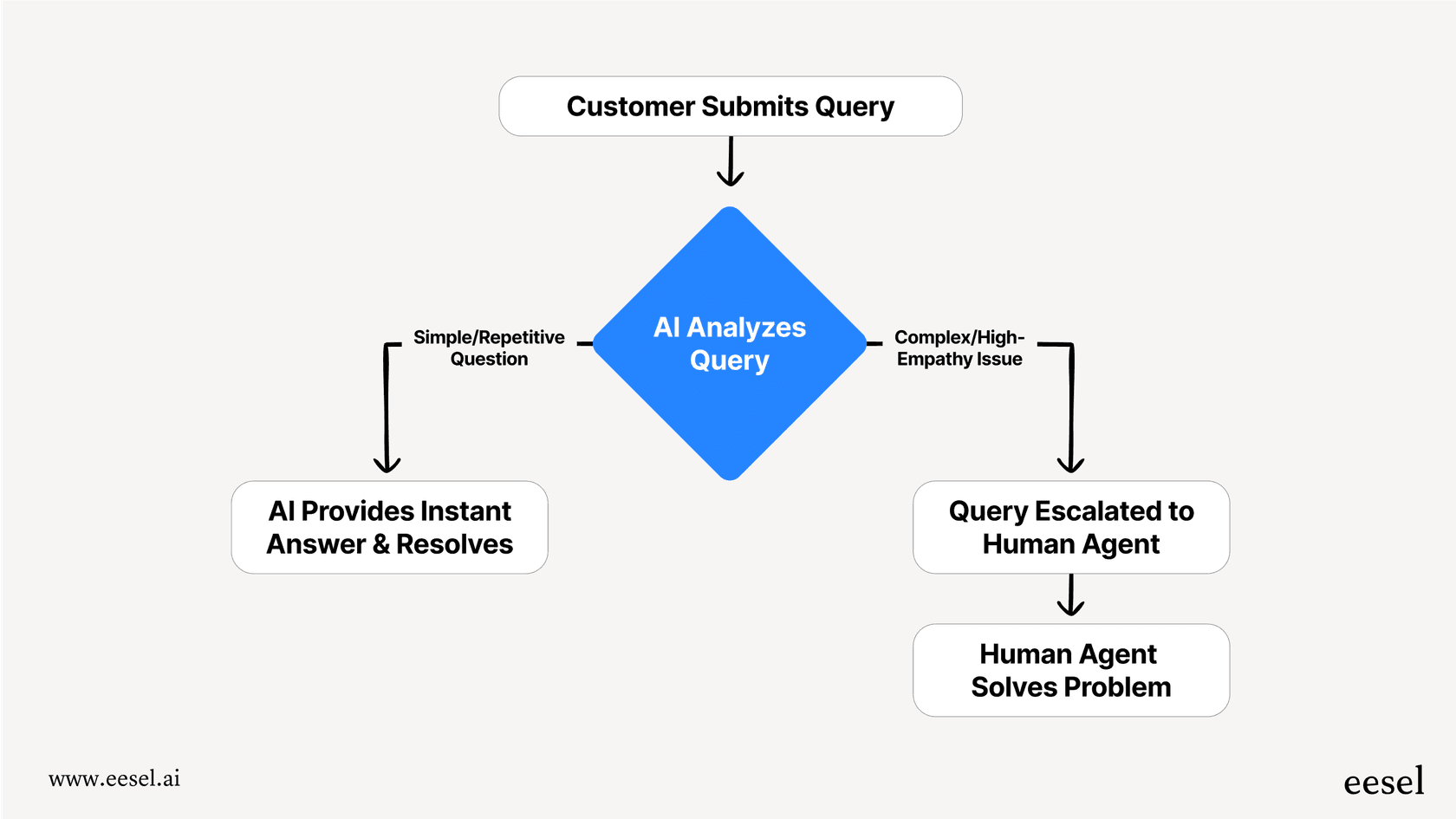
They are a great first step, but they are usually just that (a first step). Once you see the benefits and want a solution that truly understands your business, it might be time to bring on a real AI teammate.
If you want to see what that looks like, you can invite eesel AI and see it start drafting replies to your real tickets in just a few minutes.
Frequently asked questions
Do free AI tools for customer service actually work for small businesses?
Yes, they work well for automating repetitive questions like shipping updates or return policies, which helps small teams manage their time better.
What is the biggest limitation of free AI tools for customer service?
The main limits are usually the number of conversations you can have per month and the lack of advanced features like sentiment analysis or deep integrations.
Can I set up free AI tools for customer service without knowing how to code?
Most of the tools on this list, like Tidio and LiveChatAI, are designed for non-technical users and offer simple no-code setups.
Are free AI tools for customer service secure for my customer data?
Most reputable providers follow standard security practices, but you should always check their privacy policy to see how they handle and store your data.