


I work eesel's support queue, so I read these vendor pages the way a buyer does: what will this cost me next month, and what happens when it gets a ticket wrong. After comparing nine tools, the honest answer is that the model quality is no longer the thing that separates them. The two things that actually differ are the billable unit and how much control you keep.
On price, the published rates in 2026 span a 5x range for what looks like the same job: roughly $0.38 to $0.60 per ticket with eesel (credit plans), $0.49 per Freddy session, $0.75 per Help Scout AI resolution, $0.85 to $1.00 per Gorgias automated interaction, and $2.00 per Agentforce conversation. Ada, Decagon, and Sierra publish nothing, and Ada's own page says it wants companies doing at least 300,000 conversations a year.
If you already run Zendesk, Freshdesk, or Gorgias and want AI on your queue this week, layer it rather than replace it. eesel plugs into the helpdesk you have, charges a fixed monthly price from $299/month for 500 credits (1 credit per ticket) with no seat fee, and runs in draft mode until you trust it. If you are a Fortune 500 rebuilding CX from scratch, Sierra and Decagon are real, and you will need a procurement cycle to find out what they cost.
The thing every comparison gets wrong
Almost every roundup of AI customer service solutions compares features. Knowledge base ingestion, multilingual replies, sentiment tagging, handoff to a human. In 2026 that list is table stakes; every tool here does all of it, and the underlying models are close enough that a blind test would be a coin flip.
What actually decides whether an AI rollout is a win or a quiet write-off is one line in the contract: what counts as one billable thing. A ticket, a conversation, a session, an interaction, or a resolution are five different units, and vendors are not using them the same way.
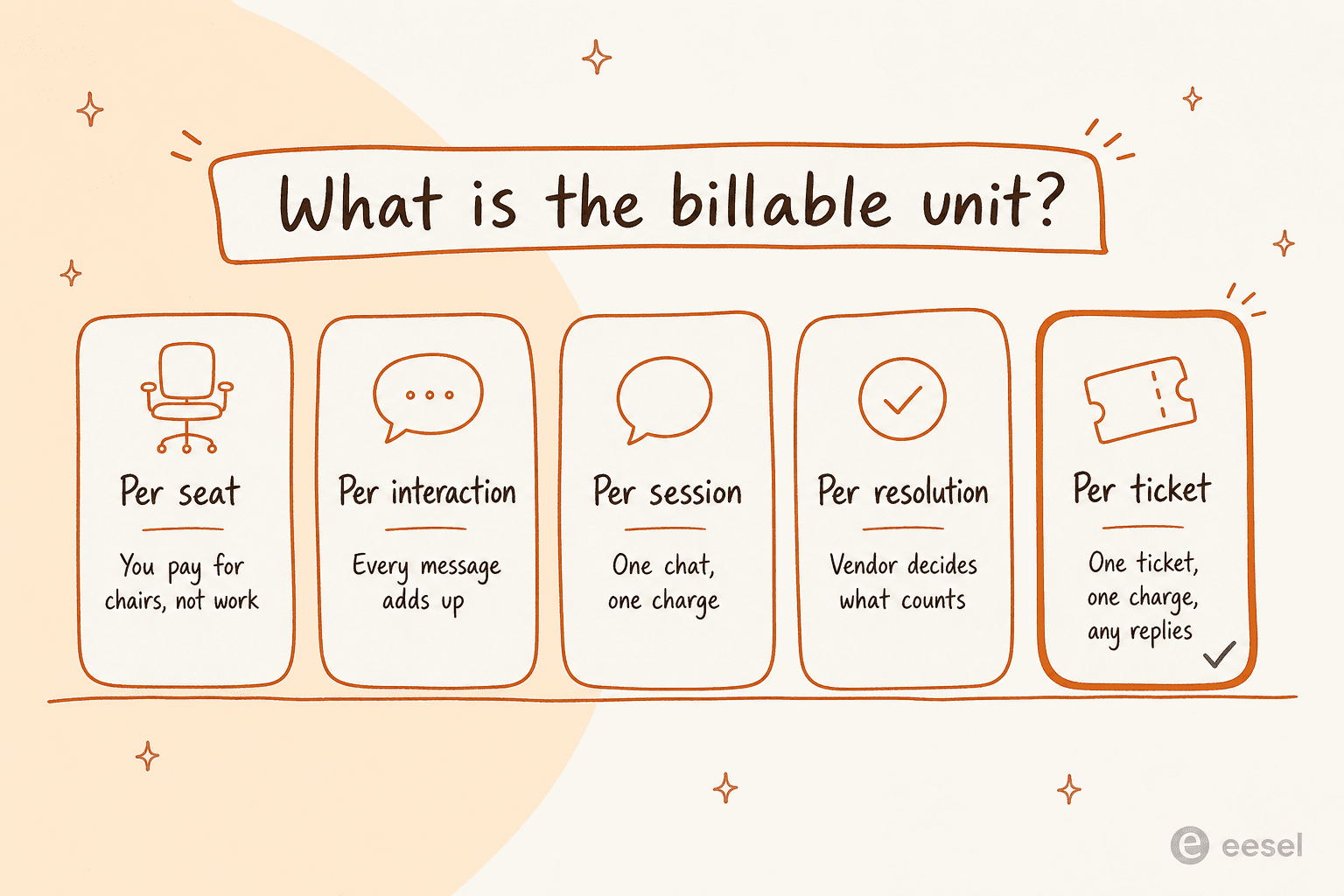
This is not theoretical. One of the sharpest objections I have seen in our own sales calls came from an ops lead at a payouts and money-transfer fintech running Zendesk with roughly 7,000 to 8,000 escalated tickets a month. A 3,000-interaction monthly cap sounded generous until they did the arithmetic: about 500 tickets a day, roughly four exchanges each, is 2,000 interactions a day. They would have burned the whole allowance in a day and a half. Per-interaction pricing was a non-starter, not because the price was high, but because the unit was wrong for their shape of work.
The second differentiator is control. When teams tell us why they stalled on an AI rollout, the reason is almost never "the answers were bad." It is that they could not decide which tickets the AI was allowed to touch. As a CX lead at a DTC supplements brand on Gorgias and Shopify, running about 7,000 tickets a month, put it to us:
"The AI will never be able to answer 100% of the questions, but if it tries and just answers 'sorry I don't know this,' I cannot go and check all my 7,000 tickets to see if the AI actually made a good answer. I need an AI who is only handling the tickets that it's confident to handle and all the other ones, leave them alone."
That is the whole buying decision in one paragraph. Keep both lenses on as you read the nine below.
How I compared these
I am on eesel's customer support team, so I have a bias and you should know it up front. What I have tried to do is make the comparison checkable rather than neutral-sounding:
- Pricing comes from the vendor's own page, re-checked on 27 July 2026. Where a vendor publishes nothing, I say so instead of quoting a number some aggregator invented.
- The billable unit is quoted in the vendor's own words, because "per resolution" and "per conversation" mean different things at different companies.
- Community voice comes from Reddit, G2, Capterra, and X, with the permalink attached. If I could not find a real one, there is no quote.
- Excluded: tools with no public product surface to evaluate, and anything I could not price or scope from primary sources. If you want the wider field, my roundup of customer service AI platforms covers the ones that did not make this cut.
One thing I did not do is claim to have run all nine in production for a year. I have not. I have read every pricing page and doc set, and I work a real queue on one of them, so treat the operational notes as coming from that seat.
The 9 best AI customer service solutions at a glance
| Tool | Best for | Billable unit | Entry price | Free tier | Self-serve start | Sits on your helpdesk | Draft-first mode | Volume floor |
|---|---|---|---|---|---|---|---|---|
| eesel AI | Layering AI onto the helpdesk you already run | Ticket or chat session | From $299/mo for 500 credits | 100 free credits, no card | Yes | Yes | Yes | None |
| Zendesk AI | Teams already deep in Zendesk Suite | Automated resolution | $19 per agent/mo (Support Team) | 14-day trial | Yes | Native only | Partial | None |
| Freshdesk Freddy | Freshworks shops wanting bundled sessions | Session | $19 per agent/mo (Growth) | 14-day trial | Yes | Native only | Copilot only | None |
| Gorgias AI Agent | Shopify brands with order-heavy tickets | Automated interaction | $40/mo (Starter) | 7-day trial | Yes | Native only | Guidance rules | None |
| Salesforce Agentforce | Salesforce-standardised enterprises | Conversation or Flex Credit | $2 per conversation | Foundations at $0 | Partial | Salesforce only | Testing Center | None stated |
| Ada | Very large CX orgs with a services budget | Resolution (quoted) | Not published | No | No | Yes | Coaching queue | 300,000 conversations/yr |
| Decagon | Enterprises wanting engineer-grade agent logic | Not published | Not published | No | No | Yes | Simulated QA | Bracketed by volume |
| Sierra | Consumer brands buying outcomes, not software | Outcome | Not published | No | No | Yes | Experiments | Enterprise only |
| Help Scout AI | Small teams that want a simple inbox with AI billed per resolution | Resolution | $25 per user/mo (Standard) | Free plan (5 users, no AI) | Yes | Native only | AI Drafts (Plus and up) | None |
Prices are the vendor's published rates as of 27 July 2026. Annual and monthly figures differ on several of these, so I flag the basis in each section below.
1. eesel AI
Best for: teams who want an AI agent answering real tickets this week without migrating off Zendesk, Freshdesk, or Front.

I work here, so start with the disclosure and then check the claims. eesel is not a helpdesk. It is an agent that plugs into the one you already run, reads your help center, past tickets, macros, and docs, and then either drafts replies for your agents or answers customers directly. The helpdesk agent is the surface most support teams use; there is also a Blog Writer and an e-commerce agent on the same account.
The reason I lead with it is not loyalty, it is the deployment shape. Smava runs 100,000+ tickets a month through a fully automated Zendesk agent, entirely in German. Design.com handles 50,000+ a month across Freshdesk. Ecosa does 10,000+ across Zendesk, Slack, and their website. None of those teams changed helpdesk to get there.
Pricing. One fixed monthly price by credits, where 1 credit is one ticket or chat session, however many replies it takes, so a five-message back-and-forth still uses one credit. Dashboard questions are mostly free. Blog posts are $4.00 each. There is no seat fee and no platform fee, 100 free credits to start with no credit card, and two months free if you pay a year upfront. Plans run $299/mo for 500 credits, $499/mo for 1,000, $999/mo for 2,500 and $1,899/mo for 5,000. SSO and MFA (from $199/mo), priority support (from $299/mo) and data residency ($500/mo) are add-ons. At 1,000 tickets a month the pricing page publishes the number itself: $499.
Pros
- One ticket is one credit no matter how many replies it takes, which is the unit most support teams actually budget in.
- Draft mode first, auto-respond when you are ready, with a confidence threshold for everything else.
- Gradual rollout is priced honestly: route 200 of your 1,000 monthly tickets to AI and the 500-credit plan ($299/mo) covers it.
- Setup is fast; most teams are live in about 30 minutes, and there is no implementation project.
- Works alongside the AI support tools you already have rather than asking you to consolidate.
Cons
- It is not a ticketing system, so if you do not have a helpdesk yet you need one first.
- Credits are a fixed monthly batch, so a spiky month can run past your plan; agents pause until credits reset unless you turn on capped overage ($0.80 per extra credit).
- The heavier compliance package (HIPAA, SSO and MFA, data residency) is sold as add-ons.
My take: if you already have a helpdesk and a help center, this is the lowest-risk way to get AI onto the queue, because you can watch it draft for a week before it ever speaks to a customer. If you are shopping for the helpdesk itself, buy that first and come back.
2. Zendesk AI
Best for: teams already standardised on Zendesk Suite who want the AI to live inside the same admin surface.
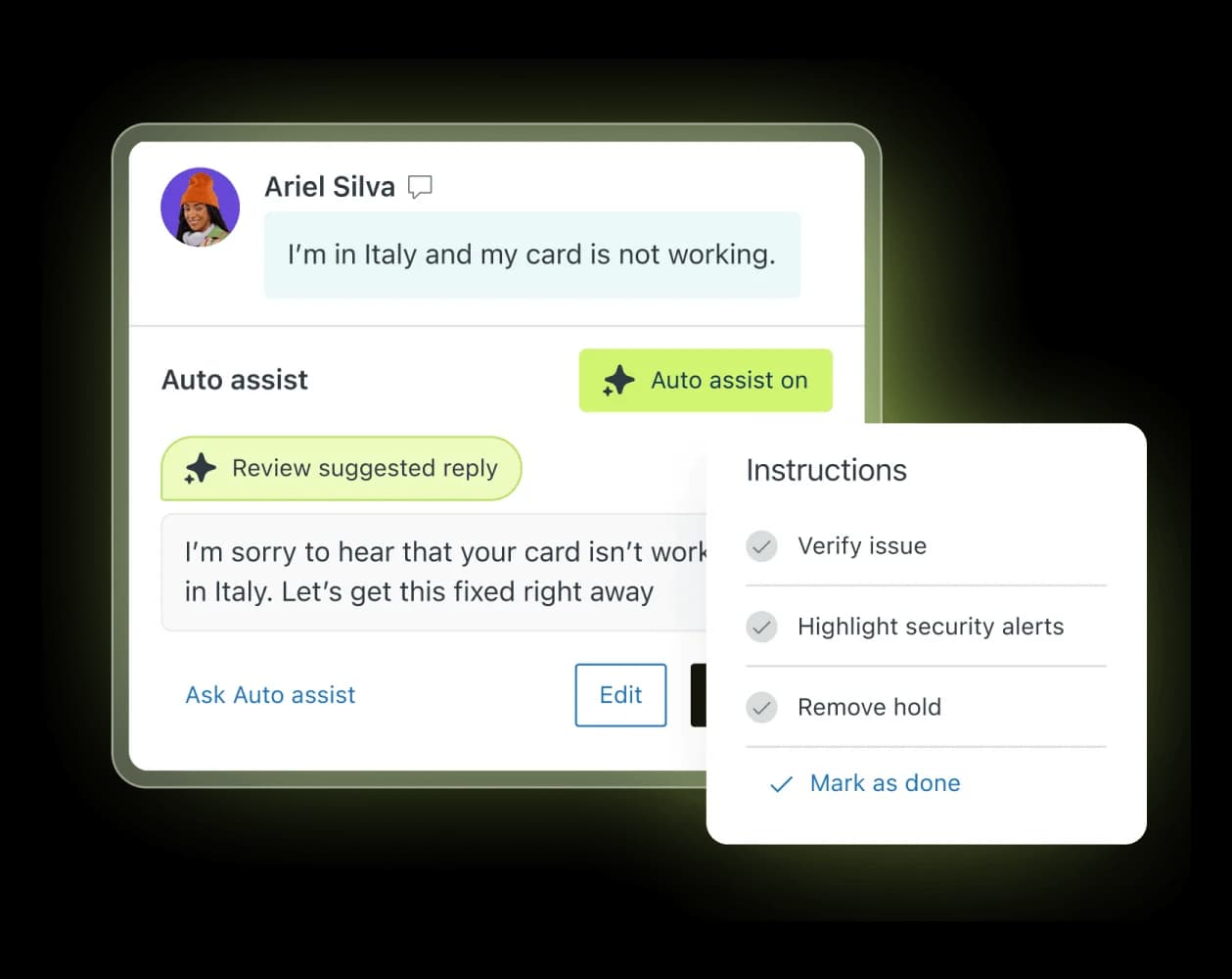
Zendesk has folded AI into nearly every tier rather than selling it as one add-on. The old standalone Advanced AI package is gone from the pricing page; in its place are AI-tagged features spread across plans, including AI agents, Action Builder, Admin Copilot, intelligent triage, and Auto assist. The top tier is now literally called Suite Enterprise + Copilot.
Credit where it is due: nothing else here has 1,800+ marketplace apps and a decade of ticketing depth behind it. If your workflows are built on Zendesk triggers and views, staying inside that world has real value.
Pricing. Per agent per month, billed annually: Support Team $19, Suite Team $55, Suite Professional $115, Suite Enterprise + Copilot is talk-to-sales. Add-ons on top: Copilot $50, Workforce Engagement $50, Contact Center $83. So a Professional seat with Copilot is $165 per agent per month before any AI usage. AI agents bill as automated resolutions on top of seats, and Zendesk publishes no dollar rate for a resolution anywhere on the pricing page. App Builder, Action Builder, and Voice are also metered above plan allowances with no published rate.
Pros
- Deepest helpdesk platform in the list, with the biggest app ecosystem.
- AI features are available from the entry tiers rather than locked to Enterprise.
- Triage, routing, and QA all live in the tool your agents already have open.
Cons
- The bill has three layers (seats, add-ons, usage) and only the first two are public.
- Quality is gated on help center hygiene more than on the model.
- Operators are blunt about the reporting gaps.
Two Reddit threads capture the range of sentiment better than any summary I could write:
"The Co-Pilot stuff is decent, but we found its effectiveness really depends on having a perfectly curated Zendesk knowledge base, which... ours isn't, lol."

"No, it's just terrible and a rip off. You can't even export the data on like what people ask the bot so you can sort it or manipulate it how you want. We stopped using it because ARs are a rip off, and it's a rushed product to get into the AI hype."
My take: if you are already on Suite Professional, turn on what you are paying for before you shop. If you are pricing it fresh, get the automated resolution rate in writing before signing, because it is the one number that scales with your success and the only one they will not print. My full breakdown of Zendesk pricing and the list of Zendesk AI alternatives go deeper.
3. Freshdesk with Freddy AI
Best for: Freshworks shops that want a chunk of AI sessions bundled into the seat price.
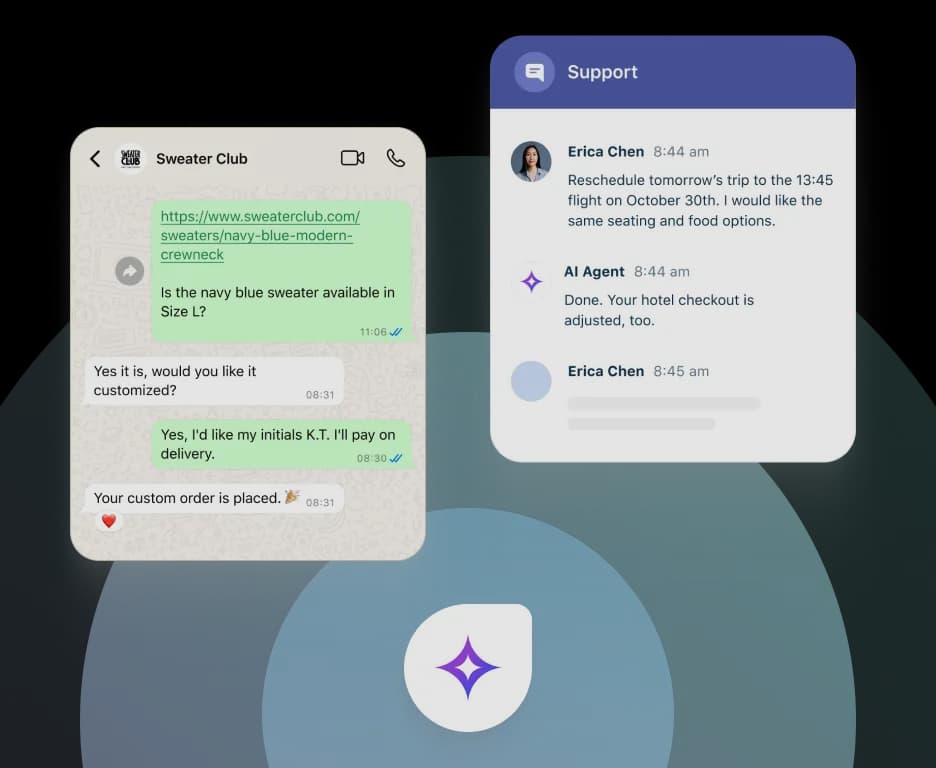
Freshdesk splits its AI into two products that get confused constantly: Freddy AI Agent is customer-facing and answers on chat, email, and WhatsApp, while Freddy AI Copilot sits beside your agents and drafts. They are billed completely differently, which is where most surprise invoices come from.
The genuinely good news, and a change from earlier in 2026, is that the first 500 Freddy AI Agent sessions are now included on all three plans, including the $19 Growth tier. For a small team that is a real allowance, not a token.
Pricing. Per agent per month, billed annually: Growth $19, Pro $55, Enterprise $89. There is no free plan on the page as of 27 July 2026. Freddy AI Agent overage runs $49 per 100 sessions, so $0.49 a session. Freddy AI Copilot is $29 per agent per month and is only sold on Pro and Enterprise. Day passes for occasional agents cost $2, $7, or $12 depending on tier, and connector app tasks are $80 per 5,000.
Pros
- 500 bundled AI sessions on every tier, including the cheapest one.
- Seat prices undercut Zendesk at the equivalent tier.
- Omnichannel is included rather than sold as a contact centre add-on.
Cons
- A session is not a ticket; a long thread and a one-line question cost the same, and returning customers can open new sessions.
- Copilot is not available on Growth, so the cheapest plan is customer-facing AI only.
- The monthly (non-annual) prices are not published in the page source at all, so budget against the annual figures.
My take: the best-value bundled AI on this list at small scale, and the arithmetic turns at roughly 500 sessions a month, where $0.49 a session starts compounding. Compare the maths against my Freshdesk AI pricing breakdown before you scale, and look at Freshdesk alternatives if the session unit does not fit your traffic.
4. Gorgias AI Agent
Best for: Shopify brands where a big share of tickets are order actions, not conversations.
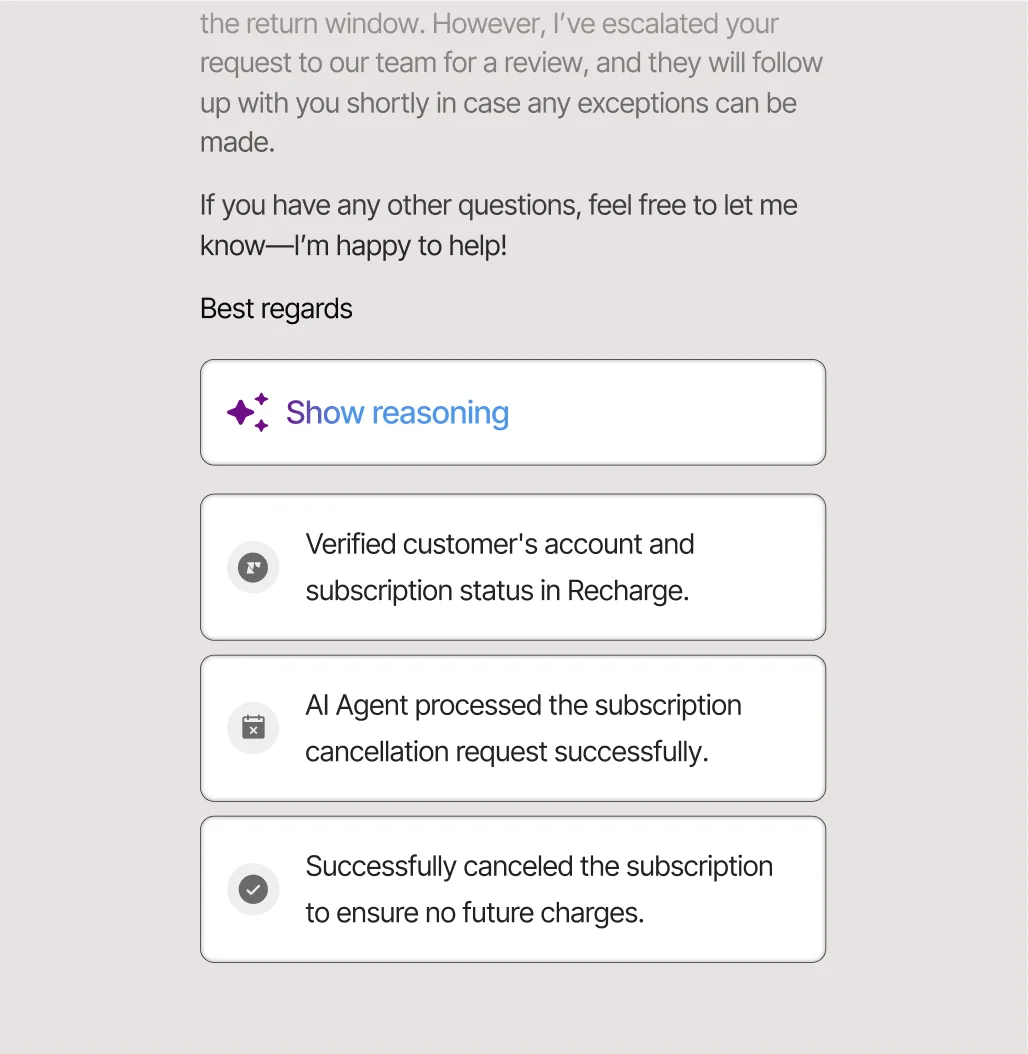
Gorgias is the most e-commerce-native tool here, and it is not close. Order lookups, refunds, cancellations, and subscription changes happen inside the ticket with Shopify context attached, and the AI Agent can show its reasoning steps for each action it took. If your queue is 40% WISMO and returns, that matters.
Pricing. This one needs care, because the pricing page bundles two meters. Starter is $40/mo for 50 tickets plus 30 automated interactions. Basic is $90/mo ($77 annual) for 300 tickets plus 30 automated interactions. Pro is $550/mo ($471 annual) for 2,000 tickets plus 190 automated interactions. Advanced is $1,430/mo ($1,227 annual) for 5,000 tickets plus 530. Ticket overage is $0.40 on the small plans and $0.36 on the big ones. And the number to circle: automated interactions are priced at $1.00 on Starter, $0.90 on Basic and Pro, and $0.85 on Advanced, and each one also counts as a billable ticket.
Pros
- Shopify actions genuinely execute rather than just linking the customer to a page.
- Instagram and Facebook comments and DMs land in the same inbox, which is rare, and ticket routing is tuned for order flows.
- Guidance rules give you meaningful control over when the AI hands over.
Cons
- The headline says you pay when it resolves a conversation, but the unit printed on every card is the automated interaction.
- Two meters running at once (tickets and AI interactions) makes forecasting harder than it should be.
- The price step from Basic to Pro is steep for a team of two or three.
The Reddit consensus on the value question is unusually consistent:
"I've been around ecommerce for 10+ years and this is honestly how I'd choose: 40%+ tickets need Shopify actions → I'd lean Gorgias. Mostly conversational support → Zendesk is fine."
My take: the 40% rule from that thread is the best heuristic in this whole post. Above it, Gorgias earns the premium. Below it, you are paying e-commerce prices for conversational support. Run your own numbers with my Gorgias AI pricing guide, and see Gorgias alternatives if the second meter is the sticking point.
5. Salesforce Agentforce
Best for: enterprises already standardised on Salesforce, where the CRM is the system of record for everything.
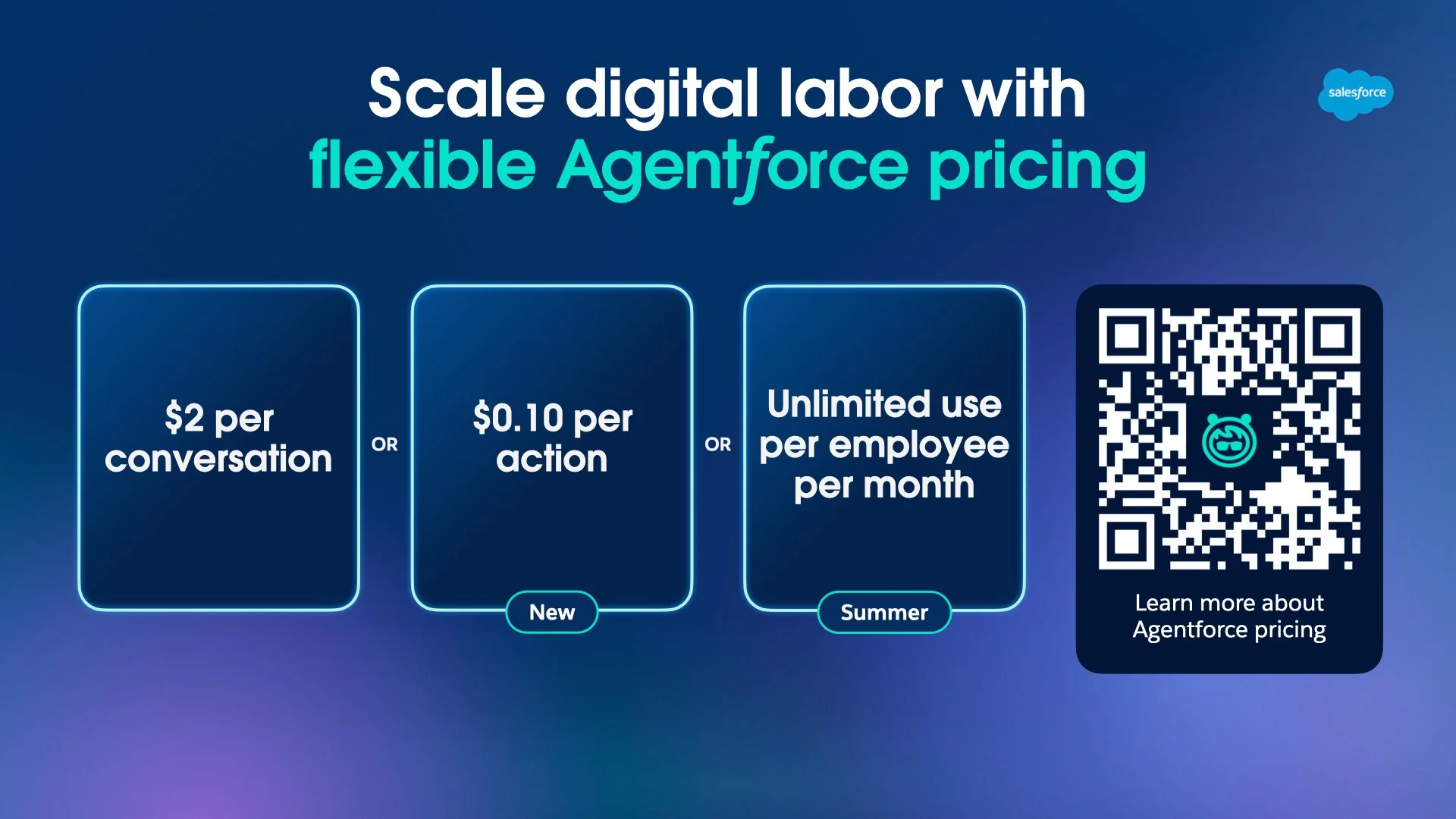
Agentforce is the most transparent enterprise pricing on this list, and I mean that as a compliment. Salesforce publishes the actual credit maths, including how many credits each action burns, which nobody else in the enterprise tier does.
Pricing. Two models that cannot coexist in one org. Either $2.00 per conversation for customer-facing agents, or Flex Credits at $500 per 100,000 credits ($0.005 each), where Salesforce's own examples price a standard action at 20 credits ($0.10) and a voice action at 30 credits ($0.15). On top of that: an Agentforce User License at $5/user/mo (which requires a Flex Credit balance), an Agentforce add-on at $125/user/mo, Industries at $150/user/mo, and Agentforce 1 Editions from $550/user/mo with 2.5M credits a year. Salesforce Foundations is $0. Credits do not roll over.
Pros
- Published per-action credit costs, which makes modelling possible before you sign.
- Deep native access to Salesforce data, flows, and Service Cloud objects.
- Testing Center lets you evaluate agents before release.
Cons
- $2.00 per conversation is the highest published rate here, roughly 3x to 5x eesel's per-ticket price.
- Credits expiring rather than rolling over punishes seasonal support volume.
- Real value depends on already owning the Salesforce stack; standing it up for AI alone makes no sense.
My take: if Salesforce is already your CRM, Agentforce is the path of least resistance and the credit model is honest. If it is not, this is the most expensive way to answer a support ticket in this comparison. My Agentforce pricing post has the worked scenarios, and Agentforce for customer service covers the setup side.
6. Ada
Best for: very large CX organisations that want a vendor's services team embedded alongside the software.

Ada calls its category Agentic Customer Experience, and the product is built as a standalone agent layer over Zendesk, Salesforce, Freshworks, ServiceNow, or Genesys. Playbooks turn multi-step SOPs into agent instructions, and a Coaching queue lets a human review and correct behaviour. The customer list is heavyweight: Monday.com, Pinterest, Grab, Sky, Barnes & Noble.
Pricing. Nothing published. The pricing page is a qualification form, and it states the floor plainly: Ada is "a great fit for companies with at least 300,000 annual customer service conversations." Contract sizes reported in operator discussions cluster in the $30,000 to $300,000+ per year band. No free tier, no trial, no self-serve.
Pros
- Playbooks are a genuinely good abstraction for complex, multi-step processes.
- The Coaching loop is one of the better review workflows on this list.
- Multilingual and omnichannel coverage is mature, including voice.
Cons
- The 300,000-conversation floor rules out most teams reading this.
- Zero pricing transparency, so every evaluation starts with a sales cycle.
- Cost has been the loudest community complaint for years.
"Used to work for a company paying ~300k+ for Ada.cx, it's expensive […] I would stick with Zendesk messaging and answer bot."
My take: Ada is a credible enterprise platform and a bad fit for anyone under its own stated floor. If you are doing 25,000 conversations a year, you are not the customer, and the tools further up this list will do the same job for a fraction. See my Ada CX review and the Ada alternatives list.
7. Decagon
Best for: enterprises that want engineers and CX operators editing the same agent logic without stepping on each other.
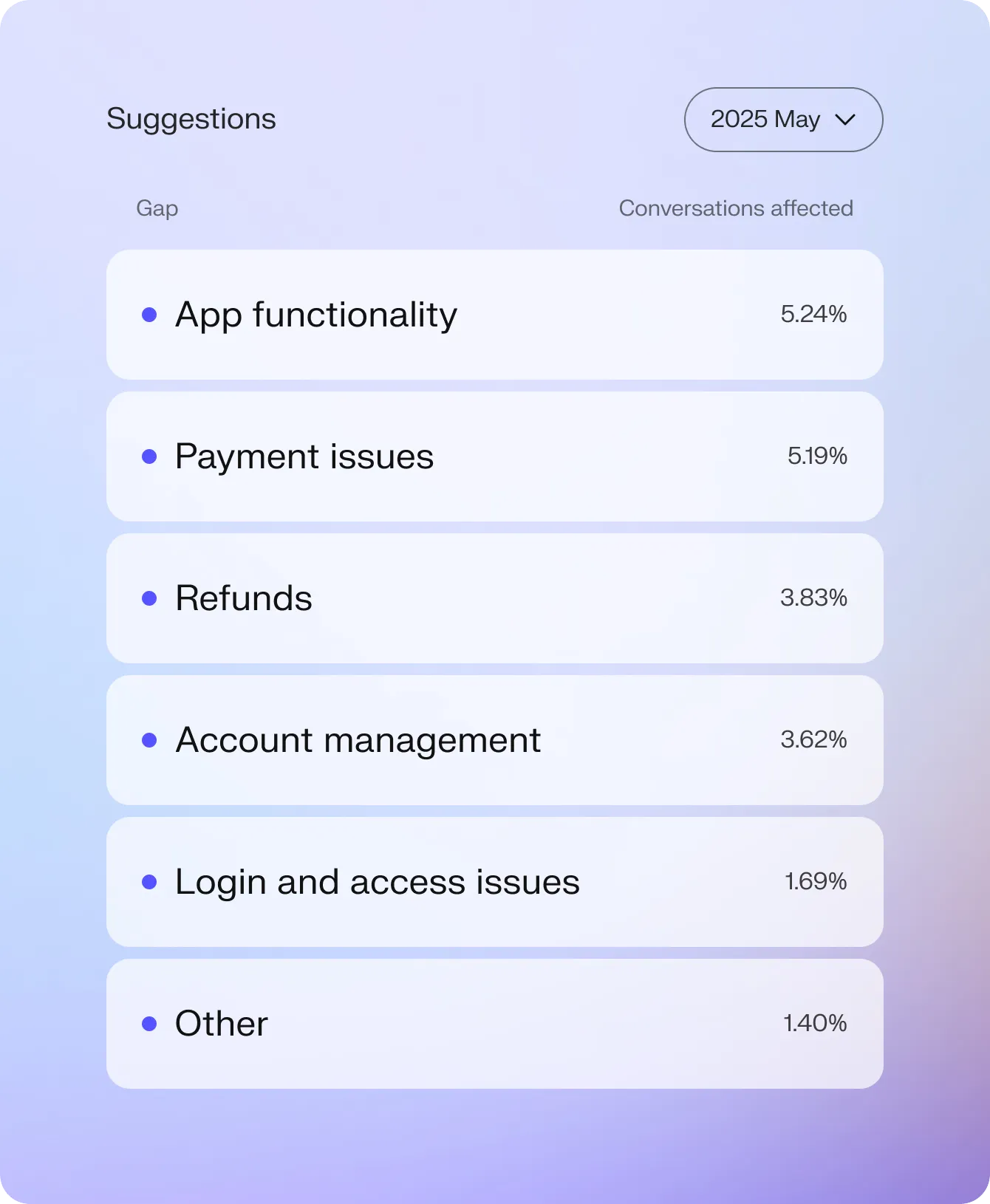
Decagon's technical wedge is Agent Operating Procedures: natural-language instructions that compile into executable code, so a CX lead can author logic while engineers keep guardrails and versioning. The company raised $250M in January 2026 at a $4.5B valuation, roughly triple its June 2025 mark, which tells you how hot this category is.
The customer results it publishes are specific enough to be checkable: Duolingo reports 80% deflection, ClassPass cites a 95% cost reduction, Chime runs 70% resolution across chat and voice.
Pricing. Not published. The /pricing URL is a 404 and every CTA routes to a demo form whose mandatory field is monthly support ticket volume, bracketed from under 9,999 up to 250,000+. No free tier, no trial.
Pros
- AOPs are the most convincing answer I have seen to the "who owns the agent logic" problem.
- Observability is strong: every model call, workflow, and knowledge lookup is traceable.
- Watchtower and Duet give real audit and analysis surfaces rather than a dashboard of vanity metrics.
Cons
- No public pricing and no self-serve path.
- Aimed at mid-market and up; the smallest bracket still starts near 10,000 tickets a month.
- Replacing rather than layering means a longer path to first value.
"With the previous vendor, at least half my week was dedicated to maintaining their system. With Decagon, it's been a night-and-day difference."
Ian Riggins, Senior Operations Manager, Duolingo (decagon.ai)
My take: the strongest of the enterprise-native platforms on engineering rigour, and the one I would shortlist if I had a real platform team and a nine-month horizon. Details in my Decagon review and Decagon pricing posts.
8. Sierra
Best for: consumer brands that want to buy resolved outcomes rather than software licences.
Sierra is the most-funded company in this comparison by a distance. Co-founded by Bret Taylor and Clay Bavor, it raised $950M in May 2026 at a $15.8B valuation and says it now serves over 40% of the Fortune 50.
"Sierra is raising $950 million from new and existing investors, led by Tiger Global and GV, at a valuation of over $15 billion."
The commercial model is the interesting part: outcome-based pricing, where you pay for a resolved outcome rather than a seat or a message. Sierra frames outcomes broadly enough to include retention and lifetime value, not just deflection.
Pricing. Nothing published: no rate card, no dollar-per-outcome figure, no disclosed minimums or volume tiers. Sales-negotiated only, with no free tier and no trial.
Pros
- Outcome pricing aligns vendor and buyer incentives better than any per-message meter.
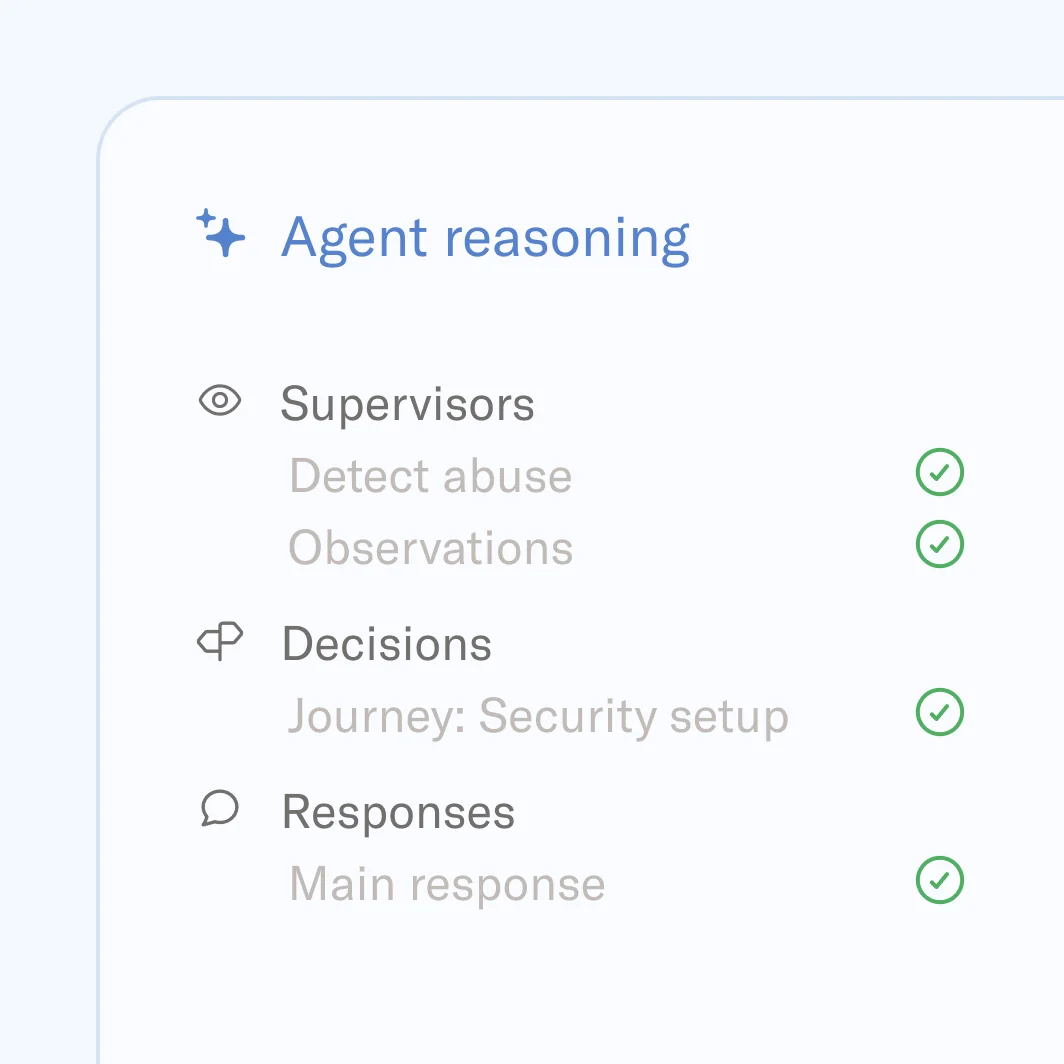
- The agent reasoning panel (supervisors, decisions, responses) is one of the clearest audit surfaces here.
- SOC 2, ISO 27001, and ISO 42001 certifications are all published.
Cons
- "Outcome" is defined in the contract, not on a public page, so the unit is whatever you negotiate.
- Enterprise only, with no way to try before a procurement cycle.
- Sierra replaces rather than layers, so the migration cost is real.
My take: the most philosophically appealing pricing model in the category and the least checkable. If you have the leverage to negotiate a tight outcome definition, it can be excellent; if you do not, you are paying a per-unit rate you cannot benchmark. My Sierra reviews post and Sierra AI pricing breakdown cover what is knowable.
9. Help Scout AI
Best for: small teams that want a simple shared inbox and an AI chatbot billed only when it resolves a chat.
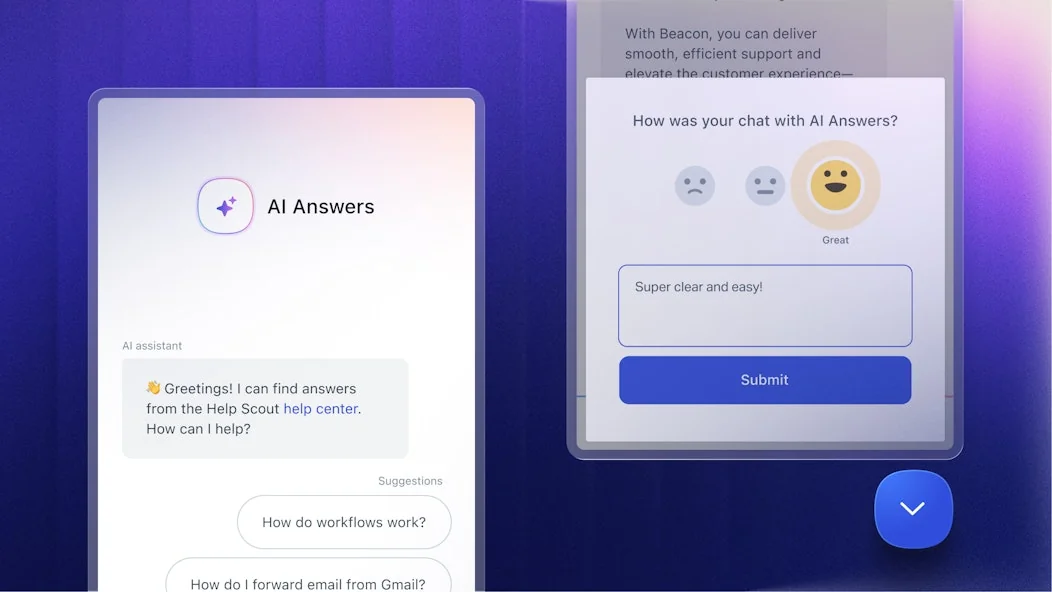
Help Scout is a shared inbox first and an AI vendor second, which is part of its appeal for small teams. The customer-facing piece is AI Answers (now sold as Envoy, with a built-in agent called Scout): a chatbot in the Beacon widget on your site or in your app that answers from your help center, websites, and custom sources like a Google Doc, then hands off to your team with context. On the agent side, AI Drafts writes reply drafts from past conversations, AI Summarize turns a long thread into a few bullet points, and AI Assist edits or translates text in the reply box.
The controls are better than you might expect at this price. You can pick topics the AI must not answer, test it privately before launch, and see which sources it used for each answer, which covers part of the control checklist further down.
Pricing. Per user per month, billed yearly: Free $0 (up to 5 users, no AI), Standard $25, Plus $45, and Pro $75 (demo only, 10-user minimum). Monthly billing is $30, $54, and $90. AI Answers is billed on top at $0.75 per resolution on Standard and up, and the pricing page counts a resolution only when the customer did not escalate, search the knowledge base, ask more questions, or say they need more help. It is one charge per conversation, however many questions the AI answers in it. You can set a monthly spending cap, after which AI Answers switches off for the rest of the month. Two traps worth knowing: the 3 free months of AI resolutions only apply to new accounts, and AI Drafts and AI Summarize start on Plus, so a Standard team gets the chatbot but not the reply drafts.
Pros
- One charge per resolved conversation, however many questions it answers, and nothing for chats the customer escalates.
- A monthly spending cap you set, so a busy month cannot run away with the AI bill.
- A real free plan, plus a 15-day trial of Standard or Plus with no credit card.
Cons
- Two meters: per-user seats plus per-resolution AI, and the reply-drafting AI needs Plus ($45 per user/mo yearly).
- The agent is still catching up. Help Scout's Envoy page marks learning from past conversations, connecting to other apps like payment processors and CRMs, and answering email as "Coming Soon".
- The names keep changing (AI Answers, Envoy, Scout), which makes plans and docs harder to compare.
My take: a good fit for a small team that wants its helpdesk and AI chatbot in one simple tool, with an AI bill that only moves when the AI actually resolves something. If you need the AI to take actions in other systems today, or you already run a different helpdesk, it is not the right pick yet. See my Help Scout AI breakdown and the Help Scout pricing guide.
What this actually costs at 2,000 tickets a month
Feature tables hide the money. Here is the same workload, 2,000 AI-handled customer contacts in a month with a five-agent team, priced against each vendor's published rate. Where a vendor publishes nothing, I have left it blank rather than guess.
| Tool | Seat cost (5 agents) | AI usage cost | Published monthly total |
|---|---|---|---|
| eesel AI | $0 | 2,500-credit plan covers 2,000 tickets | $999 |
| Freshdesk Pro + Freddy | 5 × $55 = $275 | 500 free, then 1,500 × $0.49 = $735 | $1,010 |
| Help Scout Standard + AI Answers | 5 × $25 = $125 | Up to 2,000 resolutions × $0.75 = $1,500 | Up to $1,625 |
| Gorgias Pro | $550 (2,000 tickets, 190 AI) | 1,810 × $0.90 = $1,629 | $2,179 |
| Salesforce Agentforce | 5 × $5 licence = $25 | 2,000 × $2.00 = $4,000 | $4,025 |
| Zendesk Suite Pro + Copilot | 5 × $165 = $825 | Automated resolutions, rate not published | $825 + usage |
| Ada / Decagon / Sierra | Not published | Not published | Quote only |
A few honest caveats: Freshdesk sessions and eesel tickets are not identical units, Gorgias bundles 2,000 helpdesk tickets into that $550 so the comparison flatters nobody perfectly, Help Scout only charges for chats the AI resolves so its line is a ceiling, and annual billing moves several of these numbers. But the spread is the point. The same 2,000 contacts range from about $1,000 to over $4,000 a month depending purely on what the vendor decided to call one unit.
That spread is also why per-interaction models break at the top end. In our own data, one team at 17,000 tickets a month and another needing 40,000+ interactions a month both told us flatly that per-interaction pricing does not pencil out. The customers who succeed most with AI are the ones with the most volume, and a per-message meter charges them the most for it.
The control setting nobody demos
Every vendor demo shows the AI answering correctly. None of them show you the second question a support lead actually has: what happens on the ticket it should not have touched.
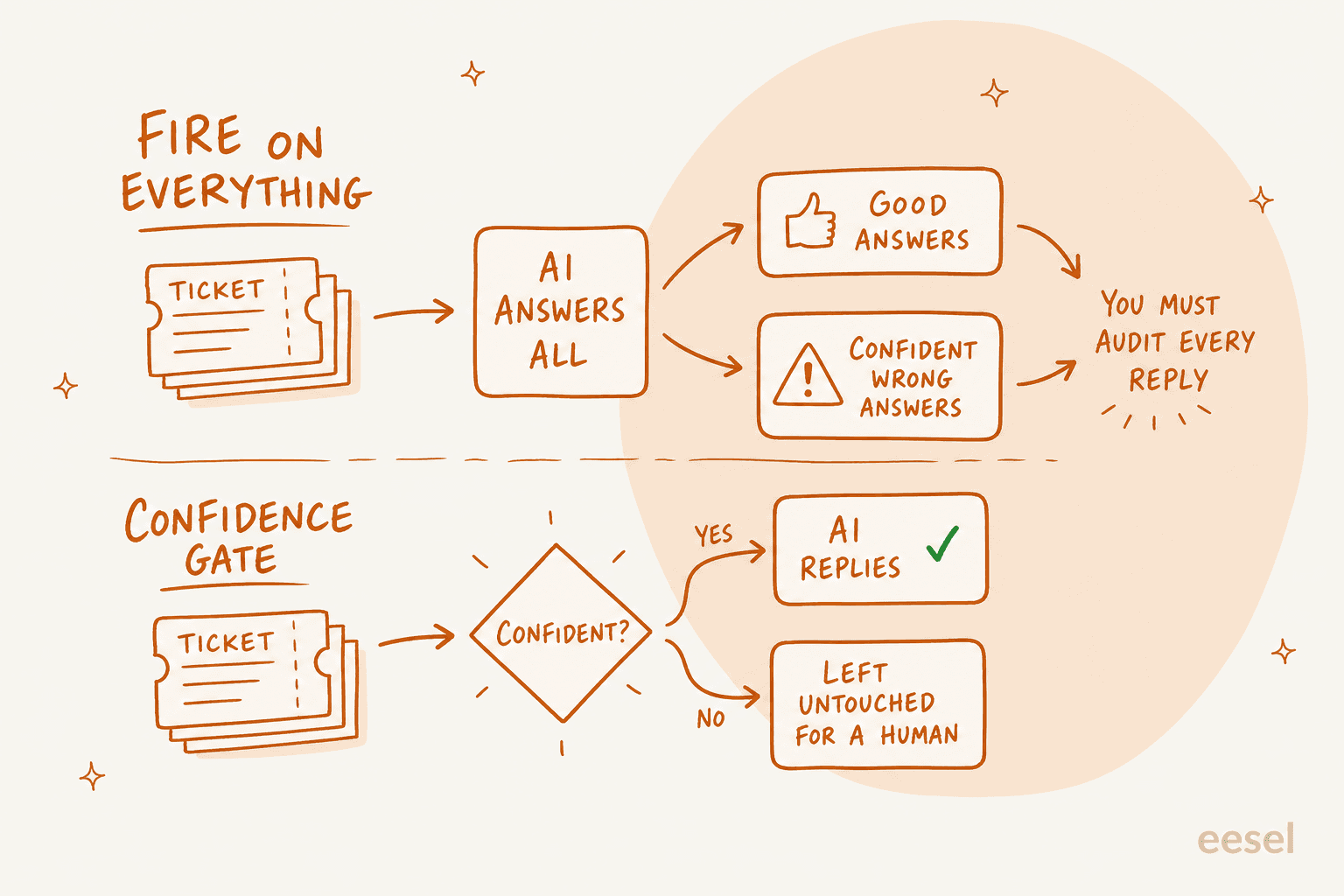
The failure mode is not an AI that says "I don't know." That is fine, a human picks it up, and your deflection rate barely moves. The failure mode is a confident wrong answer, because it looks exactly like a good one until a customer replies angrily three days later. If your AI answers everything, your team inherits an audit job on every single ticket, and nobody has time for that at 7,000 tickets a month.
So when you evaluate, ask for these four specifically:
- A confidence threshold you set, not one the vendor tuned. Below it, the AI leaves the ticket alone rather than guessing.
- Draft mode, so replies land as internal drafts your agents approve before anything goes to a customer.
- Exclusions by ticket type or tag. Support leads routinely tell us "there are certain tickets I don't want to go through AI," and refunds, cancellations, and legal are usually the list.
- A visible learning loop, so you know where corrections go and whether they stick, and a real resolution rate you can track week to week.
These are the settings that decide whether an AI rollout survives contact with a real queue. My guides on AI agent handoff and chatbot escalation cover the mechanics, and improving resolution rate covers what to do once the gate is in place.
How to pick one
Two axes sort this whole market, and neither of them is model quality.
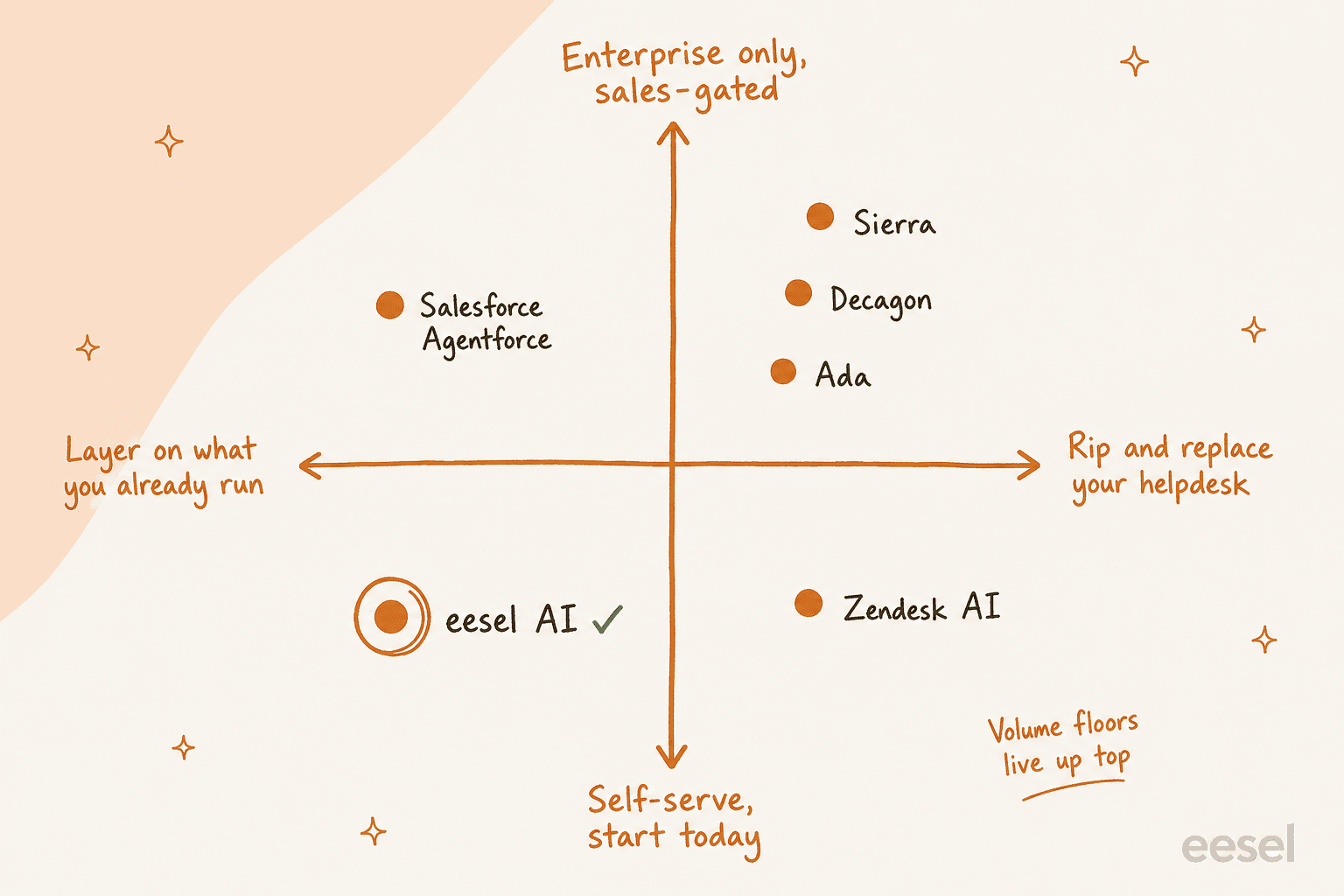
The first is whether the tool layers onto the helpdesk you already run or replaces it. The second is whether you can start today or need a procurement cycle first. From where I sit, the practical decision goes like this:
- Under 1,000 tickets a month, no helpdesk yet → Help Scout for a simple inbox with a chat widget, or Gorgias if you are on Shopify and order actions dominate.
- Any volume, already on Zendesk, Freshdesk, Front, or Jira Service Management → layer an agent on top rather than migrating. This is the case for eesel, and it is also the fastest path to knowing whether AI works on your tickets.
- Deep in Salesforce → Agentforce, with the credit model modelled out properly first.
- Enterprise, 300,000+ conversations a year, with a platform team → Ada, Decagon, or Sierra, and budget a real evaluation cycle.
- Still unsure whether AI can handle your queue at all → run whatever you pick against historical tickets before it touches a live customer, and read my notes on customer service automation first. If a vendor cannot show you that, treat it as a red flag.
One more from our own experience, which cost a customer real money: a team that ran twelve successful test chats, loved the results, then hit the billing page and immediately cancelled. The product worked. The pricing model was the surprise. Model the bill before you run the pilot, not after.
Try eesel for your helpdesk
If you already run Zendesk, Freshdesk, Gorgias, Front, or Jira Service Management, you do not need to change anything to find out whether AI can handle your queue. eesel AI connects to your helpdesk, reads your help center and past tickets, and starts drafting replies inside the tickets your agents already work in. Most teams are live in about 30 minutes, with no implementation project and no developer.
Two things I would flag as an actual support person rather than a marketer. First, run it in draft mode for a week: you get to read every reply before a customer does, and that is the fastest way to build trust in it internally. Second, the billing is per credit, so a messy five-reply thread uses the same single credit as a one-liner, and you pick the plan size that fits the tickets you actually route to it. Start with 100 free credits and no credit card, or book a demo if you want us to model your volume first.