

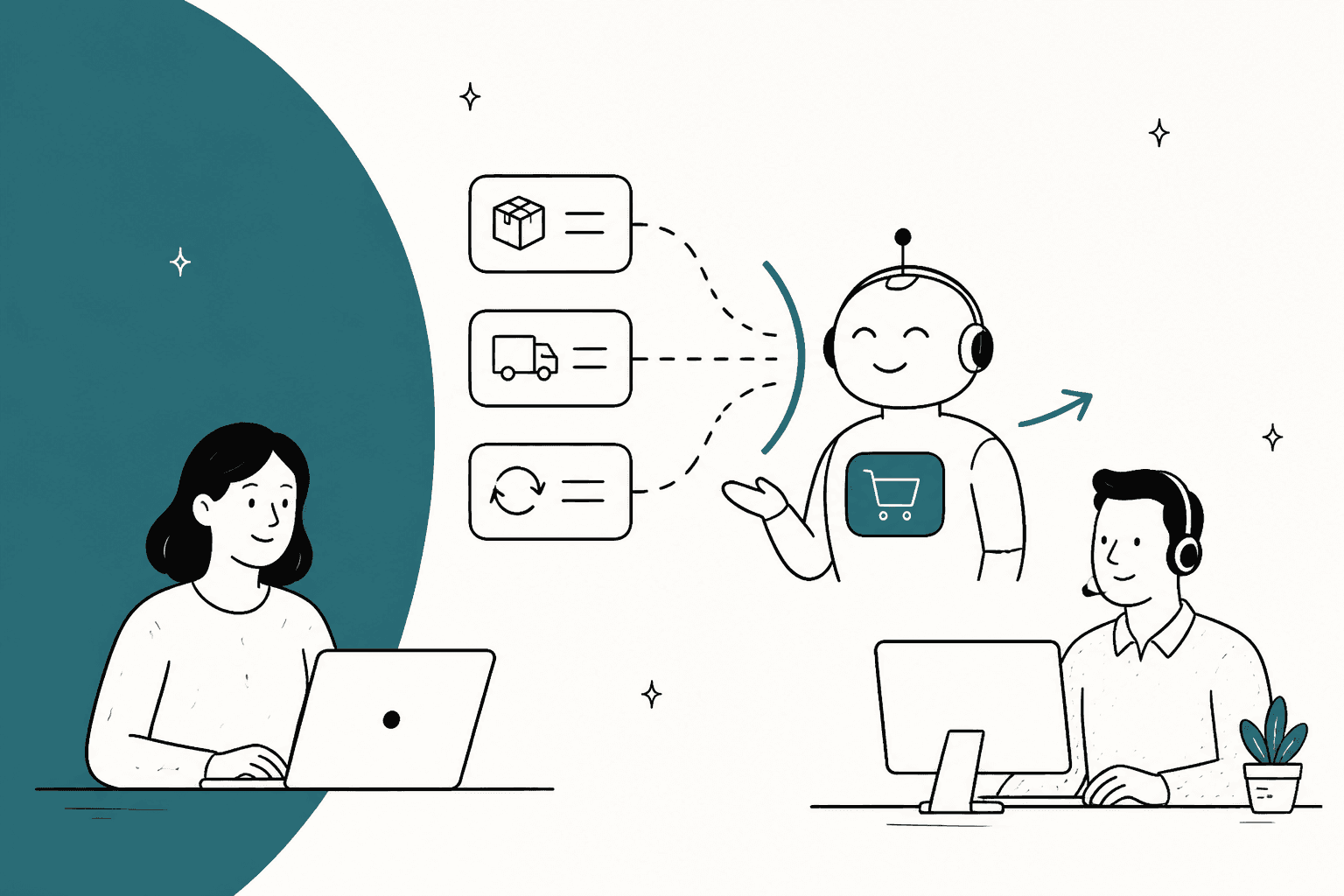
Yes, Re:amaze deflects tickets in layers: FAQ articles customers read before writing in, Cues and chatbots, an AI Agent (still labelled beta) that answers on chat, email and SMS, and AI Pre-Filter, which routes sensitive topics to people. Only the AI Agent bills: 5, 10 or 20 resolutions per seat on Basic, Pro and Plus, then $0.85 each. The catch is that switching the AI Agent on stops the classic Hello, Order and FAQ bots, and it answers from your FAQ, templates and store data, not from your team's past replies.
If email is where deflection stalls, eesel learns from your Re:amaze conversations and checks the queue every ten minutes. With the eesel CLI, a coding agent can upload approved knowledge and run test questions before go-live, though a person still copies the API token.
Can Re:amaze deflect tickets with AI?
It can, through five separate pieces, and I would not treat them as one feature. I work on eesel's helpdesk integrations, and when I read a helpdesk's "AI" page I look for two things: what the model reads, and which conversations get counted as handled. Re:amaze's answers differ by layer, so here they are side by side.
| Layer | What it does | Where it deflects | Billed? |
|---|---|---|---|
| FAQ articles | Public, internal and draft articles, embeddable on-site, in-app and in chat | Before a conversation exists | No |
| Cues and classic chatbots | Proactive messages and scripted bots (Hello Bot, Order Bot, FAQ Bot, custom bots) | Chat, mostly | No |
| AI Agent (beta) | Answers customers on Chat, Email and SMS from FAQ, templates, custom context and store data | Inside a conversation | Per resolution, past your allowance |
| AI Pre-Filter | Reads new conversations, applies a tag and an action | Keeps topics away from the AI, or archives noise | Needs the AI Agent on |
| Learned Answers | Turns escalated, finished conversations into suggested answers | Improves the AI Agent over time | No |
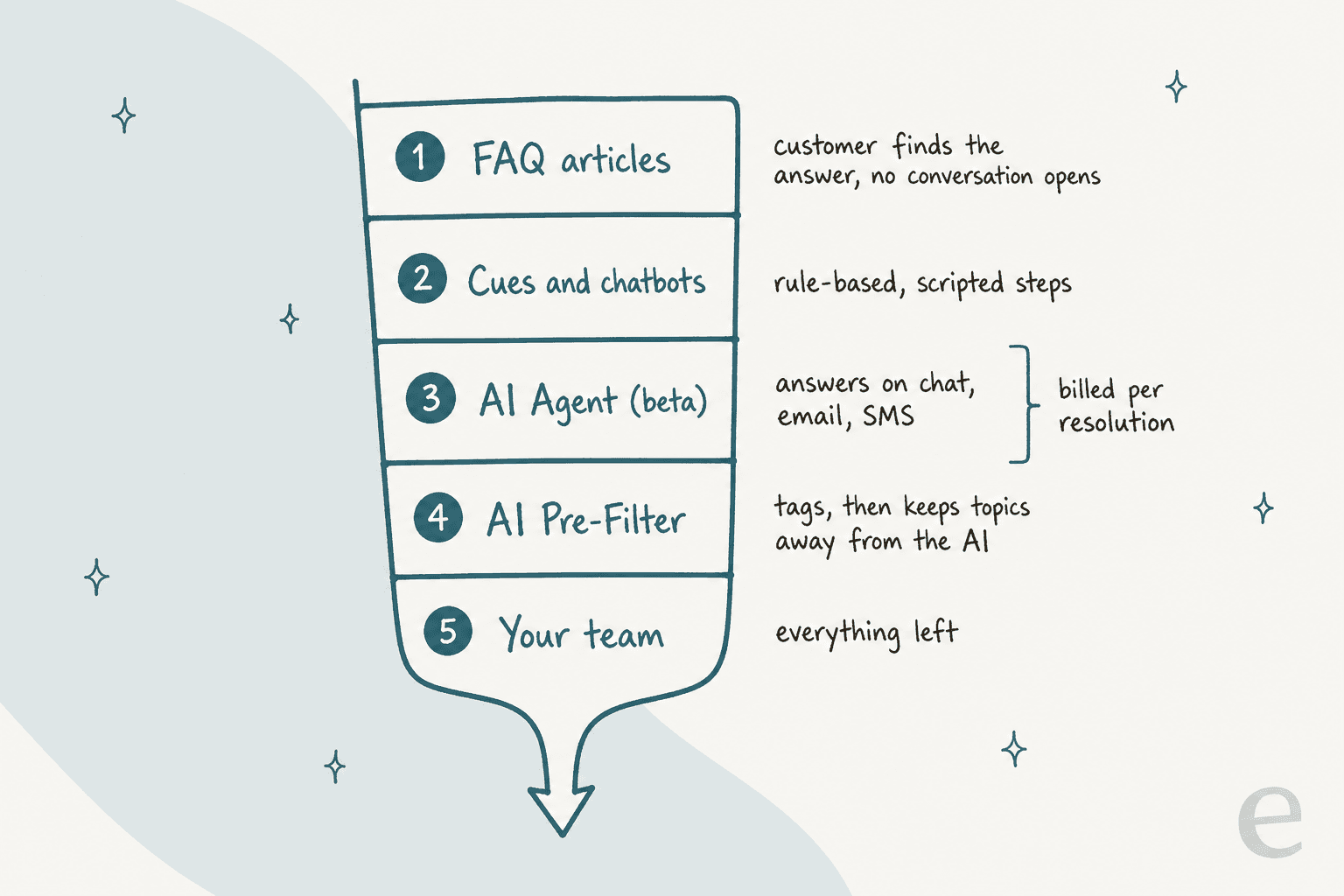
The Re:amaze AI page says these tools are powered by OpenAI's GPT models and carries a beta label. Most of what follows comes from Re:amaze's own help center, and I checked each figure against it on 22 November 2026.
How does the FAQ layer deflect before a ticket exists?
Customers read an article and never write in, which is the cleanest kind of ticket deflection because nothing is billed and nobody waits. Re:amaze's FAQ is included on every plan, with public, internal and unlisted articles, search by keyword, and embedding in your site, in your app and inside Re:amaze Chat.
It matters beyond self-service because the AI Agent reads the same articles. Re:amaze's guidance says the AI Agent is only as good as the content behind it, so a stale return policy gets repeated confidently. One Capterra reviewer liked how the two fit together:
"I loved how easy it was to setup and how the knowledge base integrated into the chat widget."

Another named the weak spot, which is authoring:
"Their knowledge base editor doesn't support uploading photos to an article. If you want to add an image to an article, you have to point to an external URL."
If your FAQ is thin, fix that before turning anything on. Customer self-service pays off only when the answers exist, and a readable help center is a good checklist.
What happens to Cues and chatbots when the AI Agent is on?
They mostly stop, and this is the detail I would want to know before flipping the switch. Re:amaze's setup guide says that while the AI Agent is enabled, the classic chatbots (Hello Bot, Order Bot, Shopping Bot, AI FAQ Bot and FAQ Bot) will not run. Cue Bots and Workflow Bots keep operating, so your workflow automation survives.
The billing guide adds a fallback: with Usage Overage turned off in Settings > AI Settings, classic chatbots can keep running at no cost once your included resolutions are gone. So the choice is real. Keep the free Order Bot answering "where is my order" and you pay nothing, or hand that same question to the AI Agent, which handles more phrasings and is metered.
The chatbots page describes what the classic bots do: the Order Bot checks order status for Shopify, BigCommerce and WooCommerce, the FAQ Bot answers from FAQ content when a question matches, and custom bots are built in a visual editor and attached to a Cue or a workflow. If you want the long tour, Re:amaze automation covers workflows and bots.
How does the AI Agent deflect, and what does it read?
It answers customer messages on its own, in Chat, Email and SMS, and escalates when it can't. Per the setup guide, it draws on five sources:
- FAQ articles from your knowledge base.
- Response templates your team already wrote.
- Custom AI context: personality, response guidelines and external URLs you add under AI > Manage Bots > Custom AI Context.
- Shopify products and orders, if you use Shopify.
- WooCommerce products and orders, if you use WooCommerce.
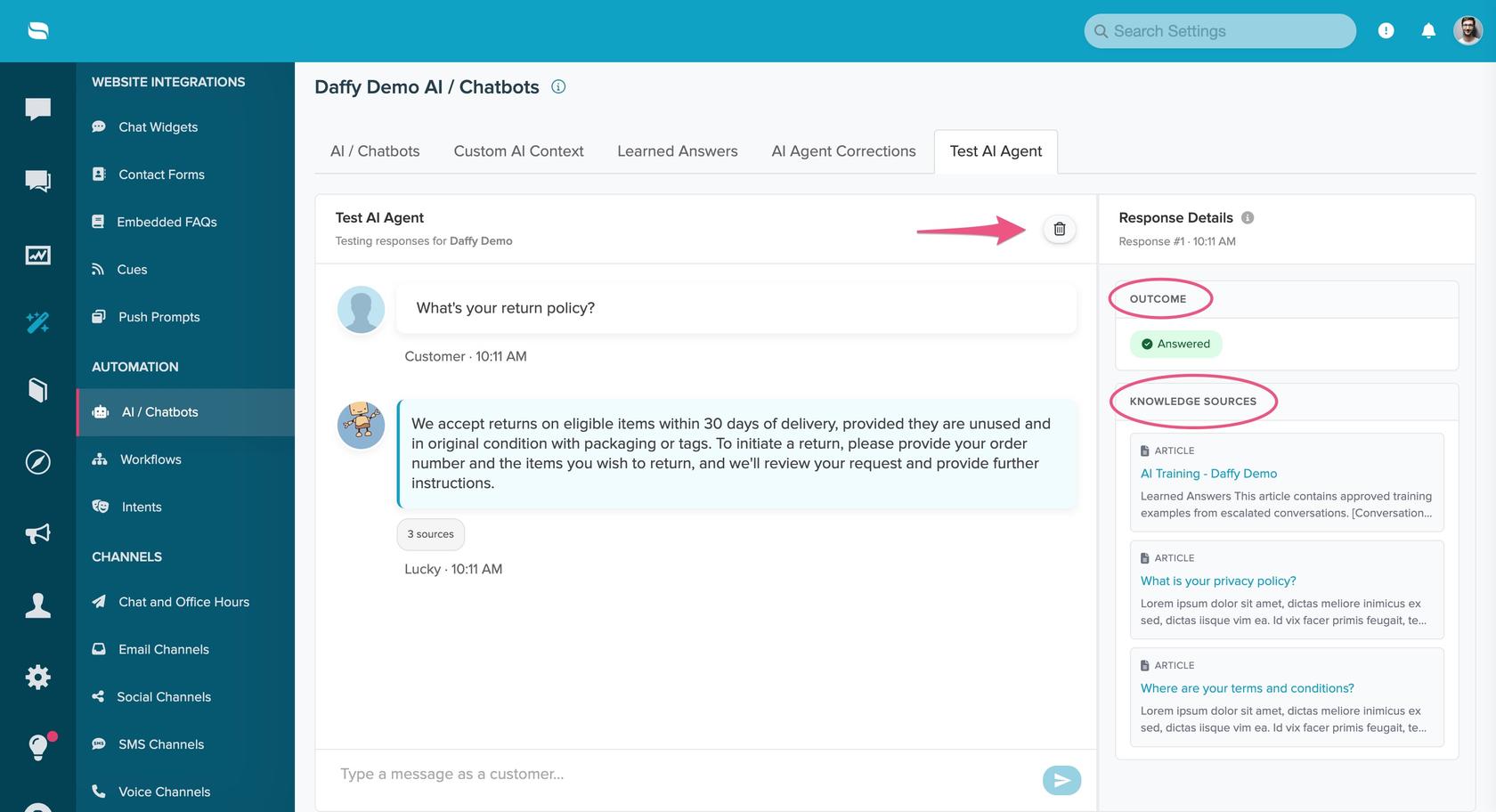
Two features make it easier to trust than most. First, every AI answer shows a source count, and expanding it lists which article, product or template was used, so you can trace a bad answer to the page that caused it. Second, the Test AI Agent tab lets you chat with it before customers do, with outcomes of Answered, Escalated, Resolved or Failed. The limit: the test tool has no real store connection, so it can't look up actual order status.
When an answer is wrong, the Improve Response button saves a correction, but only on answers where the AI used an FAQ article, and Re:amaze stores up to 100 corrections. If the AI answered without an article, the guide's advice is to write one. That is a sound habit against an AI hallucination, and for preventing them in support, and it also means the FAQ stays your single source of truth.
One reviewer on G2 described the draw of the FAQ-fed approach:
"They recently added AI features that pull information from FAQ's, those are very helpful"

What does AI Pre-Filter do for deflection?
It decides which conversations the AI Agent never touches, and it tags everything it reads, a form of auto-triage. A pre-filter has three parts: a prompt of up to 500 characters, a tag, and one of four actions (tag only, tag and mark done, tag and mark spam, tag and archive). Re:amaze ships five defaults: Marketing, Purchases, Updates, Social and Spam.
Read the rules carefully, because they shape your setup. Per the guide, any conversation that matches a pre-filter is not handled by the AI Agent, whichever action it uses, and pre-filters take priority over Workflows. The guide's suggested use is routing: billing issues, cancellations and VIP customers go to a person first. And Pre-Filter itself needs the AI Agent enabled with resolutions remaining or overage turned on.
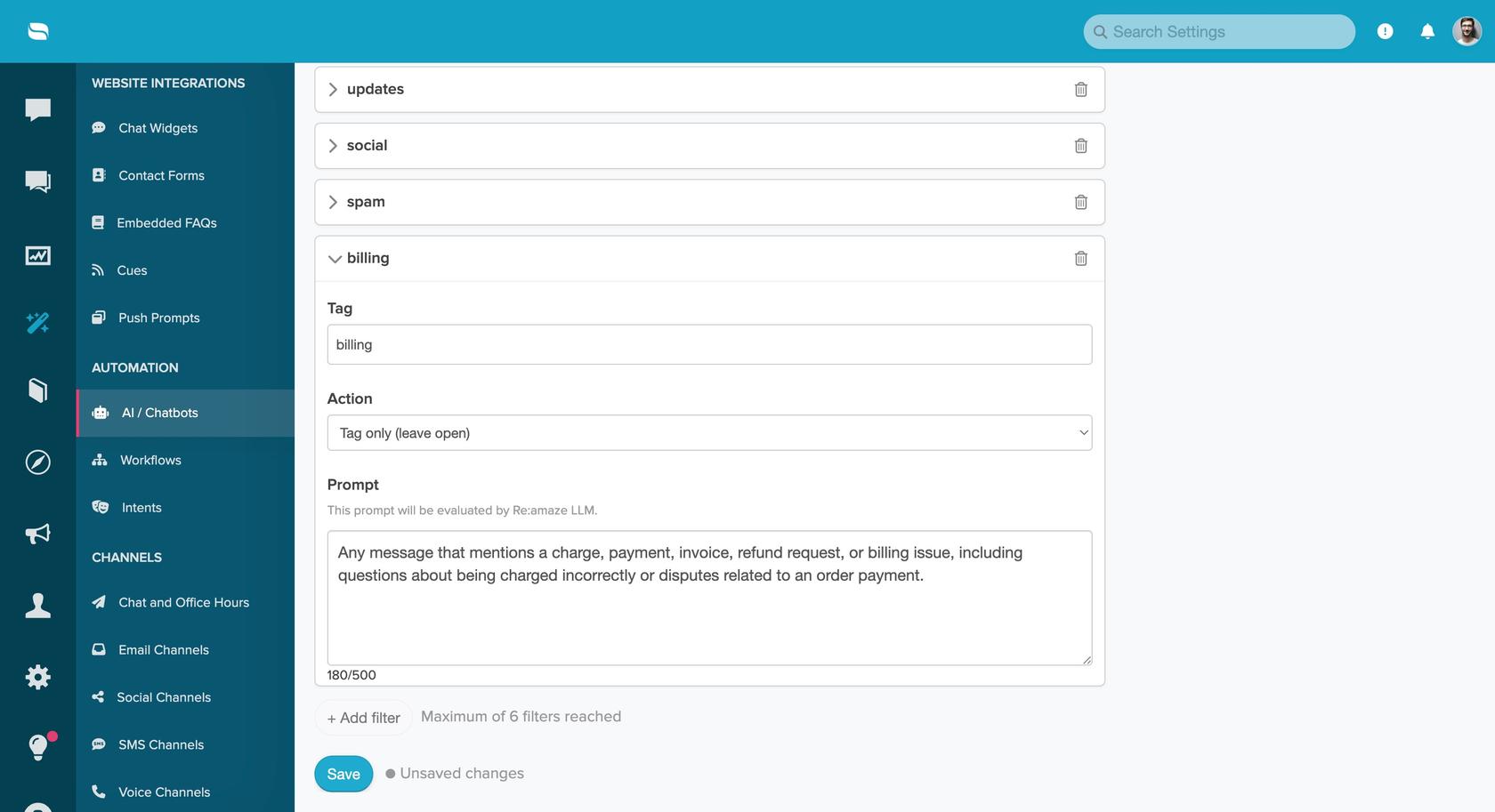
That screenshot shows a custom billing filter, and the page notes a maximum of 6 filters. I like this layer for a reason people don't expect: good deflection is partly about what you refuse to automate. For a deeper look at tagging conversations, see Re:amaze ticket tagging and routing.
Do Learned Answers improve deflection?
Slowly, and only for the AI Agent. When the AI Agent escalates a conversation and a person marks it Done, Re:amaze creates a suggested answer. You save, edit or delete each one, suggestions expire after 14 days, and the guide says you can save up to 50 answers.
It learns from escalations only, and nothing is added until a person approves it. For a store with a few hundred recurring questions, 50 saved answers fills up quickly, so treat Learned Answers as the place for policy exceptions, and keep general answers in the FAQ. The same limit is why I covered Re:amaze draft replies separately: agent-side drafts have different inputs from the AI Agent.
What does Re:amaze AI deflection cost?
Seats first, then resolutions. Prices below are from Re:amaze's pricing page and the billing guide, checked on 22 November 2026.
| Plan | Monthly price | Annual price (per month) | AI Agent resolutions included | Extra resolutions |
|---|---|---|---|---|
| Starter | $59 flat, unlimited team members, 500 responded conversations a month | Not listed | Not listed | Not listed |
| Basic | $29 per team member | $26.10 | 5 per seat | $0.85 each |
| Pro | $49 per team member | $44.10 | 10 per seat | $0.85 each |
| Plus | $69 per team member | $62.10 | 20 per seat | $0.85 each |
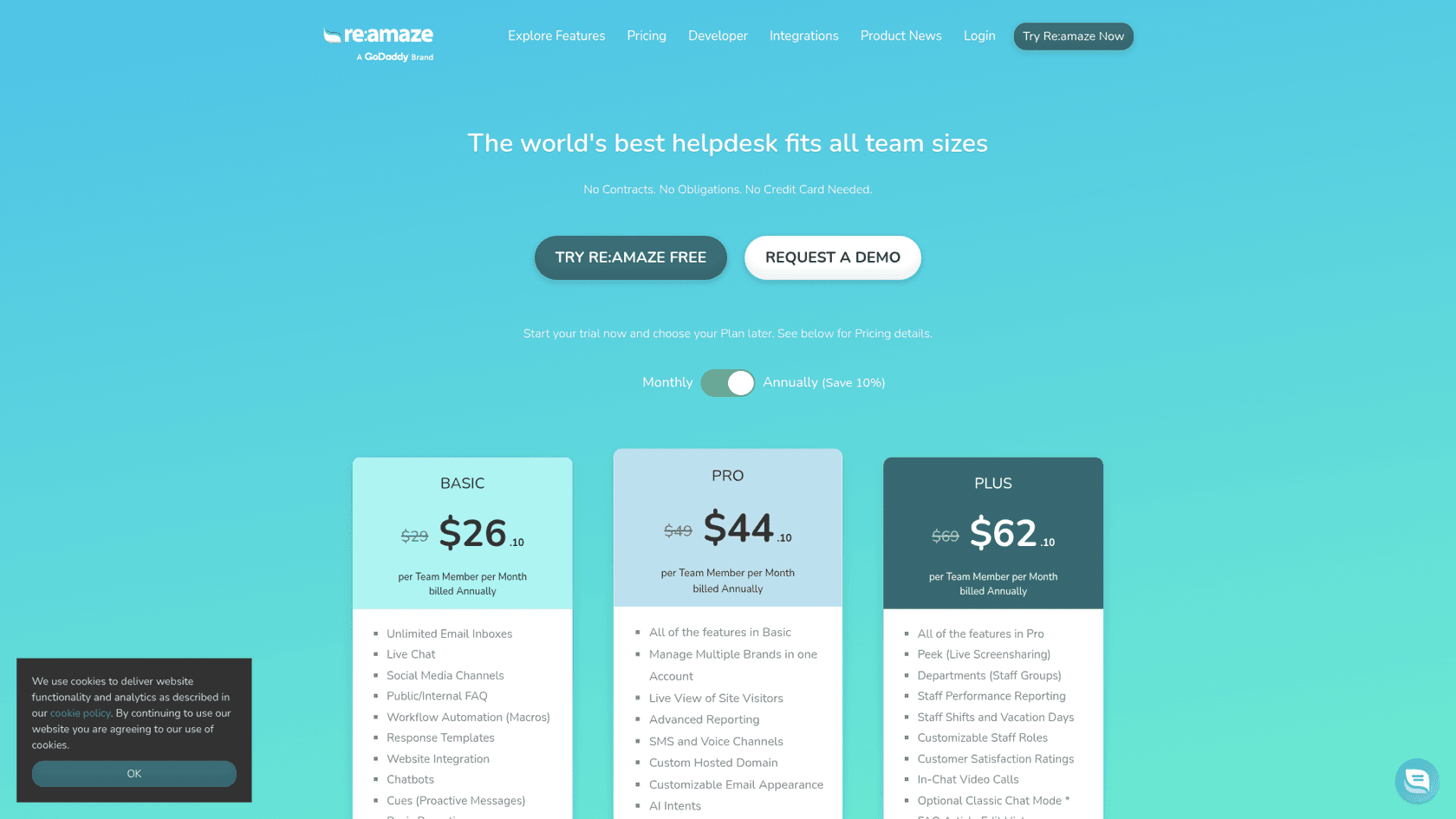
The guide says volume plans have no seat-based allowance and bill every resolution at a flat $0.85. Here are three scenarios I worked out. The resolution counts are my assumptions, not Re:amaze figures.
| Team | Seat cost (monthly billing) | Included | Assumed resolutions | Overage | Total |
|---|---|---|---|---|---|
| 2 seats on Basic | $58 | 10 | 100 | 90 x $0.85 = $76.50 | $134.50 |
| 3 seats on Pro | $147 | 30 | 200 | 170 x $0.85 = $144.50 | $291.50 |
| 5 seats on Plus | $345 | 100 | 400 | 300 x $0.85 = $255.00 | $600.00 |
The seat allowance covers a small slice of a busy store, so overage quickly becomes the main AI cost. The meter only runs on conversations the AI Agent finishes, so an escalated conversation is free, which rewards a good FAQ. For the wider plan picture, what Re:amaze costs and the Re:amaze review go further.
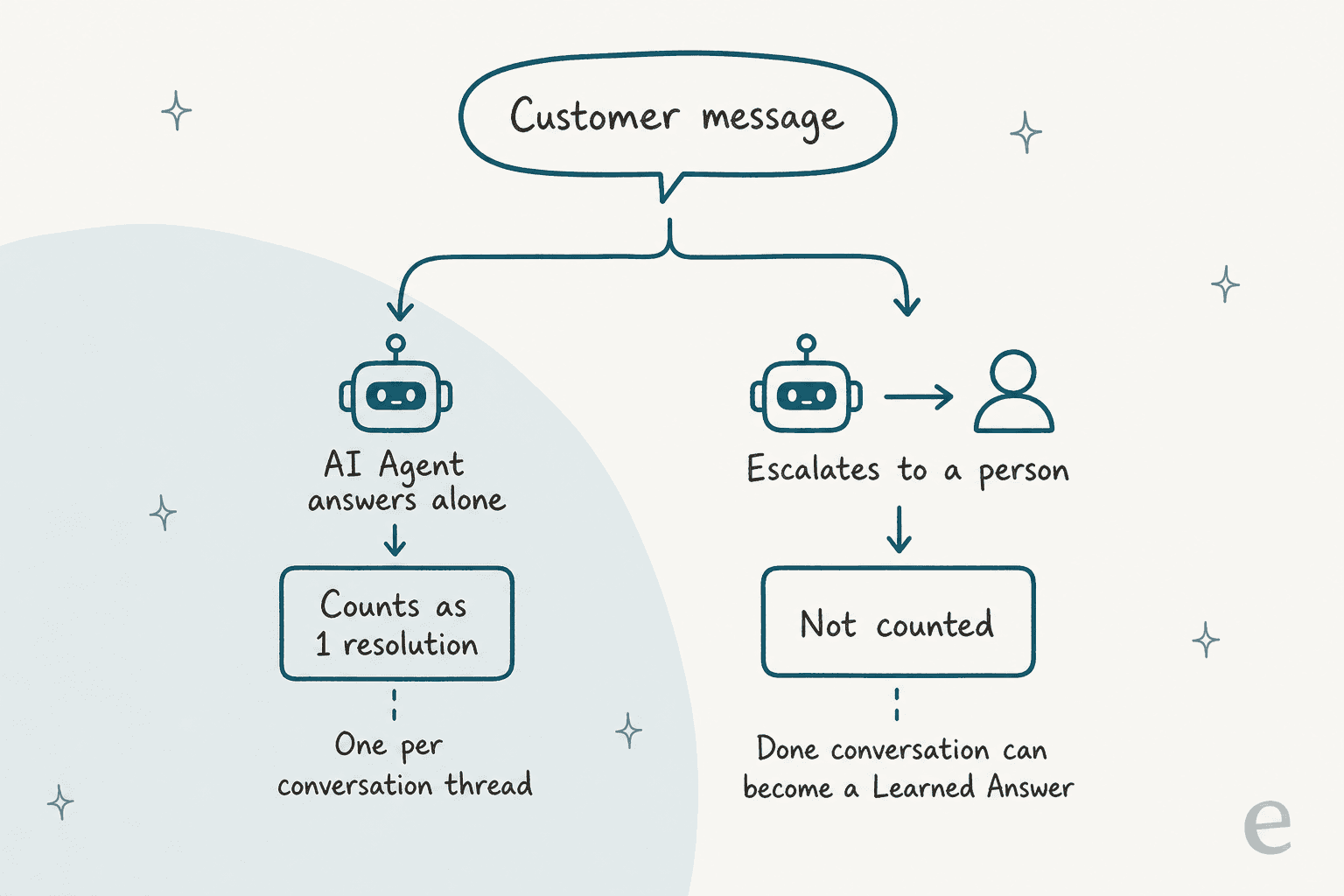
How do you set up Re:amaze AI deflection in about an hour?
Most of this is writing, not clicking. Here is the order I would use.
- Fix the FAQ first (20 minutes). One question per article, the question as the title, the answer in the first line. Unpublish anything outdated, because the AI will repeat it.
- Fill in Custom AI Context (10 minutes). Under AI > Manage Bots > Custom AI Context, set a personality and short guidelines, and add external URLs for policies that live outside Re:amaze.
- Add Pre-Filters for what a person should answer (10 minutes). Billing, cancellations and VIP customers are the usual first three.
- Test it (15 minutes). Use the Test AI Agent tab with your ten most common questions and note any that escalate or cite the wrong article.
- Turn it on for one channel. Go to AI > Manage Bots > AI/Chatbots, toggle Re:amaze AI Agent and pick a single email or SMS channel, remembering the classic bots stop running.
- Review daily for two weeks. Check source counts on answers, save corrections, and approve Learned Answers that match your policy.
If you also use Shopify, eesel has a Shopify integration, and AI for Shopify support shows what order-aware AI can do, and my colleague's Re:amaze AI setup is the longer walkthrough.
How do you measure deflection honestly?
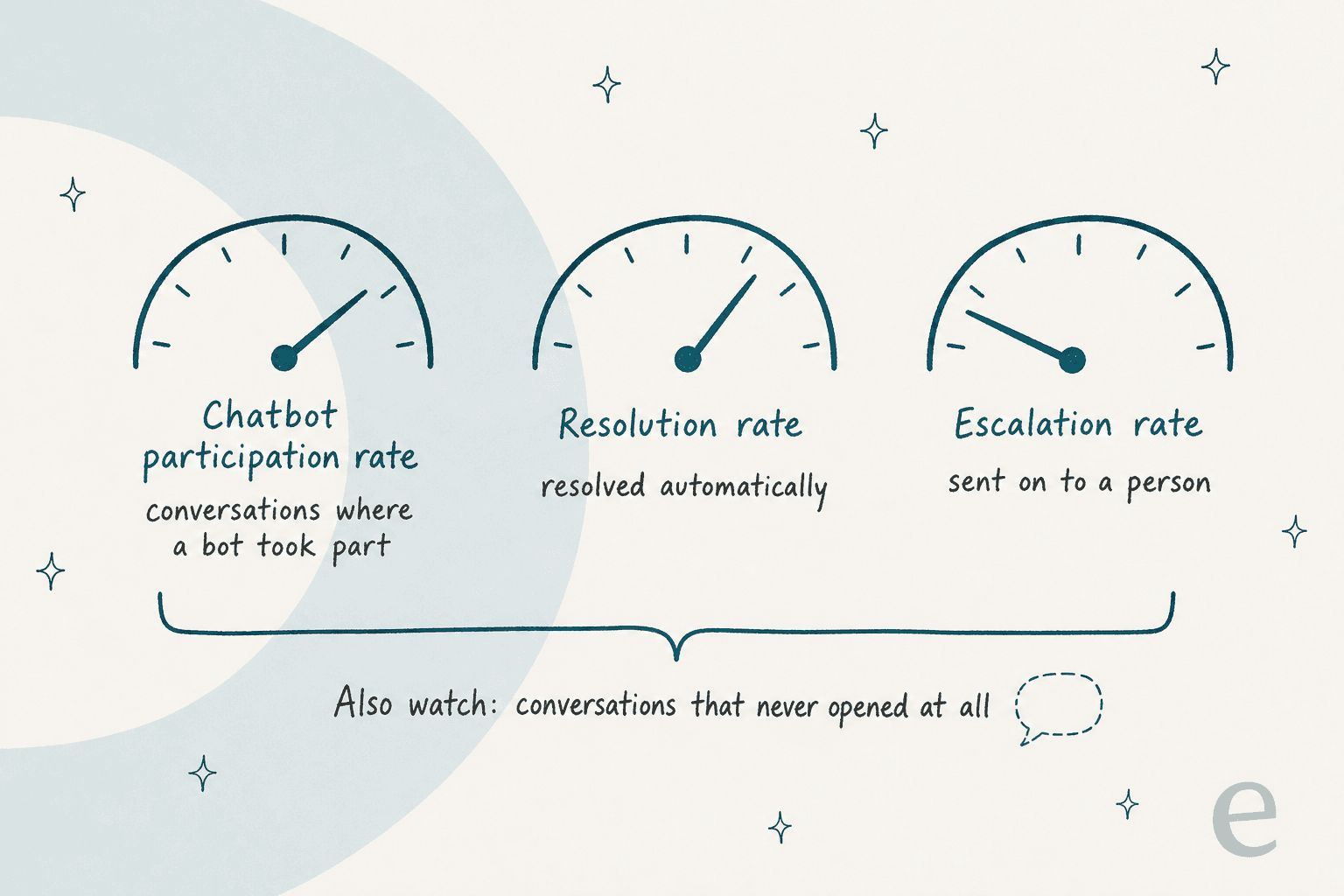
Count the conversations that never happened, not just the ones a bot finished. Re:amaze's Chatbot report (Reports > Chatbot Reports) gives you four numbers: triggered amounts, participation rate, resolution rate and escalation rate. Those describe conversations that already exist. FAQ visits that ended without a message aren't among them.
My approach, which is a method of mine and not a Re:amaze feature:
- Resolution rate tells you how often the AI Agent finishes what it starts. Read it next to the escalation rate, because a high resolution rate on a narrow set of easy questions says little. AI resolution rate and containment and escalation quality explain the distinction.
- Conversations per 1,000 orders is the closest thing to true deflection. Write down last month's number before launch and compare after four weeks.
- Reopened and repeat conversations show answers that sounded right and weren't. Repeat support tickets covers how to read them.
A resolution in Re:amaze means "no human replied", which is not the same as "the customer got the right answer". Spot-check twenty resolved conversations a week for the first month.
Where does Re:amaze's deflection stop?
It stops where your own team's habits matter more than your written FAQ. Here are the limits I would plan around, each from Re:amaze's documentation.
- The sources are your content. FAQ, templates, custom context and store data. Past ticket history isn't listed as an input, and Learned Answers only come from escalations.
- Learning is capped and manual. 50 saved answers, 100 corrections, 14-day expiry on suggestions.
- The AI Agent and classic bots don't run together. You choose one for chat.
- Pre-Filters depend on the AI Agent. You need it on, with resolutions left or overage enabled.
- It's labelled beta. The AI page and pricing page both show the label, so expect the feature set to keep changing.
Most helpdesks' built-in AI has similar limits. Help Scout's deflection stack draws the lines in different places, and built-in helpdesk AI versus an added layer is the trade-off in general terms. If you're weighing a move, Re:amaze AI alternatives and is Re:amaze worth it give the wider view.
How does eesel add deflection on Re:amaze?
eesel is an AI teammate that joins your helpdesk, and on Re:amaze it fills the gap the built-in tools leave: answers based on how your team already replies. Per eesel's Re:amaze docs, it reads your past conversations, response templates and help center articles, and it can read the newest 40 messages of a thread. It can leave an internal note for a person to send, or send a reply that customers see. Before sending, it re-reads the thread and stops if someone already answered, then tags the conversation eesel-handled.
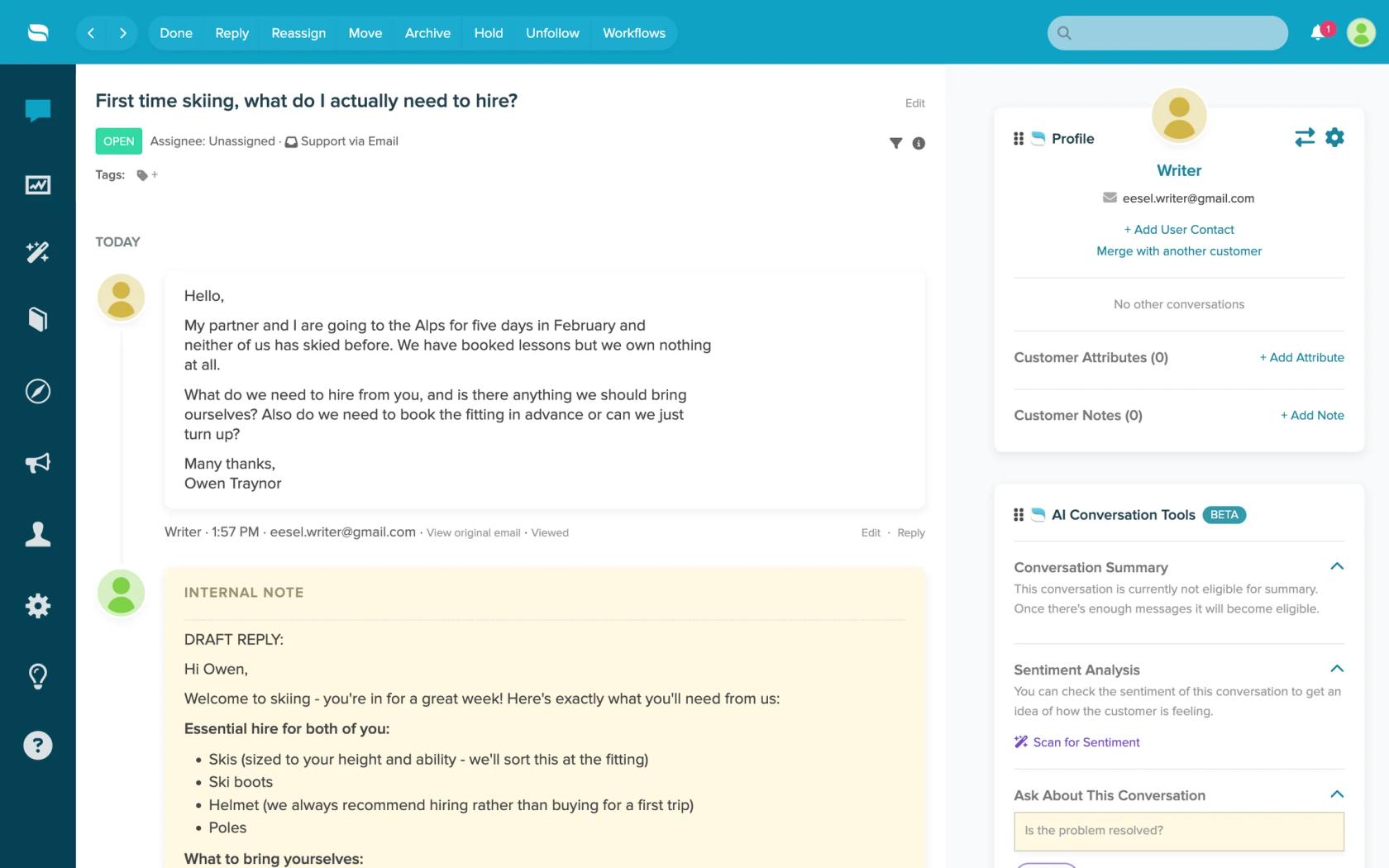
Be clear about the limits. Re:amaze has no event triggers in eesel, so it runs on a schedule as often as every ten minutes, which suits email better than live chat. It doesn't read attachments or custom fields. Replying doesn't close the conversation unless you ask for that status change. That is why I'd keep Re:amaze's own AI Agent for instant chat and give eesel the email queue.
For what deflection looks like on an ecommerce inbox, Question Beauty runs eesel on Gorgias and Shopify. In one month (8 August to 8 September 2026), eesel handled about 990 tickets, sent about 960 replies directly to customers rather than drafts, looked up about 290 Shopify orders before answering delivery questions, and closed about 280 tickets without a person. Refunds, complaints and anything needing a decision go to a team member with a note attached. That setup runs on Gorgias, which triggers on new messages, so Re:amaze's schedule would be slower, but the pattern of answering, checking the order and handing off carries over. STIL Classics takes the cautious route: eesel drafts into internal notes that a person checks and sends. Both fit the human in the loop approach I'd use for the first month. Broader ideas are in reducing support tickets with AI and FAQ deflection tools.
Try eesel on your Re:amaze queue
Use Re:amaze's FAQ, Order Bot or AI Agent for the instant answers they handle well, and let eesel take the email conversations where your team's past replies matter more than a FAQ article. Connect Re:amaze with an API token, start with internal-note drafts on conversations that have no reply, and switch to sending once you trust the answers.
A conversation costs 1 credit however long it runs. The free trial gives you 100 credits over 7 days with no card, and plans start at $299 a month for 500 credits, per eesel pricing. Try eesel on your Re:amaze inbox, or read the best AI for ecommerce support roundup first.