


Yes, Re:amaze drafts replies with AI. Click Suggest a Response in a conversation and Re:amaze writes a full reply from the customer's message, your FAQ articles and, if there's an order number, the order's tracking. Improve what I've written polishes a reply you started. The catch: none of these is described as learning from how your team actually replies, so expect to fix tone and length, and keep your FAQ in good shape, because the drafts lean on it.
If you want drafts that copy your team's own past answers, eesel learns from your Re:amaze conversations and templates and leaves each draft as an internal note for a person to send. With the eesel CLI, an AI coding agent can load approved knowledge and run test questions before anything goes live, though a person still pastes the Re:amaze API token in.
Does Re:amaze draft replies with AI?
It does, with four tools for agents and one AI Agent that replies on its own. I build features and AI agents at eesel, so when I look at a helpdesk's "AI reply" button I go straight to what the model gets to read, because that decides how much of the draft your agent keeps. In Re:amaze, everything below lives in the same shared inbox where email, chat, social and SMS arrive.
| Tool | What it does | Who sends |
|---|---|---|
| Suggest a Response | Writes a complete reply to the customer's message, with order details when there's an order number | The agent, after editing |
| Improve what I've written | Rewrites a reply you started for tone, clarity or helpfulness, using the earlier messages in the thread | The agent |
| Quick responses | Short replies generated from the conversation ("Thank you", "Need more info") | The agent |
| AI in response templates | Drafts a canned response from a short brief, and can add dynamic variables | The agent, when they use the template |
| Re:amaze AI Agent | Answers customers on chat, email and SMS by itself | The AI Agent |
All four agent tools are described in Re:amaze's AI tools guide. The Re:amaze AI page says they run on "OpenAI's GPT models", adds translation on demand, and still carries a beta label. The AI Agent is a different product with its own billing, which my colleague covers in adding AI to Re:amaze. This post is about the drafts a person sends.
How does Suggest a Response work?
You open a conversation, select Suggest a Response, and Re:amaze writes a full reply before you type anything. The draft appears in an "AI suggested response" box with two buttons: Start with this response, which drops it into the reply editor, and Hide.
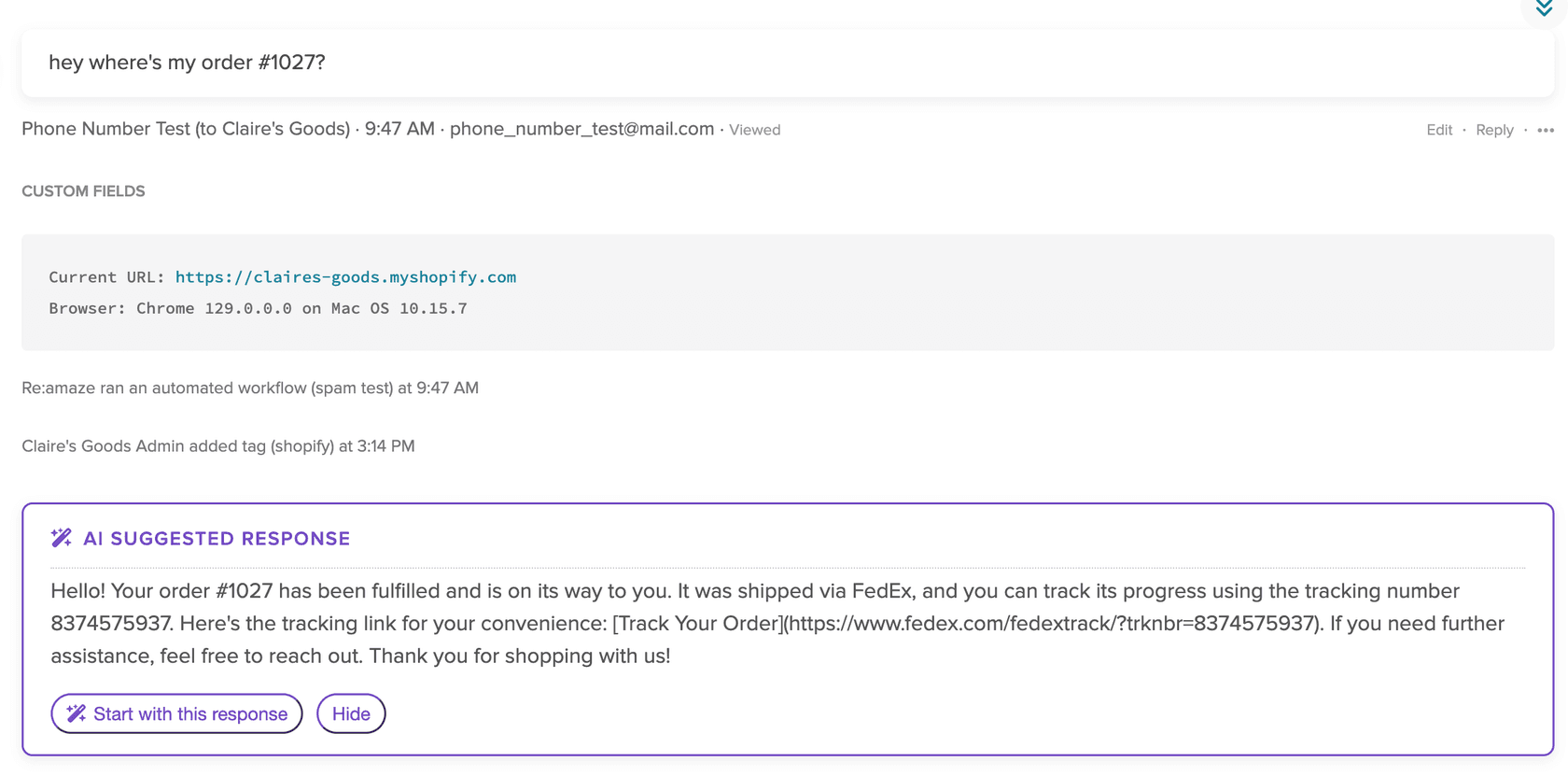
The part that makes it useful for a store is order lookups. Per Re:amaze's guide, if the customer includes an order number, the suggestion carries the order status, the tracking information and a tracking link. "Where's my order" is the most common message in ecommerce support, so this saves real typing on the questions you see 50 times a day.
When the FAQ doesn't cover a question, Re:amaze may suggest writing a new FAQ article, and it raises those prompts when it spots repeated or high-value questions. I like that nudge. It turns the drafts into a to-do list for your knowledge base, which is where the draft quality comes from anyway.
What does a Re:amaze AI draft learn from?
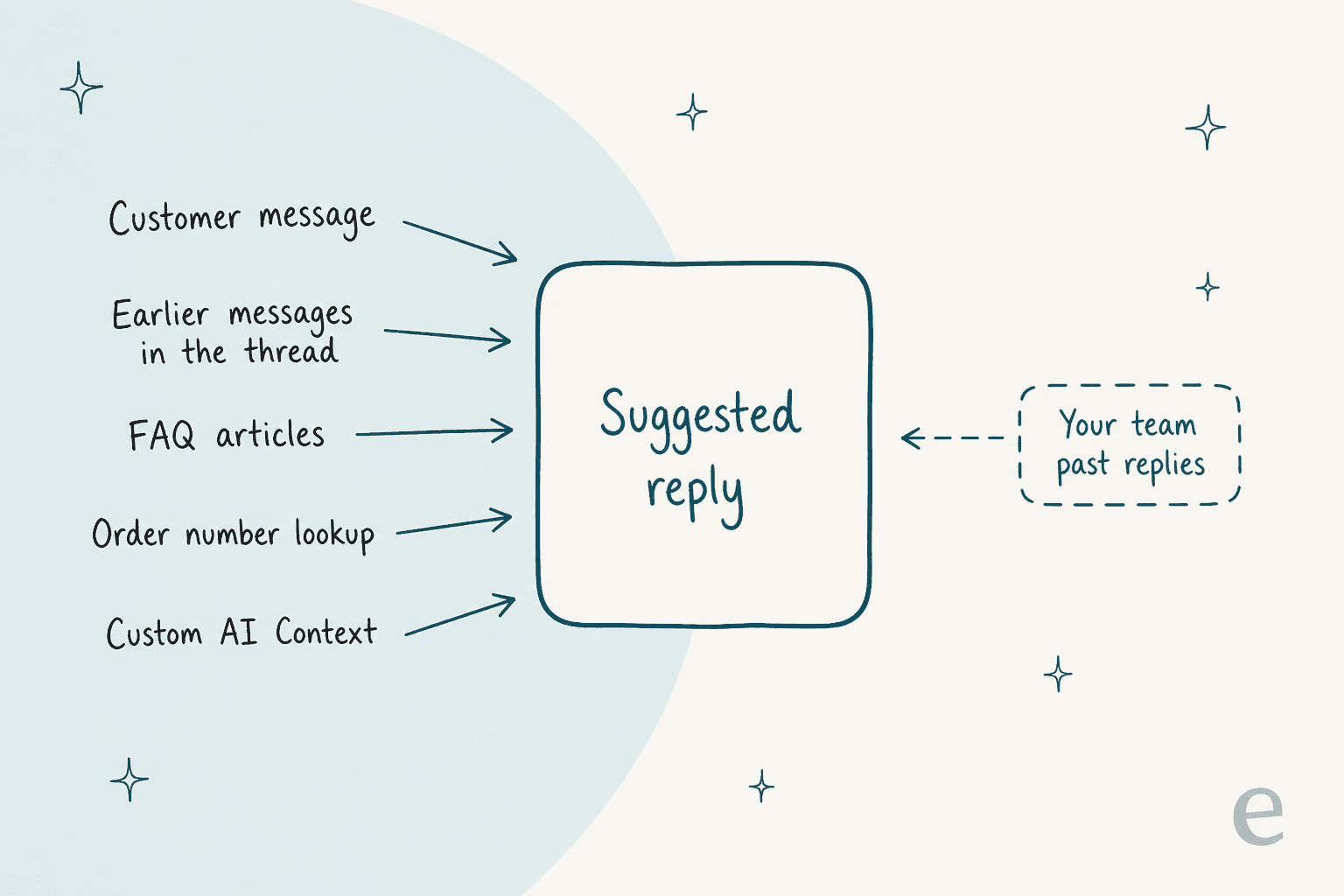
Per Re:amaze's documentation, a suggested reply works from five things, and none of them is your team's past replies:
- The customer's message, and for Improve what I've written, the earlier messages in the thread.
- Your FAQ articles. Re:amaze's FAQ guidance says internal and unlisted articles can be used too, and unlisted ones are a setting you choose.
- Order data from a connected store, when an order number is in the message.
- Custom AI Context: a business description, a personality and response guidelines.
- Dynamic variables such as
{{ customer.name }}and{{ staff.name }}, which the AI adds when needed.
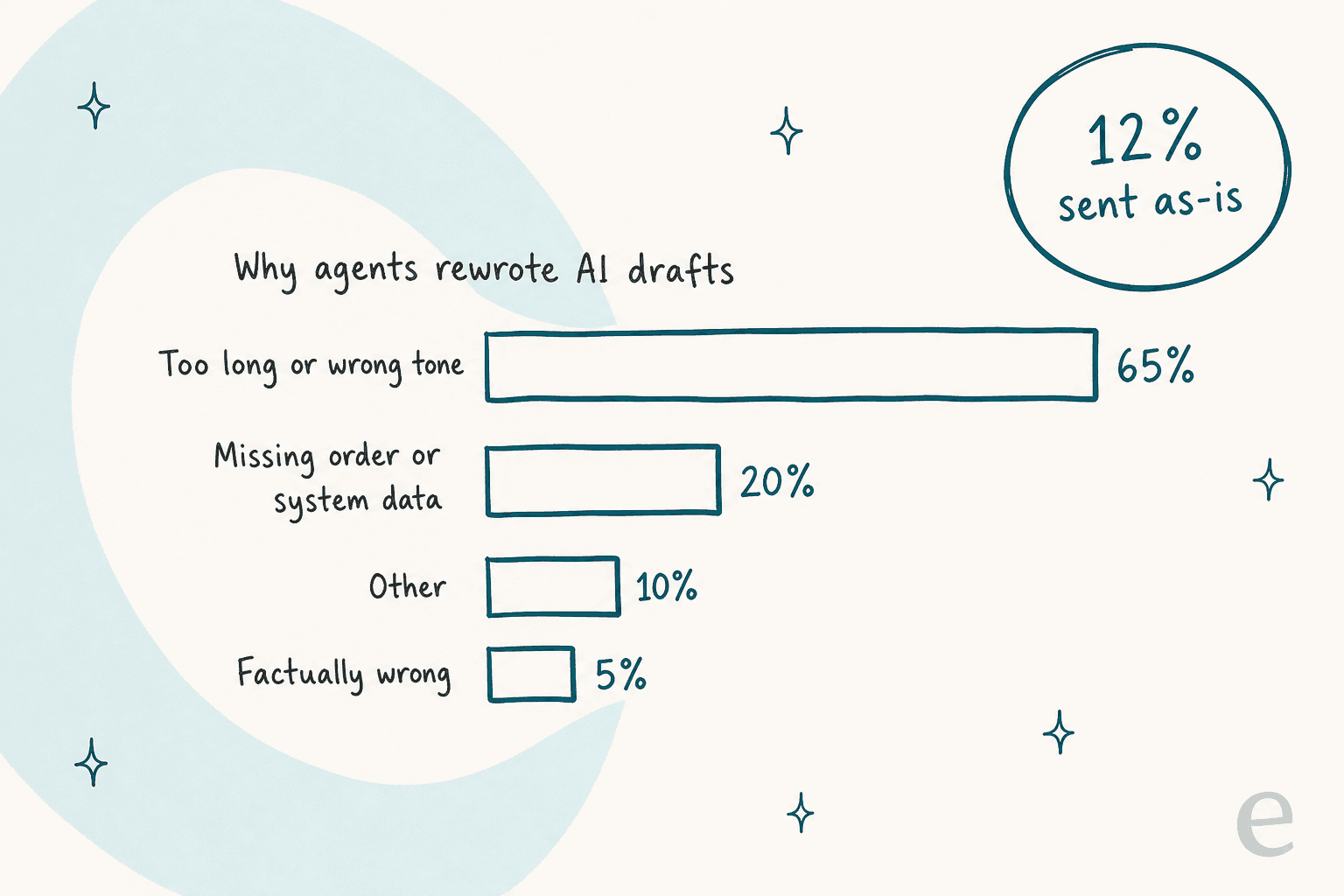
That last gap matters more than it looks. In one eesel trial on an ecommerce inbox of about 1,000 tickets a month, agents sent only 12% of AI drafts as they were. When I looked at why, about 65% of the rewrites were for length and tone (agents turned 8 to 15 sentence drafts into 1 to 3 sentences), about 20% needed order or system data the AI didn't have, and only about 5% were the AI getting a fact wrong. The fix for the biggest slice was training on the team's own sent replies, which a FAQ-based draft doesn't do.
Re:amaze's answer to tone is Custom AI Context, under AI > Manage Bots > Custom AI Context. Its settings guide says the settings apply to "any AI-generated text, including Response Templates, Quick Replies, Suggested Responses". You get a business description (the field in the screenshot caps it at 150 characters), a personality such as Neutral, Formal, Upbeat, Casual or Empathetic, and response guidelines of up to 2,000 characters, per the guidelines article.
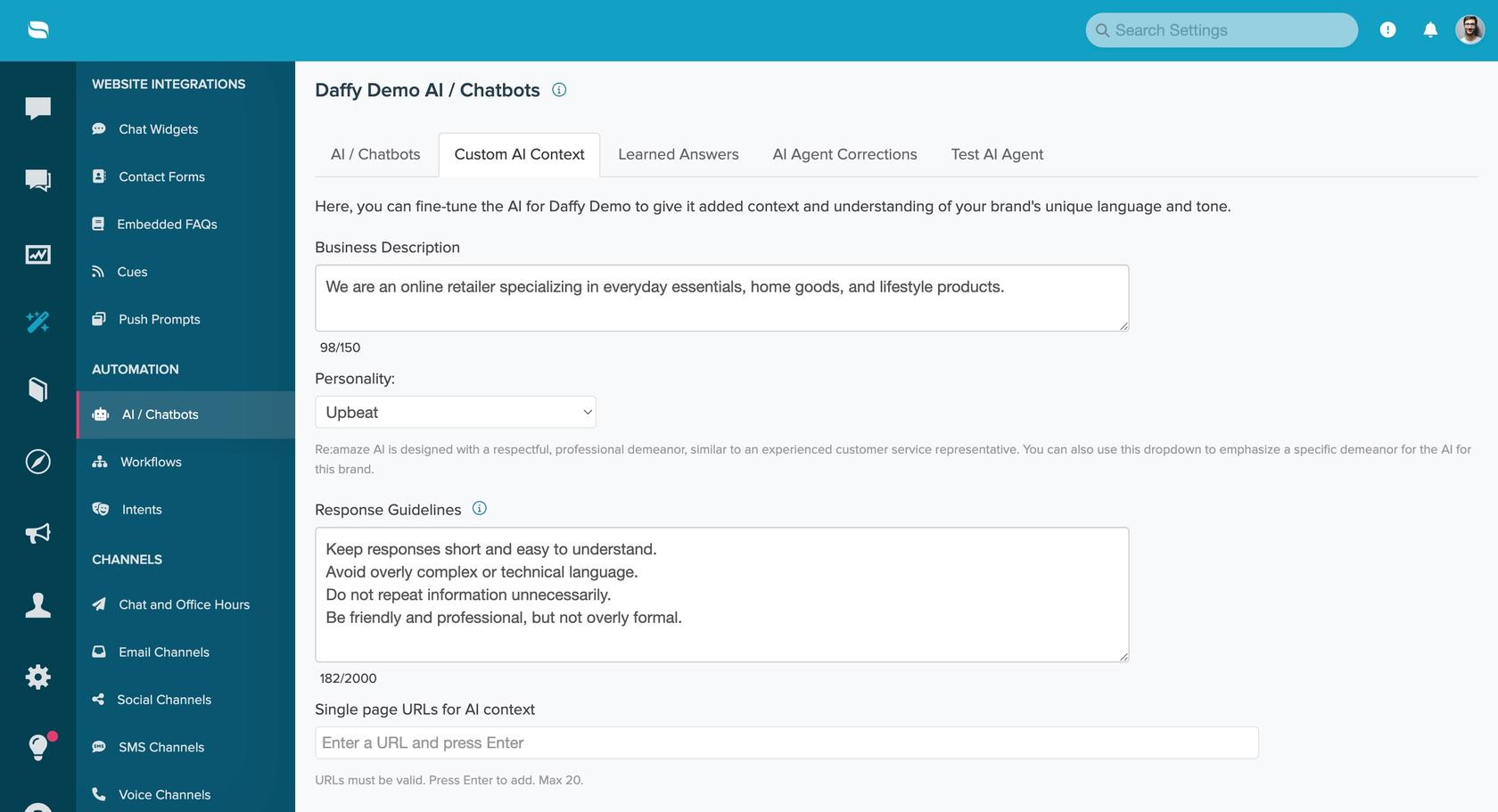
Use those guidelines for the things agents keep fixing: "Limit responses to 2–3 sentences unless more detail is required" is one of Re:amaze's own examples, and it's the line I'd add first given the trial numbers above. A written tone of voice gets you part of the way. It can't tell the AI how your team handles a damaged parcel.
What about Learned Answers?
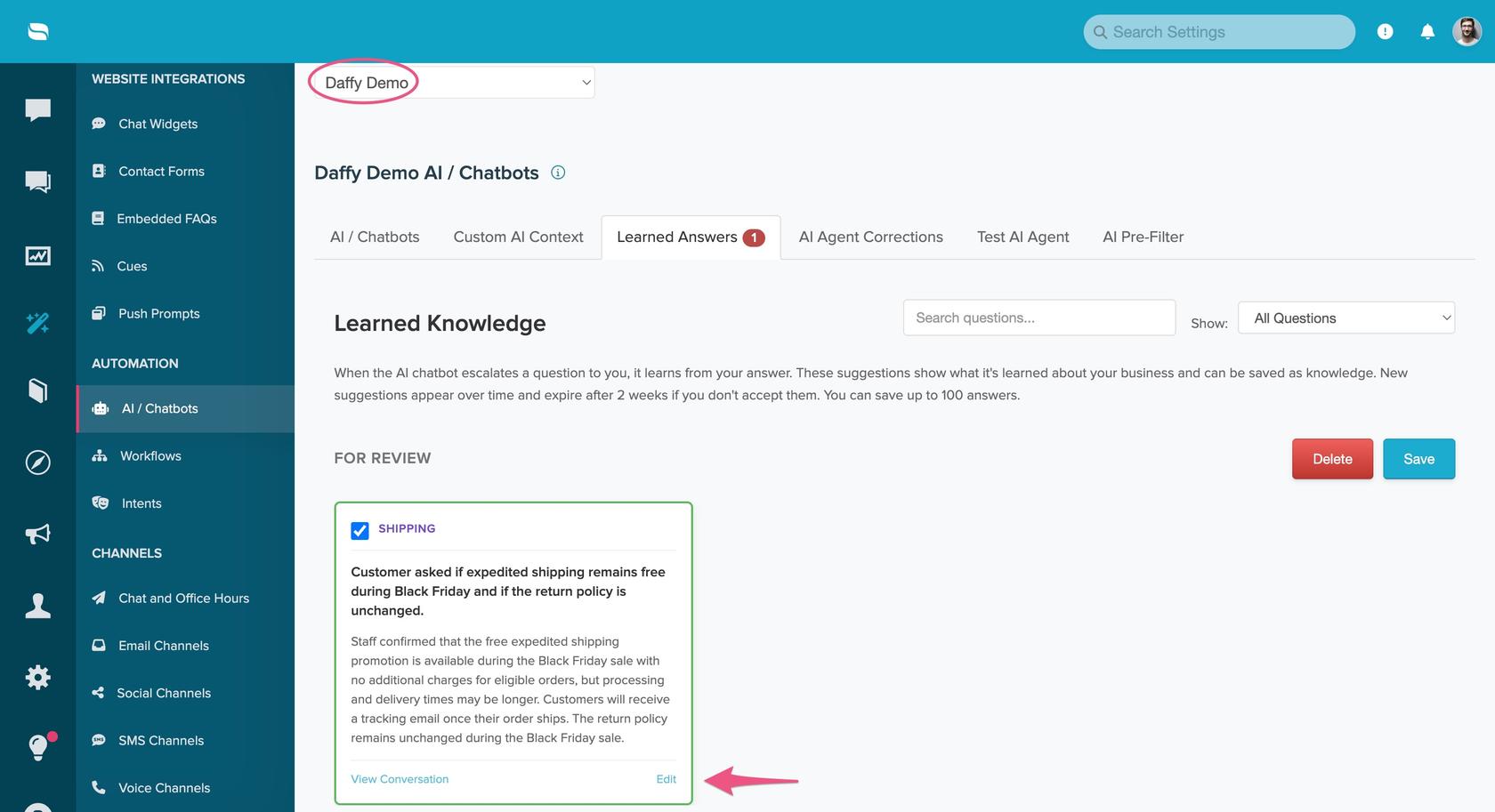
Re:amaze does learn from real conversations, but for the AI Agent. Per its Learned Answers guide, when the AI Agent escalates a conversation and a person marks it Done, Re:amaze suggests an answer from how the person replied. You approve it, edit it or delete it, unapproved suggestions expire after 14 days, and the guide caps saved answers at 50 (the settings screen in the same guide says 100). The docs describe these as knowledge for the AI Agent and don't say Suggest a Response uses them.
How do Improve what I've written and quick responses work?
Both sit under the reply box. You type a rough reply, select Improve what I've written (labelled Improve My Response in the screenshot), and Re:amaze rewrites it for tone, clarity or helpfulness, using what you wrote plus the earlier messages in the thread. Next to it, quick responses offer short replies generated from the conversation, such as "Thank you" or "Need more info".
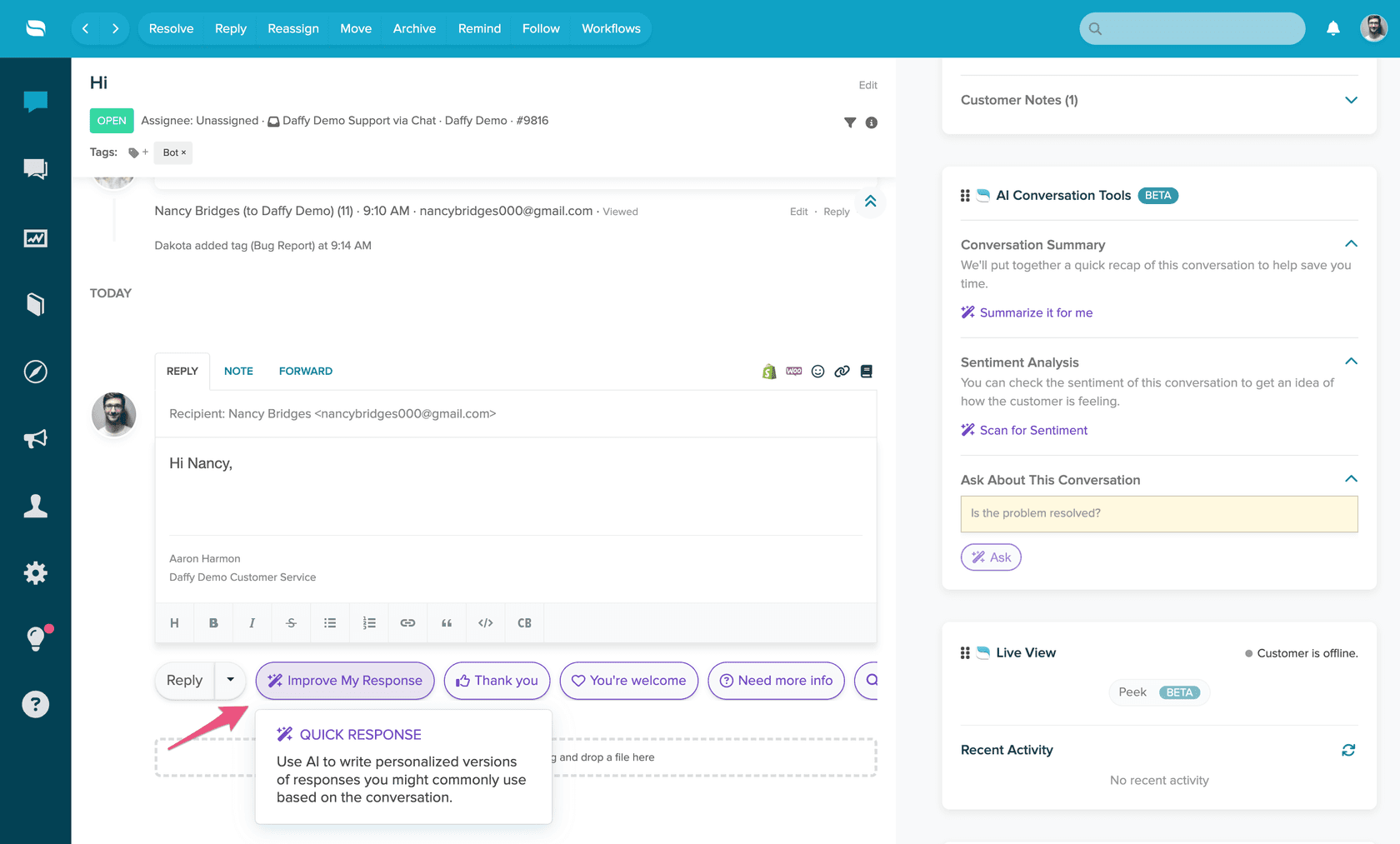
Improve what I've written is the tool I'd point agents to first, because the facts come from the agent and only the wording comes from the AI, so there's less room for an AI hallucination. The same button works when you write response templates, and the right-hand panel holds the summary and sentiment tools my colleague walks through in Re:amaze conversation summaries.
Which Re:amaze plan includes AI draft replies?
Re:amaze's pricing page doesn't list the agent-side AI tools as a plan feature at all. What it lists is the Re:amaze AI Agent, on every plan, with a resolution allowance per user. Prices below are from that page on 21 November 2026.
| Plan | Monthly price | Annual price | AI Agent resolutions included | AI features named on the plan |
|---|---|---|---|---|
| Starter | $59 flat (unlimited team members, 500 responded conversations a month) | Not listed | Not listed | All Basic features |
| Basic | $29 per team member | $26.10 | 5 per user a month | Re:amaze AI Agent, response templates |
| Pro | $49 per team member | $44.10 | 10 per user a month | Adds AI Intents |
| Plus | $69 per team member | $62.10 | 20 per user a month | Adds customizable staff roles |
Extra resolutions are $0.85 each, per Re:amaze's billing guide. Trials include all Plus features, so test the draft tools on the plan you'll actually buy. The Re:amaze AI page also says you can moderate AI usage with roles and permissions, and customizable roles are a Plus feature. For the rest of the plan detail, see Re:amaze pricing.
If you're still deciding whether the plan is worth it, what Re:amaze costs covers the cost in more detail.
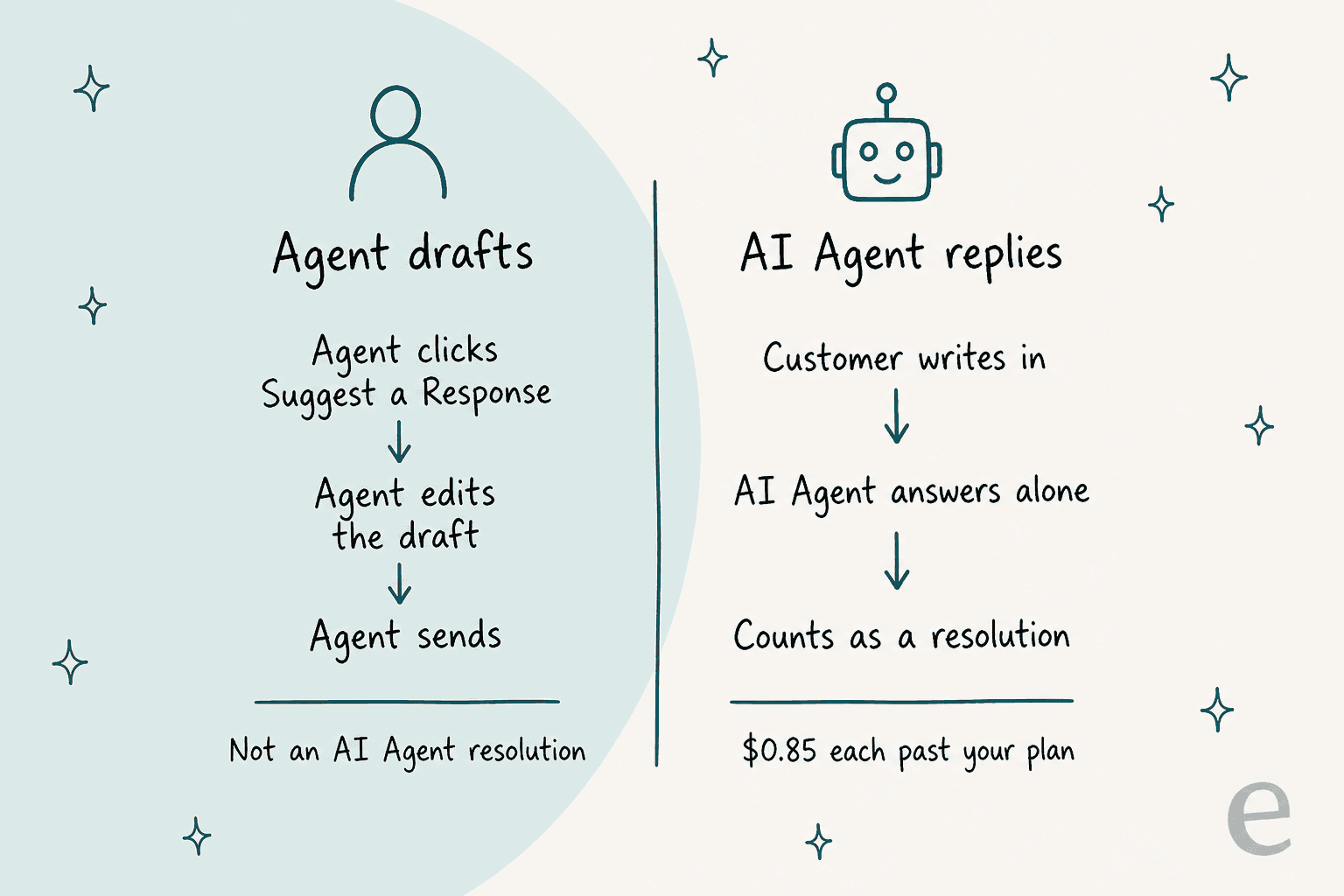
The billing line that matters for drafts: a resolution is a conversation handled entirely by the AI Agent that doesn't escalate to a person. A suggested reply an agent edits and sends is the agent's reply, not an AI Agent resolution.
How do you set up AI draft replies in Re:amaze?
Setup takes about 30 minutes, and most of it is writing, not clicking.
- Fix your FAQ first. Re:amaze's guidance is one question per article, the question as the title, and the direct answer in the first line. Unpublish anything outdated, because the AI will quote it.
- Fill in Custom AI Context. Go to AI > Manage Bots > Custom AI Context, pick the brand if you run several, write the business description, choose a personality and add response guidelines. Short, one-rule lines work best.
- Add single-page URLs for policies that live outside Re:amaze, such as shipping or returns. The AI reads only that page, not the whole site.
- Connect your store if you sell on Shopify, so order numbers in a message become order details in the draft.
- Try it on 10 real conversations. Have an agent use Suggest a Response, note what they change, and turn each repeated fix into one guideline line.
- Draft your templates with AI where you're missing common answers, then check each one by hand.
If you also plan to switch on the AI Agent, Re:amaze's testing tool lets you chat with it before customers do, though it doesn't pull real order data. The Re:amaze chatbot guide covers that side.
Where do Re:amaze AI drafts fall short?
They fall short where the right reply depends on how your team usually handles a case, not what the FAQ says. Reviewers like the direction. One on G2 put it this way:
"They recently added AI features that pull information from FAQ's, those are very helpful"

That praise and the limit come from the same design. Here's what I'd plan around:
The drafts are only as good as the FAQ. If the policy isn't written down, the draft can't know it. Re:amaze's own fix is to prompt you to write the missing article.
Your sent replies aren't a source. Learned Answers feed the AI Agent from escalated conversations, need approval one by one and are capped. For drafts, tone comes from guidelines you write by hand.
It's on demand. Per the guide, an agent selects Suggest a Response in each conversation. Nothing is waiting in the thread when they open it, so every draft costs a click and a wait.
Corrections are narrow. Re:amaze's AI Corrections let you fix an AI Agent answer, but only where it used an FAQ article, and up to 100 corrections in total.
None of this is unusual for a helpdesk's built-in tool. Help Scout's AI drafts, Freshdesk's version and Zendesk's drafts each draw the line between knowledge base and past tickets in a different place.
Gladly and Gorgias are worth a look if you're weighing a switch, and the Re:amaze review covers the rest of the product.
Drafting Re:amaze replies with eesel
eesel is an AI teammate for your helpdesk, and on Re:amaze it does the part Suggest a Response leaves out: it learns how your team already answers. Per eesel's Re:amaze docs, it reads:
- Your past conversations, by default resolved and archived ones from the last 30 days, so drafts copy your team's length and phrasing.
- Your response templates, reused word for word when one fits.
- Your help center articles, read live, so a new article counts the moment you publish it.
- The thread, up to the newest 40 messages, internal notes included.
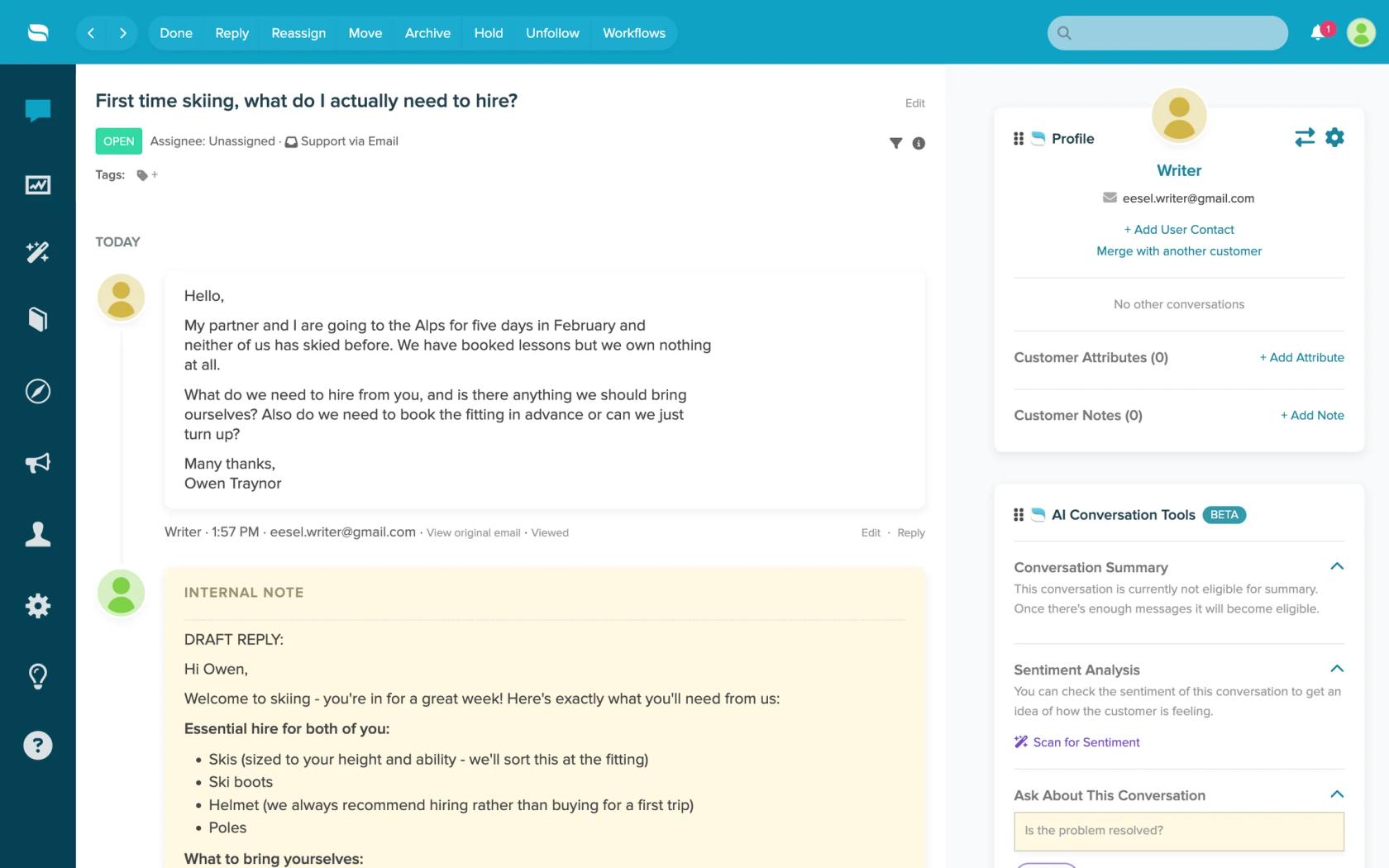
The draft lands as an internal note before your agent opens the conversation, with the sources it used, and it says so when no article confirms a detail instead of guessing. You correct it in plain words ("shorter, sign off with the team name") and it saves that as a rule for every later draft. That's human in the loop by default: nothing reaches a customer until a person sends it, unless you turn on sending.
Be clear on the limits. Re:amaze has no event triggers in eesel, so it works on a schedule, as often as every ten minutes. It doesn't read attachments or custom fields. And if you need order lookups, Re:amaze's own Shopify link does that inside the draft today.
This is how STIL Classics runs eesel on Gorgias and Shopify: it reads the ticket, looks up the order, and leaves a draft as an internal note that a person checks and sends. That came to about 430 drafts on 320 tickets in a month (8 August to 8 September 2026). Innr does the same on Freshdesk, drafting in Dutch, German, English or French from about 1,500 help center articles and past tickets.
Try eesel next to Re:amaze
Keep Suggest a Response for order questions, and let eesel draft the conversations where your team's usual answer matters more than the FAQ. Connect Re:amaze with an API token, ask eesel for a draft on a conversation that has no reply yet, and compare it with what your agent would have sent. Then set a schedule that leaves a draft note on every open conversation with no staff reply.

A conversation is 1 credit however long it runs. The free trial gives you 100 credits over 7 days with no card, and plans start at $299 a month for 500 credits. Try eesel on your Re:amaze inbox.
Still comparing? The best AI for Re:amaze roundup and Re:amaze AI alternatives cover the options, and agent assist tools widens the field.