

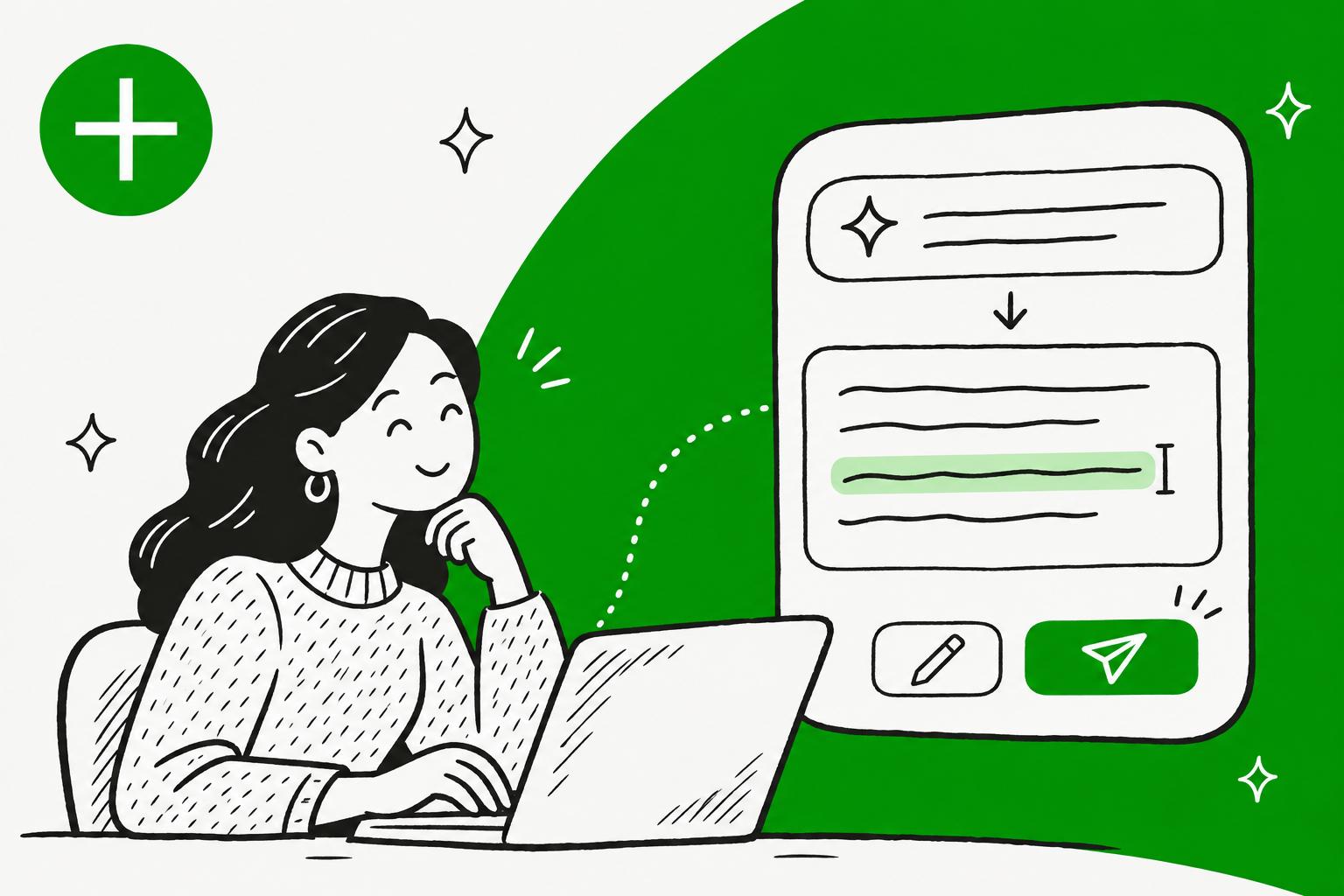
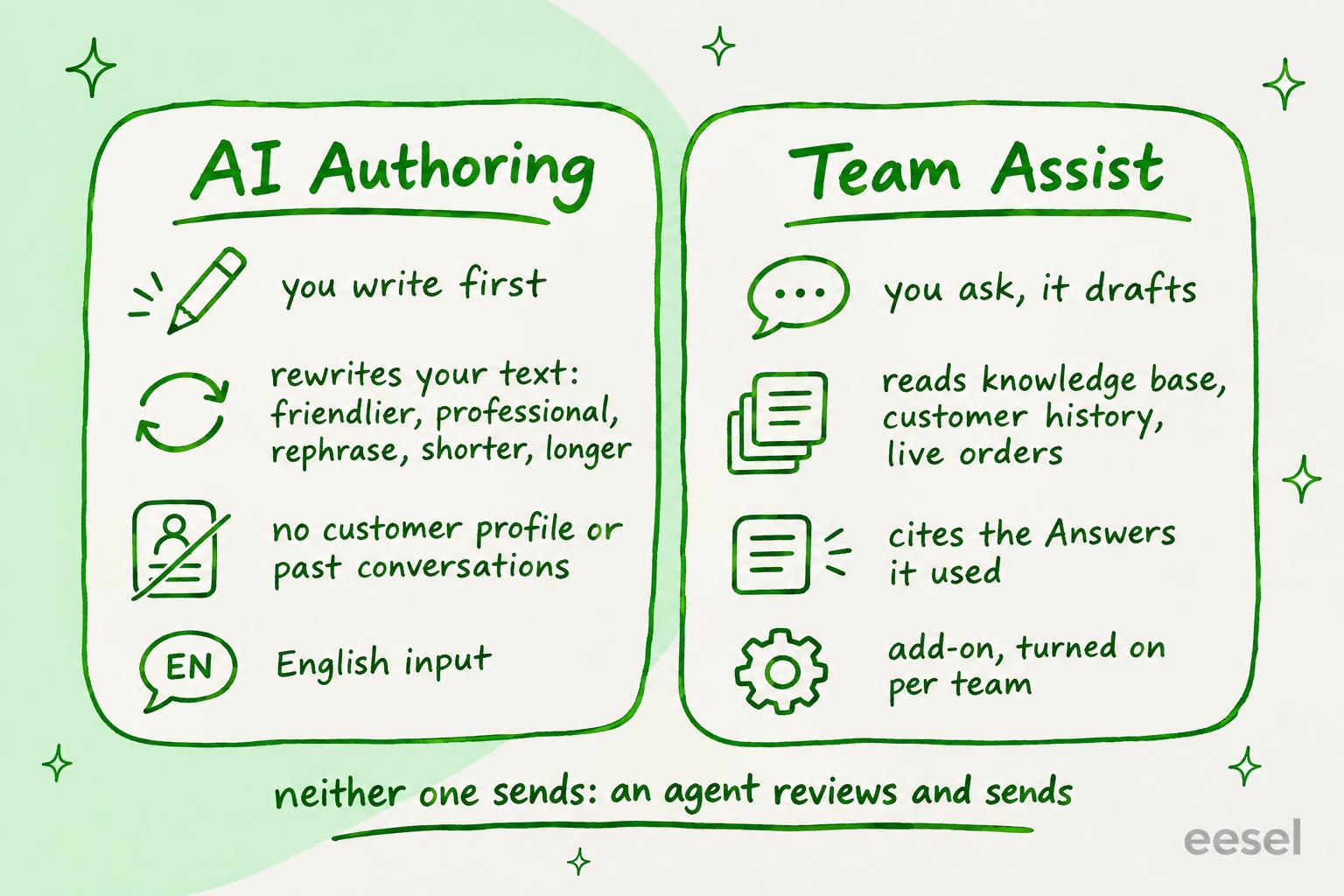
Gladly drafts AI replies with Team Assist, a panel that writes a reply from your Answers knowledge base, the customer's history and live order data when an agent asks for one. It never sends on its own: the agent clicks Use, edits in the composer, and sends. Gladly's older AI Authoring is a different tool that only rewrites text you already typed, and it doesn't read the customer profile or past conversations. Two setup details decide whether agents use Team Assist at all: the Quick responses panel starts empty, so add a "Suggest a reply" button, and keep policy numbers out of your brand voice examples.
If your team is on Zendesk, Freshdesk, Gorgias or Help Scout, eesel's AI teammate can have a draft waiting before an agent opens the ticket; it doesn't connect to Gladly. With the eesel CLI, an AI coding agent can upload approved help articles and macros and ask test questions before anything goes live, though an admin still approves the helpdesk connection.
What does Gladly use to draft replies with AI?
It uses two features, and they do different jobs: one is an AI copilot that writes, the other a rewriter. I work on eesel's support team, and the first thing I ask about any drafting tool is what it reads before it writes, because that decides whether the draft knows this customer or only knows English.
| Feature | What the agent does | What it reads | Where to find it |
|---|---|---|---|
| Team Assist | Asks for a draft in a side panel, then clicks Use | Public and private Answers, the customer's profile, conversation history and live order data | A panel on the right of the agent workspace, turned on per team |
| AI Authoring | Types a reply, then picks a rewrite option | The text in the composer only | The composer toolbar, for email and messaging |
Gladly also has a customer-facing AI agent that answers customers itself on chat, email and voice, and hands off to a person with a summary when it can't. That is a separate product, covered in my Gladly AI deflection post. This one is about the drafts a person sends.
How does Gladly Team Assist draft a reply?
An agent types a request into the Chat with Gladly AI field, such as "Help me draft a response to this message" or "Draft a response apologizing for the delay", and Team Assist writes a reply grounded in the knowledge base and that customer's conversation, per Gladly's Use Team Assist guide. From there the agent can:
- Select Use to load the draft into the composer for the right channel, and edit it before sending
- Select Retry to get a new version
- Type a follow-up such as "make it more apologetic" or "make it shorter" and keep going until it's right
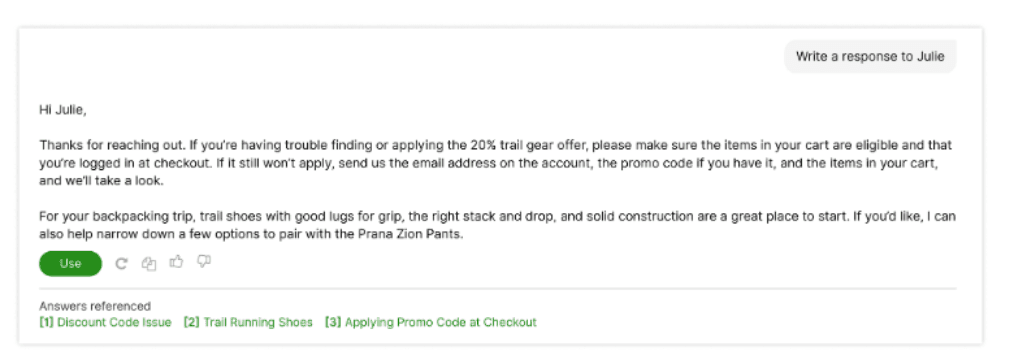
The part I like most is the Answers referenced list under each response. An agent can open the article a draft leaned on before sending it, which is the fastest way to catch a draft that quoted the wrong policy. Team Assist reads private Answers too, so internal-only guidance can shape a draft without the customer-facing AI ever seeing it, according to Gladly's agent assist page.
A few behaviours worth knowing before you roll it out, all from Gladly's What is Team Assist page:
- It only answers when asked. "It does not proactively generate responses or take any action on its own." No draft is waiting when the agent opens a conversation.
- Sessions are private. What one agent asks isn't visible to another agent on the same conversation, unless they share a session link. That's handy for a mid-shift handoff.
- It never sends. The agent always reviews and sends.
Gladly made Team Assist generally available on 22 July 2026, as an add-on for Gladly Team, per its launch post. On Gladly's agent assist page, 64% of team members replied faster after their first session and 54% of suggested drafts were used verbatim or lightly edited. Those are vendor-reported, so I'd treat them as a target for your pilot, not a forecast.
How does Gladly AI Authoring rewrite a reply?
The agent writes something first, then picks one of five options from the composer: Friendly, Professional, Rephrase, Shorten or Make Longer. With nothing highlighted, the whole message is rewritten; highlight a sentence and only that part changes. Tab accepts the suggestion, Esc cancels it, and retry asks for another.
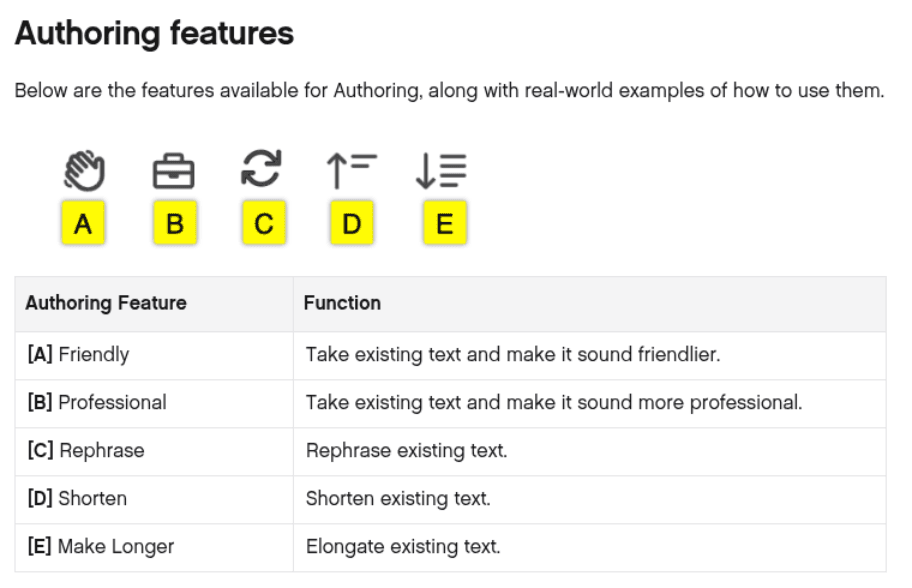
Gladly's tip is to type in shorthand and let Authoring fill it out: "Yes, can help, need one moment" comes back as a full, friendly sentence. That works well for a team whose writing is uneven. The limits are stated plainly in the Authoring guide:
- "Customer Profile details and past Conversations are not considered when generating responses."
- On email, it rewrites greetings and signatures too unless you highlight just the body.
- Gladly's getting-started page says it "supports English input only", and other languages aren't guaranteed.
So Authoring polishes tone. It can't tell you the refund window or what this customer ordered; that is Team Assist's job.
Which Gladly drafting tool fits your team?
Pick the job you have to see which Gladly feature does it, and the catch that comes with it.
How do you set up Gladly Team Assist for draft replies?
An administrator turns it on per team, then shapes it on one settings page. These steps follow Gladly's Set Up Team Assist guide.
- Turn it on for a team. Go to Settings > Teams, open the team, check Team Assist under Enable features, and save. An agent on several teams needs it on only one of them.
- Add a drafting button. In Settings > Agent Experience > Team Assist, the Quick responses panel starts empty, so agents see no shortcuts until you add some. Select Browse library and add Suggest a reply, which "drafts a starting response based on the current Conversation and Customer context", along with Catch me up and Summarize this customer.
- Set a brand voice. Under Brand voice, describe how you sound (up to 500 characters), choose an emoji setting, list phrases to prefer and avoid, and add example replies with a situation and a channel. My guide to AI brand voice covers what makes a good example.
- Scope the knowledge. If you split Answers by brand, region or language with Audiences, map each inbox or entry point to its Audience. Unmapped ones draw from your whole Answers library.
- Choose its App Actions. If you've connected apps through Gladly's App Platform, pick which actions Team Assist may use. New actions that change data, such as cancelling or refunding an order, stay off until an administrator turns them on, and the limit is 128 tools. That split mirrors how I think about AI agent permissions generally.
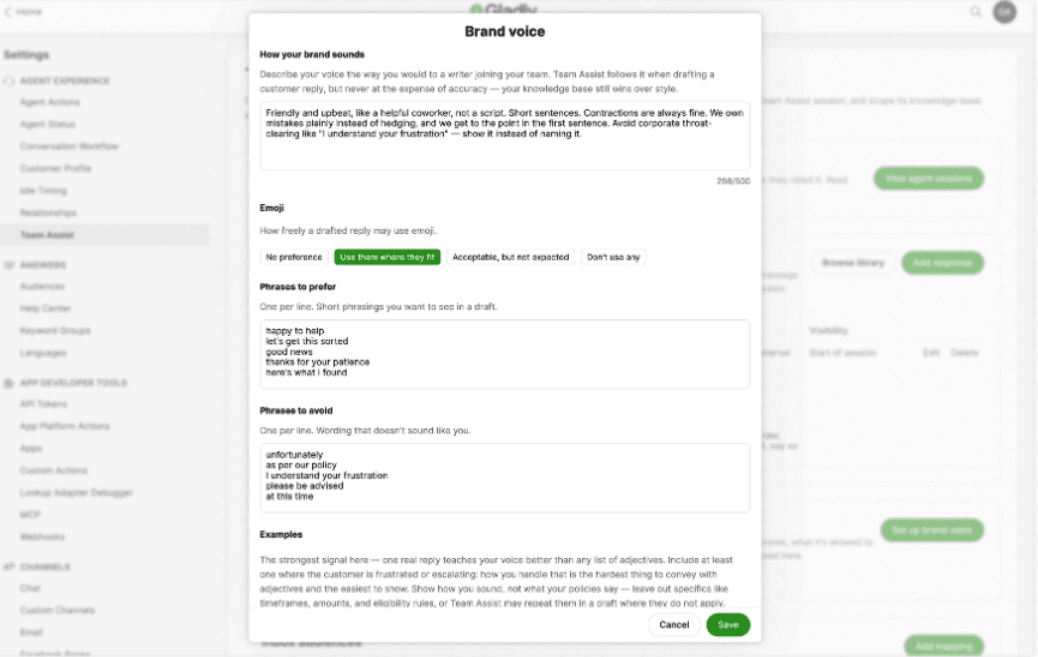
Two details from that guide save a lot of rework. First, keep timeframes, dollar amounts and eligibility rules out of your voice examples, because Team Assist "may repeat those details in a draft where they don't actually apply". Second, a button's prompt has to work as the very first message in a session, so "make it shorter" belongs in what agents type later, not on a button. Button prompts are capped at 1,000 characters.
How do you get better drafts out of Team Assist?
Name the tone and the source. Gladly's best practices guide calls "Draft a firm but empathetic reply" "the single most reliable way to lift draft quality", and suggests saying where to look ("check the knowledge base", "look at their order history").
Its standard path for most conversations is short:
- Click Catch me up.
- Ask "What's our policy on [issue] for [situation]? Answer in 2–3 sentences."
- Ask "Draft a reply from the answer above."
- Ask "Make this reply shorter."
- Review, then send.
I'd add one habit from eesel's support queue: when a draft states a policy, open the referenced Answer before sending. Gladly suggests the same for an unclear case: ask "Is there a source for that answer, or is this your best guess?", and loop in someone with more context if there isn't one. A wrong refund window sent confidently, a classic AI hallucination, costs more than the minute it took to check. My routine for reviewing AI support conversations covers what to sample each week.
To see whether it's working, administrators can read every session under Team Assist Sessions on the settings page, with what was asked, what came back and how the agent rated it. The Feedback and Usage report under Reports > Gladly AI counts thumbs up and down, the reasons behind a thumbs down, and which buttons agents use most. Average handle time and first contact resolution with and without Team Assist still come from your Gladly account team, per the setup guide.
Where do Gladly's AI drafts fall short?
They fall short mostly on timing and price visibility, not on quality.
- Nothing is drafted until someone asks. Team Assist is built to respond only when prompted, so the agent still opens the conversation, opens the panel and clicks. A Quick response button makes that one click; it doesn't remove it.
- Authoring writes blind. It improves tone but reads nothing about the customer, so a polished reply can still be wrong.
- No public price. Team Assist is an add-on and Gladly publishes no price for it (my Gladly pricing notes cover what is public), so you won't know the cost until you talk to sales. Ask for it per agent, and ask whether App Actions cost extra.
- Impact numbers come from Gladly. Feedback and usage are in Reports > Gladly AI, but handle time and first contact resolution with and without Team Assist come from your account team on request.
None of this is unusual. Kustomer's auto-reply makes its own trade-off between drafting on request and drafting ahead, and so do Gorgias drafts. Gladly's strength is context: one lifelong conversation per customer across every channel, which its conversation routing also builds on. Its AI summaries lean on the same timeline. For other tools that sit beside an agent, my best AI agent assist tools list compares them.
Where does eesel fit with Gladly drafts?
eesel is an AI teammate that joins the helpdesk and can draft before anyone asks, on Zendesk, Freshdesk, Gorgias or Help Scout. It doesn't connect to Gladly, so if you're committed to Gladly, use Team Assist and see best AI for Gladly for what else works there.
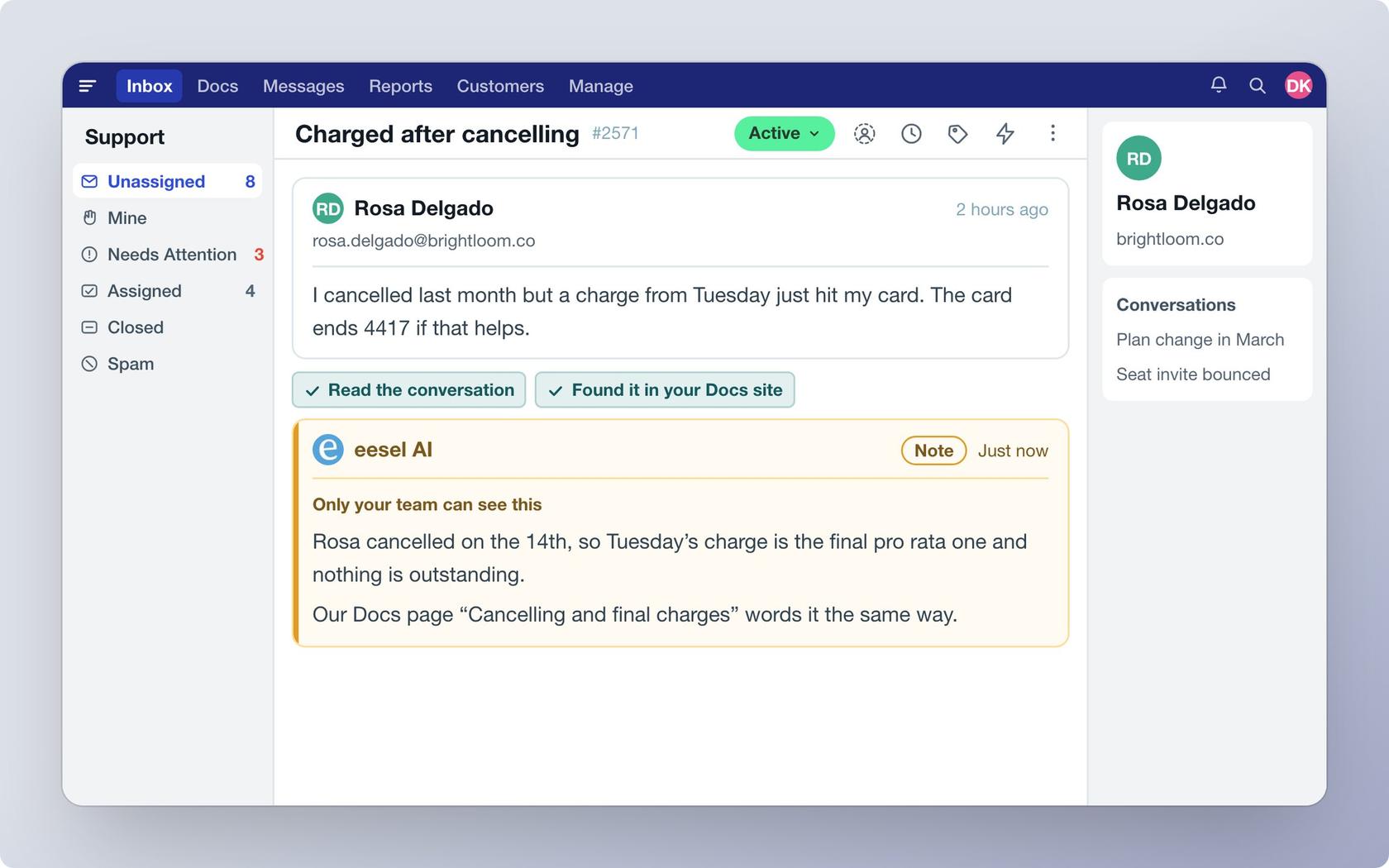
On those helpdesks, an automation starts it when a ticket arrives, it writes from your help center and past tickets, and each action, including sending, can run on its own, wait for a person's yes, or stay off. In Help Scout, for example, its Leave draft reply action leaves an unsent draft in the conversation for a teammate to review, as my Help Scout AI drafts post walks through. If you're weighing a move off Gladly, my Gladly alternatives roundup is where I'd start. For a head-to-head, see Kustomer vs Gladly.
Try eesel for drafts that are ready when your agent is
If your agents spend the first minute of every ticket asking an AI for a draft, try having one waiting instead. eesel reads your knowledge base and past tickets, and you can run it against closed tickets to read its drafts before it touches a live one. Plans start at $299 a month on eesel's pricing page.
Try eesel free, and test it on your own past tickets first.