


Re:amaze has a built-in Conversation Summary: press Summarize in a conversation's right rail and the AI writes a recap, but only once the thread has 10 messages, and then only every 5 messages, per its AI tools docs. It is a button a person presses, I found no plan restriction in the docs, and the summary card is labelled Beta. I would use it for mid-thread handoffs and add a written note for the one thing a summary cannot know: why the case is being passed on. eesel has no native Re:amaze integration, but on helpdesks it does connect to, its agent writes that note for you.
With the eesel CLI, an AI coding agent can upload approved knowledge, such as exported FAQ articles and response templates, then ask the eesel agent test questions and check the answers before anything goes live. The CLI does not replace the helpdesk connection, which someone with admin access still approves, and eesel does not connect to Re:amaze natively today.
What does Re:amaze's Conversation Summary do?
Open a conversation, look at the right rail, and you will find a Conversation Summary section. Select Summarize and Re:amaze generates a summary of the thread. The docs say it is "especially helpful when conversations are passed between agents or when an agent needs a quick refresher on a long thread", which tells you who it is written for: the next reader, not the customer.
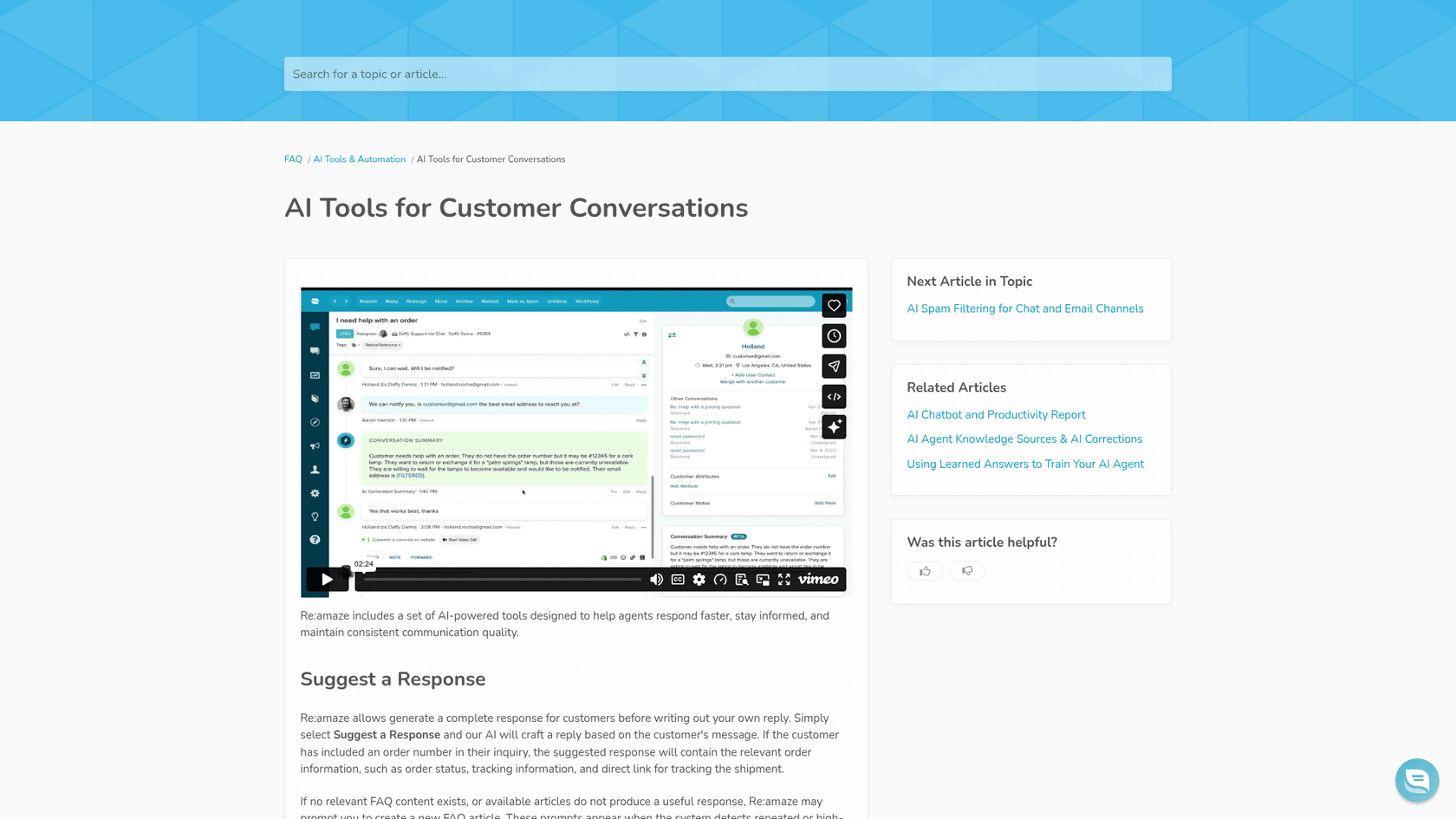
Summarize is one of several AI tools Re:amaze groups on the Re:amaze AI page (also marked Beta there), which says they run on OpenAI's GPT models and work with the channels in the Re:amaze inbox. The product page lists "Summarize with AI" and "Ask Questions with AI" side by side.
Re:amaze is a GoDaddy brand, built for ecommerce and SaaS teams, and a shared inbox across email, chat and social. That context matters: summaries earn their keep in the threads where several people touch one customer. If you are still sizing up the product, my Re:amaze review covers the rest.
Which Re:amaze plans include AI summaries?
I could not find an answer on the pricing page. Re:amaze pricing lists the AI Agent on every plan and AI Intents on Pro, and says trials include all Plus features. The AI tools article does not mention a plan either. So the honest answer is that nothing I read restricts Summarize to a tier, and nothing confirms it is on all of them.
| Plan | Price per team member per month | AI Agent resolutions included per user per month | AI features named on the pricing page |
|---|---|---|---|
| Basic | $29 monthly, $26.10 billed annually | 5 | Re:amaze AI Agent |
| Pro | $49 monthly, $44.10 billed annually | 10 | Adds AI Intents |
| Plus | $69 monthly, $62.10 billed annually | 20 | Same as Pro, plus customizable staff roles |
| Starter | $59 flat per month, up to 500 responded conversations | Not listed | All Basic features, unlimited team members |
Extra AI Agent resolutions cost $0.85 each. That meter belongs to the AI Agent, not to Summarize, so a summary-only team may never touch it. My Re:amaze cost guide walks through seat math for different team sizes.
One detail is worth a look if you manage who can use AI. The AI page promises "moderate AI usage with roles and permissions", and the pricing page puts customizable staff roles on Plus. If you need to limit which agents can press Summarize, check that on your own plan before you promise it.
When can you summarize a conversation?
This is the limit most people hit first. The docs say a conversation must have at least 10 messages before a summary can be generated, and after the first summary a new one can be generated every 5 messages.
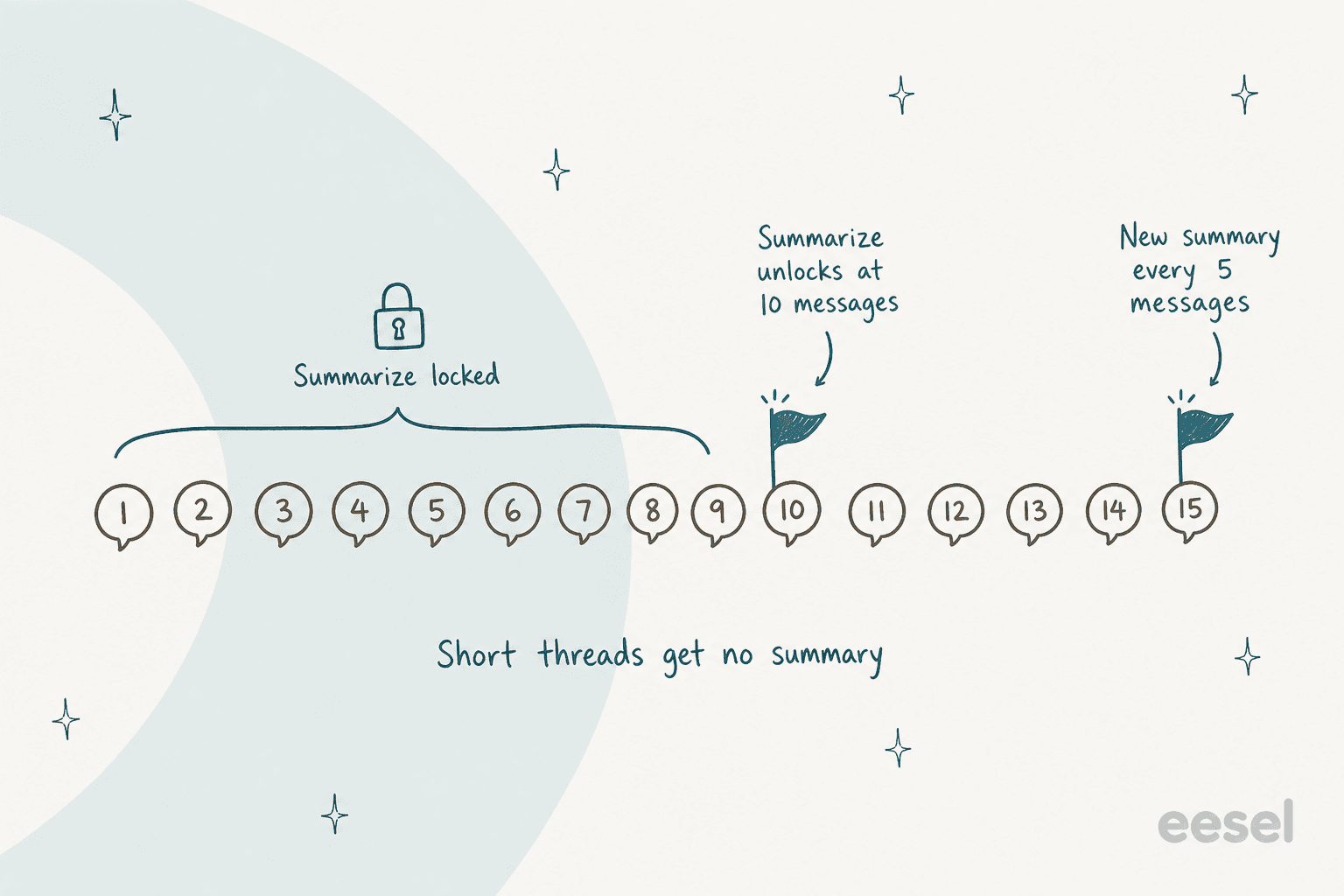
Think about what that means in a real queue. A typical ecommerce thread is four or five messages: customer asks, agent replies, customer confirms. Those never get a summary, which is fine because they are short to read. The summary shows up on the long, tangled ones. But a handoff that happens at message 8 gets no AI recap at all, and a handoff at message 12 gets one that is stale after message 15.
The docs do not say what happens to the summary when a customer writes back inside the 5-message window, or how a summary treats attachments and internal notes. I would test both on a real thread before relying on it.
What else do Re:amaze's AI conversation tools do?
The same docs article covers more than Summarize, and a few of the others help with handoffs too:
- Sentiment analysis. Select scan for sentiment and Re:amaze gauges how the customer feels. The docs say it helps when conversations pass between agents, because the next agent can see if the issue looks resolved. My notes on AI sentiment analysis cover where this works and where it misleads.
- Ask About This Conversation. You type a question such as "Is the customer upset?" and get an answer. This is the closest thing to a custom summary, since you decide what the AI looks for.
- Suggest a Response. The AI drafts a reply from the customer's message, and when an order number is present it pulls order status and tracking into the draft.
- Improve what I've written. It rewrites your draft for tone and clarity, including in response templates, which many teams call macros.
An "Ask" box beats a fixed summary for one reason: you can ask for the exact handoff fact you need. "What did we promise, and what is still open?" is a better query than a generic recap. If you collect these questions into a shared list, you get a consistent handoff format without any new tooling. For more on the template side, see my guide to AI macros.
How do I use summaries for handoffs in Re:amaze?
Here is the routine I would set for a team on Re:amaze. Setup is about 15 minutes.
- Summarize at the moment of handoff. Press Summarize after the last reply so the recap includes what was just promised.
- Check three facts against the thread. Amounts, dates and commitments are where a wrong line costs money.
- Ask one targeted question. Use Ask About This Conversation for "What is still open?", since the summary alone may not say.
- Write the why in an internal note. Paste the bullets, then add why you are escalating and what the next person should do first.
- Handle the short ones by hand. Under 10 messages there is no summary, so write two lines yourself.
- Refresh after five more messages. If the customer replies a lot, regenerate before the next shift reads old bullets.
Pair this with clear routing. My notes on Re:amaze AI routing show how tags and workflows decide who gets the thread, and the glossary entries on ticket summarization and escalation cover the vocabulary. For the broader process, read my ticket escalation process guide and AI conversation summarization.
Where do AI summaries fall short on handoffs?
A summary is written when someone clicks. A handoff note is needed when work stops. Those are different moments.
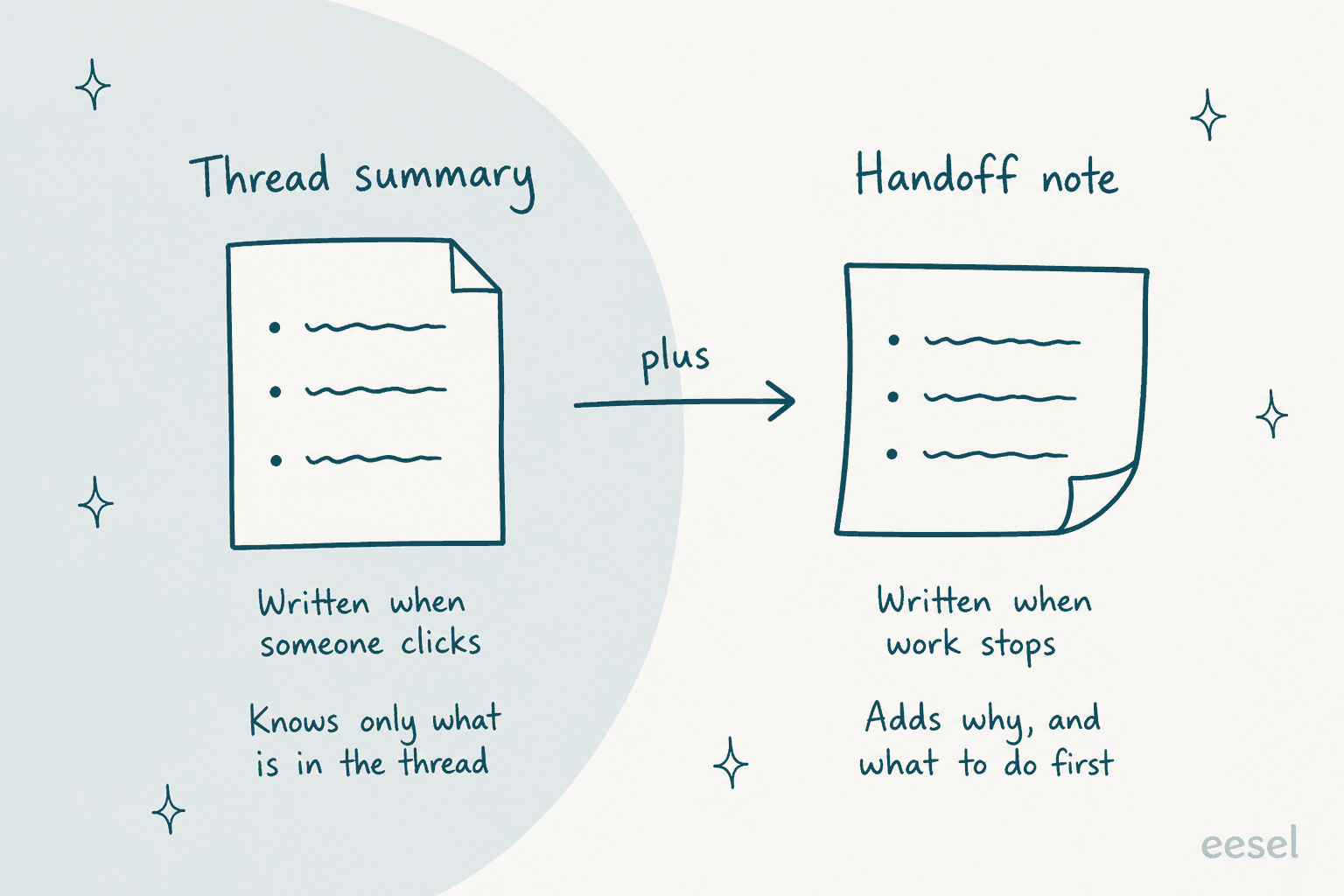
Picture a Friday evening escalation on a 40-message order dispute. Monday's agent can press Summarize and get a decent recap of what is in the thread. The reason the first agent escalated, the refund they were about to approve, and the tone of a phone call are not in the thread, so they are not in the summary either. Add the stale-summary problem and the 5-message refresh rule, and you can see why I keep both: the summary for speed, the note for intent.
My AI agent handoff best practices post covers what a good note contains, and human handoff in chat support covers the chat side.
Does the Re:amaze AI Agent write the handoff?
Not that I can find. The AI Agent now answers on email and SMS as well as chat, and you can enable it per inbox or number. The announcement does not describe a handoff note, an escalation summary, or what staff see when it stops. The AI Agent's job is deflection, billed per resolution, while Summarize is a separate reading aid.
So the gap is specific: Re:amaze can summarize on request and answer customers automatically, but I found no documented step where it writes a note when a conversation changes hands. If that step matters to you, look at my best AI for Re:amaze roundup and the Re:amaze AI chatbot guide. For how built-in AI compares with a separate layer, read AI layer vs built-in AI.
Where does eesel fit with Re:amaze summaries?
eesel is an AI teammate platform, and the one that matters here is the AI helpdesk teammate. I have to be plain about the limit: eesel does not integrate with Re:amaze natively, so it cannot sit inside a Re:amaze inbox today. Where it does connect, such as Gorgias, Help Scout and Freshdesk, it handles the handoff step that a summary button leaves open.
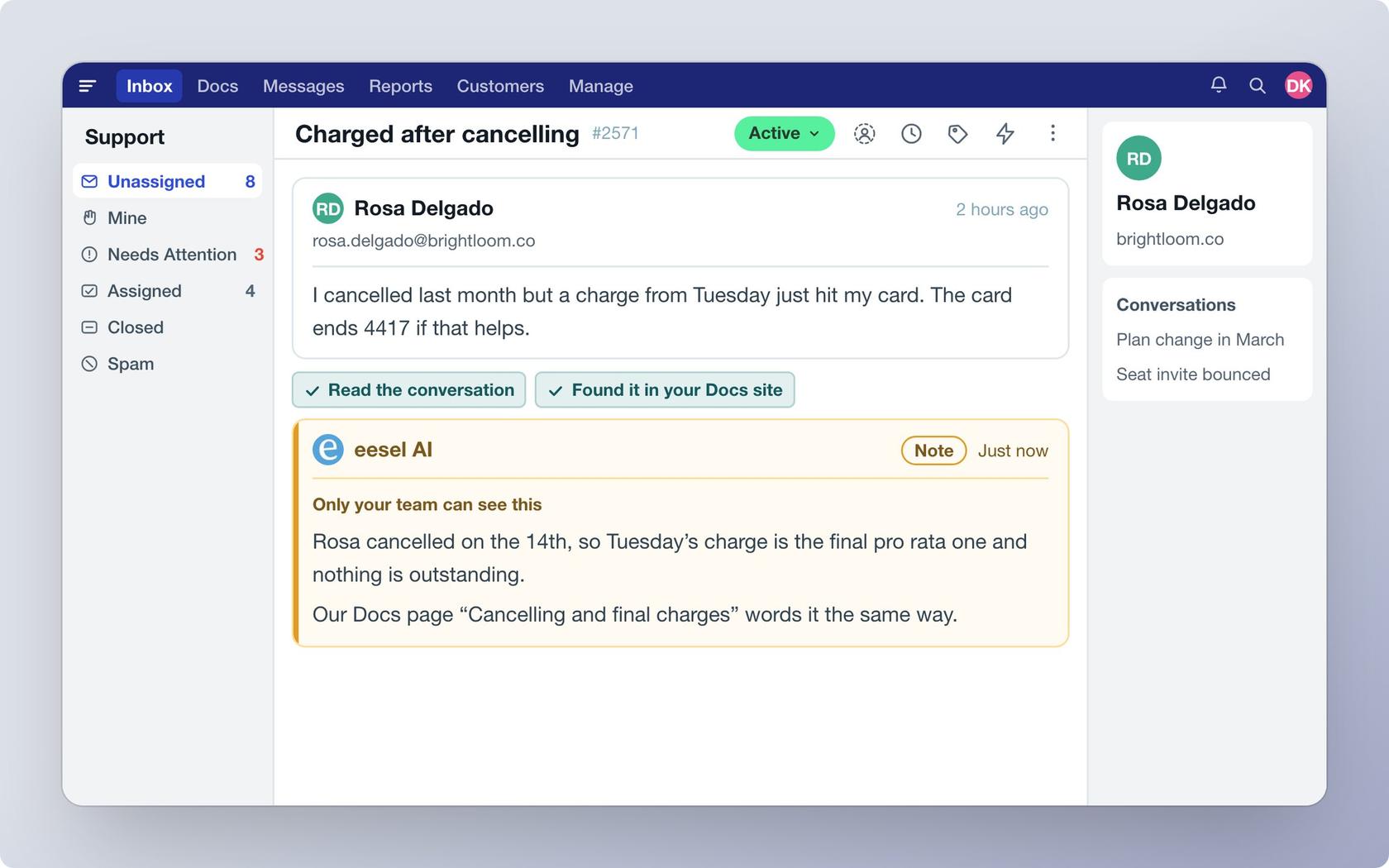
Luxedo is the clearest example. It runs eesel on Gorgias for home projector customers. On each new ticket, eesel checks it is a home customer, searches about 1,000 past tickets, macros and articles, and leaves one internal note with two parts: a draft reply, and a short section for the team covering what the customer is trying to do, what was tried, and why it needs a person if it does. Nothing goes to the customer until a person sends it. Between 8 August and 8 September 2026, eesel prepared 21 tickets and left 27 internal notes. It is early data, but the note shape is what matters: the "why" is written down when work stops.
If you are on Re:amaze today, I would not rip it out for this. Press Summarize, add the why by hand, and keep an eye on the AI Agent meter. If your handoffs keep losing context and you are open to a switch, the helpdesk matters: my best AI helpdesk for ecommerce and ecommerce help desk software posts compare options, and Re:amaze vs Dixa is one head-to-head. Pricing is credit-based: a ticket that wakes the agent is 1 credit, and plans start at $299 a month for 500 credits per the pricing docs.
For other helpdesks' built-in summaries, see Gorgias ticket summaries, Help Scout summaries, Gladly summaries, Zendesk AI summaries and Front AI summarize.
Try eesel for handoff notes
If your handoffs lose context between shifts, I would put an agent on the queue that writes the note when it stops. eesel works inside Gorgias, reads your past tickets and help content, and leaves internal notes your team sees, so the next person starts from a written reason, not a guess. You can run it against past conversations before it touches a live one, and a customer story like SamCart's shows the same handoff design on Freshdesk. Read how the AI helpdesk teammate works, or see best AI for ecommerce support.
Try eesel free, or book a demo to see it on your own tickets. The terms knowledge base and AI agent are in the glossary if you want the background.