Gorgias AI ticket summaries: plans, limits, and handoffs

Riellvriany Indriawan

Katelin Teen
Last edited November 20, 2026

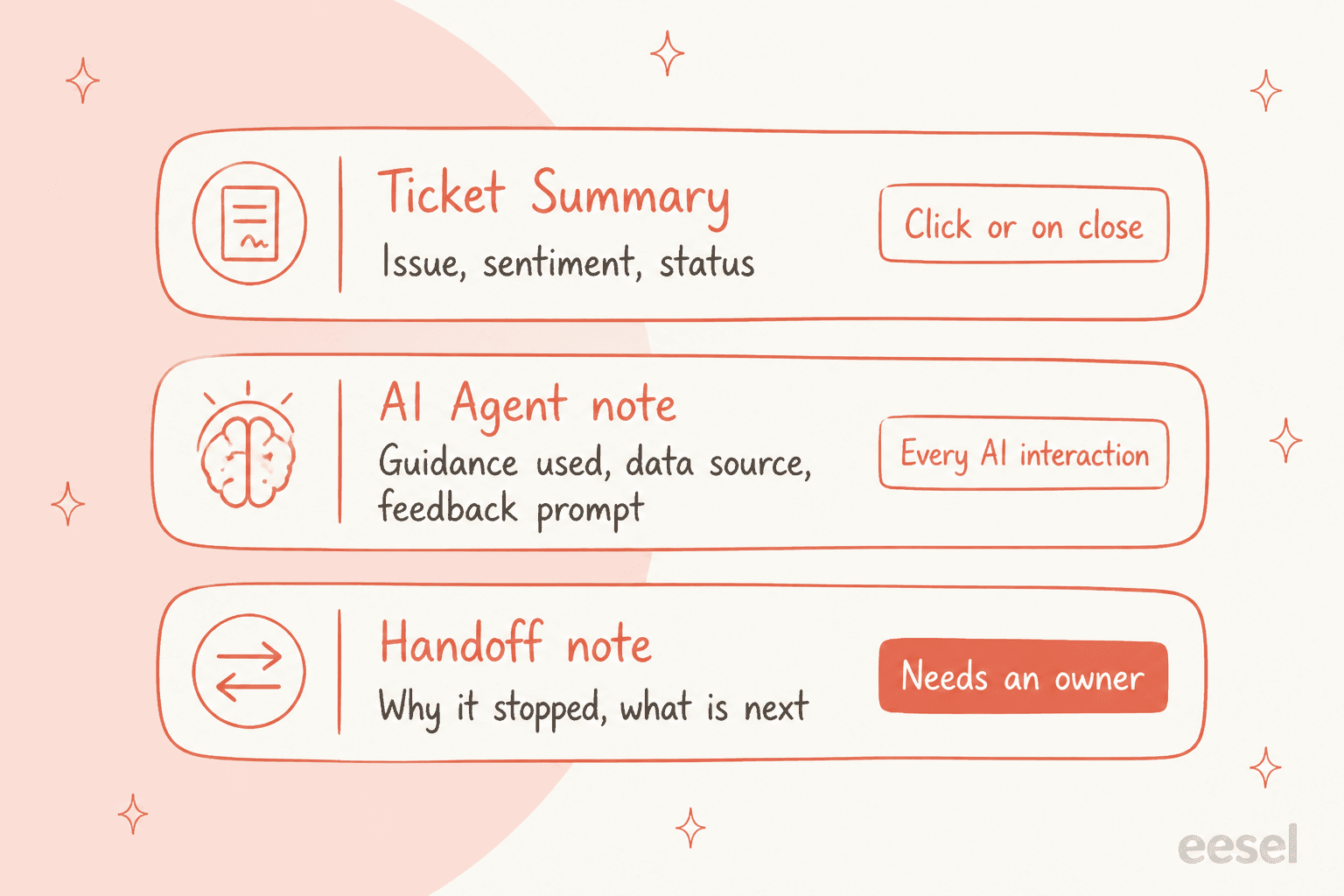
Gorgias ticket summaries are included in every Helpdesk plan at no extra cost: click Summarize on an open ticket with at least 3 messages, or get one automatically when a ticket closes. Each summary covers the issue, sentiment and resolution status. They are a reading aid, limited to one manual summary a day and no auto summary past 100 replies. I would use them for handoffs and QA, and add a written handoff note for the part a summary cannot know: why the ticket moved.
With the eesel CLI, an AI coding agent can run npx @eesel/cli integrations connect gorgias to see the Gorgias connection options, download the knowledge sources and check them, then test an internal-note draft on a test ticket before any live reply. Someone with admin access still has to approve the connection.
What do Gorgias AI ticket summaries do?
A summary is a short AI recap of a ticket that sits at the top of the conversation. Gorgias announced it in June 2025 as "concise summaries that highlight the customer's issue, sentiment, and resolution status", aimed at fresh handoffs, reopened tickets and QA reviews.
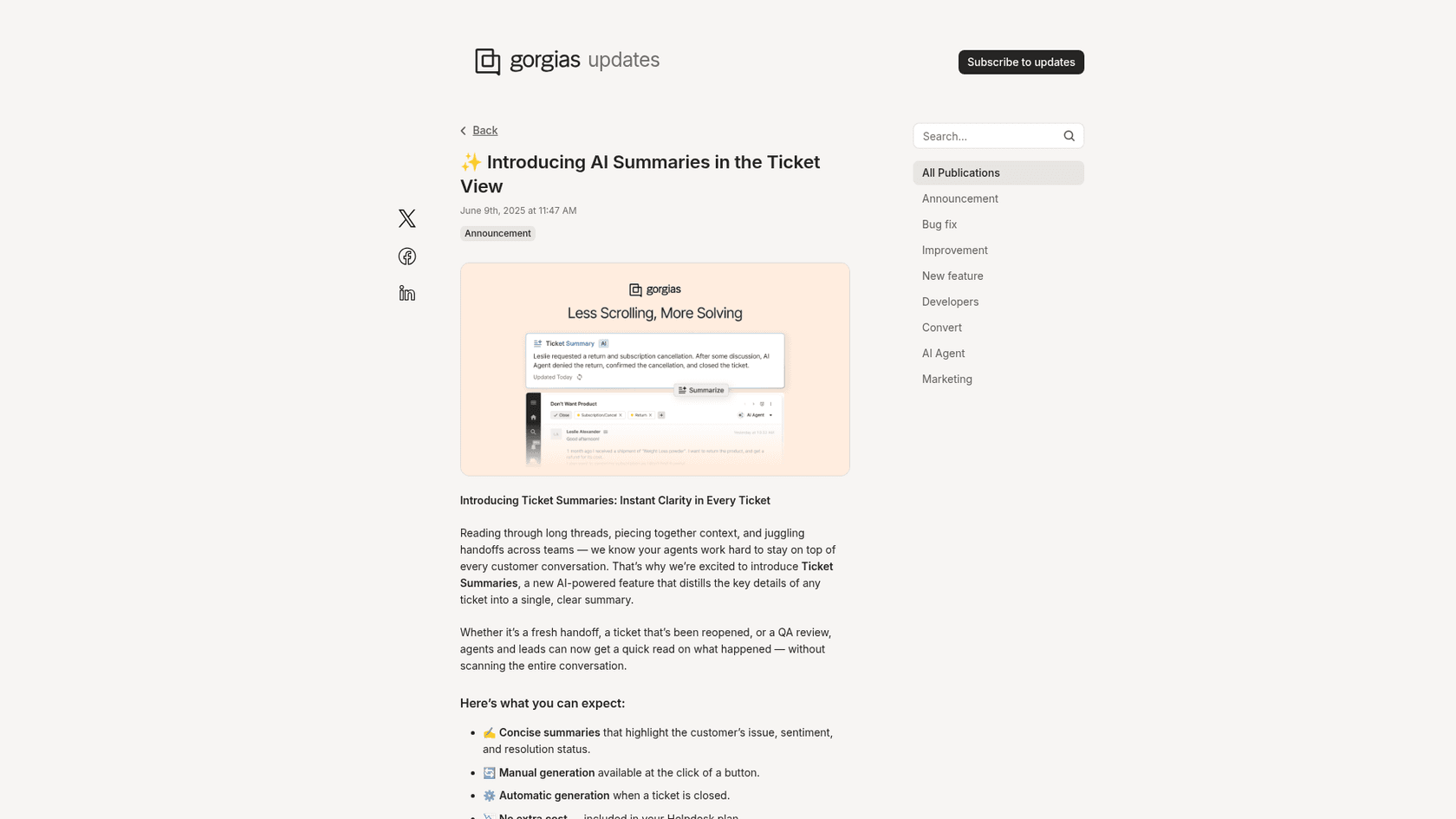
The same recap shows up in the Customer Timeline, where you can preview a customer's past tickets in a modal and click Summarize without leaving the page. Gorgias says teams using the Timeline resolve tickets 26% faster on average, though that figure is about the Timeline as a whole, not summaries alone.
One thing I want you to notice early: this is a feature for a human reader after the fact. It is a recap, not a field you can report on, and the customer never sees it. It sits next to macros and rules in the ticket view. For the wider picture, my Gorgias AI overview covers the Helpdesk and AI Agent pieces side by side.
When does a Gorgias summary appear?
Two ways, and the limits are specific enough that they decide how you use it.
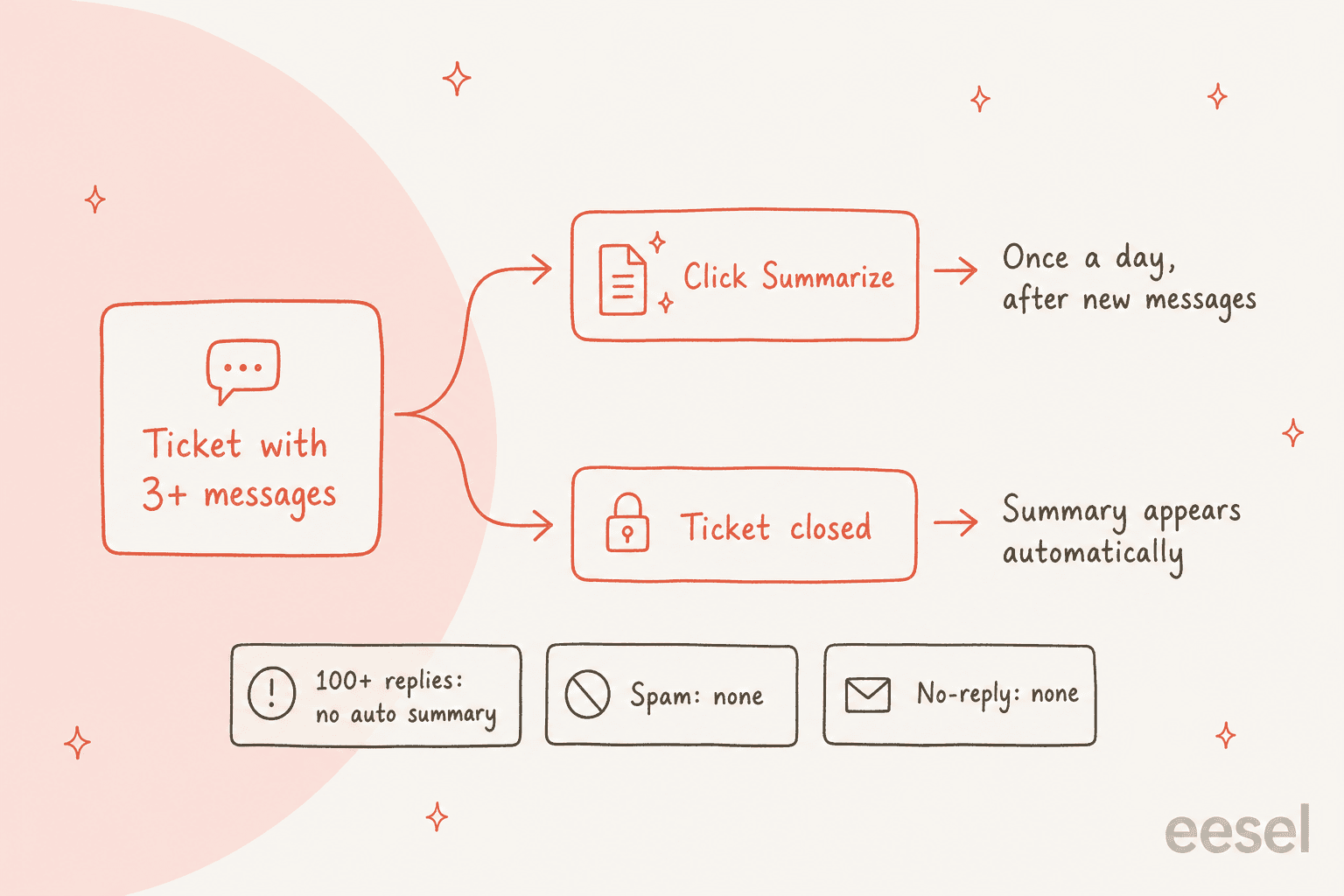
- Manual. An agent clicks Summarize on a ticket with at least 3 messages. Per Gorgias, manual summaries can be generated once per day, and only after new messages have been added.
- Automatic. A summary is created when a ticket is closed. There is a 30-minute delay required between an auto and a manual generation.
- Not available. Tickets with 100+ replies do not get an automatic summary, and spam and no-reply tickets are not summarized at all.
The docs and the release notes disagree by one message. The Customer Timeline docs say closed tickets "containing more than three messages" get the automatic summary, while the release note says manual summaries need at least 3 messages. I would test a 3-message ticket in your own account before you promise a team that boundary.
The once-a-day cap matters more than it looks. If a customer replies twice in an afternoon after your morning summary, the bullets you read at noon are already out of date, and you cannot refresh them until tomorrow. That is where I would lean on the thread itself, not the recap.
Which Gorgias plans include ticket summaries?
Every Helpdesk plan. The release note says summaries are "available with your Helpdesk plan, no additional subscription required", and the Timeline docs say it is available on all Helpdesk plans. Check roles and permissions if an agent cannot see the button. There is no separate AI Agent purchase needed to get one.
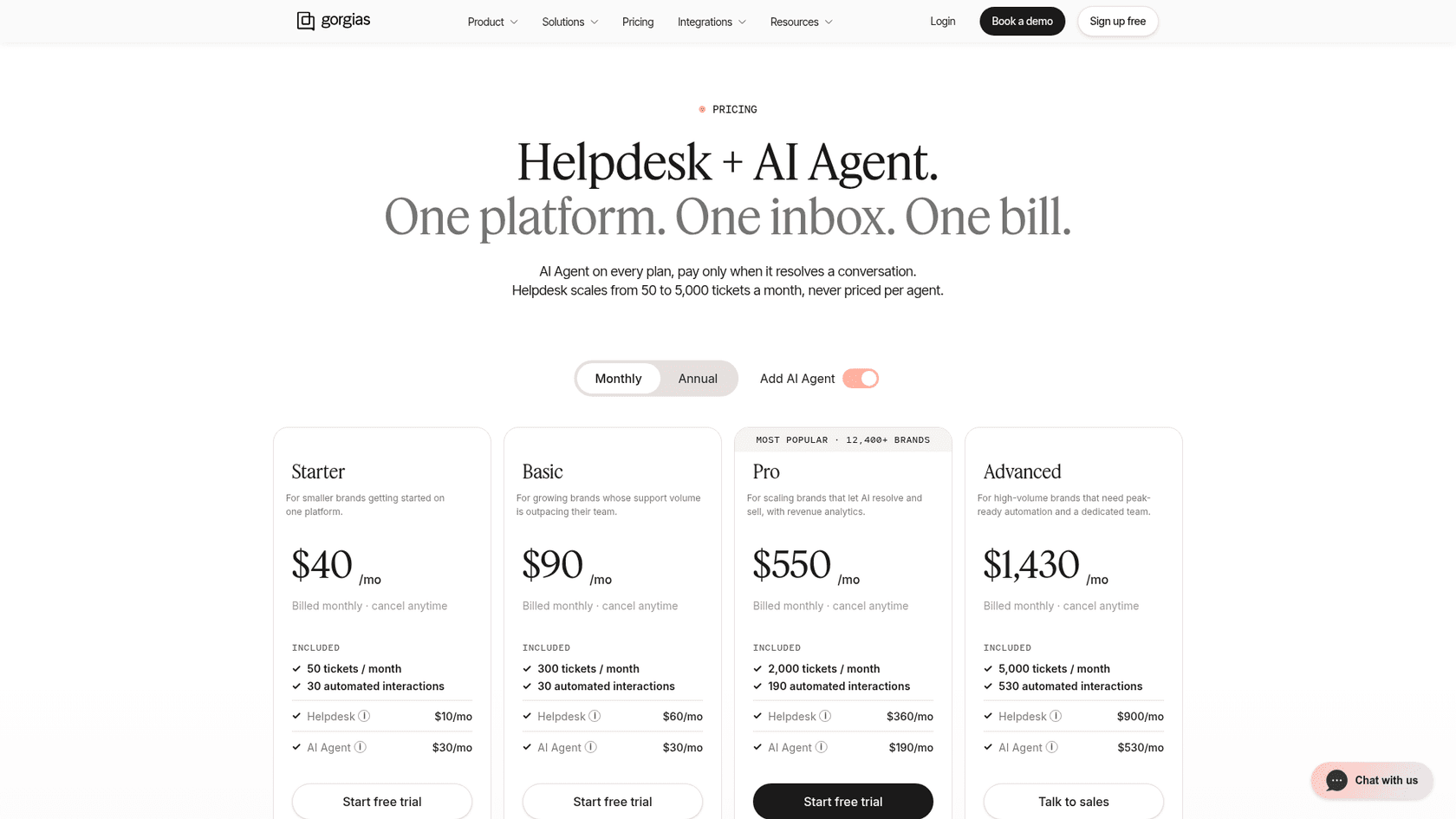
Here is the pricing page as I read it on 20 November 2026, on monthly billing. The page shows totals with the AI Agent toggle on, so I split out each line item:
| Plan | Helpdesk (per month) | Tickets included | AI Agent add-on (per month) | Automated interactions included |
|---|---|---|---|---|
| Starter | $10 | 50 | $30 | 30 |
| Basic | $60 | 300 | $30 | 30 |
| Pro | $360 | 2,000 | $190 | 190 |
| Advanced | $900 | 5,000 | $530 | 530 |
Gorgias bills by ticket, not by seat. A ticket counts once it has at least one message sent from your helpdesk, and per the billing docs the Basic example is $60 for 300 tickets plus $0.40 per extra ticket. Replying to a customer makes a ticket billable, while adding an internal note or changing the assignee does not. If you want the plan math in full, see my Gorgias pricing for Shopify stores and plans comparison posts.
My read: summaries are not a reason to pick a plan. They come with all of them, so choose on ticket volume and spend your attention on whether the team will actually use the button.
How do I use summaries for handoffs, escalations and QA?
Here is the routine I would set for a team of agents on any plan. Setup is about 15 minutes, and then it is a habit.
- Summarize at the moment of handoff. Click Summarize after the last reply so the recap includes what was just promised. Remember the once-a-day cap, so do it at the end of your turn, not the start.
- Check three facts against the thread. Amounts, dates and any commitment to the customer. These are the lines where a wrong bullet costs money.
- Write the handoff in an internal note. Internal notes show on a yellow background, customers cannot see them, and they do not count as billable tickets. The summary tells the next person what happened; the note tells them why you are passing it on.
- Tag it so it can be found. Use tags and views so escalated tickets land in one queue, and assignment rules to route them.
- Use closed-ticket summaries for QA. Because every closed ticket gets one automatically, a lead can skim a day of summaries, pick the odd ones, and open only those threads. Pair it with QA calibration so two reviewers agree on what "good" looks like, and see the glossary on quality assurance.
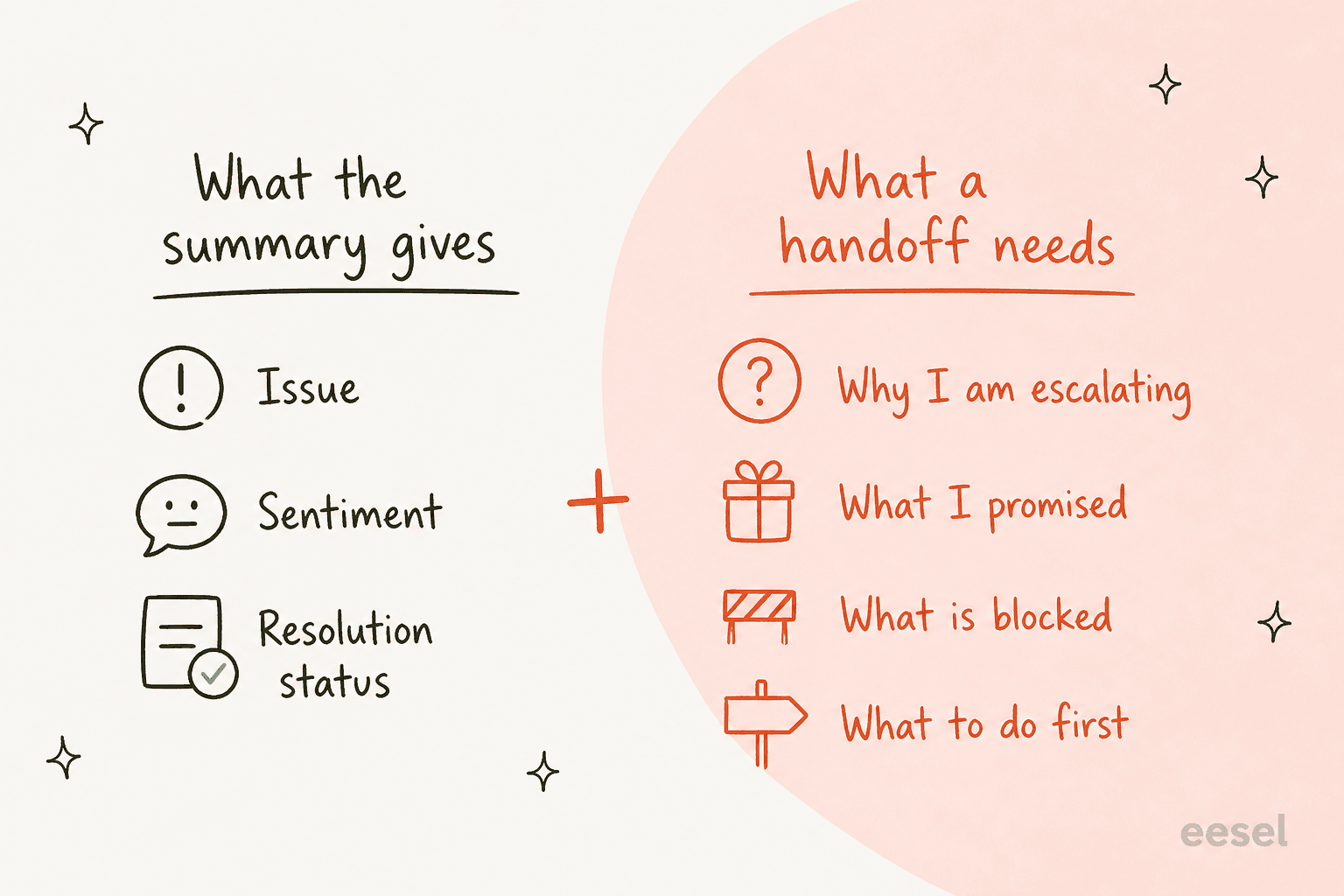
The gap in that picture is the point. Gorgias says summaries cover issue, sentiment and resolution status. Those are the facts in the thread. A good handoff also carries intent, and intent is not in the thread. My AI agent handoff best practices guide goes deeper on what to write.
For the process around it, read my ticket escalation process post. The glossary entries on ticket summarization and escalation are short.
The sentiment line comes from the same idea as sentiment analysis, and Gorgias has its own sentiment detection feature.
What are the limits of Gorgias summaries?
None of these are hidden, but they are easy to miss until you hit one:
- Reader, not a workflow. Gorgias documents a button and an on-close trigger. It does not describe using a summary as a rule condition or a field you can filter on.
- Refresh. One manual summary a day, and only after new messages.
- Length. No automatic summary past 100 replies, which is exactly the long escalation you most want recapped.
- Excluded tickets. Spam and no-reply tickets never get one.
- Accuracy. I could not find a Gorgias statement on accuracy for summaries, so I treat them like any AI recap: fine for orientation, verify before acting on money or dates.
- Language. I did not find language support documented for summaries, so test one in your second language before relying on it.
One Capterra reviewer put summaries in a list of features that earned their keep:
"Features like sentiment-based auto-tagging, customizable ticket fields, AI-generated ticket summaries, phone transcription, and the much-improved multi-level IVR with natural-sounding text-to-speech have all had real practical value."

That is one verified review, not a trend, but it matches how I would describe them: a useful extra, not the main event.
Does Gorgias AI Agent write a handover summary?
Not in the way a person would. The AI Agent, which can learn from past tickets, does leave an internal note on each interaction, and per Gorgias's AI Agent explainer that note covers the guidance, articles or macros it used, the source of the account information, and a prompt for your feedback. That is an audit trail for you, not a recap for the next agent.
When the agent hands over, the Gorgias docs describe handover topics and controls, and an update added a chat confirmation step where AI Agent asks the shopper "Would you like to talk to a human?" before connecting them. I did not find a documented, summary-style handover note in the help center. If you find one in your account, trust that over this post. The handover experience in chat post has the settings.
Gorgias also has an MCP server for AI assistants. Its get_ticket tool returns a ticket with its tags and summary, add_internal_note adds a note customers cannot see, and escalate_ticket assigns a team, adds an escalated tag and leaves a note explaining why. So the building blocks for a written escalation note exist; someone has to ask for them.
How do other helpdesks compare?
The idea is common. If you are weighing options, compare how each one triggers the recap and what it costs. I covered Zendesk custom summaries, Help Scout AI conversation summaries and Front AI summarize in the same format. The difference with Gorgias is the on-close automatic summary and the bundling in every plan; the cost of the bundle is the limits above.
For Shopify stores weighing the whole stack, my Gorgias AI agent alternatives and best AI for Gorgias posts compare the choices, and the general case is in AI ticket summarization for support.
Two related reads: whether AI can summarize support tickets reliably, and AI conversation summarization beyond one helpdesk.
My Gorgias review and first response time post cover the rest of the helpdesk.
Where does eesel fit with Gorgias summaries?
eesel is an AI teammate platform, and the one that matters here is the AI helpdesk teammate. Per the Gorgias setup docs, it works inside your Gorgias tickets on email and chat: it replies or drafts, leaves internal notes, tags, assigns, snoozes and closes tickets, and checks your customer's orders. It learns from your Help Center, macros and past tickets, and when it starts a run it reads the newest 40 messages, internal notes included.
What I would not claim: eesel does not have a documented Summarize button that replaces Gorgias's own. For a person skimming a long thread, use the Gorgias button. Where eesel earns its place is the moment work changes hands. Its internal notes are private to your team, and you can instruct it in plain language to end a handoff note with what the customer wants, what it already tried and what is blocked. A teammate can also mention @eesel in an internal note for on-demand help. I would test that wording on past tickets before turning on live replies, since a note is only as good as its instruction.
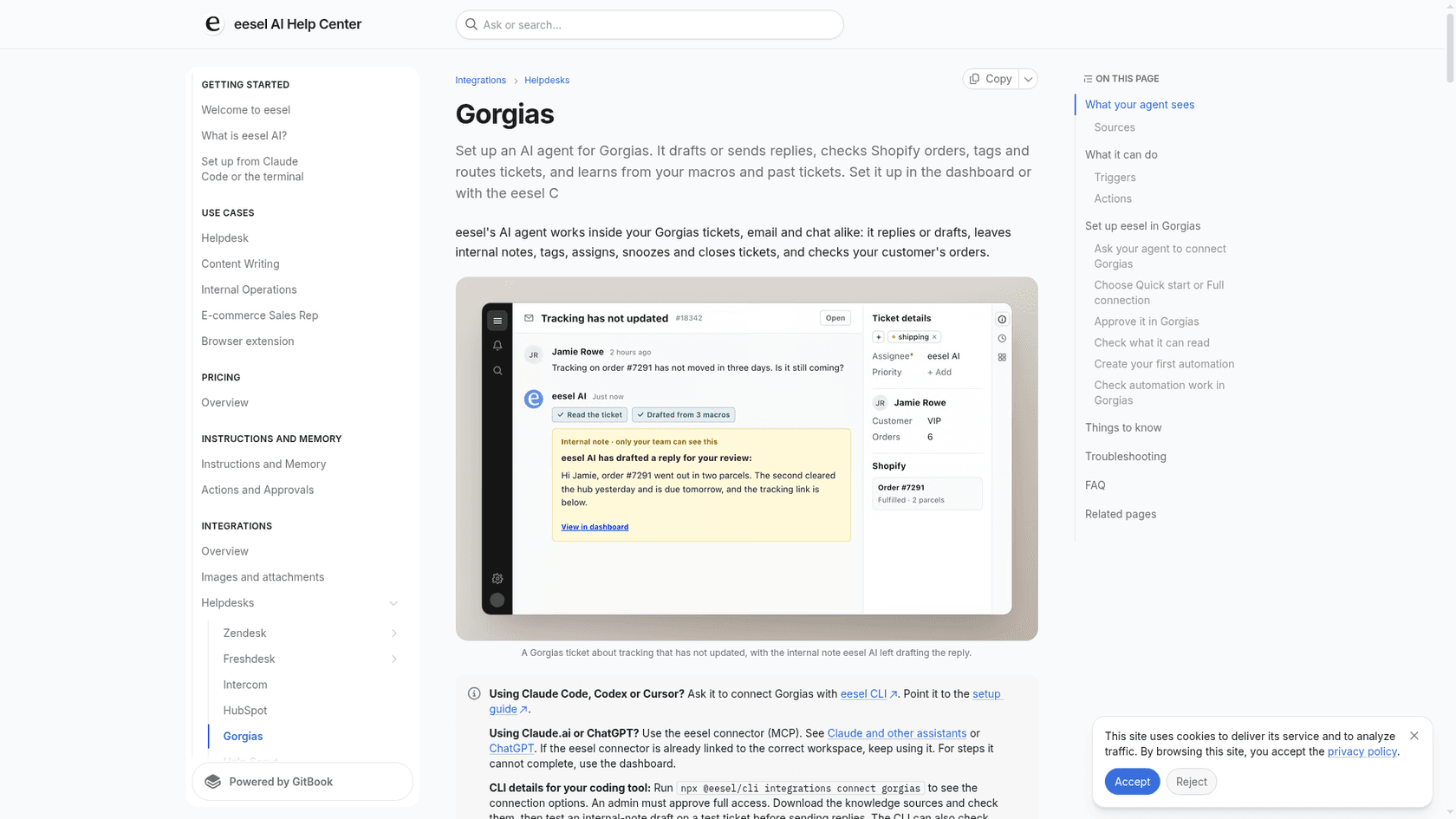
The pattern works in practice. ClutchLoop runs eesel as "Loopy" on Gorgias, Shopify and its website chat. Between 8 August and 8 September 2026 Loopy handled about 230 Gorgias tickets, sent about 180 replies directly, drafted 43 replies for the team and left 30 internal notes. That mix of direct replies, drafts and notes is the shape I would aim for: the agent does what it can, and the team gets a written reason when it steps back.
On cost, eesel's pricing is credit-based, with plans starting at $299 a month for 500 credits per the pricing docs. Compare that with Gorgias's AI Agent add-on (my Gorgias AI agent pricing post has the maths) and its per-interaction overage, and decide which problem you are paying to solve.
Try eesel for Gorgias
If your handoffs lose context between shifts, I would put an AI helpdesk agent on the Gorgias queue that writes the note when it stops. eesel connects to Gorgias in a few steps, reads your macros, Help Center and past tickets, and leaves internal notes your team sees. Run it against past tickets first, so you see what it writes before it touches a live customer.
Try eesel free, or read how it compares in my Gorgias AI agent versus eesel post.