Gorgias holiday hours: how to set closures, auto-replies and SLAs

Riellvriany Indriawan

Katelin Teen
Last edited November 12, 2026

Gorgias holiday hours are dated exceptions that replace your business hours, either fully closed or with shorter hours, for the integrations you pick. They are set under Settings, Workspace, Business and holiday hours, can repeat yearly, and feed chat availability, rules, call routing and SLA pauses. The catch I would test first is that a closure day triggers both your holiday and your outside-hours auto-replies unless you exclude one. If you want ticket triage and drafts while you are closed, eesel's Gorgias integration can acknowledge, tag and draft while a person sends.
How do I set holiday hours in Gorgias?
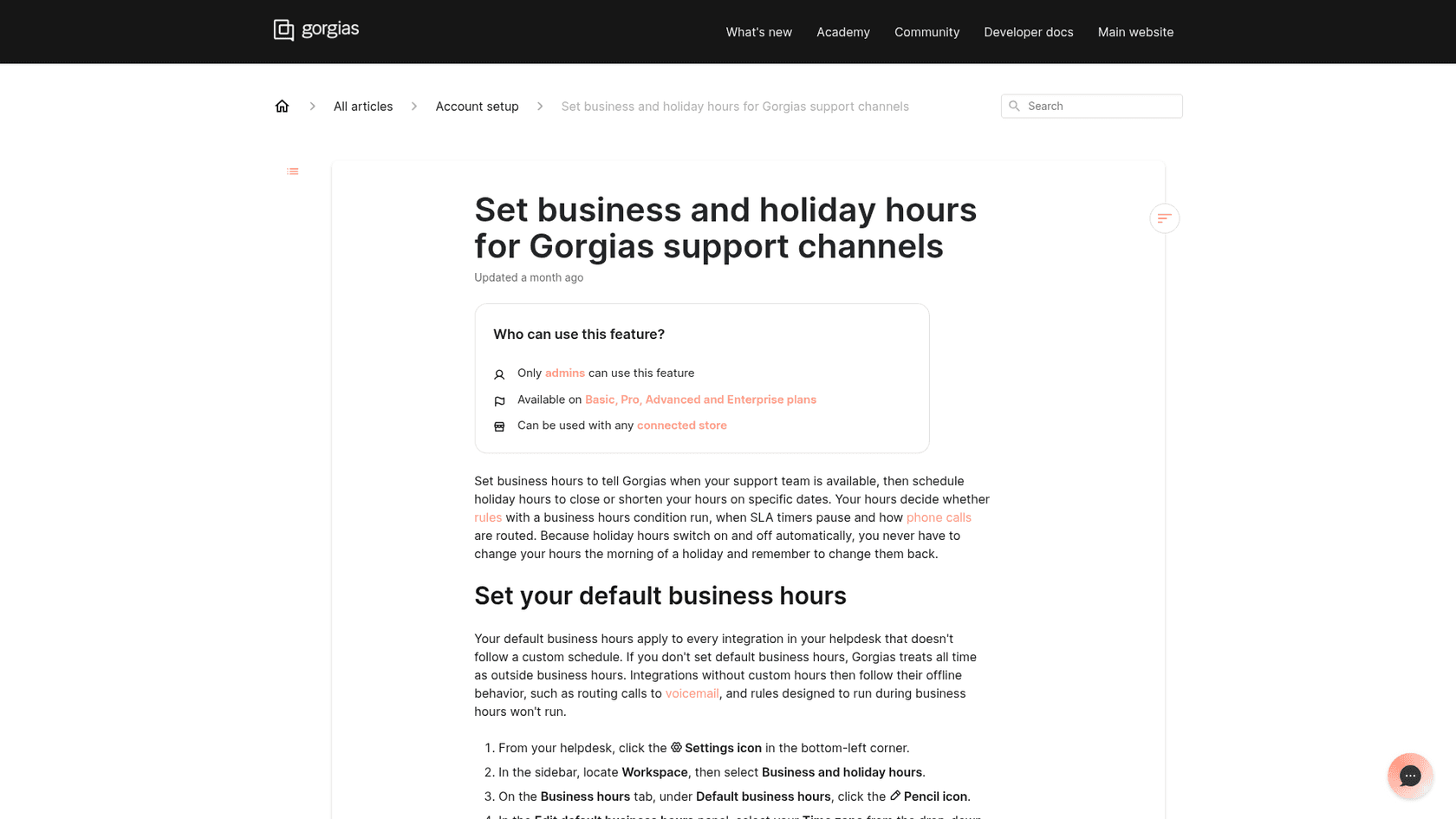
Open your Gorgias helpdesk, click the Settings icon, choose Workspace, then Business and holiday hours and open the Holidays & exceptions tab. Click Add holiday hours, name it, pick a date or date range, and choose how your team works on those dates, per Gorgias's business hours article.
The form has four choices that matter:
| Setting | What it does | Watch out for |
|---|---|---|
| Fully closed | Treats the whole date range as outside business hours | Uses each integration's own business hours time zone, so closure starts at local midnight |
| Open with different hours | Replaces your regular hours with the time ranges you enter | Uses the time zone you pick in the form, which defaults to your default hours |
| Repeat every year | Applies the same calendar dates each year, including ranges that cross into January | A single holiday can span up to 366 days |
| Integrations | Chooses which channels and stores the holiday applies to | An integration cannot sit in two holidays with overlapping dates |
Two details save a headache. Integrations you do not assign keep their regular hours, so a Canadian holiday can cover only your Canadian store's email and phone. And if you never set default business hours, Gorgias treats all time as outside business hours, which means rules built for working hours never run.
Only admins can do this, and the roles and permissions table lists adding, editing and deleting holiday hours as admin-level actions. The list view tags each holiday Active, Upcoming or Expired, and you cannot delete a holiday that a rule uses as a condition until you remove it from the rule.
If you run several Shopify storefronts, the per-integration assignment is what makes multiple brands workable, since each brand can close on its own calendar.
What does a holiday actually change?
A holiday overrides whichever schedule an assigned integration normally follows, then hands control back automatically when the dates pass. Gorgias says holiday hours show up in chat availability, voice routing and rules, and its docs add SLA timers.
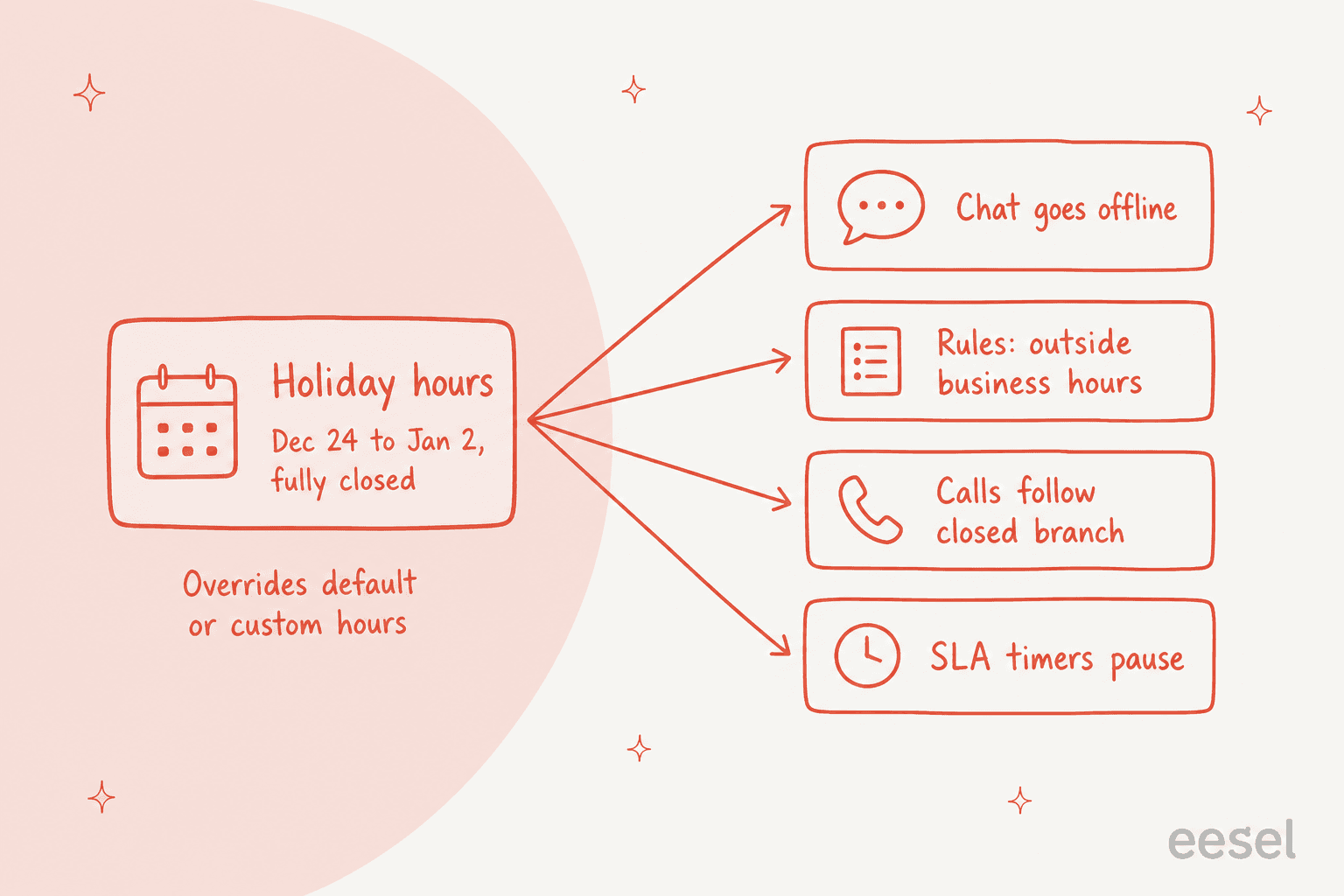
Here is each one in plain terms:
- Rules. The built-in during business hours and outside business hours conditions already account for holidays, so existing rules need no edits. New during holiday hours and outside holiday hours conditions let you target a named holiday, and they work with ticket dates like created and last message. For a holiday that is open with different hours, during holiday hours is only met in the closed part.
- Calls. On a voice integration, the Time rule step checks the holiday before regular hours. By default holiday calls follow your outside-hours branch, or you can add a separate During a holiday branch. Add at least one step to it, because calls routed to an empty branch end with no warning. See my notes on the Gorgias phone integration and AI phone support.
- SLAs. If a policy pauses outside business hours, it also pauses during holiday hours, so a closure is not counted as a breach.
- Chat. Covered below, because it depends on one setting.
How do I send one holiday auto-reply, not two?
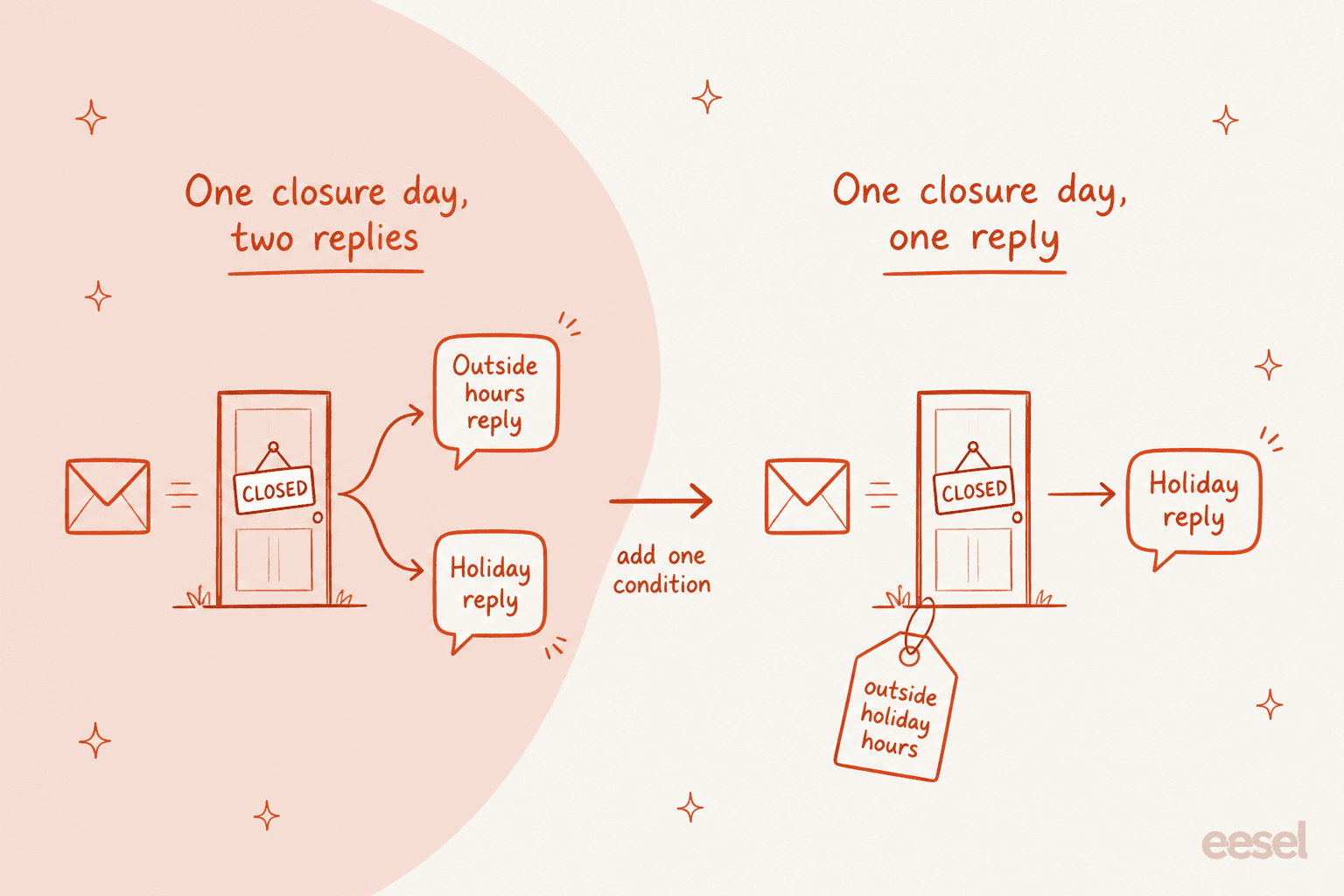
Create a rule with the during holiday hours condition, select the holiday, and write a reply that says when you are back. Gorgias even ships a During a holiday template: when a ticket is created during the closure and the message is not from an agent, reply to the customer and tag it holiday.
The trap is that a ticket created on a closed day is also outside business hours. If you already have an outside-hours auto-reply, both rules fire. Gorgias's own tip is to add outside holiday hours to the outside-hours rule and select the same holidays.
One more caution from the same docs: Gorgias says rules run first and AI Agent picks up after, so if a rule sends an auto-reply, AI Agent may still attempt its own response and the customer gets two messages. If you use both, decide which one owns the closure. My auto-reply tips go deeper on rule design.
Also skip the outside-hours auto-reply for social comments. Gorgias notes the rule is meant for email tickets and says it does not recommend it for Facebook or Instagram comments, which can be flagged as spam.
What happens to chat and AI Agent on a closed day?
It depends on your chat availability setting. In the chat preferences, there are three modes:
| Chat availability | Controlled by | On a closed holiday |
|---|---|---|
| Live when agents are available | Agent availability | Business hours are not the control, so chat stays live if an agent shows as available |
| Always live during business hours | Business hours | Chat goes offline automatically |
| Offline (capture messages only) | Manual | Always offline until you change it |
The first row is my reading of the table, not a sentence in the docs, so test it with a holiday dated today. There is also a Show chat outside of business hours toggle that hides the widget entirely, which is blunt but clear for a long closure.
When live chat is offline, shoppers get the offline capture form and a reply by email. That changes if AI Agent is on for chat: the same article says chats started outside business hours are handled by AI Agent, not offline capture.
For handovers, Gorgias's handover settings treat chat as offline when it is outside business hours, and AI Agent always asks for an email address then. You can write separate handover instructions for the offline case, and turn on Share business hours in handover message so the shopper knows when to expect a person. The docs do not say whether that message mentions a holiday closure, so write the return date into your offline instructions yourself. My guides to handover guidance and the chat handover experience show wording that works.
A G2 reviewer describes the upside of this setup well:
"The AI Agent and AI Shopping Assistant have been especially valuable for our business as we have limited business hours and AI is available 24/7 with solid customer service skills and actions."

Which plans include holiday hours, and what does a peak week cost?
Gorgias's business hours article says the feature is available on Basic, Pro, Advanced and Enterprise plans. The offline capture article says offline capture is available on all helpdesk plans, and the pricing page lists a Starter tier at $40/mo with 50 tickets. So whether Starter gets holiday hours is not clear from the docs, and the business hours article does not name it.
The bigger holiday question is volume. Closing does not stop tickets arriving, and Gorgias bills on them, a pattern I also see in Black Friday support. Per the pricing page, Basic includes 300 tickets a month and charges $0.40 per extra ticket, Pro includes 2,000 and charges $0.36, and each automated interaction past your allowance costs $1.50. A Basic store that takes 500 extra tickets over a Black Friday through New Year stretch pays about $200 more in ticket overage (500 x $0.40), before any AI Agent overage. A G2 reviewer put the feeling bluntly:
"During peak seasons like the holidays when support volume spikes, the costs can increase significantly in a short period."
That is the argument for planning, and for reading what changed in AI Agent 2.0 before peak: Gorgias's plan tiers and AI Agent pricing both scale with peak weeks, so a holiday rule that cuts duplicate auto-replies also cuts noise.
Where do the Gorgias docs disagree or go quiet?
These are the spots I would verify in a test account before the season:
- Starter plan. Business hours article: Basic and up. Offline capture article: all helpdesk plans. Pricing page: Starter exists. Confirm with Gorgias.
- Chat on "agents available". The docs do not say a closure takes chat offline in that mode. They only say business hours control the other mode.
- AI Agent and holidays. No doc I found ties AI Agent answers to holiday hours. It reads chat as offline outside business hours for handover, but the docs never say that a holiday counts.
- Shared business hours. The handover message option shares your business hours. Whether holiday closures appear in it is not documented.
- Different help center hosts. Some articles live on
docs.gorgias.comand others link tohelpcenter.gorgias.com, and wording can lag between them. Read the page you are acting on.
What does a sane holiday setup look like?
- Add one holiday per region or brand, fully closed, assigned only to the integrations that close. Turn on Repeat every year for fixed dates.
- Write the during holiday hours rule with the return date, and add outside holiday hours to your outside-hours rule.
- Turn on the SLA pause toggle if your policies run outside business hours.
- Set chat to Always live during business hours, or hide it for a long closure.
- Give voice a During a holiday branch with at least one step, such as voicemail.
- Tag holiday tickets and build a ticket view so the first morning back starts with a sorted queue, and watch your first response time when you reopen.
- Decide what AI may send on its own and what it should only draft.
For the reply side, macros and tags do the heavy lifting, and a similar Zendesk holiday schedule exists if you run both.
Can AI cover the queue while the team is closed?
It can cover the first touch, and that is where I would stop. A closure is when a wrong answer sits unseen for days, so the safe split, which I cover in AI first response automation, is: AI acknowledges, tags and drafts, and people send anything involving money or judgment.
Rúngne, a Norwegian climbing brand whose support team works from Manila, runs three eesel agents on its Gorgias queue. In one month eesel handled about 2,100 tickets, with a triage agent that sends one short acknowledgement and tags each ticket, a draft agent that leaves about 580 replies as internal notes, and a helpdesk agent behind about 440 public replies on topics the team chose. Cancellations, damage and customs disputes go to people, and order tracking questions are the plain kind AI can answer.
Question Beauty shows the other half. Its eesel agent replied directly to about 960 Gorgias tickets in a month, in the customer's language, and still assigned about 250 to a person with a note on refunds, complaints and wholesale. That routing is the pattern I would copy for a closure, and my write-ups of AI escalation and seasonal support spikes explain how to set the lines.
If you work from a terminal, the eesel CLI lets Claude Code or Cursor upload approved knowledge, such as your holiday shipping cutoffs and return policy, and ask test questions to check answers before they reach a customer. It does not replace the Gorgias connection, which an admin still approves.
Try eesel for Gorgias
Gorgias's holiday hours tell your helpdesk when you are closed. They do not answer the ticket that arrives at midnight on Christmas Eve. eesel plugs into Gorgias, learns from your help center and past tickets, acknowledges and tags what comes in, and drafts replies as internal notes your team sends when it is back. Start with the eesel Gorgias integration, or compare options in eesel vs Gorgias AI and the best Gorgias alternatives.
Frequently asked questions
How do I set holiday hours in Gorgias?
Go to Settings, then Workspace, then Business and holiday hours, open the Holidays & exceptions tab and click Add holiday hours. Pick the dates, choose fully closed or open with different hours, and select the integrations it covers. My autoresponder scheduling guide covers the rules side.
Can Gorgias holiday hours repeat every year?
Yes. The Repeat every year toggle applies the same calendar dates each year, including ranges that cross into January, and one holiday can span up to 366 days. Check the list afterwards, because repeating holidays show the next occurrence. See also how to handle holiday support spikes.
Do Gorgias holiday hours pause SLA timers?
Only if your SLA policy has the Pause SLA timer outside of business hours and holiday hours toggle on. The timer uses the holidays assigned to the ticket's integration when the policy is applied. For the wider picture see my AI support SLA guide.
Will customers get two auto-replies on a Gorgias holiday?
They can. A ticket created during a closure is also outside business hours, so both your holiday rule and your outside-hours rule can fire. Add the outside holiday hours condition to the outside-hours rule, as in these auto-reply rule best practices.
What happens to Gorgias live chat on a holiday?
If chat availability is set to Always live during business hours, chat goes offline on a closed holiday and shoppers see offline capture. If it is set to Live when agents are available, agent availability decides instead. My Gorgias live chat guide covers the settings.
Does Gorgias AI Agent stop answering on holidays?
Gorgias's docs do not describe an AI Agent switch tied to holiday hours. They say rules run before AI Agent, and that chats started outside business hours go to AI Agent instead of offline capture. Test your setup, and read my notes on controlling handover to humans.
Are Gorgias holiday hours available on every plan?
The business and holiday hours article lists Basic, Pro, Advanced and Enterprise, while the offline capture article says all helpdesk plans and the pricing page lists a Starter tier. Confirm Starter with Gorgias before relying on it, and compare tiers in my Gorgias plans comparison.
What can an AI teammate do while my Gorgias team is closed?
It can acknowledge and tag tickets, and leave draft replies for your team to send when you are back. eesel's Gorgias integration works this way, and AI after-hours support explains where to keep a human in the loop.