Gorgias AI Agent skills: how to build, test and price them

Rama Adi

Katelin Teen
Last edited November 12, 2026

A Gorgias AI Agent skill is a set of written steps tied to one or more shopper intents, so AI Agent handles that conversation type the same way every time. Build one skill per high-volume request such as returns, test it in the Playground, publish it, then watch its handover rate and CSAT on a 28-day window. I found no separate skill fee in the docs: you pay the usual ticket and automation fees.
If you would rather have a coding agent do the grunt work on the eesel side, the eesel CLI lets Claude Code or Codex upload approved knowledge, such as exported Gorgias macros and help articles, then ask test questions and check the answers before anything goes live. Connecting the helpdesk itself still needs someone with admin access.
What is a Gorgias AI Agent skill?
A skill is the playbook AI Agent follows when it recognises a type of request. Gorgias classifies every conversation by intent, such as Return / Request or Order / Cancel, and a skill holds the instructions for one or more of those intents. I build integrations for eesel for a living, so I read this the way I read an API: what is the trigger, what is the payload, and what can go wrong between them.
Every skill has three parts:
- At least one intent. Intents are built into Gorgias. You do not create them, you only link them.
- Instructions. Plain-language steps, up to
30,000characters, per the create a skill doc. - A knowledge toggle. On by default. When on, AI Agent can pull help center articles and guidance to fill gaps. When off, it uses only your instructions.
The toggle is the quiet decision. Gorgias suggests turning it off only for sensitive or legally constrained processes, where you want the steps followed exactly.
How does a skill decide what AI Agent says?
The skill wins whenever its intent matches. The shopper writes in, Gorgias detects the intent, and the linked skill's instructions drive the reply, with actions called at the steps where you insert them.
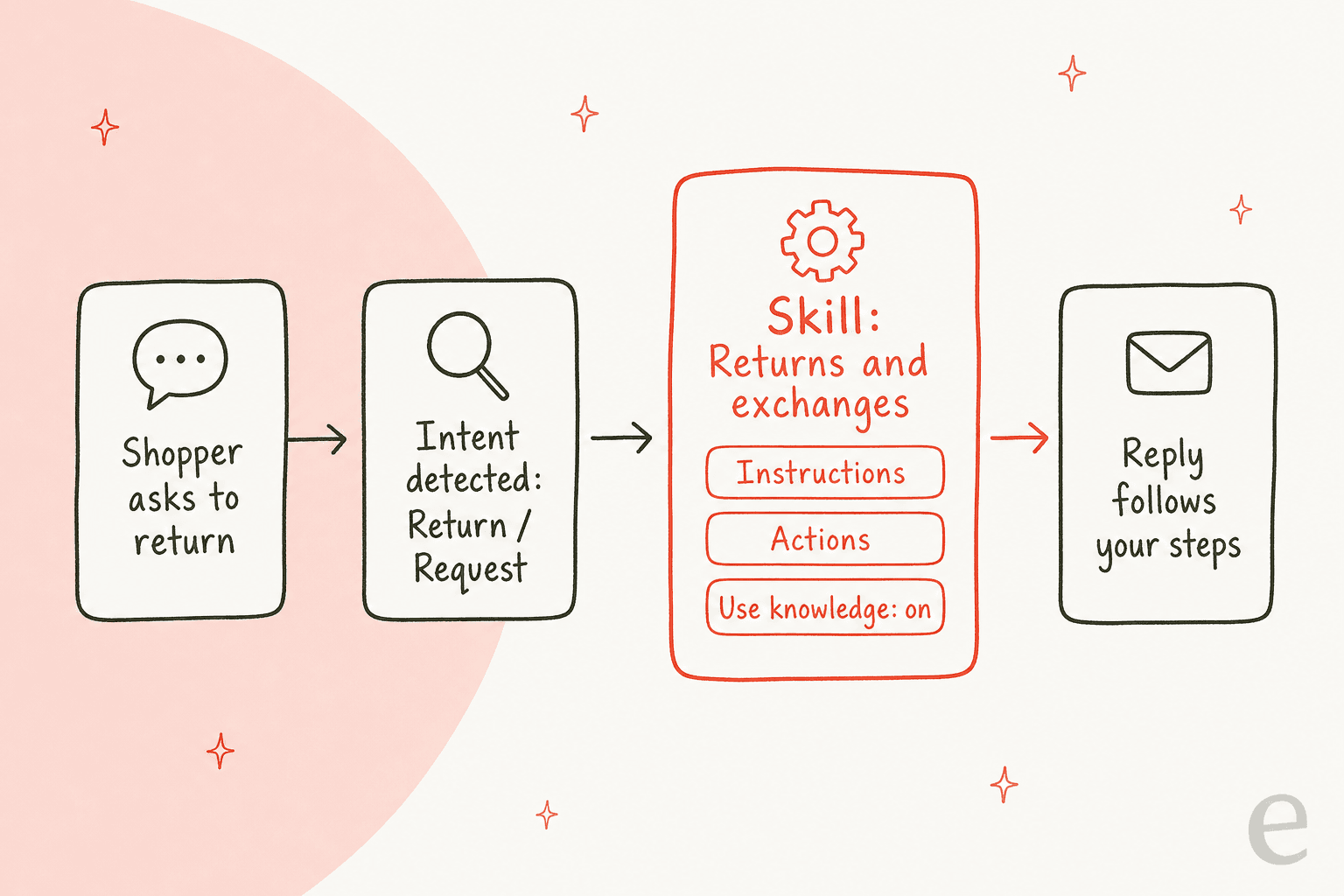
Gorgias gives a rule of thumb for what belongs where. If the content describes what AI Agent should do for a request, it goes in a skill. If it describes what AI Agent should know, like store hours or a free-shipping threshold, it goes in knowledge. A subscription cancellation with retention steps is a skill. "Gold members get free shipping" is guidance.
One constraint trips teams up: a skill can have many intents, but each intent links to only one skill. Link an intent that another skill already owns and enabling yours moves it over. If the original skill ends up with no intents, it switches itself off.
How do I create a skill?
Start from a template unless your process is unusual. Templates cover returns, cancellations, order status and shipping address updates, arrive with intents pre-linked, and leave placeholders where an action goes.
- Open AI Agent, then Skills, then Create skill.
- Choose From template or From scratch. You can also open an existing piece of guidance and select Convert to skill, which moves it out of knowledge into a draft skill.
- Write instructions in a WHEN, IF, THEN shape: WHEN is the intent, IF is a condition like "order older than 30 days", THEN is the ordered steps.
- Insert variables with {+} Variables (order number, first name) and actions with Actions.
- Click Link intents and pick the intents this skill covers.
- Test in Playground, then click Enable.
Actions deserve a second look, because they are where a skill stops talking and starts doing. A Returns skill might send a Loop Returns portal link after confirming eligibility. I cover what actions can do, and their confirmation prompts, in my guide to AI Agent actions.
Write for a new hire, not a model. The docs say to reference your real policies and timelines. A returns policy I would write down: window in days, who pays shipping, which product types are final sale. Compare that with the older macro approach in my notes on returns macros without a portal and refund versus exchange detection.
What happens to an intent that has no skill?
You have three choices per intent, per the skills doc: cover it with a skill, leave it on with no skill so AI Agent answers from knowledge, or turn it off so every matching ticket goes to your team.
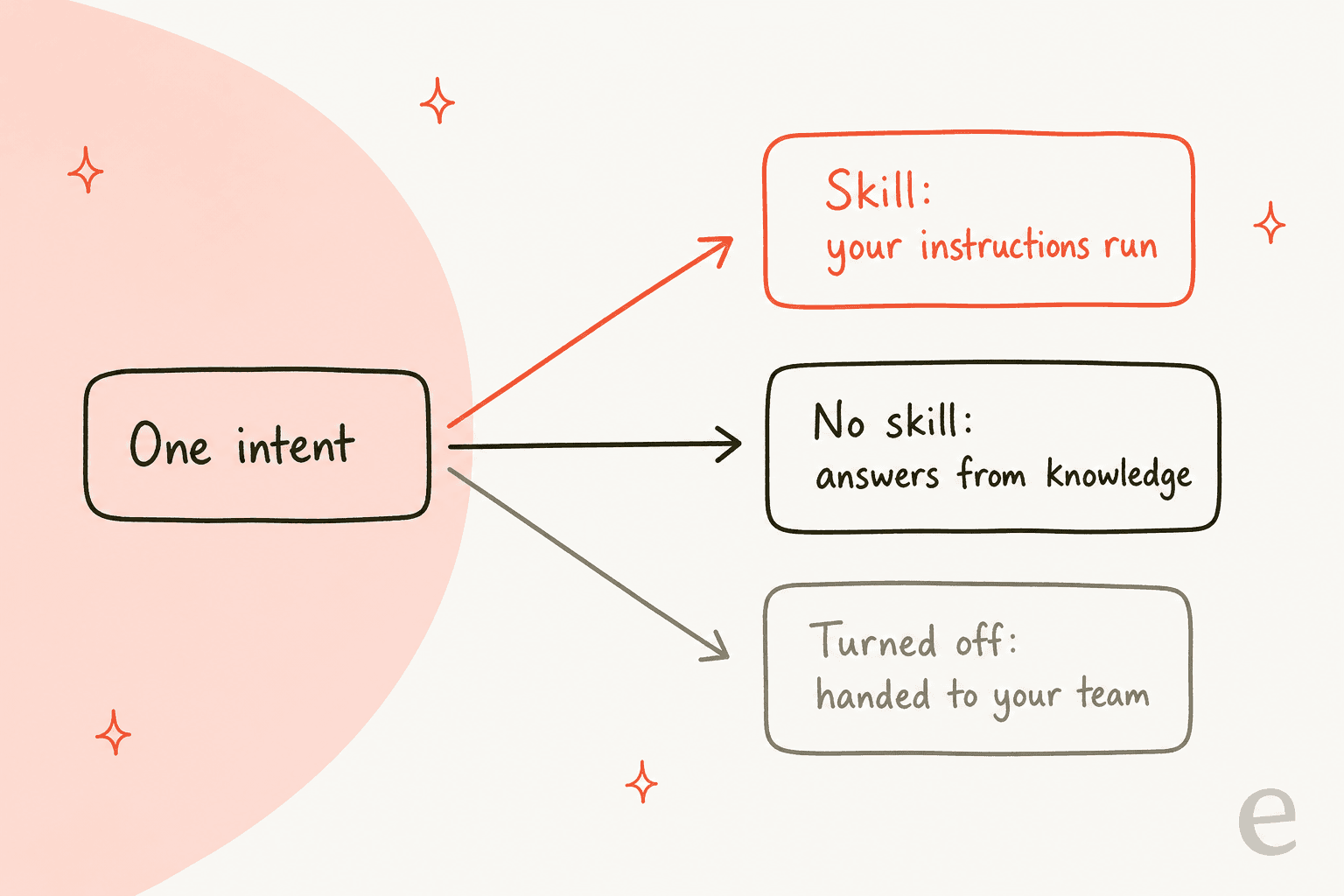
Gorgias has since moved where you make that choice. AI Coverage, formerly Intents, lists every intent with its tickets and handovers, labels it "AI handling" or "Handing over", and lets you link a skill or leave it unlinked. Handover topics now live on the same page. My take: use this page first, skills second. Decide what AI should touch at all, then write skills for the intents you keep. The earlier AI Agent 2.0 changes and my post on AI Agent on social channels show how the same skills carry across channels.
How do I edit, test and roll back a skill?
Edits save as a draft, so the live version keeps running until you click Publish changes (you can add a summary). A banner lets you switch between draft and live, and Compare to current shows additions in green and deletions struck through in red, per the manage your skills doc.
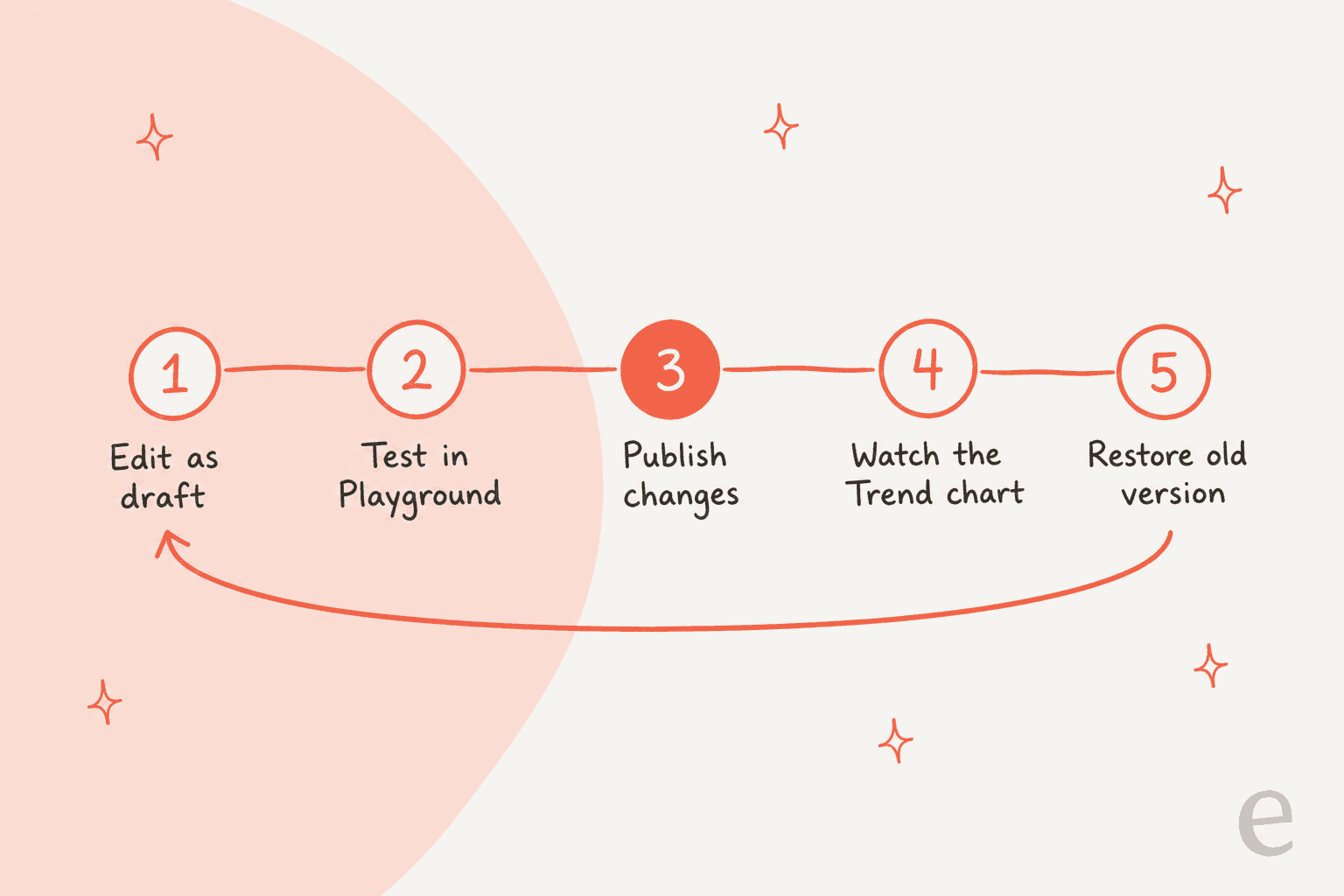
Three safety valves matter in practice:
- Restore a previous version. Restoring creates a new draft, so nothing goes live until you publish it. The mechanics match help center articles and guidance.
- Disable, do not delete. A disabled skill keeps its instructions and AI Agent falls back to knowledge for those intents.
- Delete only when sure. Deleting is permanent and removes the instructions, version history and performance data.
Playground has a Show reasoning option, which I would use on every first test. If the reasoning cites the wrong knowledge, the fix is usually the toggle, not the instructions.
How do I know whether a skill is working?
Every skill carries its own ticket volume, handover rate and average CSAT, measured over the last 28 days and compared with the previous 28, per the performance doc. The newer Trend chart marks each time you published a version, so you can match an edit to what happened next.
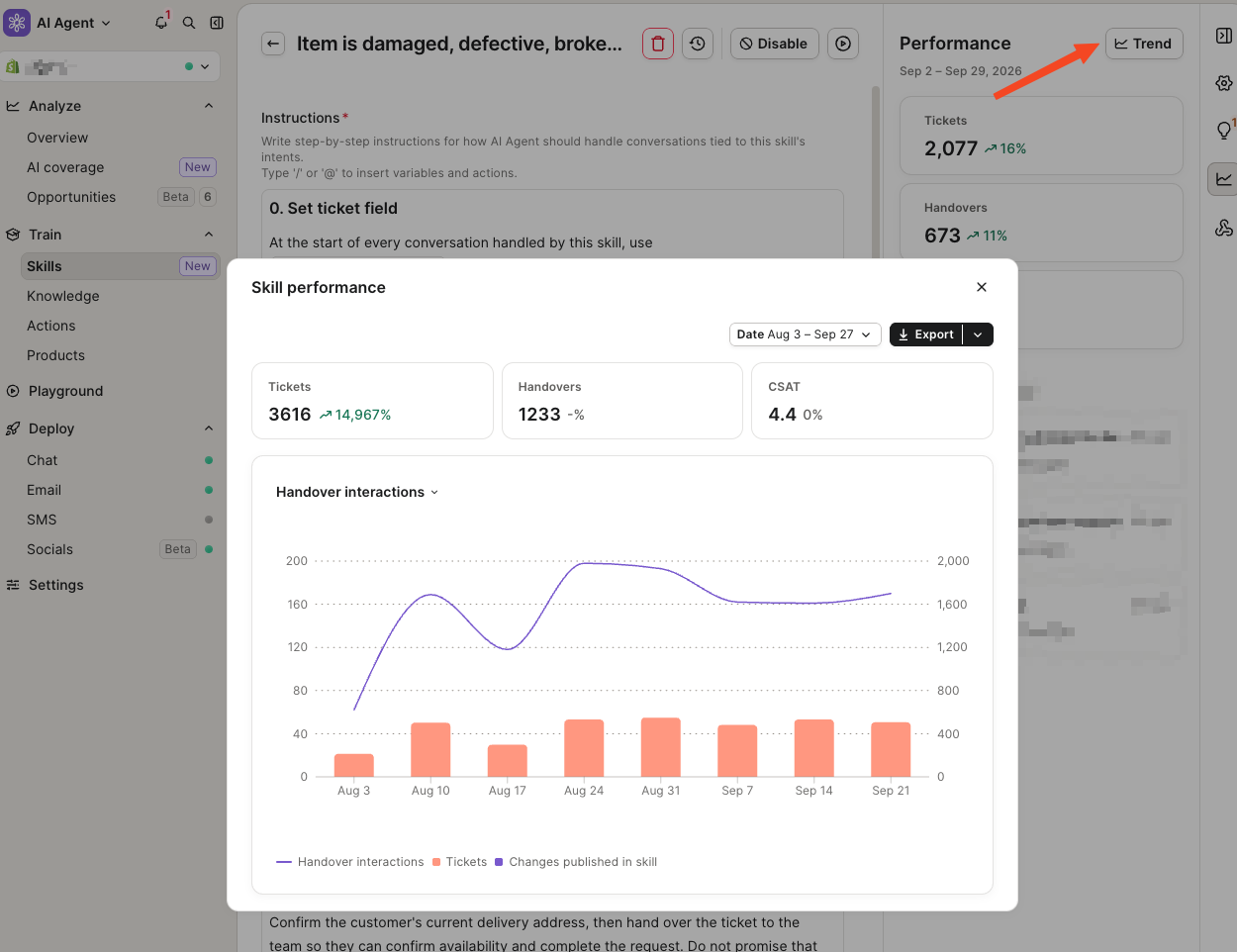
Screenshot as taken from the Gorgias product updates page.
My reading order, which follows Gorgias's own advice: sort by ticket volume, because the top skills have the widest effect. Then open the high-handover skills and read the tickets. Then fix low CSAT on high-volume skills. For reporting beyond skills, see my guides to Gorgias analytics and the CSAT survey. Gaia, Gorgias's coaching assistant, can also audit skills and draft improved versions.
Who gets skills, and what do they cost?
The skills docs say the feature is for the Owner, Admin and Lead roles, on all plans with AI Agent, and for Shopify stores connected to Gorgias. I found no separate price for skills. What you pay is the standard bill.
| Item | What the Gorgias docs and pricing page say |
|---|---|
| Roles | Owner, Admin, Lead |
| Plans | All plans with AI Agent |
| Store | Shopify stores connected to Gorgias |
| Skill fee | None described in the docs I read |
| Ticket fee | Applies to any ticket with a message sent from the helpdesk |
| Automation fee | Applies when AI Agent resolves a ticket without a handover |
| Fees together | Both apply when AI Agent resolves with no human; ticket fee only on handover |
| "Automated" means | No human involvement within 72 hours |
On the pricing page I checked on 2026-11-12, plans are Starter $40, Basic $90 ($77 billed annually), Pro $550 ($471) and Advanced $1,430 ($1,227), with 30, 30, 190 and 530 automated interactions included. A worked case: a Pro store whose returns skill resolves 250 conversations in a month has used 190 included, so 60 bill as overage. At the $1.50 overage line the page shows, that is $90. At the $0.90 Pro rate in the comparison table, it is $54. That gap is the first of the doc differences below. More on tiers in my ticket limit and automation add-on guides.
Where do the Gorgias docs disagree?
I found four places where pages do not line up. I am reporting them neutrally, because docs change quickly.
- Actions. The skills doc says actions like cancelling an order only run from a skill or guidance. The actions doc says actions you create can run automatically, and adding them to a skill may improve success rate. Treat a skill as the safer place to control when an action fires.
- Where intents live. The skills docs still say go to Skills, then View intents. A later product update says intent settings moved to AI Coverage.
- Overage price. The pricing page shows
$1.50per automated interaction past the limit, while its comparison table lists$1.00,$0.90,$0.90and$0.85per plan. - The word "skills". The billing doc also uses "Shopping Assistant skills" for a paid upgrade on accounts created before May 28, 2025. That is a different feature from the instruction skills in this post.
What would I build first?
Pick the two or three intents with the most tickets and the most predictable answer, usually order status, returns and address changes. Resist writing twenty skills in week one. Narrow jobs are easier to test and easier to blame.
Customers on the eesel side learn the same thing. Rúngne started with one eesel agent doing everything, then its COO split it into three agents with one job each (triage, draft, answer) on its Gorgias queue, and handled about 2,100 tickets in a month. ClutchLoop lets its agent reply to return requests by sending customers to its returns portal and sent about 180 direct replies on roughly 230 Gorgias tickets. Different tools, same idea: one defined job beats one vague one. The Question Beauty story shows the handover side, where refunds and complaints go to a person with a note attached.
For the surrounding pieces, see how AI Agent works for Shopify, the flows and order management layer, and the order status bot pattern. Alternatives are covered in Gorgias AI Agent alternatives.
Try eesel
Skills tell Gorgias's AI Agent how to answer. eesel works the queue next to it: it plugs into Gorgias, learns from your help center and past tickets, drafts replies as internal notes, and waits for your team to send. It is the teammate for the tickets your skills do not cover yet, and it is free to try. See the Gorgias integration or my read on the Gorgias AI agent.

Frequently asked questions
What are Gorgias AI Agent skills?
A skill is a set of written instructions that AI Agent follows when it detects a matching intent, such as Return / Request. Per the skills explained doc, each skill has at least one intent, instructions, and a toggle for using your knowledge. See my AI Agent actions guide for the tasks skills can trigger.
How do I create a skill in Gorgias?
Go to AI Agent, then Skills, then Create skill, and pick From template or From scratch. Write your steps, link intents, test in Playground and click Enable, as the create a skill doc describes. My Gorgias AI setup guide covers the steps before that.
Do Gorgias AI Agent skills cost extra?
The docs I read describe no separate skill fee. You pay the ticket fee plus an automation fee when AI Agent resolves a conversation without a handover, per how you are billed. Compare tiers in my Gorgias plans comparison and Gorgias pricing breakdown.
What is the difference between a skill and guidance?
A skill handles one type of request the same way every time and is triggered by linked intents. Guidance is general reference that AI Agent draws on by relevance, per Gorgias. Read my Gorgias AI guidance overview and the guidance templates post.
Can I test a Gorgias skill before it goes live?
Yes. Open the Playground inside the skill editor, send a sample message, and use Show reasoning to see why AI Agent answered as it did. Edits are saved as drafts until you publish. For handover control, see my handover guidance post.
Who can create and edit skills?
The Gorgias docs list the Owner, Admin and Lead roles, on all plans with AI Agent and for Shopify stores connected to Gorgias. Roles are covered in my Gorgias roles and permissions guide.
What happens if a skill performs badly?
You can publish a new version, restore an earlier version, or disable the skill so AI Agent falls back to your knowledge. Handover rate and CSAT per skill show where to look, as in my Gorgias CSAT report guide.
Is there an AI teammate for Gorgias beyond skills?
Yes. eesel's Gorgias integration adds an AI helpdesk teammate that drafts replies as internal notes in your queue. See how it compares in Gorgias AI Agent vs eesel.