Gorgias agent statuses: how availability controls assignment

Kira

Katelin Teen
Last edited November 12, 2026

Gorgias agent statuses are four separate signals, and only one of them, availability, is yours to set. Available, Unavailable or a custom unavailable status decides whether auto-assignment and Voice route work to you, on every Helpdesk plan. Admins and leads can create up to 25 custom statuses with timers, but the docs disagree on how many states exist, what counts as online, and whether dashboards refresh live. Statuses only steer work to people, so for tickets that arrive while the team is away, eesel's AI helpdesk teammate tags and drafts them, and with the eesel CLI an AI coding agent can upload approved knowledge and test answers while an admin approves the Gorgias connection.
What are Gorgias agent statuses, really?
I'm a software engineer who builds eesel's AI agents, and when I wire an agent into a helpdesk the first thing I read is the routing logic, because that decides who sees a ticket first. In Gorgias that logic hangs on statuses. The status doc describes four of them running in parallel.
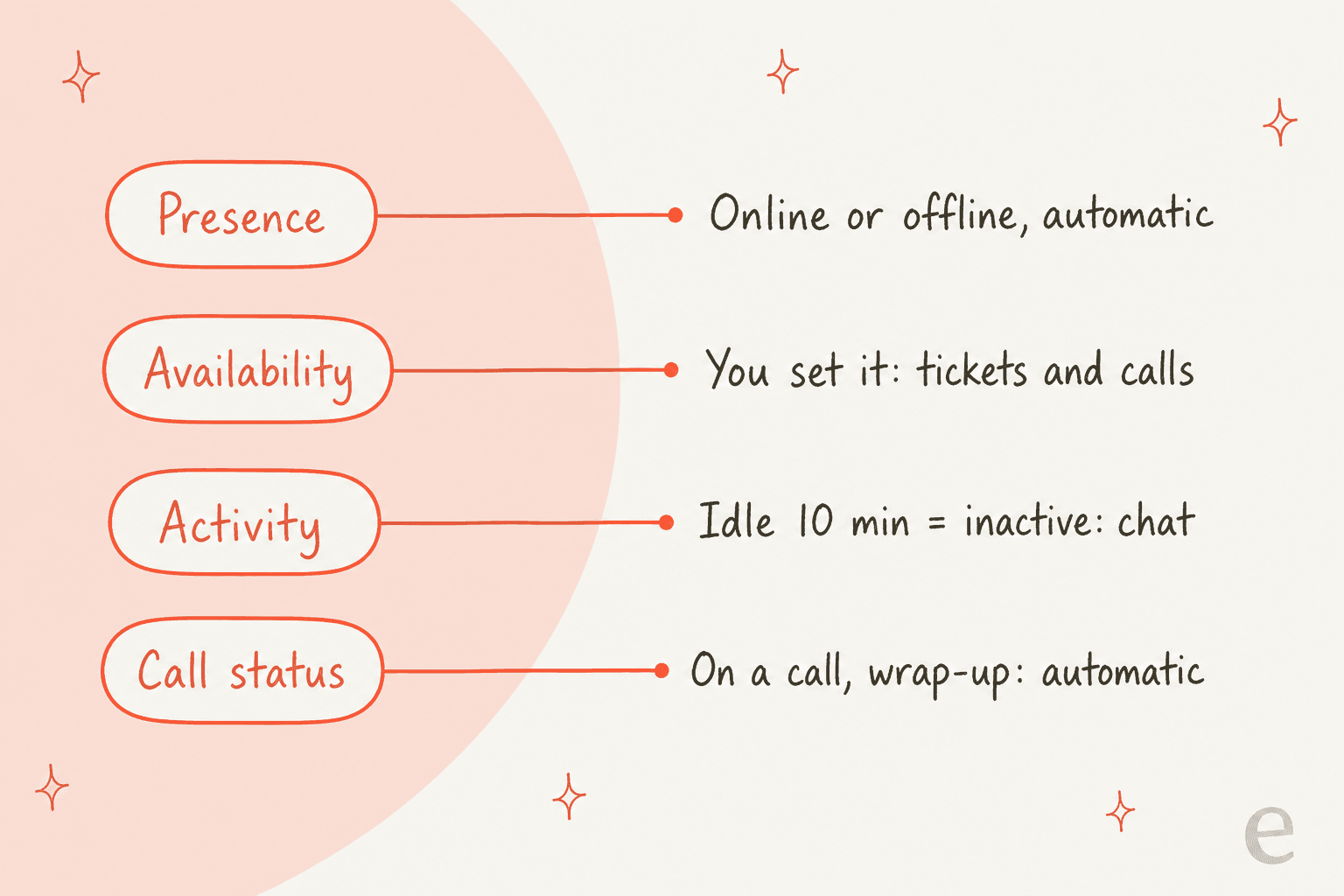
- Presence is automatic: online when the Gorgias app is open, offline otherwise. Tickets, chats and calls are only ever assigned to agents who are online.
- Availability is the one you set: available, unavailable, or a custom unavailable status. It decides whether tickets and calls are routed to you.
- Activity is based on mouse and keyboard use. After
10minutes idle you are inactive, which nobody sees, but it can block live chat if chat is set to show only when agents are available. - Call status (with the Voice add-on) is automatic: On a call, and Call wrap-up when wrap-up time is on.
You can be online and unavailable at once. That is the point: availability is a promise about capacity, not a sign you are logged in.
How do you set a status, and who can change it?
Agents click their profile icon in the bottom-left, then Status, then pick from the list. The doc stresses that the status persists when you close the app, so an Unavailable with no duration will still be Unavailable tomorrow morning.
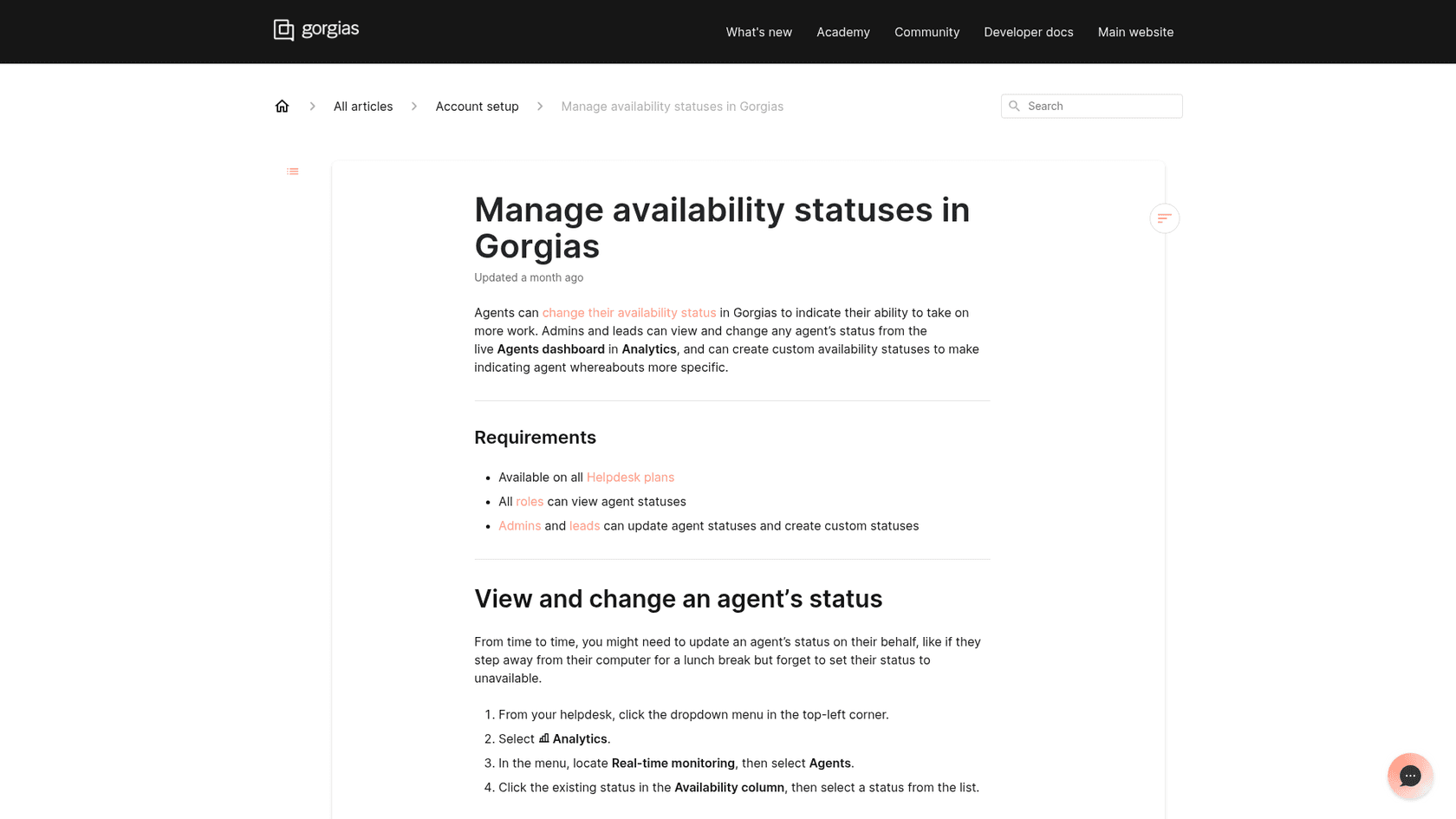
Permissions, per the manage statuses doc:
- Available on all Helpdesk plans.
- All roles can view statuses and set their own.
- Admins and leads can change any agent's status and create custom statuses. The update post says leads were included so BPO teams, whose leads lack admin rights, can fix a forgotten Lunch status. See roles and permissions.
To change someone else's status, go to Analytics, Real-time monitoring, Agents, and click the Availability column. Pricing is flat here: the status feature itself costs nothing extra, though your plan sets ticket allowances.
What can custom statuses do?
Gorgias announced custom agent unavailable statuses on August 6, 2026, rolling out to all accounts by mid-August with nothing to switch on.
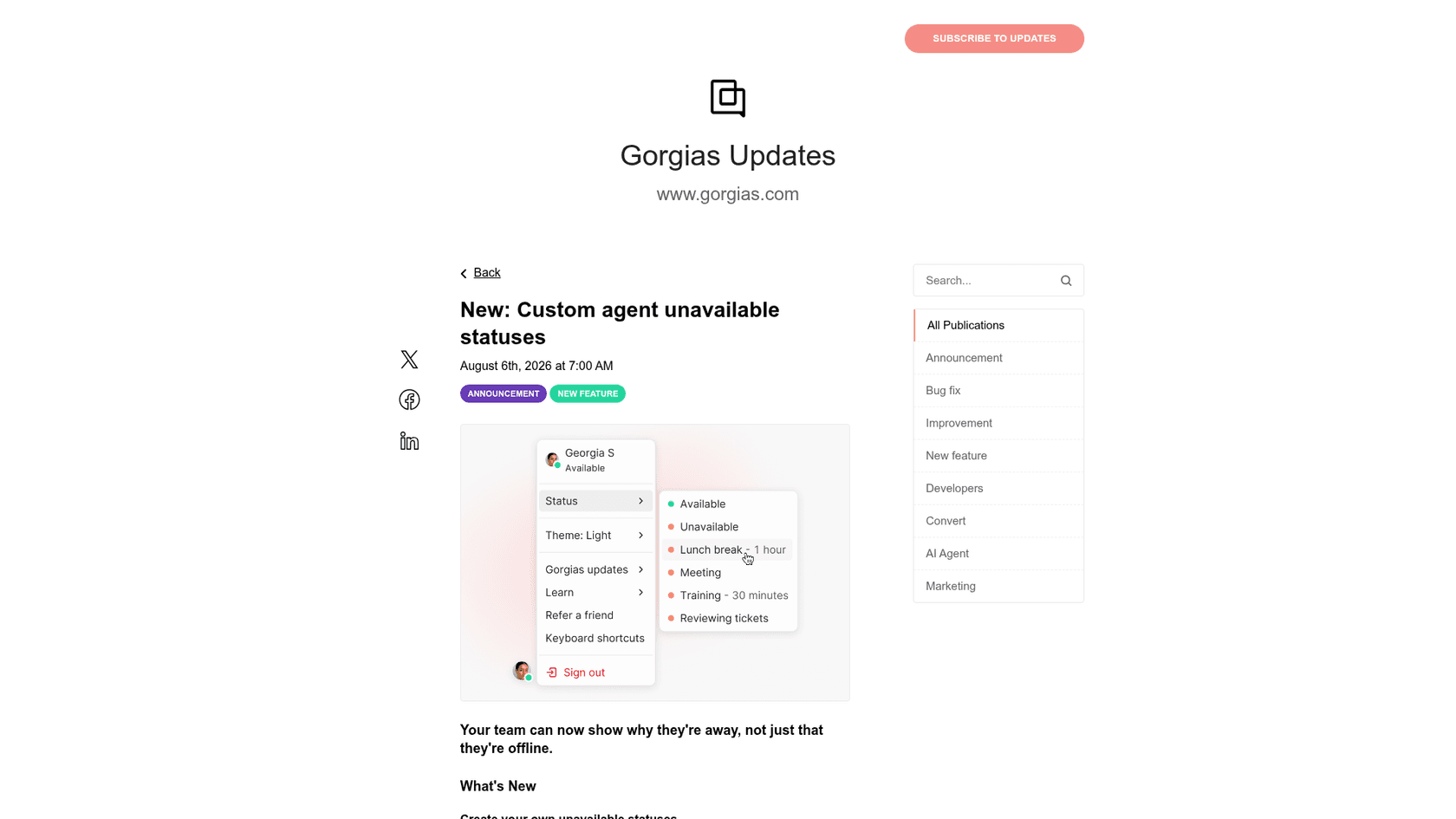
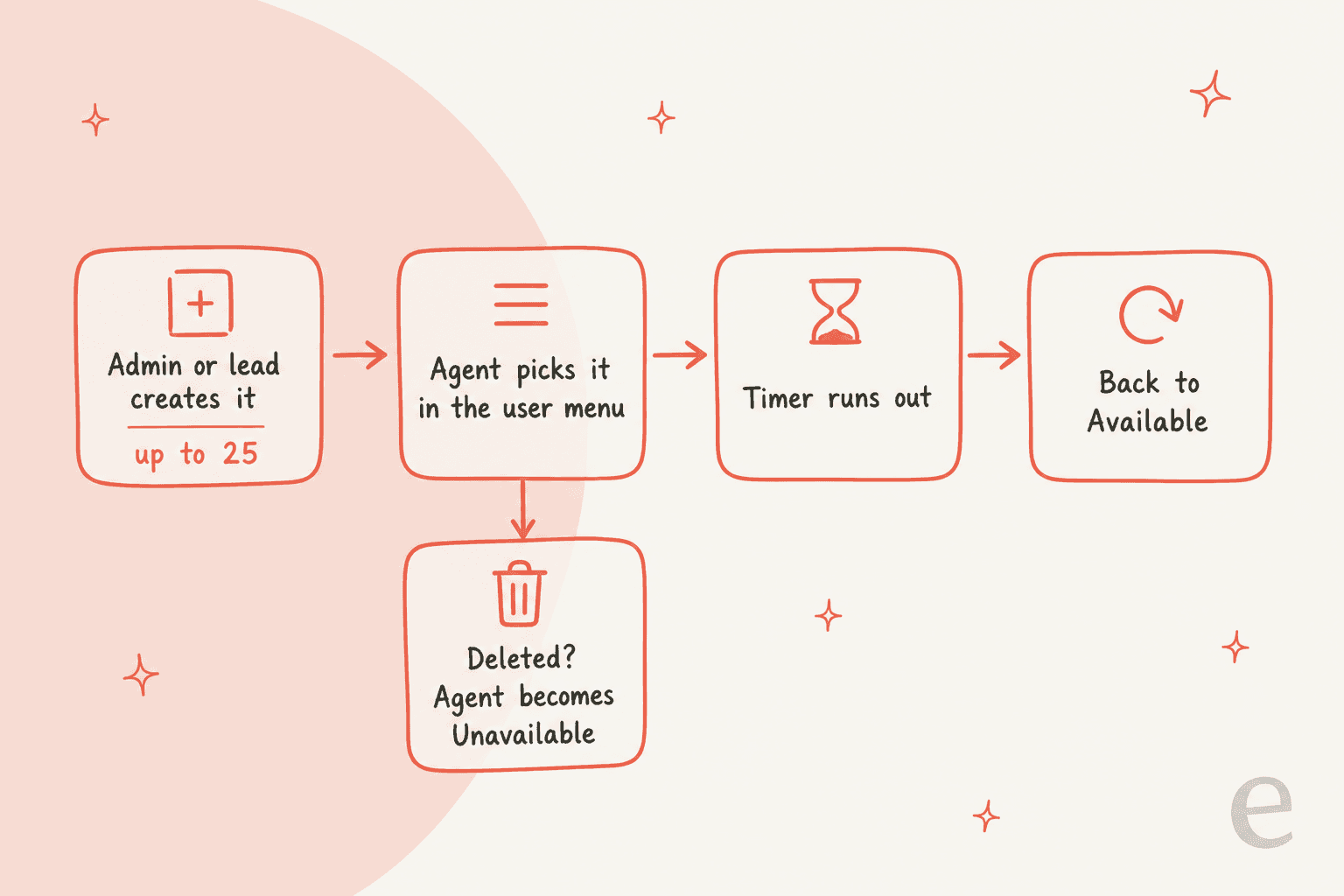
- Create up to
25under Settings, Account, Agent unavailability, with a name, optional description and a duration. - When the timer ends, the status reverts to Available. No more agents stuck on lunch until 4pm.
- Available and Unavailable cannot be edited or removed.
- Delete a status and agents using it become Unavailable immediately; agents with it queued next get Unavailable when their current status ends.
- Voice statuses (On a call, Call wrap-up) are automatic. You cannot change status mid-call, but during wrap-up you can clear it.
The practical win is reporting: training, meetings and breaks stop all counting as one grey Unavailable bucket.
How do statuses drive auto-assignment?
Auto-assignment needs teams, rules that send tickets to teams, then the toggle in Workflows, Ticket assignment. Only the account owner and admins can manage it. Tickets go by priority, then creation date, to eligible agents.
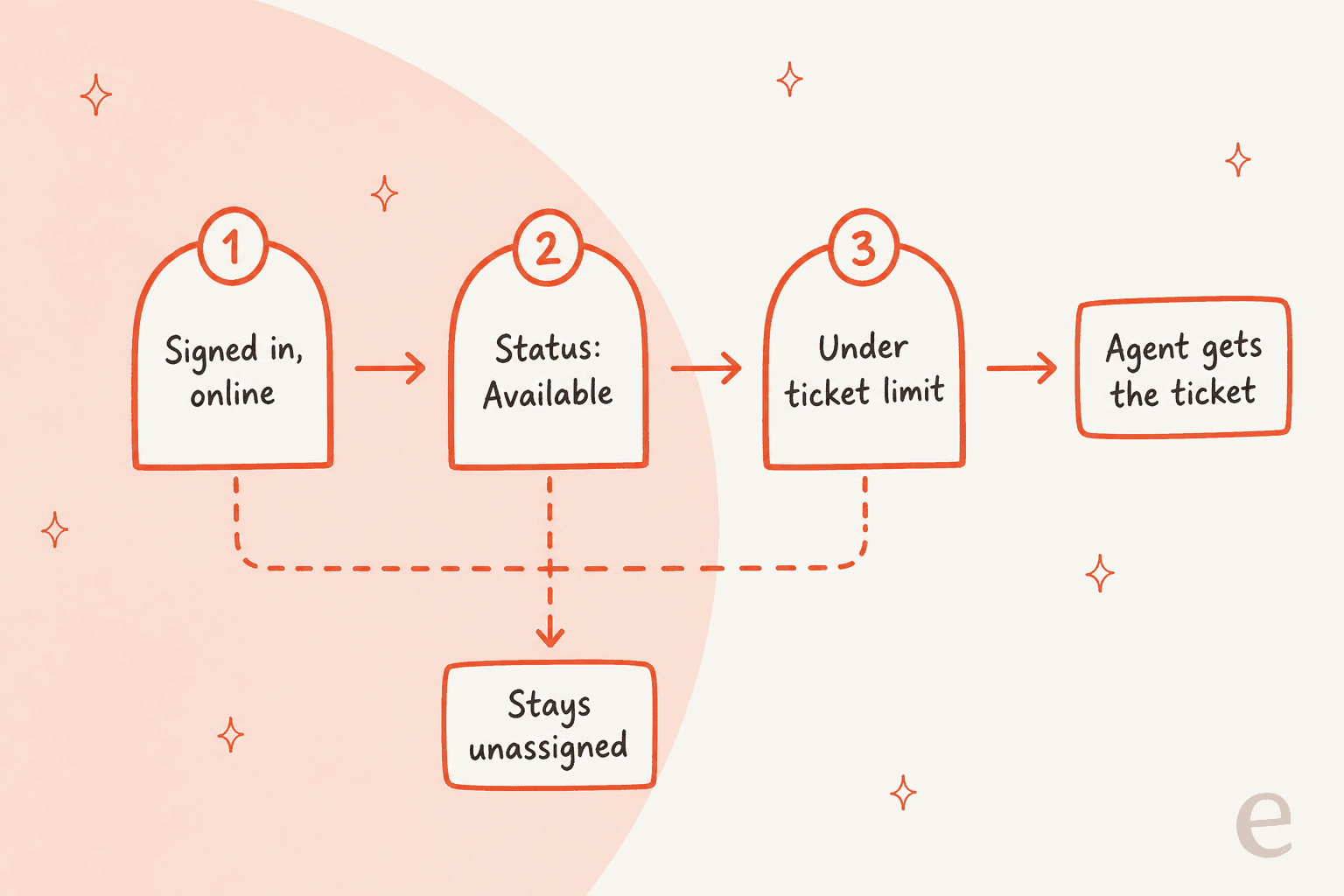
Eligible means signed in, Available, and under the limit you set. If every available agent is at the limit, tickets stay unassigned. There are two limits: one for Chat and Messaging tickets (chat, SMS, Messenger, Instagram DMs), one for other text tickets, with Voice excluded. A Gorgias Specialist's community post suggests 3 as a benchmark for live tickets. Related options: assign to the last responding agent, let reopened tickets exceed capacity, unassign on reply when the agent is offline, and unassign chats when the agent becomes unavailable. My ticket limit and round robin notes cover the edges.
The same post says that with AI Agent on, it takes the first pass and a handoff goes to an assigned human. See handover controls and my AI handoff notes.
What do the live dashboards show?
The real-time reports doc is open to all roles on all plans. The Overview shows agents online and offline (updated every 5 minutes) and open tickets. The Agents report shows online status, tickets closed, messages sent and open tickets by channel. The Voice report adds available, unavailable and busy agents, and with broadcast ringing everyone flips to Busy. An offline agent counts as available for calls only if Forward calls when offline is on. For history, use Gorgias reports and first response time.
Where do Gorgias's own pages disagree?
Prior Gorgias posts of mine hit doc conflicts, and this feature has several.
| Question | One page says | Another page says |
|---|---|---|
| How many states? | The status doc intro: "three states" | The same page lists four, then says "four types of status" |
| What is online? | Status doc: presence is set when you open the app | Voice FAQ: online means Gorgias not closed in 15 minutes and not idle over 10 |
| Do dashboards refresh? | Update post: leads see current status "without refreshing" | Reports doc: data is current as of last page load, so refresh |
| Where is time in status? | Update post: Live agents and Live voice show it | Reports doc lists no such column |
| Who is unavailable? | Older update post: offline or toggle off | Newer docs: online and unavailable are separate |
None of this is sinister, since the feature is new and docs update separately. Test with two accounts before you rely on the edge cases, and check your audit log.
"I cannot go and check all my 7,000 tickets to see if the AI actually made a good answer. I need an AI who is only handling the tickets that it's confident to handle and all the other ones, leave them alone."
Ops lead at a DTC supplements brand doing about 7K Gorgias tickets a month, eesel sales call, March 2026
Where does eesel fit for a Gorgias team?
Statuses answer "which human gets this?" They do not help when nobody is Available: night shift, lunch, a training block. eesel's AI helpdesk teammate fires on tickets, not on a roster, so it can tag, draft or answer while your team is away. I would pair it with AI first response, macros and tags.
- Rúngne sells from Norway and the US, with a support team in Manila. In one month eesel handled about
2,100Gorgias tickets: a triage agent acknowledges and tags each new ticket, a draft agent leaves internal notes, and people take cancellations and damage claims. - Question Beauty had eesel handle about
990Gorgias tickets in a month, closing about280without a person and tagging the rest for the team. See AI escalation. - Poseidon Animal Health uses drafts that a person reads and sends.
Before going live, test against approved knowledge: simulate and run a knowledge audit. Uploaded knowledge is not ready until answers pass. Also see Gorgias Gaia and AI Agent social channels.
Try eesel in Gorgias
If your Unavailable column fills up at lunch and your queue does not wait, give the unattended hours a teammate. eesel plugs into Gorgias, learns from your help center and past tickets, tags and drafts, and hands off to your team. Start with the eesel Gorgias integration or compare Gorgias alternatives and eesel vs Gorgias AI.
Frequently asked questions
What are Gorgias agent statuses?
Per the Gorgias status doc, each agent has a presence status, an availability status, an activity status and, with Voice, a call status. Availability is the one you set yourself. My Gorgias auto-assign guide shows where it matters.
Who can create custom statuses in Gorgias?
Admins and leads can create up to 25 custom unavailable statuses under Agent unavailability, each with an optional duration. Every role can view statuses, and everyone sets their own. Auto-assignment settings are narrower: only the owner and admins. My Gorgias assignment rules post covers that side.
Do Gorgias agent statuses cost extra?
The docs say statuses are available on all Helpdesk plans, with no add-on. Only the call statuses need the Voice add-on. Compare tiers in the Gorgias plans comparison.
Can I see how long agents spend in each status?
The August 2026 update post says the Live agents and Live voice dashboards show time spent in each status. The real-time reports doc does not list that column, so check your own dashboard. See Gorgias analytics for the rest of reporting.
How does an AI teammate fit with Gorgias statuses?
Statuses route tickets to people. eesel's Gorgias integration adds an AI helpdesk teammate that works tickets as they arrive, whoever is Available. Compare options in Gorgias AI Agent alternatives.