AI response for Gorgias: how the AI Agent drafts and sends replies in 2026

Alicia Kirana Utomo

Katelin Teen
Last edited September 25, 2026

What "AI response" actually means inside Gorgias
Before you turn anything on, it helps to name the three things Gorgias calls "AI," because they're aimed at different jobs.
The first is AI Agent, the autonomous one. Per the AI Agent explained docs, it plays two roles on the same subscription: a support agent that "resolves post-purchase conversations like returns, order tracking, cancellations, and missing items," and a shopping assistant that engages pre-purchase shoppers. This is the piece that writes and sends a full reply without a human.
The second is rule-based auto-responses. These are the templated messages you build in the automation editor, a tracking reply, an order-status update, a "we're closed" note. They're deterministic: a rule matches, a template fires. Useful, but not really "generative."
The third is the human-assist layer: macros and copilot drafts your agents pull into a reply while they work a ticket. Handy, but a person is still doing the sending.
When people search for an AI response for Gorgias, they almost always mean the first one. So that's where we'll spend the most time.
How the Gorgias AI Agent actually writes a reply
Here's the part I find genuinely well-designed. The AI Agent doesn't just autocomplete a friendly-sounding message and hit send. It runs a small pipeline, and understanding it tells you exactly where a reply can go wrong.
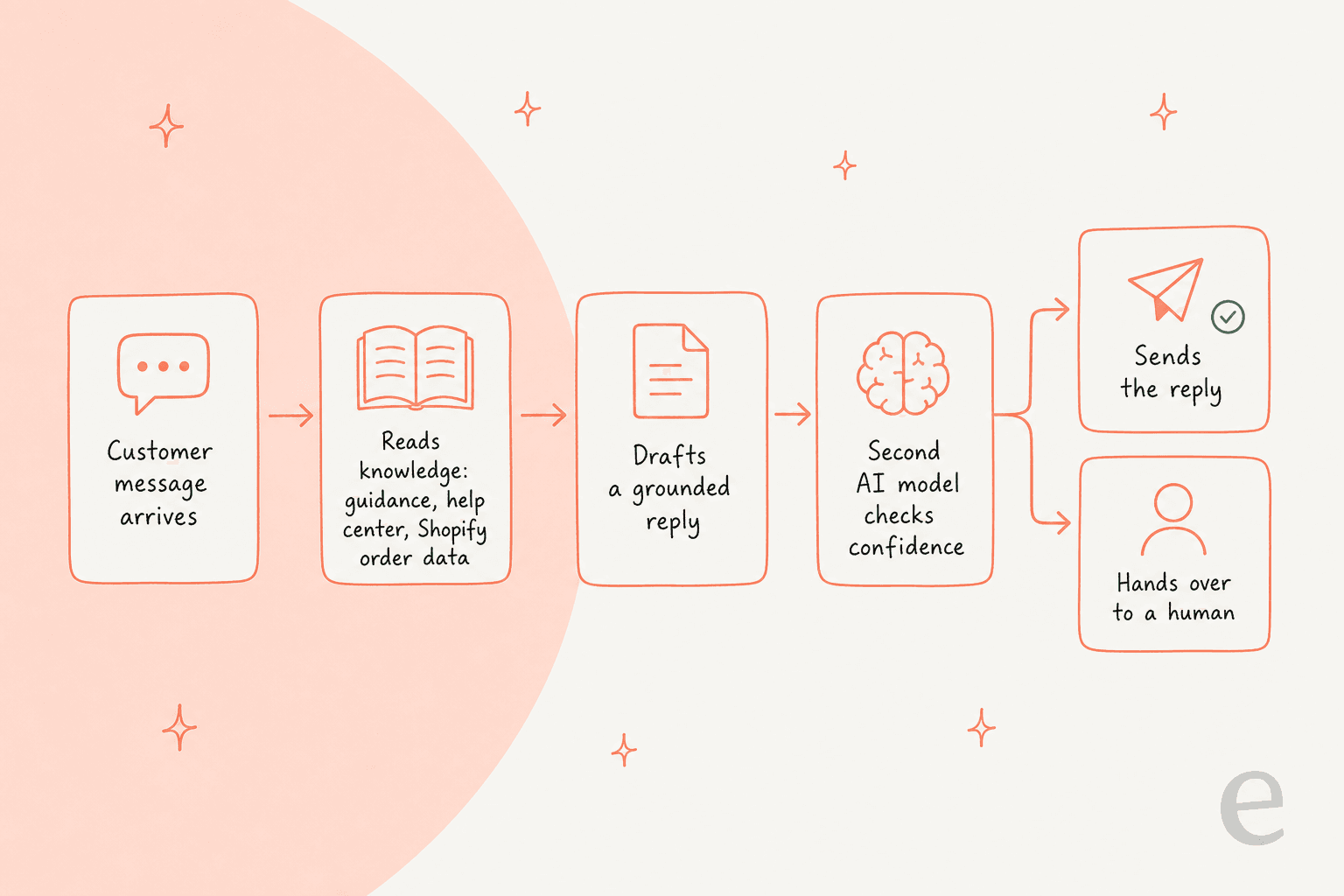
When a message arrives, the agent pulls from your knowledge and live Shopify data, drafts a grounded reply, and then, per the how AI Agent works docs, that draft has to clear a second AI model's confidence threshold before it's ever sent. If it can't ground an answer in your knowledge, Gorgias says plainly "if it can't find an answer, it won't respond," and it hands the ticket to a human instead.
Five levers shape what comes out, per the same docs: Skills, Knowledge, Actions, Tone of voice, and Language settings (Gorgias says the agent "supports over 80 languages and replies in any of them, even when your knowledge isn't translated"), plus Vision for reading images shoppers send. The agent also writes shorter on chat and SMS and fuller on email, from the same knowledge base.
On the model question, Gorgias is more open than most. Its security FAQ says the agent "uses a combination of multiple secure LLM providers, including OpenAI, Anthropic, and internally fine-tuned LLMs," and requires a zero-data-retention policy with those providers. It never publishes a specific model version, so if you need to know exactly which model drafts your responses, the honest answer is that Gorgias discloses providers, not model IDs.
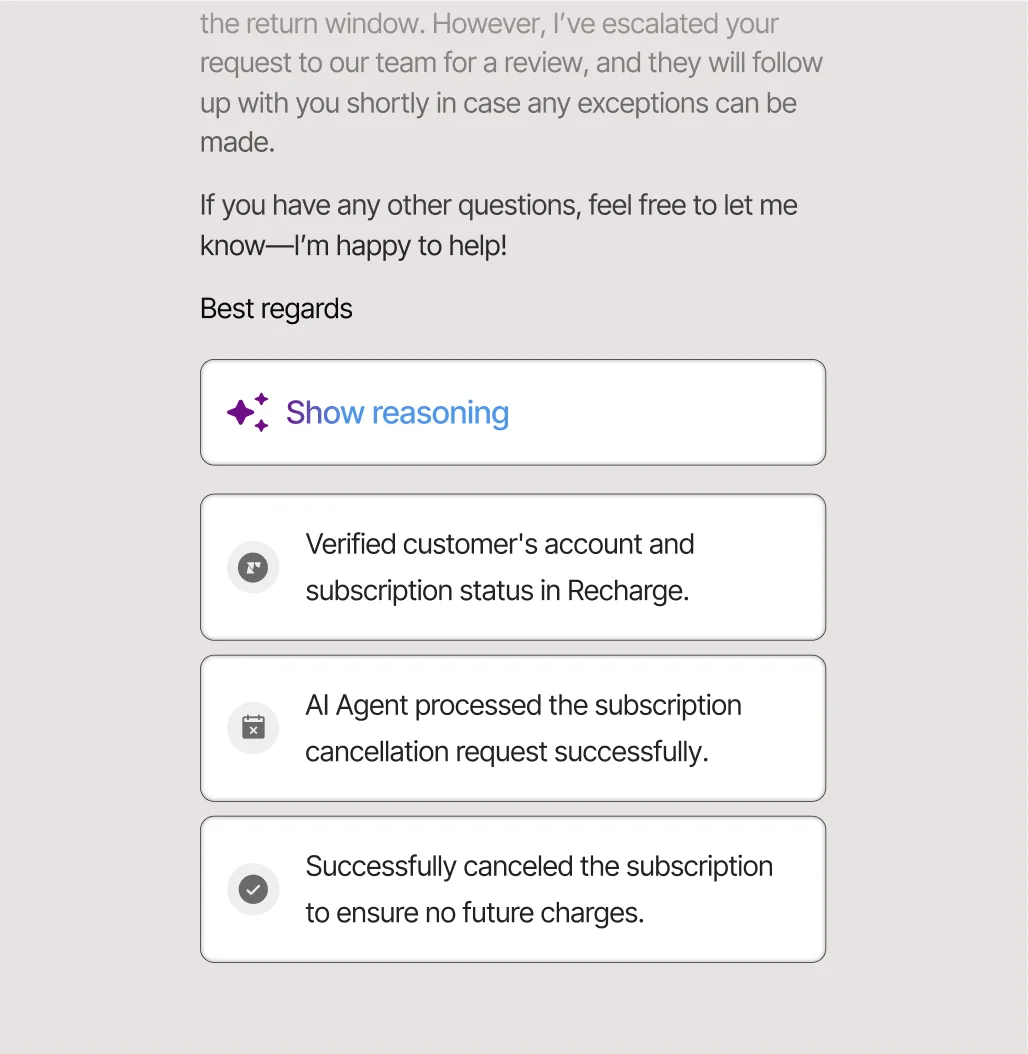
The reason this matters: a grounded, confidence-gated agent that falls back to a human is a good default. It won't invent a refund policy. But it's only ever as good as the knowledge you give it, which brings us to the sharpest limit.
What you can, and can't, train the AI response on
This is the section I'd read twice before turning anything on, because two of the things people assume the AI learns from, it doesn't.
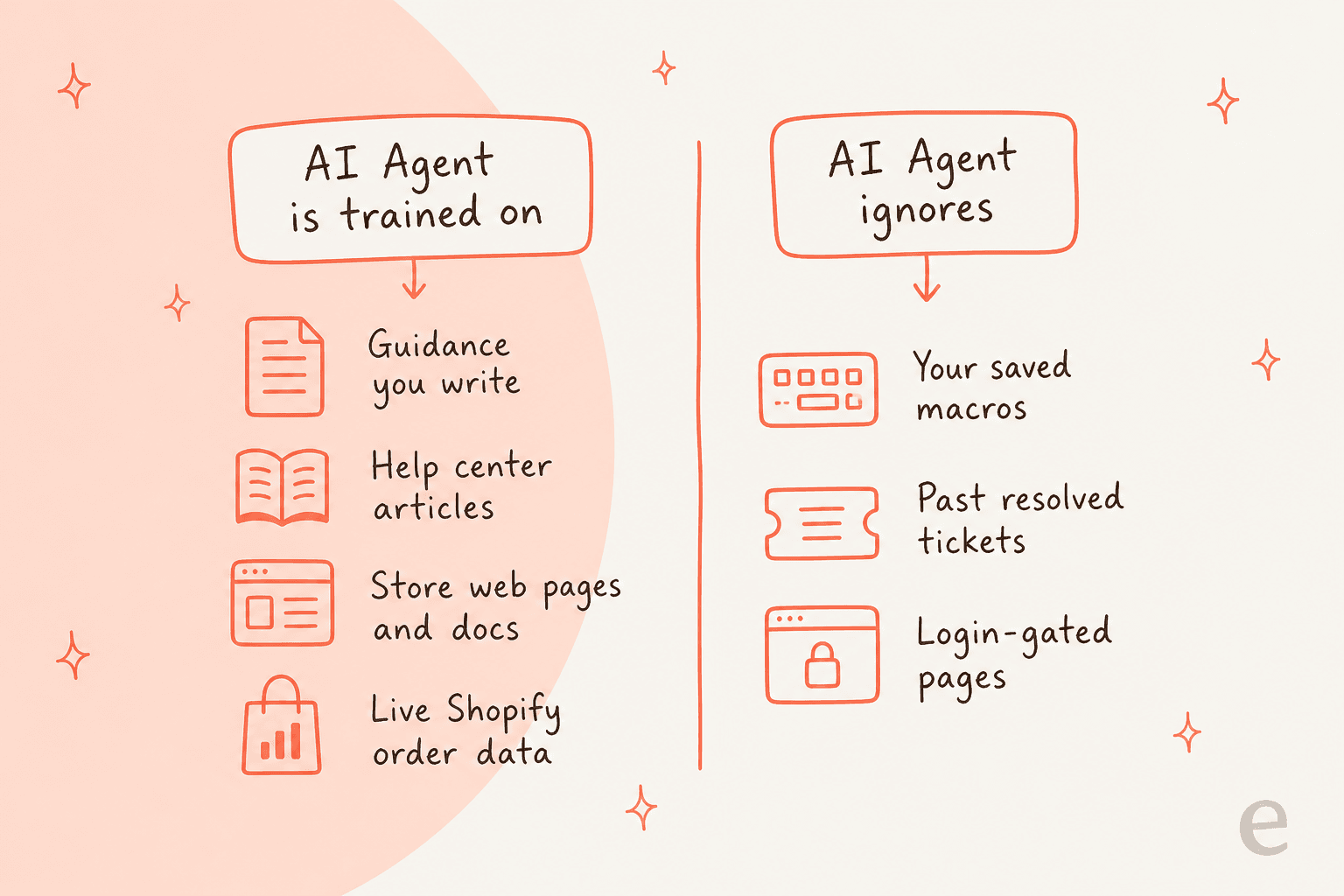
Per the add your brand's content docs, AI Agent trains on five content types plus product data: Guidance you write yourself (up to 100 enabled per store, 30,000 characters each), your help center articles, synced store web pages, uploaded documents (pdf, docx, pptx, xlsx only), and live Shopify catalog and order data. Gorgias notes that among these, "guidance carries the most weight."
Now the two it explicitly leaves out. First, macros: the AI Agent FAQ says "Does AI Agent use my macros? No. AI Agent generates its own responses from your skills and knowledge, not from macros." Second, past ticket history: no Gorgias doc lists resolved tickets as a knowledge source. Your closed tickets show up as feedback you rate, not as a corpus the agent writes from.
If you've spent two years writing sharp macros and closing thousands of tickets in your own voice, that's a real thing to sit with. It's not a knock on Gorgias, it's a deliberate design choice to keep answers grounded in curated knowledge. But it does mean the AI response starts from your help center and guidance, not from the institutional memory already sitting in your inbox. It's also worth knowing the setup is Shopify-centric: AI Agent requires a connected Shopify store, and its actions lean on Shopify order and customer fields, so brands on BigCommerce or WooCommerce get a narrower path.
Setting up rule-based auto-responses
Not every AI response needs the full agent. For the highest-volume, most predictable questions, a rule is often cheaper and more reliable than generation.
The classic example is a WISMO ("where is my order") auto-reply. You build a rule that detects order-status intent, pulls the shopper's recent orders, drops tracking links into a templated message, and auto-closes the ticket. If the customer replies, the ticket reopens so nothing slips. It's the same auto-reply pattern you'd use for returns windows or store hours.
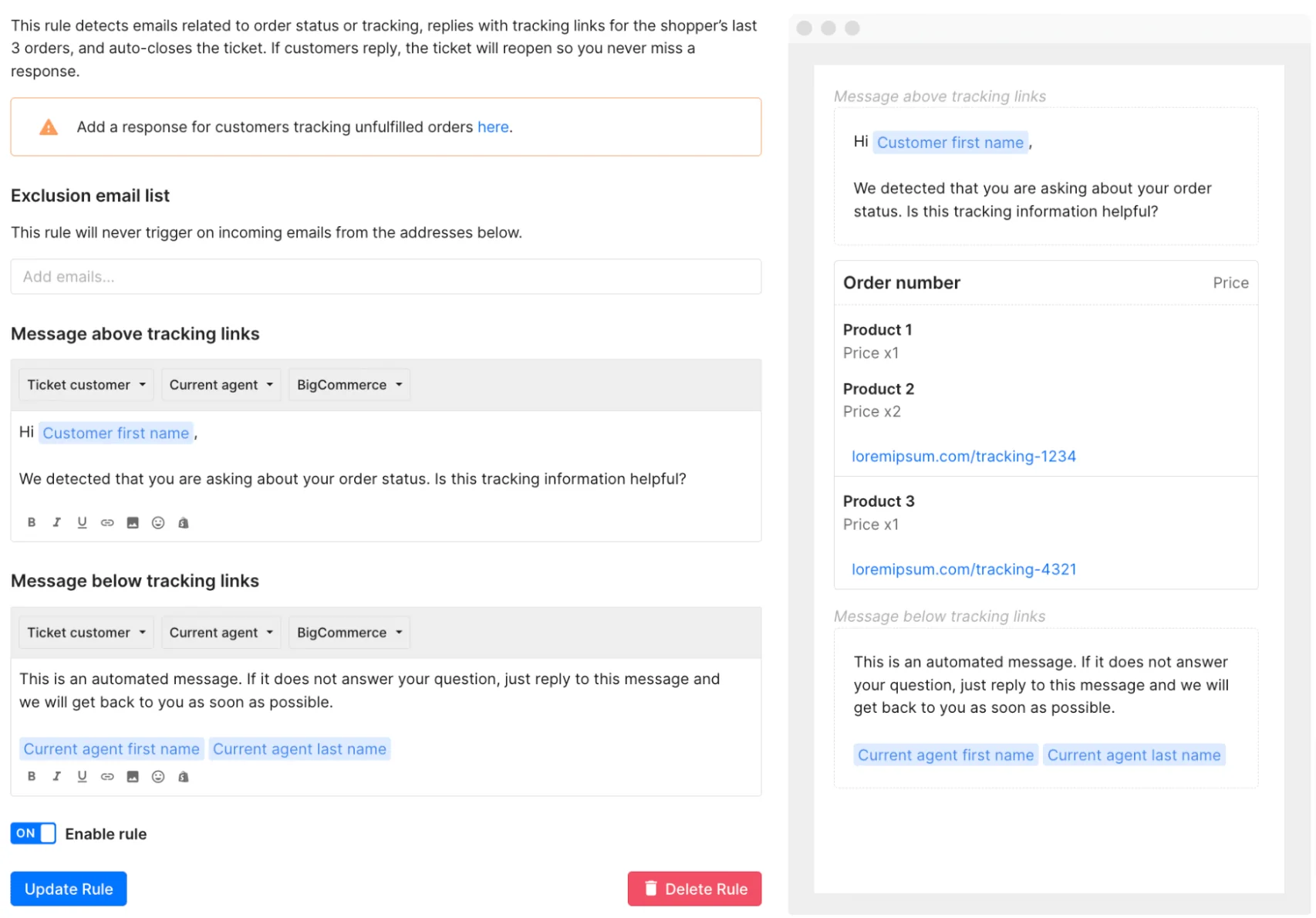
Gorgias also has Flows and Order Management for guided, deterministic self-service. One thing to note on billing: these automation features can count as an automated interaction too, so a rule that fully resolves a ticket is billable just like an AI Agent resolution. That's a detail worth pricing out before you flip on every rule you can think of.
What real Gorgias users say about AI responses
I always want the room's honest read before I trust a tool, so here's a fair sample. On the AI itself, sentiment is broadly positive; the recurring friction is cost, and it's worth quoting straight.
"The main frustration with Gorgias is the pricing model, which is based on ticket volume rather than a flat monthly fee. As our order volume grows and customer inquiries increase, the cost scales up quickly in ways that can be difficult to predict and budget for."

That's the most common note. But there's a genuine counter-argument, and it's fair to give it equal air, because per-ticket pricing works well for some teams:
"Charging per ticket instead of per user allowed nearly everyone in our company to use it freely without worrying about seat limits, which massively streamlined cross-team communication."

On the community side, the consensus break-even I keep seeing is that Gorgias earns its keep when a large share of tickets need real Shopify actions (refunds, cancels, order edits); mostly-conversational support is cheaper elsewhere, per a long r/CRM thread on ecommerce helpdesks. The add-on creep is a real theme too, one Capterra reviewer noting "it does seem like new updates are always an add-on."
What an AI response in Gorgias actually costs
Here's the part that surprises people, so let's be precise. Gorgias runs two meters on the same inbox: a per-ticket helpdesk fee and a per-automated-interaction fee. And on a fully automated conversation, both can apply to the same ticket.
Per the billing docs, if AI Agent resolves a conversation without handing over, you pay the ticket fee plus the automation fee. If it responds but hands over to a human, you pay the ticket fee only. An interaction counts as automated if the customer "does not require the involvement of a human agent within 72 hours."
Here's the current self-serve ladder, taken from the live pricing page:
| Plan | Bundled price (annual) | Tickets included | Automated interactions included | Extra ticket | Extra automated interaction | Effective included AI rate |
|---|---|---|---|---|---|---|
| Starter | $40/mo (monthly only) | 50 | 30 | +$0.40 | $1.50 | ~$1.00 |
| Basic | $77/mo | 300 | 30 | +$0.40 | $1.50 | ~$0.90 |
| Pro | $471/mo | 2,000 | 190 | +$0.36 | $1.50 | ~$0.90 |
| Advanced | $1,227/mo | 5,000 | 530 | +$0.36 | $1.50 | ~$0.90 |
| Enterprise | Custom | Custom | Custom | Not published | Not published | Not published |
The $1.50 figure is the overage rate past your included allowance, not the blended rate. Gorgias's own AI Agent pricing post confirms the included resolutions are cheaper: "Most plans are $0.90 per resolved interaction. Starter plans begin at $1." For the full plan-by-plan math, our Gorgias AI pricing guide runs the numbers.
The practical read: if AI resolves 1,000 conversations in a month, that's roughly $900 in automation fees before the ticket fees stacked underneath. That's not "bad," it's outcome-based, and for a store where each resolution replaces real agent time it can pencil out fine. It's just a number you want to model against your own volume before you scale automation up.
Where the native setup leaves a gap
So the native AI response for Gorgias is good at what it does: grounded, confidence-checked, Shopify-aware. The gaps are specific and worth naming plainly. It doesn't learn from your macros or your past tickets, it's tied to a Shopify store, and you can't dry-run it over your own ticket history before it goes live. You configure it, then watch it on real customers.
Those three gaps are exactly what an added AI layer is for, and they're the reason a tool like eesel AI exists on top of the helpdesk rather than replacing it.
Try eesel for Gorgias
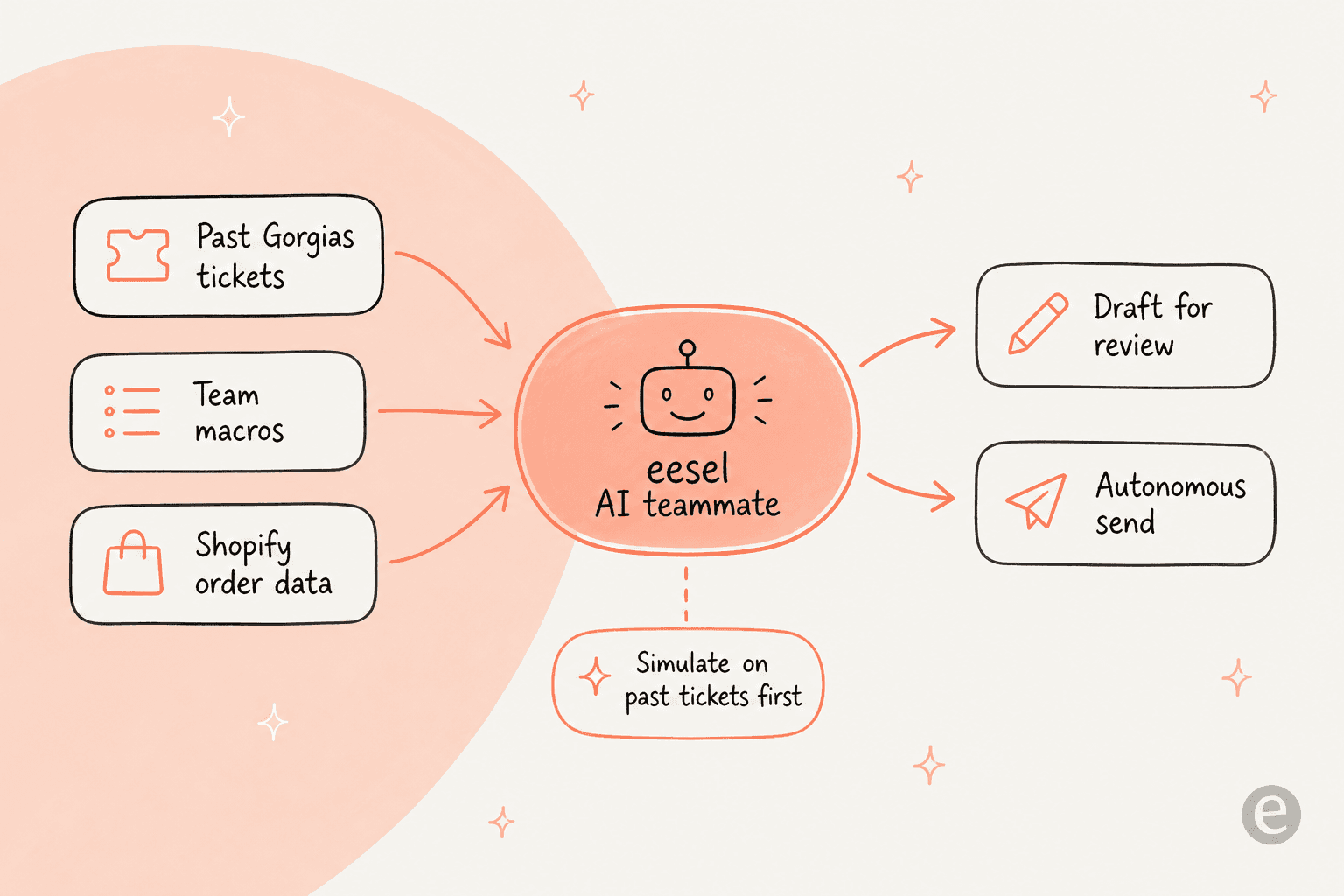
If you want an AI response for Gorgias that starts from everything you've already written, this is the pitch. eesel AI joins as a real AI Agent inside your Gorgias account (no separate widget, no second inbox), and per the integration docs it trains on the three things native leaves out and in: your help center, your macros, and your past resolved tickets, plus live Shopify order data for action-based answers like "your order #1042 shipped via FedEx."
The two differences I'd care about most as a support lead: it starts in draft mode so replies land as suggestions your team reviews before you switch the easy tickets to autonomous, and it runs a simulation over your past Gorgias tickets first, scoring accuracy and handing you a gap report so a bad answer never reaches a customer. You can run that simulation on a free trial before any spend.
Pricing is usage-based and flat: $0.40 per ticket handled, one ticket is one task including all the back-and-forth, with no platform fee, no per-seat charge, and no separate "resolution" meter stacked on top. A team handling 1,000 AI tickets a month pays about $400, and you only pay for the tickets you route to the AI. If you're comparing options more broadly, our best Gorgias alternatives roundup lays out the field. Either way, the move I'd make is the same: connect it in minutes, simulate on your own tickets, and let the results decide.
Frequently Asked Questions
How do I get AI to respond to tickets in Gorgias?
Does the Gorgias AI Agent use my macros to write responses?
How much does an AI response in Gorgias cost?
Can I test the AI response before it replies to real customers?
Does AI response for Gorgias work outside Shopify?



Article by
Alicia Kirana Utomo
Kira is a writer at eesel AI with a Computer Science background and over a year of hands-on experience evaluating AI-powered customer service tools. She focuses on breaking down how helpdesk platforms and AI agents actually work so that support teams can make better buying decisions.