Gorgias AI Shopify integration: how it works, what it costs, and its limits

eesel Team
Last edited October 14, 2026

Gorgias is the ecommerce helpdesk with the deepest native Shopify integration on the market, and it says 40% of the top 1.5K Shopify brands choose it. The Shopify link is native, not a sync: orders, customers, and store data live inside Gorgias, so every ticket shows the shopper's order history and agents can refund, cancel, or edit orders without switching tabs. The AI Agent uses that same live data to automate WISMO (where is my order), returns, cancels, and order edits, resolving up to about 60% of email and chat conversations.
Two things buyers should know before committing. First, pricing is per automated interaction: $0.85 to $1.00 depending on plan, and that automation fee stacks on top of a helpdesk ticket fee. Second, the classic "Send tracking information email" autoresponder rule stopped working after January 30, 2026, so WISMO automation now runs through the paid AI Agent.
If you want the same Shopify-aware automation but a more predictable cost and a way to test before you go live, an AI layer like eesel AI sits on top of your existing Gorgias, reads your tickets and Shopify order data, and runs on one fixed monthly price (from $299/month for 500 credits, 1 credit per ticket) with no per-resolution surcharge.
What the Gorgias Shopify integration actually is
I build integrations for a living, so the first thing I do with any "native" claim is check whether it is a real data connection or a nightly sync dressed up in marketing copy. With Gorgias it is the real thing (I dug into the mechanics in our Gorgias AI review). Orders, customers, and store data live inside Gorgias natively through a one-click install, with no data syncing to break at 2am during a flash sale. Gorgias is also Shopify's only Premier Partner for CX, and it is Shopify-invested, which is why the order data feels first-party rather than bolted on.
In practice, that means the customer's full Shopify context shows up inside every ticket. You see their order history, cart, customer type, and lifetime value in the sidebar, and you get one-click order actions right there next to the conversation.
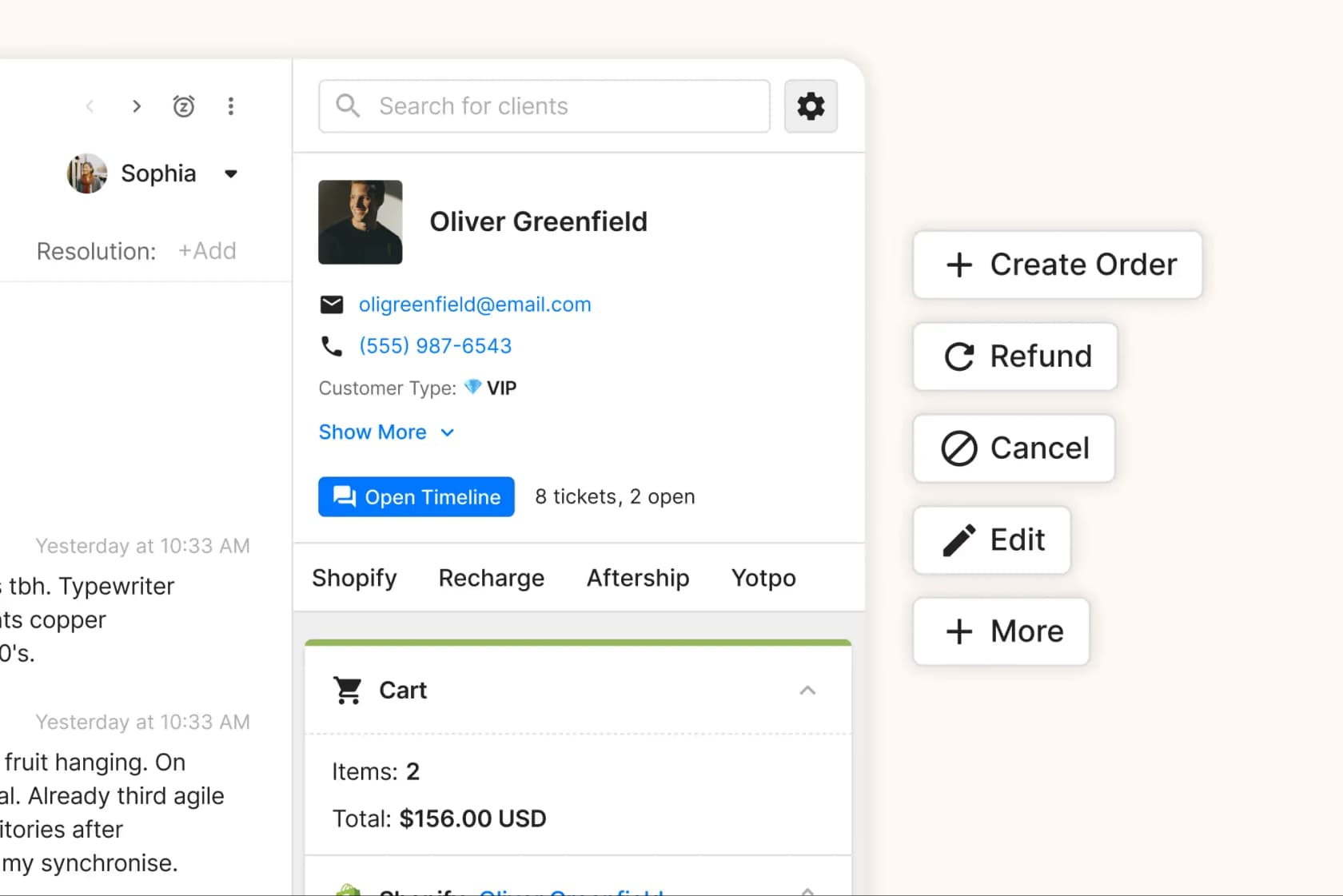
The load-bearing detail is that agents (and the AI Agent) never have to ask a customer for information the store already has. No "can you confirm your order number?" A ticket arrives, and the order is already attached. That is the whole promise of an ecommerce helpdesk built for Shopify rather than a general-purpose one you have to wire up yourself.
Connecting Shopify to Gorgias
The connect flow is genuinely a few clicks, and it starts from the Shopify App Store rather than deep inside settings (there is a full Gorgias AI setup guide if you want the whole walkthrough). In Gorgias you go to Settings → App Store → All Apps → Shopify, click Add Shopify, and you get redirected to the Gorgias listing on the Shopify App Store.
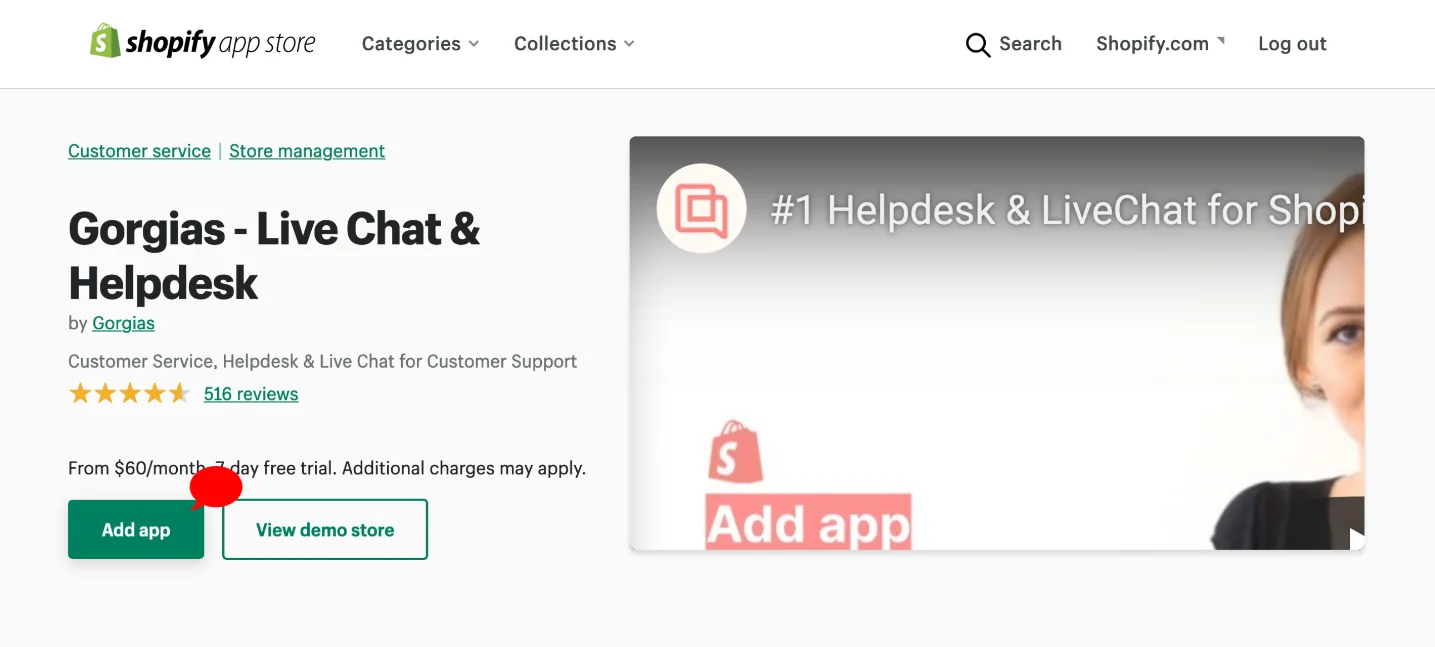
From there you click Add app to install it on your store, then either link an existing Gorgias helpdesk (by entering your subdomain and hitting Find My Account) or create a new account. Once it is connected, "when a customer contacts you you'll see their profile and orders in the sidebar on the right-hand side of each ticket," per the Shopify 101 doc. That sidebar data is the source everything else reads from.
Multi-brand stores are supported too. You can connect multiple Shopify accounts to one Gorgias dashboard, and multi-store connections are unlimited on every plan, though Gorgias recommends one account per legal entity to keep reporting clean.
Getting Shopify order data into a reply
This is where the integration earns its keep, and it is worth understanding the mechanics because they explain both what the AI can do and what it costs. There are two ways order data reaches a customer: macro variables that a human (or a rule) inserts, and the AI Agent generating its own reply from the same underlying data.
The variable approach is the classic one. You build a macro and drop in a Shopify variable like {{ticket.customer.integrations.shopify.orders[0].line_items[0].name}} for the first product in the last order, or {{ticket.customer.integrations.shopify.orders[0].total_price}} for the order total. When the macro is applied, Gorgias swaps each variable for the live value; if the data is not available for that ticket, the variable is replaced with a blank space. Ecommerce variables only appear once a store is connected, which is the gotcha people hit when a variable renders empty.
One honest limitation worth flagging: the published Shopify variable table does not include a dedicated tracking-number variable. Tracking is surfaced through Order Management and the tracking-link auto-reply rather than a macro token, which matters if you were planning to build a WISMO macro by hand. There is a well-trodden pattern to pull Shopify order data into replies that works around this.
How the AI Agent handles WISMO
"Where is my order" is the highest-volume ticket type any Shopify brand handles, and it is the one the Gorgias Shopify integration is built to automate. Here is the actual path a WISMO ticket takes.
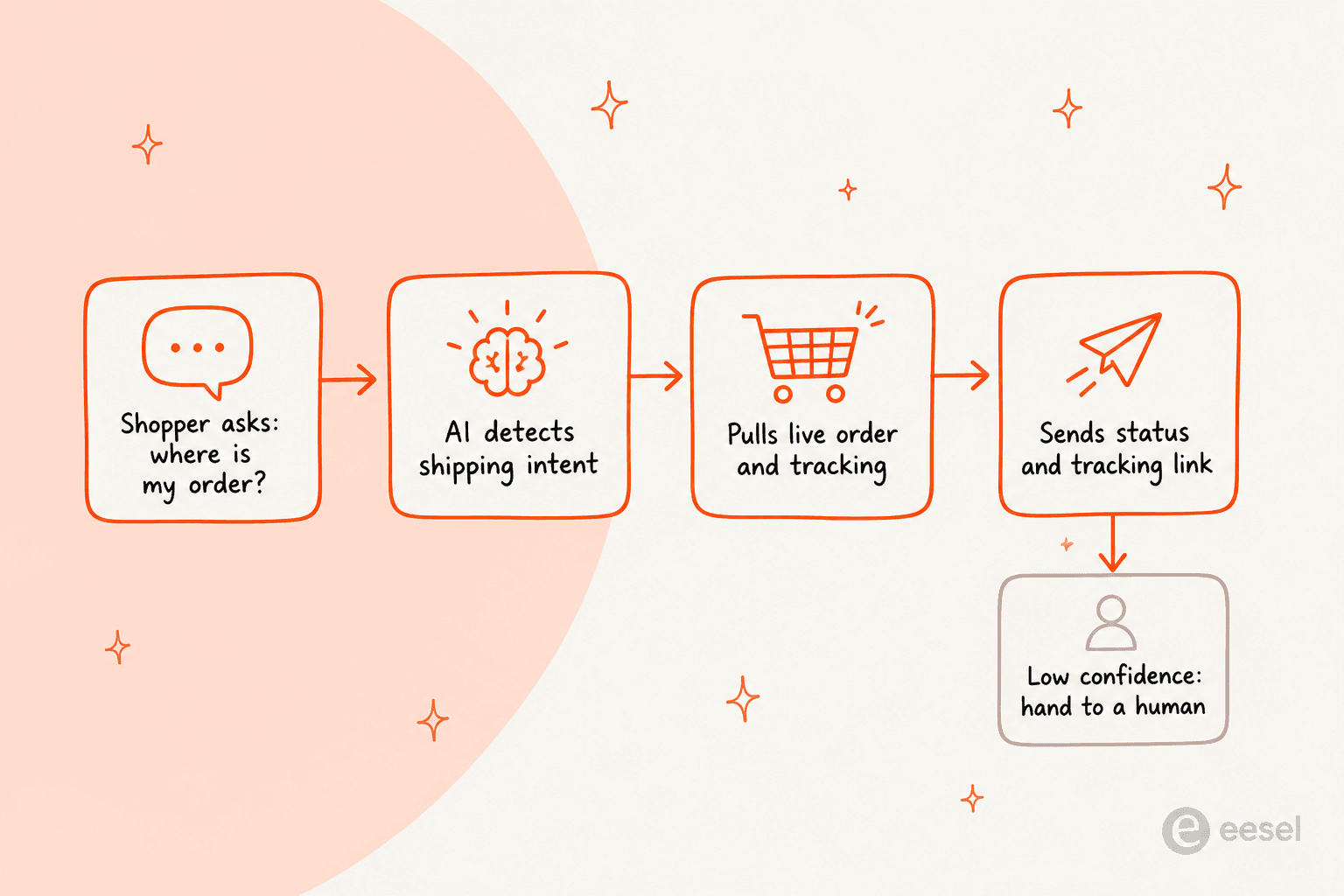
The AI Agent detects the shipping intent, pulls the live order and tracking from Shopify (and from 3PLs like ShipBob, ShipStation, or ShipHero when connected), and sends a status update with a tracking link. If it cannot answer with confidence, it hands the ticket to a human rather than guessing. That confidence gate is real: a generated reply has to clear a second AI model's confidence threshold or it is not sent.
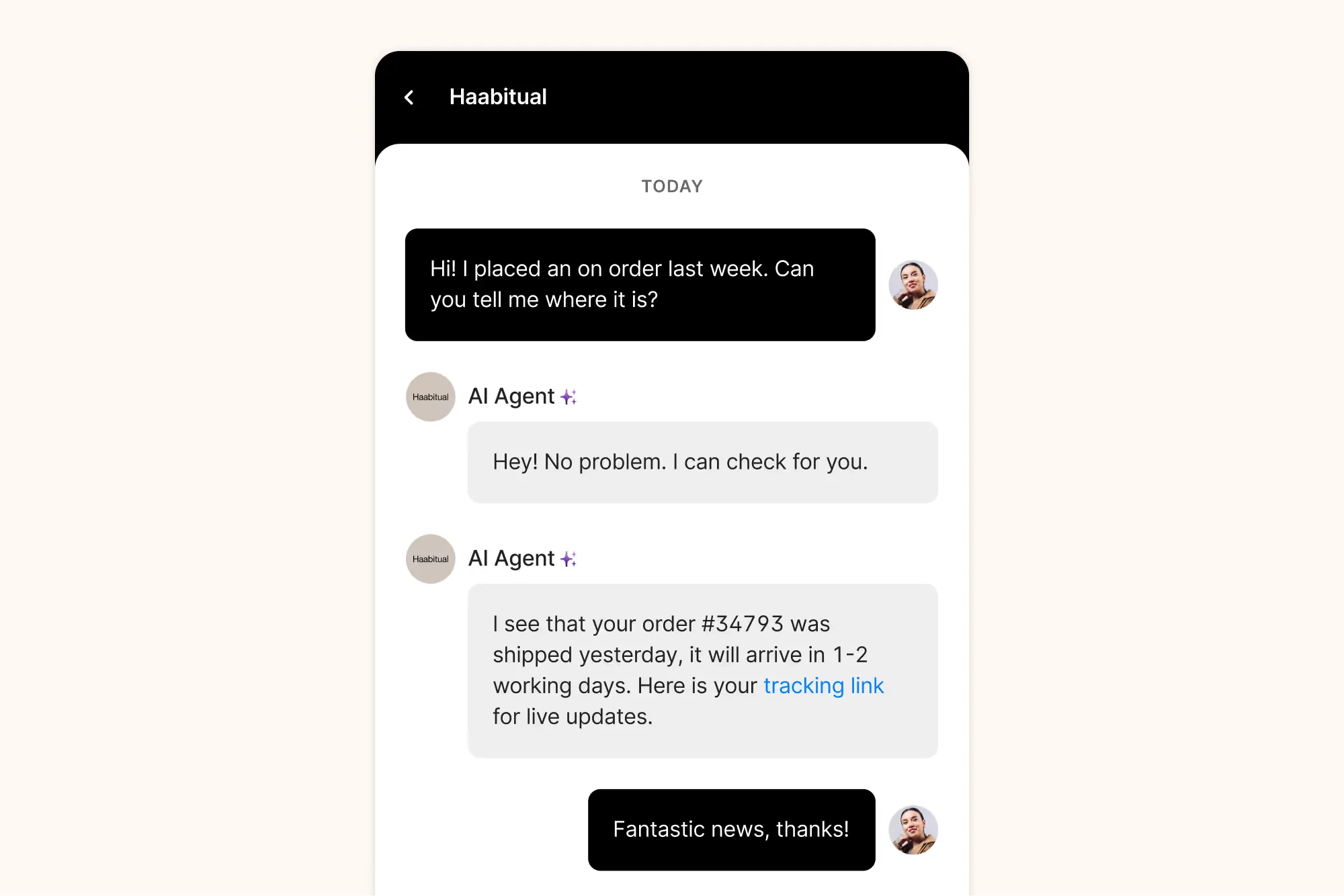
There is also a self-service route. The Order Management portal lets shoppers log in (with a one-time code by email or SMS) and check status, tracking, and shipping themselves. Gorgias says it can automate up to 30% of live chat ticket volume, and it is Shopify-only, with an active AI Agent subscription required.
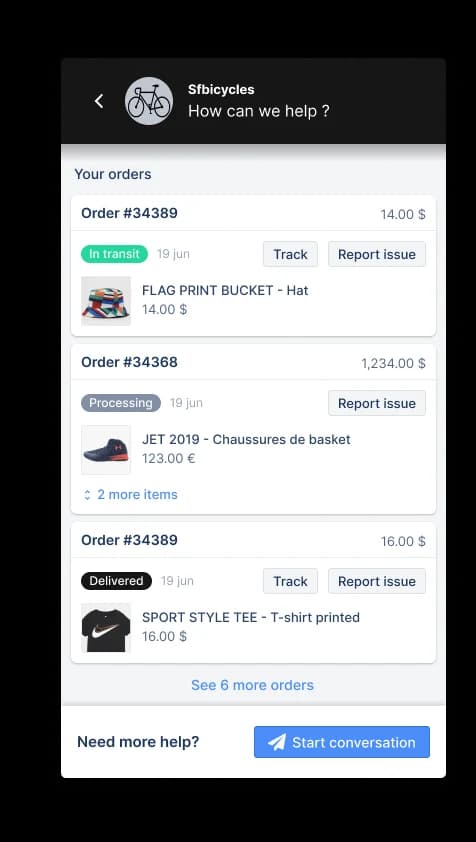
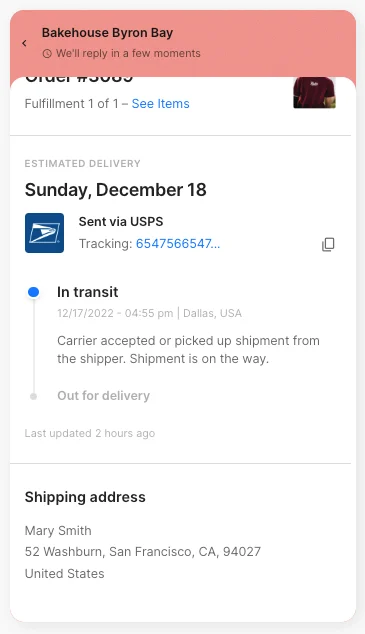
The Track option gives the shopper a detailed timeline of order events, synced directly from Shopify: order shipped, in transit, out for delivery, delivered. It is the kind of thing a customer would otherwise open three tickets to ask about.
Order actions the AI can take
WISMO is the volume play, but the actions that save the most agent time are the ones that write back to Shopify. Gorgias splits the AI Agent's behaviour into Skills (the trigger plus WHEN/IF/THEN instructions) and Actions (the tasks it performs in Shopify and connected apps). An Action only runs when the AI calls it from inside a Skill, and each Action is one or more steps that run top to bottom.
Here is what the AI Agent can do against a Shopify store, pulled straight from the Gorgias docs:
| Action | What it does | Guardrail |
|---|---|---|
| Track order | Real-time fulfillment status and tracking link | The core WISMO automation |
| Cancel an order | Cancels an unshipped order in Shopify | Auto-condition: fulfillment status must be unfilled; confirmation auto-required |
| Edit shipping address | Updates the delivery address before fulfillment | Order must be unfilled; confirmation auto-required |
| Edit / modify order | Catches urgent edit requests before fulfillment | Shopify order write access |
| Process a return / refund | Initiates a return and explains refund timelines | Often paired with a returns platform like Loop Returns |
| Pause / skip / cancel subscription | Manages recurring orders | Runs through Recharge, Loop, or Smartrr; confirmation auto-required |
| Send a discount code | Issues a Shopify discount at a high-intent moment | Governed by your discount strategy settings |
The pattern I like here is that the irreversible actions (cancel, address edit, subscription cancel) automatically force a "require customer confirmation" step. The AI has to get positive consent before it executes, which is exactly the sort of guardrail you want a bot to have when it can move real money. When an action fails a step, the AI posts a note ("failed to execute one or more steps") and hands the ticket to a human, so it fails safe rather than silently.
One caution from the docs that is easy to miss: actions run in a test conversation can mutate real customer and order data unless you point them at a fake profile. If you are testing a refund action, use a test customer.
The catch: the old WISMO autoresponder rule is gone
Here is the thing that trips up brands who set up Gorgias a couple of years ago. The classic way to automate tracking replies was the Send tracking information email autoresponder rule: a rule that fired on shipping-intent email tickets and sent a tracking link. It was simple, and it did not need the AI Agent.
That path has closed.
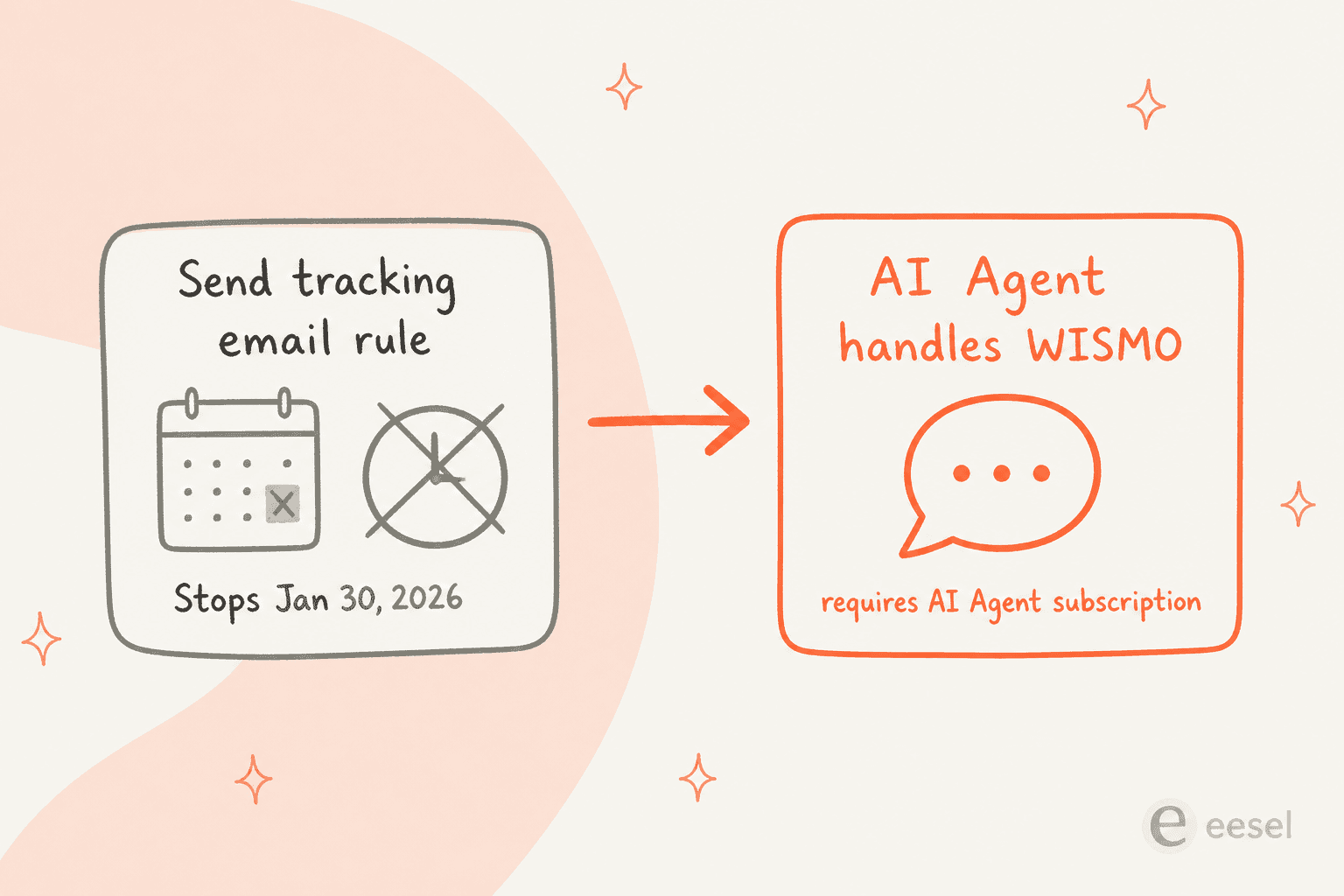
Autoresponder Rules are no longer available for any account created after September 2024, and accounts created before then could use them only until January 30, 2026, after which the feature stops working. Gorgias directs Shopify brands to use the AI Agent to automate those responses instead. The practical read: the free-ish, rule-based WISMO automation is being replaced by the per-resolution AI Agent, so the cost of automating tracking replies went up for a lot of stores whether they planned for it or not.
What the Gorgias Shopify integration costs
Gorgias uses ticket-based (not per-seat) plans, and the AI Agent is included on every plan and billed by usage, per automated interaction. Here are the self-serve tiers on annual billing:
| Plan | Helpdesk only | With AI Agent | Tickets/mo | Automated interactions included |
|---|---|---|---|---|
| Starter | $10 | $40 (monthly billing only) | 50 | 30 |
| Basic | $50 | $77 | 300 | 30 |
| Pro | $300 | $471 | 2,000 | 190 |
| Advanced | $750 | $1,227 | 5,000 | 530 |
| Custom plan | Custom | Custom | 5,000+ conversations | Custom |
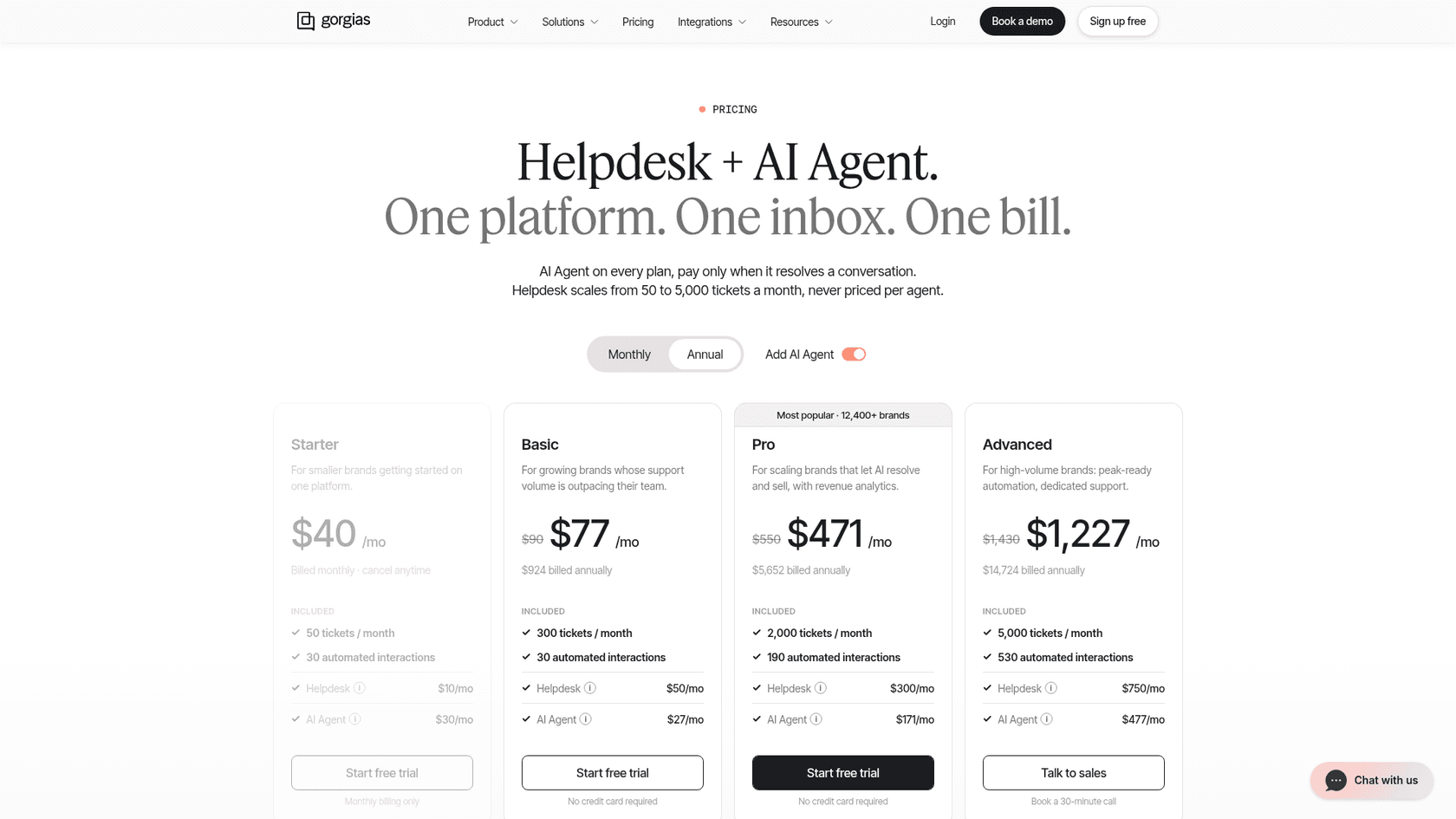
The part that actually drives your bill is how the AI Agent is charged. Two fees can stack on a single ticket.
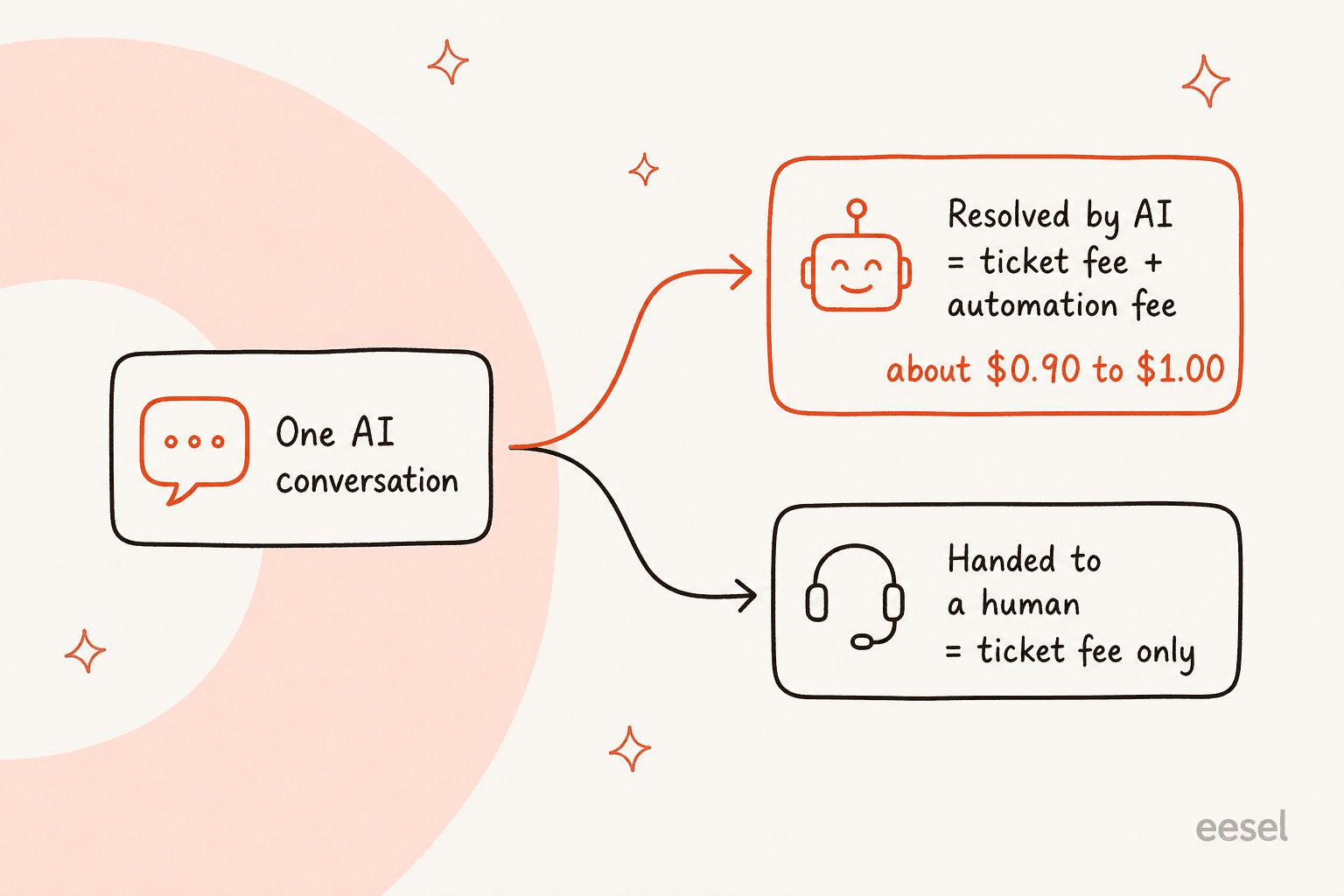
A ticket with at least one message sent incurs a helpdesk ticket fee. If the AI Agent resolves it without a human (defined as no human involvement within 72 hours), you also pay an automation fee. That automation fee is $1.00 per automated interaction on Starter, $0.90 on Basic and Pro, and $0.85 on Advanced. A ticket the AI hands off costs the ticket fee only. Accounts created before May 28, 2025 that have not subscribed to AI Agent and upgraded may still be on legacy pricing, where a ticket counts toward one meter, not both. Proactive features like Search assist count too: if a shopper engages a greeting and the AI finishes the conversation, you pay both fees.
Community sentiment on this is consistent. As one Reddit user put it in a Zendesk vs Gorgias thread:
"For a single agent the pricing jump is hard to justify unless you're really squeezing value out of those workflows."
u/FriedrichNietzsche69, r/CRM

The rough rule of thumb from the same discussions: Gorgias pays off once roughly 40% or more of your tickets need direct Shopify actions (refunds, cancels, order edits). If most of your volume is conversational, the per-resolution model gets expensive fast. Here is a quick way to see the difference in the AI resolution cost between Gorgias and a fixed-price credit plan like eesel.
Where the Gorgias Shopify integration stops
I try to be fair to any tool I review, and Gorgias is genuinely excellent at what it is built for. But it is worth being precise about the edges, because they decide whether it fits your stack.
- It is Shopify-centric by design. The AI Agent requires a connected Shopify store, and conditions and variables draw primarily from Shopify order and customer fields. If you run BigCommerce, Magento, or WooCommerce, you are on custom HTTP actions rather than the native path.
- AI resolution skips Voice. The AI Agent answers on email, chat, SMS, and social channels, and Instagram DMs, Facebook Messenger and WhatsApp became generally available on Oct 14, 2026, though Voice is not on the list.
- Macros are not available to the AI Agent. It generates its own responses and ignores your macro library, which only humans can apply.
- There is a stated benchmark. Gorgias's own marketing cites automating about 60% of email and chat conversations, which implies roughly 40% still needs a human.
- You get one AI Agent per store. Multi-brand teams configure and maintain each store's skills and guidance separately.
None of these are dealbreakers for a single-store Shopify brand doing heavy order operations. They start to bite if you are multi-platform, multi-brand, or if you want to test automation against your own history before you switch it on, which Gorgias does not make easy out of the box. If those edges matter, it is worth scanning the best Gorgias alternatives or a head-to-head like Gorgias AI vs Tidio AI before you commit.
Try eesel for your Gorgias and Shopify support
If you like the Shopify-native idea but want a flatter cost and a real way to de-risk the rollout, eesel AI is worth a look. It is an AI support teammate that joins your existing Gorgias as a real AI Agent, no separate widget or inbox. It reads your Gorgias tickets, macros, and Shopify order data, drafts on-brand replies, and pulls the same live order info into every response, so it handles WISMO, returns, and product questions on the data you already have.
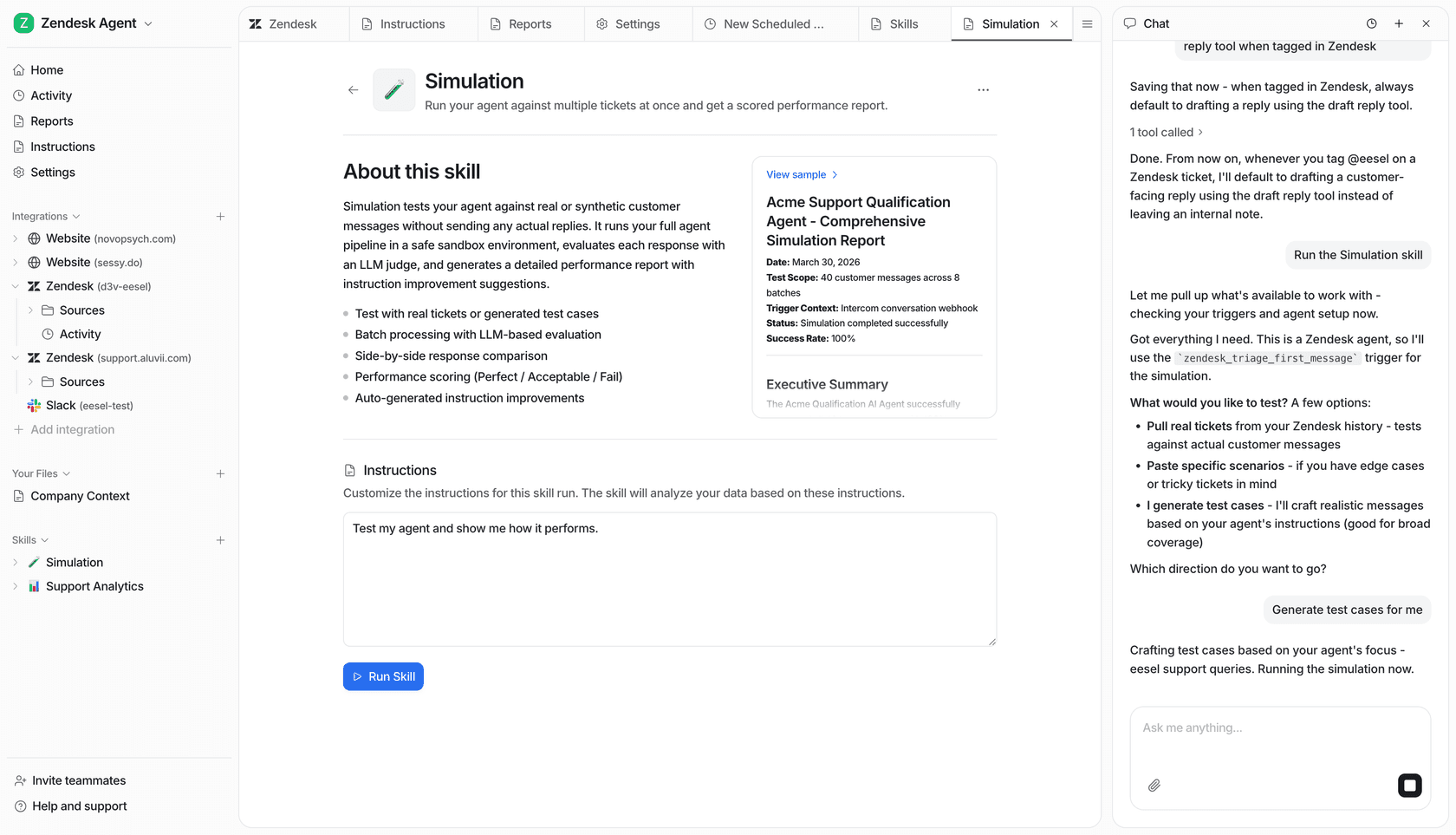
The two things I would flag for anyone comparing it to the native AI Agent: pricing and testing. eesel runs on one fixed monthly price, from $299/month for 500 credits, where 1 credit is one ticket or chat including all the back and forth, with no platform fee and no per-resolution surcharge. And before you go live, you can run a simulation against your past Gorgias tickets to see exactly where it is strong and where the gaps are, so customers never see a bad answer.
Teams see it land quickly. As Kim Simpson at Gridwise put it, "in the first month, eesel is resolving 73% of our tier 1 requests." Or, as the DTC pet food brand Years described it, eesel "was the glue that connected our helpdesk to our Shopify store and all our internal knowledge." You can connect Gorgias, run simulations on your own tickets, and see the numbers on the free plan (100 credits, no card) before you spend anything.