


Front's Autopilot agent hands a conversation to a teammate when its instructions or a Playbook say to, when the customer asks for a person, or when it cannot answer, and the teammate picks it up in the same shared inbox. Front bills the outcome: $0.39 per handoff and $0.89 per resolution. Its docs describe a summary ticket for Resolve chat but no fixed handoff note for email, so I would test that first. eesel can sit in the same inbox and leave an internal comment before a person opens the thread, and with the eesel CLI a coding agent can connect Front and check a draft on a test conversation. Approving the connection still needs someone who can authorize apps in Front.
How does Front's AI hand a conversation to a human?
People who search for Front AI escalation to human are usually past the "does it answer questions" stage. They want to know what happens on the conversation the agent should not finish, because that is where an AI agent either protects the queue or embarrasses it.
In Front's current setup, an Autopilot AI agent is a teammate with its own name and permissions, and a handoff is the agent giving the conversation back to a person. Front's help center says an assignment means resolving that conversation is the agent's scope of work, while an @mention applies to one comment only. Admins can pause the agent from its settings, and Front says pausing runs the agent's escalation actions on every conversation currently assigned to it.
Front uses two words here, and they are not the same. Its metric definitions call a handoff a planned transfer, for example a Playbook that finishes and passes the conversation to a human on purpose. An escalation is an unplanned exit, and the escalation rate counts them: the agent cannot answer because it has no relevant knowledge, a Playbook hits a technical error, or the customer asks for a person.
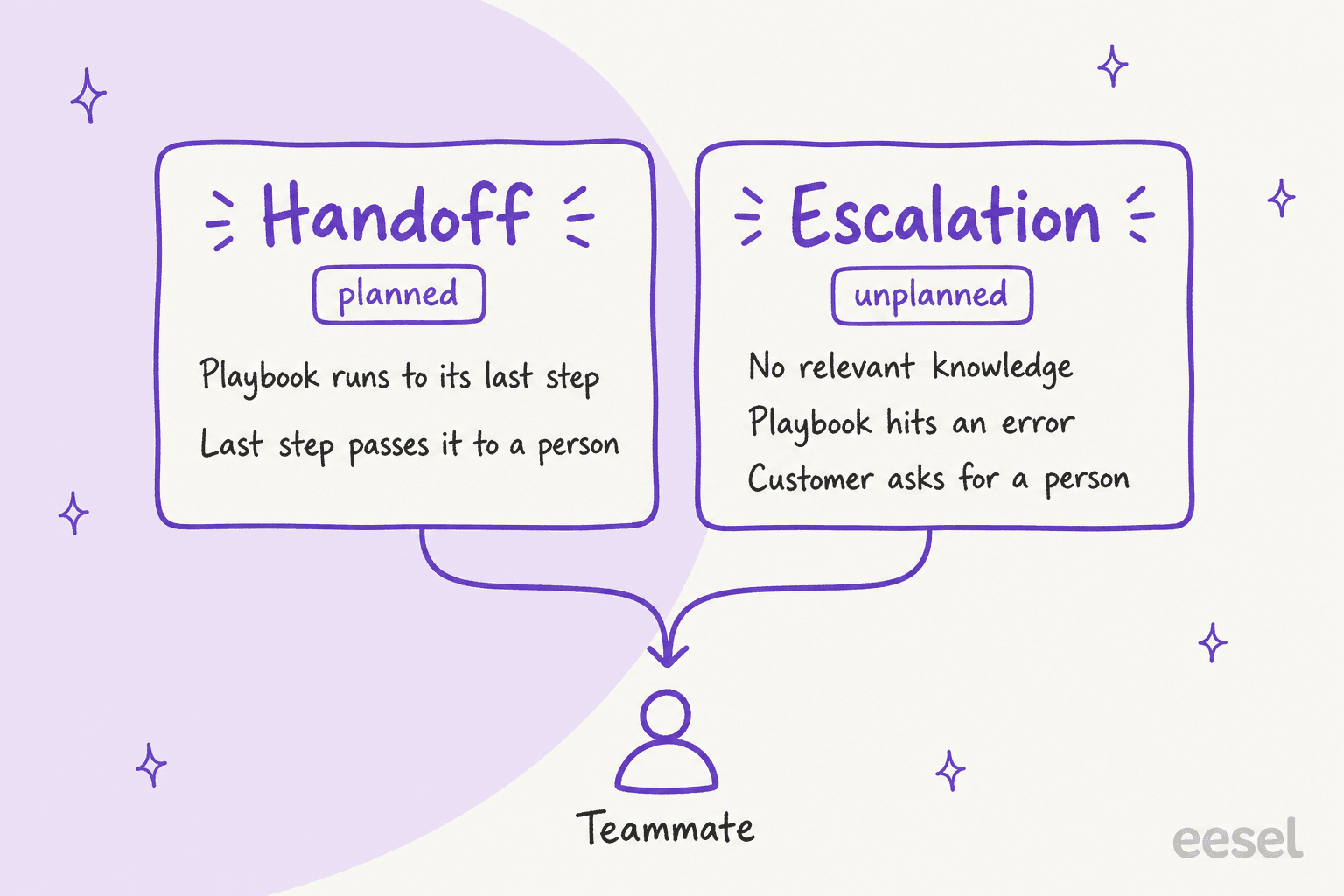
That split matters for reports and, as I will show below, it leaves one billing question open. Front is a shared inbox first and a ticketing system second, which I explain in shared inbox vs ticketing, so a handoff is mostly a reassignment inside the same thread. For the general theory of when an AI should give up, see AI agent handoff and AI escalation management. This post is only about what Front does.
What triggers a handoff in Front?
Front has no single "escalate" switch. Handoffs come from six places, and which ones you control depends on how you built the agent.
| Trigger | Where it lives | What I could confirm |
|---|---|---|
| Agent instructions | Agent setup, Instructions step | Front's page says the box takes "escalation instructions" and broad do's and don'ts |
| Playbooks | AI resources, Playbooks tab | An Apply when field says when it runs, and the instructions can name tags, comments and hold-for-review steps |
| Customer asks for a person, or sounds dissatisfied | Resolve channel | Listed by Front as escalation events |
| The agent cannot answer, or a Playbook errors | Any channel | Counted by Front as an unplanned escalation |
| Draft replies only toggle | Agent setup, Instructions step | The agent drafts and never sends, whatever the Playbooks say |
| Rules with AI steps | Rules and macros | Branch with AI is documented for Enterprise |
All of these come from Front's pages on AI agents, Resolve and rules.
Rule-based AI triage and replies are a separate lane, covered in Front AI email triage and Front AI auto-reply.
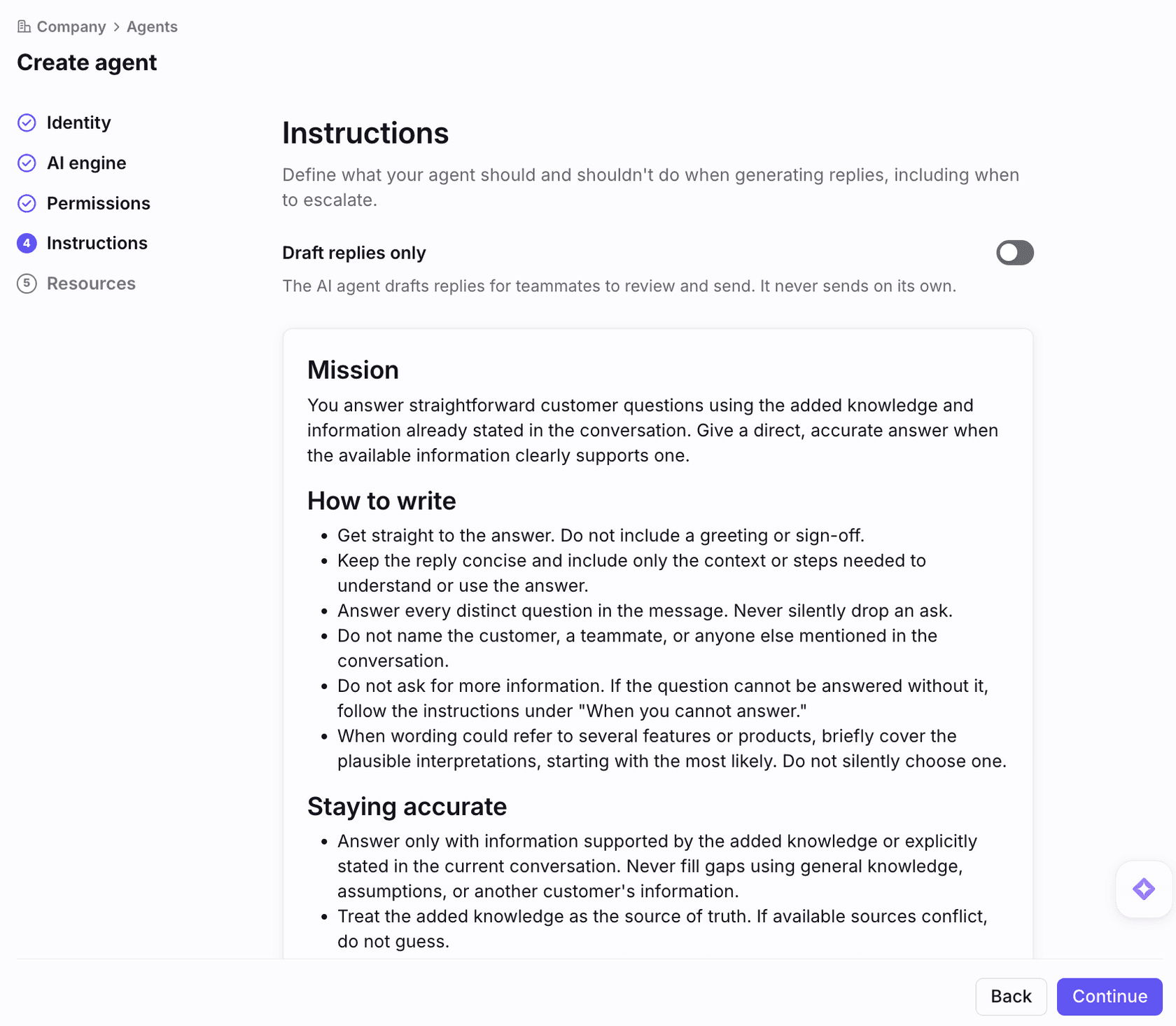
The instructions step is where most teams will start, because every Autopilot agent has one. Front's own screenshot of the step says the box defines what the agent should and should not do "including when to escalate", and it sits above a Draft replies only toggle, a blunt form of human-in-the-loop review that blocks sending entirely.
The Playbook route is the one Front pushes for repeatable cases. A Playbook is a plain-language SOP with an Apply when line and an Instructions body. Front suggests writing it in a set order: scope, hard rules, decision logic, what to say, then actions, meaning when to send or hold a reply for review, which tags to apply, and which comments to leave and for whom. The same page warns that the Apply when line matters as much as the body, because a wrong one means the Playbook never runs. Only company admins can create Playbooks.
One detail I would not skip. Front rewrote Playbooks on October 6, 2026. The older version had a dedicated Escalation section where you picked an inbox and tags to apply when a Playbook hit a technical error or a customer explicitly asked for a human, and customers who created Playbooks before that date still use it, per the legacy Playbooks page. The new Playbooks article has no such section.

I also went through Front's steps for creating a new Autopilot agent: the pages are Identity, AI engine, Permissions, Instructions and Resources, then Create. None is an escalation screen. So in the new model, the "where" of a handoff is whatever you wrote into Instructions and Playbooks, plus your rules. That is flexible, and it also means nobody can audit the escalation setup in one place. I would keep a short written list of your handoff conditions next to the agent.
What does the teammate see after a handoff?
It depends on the channel, and Front's documentation is much fuller for chat than for email.
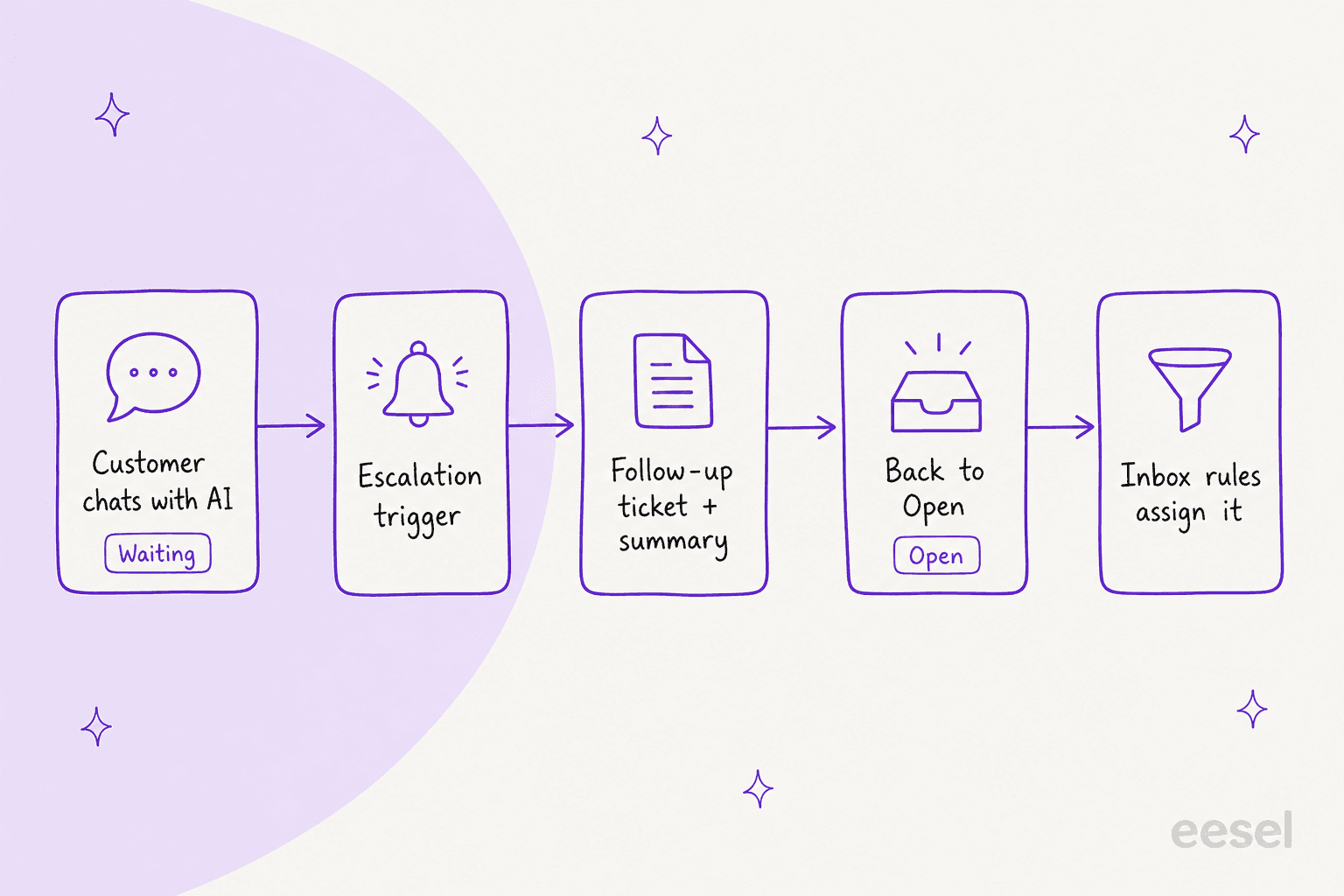
For Resolve, Front's embeddable chat, the picture is clear. The customer gets a follow-up ticket created automatically with a summary of the conversation so far, after they enter an email address and verify it with a 6-digit code, and they only re-verify every 7 days. Before the handoff the conversation is not available for interaction, and inbox rules do not apply. Front also says conversation status moves on its own: Waiting while Autopilot handles it, Open while it generates a reply, Resolved when done, and back to Open if it escalates. My Front ticket status rules post explains how those statuses behave in rules.
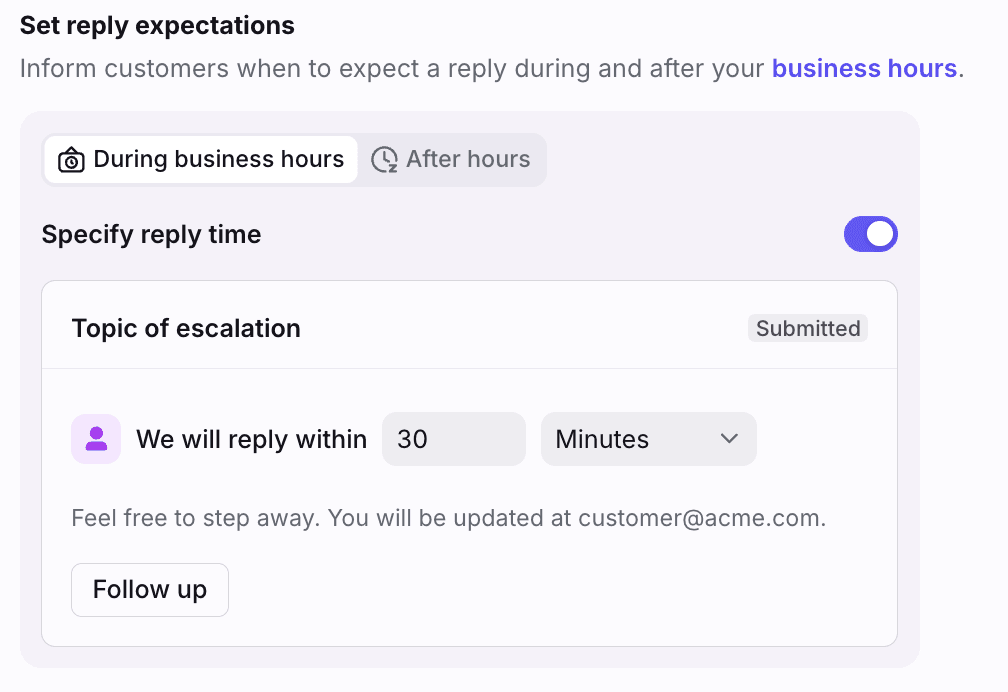
Customers also see a message you write. The Set reply expectations setting lets you tell them when to expect a person, with different text during and after business hours.
For email and other channels there is no summary ticket. The agent is a normal assignee, so the teammate opens an ordinary conversation where the agent's replies and internal comments sit in the thread like anyone else's. In its launch post, Front says the full conversation and customer context come with the handoff. In the older Playbooks, Front's own advice was to leave internal comments as checkpoints so a teammate sees what already happened.
What Front does not publish: a fixed handoff note. I found no description of a standard summary the agent writes when it gives up on an email, no statement that it unassigns itself, and no default status. If you want a clean note on every handoff, write that into the Playbook or instructions and check it in a simulation. A teammate can also use Copilot, which Front prices at $20 per seat per month, to catch up on a thread. My Front Copilot and Copilot routines posts cover it.
Who gets the conversation after the AI steps back?
There are three documented routes.
- Resolve chat. Once the handoff occurs, Front says the conversation follows the assignment and routing rules configured for the inbox.
- Playbook or instructions. The agent can tag, comment and move the conversation as part of its steps. Front's Compass docs list assignment, tags, inbox moves and ticket status among the actions a simulation can observe, for example "The agent assigns the conversation to the Billing team".
- Another agent or person pulled in by mention. Front's launch post describes a Billing agent that sees a refund above the policy limit, drafts a reply, tags in a Finance teammate for approval, and sends the drafted message and resolves the conversation after Finance @mentions it.
Route 3 is the most interesting design in Front's docs, because it keeps the agent in the loop instead of dropping the thread. If a handoff needs a second owner with a due date, linked tasks are Front's other tool for that. Whether route 3 suits you depends on how you handle assignment today. My posts on Front load balancing and assignment and Front snooze behavior explain what a rule does after the agent has moved on.
A practitioner on Reddit described the user-facing side plainly:
"Can only speak from experience with Front, CX platform... the agents get access to all shared information (inboxes, documentation) and if it's stumped, then the problem is escalated."

That matches what the docs say about unplanned escalations. The part the comment leaves out is the one that decides whether your team likes the result: whether the person who receives it needs to start over.
How do I test the handoff before it goes live?
This is the part of Front's setup I would use first. Autopilot agents have a Simulations tab, and Front's own recommended starter criteria are all about handoff.
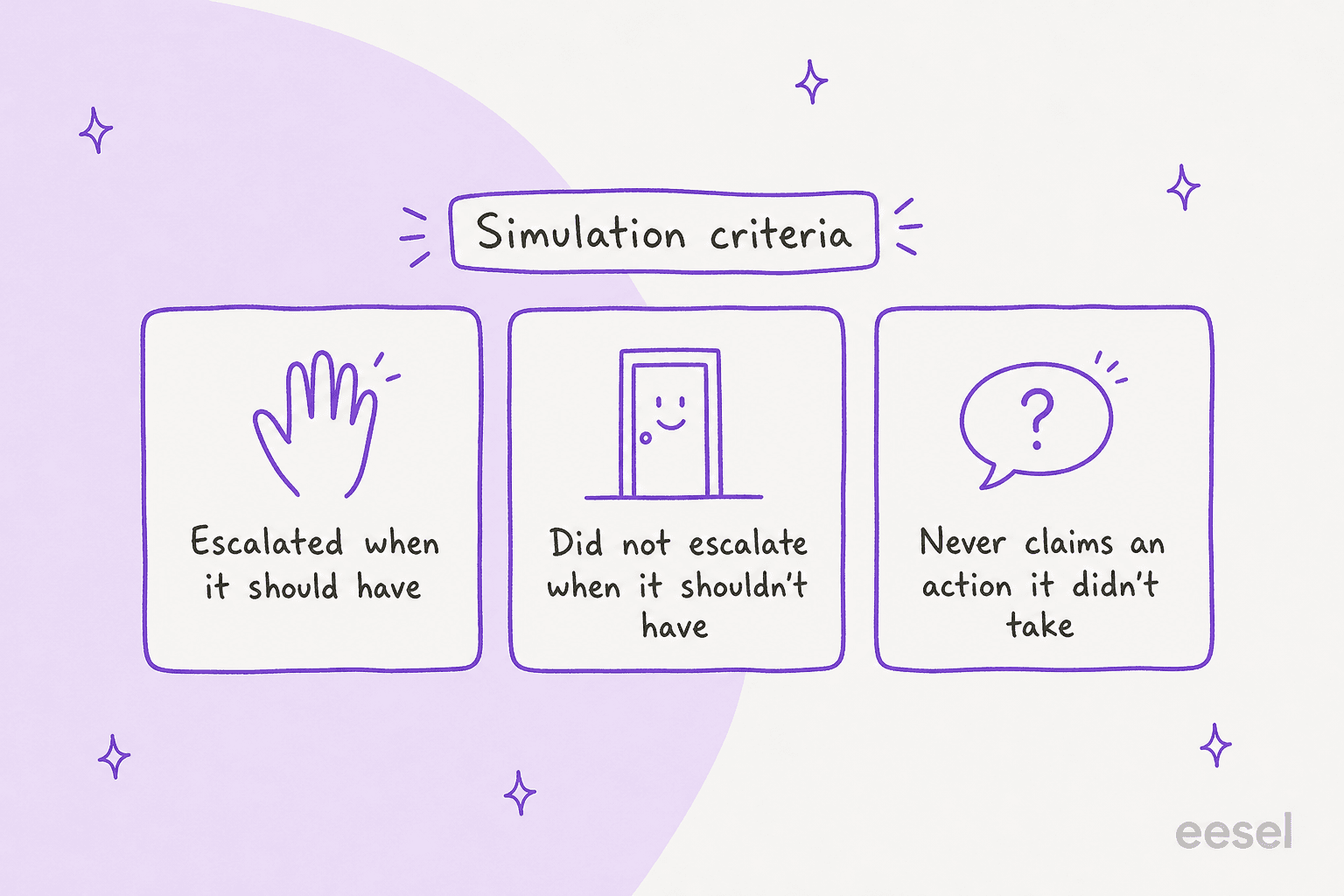
The three criteria come straight from Front's Compass page. The first two catch both directions of failure, an agent that holds on to a conversation it cannot handle and one that escalates something it could have answered. The third catches the dangerous one, a broken guardrail, where the agent tells a customer a refund was issued or a ticket was escalated when no such action appears in what it actually did.
Some limits to plan around, all from the same page:
- A simulation conversation caps at 10 back and forth exchanges with the agent.
- The validator can see messages, internal notes, tags, inbox moves, assignment, ticket status, connector calls and how the conversation ended. It cannot see drafts, Playbook content, your instructions or knowledge article bodies.
- A reply held back as a draft counts as Escalated to a teammate in the end reason, and the Smart QA scorecard only evaluates replies, so a draft-only agent is not scored for tone.
- Criteria cannot check whether an answer matches your help center, so you still have to read the simulated conversation.
- Simulations do not touch live conversations or analytics.
You can start a simulation from a conversation ID, and Front says each ID creates one simulation. It runs a simulated customer against your agent, not a replay of what actually happened, so treat a pass as evidence and not as proof. My Front AI agent evaluation post covers Compass scoring in more depth, and I wrote more about testing in testing an AI agent and AI support simulation testing.
For live monitoring, Front's Agents report counts agent-escalated conversations and an escalation rate, and splits resolved conversations into agent-only, teammate-only and hybrid buckets. Hybrid is the number I would watch, because it shows how many resolved conversations needed both. Front says legacy Autopilot data is excluded from the report. The wider question of what a good containment rate looks like is in measuring containment and escalation quality.
What does Front AI handoff cost?
Front prices Autopilot by outcome, and a handoff is one of the outcomes. From Front's Autopilot article:
| Outcome | What Front says it is | Price per conversation |
|---|---|---|
| Handoff | Drafting, replying or taking an action by an AI agent that is intended for human takeover | $0.39 |
| Resolution | Fully resolved with no human replies; no teammate follow-up within 24 hours for Resolve, SMS and WhatsApp, or 72 hours for email and portal | $0.89 |
A conversation is charged once, at the highest level it reaches. Front's pricing page shows Autopilot as an add-on on all three plans "starting at $0.39/conversation", and the help page names a Triage level in its text but lists only Handoff and Resolution in the table. Billing is pay-as-you-go, invoiced monthly, with volume discounts as prepaid commitments. You are not charged for a technical failure on Front's side.
A worked example, using only those published rates: 1,000 conversations in a month where Autopilot ends up handing off 600 and resolving 300 comes to 600 x $0.39 plus 300 x $0.89, which is $234 plus $267, or $501. Add seats on top, since Front's plans run $25 (Starter, up to 10 seats), $65 (Professional, up to 50) and $105 (Enterprise) per seat per month billed annually. Ten Professional seats are $650 a month before Autopilot. My Front pricing and Autopilot guides go deeper.
Three things I would ask Front before committing:
- Do unplanned escalations bill as Handoffs? The definition says "intended for human takeover", and the metrics page separates planned handoffs from unplanned escalations. The billing page does not say which bucket a conversation that escalates falls in.
- Does a drafting agent bill every conversation? Front's drafting-agent example assigns the agent to all new conversations in an inbox. By the Handoff definition, drafting for a human to send looks like it would be billed at
$0.39each, but Front does not spell it out. - What changed in the exceptions? A capture of this page on October 5 also excused conversations where the customer asked for a human or a teammate cancelled the automation. The page today lists only a technical failure on Front's side.
Copilot, the teammate-facing assistant, is $20 per seat on Starter and Professional and is included in Enterprise. A 30-day Autopilot trial covers all automations and up to 1,000 Resolutions, and Front says that after it ends, Autopilot rules, Playbooks and Resolve channels stop running unless you opt in. That means your escalation path stops with them, so plan the switch before day 30.
What are the limits and gaps in Front's docs?
Fair warning that most of these are things the docs do not say, not things they say are broken.
- No single escalation screen for new Autopilot agents, as covered above.
- No documented handoff note for email, and no statement about whether the agent unassigns itself.
- How an agent chooses a person to assign is not described. The examples name a team or a Finance teammate through the instructions you write.
- English first. Front says only English is officially supported for Autopilot, and other languages may give unexpected results.
- Shared inboxes only. Front says AI agents cannot automate work in individual inboxes, though you can add one to a single conversation.
- One agent per Resolve channel.
- Knowledge changes lag. Instruction, tone and note changes take effect immediately, but knowledge article updates take about 12 hours to re-ingest, so allow 24 hours before a handoff condition that depends on new content works.
- Playbooks are admin-only, and agent setup needs company admin permissions.
The balanced read: Front gives you strong building blocks and a good testing tool, and leaves the escalation design to you. If you have a platform admin who likes writing SOPs, that is a feature. If you do not, it is homework. The same pattern shows up in the sibling guides I wrote for Zendesk AI handoff, Freshdesk escalation and Gorgias handover.
How does eesel handle handoffs inside Front?
Here is where I would start with any agent on a Front queue: treat the handoff as a defined act, where the agent says what it did, what it could not do, and who should take it. In eesel's sales calls in March, enterprise buyers repeatedly said they would not accept an AI that replies to everything, including "I don't know". They wanted it to answer only when confident and pass the rest on.
In Front, eesel joins the shared inbox as an agent. Per the eesel docs, it can leave an internal comment, draft a reply for a teammate to review, add or remove a tag, assign the conversation to a named teammate, archive it, or move it into another inbox. Front has no team assignee, so eesel hands a conversation to a team by moving it into one of that team's inboxes. Triggers include the customer's first message, any new message, an @eesel mention in a comment, and a conversation being archived. Each Activity entry shows the searches it ran, the actions it took and its reasoning, and conversations it skipped show why.
Two named customers show what a clean handoff looks like, though both run on Zendesk and not Front. SE Ranking has an eesel agent per product. A refund, a trial extension, a request for a person or a question it cannot answer goes to the team with the customer's name and email, and eesel tells customers to expect a reply in one or two business days, never that someone is joining now. In the month from 8 August to 8 September 2026 it handed about 1,260 chats to the team and created about 400 tickets for Tier 2 and weekend cases. At Adverscale, the agent leaves an internal note saying what the ticket is and why it stopped, and assigns it to the right group. Refunds are never decided in a reply. Its agent left about 2,700 internal notes and assigned about 290 tickets to a group in the same month.
I would copy three habits from those setups into any Front agent, Front's or ours:
- Name the handoff conditions in writing: refunds, security, a repeated question, a request for a person.
- Make the agent say what it will not promise, such as a live agent joining now.
- Make every run end with an action, so a teammate can tell the agent looked. My guides to refund guardrails and agent observability go further.
If you are choosing between Front's agent and a connected one, my Front AI vs eesel comparison and the guide to adding AI to Front lay it out. Front has also said external agents are available on all plans, so you can run more than one. If Front itself is the question, see Front alternatives.
Try eesel in your Front inbox
If your open question is what happens on the conversation the agent should not finish, eesel is easy to try in Front without rebuilding anything. It reads your Front help center and past conversations, leaves a drafted reply or a note as an internal comment, tags the conversation from tags you already have, and assigns it or moves it to the right inbox. Start with comments only, read what it hands over for a week, then widen what it may send.
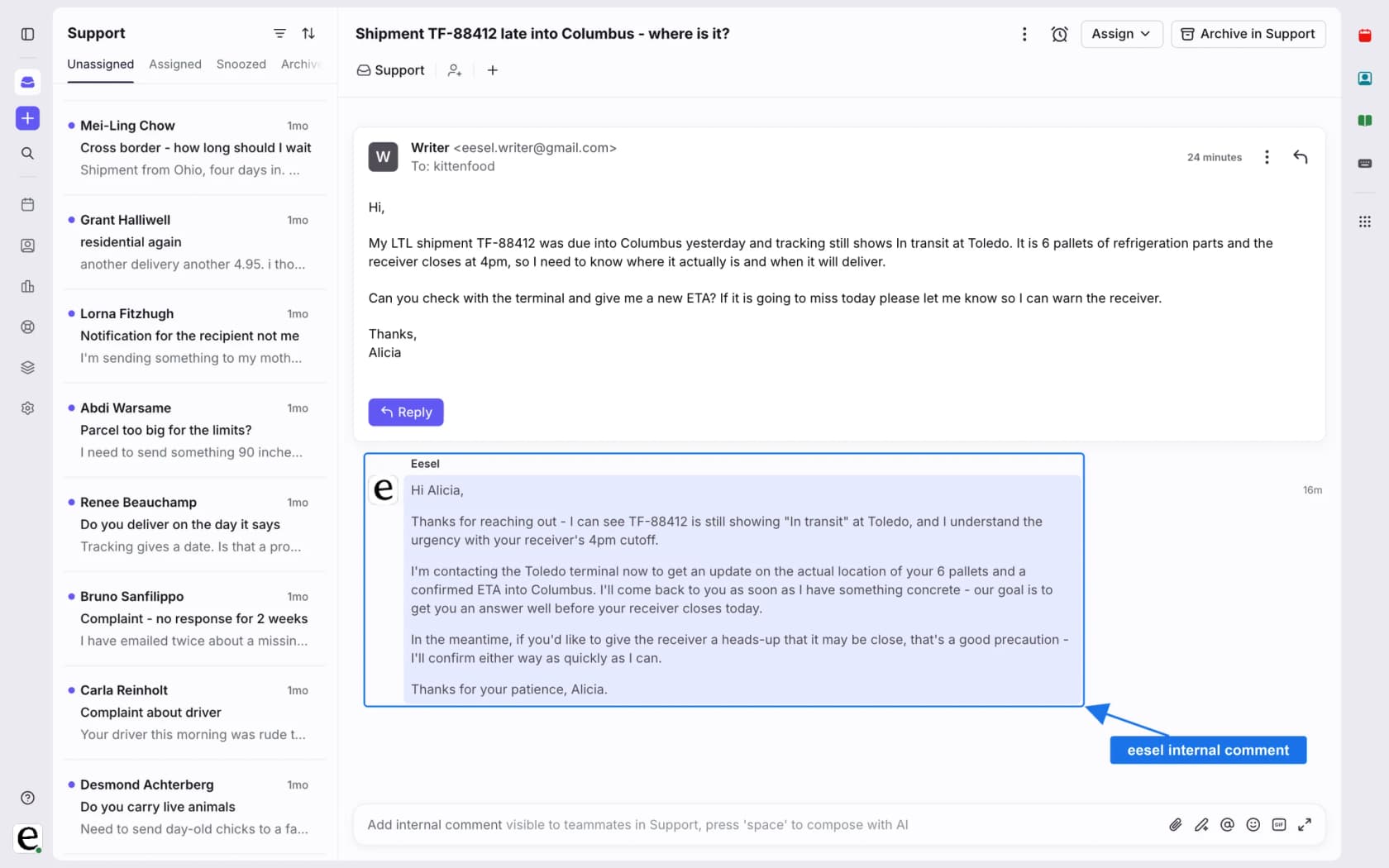
Tags have to exist in Front already, and eesel does not see data from apps in Front's sidebar, so list what a teammate needs before you launch. See the AI helpdesk agent page for the wider picture, then Try eesel on a few real Front conversations before deciding.
Frequently Asked Questions
How does Front AI escalate a conversation to a human?
What triggers a handoff from Front's Autopilot to a teammate?
Does Front charge when its AI hands a conversation to a human?
$0.39 for a Handoff and $0.89 for a Resolution, charged once at the highest level a conversation reaches. Whether an unplanned escalation bills as a Handoff is not stated. My Front pricing guide covers the seat plans.Can I force Front's AI to escalate topics like billing or security?
Which Front plan do I need for AI escalation to a human?
$25, Professional $65 and Enterprise $105 per seat per month billed annually. Front's rule step Branch with AI is documented for Enterprise. See my Front review for the plan trade-offs.