

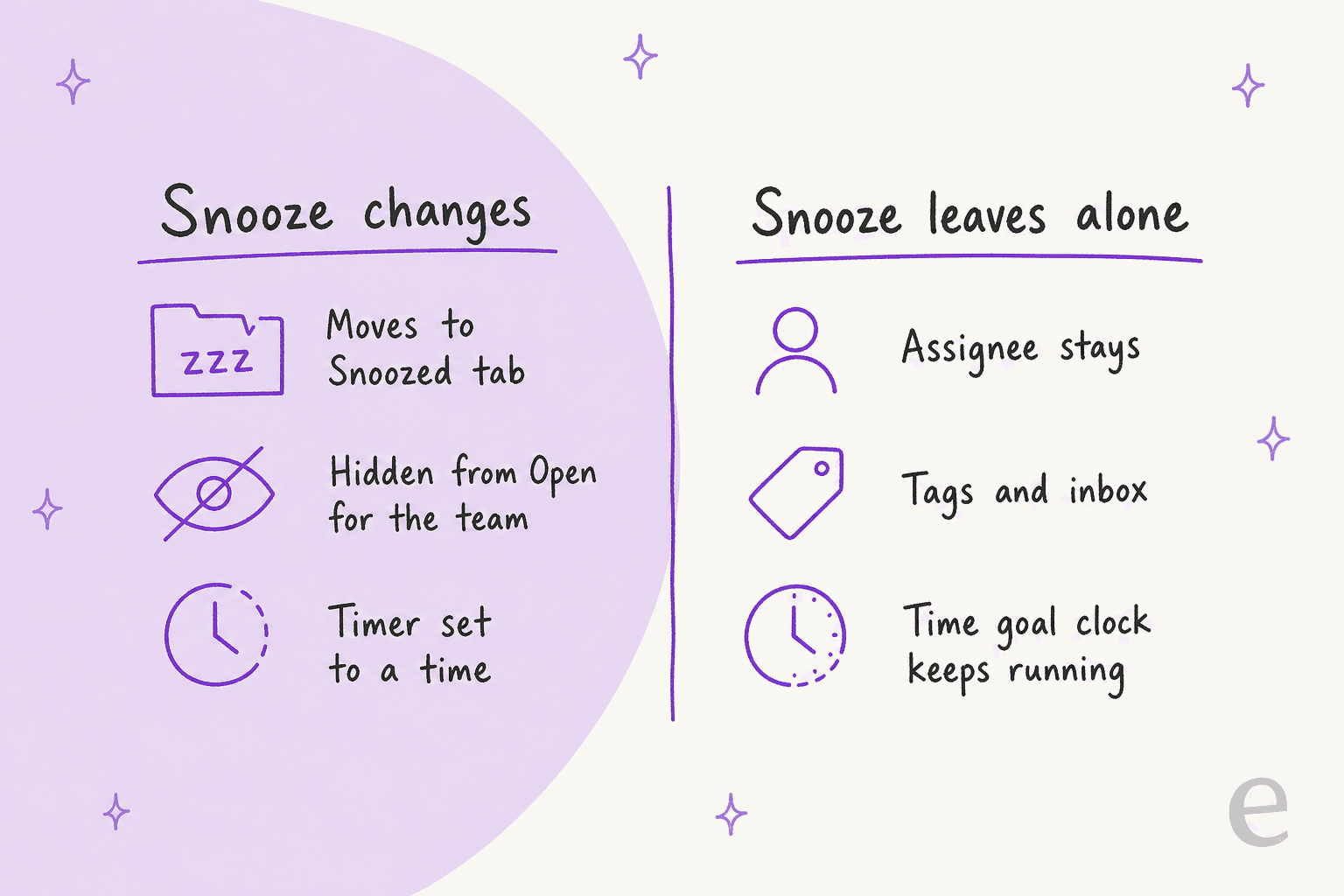
Snoozing a Front conversation hides it until a set time, and nothing in Front's docs says snooze changes the assignee. The assignee changes only through side paths: if the timer ends while the assignee is out of office, Front unassigns the conversation, an admin setting can switch that off, and a customer reply cancels the snooze and reopens the thread. Snoozed conversations do not count toward load balancing limits, and they do not pause a time goal. The docs say little about what happens when a snooze and an availability change collide, so I would test those cases.
eesel can assign, tag and draft in the same Front queue. With the eesel CLI, an AI coding agent can load approved knowledge and then ask test questions about a snoozed thread before anything goes live, though connecting the inbox still needs someone with admin access.
What does snoozing a Front conversation actually do?
It moves the conversation out of Open and brings it back at a time you choose. Front's snooze guide says it lands in the Snoozed tab of the inbox and reappears in Open at the exact date and time you set. There are three ways in: the clock icon at the top of the conversation, the quick action in the conversation list, and Send & snooze in the composer.
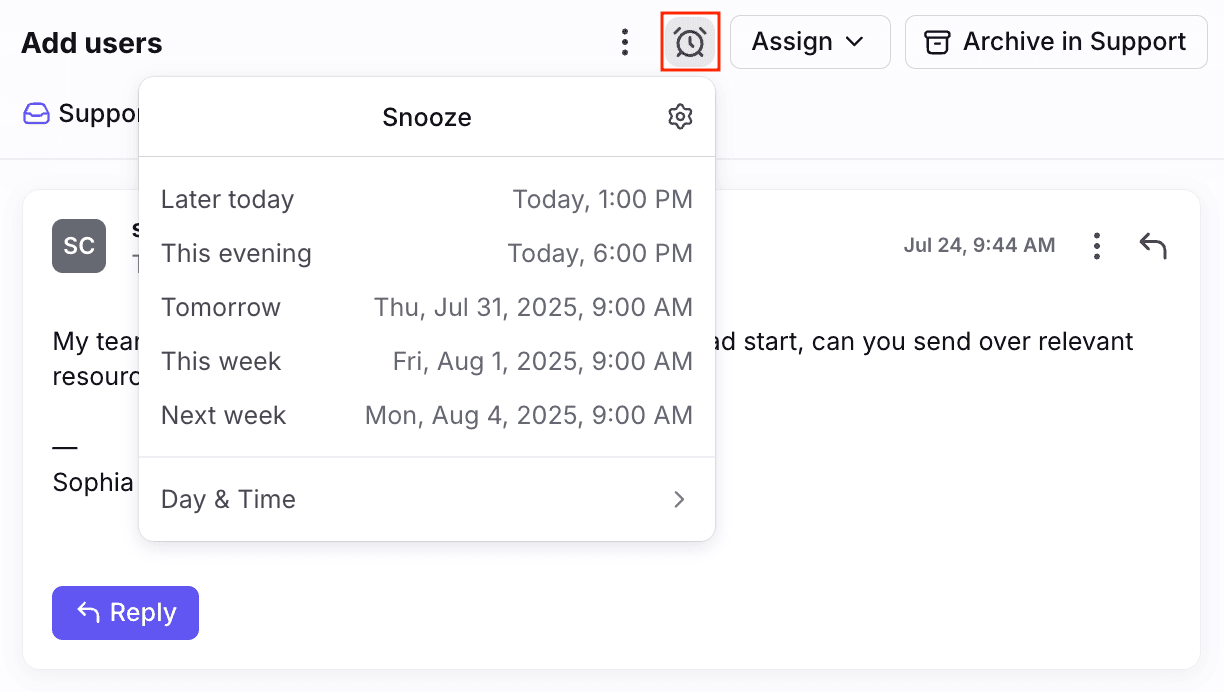
I build eesel's helpdesk integrations, and snooze is the state I check first in any of them, because it is the one place a conversation is open, owned and invisible at once. Front's snooze guide describes the tab, the timer and the cancel rules in detail. It never mentions the assignee as something snoozing touches, so the default reading is that the owner stays the owner.
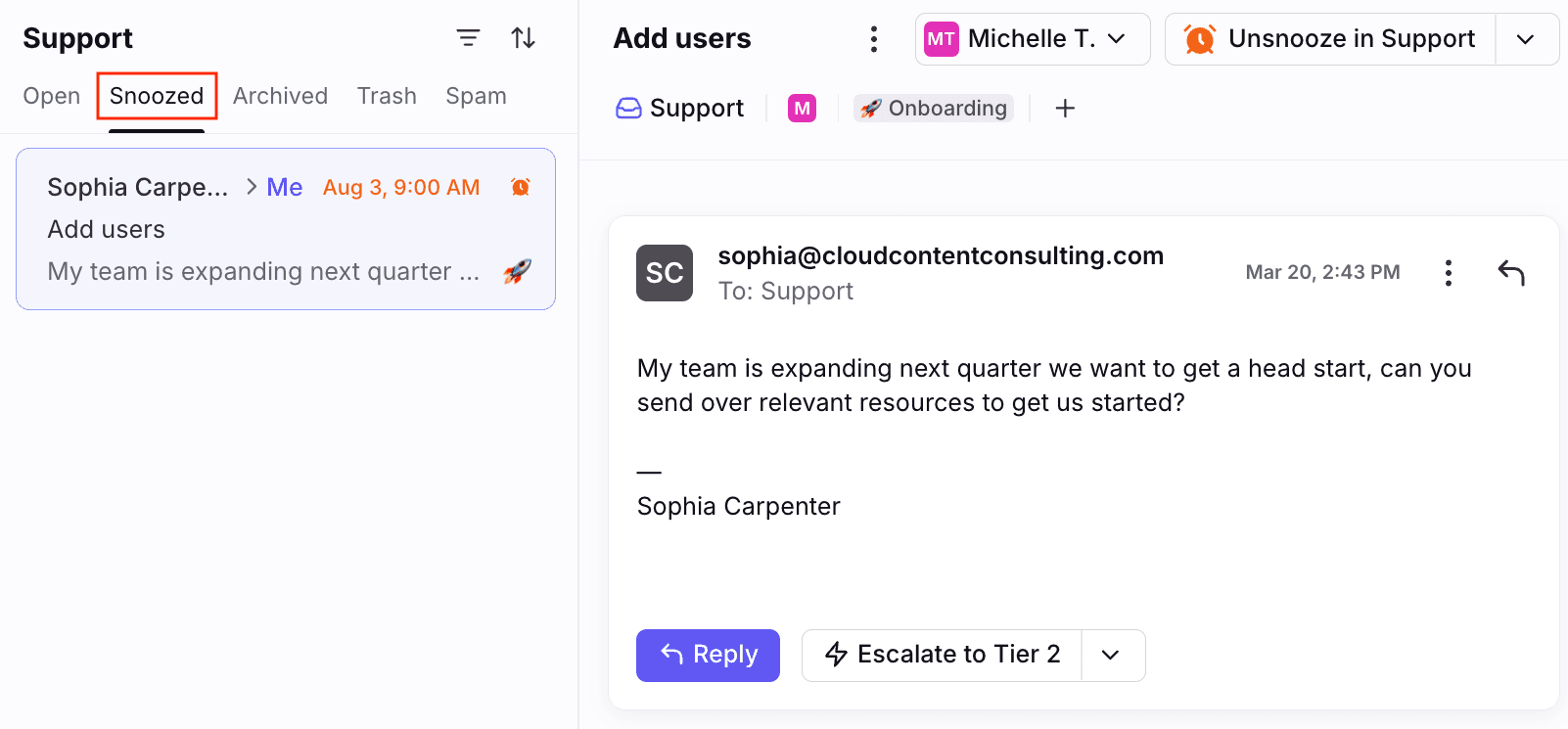
Front's own screenshot supports that reading. A snoozed conversation in the Snoozed tab still shows its assignee, here the teammate abbreviated as Me, next to the wake up time.
If your team also uses ticket statuses, the picture changes in name only. As my Front ticket status rules post explains, Snoozed becomes Waiting, and Front says Send & snooze is still available, with snoozed conversations visible in the Waiting tab.
Who sees a snooze, and does it change anyone else's view?
It depends on where you snooze from. This is where I found the most surprising lines in the docs.
- Shared inbox. Snoozing from a shared inbox snoozes the conversation for all teammates, per Front's snooze guide.
- Your own sections. Snoozing from the individual workspace section of your sidebar snoozes it for you only.
- A teammate snoozes your conversation. Front's status article says that if a teammate who is not the assignee changes status from a shared inbox, the conversation stays open in the assignee's Assigned to me section.
- The assignee snoozes. The conversation moves to the matching tab in both Assigned to me and the shared inbox.
- Followers. A snooze from the shared inbox does not change the conversation for followers who did not take the action, and it stays in their Subscribed section.
- Individual inbox shared with a shared inbox. Your status change affects the shared inbox copy only if you are the assignee.
- Several shared inboxes. An action in one inbox applies in the others unless the setting to keep actions separate is on.
The assignee case is the one to remember. A supervisor can snooze a conversation from the shared inbox and the owner will still see it sitting open in their personal queue, which is how a thread gets worked twice. My Front shared inbox ownership guide goes into the rest of the ownership model.
What happens when the snooze timer ends?
The conversation reopens, and for most assignees nothing else changes. Front's snooze guide adds one condition: if the timer expires and the assignee is out of office, the conversation is unassigned so other teammates can see it and follow up.
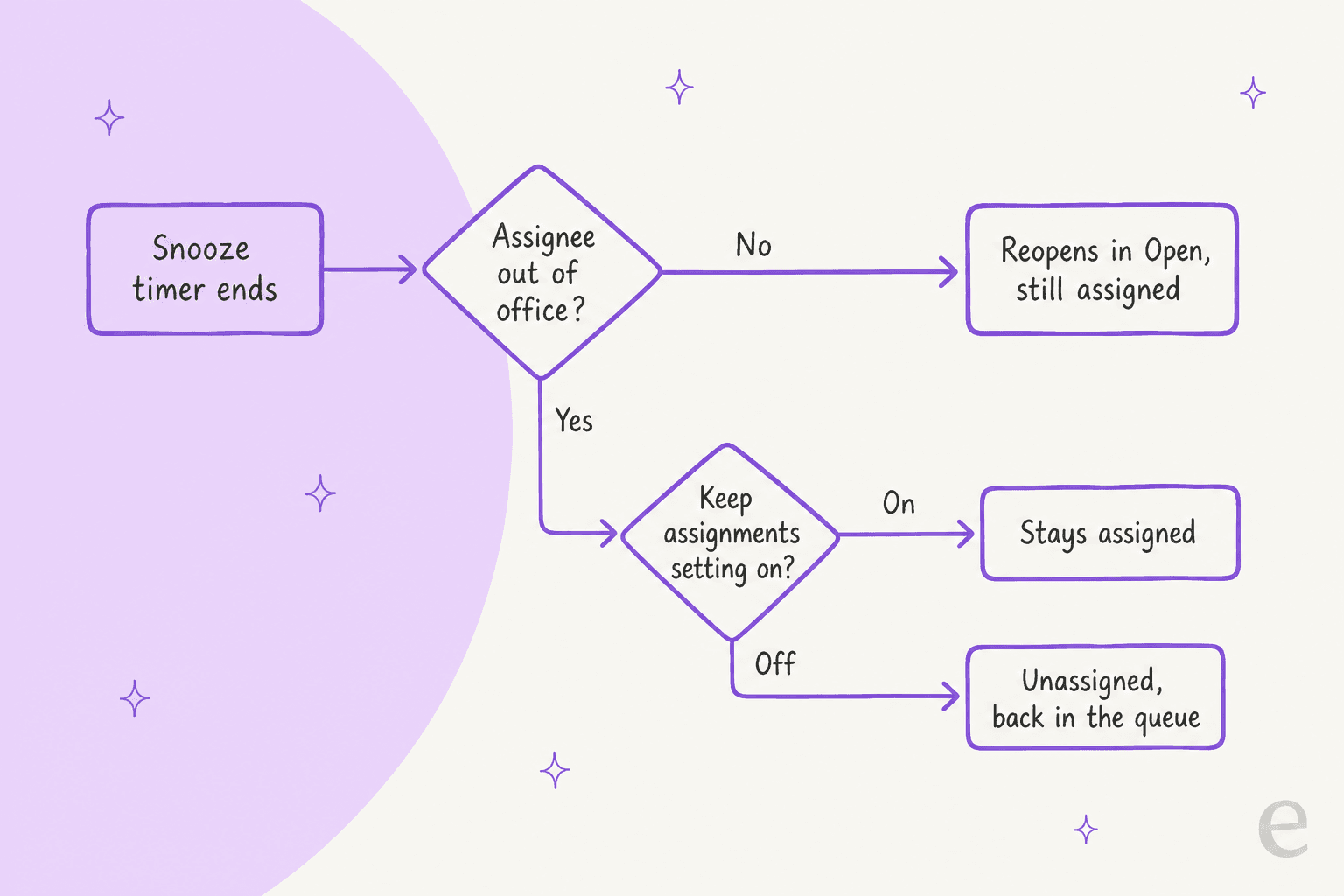
There is a switch for this. Front's inbox settings article says that when Keep assignments when teammate is out of office or busy is on, snoozed and assigned conversations stay assigned when snooze timers expire. Turning it on also disables Unassign conversation if inactive for, so you cannot run both.
Pick a case to see what the docs say:
The last tab is an inference from two pages, so I would test it before relying on it. For history on how Front handles the out of office side, see my Front load balancing post.
Does a customer reply unsnooze the conversation?
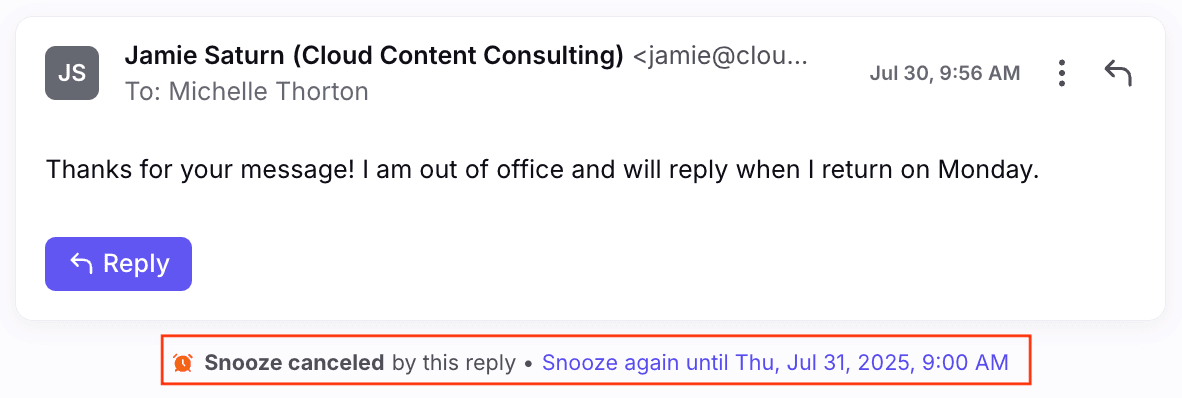
Yes, and it also cancels the snooze. Front's snooze guide says that if a recipient replies before the timer expires, the conversation reopens in your inbox and the snooze is cancelled automatically. The thread then shows a Snooze canceled by this reply note with a one click Snooze again until link.
The assignment side is thinner. A Front support specialist answered a user asking how to keep a conversation assigned while out of office:
"any new inbound message to a conversation assigned to you in a shared inbox will cause that conversation to be unassigned"
That reply is about an out of office assignee and says nothing about snooze. Put the two together and a customer reply to a snoozed thread owned by someone out of office is likely to unassign it, but no page states that case directly. Front's teammate status article adds that the Busy status keeps existing conversations assigned when customers reply, and that Out of office unassigns them on new activity. My AI after hours support and weekend coverage posts cover who should answer in the gap.
How does snooze interact with load balancing and round robin?
Snooze takes a conversation out of the load balancing count, and the rest depends on which assignment rule you use. Front's load balancing article says all open assigned conversations from shared inboxes count toward a teammate's limit and snoozed ones do not.
- Load balancing. Snoozed conversations do not count. The engine retries when an archive frees capacity or when an out of office or busy teammate becomes available again. Snooze expiry is not named as a retry moment.
- Round robin and assign to teammate. Front says these actions do not use the load balance limit at all.
- Going over the limit. Front gives two examples: a message reopening an archived conversation you were assigned to, and a manual assignment. Snooze expiry is not listed, but a conversation that wakes up is open again, so I would expect it to count again.
- Reassignment. If a conversation is unassigned because the assignee is out of office or busy, a load balancing rule with an Assignee is removed trigger assigns it again.
That last line matters for snooze. The expiry unassign described earlier is a removal, so a rule with that trigger can catch it. The docs do not say it works for snooze expiry specifically, which is the check I would run first. Front's rule guide lists the triggers and conditions involved, and my Front load balancing post walks through the limits. If you are comparing tools, Freshdesk round robin and Gorgias round robin work differently.
Can a rule react to snooze?
Yes, but it can react, not snooze. Front's rule guide lists two status triggers, Conversation is snoozed and Snooze expires, plus an If condition, Conversation is currently snoozed. It also says Conversation is reopened does not include conversations reopened by inbound messages or by snoozes expiring, so you cannot lean on it for wake ups.
A useful pattern is a rule that fires on Snooze expires, checks Conversation is unassigned, and assigns the conversation to a group by round robin or load balancing. That turns the out of office unassign into a hand back instead of a dead end. I have not run it, so I would test it on a sandbox inbox. The rule guide also warns that rule assignments skip busy and out of office teammates unless the inbox keeps assignments.
On the other side, I could not find a snooze action. A Front support specialist told a user in October 2024:
"Right now, there isn't a rule condition for "Snooze conversation"."
That thread is more than a year old, and the current rule guide I read lists the same triggers, so I treat it as still true. See my Front time goal rules post for how a rule and a goal timer sit together, and how to automate ticket triage and AI support tagging for what a hand back rule should tag.
Does snooze affect time goals?
It does not pause them. Front's time goal FAQ says the goal timer keeps running while a conversation is snoozed. If the timer expires while the conversation is snoozed, the reply goal rule skips it and nothing is tagged. If the snooze ends before the timer expires and nobody has replied, the rule still fires. Front's example is a 1 hour goal and a 30 minute snooze.
So a snooze is a quiet way to lose a breach, which is worth a conversation with the team. If your snoozes are mostly "waiting on the customer", the trade is fine. If they are "I will get to this", the goal is hiding the miss. My SLA best practices and AI for support reporting posts cover how to measure it, and the glossary has SLA, first response time and resolution time.
What about mobile?
The docs describe the same snooze, reached differently. Front's mobile app article says you can long press to multi select conversations and snooze them, snooze from the three dot menu in a conversation, assign snooze as a swipe action, and use Send & Snooze from the send options. It does not describe any different assignment behavior on mobile, and I found no page that does. I would assume one behavior and test the one surprising case, a snooze set on the phone by someone other than the assignee.
What do Front's docs not say?
Several things that matter for assignment are undocumented, so test them in a sandbox inbox.
- Reply to a snoozed thread, assignee out of office. Each half is documented, the combination is not.
- Snooze expiry and load balancing. Whether a waking conversation triggers a retry, and whether it can push someone over the limit.
- Snooze expiry and the assignee is removed trigger. Whether a rule with that trigger fires on the expiry unassign.
- Busy at expiry. The snooze guide names out of office only.
- Inactivity unassign. Front's bump article says inactive conversations unassign on inbound, or outbound too if bump on replies is enabled. It does not say how a snooze counts as inactivity.
- Mobile differences. None described.
- Snooze limits. Front says you can create up to
34custom snooze times, and nothing about a cap on how long a snooze can last.
None of this makes snooze unsafe. It means the clean story, snooze is a tab and a timer, holds until a status, a rule or a reply gets involved.
How should a team run snoozes with assignment?
Treat snooze as a promise with a name on it. A few habits from the docs cover most of the risk:
- Decide what out of office means for snoozes. Either accept the unassign at expiry and add a hand back rule, or switch on Keep assignments when teammate is out of office or busy and accept that owners come back to their own backlog.
- Snooze your own conversations. A non assignee snooze leaves the owner's queue open, which is how threads get worked twice.
- Use Waiting if ticket statuses are on. It maps to the same state, and my Front ticket status rules post shows the rules attached to it.
- Keep snoozes out of the goal conversation. A snooze is not a way to extend a reply goal.
- Review snoozed conversations weekly. The search condition is:snoozed finds them across inboxes, and a stale snooze is a ticket backlog in disguise.
For broader ownership, my Front required resolution fields, linked conversation tasks and conversation custom fields posts cover how to keep context attached. The glossary has entries on shared inbox, ticket routing and support queue.
How do AI agents fit with snoozed and assigned conversations?
An agent usually keys off assignment, so what snooze does to the assignee decides what it sees. Textla shows the pattern, on Intercom rather than Front. eesel only replies on conversations and tickets assigned to one specific teammate, which is how Textla controls which chats the agent takes, and it started with a trial where eesel only left internal notes. It answers from 76 knowledge items across two channels, and anything that needs a person stays with the team. Front has no published customer story I can cite, so treat that as the same idea on a different helpdesk.
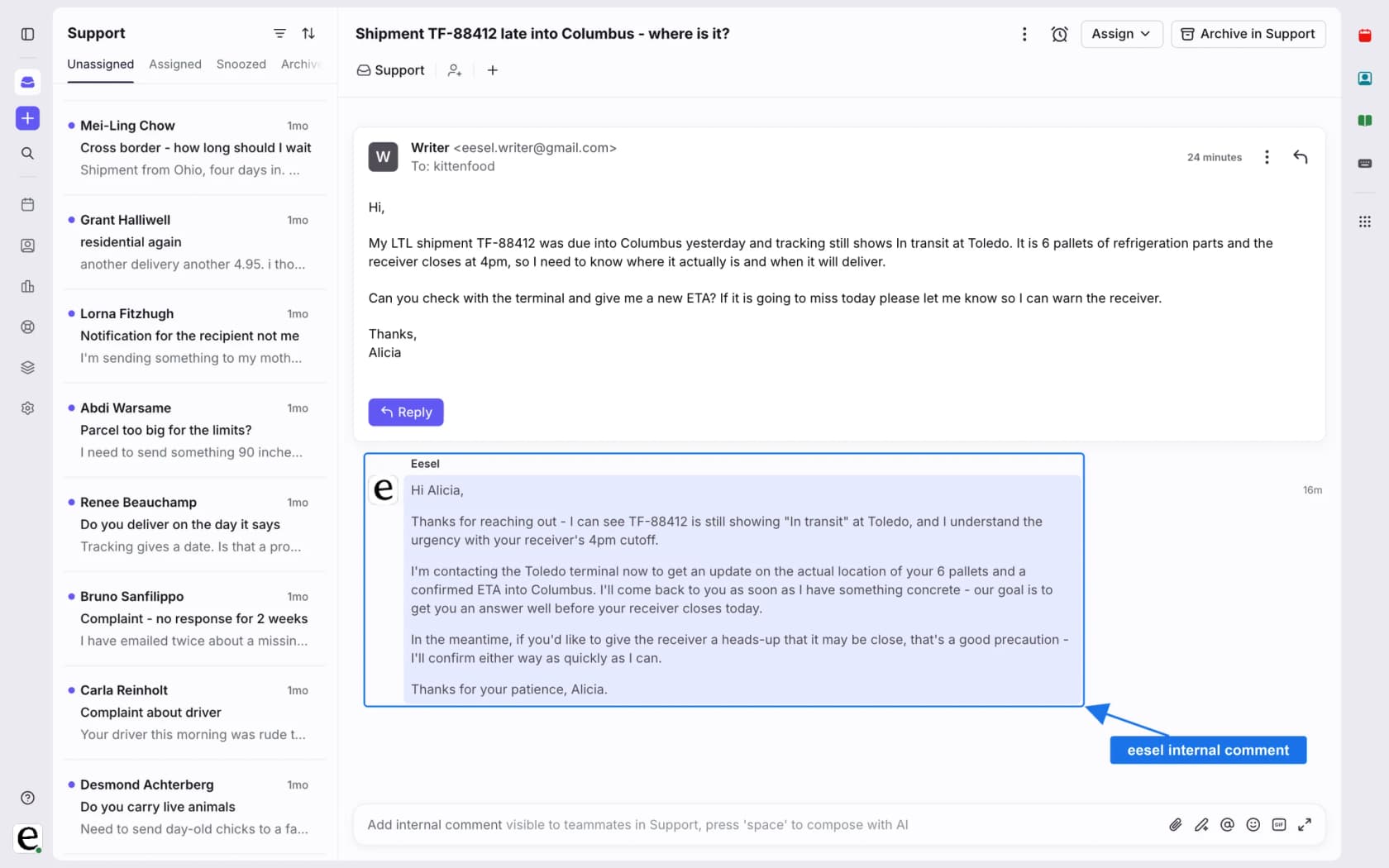
eesel's Front docs list the actions, which include assigning to a teammate, adding tags, drafting an internal comment, replying and archiving. They name a customer message as the trigger and do not mention snooze or unassign, so I do not know how it treats a snoozed conversation. In Front terms, I would run a drafting agent first, test a snoozed thread in a sandbox inbox, and only then let it reply. My AI first response automation, AI agent handoff best practices and AI escalation management posts cover the wider design, and intelligent routing covers the assignment step.
Try eesel in your Front inbox
If snoozed threads come back to blank pages, eesel is built for that gap. It reads your help center and past Front conversations, drafts replies as internal comments, and can assign and tag conversations, so the person who gets the thread back confirms a draft instead of starting over. Start with drafts only, keep your rules and time goals as the scoreboard, and move to direct replies once the drafts match what a person would write. Paid plans start at $299 a month for 500 credits, where a ticket or chat is one credit, and there is a free plan to try it on a few real conversations (eesel pricing).
For setup, see my guide to adding AI to Front, the best AI for Front roundup and Front vs eesel. To compare tools, see Front pricing, my Front review and Front alternatives. Try eesel on a handful of real conversations before you decide.