Freshdesk AI escalation to human: where handovers go, and how to route them

Kira

Katelin Teen
Last edited November 22, 2026
Freshdesk's AI agent escalates to a human in six ways (a customer asking for a person, no confident answer, a Not helpful click, too many turns, a topic you blocked, or a ticket outside business hours), and every one except the after-hours case sends the ticket to the same single destination: the open queue or one group. To send billing handovers to Billing and angry customers to Tier 2, you need an automation on the "Ticket is handed over" event, which is a Pro feature ($55 per agent a month, billed annually). That automation can only tell three handover reasons apart, so a customer who asked for a person looks the same as any other handover. If you run eesel on Freshdesk instead, you write the handover rule in plain words and it tags, assigns and leaves an internal note with its reason; an AI coding agent can also set it up through the eesel CLI, though connecting Freshdesk still needs an admin's approval.
What does "escalate to a human" mean in Freshdesk?
It means the Freddy AI Agent stops replying and passes the ticket to a person. While the AI works a ticket, Freshdesk shows it in a status of its own, Assigned to AI Agent. Freshworks builds both its email and chat AI agents in AI Agent Studio, and the hand-off is set in one panel: Build > Configurations > Handover settings, per Freshdesk's handover settings guide.
I build AI agents at eesel, and the escalation step is where I see most rollouts go wrong. Not because the AI hands over too often, but because the hand-off lands in a pile nobody owns. So this guide is less about whether Freshdesk escalates (it does, sensibly) and more about where the ticket goes next. If you want the general idea first, my colleague's piece on AI escalation covers it across helpdesks, and chatbot escalation covers the chat side.
The Freddy AI Agent is on every paid Freshdesk plan. The Freshdesk pricing page lists Growth at $19, Pro at $55 and Enterprise at $89 per agent a month, billed annually, each with the first 500 AI Agent sessions included and more at $49 per 100 sessions. A session is every exchange with one customer inside 24 hours, per Freshworks' session FAQ, so a conversation that escalates has already used its session. The Freddy AI pricing post works through what that costs at volume. My post on session consumption has the detail.
What makes the Freddy AI Agent hand a ticket over?
Six things, and they sit in different parts of the settings. The email agent's trigger rules guide and the chat agent setup guide describe them:
- The customer asks for a person. On chat, you list sample phrases such as "Talk to an agent" under the topics the AI agent should skip, and a match transfers the conversation.
- The AI has no answer it trusts. The email agent's Confidence threshold is High (replies only when highly confident, escalates when unsure) or Medium (replies more broadly with fewer escalations). On chat, the fallback message can be set to transfer after it's sent.
- The customer clicks Not helpful. Email replies that resolve a question carry feedback buttons; a Not helpful click escalates the ticket. The buttons only appear on resolution replies, not on clarifying questions.
- Too many back-and-forths. Max Conversation Turns escalates once the count is reached. The minimum is 10 turns, so this is a backstop, not a way to keep the AI on a short leash.
- A topic you never want the AI to answer. Topics that AI Agent shouldn't respond to sends matching tickets to a person even when the AI has a relevant answer. Freshworks suggests it for safety incidents, large refunds and media inquiries.
- It's outside business hours. Transfer outside business hours picks a business-hours calendar and sends those tickets to an agent or a group with a message.
Here is where they go, and whether an automation can tell them apart. Pick the reason you care about:
Where does the ticket go after the handover?
To one place you pick. Under Where should we transfer this conversation?, the email agent offers Make available for assignment (unassigned, in the queue for anyone) or Transfer conversation to group (straight to one group, such as Tier 2 Support). You can also send the customer a message first.
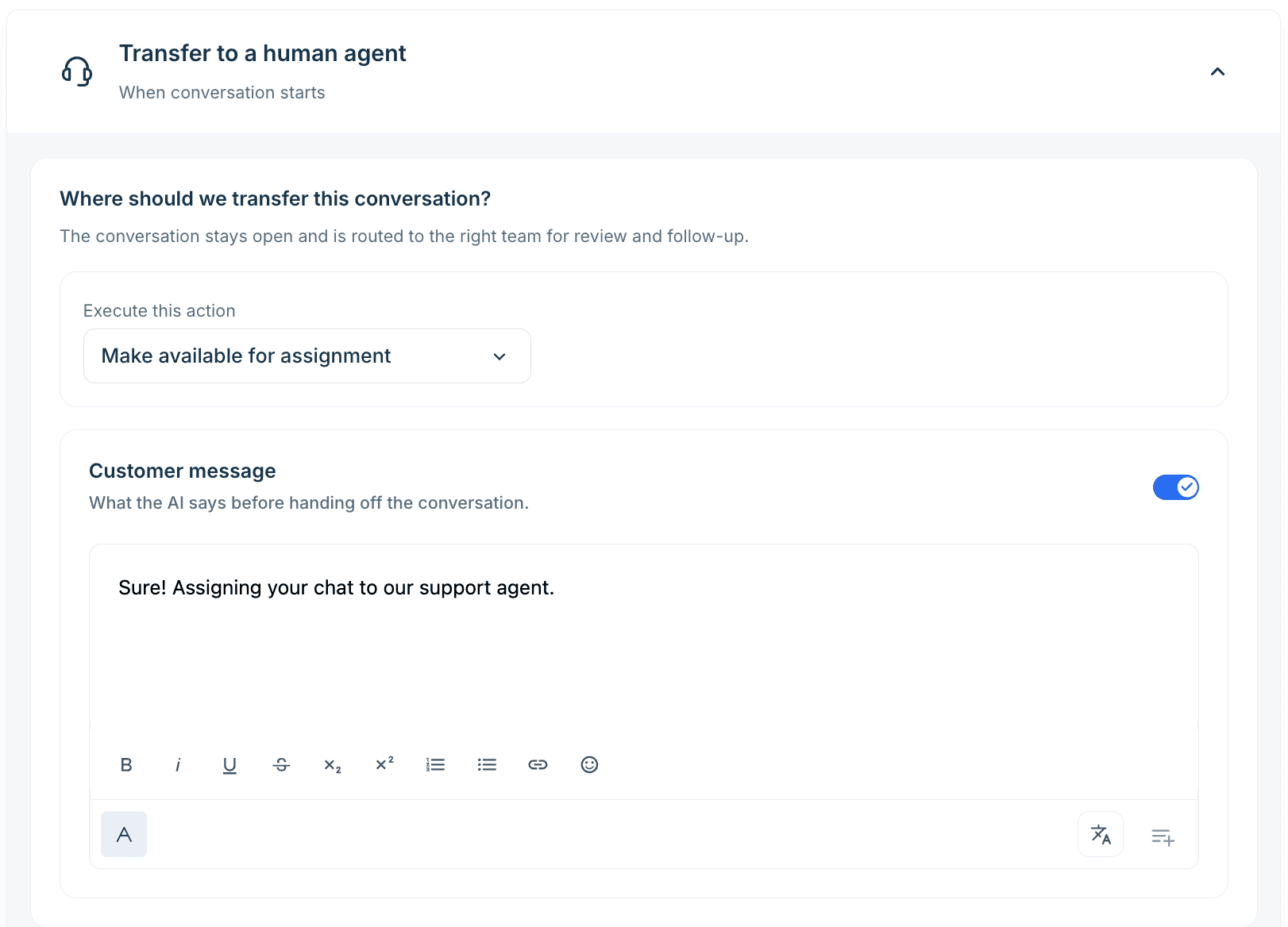
The catch is in a note in that same guide: "The transfer action applies to all escalation paths", and it names fallback, customer-requested and multi-turn handovers. So the refund question the AI wasn't sure about, the customer who typed "agent" and the thread that ran long all land together. If you pick a group, it should be one that can handle anything. If you pick the open queue, your normal round-robin or skill-based routing decides who gets it, and that routing doesn't know why the AI gave up.
Freshdesk's answer to "different routing per reason" is an automation, which comes next.
How do I route handovers by reason in Freshdesk?
Build a rule on ticket updates that fires when the AI agent hands a ticket over. Freshdesk's automations guide lists this for Pro and Enterprise, not Growth.
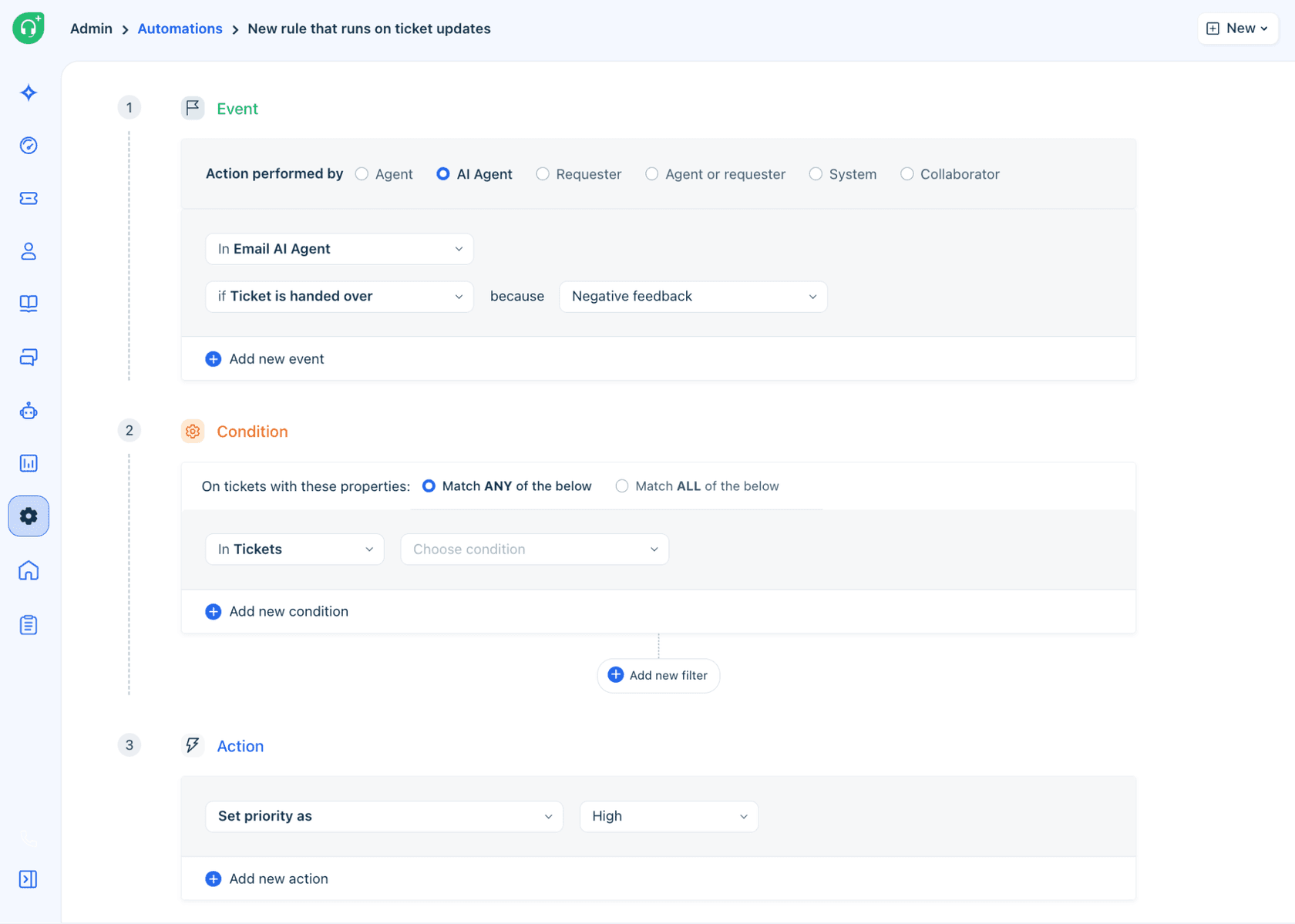
- Go to Admin > Workflows > Automations, open Rules on Ticket Update and click New Rule.
- Under Event, set Action performed by to AI Agent, then pick Email AI Agent (a Chat AI Agent is a separate option).
- Choose Ticket is handed over and, in the because dropdown, one of: Any reason, Doesn't have an answer, Negative feedback, or Non-actionable.
- Add ticket conditions if you need them, such as the ticket type, the product field or a tag (my AI auto-triage post covers filling those fields).
- Add the actions: assign to a group, set priority, add a tag, notify someone.
Three rules cover most teams:
- Negative feedback, set priority to Urgent and assign to a senior group. Someone told you the AI's answer didn't help, so they've now waited twice. VIP priority scenarios shows a similar rule for key accounts.
- Doesn't have an answer, tag
ai-gap. A saved view of this tag is your list of missing help articles, the same idea as a knowledge gap analysis. I'd review it weekly, because each one is a ticket the AI could close next month. - Any reason, plus a condition on ticket type, assign to that team. This is the only way to route the customer who asked for a person, since "customer requested" and "max turns" aren't among the "because" options.
Two settings change what you'll see while testing. Changes to handover settings apply only to tickets created after you save, so an old test ticket keeps the old behaviour. And any existing rule that reopens a ticket when the customer replies should get the condition Status is not Assigned to AI Agent, or it will pull tickets away from the AI mid-conversation. Freshworks flags both in the guides above. My Freshdesk AI automations post covers rules more broadly.
What should the human agent see when the ticket arrives?
The reason, at least. Freshdesk logs every AI state change in the ticket's activity timeline with a reason code (Did not find an answer, Negative feedback, Non-actionable or Max turns exceeded) and a timestamp, per the trigger rules guide. The agent also has the whole thread, since the AI's replies sit in the ticket.
On chat, you can collect details before the transfer. The chat agent's Collect user details step, set in conversation behaviour, collects details before handing over and stores them as contact fields or conversation properties. Use it for what the agent will need to act, like an order number, not for a form that delays a customer who already wants a person.
What I'd add, whichever tool does the AI: a one-line note in plain words on what the customer wants and what was already tried. The timeline says why the AI stopped; it doesn't say what to do next. Handoff best practices goes deeper on that note, and so does the guide to human handoff in chat.
How do I test escalation before going live?
Run your hardest tickets through Test first. The chat agent's Evaluate agent takes up to 50 queries per run, from your own list, generated samples or imported solved conversations, and marks each Answered, Unanswered or Error. The email AI agent also has a shadow mode and can be deployed only to tickets assigned to selected internal users as a pilot. My Freddy best practices post has more on rollouts.
Previews use sessions too, published or not, per the session FAQ. So plan a test set on purpose rather than typing at the preview widget for an afternoon.
For escalation, the test set needs tickets that should go to a person: a customer swearing about a double charge, a legal threat, "can I talk to someone". Unanswered is the result you want on those. Freshworks recommends starting the confidence threshold on High and checking escalation patterns in the Analyze tab for 2 to 4 weeks before moving to Medium, which matches what I'd do. Your escalation rate going down is only good news if the tickets the AI kept were ones it closed, which is why I'd watch containment rate next to it. My Freshdesk AI QA post covers reviewing those replies.
Common mistakes with Freshdesk AI escalation
- One catch-all group for every handover. Every reason lands in one place by default. Without the Pro automations, that group needs people who can take billing, bugs and complaints alike.
- Relying on the turn limit to stop loops. At a minimum of 10 turns, a customer has written to you ten times before it fires. Use the confidence threshold and blocked topics instead.
- Forgetting the customer-request phrases on chat. The chat agent runs on Freshchat's widget and messaging channels (Freshchat routing covers what happens after). Add the obvious wordings ("human", "agent", "real person", "speak to someone") in every language you support, and test them in the preview.
- Old reopen rules. A rule that reopens tickets on a customer reply fights the AI agent unless it excludes Assigned to AI Agent.
- Reading "handed over" as failure. A handover on a refund or a safety issue is the AI doing its job. Tag what should have been answered, and fix those articles.
Try eesel next to Freshdesk
If you'd rather describe your escalation rules than build them from dropdowns, eesel works inside Freshdesk as an AI teammate. It learns from your help centre and past tickets, and you write when it should hand over in plain words: "refund requests over $200 go to Billing, anyone who asks for a person goes to Tier 1, a bug report gets tagged bug and assigned to the product queue". It can assign to a team or a teammate, tag, change ticket fields and leave an internal note saying what the customer wants and why it stepped back, per the Freshdesk docs. You also choose, for each action, whether it runs on its own, asks a person first or stays off.
SamCart runs eesel on Freshdesk tickets and its website chat. When a seller asks for a person, or the question is beyond the help centre, the ticket is tagged for handoff and the agent stops replying on it.
You can try it on your own past Freshdesk tickets before it replies to anyone. Try eesel